

Recensione SAP Business One 2026: Vantaggi, Svantaggi, Funzionalità e Prezzi
SAP Business One aiuta le aziende a gestire finanza, inventario, vendite, acquisti e operazioni con strumenti ERP progettati per piccole e medie imprese in crescita.

Recensiamo gli strumenti in modo indipendente e le commissioni aiutano a finanziare i nostri test. Consulta la nostra politica sulla trasparenza, la nostra metodologia, oppure suggerisci uno strumento.
SAP Business One is an ERP software designed for small and midsize businesses that need integrated financials, supply chain, and operations in one platform. If you’re a CFO tackling disjointed data, manual processes, or a lack of visibility, this software could bring all those elements together. The platform promises scalability, real-time reporting, and controls without the steep complexity you get from larger enterprise systems.
In this SAP Business One review, I break down its core features, strengths and weaknesses, pricing, and what types of businesses are likely to get the most value from it.
SAP Business One Evaluation Summary
4.4/5
- Pricing upon request
- Free demo available
Perché fidarsi dei nostri consigli sui software
6,700+
Reviews
20
Industry experts
16+
Evaluation factors
14
Years
Le nostre recensioni riflettono il nostro giudizio indipendente, non un discorso di vendita. Scopri come manteniamo la trasparenza.
Per questa guida, abbiamo valutato gli strumenti attraverso test pratici e ricerche indipendenti, assegnando un punteggio agli strumenti in base ai nostri criteri di selezione.
Le nostre recensioni riflettono il nostro giudizio editoriale umano, non un discorso di vendita.
SAP Business One Overview
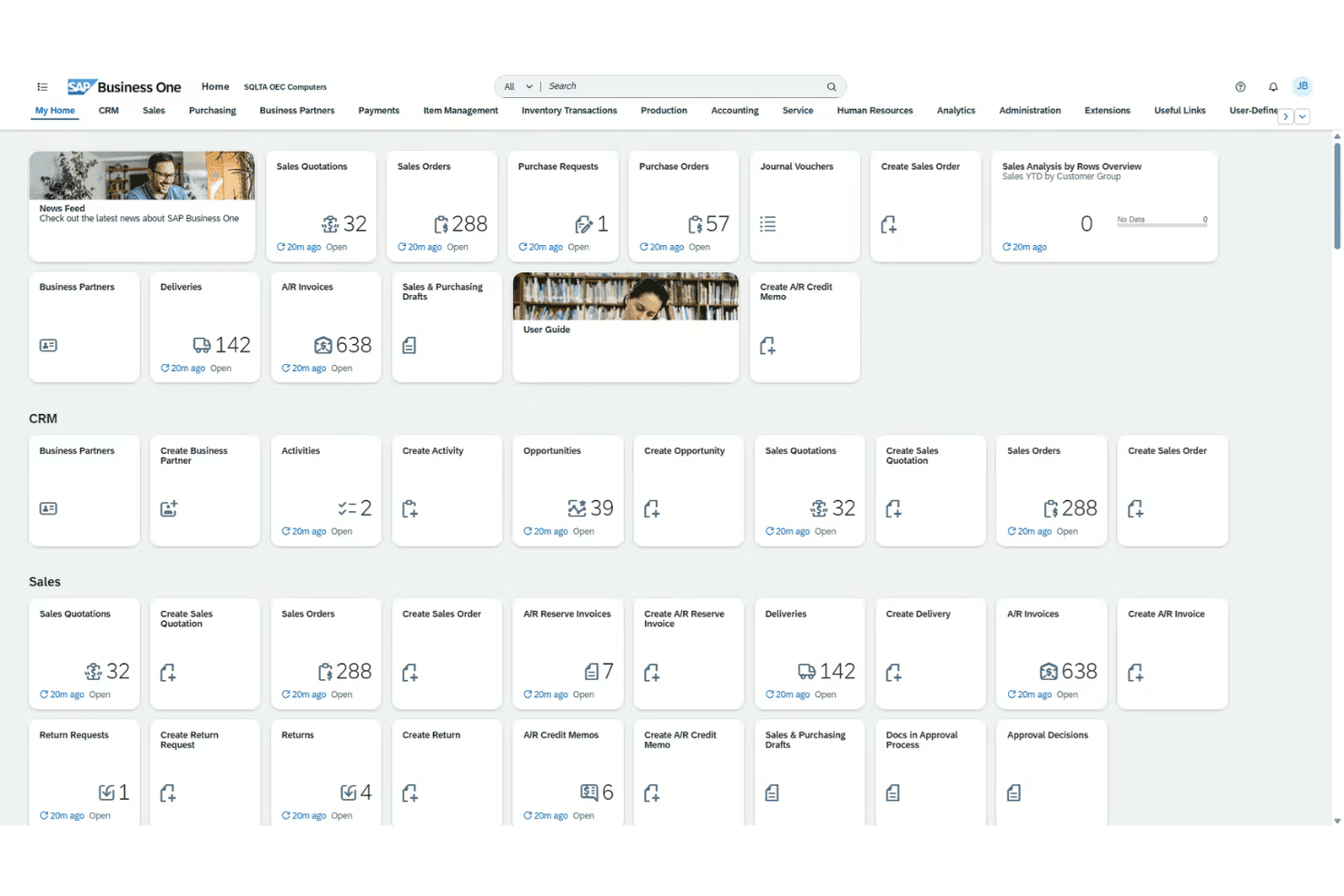
When judging SAP Business One, I think its all-in-one approach provides greater visibility and automation than most entry-level ERP systems, especially in finance and inventory. Its customization, bank integrations, and localized support stand out for global teams, though onboarding can be slower and costs steeper than some peers.
In my view, if you’re determining the right fit for growing manufacturers, distributors, or services that need granular controls but not full-blown, heavyweight ERP, SAP Business One is worth selecting—especially if you want mature features without overwhelming complexity
Pros
- Real-time inventory tracking and batch management are built in
- Localized tax and language support for global operations
- Advanced financial consolidation for multi-entity reporting
Cons
- Mobile app lacks some key desktop features
- Reporting tools feel dated compared to newer platforms
- Complex upgrades require expert consulting to execute
Is SAP Business One Right For Your Needs?
Who Would be a Good Fit for SAP Business One?
SAP Business One works best for companies with multi-entity operations, global compliance needs, and a demand for in-depth financial controls. Manufacturing, wholesale, and distribution teams that need strong inventory, production, and order visibility get real value from its unified workflows.
Mid-sized businesses expanding into new markets also benefit from localization tools and deployment flexibility.
- Global SubsidiariesCentralized controls, built-in multi-currency, and tax support make SAP Business One ideal for enterprises managing subsidiaries or international branches.
- Wholesale DistributorsReal-time inventory, advanced batch tracking, and warehouse management help distributors meet demanding logistics and replenishment needs.
- Manufacturing OperationsProduction planning, bill of materials, and material requirements planning features fit manufacturers who need end-to-end oversight.
- Financial ControllersIn-depth reporting, customizable user permissions, and audit trails make this platform a good match for finance teams running rigorous internal controls.
- Growing SMBsSMBs scaling up to international or multi-location businesses get enterprise features without switching to an unwieldy solution.
- Regulated IndustriesStrong compliance management, integrated document control, and regional localization are suited to industries with heavy regulatory oversight.
Who Would be a Bad Fit for SAP Business One?
SAP Business One won’t be a good fit for teams with simple needs, very small budgets, or those seeking ultra-modern, highly intuitive user interfaces out of the box. Early-stage startups, retail chains with a real-time ecommerce focus, or organizations needing industry-specific functionality not provided may struggle to see real value given the required investment and setup.
- Early-Stage StartupsThe software’s upfront costs and complexity are too high if you need a basic accounting or inventory tool.
- Solo EntrepreneursSingle-user businesses won’t benefit from the system’s advanced modules and multi-user workflows.
- Small NonprofitsResource-limited nonprofits likely find SAP Business One’s depth overwhelming and its licensing out of reach.
- High-Volume RetailBrick-and-mortar or ecommerce retailers needing highly specialized POS or omnichannel experiences may find core retail features lacking.
- Highly Niche VerticalsIndustries with unique, custom regulatory or workflow needs outside SAP’s standard templates will spend too much on customization.
- UX-First TeamsOrganizations that prioritize the newest, most modern UI or low training requirements may find SAP Business One cumbersome.
Come testiamo e valutiamo gli strumenti
Abbiamo impiegato anni a costruire, perfezionare e migliorare il nostro sistema di test e valutazione dei software. Il nostro schema è progettato per cogliere le sfumature della scelta del software e ciò che rende uno strumento efficace, concentrandosi sugli aspetti critici del processo decisionale. Di seguito puoi vedere esattamente come funzionano i nostri test e le nostre valutazioni in base a sette criteri. Questo ci permette di offrire una valutazione imparziale del software basata su funzionalità di base, caratteristiche distintive, facilità d’uso, onboarding, assistenza clienti, integrazioni, recensioni dei clienti e rapporto qualità-prezzo.
Funzionalità principali (25% del punteggio finale)
Il punto di partenza della nostra valutazione è sempre la funzionalità principale dello strumento. Dispone delle funzionalità base che un utente si aspetterebbe di trovare? Alcune di queste funzionalità sono riservate ai piani a pagamento più elevati? In sostanza, ci aspettiamo che uno strumento sia all’altezza delle capacità minime dei concorrenti.
Caratteristiche distintive (25% del punteggio finale)
Successivamente, valutiamo le caratteristiche distintive che vanno oltre la funzionalità principale normalmente presente negli strumenti di questo tipo. Un punteggio elevato riflette funzionalità specializzate o uniche che rendono il prodotto più rapido, efficiente o offrono valore aggiunto all’utente. Valutiamo inoltre quanto sia semplice integrare il software con altri strumenti tipicamente presenti nello stack tecnologico, per estenderne la funzionalità e l’utilità. Gli strumenti che offrono numerose integrazioni native, connessioni di terze parti e accesso API per creare integrazioni personalizzate ottengono il punteggio migliore.
Facilità d’uso (10% del punteggio finale)
Consideriamo quanto sia rapido e semplice eseguire le attività fondamentali previste dallo strumento. Un software con punteggio elevato è ben progettato, intuitivo da usare, offre app mobile, modelli predefiniti e semplifica operazioni complesse.
Onboarding (10% del punteggio finale)
Sappiamo quanto sia importante l’adozione rapida da parte del team quando si introduce una nuova piattaforma: per questo valutiamo quanto sia facile imparare e utilizzare lo strumento con una formazione minima. Valutiamo la rapidità con cui un membro del team può impostare e iniziare a utilizzare lo strumento senza esperienza pregressa. Le soluzioni con punteggio alto richiedono poco o nessun supporto.
Assistenza clienti (10% del punteggio finale)
Analizziamo quanto sia semplice e veloce ottenere aiuto tramite telefono, live chat o knowledge base. Gli strumenti e le aziende che offrono supporto in tempo reale ottengono i punteggi migliori, mentre i chatbot ricevono i punteggi più bassi.
Recensioni dei clienti (10% del punteggio finale)
Oltre ai nostri test e valutazioni, consideriamo il net promoter score dei clienti attuali e passati. Verifichiamo la probabilità che i clienti scelgano nuovamente lo strumento per le funzionalità di base. Un software con punteggio elevato riflette un net promoter score alto da parte dei clienti vecchi e attuali.
Rapporto qualità-prezzo (10% del punteggio finale)
Infine, considerando tutti gli altri criteri, valutiamo il prezzo medio dei piani base rispetto alle funzionalità principali e agli altri criteri di valutazione. I software che offrono di più, a un costo inferiore, ottengono punteggi migliori.
Core Features
Financial Management
Track accounts, budgets, and journal entries in real time. Streamline audits and financial closes with automated workflows.
Sales and Customer Management
Manage leads, quotes, and customer activity from first contact through post-sale service. Get a unified view of sales and customer data across your business.
Inventory and Distribution
Monitor stock levels, serial numbers, and order fulfillment across multiple warehouses. Automate replenishment and spot shortages or surplus before they become costly.
Purchasing and Supplier Control
Handle purchase orders, vendor performance, and payment processing on one platform. Reduce manual errors and keep supplier relationships transparent.
Production and MRP
Plan, track, and control production with bill of materials and resource planning tools. Optimize workflows for manufacturing and reduce bottlenecks.
Analytics and Reporting
Build custom dashboards and run real-time reports across all modules. Spot trends, analyze margins, and create board-ready summaries in a few clicks.
Ease of Use
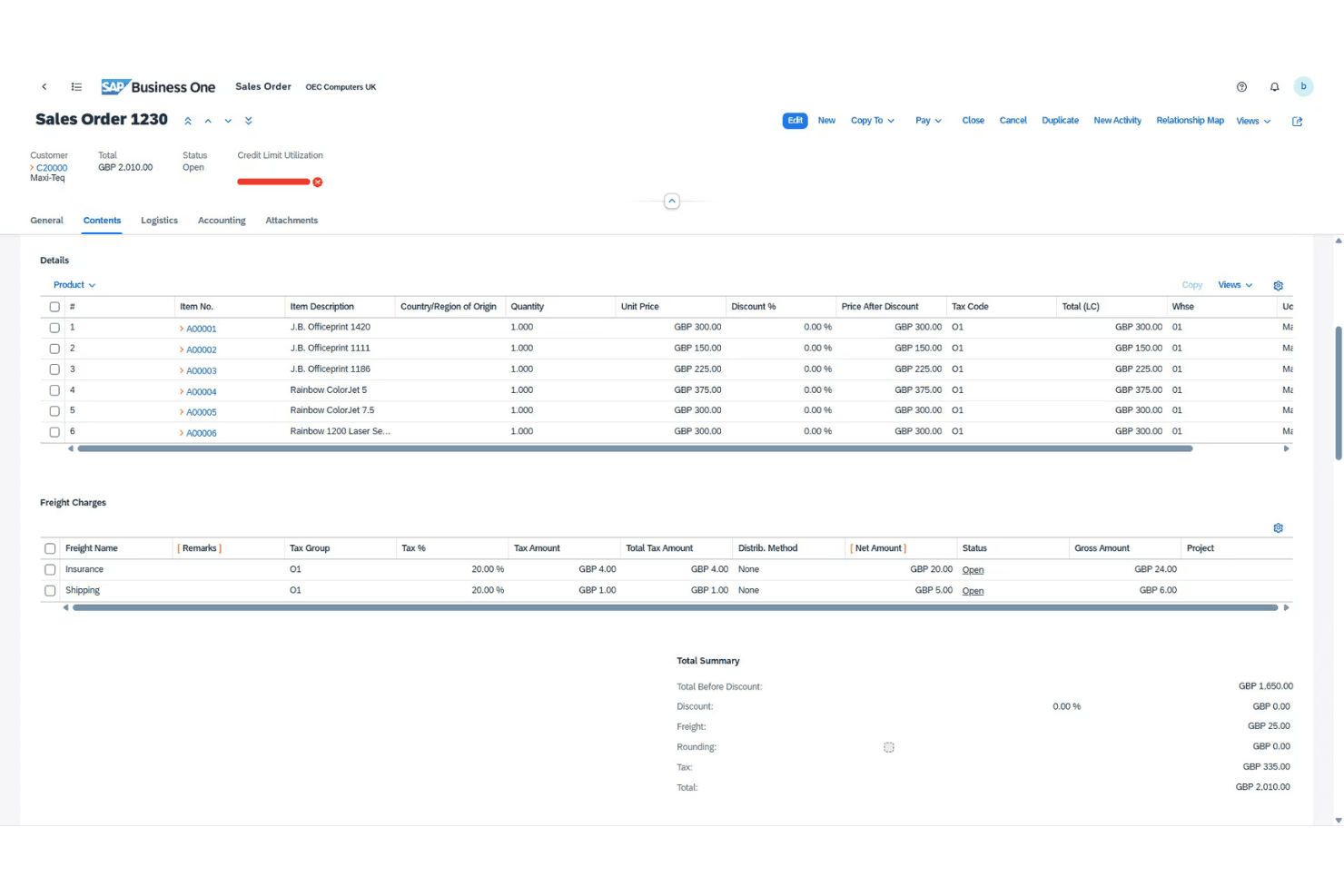
SAP Business One isn’t the most intuitive ERP for newcomers, but its navigation and menus are predictable once you learn the ropes. I’ve noticed users appreciate how task flows—like approvals and procurement—stay customizable, but some screens still feel crowded. Built-in help and regional support ease the learning curve, especially for teams handling complex financials.
Integrations
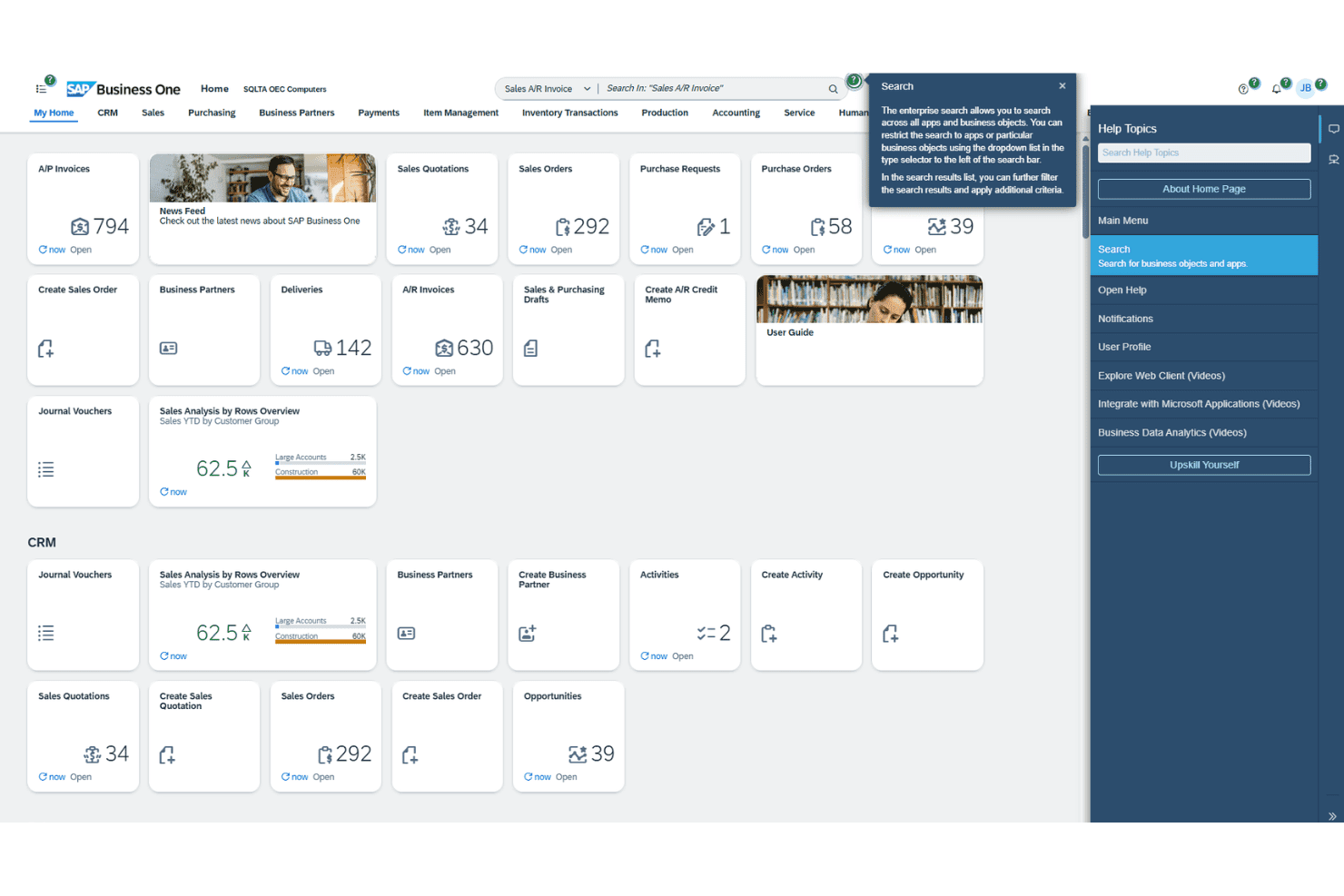
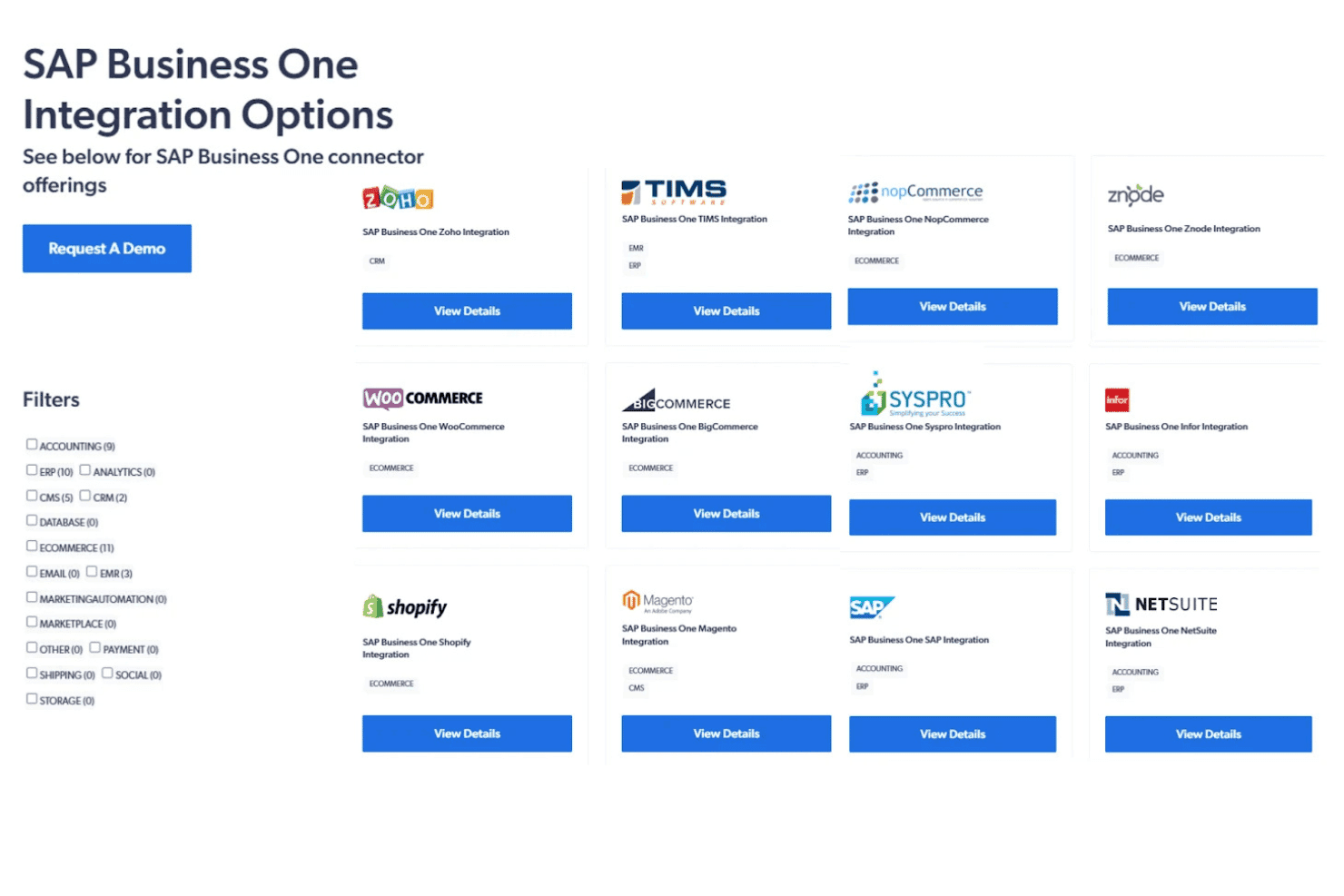
SAP Business One integrates with Microsoft Outlook, Magento, Shopify, WooCommerce, SAP Analytics Cloud, Boyum IT, Mailchimp, DHL, FedEx, and Avalara, among others.
SAP Business One also offers a comprehensive API and can connect with popular third-party integration platforms.
SAP Business One Specs
- 2-Factor Authentication: No
- Analytics: Yes
- Anti-Virus: No
- API: Yes
- Batch Permissions & Access: No
- Bug Tracking: No
- Call Integration: No
- Chat: No
- Contact Management: Yes
- CRM Integration: Yes
- Customer Management: Yes
- Data Export: Yes
- Data Import: Yes
- Email Integration: Yes
- Escalation Management: No
- External Integrations: Yes
- Incident Management: No
- Instant Chat Integration: No
- Knowledge Base: No
- Malware Protection: No
- Multi-User: Yes
- Notifications: Yes
- Organization Management: Yes
- Password & Access Management: No
- Project Management: Yes
- Real-time Alerts: Yes
- SAP Integration: Yes
- Self-service Portal: No
- Social Media Integration: No
- Support Forum: No
- Ticket Management: No
- Workflow Management: Yes


