

Alternativer til Sage Intacct er verktøy for økonomistyring som er utviklet for å tilby lignende kjernefunksjoner, som støtte for flere selskaper, rapportering i sanntid og automatisering, ofte til en bedre pris, med større fleksibilitet eller bedre integrasjoner. For økonomidirektører handler det å bytte verktøy ikke bare om funksjoner. Det handler om å finne en løsning som faktisk passer med måten teamet ditt arbeider på.
Som ekspert på digital programvare har jeg jobbet tett med økonomiteam som har møtt veggen med Sage Intacct. Kanskje er det kostnadene som øker ved hver fornyelse, begrensninger i rapporteringen som krever for mange omveier, eller integrasjoner som aldri synkroniserer helt riktig. Jeg vet hvor frustrerende det er når programvaren som skulle gjøre livet enklere, i stedet blir et hinder.
Derfor har jeg brukt utallige timer på å teste plattformer, analysere tilbakemeldinger og sammenligne reelle brukeropplevelser. Verktøyene på denne listen ligner ikke bare på Sage Intacct; de er utviklet for å løse problemene som får team til å begynne å lete etter noe bedre.
Hva er Sage Intacct?
Sage Intacct er regnskapsprogramvare utviklet for økonomistyring og automatisering. Den brukes ofte av økonomifagfolk som økonomidirektører og controllere som trenger nøyaktig økonomisk oversikt og rapportering.
Vanlige nøkkelfunksjoner i Sage Intacct omfatter kjernefunksjoner for økonomi, prosjektregnskap og likviditetsstyring, som bidrar til å håndtere komplekse økonomiske oppgaver. Til sammen gir disse tilleggene detaljert innsikt og forbedrer den generelle effektiviteten. Som regnskapsløsning gir Sage Intacct verdifull støtte til teamets økonomiske drift og beslutningstaking.
Hvorfor du kan stole på våre programvareanbefalinger
6,700+
Reviews
20
Industry experts
16+
Evaluation factors
14
Years
Teamet vårt har testet og anmeldt programvare siden 2012. Vi er selv økonomiledere, så vi vet hvor vanskelig og hvor viktig det er å velge riktig programvare.
I denne guiden har vi vurdert verktøyene gjennom praktisk testing og uavhengig research og gitt dem poeng ut fra våre utvelgelseskriterier.
Anmeldelsene våre bygger på vår egen redaksjonelle vurdering. De er ikke et salgsargument.
Sammenligningstabell for alternativer til Sage Intacct
Denne sammenligningstabellen oppsummerer prisopplysningene for mine beste utvalgte alternativer til Sage Intacct:
Score legend (out of 5)
- Excellent4.5–5
- Good4–4.4
- Average3–3.9
- Below average2–2.9
- Poor1–1.9
Sorted by: Default
| Tool | Starting Price | Website | |||||||
|---|---|---|---|---|---|---|---|---|---|
Best for AI-driven ERP solutions | 3.7 out of 5 | 4 | 4 | 3 | 4 | 4 | 3 | $210/user/month Not available | Website |
Best for financial close automation | 4.0 out of 5 | 2 | 5 | 4 | 5 | 4 | 4 | Pricing upon request Free demo available | Website |
Best for small business accounting | 2.5 out of 5 | 3 | 1 | 3 | 2 | 4 | 2 | $27/month 1-month free trial available | Website |
Best for free invoicing and payments | 1.7 out of 5 | 2 | 1 | 2 | 2 | 2 | 1 | $19/month Free plan available | Website |
Best for mobile-first accounting | 3.3 out of 5 | 4 | 2 | 3 | 4 | 4 | 3 | $20/month Free plan + 14-day trial + demo available | Website |
Best for GST and compliance | 2.8 out of 5 | 3 | 2 | 3 | 3 | 3 | 3 | $86/month Free demo available | Website |
Best for all-in-one business apps | 3.5 out of 5 | 4 | 4 | 4 | 3 | 4 | 2 | $38.90/user/month Free plan + free trial available | Website |
Best for small business payroll | 2.0 out of 5 | 2 | 1 | 2 | 2 | 3 | 2 | $20/month 30-day free trial + demo available | Website |
Best for Salesforce integration | 3.3 out of 5 | 4 | 3 | 3 | 3 | 4 | 3 | Pricing upon request Free demo available | Website |
Best for mid-market cloud migration | 3.3 out of 5 | 3 | 4 | 4 | 3 | 4 | 2 | Pricing upon request Free demo available | Website |


Anmeldelser av de beste alternativene til Sage Intacct
Nedenfor finner du mine detaljerte sammendrag av de beste alternativene til Sage Intacct som kom med på kortlisten. Anmeldelsene mine gir en grundig gjennomgang av de viktigste funksjonene, fordeler & ulemper, integrasjoner og ideelle bruksområder for hvert verktøy, slik at du kan finne det som passer best for deg.
 Best for AI-driven ERP solutions
- Not available
- From $210/user/month (billed annually)
Visit WebsiteCustomer Rating:4.6/5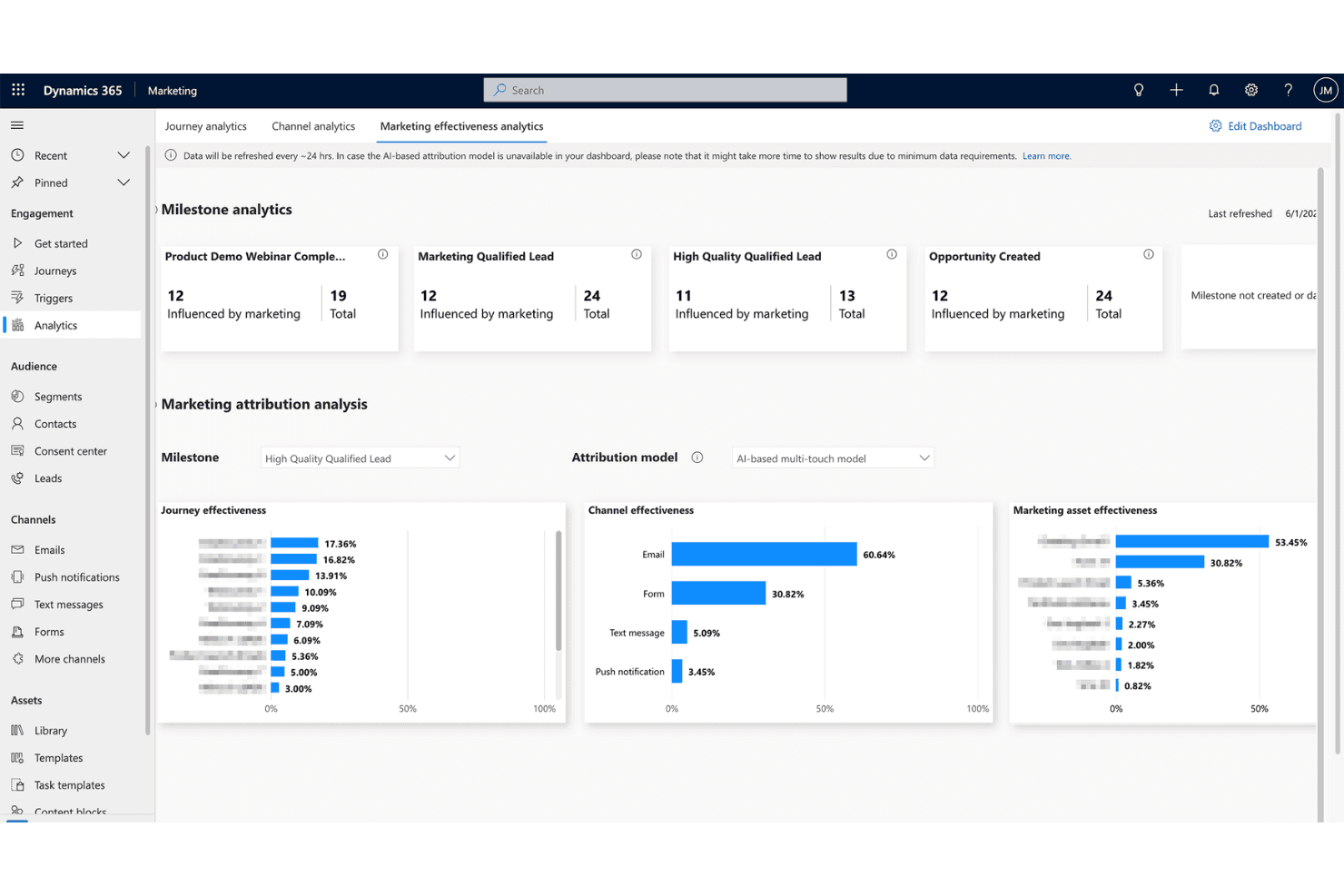
Dynamics 365 Marketing's effectiveness analytics dashboard tracks milestones and attributes results across journeys, channels, and assets. Dynamics 365 Finance is Microsoft's enterprise ERP built for finance teams managing multi-entity consolidations, AP/AR automation, and close processes—with embedded AI tools that help forecast cash flow and automate reconciliations.
Who Is Microsoft Dynamics 365 Best For?
Dynamics 365 Finance is a strong fit for enterprise finance teams managing multi-entity operations, complex consolidations, and global compliance across multiple currencies and jurisdictions.
Why I Picked Microsoft Dynamics 365
I picked Dynamics 365 Finance because its AI capabilities go well beyond surface-level automation. Copilot's Invoice Capture handles invoice entry end-to-end, while the Account Reconciliation Agent autonomously matches and clears ledger transactions at close. I also rely on customer payment predictions, which use historical invoice and payment data to flag which open invoices are at risk of running late before they actually do.
Microsoft Dynamics 365 Key Features
- Multi-entity consolidation: Consolidates multiple legal entities with currency translation, elimination journals, and support for different charts of accounts and fiscal calendars.
- Financial period close workspace: Tracks close tasks across companies, areas, and people with assignable due dates, dependencies, and historical completion records.
- Subscription billing: Handles recurring contract billing, revenue and expense deferrals, and multiple-element revenue allocation under IFRS 15 and ASC 606.
- Global localization: Supports compliance across 57 countries and regions in 67 languages, with additional AppSource solutions available for more than 200 regions.
Microsoft Dynamics 365 Integrations
Dynamics 365 Finance has native integrations across the Microsoft ecosystem, including Microsoft 365, SharePoint, Exchange Online, and Dynamics 365 customer engagement apps via dual-write. Its OData REST API supports CRUD operations for custom integrations.
Pros and Cons
Pros:
- Reviewers value centralized dashboards and reporting
- Automates invoice capture and predicts late payments
- Consolidates entities across currencies and fiscal calendars
Cons:
- Reviewers report missing details in some reports
- Analytics refreshes only twice daily
Learn more about Microsoft Dynamics 365: Best for financial close automation
- Free demo available
- Pricing upon request
Visit WebsiteCustomer Rating:4.5/5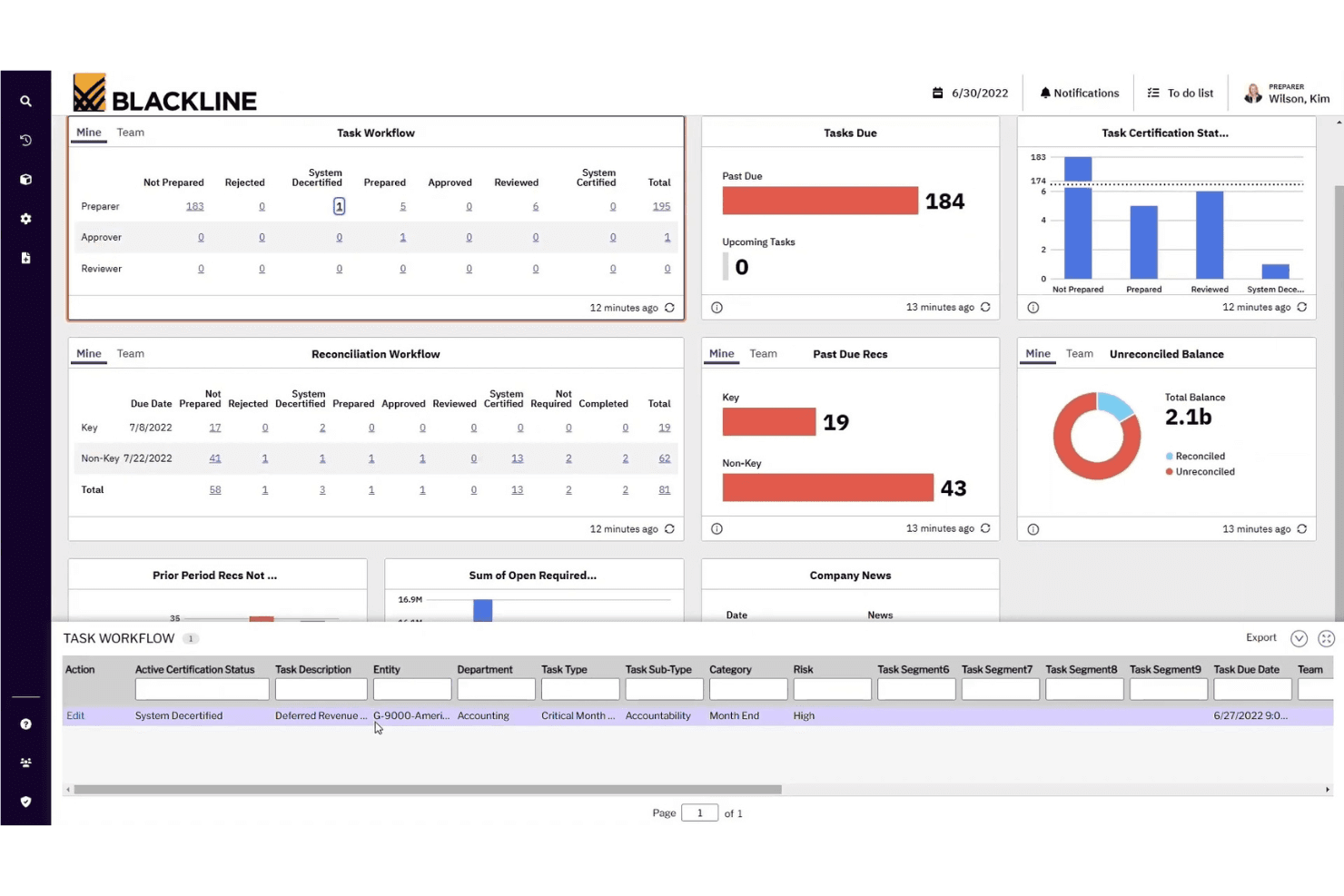
BlackLine dashboard tracking task workflow, certification status, reconciliations and past-due items for finance teams. BlackLine is a financial operations platform built for controllers, CFOs, and accounting teams managing complex close processes, intercompany activity, and high-volume reconciliations across multiple entities.
Who Is BlackLine Best For?
BlackLine is a strong fit for controllers and CFOs at mid-to-large enterprises managing high-volume reconciliations, intercompany transactions, and multi-entity financial close across multiple ERPs.
Why I Picked BlackLine
I picked BlackLine as one of the best because it handles financial close automation at a depth that few platforms match. Where Sage Intacct manages the books, BlackLine sits on top of your ERP and automates the work around closing them: reconciliations, journal entries, intercompany eliminations, and consolidation across multiple entities. I especially like Verity Accruals, which drafts accrual entries for human review, and the Journals Risk Analyser, which flags anomalies across ERPs before they become close-week problems.
BlackLine Key Features
- Intercompany netting and settlement: Automates multilateral netting and clearing through ERP and treasury integrations, then generates payment instructions for net-settled amounts across cash pools.
- Transaction matching: Ingests data from ERPs, banks, payroll, and procurement systems and applies configurable rules to match transactions and flag differences for review.
- Finance Control Console: Registers and manages AI agents with defined identities, permissions, and approval requirements, and records all agent actions in an audit trail.
- Multi-ERP consolidation: Aggregates balances, calculates ownership interests, and automates intercompany eliminations across entities connected to different ERP systems.
BlackLine Integrations
BlackLine offers 50+ native integrations, including connections with Sage Intacct, SAP, Oracle, NetSuite, Microsoft Dynamics, and Workday. It also connects with Avalara and Nuvei and provides open APIs for custom integrations.
Pros and Cons
Pros:
- Consolidates intercompany balances across entities
- Tracks close tasks with audit-ready sign-offs
- Automates high-volume reconciliations and transaction matching
Cons:
- Implementation can take three months or longer
- Doesn't replace a core accounting system
Learn more about BlackLine: 3Best for small business accounting
Xero
- 1-month free trial available
- From $27/month
Visit WebsiteCustomer Rating:4.4/5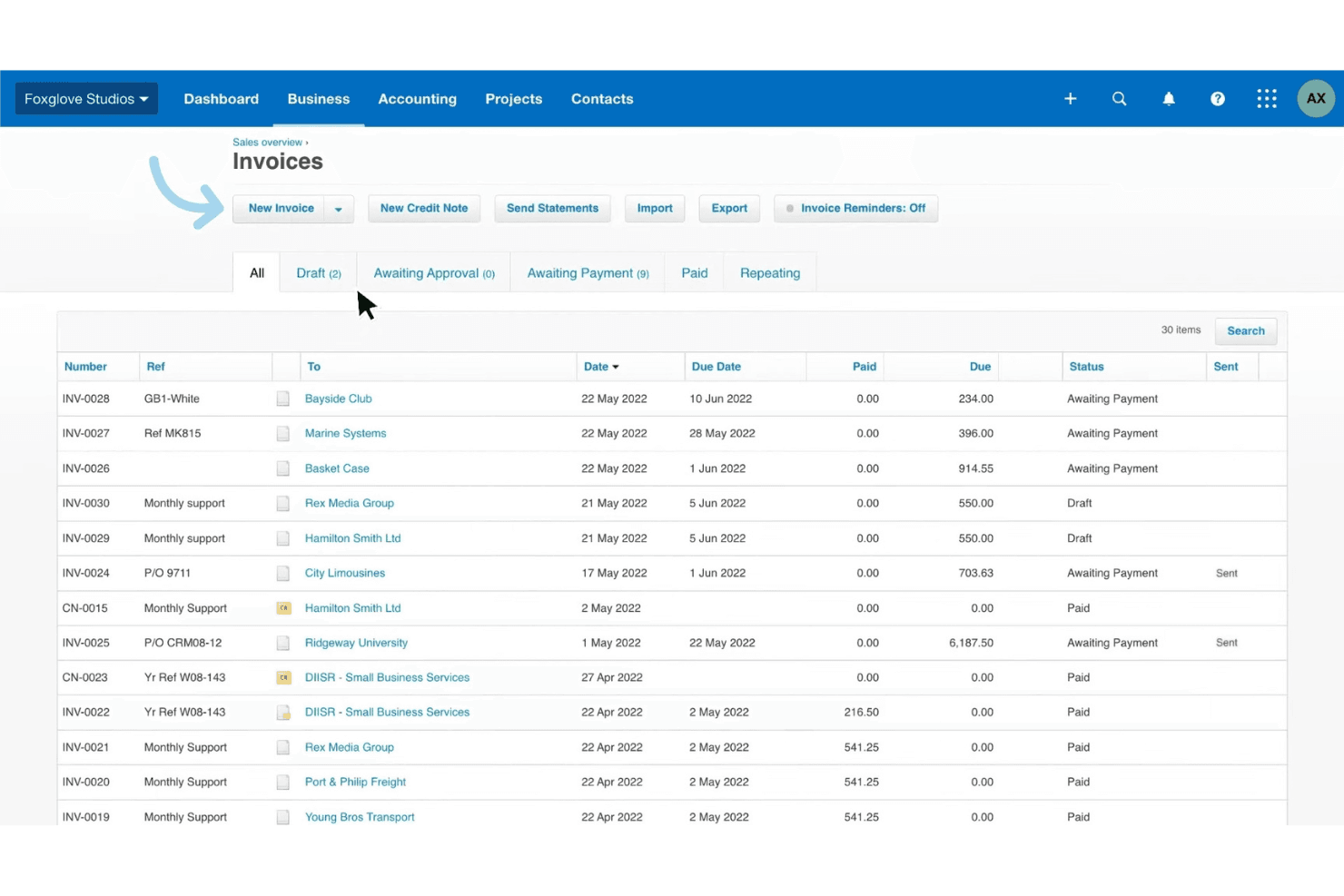
Xero's Invoices page lists sales invoices by status, showing amounts due, payment dates and sent status. Xero is cloud-based accounting software built for small businesses that need a cleaner way to manage invoicing, bank reconciliation, AP/AR, and real-time cash flow visibility without the complexity of an enterprise finance platform.
Who Is Xero Best For?
Xero is a strong fit for small businesses that need clean, accessible accounting without the complexity of an enterprise platform.
Why I Picked Xero
I've included Xero in my top picks because it's the clearest small business accounting option on this list, especially if you've outgrown basic bookkeeping tools but don't need Sage Intacct's enterprise overhead. I particularly like how the auto-reconciliation and automated bill entry on the Growing and Established plans handle the daily AP/AR grind, and the 180-day cash flow forecast on Established gives you a genuinely useful forward view without manual modeling.
Xero Key Features
- Real-time financial reporting: View live profit and loss, balance sheet, and cash flow reports that update as transactions are recorded.
- JAX AI assistant: Ask questions about your business finances and get answers with charts and tables drawn directly from your Xero data.
- Multicurrency transactions: Transact in more than 160 currencies with hourly exchange rate updates, available on the Established plan.
- History and notes report: Track date-stamped changes across transactions, contacts, and financial settings, with the user responsible for each change recorded.
Xero Integrations
Xero lists over 1,000 marketplace integrations, including Shopify, Stripe, Dext, Synder, and A2X, plus native Gusto payroll and Melio bill payments. Its open Accounting API supports custom integrations and invoice webhooks.
Pros and Cons
Pros:
- Smaller businesses get core accounting without enterprise overhead
- Live cash-flow reports support daily decisions
- Automated reconciliation reduces routine accounting work
Cons:
- Limited close structure and audit controls
- No native multi-entity consolidation or eliminations
Learn more about Xero: 4Best for free invoicing and payments
Wave
- Free plan available
- From $19/month
Visit WebsiteCustomer Rating:4.4/5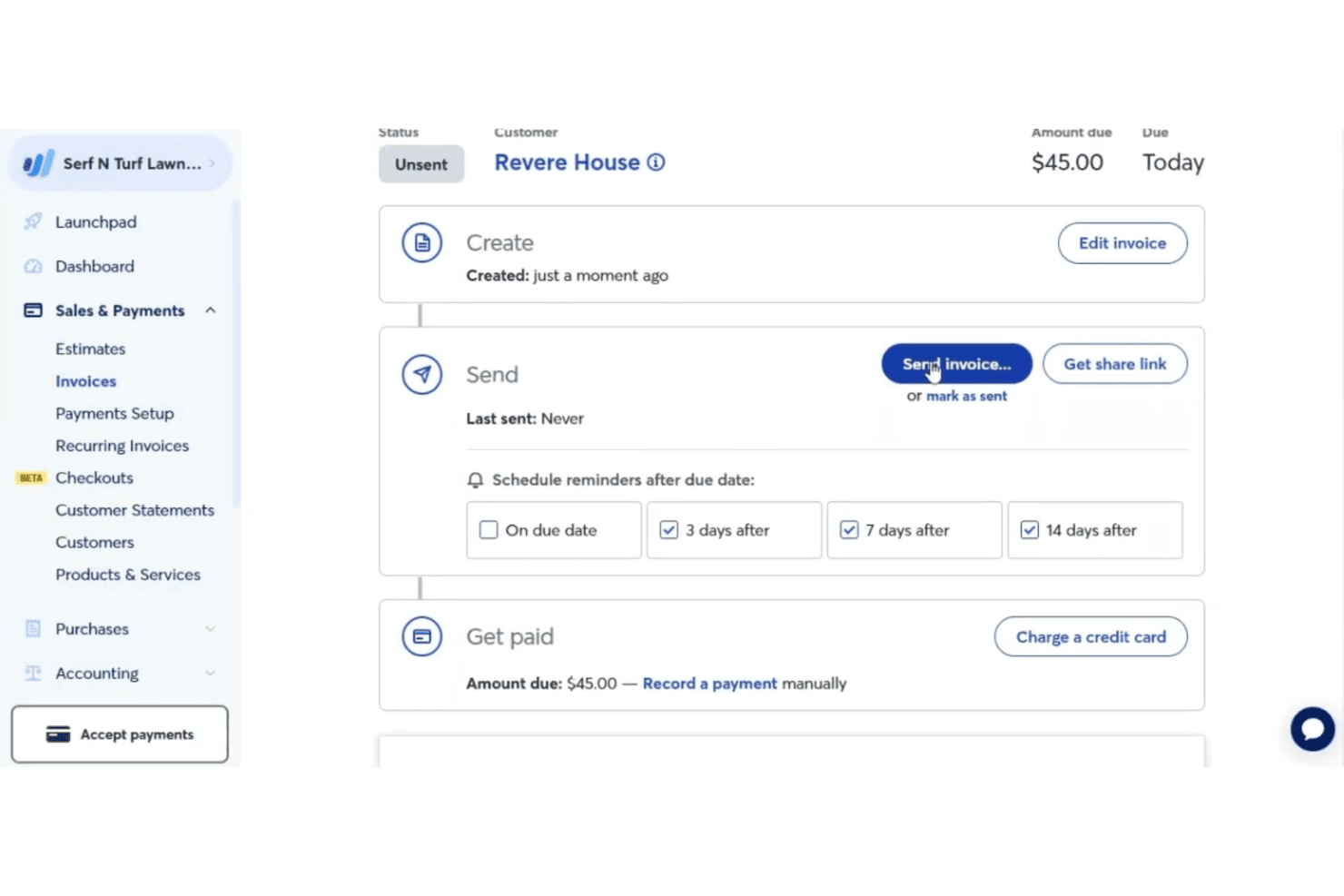
Wave's invoice screen lets users send invoices, schedule payment reminders, and collect payment. Wave is a free accounting and invoicing tool built for freelancers and very small businesses that need to manage transactions, send invoices, and track expenses without paying for software they'll barely use.
Who Is Wave Best For?
Wave suits freelancers and very small businesses in the US or Canada that need free invoicing, basic bookkeeping, and payment collection without a monthly software commitment.
Why I Picked Wave
I've included Wave in my top picks because it's the only tool on this list that lets you send unlimited invoices and collect card or bank payments without paying a monthly software fee. The free Starter plan covers double-entry bookkeeping, bills, and invoices out of the box, and upgrading to Pro adds automatic late-payment reminders and recurring invoices for repeat clients. I find it's a genuinely useful option when your priority is getting paid quickly without a software overhead eating into tight margins.
Wave Key Features
- Double-entry bookkeeping: Wave automatically records every transaction across two accounts to keep your general ledger balanced.
- Tag Comparison report: Pro users can compare income and expenses across up to seven custom tags and drill into the transactions behind each amount.
- Role-based collaborator access: Invite accountants or bookkeepers as Admins, Editors, or Viewers, each with predefined access levels across accounting and reports.
- GraphQL API and webhooks: Wave's Developer Portal lets you build custom integrations and trigger automated actions when your Wave data changes.
Wave Integrations
Wave documents 14 direct app connections and marketplace integrations with Google Sheets, Amazon, Etsy, and eBay. It also offers a GraphQL API and webhooks for custom integrations, plus connectivity through Make.com.
Pros and Cons
Pros:
- Invoice payments help small firms collect faster
- Unlimited invoicing supports straightforward receivables workflows
- Double-entry bookkeeping covers routine small-business accounting
Cons:
- No close workflow or detailed change history
- Separate profiles do not consolidate financials
Learn more about Wave: Best for mobile-first accounting
- Free plan + 14-day trial + demo available
- From $20/month
Visit WebsiteCustomer Rating:4.3/5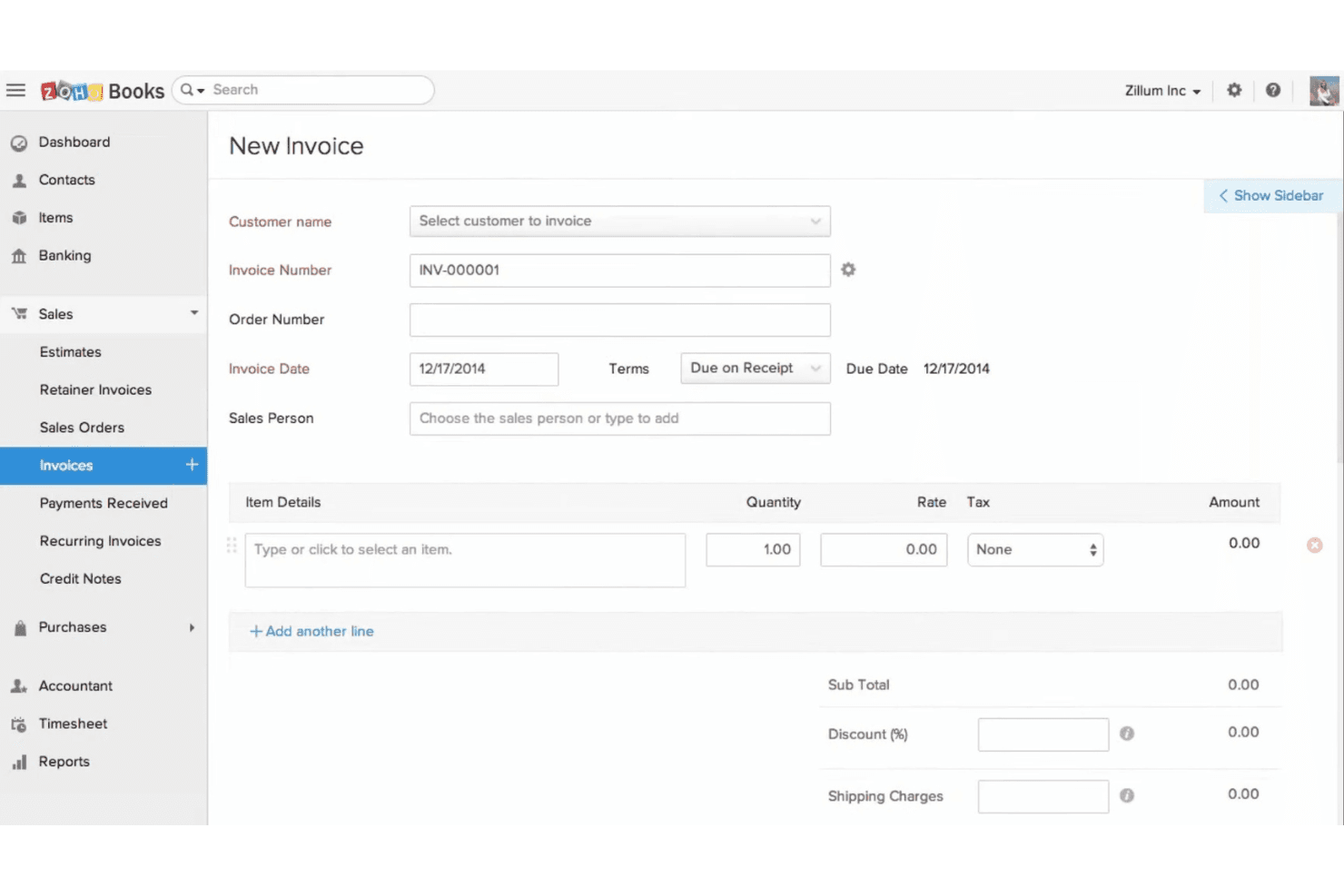
Creating a new invoice in Zoho Books, with customer, terms, and line-item fields. Zoho Books is cloud accounting software built for small to mid-sized businesses that want to automate invoicing, expenses, bank reconciliation, and AP/AR workflows without the complexity or cost of an enterprise platform.
Who Is Zoho Books Best For?
Zoho Books is a strong fit for small to mid-sized businesses that need solid day-to-day accounting automation—invoicing, reconciliation, and expense management—without the overhead of a full enterprise platform.
Why I Picked Zoho Books
I picked Zoho Books as one of the best because its mobile app genuinely handles real accounting work, not just expense snapshots. I can photograph a receipt, match it to a bill, and reconcile a bank account from my phone without touching a desktop. The iOS and Android apps support recurring invoices, payment reminders, and bank transaction matching, so month-end tasks don't pile up between desk sessions.
Zoho Books Key Features
- Transaction-period locking: Lock specific modules or all transactions by date to prevent edits after a period closes.
- Workflow automation: Set up rules that trigger email alerts, field updates, and in-app notifications based on accounting activity.
- Reporting tags: Tag transactions by cost center, revenue stream, or operational area to enable divisional reporting within a single organization.
- Revenue recognition rules: Define deferred-revenue accounts, recognition methods, and schedules at the item or invoice-line level.
Zoho Books Integrations
Zoho Books offers native integrations with Zoho CRM, Zoho Analytics, Zoho Payroll, Zoho Inventory, Stripe, Square, and Authorize.Net, plus marketplace integrations with PayPal and Avalara. It supports REST API, webhooks, and Zapier for custom connectivity.
Pros and Cons
Pros:
- Period locking and activity logs support close controls
- Recurring invoices and reminders reduce manual follow-up
- Mobile app handles reconciliation and receipt capture
Cons:
- Custom-report limits vary by plan tier
- No documented intercompany consolidation across organizations

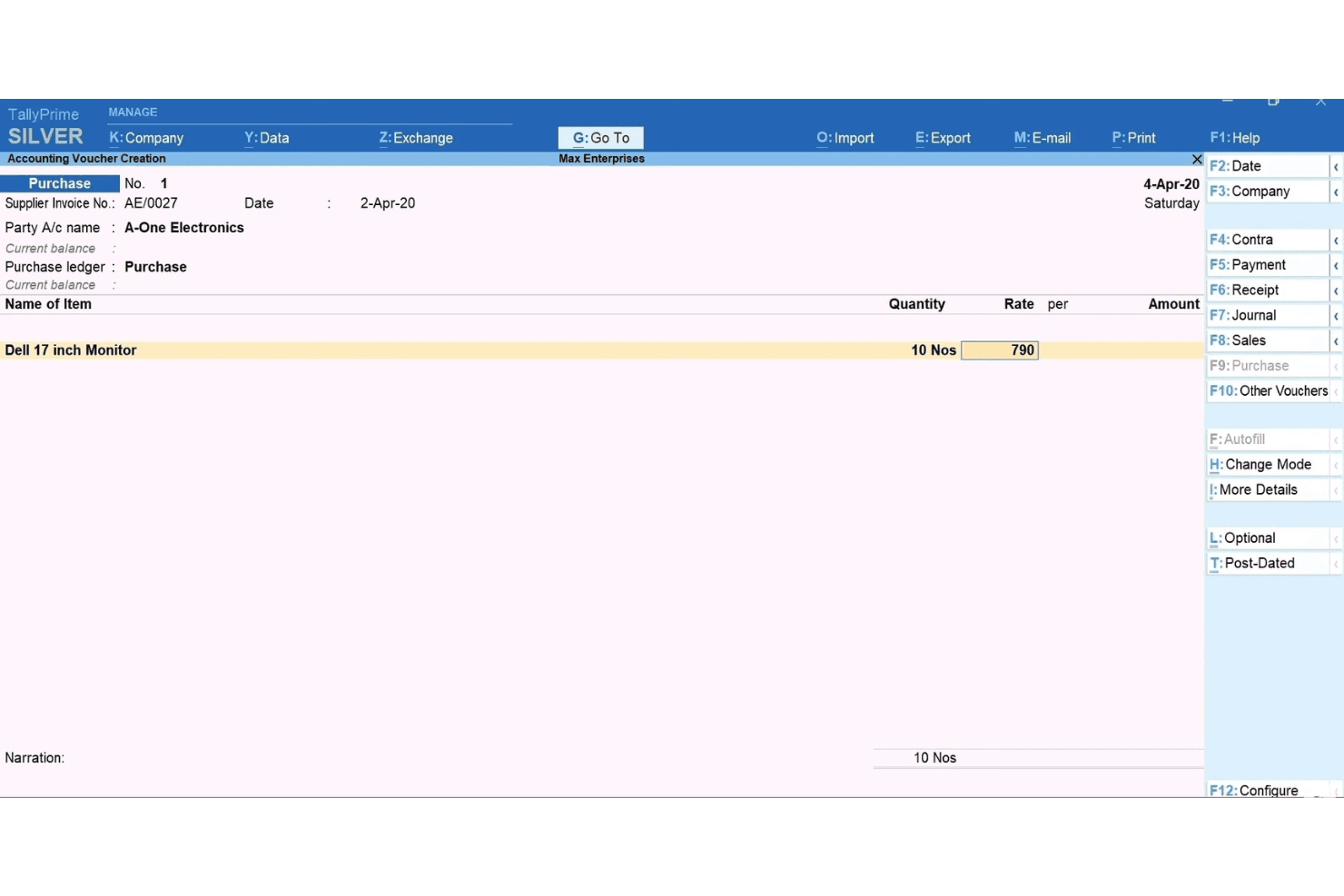
TallyPrime's purchase voucher screen recording 10 monitors from a supplier at a set rate. TallyPrime is a business accounting and compliance platform built for small businesses that need reliable GST reporting, statutory compliance, and day-to-day bookkeeping without the complexity of enterprise-grade ERP software.
Who Is TallyPrime Best For?
TallyPrime is a strong fit for small businesses that prioritize GST compliance and straightforward bookkeeping over multi-entity financial management.
Why I Picked TallyPrime
I picked TallyPrime as one of the best because its GST compliance engine is genuinely one of the most thorough I've seen in an SMB accounting tool. It automatically flags mismatched tax details and duplicate entries before filing, which saves real cleanup time during GST return cycles. The bill-wise outstandings tracking gives you invoice-level visibility into pending balances, overdue bills, and aging, so your AP and AR picture stays current without manual reconciliation work.
TallyPrime Key Features
- Multi-currency transaction recording: Record transactions in foreign currencies with automatic calculation of foreign-exchange gains and losses, with exchange rates maintained by date.
- Audit trail via Edit Log: Track creation, alteration, and deletion of vouchers, ledgers, and stock items, including the date, time, and user responsible for each change.
- Role-based security levels: Define granular user permissions for voucher entry, report access, and back-dated entries, with admin controls to restrict access by role.
- Bank statement import: Import bank statements to automatically generate payment and receipt vouchers, reducing manual data entry during reconciliation.
TallyPrime Integrations
TallyPrime offers native WhatsApp Business integration, plus API-, HTTP-, DLL-, and file-based connections to external systems. It supports Excel, XML, and JSON imports and Power BI reporting, but does not publish an integration directory or open API commitment.
Pros and Cons
Pros:
- Routine bookkeeping and bank reconciliation feel straightforward
- Bill-wise reports clarify overdue receivables
- GST checks flag mismatches and duplicates
Cons:
- Intercompany eliminations aren’t documented
- Consolidation requires matching currencies and company names
Learn more about TallyPrime:
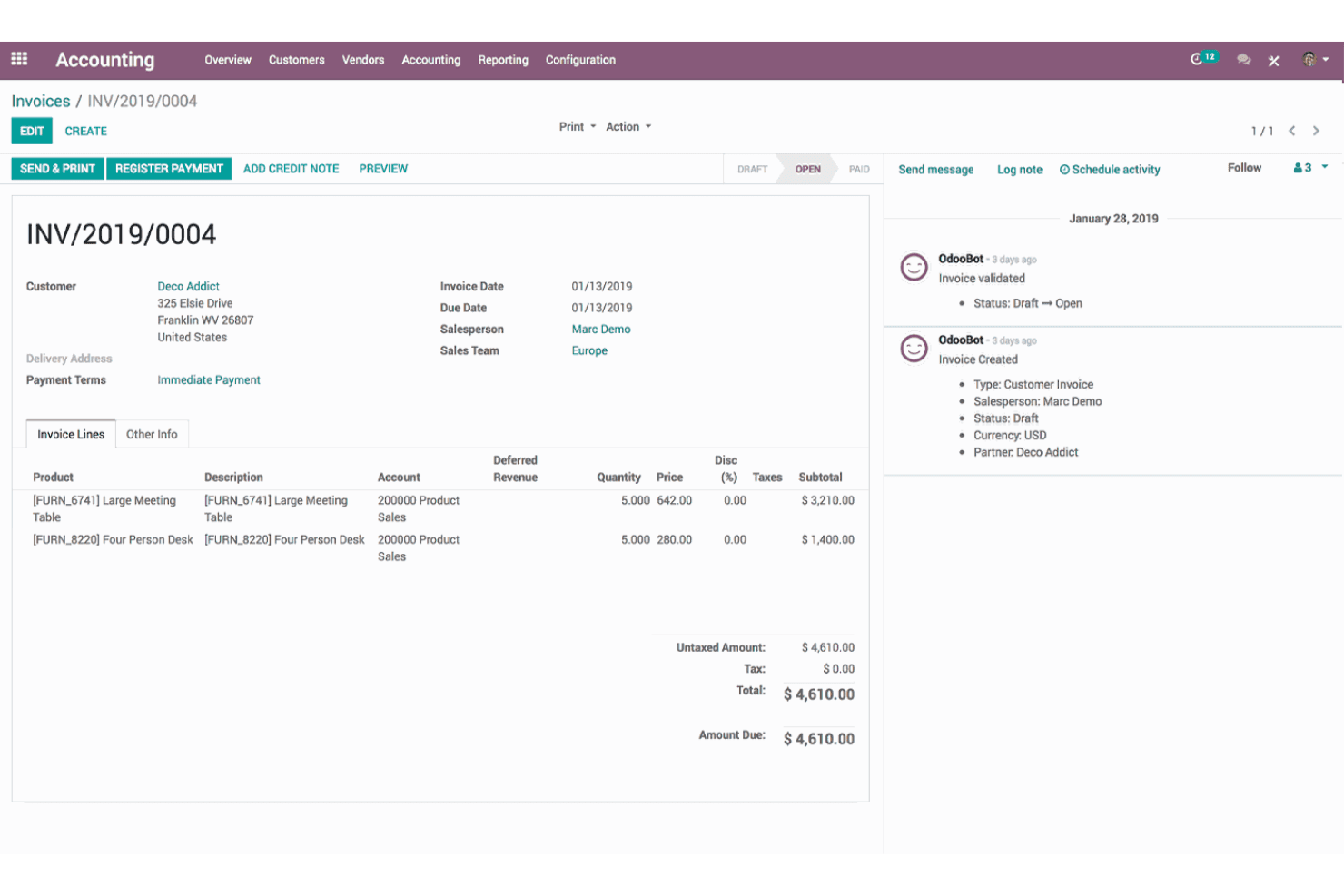
Odoo Accounting invoice form showing customer invoice lines, totals, and status workflow from draft to open. Odoo is an open-source ERP platform that connects accounting, AP/AR, inventory, and CRM in a single suite, making it a practical fit for finance teams that want to manage operations and financial reporting without juggling multiple disconnected systems.
Who Is Odoo Best For?
Odoo is a strong fit for growing businesses that want accounting, inventory, CRM, and operations managed in one place rather than stitched together across separate tools.
Why I Picked Odoo
I picked Odoo as one of the best because it brings accounting, inventory, CRM, and purchasing into a single platform, so transactions like sales orders and deliveries flow directly into the general ledger without manual re-entry. I especially like how the multi-company consolidation handles currency translation across separate legal entities using historical, average, and closing rates by account type. The ML-assisted reconciliation matching and AI-powered vendor bill digitization also mean my team spends less time on routine AP tasks and more time on actual analysis.
Odoo Key Features
- Fiscal localization: Preconfigures region-specific charts of accounts, taxes, fiscal positions, and legal reports for supported countries.
- Deferred revenue recognition: Spreads revenue across periods using days, months, or full months as the recognition basis, with entries generated on invoice validation or manually.
- Payment follow-up automation: Sends payment reminders via email, SMS, or postal letter based on configurable follow-up schedules.
- Analytic accounting and budgets: Tracks performance against budgets across configurable analytic dimensions and distributions.
Odoo Integrations
Odoo offers native integrations with Stripe, PayPal, Adyen, and AvaTax, plus bank synchronization through Plaid, Yodlee, Ponto, and Enable Banking. Its External JSON-2 API, available on the Custom plan, supports custom integrations.
Pros and Cons
Pros:
- ML-assisted reconciliation reduces routine matching work
- Multi-entity consolidation includes currency translation
- Connected sales, inventory, and accounting workflows
Cons:
- No dedicated Sage Intacct migration path
- Large databases can slow searches and pages
Learn more about Odoo: Best for small business payroll
- 30-day free trial + demo available
- From $20/month
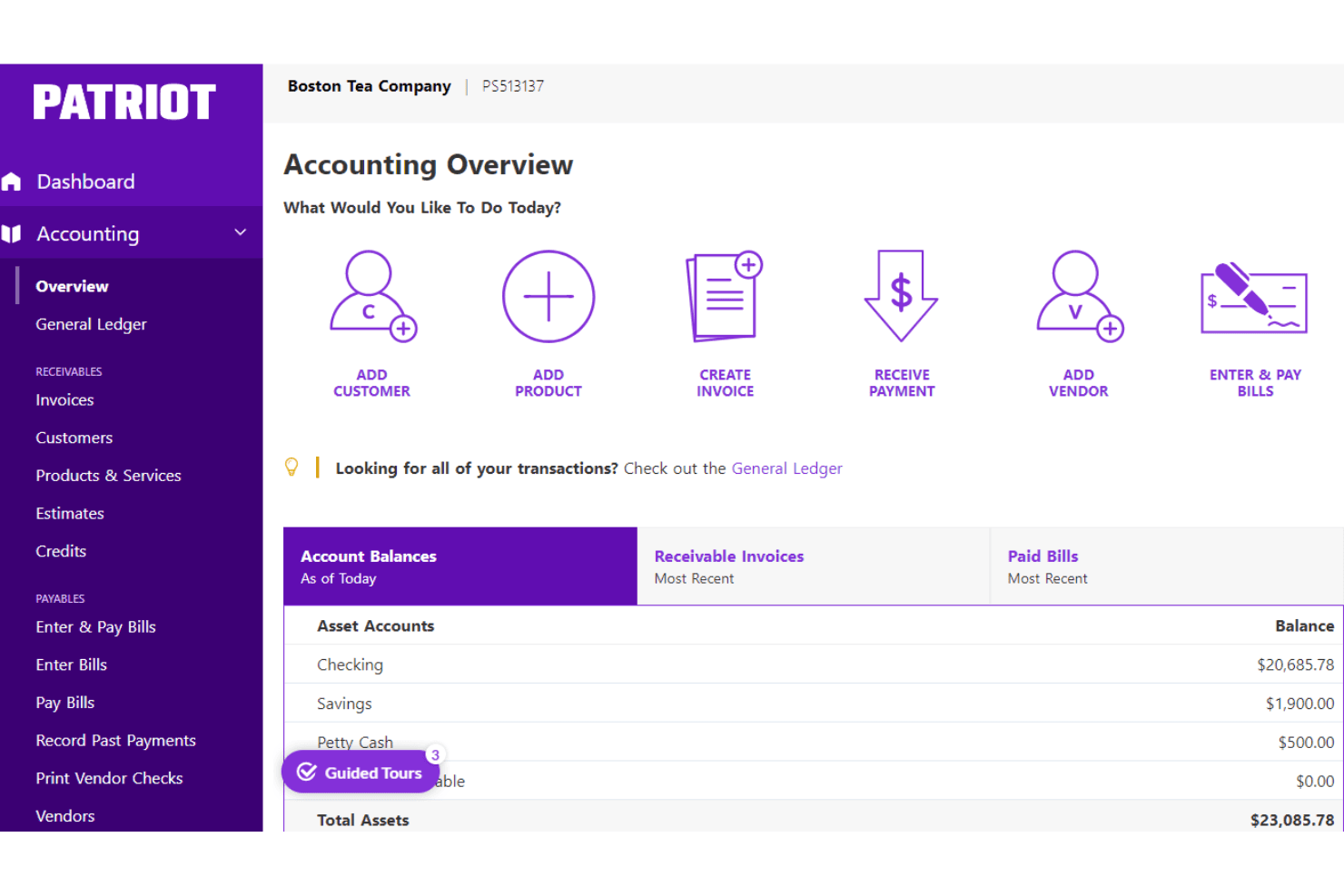
Patriot's Accounting Overview dashboard, with quick actions for customers, invoices, payments and bills. Patriot is cloud-based accounting and payroll software built for small businesses that need straightforward bookkeeping, invoicing, and payroll without the complexity of enterprise platforms.
Who Is Patriot Best For?
Patriot is a good fit for small business owners who need affordable, no-frills payroll and basic bookkeeping without the overhead of a larger accounting platform.
Why I Picked Patriot
I picked Patriot as one of the best because it's purpose-built for small businesses that need payroll done right without the overhead of a larger platform. I particularly like how Full Service Payroll handles federal, state, and local tax filings and deposits automatically, including year-end forms like W-2s and 940s, so payroll compliance doesn't require a dedicated HR team. The clean integration between Patriot Payroll and Patriot Accounting automatically generates journal entries for each payroll run, reducing manual reconciliation work at month-end.
Patriot Key Features
- Cash and accrual basis switching: Toggle between cash and accrual basis at the report level without converting your underlying entries.
- Account reconciliation: Match recorded transactions against bank statements for asset, liability, and equity accounts, with the ability to save progress mid-reconciliation.
- Modified Transactions report: View a log of every edited, voided, or deleted transaction, including the original values and the updated values, along with the username and timestamp.
- Automatic bank imports: Connect bank accounts and credit cards via Plaid to pull in up to two years of transaction history for review and categorization.
Patriot Integrations
Patriot offers three documented native integrations: Plaid for bank and credit-card imports, Stripe for invoice payments, and Patriot Payroll for payroll journal entries. No API or broader integration catalog is documented.
Pros and Cons
Pros:
- Helpful phone and chat support
- Payroll tax filings reduce compliance workload
- Routine bookkeeping suits small-business workflows
Cons:
- Limited close controls for finance teams
- No consolidated multi-entity financials
Learn more about Patriot:
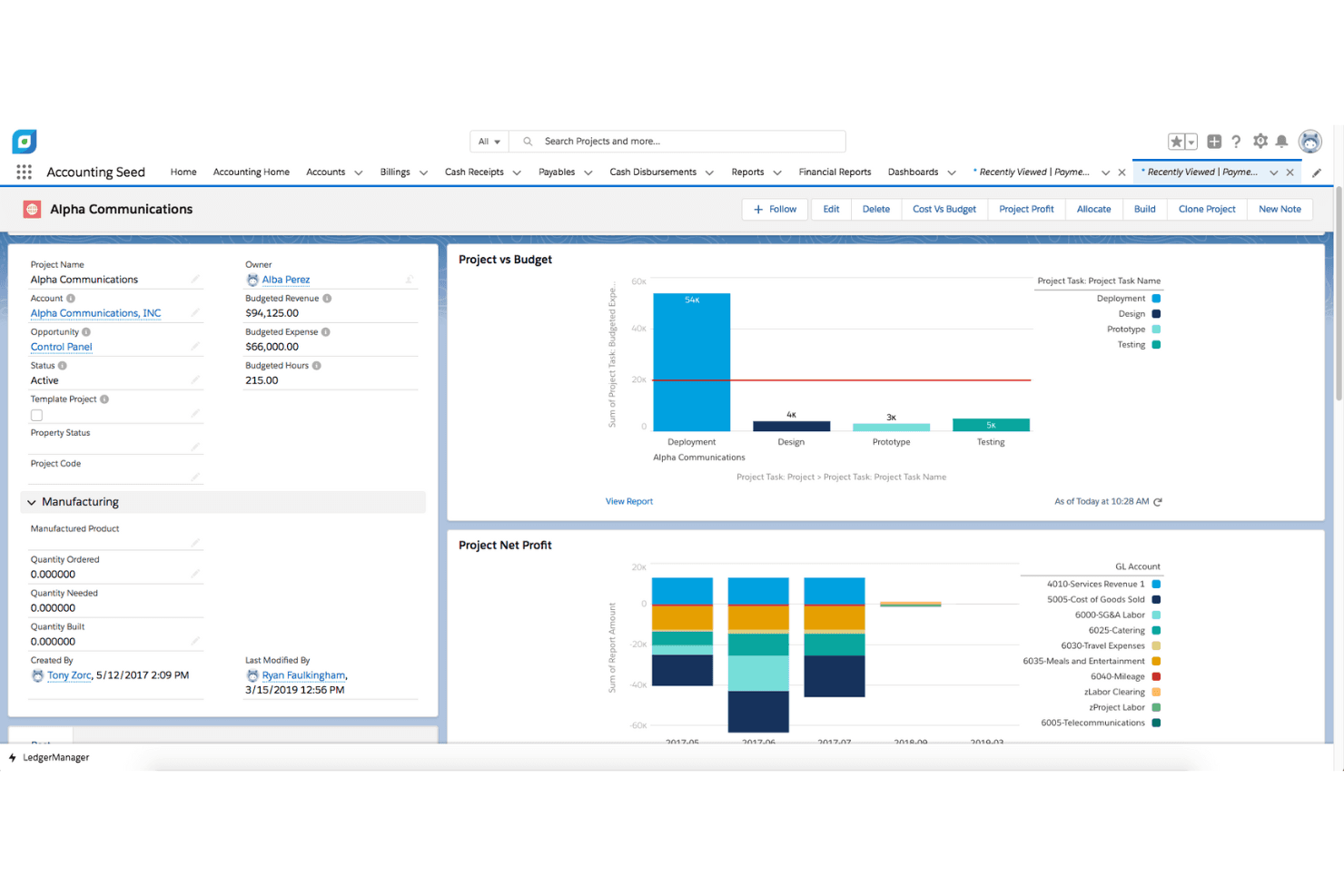
Accounting Seed project record showing budget versus actuals and net profit by GL account. Accounting Seed is a Salesforce-native accounting platform built for growing businesses that want to manage their GL, AP, AR, and financial reporting without leaving the Salesforce ecosystem.
Who Is Accounting Seed Best For?
Accounting Seed is a strong fit for growing businesses already running on Salesforce that want accounting and CRM data in one place.
Why I Picked Accounting Seed
Accounting Seed earns its spot on my shortlist because it's the only accounting platform I know of that runs natively inside Salesforce, meaning your GL, AP, and AR data live in the same org as your CRM without any sync layer in between. I particularly like how opportunity-based billing lets you generate invoices directly from closed-won deals, cutting out the manual handoff between sales and finance entirely. The AI Invoice Capture also learns your GL coding patterns per vendor over time, so it gets more accurate the more you use it.
Accounting Seed Key Features
- Multi-book accounting: Supports cash-basis, accrual-basis, or both simultaneously within a single ledger setup.
- Bank Direct Connect: Connects bank and credit card accounts to import transactions, apply categorization rules, and reconcile directly in the platform.
- Close checklist: Tracks close progress, outstanding items, and blockers in real time so your team can monitor period-end status at a glance.
- Collections Agent: An AI agent that analyzes invoices, predicts payment timing, and delivers real-time receivables aging analysis.
Accounting Seed Integrations
Accounting Seed runs natively on Salesforce and offers integrations with Avalara, Stripe, REPAY, Ramp, Plaid, and Yodlee. It supports Salesforce REST, SOAP, and Bulk APIs, Apex, Flow, and Hosted MCP for custom integrations.
Pros and Cons
Pros:
- Tracks close blockers with a live checklist
- Supports cash and accrual books together
- Automates recurring AP, AR, and reconciliations
Cons:
- Intercompany eliminations and large batches need work
- Custom reports require hands-on building
Learn more about Accounting Seed:
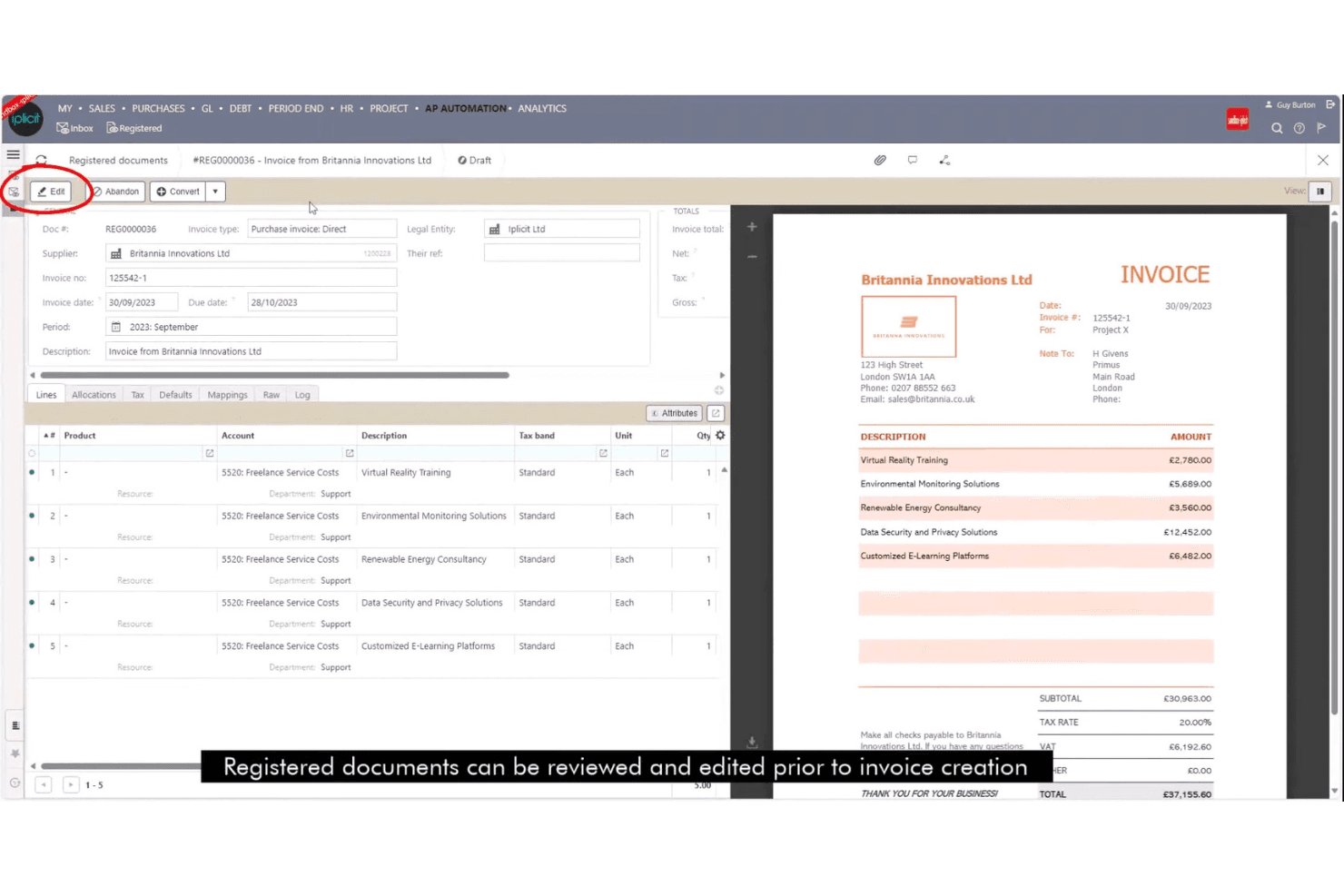
iplicit lets users review and edit registered purchase invoices before converting them into invoices. iplicit is cloud accounting software built for mid-market organisations that need multi-entity consolidation, real-time reporting across companies, and a structured path away from legacy finance systems.
Who Is iplicit Best For?
iplicit is a strong fit for mid-market finance teams ready to move off legacy on-premise systems and need multi-entity consolidation built in from day one.
Why I Picked iplicit
I've included iplicit in my top picks because it's purpose-built for mid-market teams moving off legacy on-premise systems, with multi-entity consolidation and real-time consolidated reporting built into the core rather than bolted on. I particularly like that it handles intercompany charges, allocations, and journals automatically across entities, so a group finance team migrating from an older system isn't rebuilding those workflows from scratch. The migration process can carry over seven or more years of historical data, which matters when your auditors and board still need to access pre-migration figures.
iplicit Key Features
- Unlimited reporting dimensions: Report across any combination of cost centre, department, project, or custom attribute without being capped on the number of dimensions you configure.
- Automated bank reconciliation: Downloads bank statements and matches transactions using AI, reducing the manual effort of reconciling accounts each period.
- Digital approval workflows: Configure multi-level approval chains for purchases, expenses, and supplier onboarding, with every action logged in an audit trail.
- Role-based access controls: Assign permissions by user role and restrict access by legal entity, cost centre, or department to manage data governance across the group.
iplicit Integrations
iplicit offers native integrations with Microsoft Excel, Microsoft Office 365, Microsoft Power BI, Salesforce, IRIS Payroll Professional, Lightyear, XE, Unleashed, Cin7, and IMP Software. It also provides an open API and supports Zapier.
Pros and Cons
Pros:
- Migration can retain seven-plus years of history
- Reviewers praise cross-entity reporting and drill-down
- Real-time multi-entity consolidation automates intercompany journals
Cons:
- No published transaction-volume performance benchmarks
- Executive dashboard refreshes only overnight
Learn more about iplicit:
Andre alternativer til Sage Intacct
Her er noen flere alternativer til Sage Intacct som ikke kom med på kortlisten min, men som likevel er verdt å se nærmere på:
- 11AcumaticaBest for industry-specific solutions
- 12QuickBooks OnlineBest for cost-effective plans
- 13WorkdayBest for financial planning
- 14ChargebeeBest for subscription billing
- 15AplosBest for non-profit organizations
- 16NetSuiteBest for global business management
- 17SAP S/4 HANABest for real-time analytics
How I Evaluate Sage Intacct Alternatives
I look at two layers: the non-negotiables every mid-market finance platform must cover—dimensional GL, multi-entity consolidation, audit trails—and the differentiators that set each option apart.
Core Functionality (Table Stakes For This List)
When I'm selecting tools for my list, I rank each one on a scale from 0 (does not offer the functionality) to 5 (excels in this area) for each core functionality listed below. Then, I calculate the tool's total score into a percentage. Each tool needs to achieve a minimum total score of 65% to be considered for inclusion.
- Cloud-Native Core Financials: I check that GL, AP, AR, and cash management all live in the cloud with real-time posting—not a hosted desktop app repackaged as SaaS.
- Multi-Entity Consolidation: I evaluate how each tool handles inter-company eliminations, currency translation, and subsidiary rollups across complex org structures.
- Dimensional Reporting: The ability to slice actuals by department, project, location, or fund without bloating the chart of accounts is something I look for in every tool.
- Automated Close Workflows: I look at how each platform handles recurring journals, account reconciliations, and close task sequencing to shorten month-end timelines.
- Compliance & Audit Controls: Role-based permissions, immutable audit trails, and support for GAAP or IFRS frameworks are areas I evaluate for finance-grade accountability.
- Open API & Integrations: I consider how well each tool connects to the broader finance stack—CRM, payroll, expense management, and BI platforms like Salesforce or Power BI.
Once I have a list of tools that meet this criteria, I consider what sets each platform apart.
Differentiating Factors (What Sets Vendors Apart)
Here's how I compare and contrast different vendors:
Standout Features
Native billing and revenue recognition matters when your business runs on subscriptions or long-term contracts—I evaluate how each tool handles ASC 606/IFRS 15 without bolting on a third-party module. Embedded FP&A is another area I consider, since built-in budgeting and scenario planning can save a lean finance team from maintaining a separate planning tool. Industry-specific modules also carry weight, especially for nonprofits, professional services, or SaaS companies that need tailored workflows and KPIs out of the box.
Beyond Features
Pricing transparency is something I evaluate closely—some vendors bundle core modules while others charge per module or per entity, and those add-ons stack up fast when you're running ten subsidiaries. Implementation and time-to-value also matter. I look at whether a platform offers migration paths from common systems like QuickBooks or legacy ERPs, and how long a typical deployment takes. Scalability rounds out my evaluation; a tool should handle growing transaction volumes and new entities without forcing a costly replatforming down the road.
Hvorfor se etter et alternativ til Sage Intacct?
Selv om Sage Intacct er et godt valg av regnskapsprogramvare, finnes det flere grunner til at noen brukere ser etter alternative løsninger. Det kan hende du ser etter et alternativ til Sage Intacct fordi …
- Det er ikke kostnadseffektivt for små team
- Du trenger bedre integrasjon med andre verktøy
- Det er for komplekst for dine enkle behov
- Du trenger lokal brukerstøtte i regionen din
- Det mangler bransjespesifikke funksjoner eller moduler du trenger
- Du ønsker et mer brukervennlig grensesnitt
Hvis noe av dette høres kjent ut, har du kommet til rett sted. Listen min inneholder flere alternativer for regnskapsprogramvare som passer bedre for team som møter disse utfordringene med Sage Intacct og ser etter de beste alternative løsningene.
Viktige funksjoner i Sage Intacct
Her er noen av de viktigste funksjonene i Sage Intacct, slik at du kan sammenligne hva alternative løsninger tilbyr:
- Kjerneøkonomi: Administrer leverandørgjeld, kundefordringer og hovedbok effektivt.
- Avansert funksjonalitet: Automatiser komplekse prosesser som inntektsføring og utgiftsstyring.
- Rapportering og dashbord: Få sanntidsinnsikt med tilpassbare rapporter og dashbord.
- Styring av flere enheter: Håndter flere enheter på en enkel måte og støtt global drift.
- Dimensjonsanalyse: Analyser økonomiske data fra ulike perspektiver for å forbedre beslutningstakingen.
- KI-drevet automatisering: Automatiser gjentakende oppgaver for å øke nøyaktigheten og redusere manuelt arbeid.
- Prosjektregnskap: Følg prosjektkostnader og lønnsomhet for å sikre økonomisk kontroll.
- Global konsolidering: Konsolider økonomiske data på tvers av flere enheter og valutaer.
- Integrasjonsmuligheter: Integrer sømløst med andre forretningssystemer for å utvide funksjonaliteten.
- Revisjonsspor: Oppretthold et tydelig revisjonsspor for å sikre samsvar og åpenhet.