

De beste Spendesk-alternativene gir deg sanntidsoversikt over utgifter, automatiserte kontroller og pålitelige integrasjoner som passer størrelsen og behovene til økonomiteamet ditt. Hvis du ser etter Spendesk-alternativer, leter du sannsynligvis etter løsninger som tetter hull i håndhevingen av retningslinjer, tilbyr fleksible godkjenningsflyter eller håndterer kompleksiteten ved globale utgifter. I denne veiledningen går jeg gjennom høyt rangerte plattformer som dekker alt det viktigste – fra forhåndsbetalte kort til detaljerte rapporter – slik at du kan velge et system for utgiftsstyring som støtter dine unike økonomiprosesser og forretningsmål.
Hva er Spendesk?
Spendesk er en plattform for utgiftsstyring som hjelper bedrifter med å kontrollere, spore og automatisere selskapets utgifter. Den kombinerer forhåndsbetalte kort, fakturahåndtering, godkjenninger og sanntidsrapportering i ett system. Økonomiteam bruker Spendesk til å sentralisere utgiftsprosesser, angi egendefinerte tillatelser og forenkle ansattes innkjøp. Plattformen hjelper bedrifter med å håndheve retningslinjer, redusere manuelt arbeid og få bedre oversikt over alle selskapets betalinger.
Sammenligningstabell for Spendesk-alternativer
Denne sammenligningstabellen oppsummerer prisdetaljene for mine beste utvalgte Spendesk-alternativer:
| Tool | Best For | Trial Info | Price | ||
|---|---|---|---|---|---|
| 1 | Best for integrated travel and expense | Free plan available | Pricing upon request | Website | |
| 2 | Best for automated global supplier payments | Free demo available | From $99/month | Website | |
| 3 | Best for procurement-driven spend controls | Free demo available | Pricing upon request | Website | |
| 4 | Best for multicurrency payments and expenses | Free demo available | Pricing upon request | Website | |
| 5 | Best for payroll-linked expense management | Free demo available | Pricing upon request | Website | |
| 6 | Best for automated receipt capture | Free trial available | From £9.5/month | Website | |
| 7 | Best for startup and scaleup card controls | Free plan available | From $12/user/month | Website | |
| 8 | Best for AP and card spend in one platform | Free to use | Free to use | Website | |
| 9 | Best for advanced accounting integrations | 30-day free trial | From $15/user/month | Website | |
| 10 | Best for global enterprise compliance | Free demo available | Pricing upon request | Website |


Hvorfor du kan stole på våre programvareanbefalinger
6,700+
Reviews
20
Industry experts
16+
Evaluation factors
14
Years
Teamet vårt har testet og anmeldt programvare siden 2012. Vi er selv økonomiledere, så vi vet hvor vanskelig og hvor viktig det er å velge riktig programvare.
I denne guiden har vi vurdert verktøyene gjennom praktisk testing og uavhengig research og gitt dem poeng ut fra våre utvelgelseskriterier.
Anmeldelsene våre bygger på vår egen redaksjonelle vurdering. De er ikke et salgsargument.
Anmeldelser av de beste Spendesk-alternativene
Nedenfor finner du mine detaljerte sammendrag av de beste Spendesk-alternativene som kom med på kortlisten. Anmeldelsene mine gir en detaljert gjennomgang av funksjonene, de beste bruksområdene og integrasjonene til hver plattform, slik at du kan finne den som passer best for deg.
 Best for integrated travel and expense
- Free plan available
- Pricing upon request
Visit WebsiteCustomer Rating:4.7/5
Navan offers a detailed trip itinerary page with flight details, passenger info, and trip management options. Navan is a travel and expense platform that combines corporate card management, automated expense reconciliation, and business travel booking in one place—making it a strong pick for finance teams who need unified visibility across both T&E and card spend.
Who Is Navan Best For?
Navan is a natural fit for growing companies where employees travel frequently, and finance teams need expense controls without managing separate tools.
Why Navan Is a Good Spendesk Alternative
I've included Navan in my top picks because it's the only platform on this list that combines business travel booking with expense management in a single workflow. When a traveler books a flight or hotel through Navan, that transaction flows directly into expense reconciliation, no manual entry required. I also appreciate Navan Rewards, which incentivizes employees to book under budget by letting them keep a portion of the savings, giving finance teams a built-in cost-control mechanism that Spendesk simply doesn't offer.
Navan Key Features
- AI-powered travel assistant: Ava, the virtual assistant, helps automate itinerary changes and policy enforcement for travelers.
- Customizable approval workflows: Build multi-level, conditional approvals for expenses and travel bookings across teams.
- ERP and HRIS integrations: Native connections with systems like NetSuite, Sage Intacct, Xero, Workday, and BambooHR for synced data.
- Policy-driven spend controls: Enforce real-time spend limits and category rules for all card, travel, and expense activity.
Navan Integrations
Navan offers native integrations with NetSuite, Sage Intacct, Xero, QuickBooks, Workday, and BambooHR. An API is available for custom integrations.
Pros and Cons
Pros:
- Receipt capture auto-populates expense fields
- Booking auto-flows into expense reconciliation
- Incentivizes travelers to book under budget
Cons:
- Cost controls can be difficult to configure
- Loyalty status integration is inconsistent
Learn more about Navan: Best for automated global supplier payments
- Free demo available
- From $99/month
Visit WebsiteCustomer Rating:4.5/5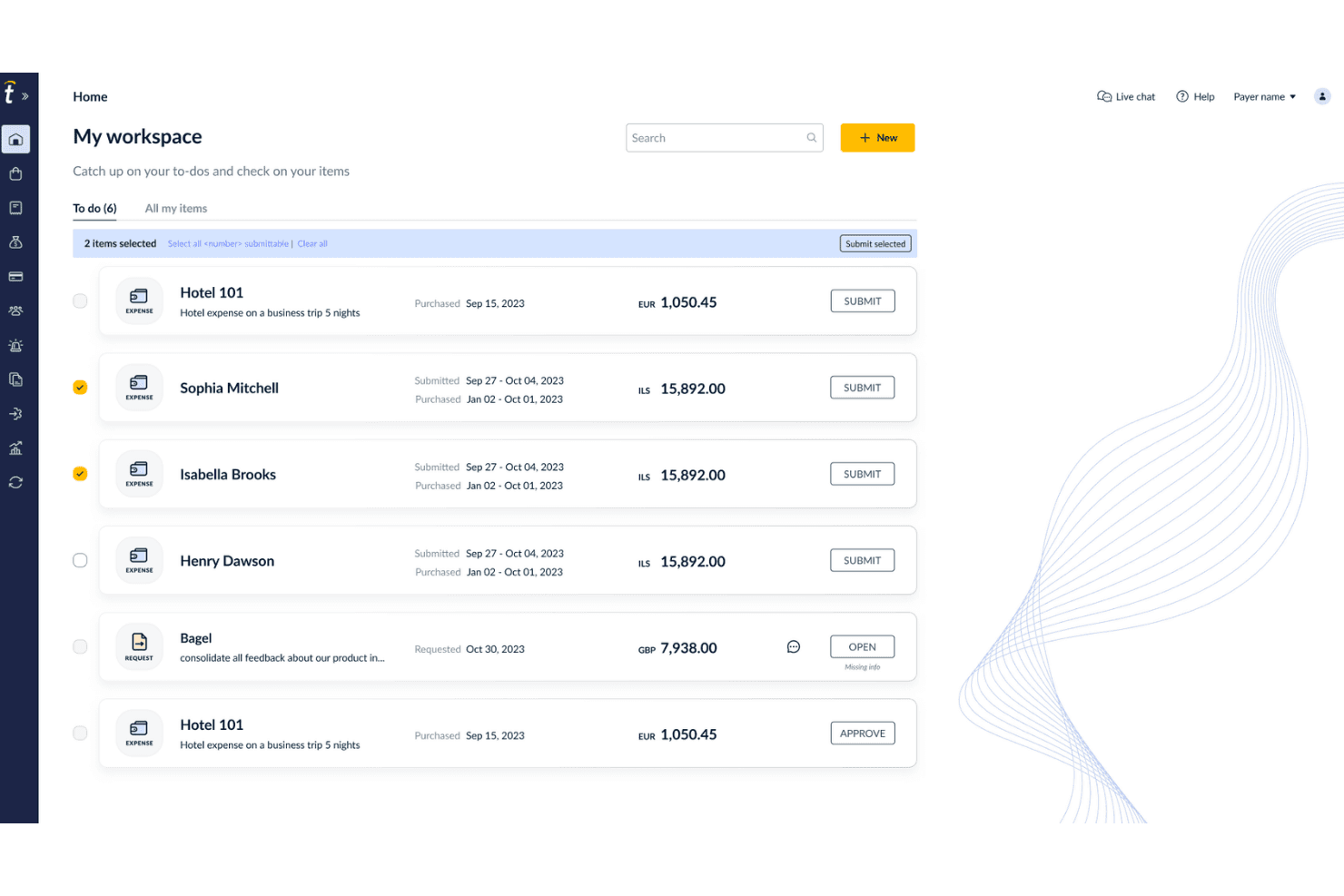
Tipalti offers a 'My Workspace' dashboard where users can manage, select, and submit multiple expense items with to-do tracking. Tipalti is an AP automation and global payments platform built for finance teams that need to manage supplier onboarding, invoice processing, and cross-border payments at scale across multiple entities and currencies.
Who Is Tipalti Best For?
Tipalti is a strong fit for mid-market companies that pay large volumes of international suppliers, contractors, or partners and need compliance and tax documentation handled automatically.
Why Tipalti Is a Good Spendesk Alternative
I've included Tipalti in my top picks because it handles global supplier payments at a scale that Spendesk simply wasn't built for. I especially like the self-service supplier portal. It collects W-8 and W-9 tax forms automatically and validates them against rules across 62 countries before payment goes out. The mass payouts engine supports 200+ countries and territories across 120 currencies, with local payment rails built in.
Tipalti Key Features
- Multi-entity management: View and control AP operations across multiple subsidiaries, currencies, and entities from a single dashboard.
- AI-driven invoice processing: Use AI to extract, validate, and code invoice data in 146 languages with automated PO matching.
- Deep ERP integrations: Connect directly with ERP systems like NetSuite, QuickBooks, Xero, and Microsoft Dynamics 365 for real-time data sync.
- Fraud detection and compliance controls: Run AML, OFAC, and VAT checks automatically to reduce the risk of error and fraud during payouts.
Tipalti Integrations
Tipalti offers native integrations with NetSuite, Sage Intacct, QuickBooks Online, Xero, Microsoft Dynamics 365 Business Central, and SAP Business One. An API is available for custom integrations.
Pros and Cons
Pros:
- Automated tax form collection and validation
- Self-service supplier onboarding reduces AP team workload
- Handles payments across 200+ countries and territories
Cons:
- Limited expense management for employee spend
- No corporate card issuance for employees
Learn more about Tipalti: Best for procurement-driven spend controls
- Free demo available
- Pricing upon request
Visit WebsiteCustomer Rating:4.2/5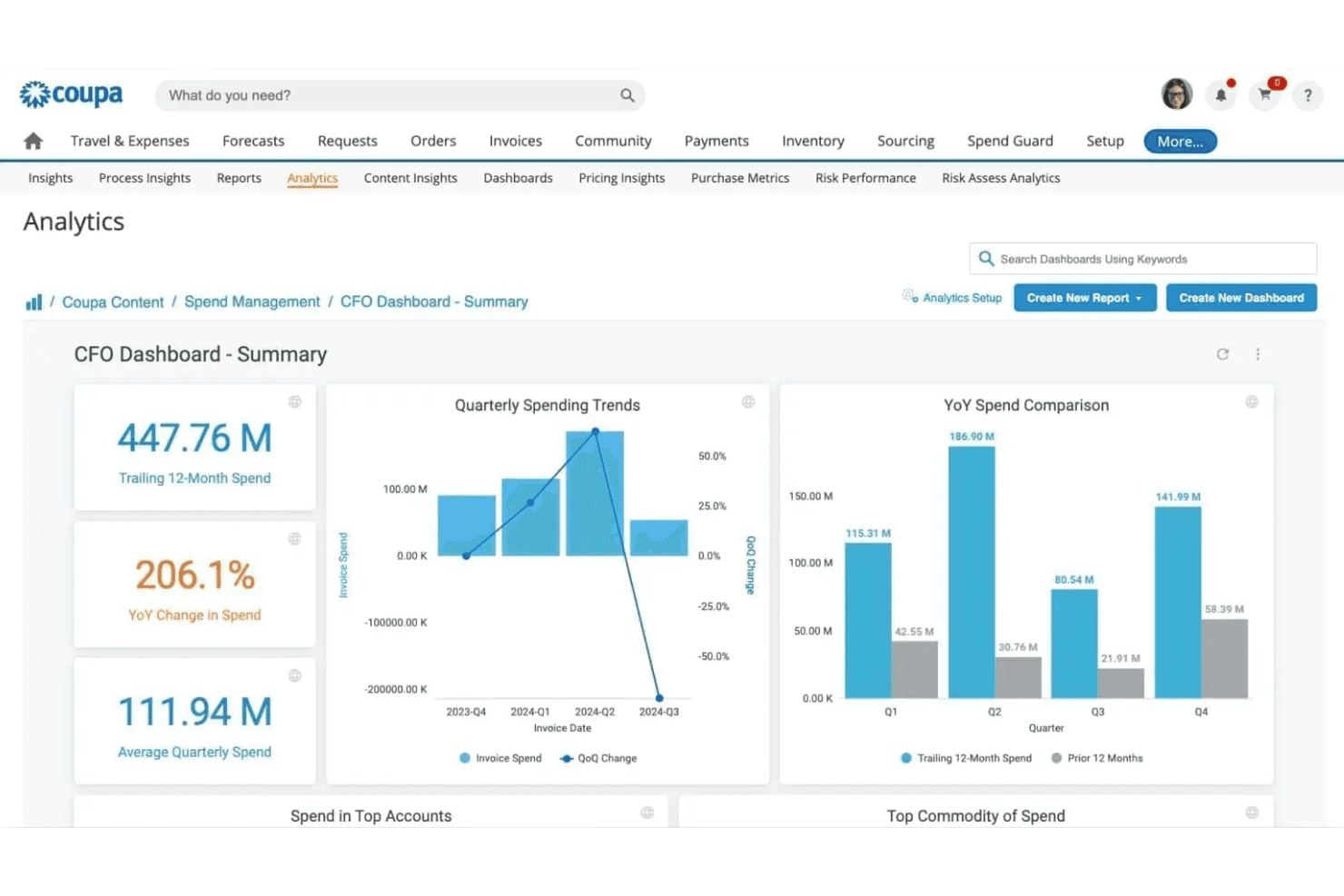
Coupa offers a CFO Dashboard with analytics including quarterly spending trends, YoY spend comparison, and key financial metrics. Coupa is an enterprise spend management platform built for mid-market and large organizations that need to unify procurement, AP automation, expense management, and supplier controls across complex, multi-team financial operations.
Who Is Coupa Best For?
Coupa suits procurement leads and finance controllers at mid-market and enterprise organizations managing high-volume supplier relationships and complex approval hierarchies.
Why Coupa Is a Good Spendesk Alternative
I picked Coupa as one of the best because its spend controls go deeper than Spendesk's policy layer. Pre-approval rules tie directly to category budgets and supplier contracts, so purchases get validated against sourcing agreements before a PO is ever issued. I also appreciate the 3-way PO matching in AP automation, which flags invoice discrepancies against both the purchase order and receipt in real time.
Coupa Key Features
- Multi-entity spend management: Manage spend across subsidiaries and currencies from a unified dashboard.
- Supplier risk and information management: Centralize compliance documents, monitor supplier risk scores, and automate onboarding.
- Contract lifecycle management: Create, store, and track procurement contracts with automated version control.
- Category-based spend analysis: Analyze spend by category to identify savings opportunities and optimize sourcing strategies.
Coupa Integrations
Coupa offers native integrations with NetSuite, SAP, Oracle, Microsoft Dynamics 365, Workday, and Salesforce. An API is available for custom integrations.
Pros and Cons
Pros:
- Granular pre-approval rules by category and team
- Strong supplier risk and compliance management
- Deep procurement controls with contract-linked POs
Cons:
- Not suited for small or early-stage teams
- Implementation is lengthy and resource-intensive
Learn more about Coupa: Best for multicurrency payments and expenses
- Free demo available
- Pricing upon request
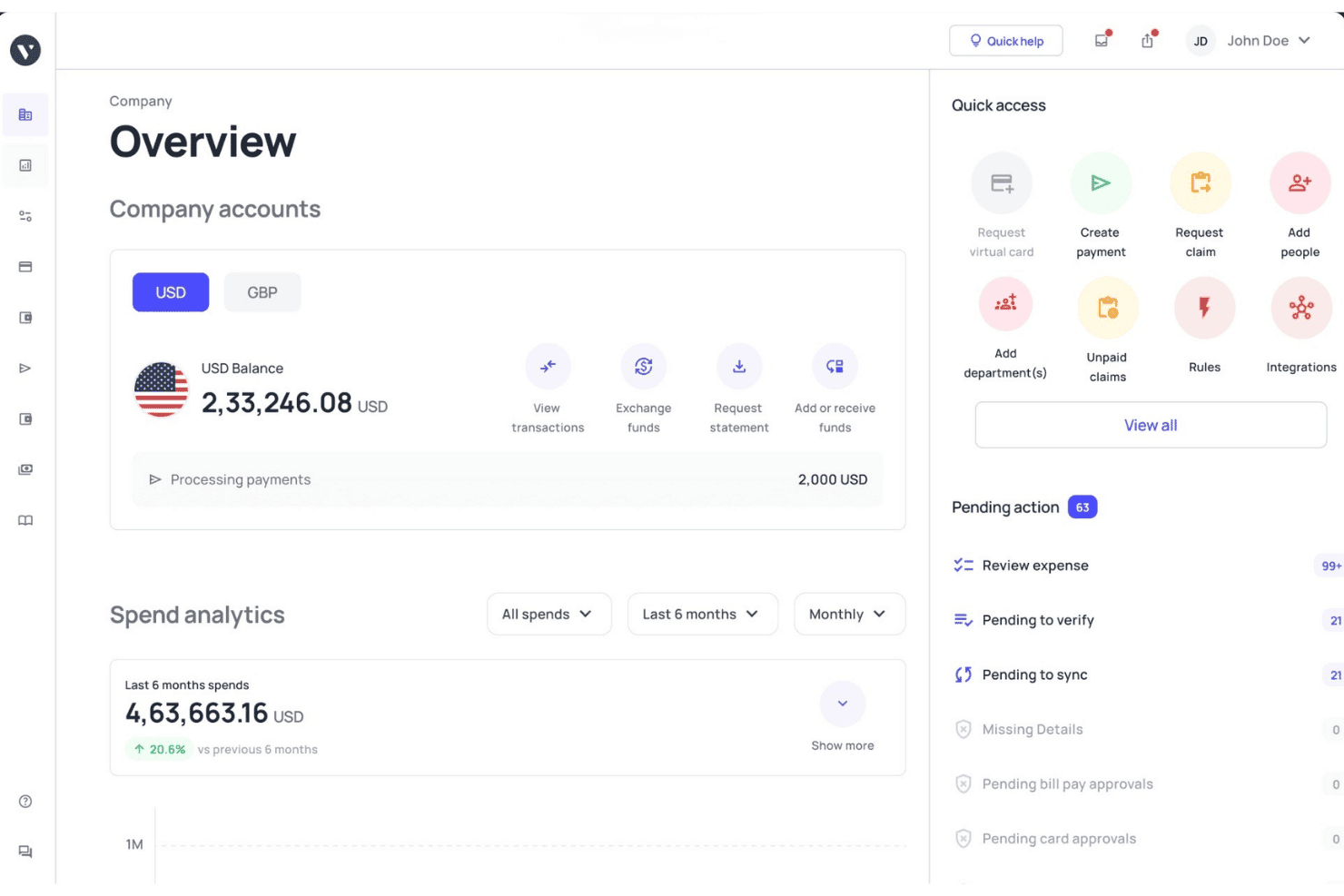
Volopay offers a company financial overview dashboard with account balances, spend analytics, quick access actions, and pending approvals. Volopay is a spend management platform built for finance teams that need to issue corporate cards, automate AP workflows, and manage vendor payments across multiple currencies and international entities.
Who Is Volopay Best For?
Volopay is a strong fit for SMBs and scaling companies operating across APAC or managing cross-border payments in multiple currencies.
Why Volopay Is a Good Spendesk Alternative
I picked Volopay for this list because of how it handles cross-border spend in ways Spendesk doesn't. Multi-currency wallets supporting 11 currencies, combined with vendor payments to 130+ countries via SWIFT and non-SWIFT rails, mean finance teams running international operations aren't stitching together a separate FX tool alongside their expense platform. The competitive exchange rates on corporate card transactions are a genuine differentiator I appreciate for high-volume forex spend.
Volopay Key Features
- Multi-level approval workflows: Set up custom approval chains with up to five approvers for any expense or payment.
- Mobile expense capture: Employees can submit claims, receipts, and categorize expenses directly from the Volopay mobile app.
- Automated accounting sync: Integrate transactions and categories with platforms like Xero, NetSuite, QuickBooks, and more.
- Vendor and subscription management: Track supplier details and recurring SaaS payments to avoid duplicate costs or surprise renewals.
Volopay Integrations
Volopay offers native integrations with Xero, NetSuite, QuickBooks, Tally, MYOB, Deskera, and Zoho Books, and provides an API for custom integrations.
Pros and Cons
Pros:
- Receipt upload and categorization via mobile app
- Cards work across 130+ countries via SWIFT
- Cashback on foreign currency card transactions
Cons:
- Virtual and physical cards aren't linked to a single profile
- Custom reporting requires manual export to spreadsheets
Learn more about Volopay: Best for payroll-linked expense management
- Free demo available
- Pricing upon request
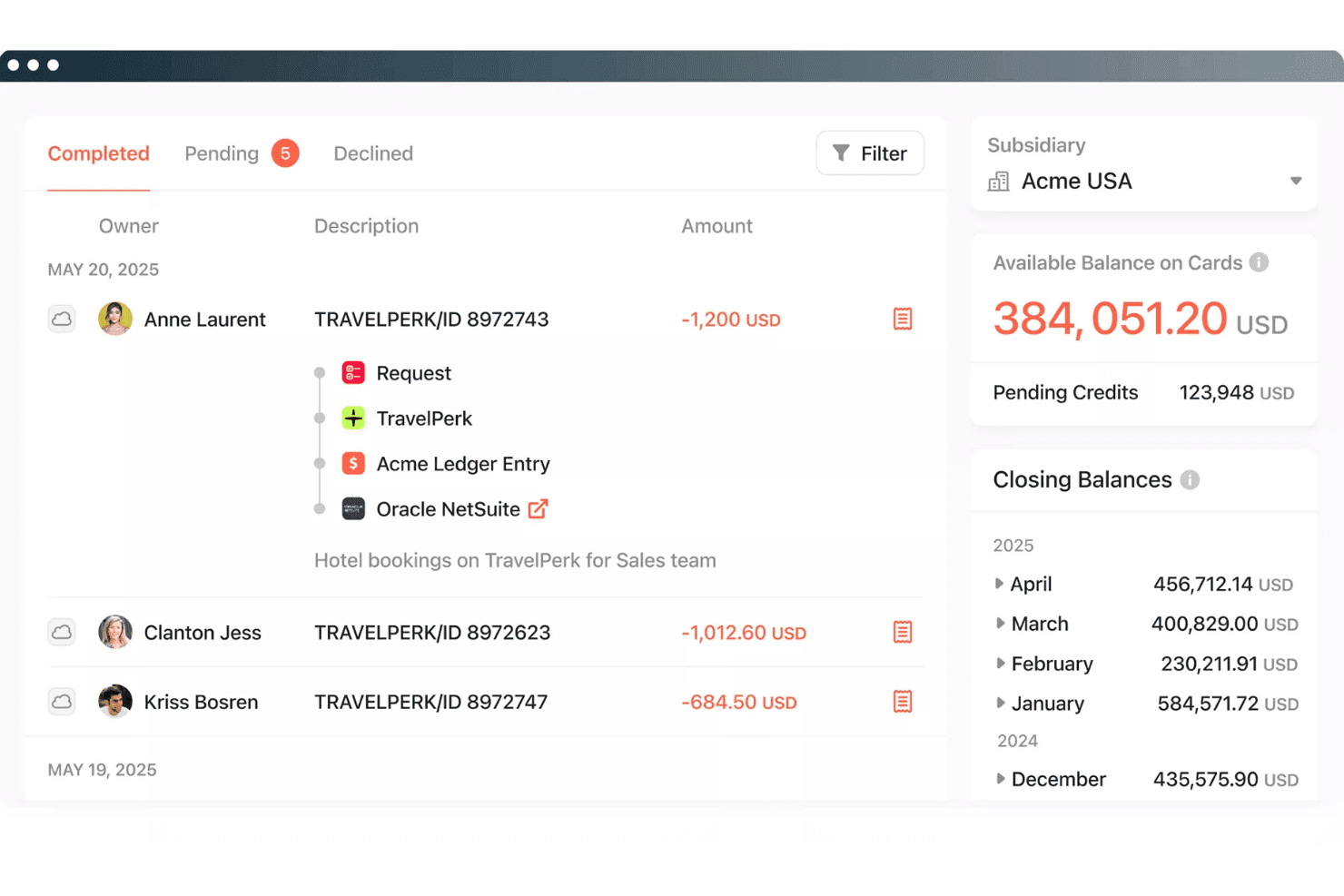
Paylocity for Finance offers a transaction management dashboard with completed, pending, and declined tabs. Paylocity for Finance (formerly Airbase) is a spend management platform built for mid-market finance teams who need to manage payroll and non-payroll spend—cards, expenses, AP, and procurement—on a single connected employee record.
Who Is Paylocity for Finance Best For?
It fits mid-market companies (100–5,000 employees) that run HR and payroll on Paylocity and want spend management built into the same platform.
Why Paylocity for Finance Is a Good Spendesk Alternative
I picked Paylocity for Finance because no other spend management tool ties expense data directly to the employee record the way this one does. When a reimbursement is processed, it syncs against the same record tracking salary and headcount, giving finance controllers a complete view of total labor cost. I also like the per-vendor virtual card model: each approved expense generates a single-use card number for that specific vendor, which tightens policy enforcement considerably.
Paylocity for Finance Key Features
- Automated AP workflows: Supplier invoices are ingested, routed for multi-level approval, and paid out directly from the platform.
- Guided procurement module: Users can request purchases, track requisitions, and follow procurement workflows all in one place.
- ERP sync for transactions: Spend and invoice data sync automatically with NetSuite, Sage Intacct, and QuickBooks.
- Real-time budget insights: Finance teams can see live spend against budgets, with alerts when thresholds are approached.
Paylocity for Finance Integrations
Paylocity for Finance offers native integrations with NetSuite, QuickBooks, and Sage Intacct. An API is available for custom integrations.
Pros and Cons
Pros:
- Strong mid-market AP approval workflow depth
- Per-vendor virtual cards tighten spend control
- Payroll and spend data on one record
Cons:
- Card controls weaker than dedicated spend platforms
- Not built for multi-entity global businesses
Learn more about Paylocity for Finance: 6Best for automated receipt capture
Pleo
- Free trial available
- From £9.5/month
Visit WebsiteCustomer Rating:4.8/5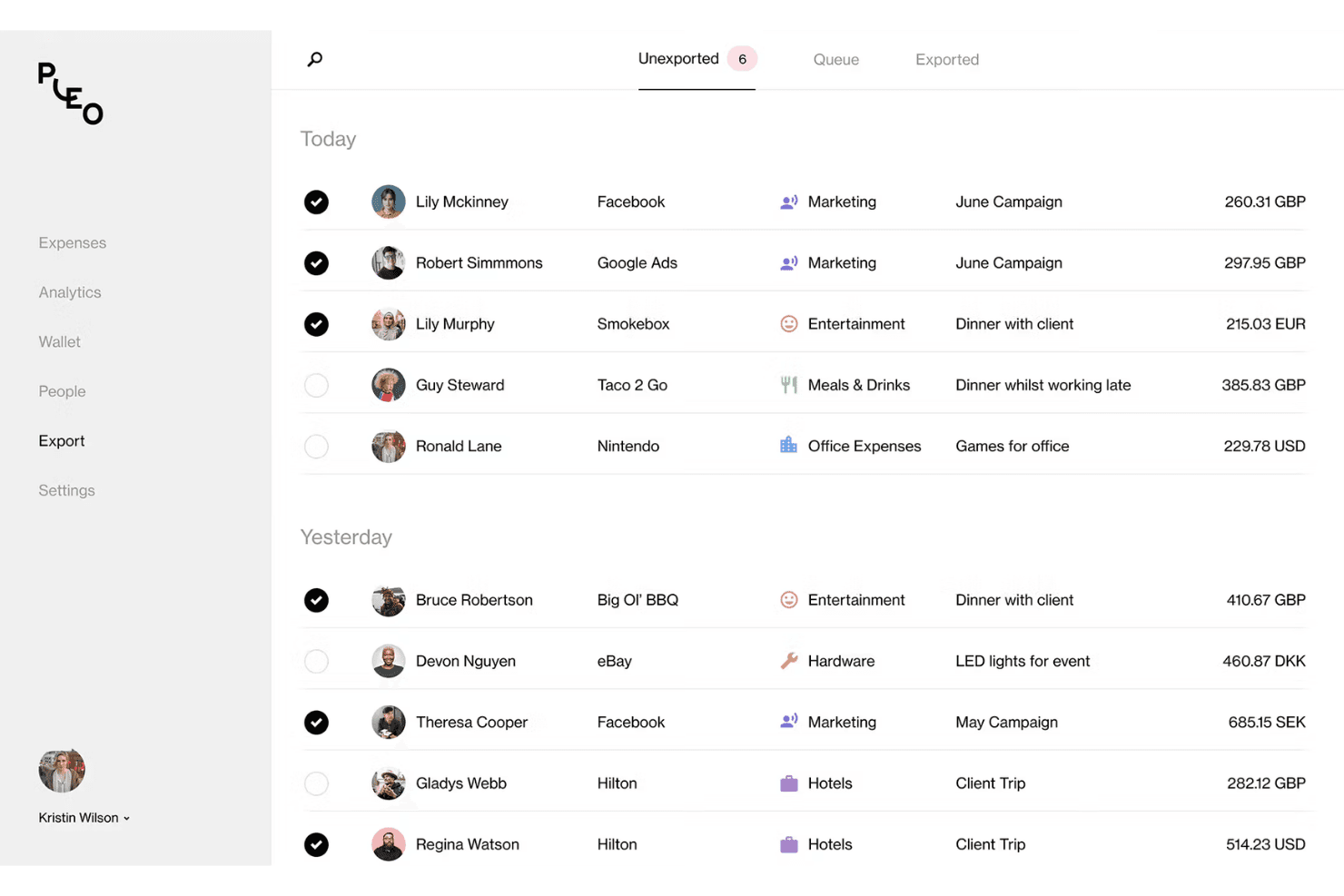
Pleo offers an export dashboard that displays categorized employee expenses with merchant details, categories, and multi-currency amounts. Pleo is a card-first spend management platform built for European SMBs that want to replace manual expense workflows with automated receipt capture, real-time spend visibility, and built-in AP controls.
Who Is Pleo Best For?
Pleo is a strong fit for finance teams at growing SMBs who need corporate card controls and automated expense workflows without enterprise-level complexity.
Why Pleo Is a Good Spendesk Alternative
I picked Pleo as one of the best because its receipt capture goes well beyond a standard upload button. The Fetch feature lets employees forward email receipts directly to a dedicated Pleo address, where they're auto-matched to the corresponding card transaction. On top of that, Pleo's OCR engine pulls merchant name, amount, and VAT data automatically, cutting the manual categorization work my team would otherwise carry into close.
Pleo Key Features
- Vendor card issuing: Create dedicated virtual cards for individual vendors to track recurring payments and control spend by supplier.
- Advanced approval workflows: Set up multi-level expense and invoice approvals with specific routing by amount, category, or team.
- Custom accounting exports: Map expense categories, VAT codes, and dimensions to your accounting system for smoother reconciliation.
- Multi-entity management: Manage spend, users, and controls across multiple subsidiaries or legal entities in one admin dashboard.
Pleo Integrations
Pleo offers native integrations with Xero, QuickBooks Online, DATEV, NetSuite, Sage, Microsoft Dynamics 365 Business Central, Fortnox, E-conomic, and Visma.net. An API is available for custom integrations.
Pros and Cons
Pros:
- Team budget visibility updated in real time
- Mileage tracking built into the mobile expense flow
- Wallet support across European entities
Cons:
- Card issuance restricted to European market
- Approval workflow customization is limited
Learn more about Pleo: 7Best for startup and scaleup card controls
Brex
- Free plan available
- From $12/user/month
Visit WebsiteCustomer Rating:4.5/5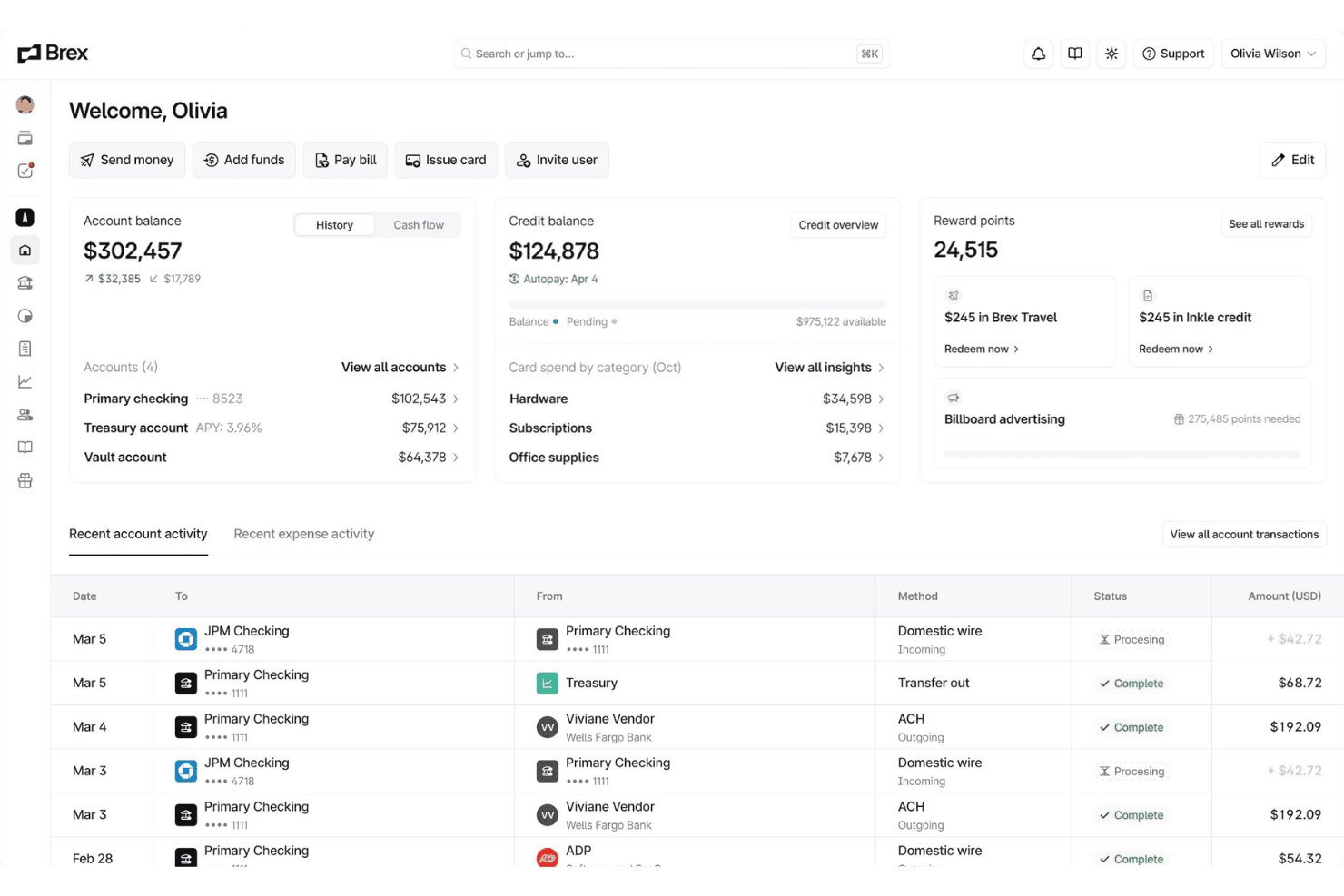
Brex offers a unified financial dashboard displaying account balances, credit balances, reward points, and recent transaction activity in one place. Brex is a unified spend management platform combining corporate cards, expense management, bill pay, and banking—built for startups and fast-scaling companies that need real-time spend controls without prefunding card accounts.
Who Is Brex Best For?
Brex is a strong fit for finance teams at venture-backed startups and high-growth companies that need scalable spend controls from seed stage through Series C and beyond.
Why Brex Is a Good Spendesk Alternative
Brex earns its spot on my shortlist because no other platform handles the transition from startup to scaleup card controls as naturally. I love that cards come with AI-powered custom rules baked in, so I can enforce merchant-category restrictions and per-card limits without prefunding accounts the way Spendesk requires. At scale, dynamic Spend Limit approval chains let my team route card requests automatically based on amount or role, keeping controls tight as headcount grows.
Brex Key Features
- Multi-entity consolidation: Manage global subsidiaries, currencies, and policies from a single dashboard.
- AI-native accounting API: Automate real-time, bi-directional ERP sync and custom mapping for faster close.
- Integrated bill pay: Process invoices, automate entry, and execute vendor payments within one unified platform.
- Embedded travel booking: Book and manage global travel in-app, keeping expenses and controls connected.
Brex Integrations
Brex offers native integrations with NetSuite, QuickBooks Online, Xero, Sage Intacct, Oracle Fusion, Microsoft Dynamics 365, Workday, Rillet, and Campfire. An API is available for custom integrations.
Pros and Cons
Pros:
- Handles multi-entity spend from one dashboard
- AI-powered rules enforce spend policies automatically
- No prefunding required for corporate cards
Cons:
- Customer support response times can lag
- Bill pay restricted to US only

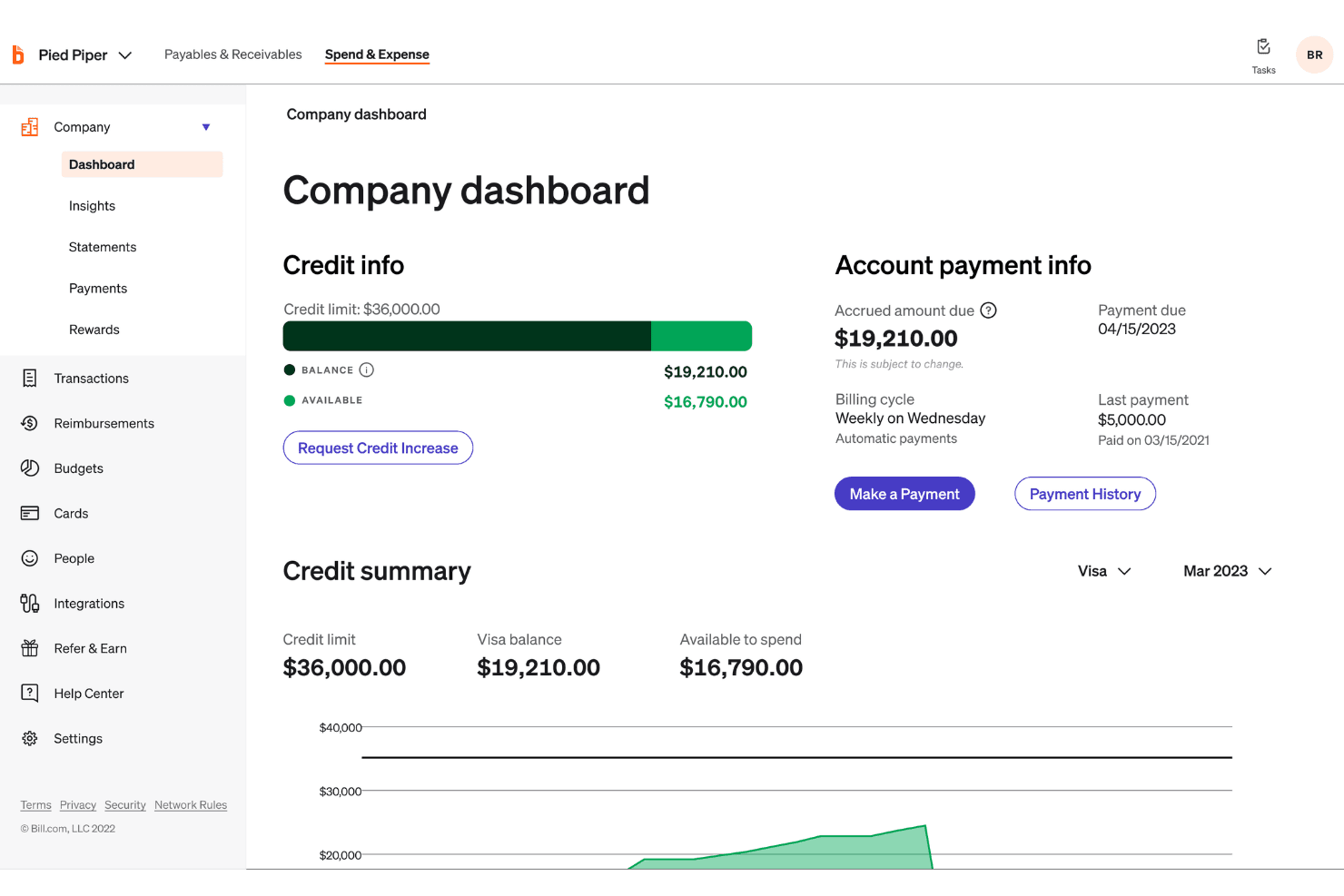
BILL Spend & Expense offers a company dashboard with credit info, available balance, and account payment details in one centralized view. BILL Spend & Expense is a spend management platform for SMBs that combines corporate card issuance, expense automation, and AP workflows in a single free-software solution synced to major accounting systems.
Who Is BILL Spend & Expense Best For?
BILL Spend & Expense fits finance controllers and AP managers at small to midsize businesses who need a unified view of card spend and vendor invoice payments.
Why BILL Spend & Expense Is a Good Spendesk Alternative
I've included BILL Spend & Expense in my top picks because it's one of the few platforms that genuinely connects corporate card spend and AP invoice payments in the same system. I like that when my team issues a virtual card for a vendor, that transaction flows directly into the same approval and reconciliation pipeline as a supplier invoice. The AI-powered receipt matching and automatic transaction coding (claiming 95% day-one accuracy) cut down the manual cleanup that typically drags out month-end close.
BILL Spend & Expense Key Features
- Multi-level approval workflows: Create custom approval routes for spend requests and invoices with conditional logic by amount, team, or category.
- Team and category budgets: Set granular budget controls for departments, projects, or individual users to manage spend allocation proactively.
- Two-way sync with major accounting systems: Connect directly with QuickBooks, NetSuite, Sage Intacct, Xero, and Microsoft Dynamics to automate transaction coding and reconciliation.
- Physical and virtual card issuance: Instantly issue and manage both physical and virtual cards for employees, each with individual spend rules and card controls.
BILL Spend & Expense Integrations
BILL Spend & Expense offers native integrations with QuickBooks (Online and Desktop), Xero, NetSuite, Sage Intacct, Microsoft Dynamics (365 BC, GP, AX, NAV, SL, F&O), and Acumatica. An API is available for custom integrations.
Pros and Cons
Pros:
- Virtual card creation and freeze controls
- Real-time transaction alerts
- Free software tier covers expense management
Cons:
- BILL Spend & Expense and BILL AP run as separate systems
- Reimbursement reporting is less developed
Learn more about BILL Spend & Expense:
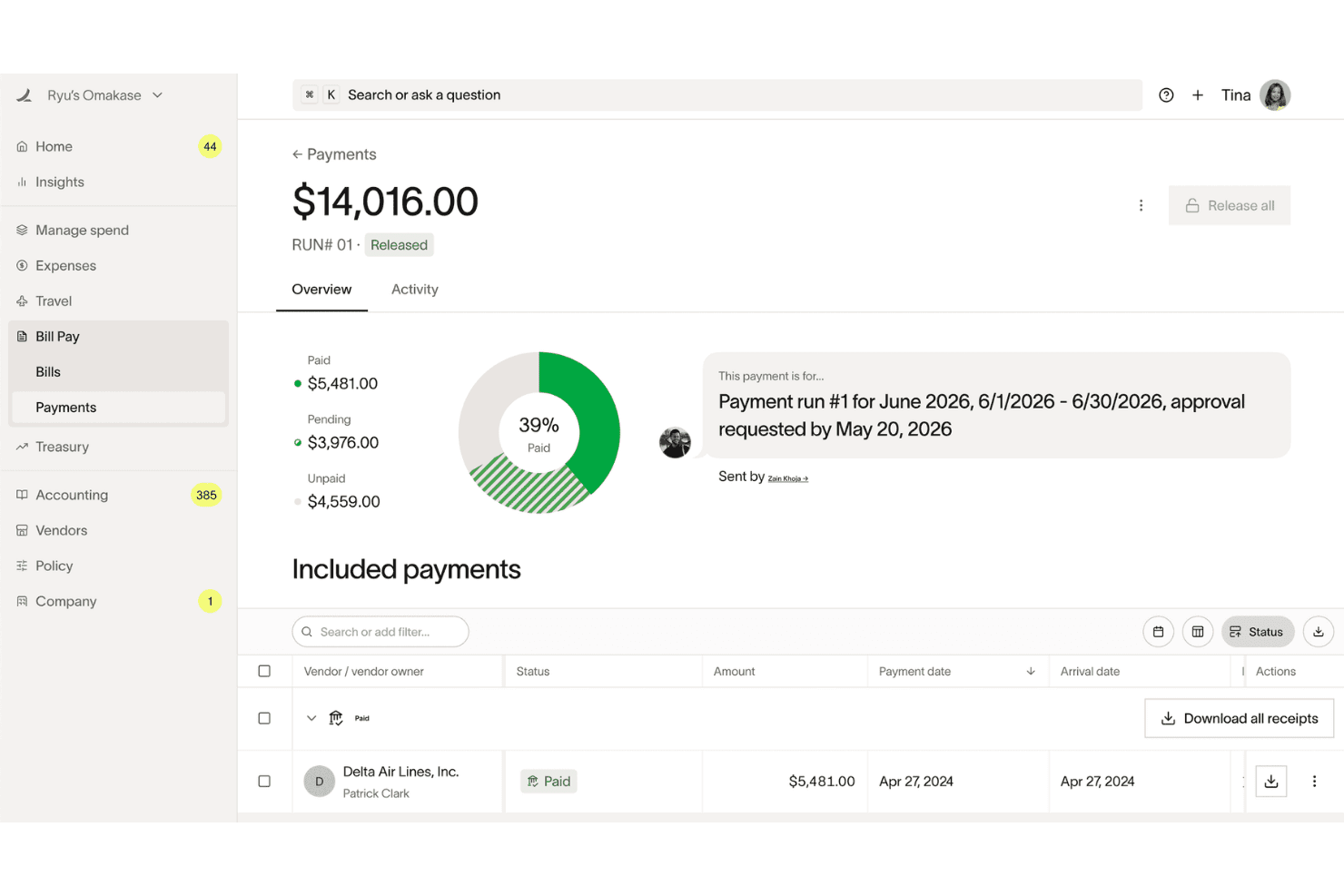
Ramp offers a Bill Pay payments dashboard with donut chart breakdowns showing paid, pending, and unpaid vendor payment statuses. Ramp is a corporate card and spend management platform built for finance teams that want to automate expense reporting, control company-wide spending, and reduce the manual work that slows down month-end close.
Who Is Ramp Best For?
Ramp is a strong fit for US-based startups and scale-ups with a dedicated finance function that needs deep accounting integrations alongside card and expense controls.
Why Ramp Is a Good Spendesk Alternative
I picked Ramp as one of the best because its accounting integration depth genuinely goes beyond what Spendesk offers. Where Spendesk covers the basics, Ramp gives you bi-directional sync with NetSuite, Sage Intacct, Workday, and Oracle Fusion, with AI-powered GL coding applied to every transaction field and custom field mapping baked in. I also appreciate that automated accruals, amortization, and reconciliation run without manual input, which meaningfully compresses close cycles.
Ramp Key Features
- Real-time spend controls: Set granular limits and enforce policies per card, vendor, or department to manage budgets proactively.
- Automated card issuance: Instantly issue and revoke unlimited virtual or physical cards with role-based permissions.
- Multi-entity management: Centralize spend oversight, billing, and reporting across multiple subsidiaries or business units.
- Integrated travel booking: Book flights, hotels, and cars directly within Ramp and match expenses to travel bookings automatically.
Ramp Integrations
Ramp offers native integrations with QuickBooks, Xero, NetSuite, Sage Intacct, Acumatica, Microsoft Dynamics 365 Business Central, Oracle Fusion Cloud, Workday, and Slack. An API is available for custom integrations.
Pros and Cons
Pros:
- Real-time budget alerts before overspending occurs
- Unlimited virtual cards with granular controls
- AI-powered GL coding on every transaction
Cons:
- AP automation less mature than dedicated tools
- US-only card issuance excludes global teams
Learn more about Ramp: Best for global enterprise compliance
- Free demo available
- Pricing upon request
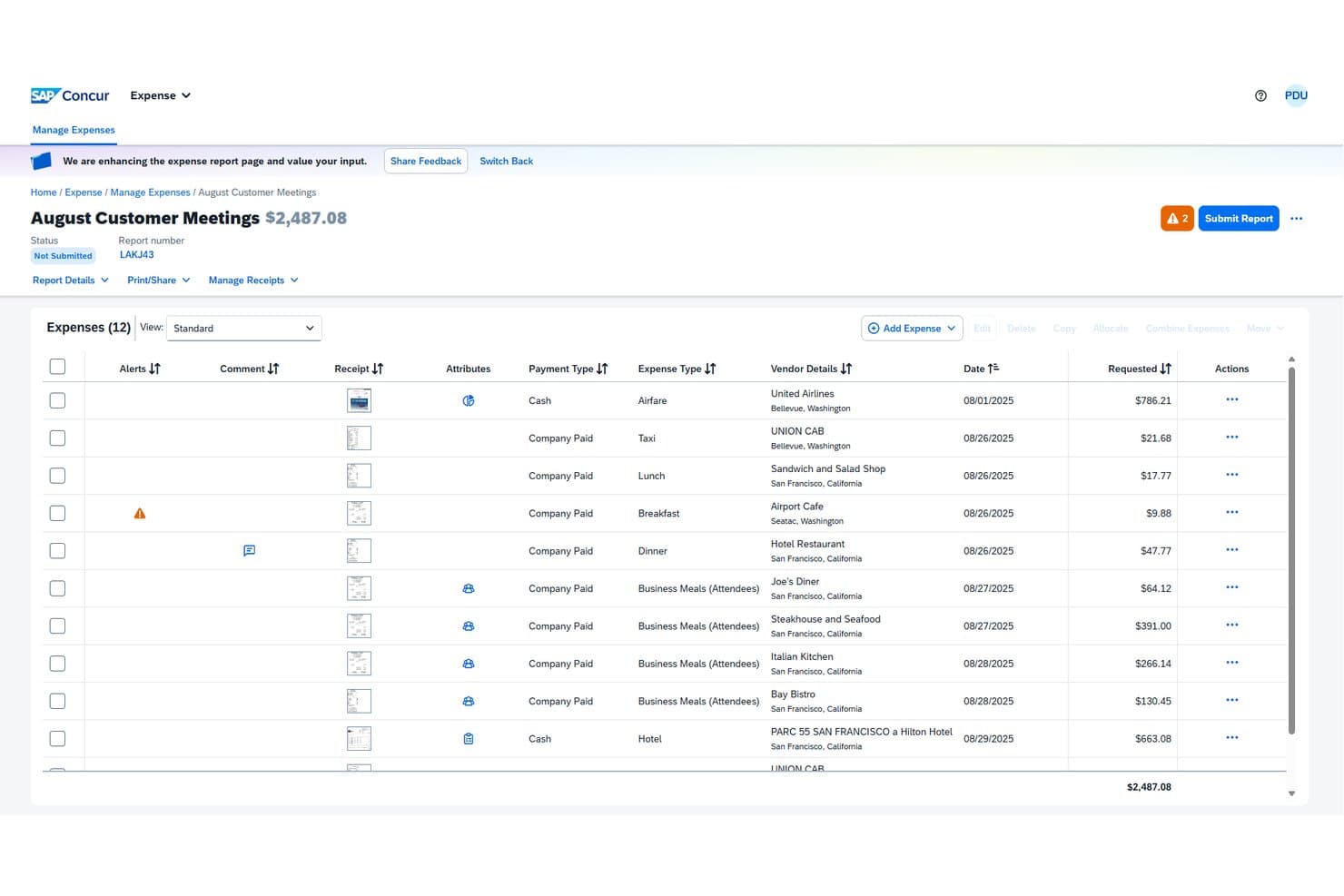
SAP Concur offers a detailed expense report view where users can manage, review, and submit itemized business expenses with vendor details, payment types, and receipt attachments. SAP Concur is an enterprise-grade spend management platform that unifies travel booking, expense reporting, and AP automation for mid-market and large organizations managing complex, multi-currency spend across global teams.
Who Is SAP Concur Best For?
Finance controllers and AP managers at large enterprises with multi-country operations who need centralized policy enforcement and VAT/tax compliance across business units.
Why SAP Concur Is a Good Spendesk Alternative
I've included SAP Concur in my top picks because its global compliance capabilities go well beyond what Spendesk offers. The configurable policy engine enforces spend rules by country, category, and employee group in real time, flagging out-of-policy transactions before they're approved. I especially appreciate the built-in VAT reclaim processing and multi-currency expense handling, which remove a layer of manual reconciliation that my team would otherwise manage separately.
SAP Concur Key Features
- Multi-entity expense management: Track, separate, and allocate expenses across subsidiaries and business units from a unified platform.
- ERP and accounting system integrations: Connect directly with SAP, NetSuite, Xero, QuickBooks, and Sage for automated transaction syncing.
- Fully configurable approval workflows: Set up conditional, multi-level approval rules for spend requests, expenses, and invoices.
- International payment capabilities: Route and execute vendor payments across currencies and geographies with built-in compliance support.
SAP Concur Integrations
SAP Concur offers native integrations with SAP, NetSuite, QuickBooks, Xero, and Sage, supports single sign-on with Azure Active Directory, and provides an API for custom integrations.
Pros and Cons
Pros:
- Handles multi-currency expense reconciliation
- Policy enforcement configurable by country
- Built-in VAT reclaim across multiple countries
Cons:
- Mobile app experience lags behind newer rivals
- Implementation takes significantly longer
Learn more about SAP Concur:
Andre Spendesk-alternativer
Her er noen flere Spendesk-alternativer som ikke kom med på kortlisten min, men som likevel er verdt å se nærmere på:
- 11Rippling SpendBest for unified HR and spend workflows
- 12PayhawkBest for multi-entity spend management
- 13Zoho ExpenseBest for integrated travel expense automation
- 14AirwallexBest for multi-currency corporate cards
- 15SpendfloBest for SaaS subscription spend management
- 16PayEmBest for customizable approval workflows
- 17Mesh PaymentsBest for granular card control and budgets
How I Evaluate Spendesk Alternatives
I split my evaluation into three parts. First—and this carries the most weight—I check whether a tool can issue corporate cards with real spending controls and route spend through configurable approval workflows before money leaves the business. Second, I look for standout capabilities like policy-driven virtual cards or embedded supplier payments. Third, I consider pricing transparency and onboarding speed.
Core Functionality (Table Stakes For This List)
When I'm selecting tools for my list, I score each one on a scale from 0 (does not offer the functionality) to 5 (excels in this area) for each core functionality listed below. I then convert the total into a percentage to help assess each tool's overall fit, with extra weight on any functionalities I’ve deemed essential.
- Corporate Cards (Essential): I look for physical and virtual cards with adjustable limits and controls, such as restricting purchases by merchant or spending category.
- Spend Approvals (Essential): I assess configurable approval routes and pre-spend checks, such as routing a request to a budget owner before a purchase.
- Expense Automation: Receipt capture, expense categorization, policy checks, and reimbursement workflows show how much manual review expense claims still require.
- Invoice & AP: I consider invoice capture, approval routing, and payment initiation, including how a team can track a bill from receipt through payment.
- Accounting Sync: I check how transactions and coding sync with accounting or ERP systems, and whether reconciliation supports accurate close and reporting.
- Spend Visibility: I look for timely, consolidated views of card, expense, and invoice activity to compare committed spend with actuals.
Once I have a list of tools that meet the criteria, I consider what sets each platform apart.
Differentiating Factors (What Sets Vendors Apart)
Here's how I compare and contrast different vendors:
Standout Features
Policy-driven virtual cards are a big deal for me. I check whether a platform can generate single-use or merchant-locked cards tied to specific subscriptions, because that's how you stop unauthorized renewals from quietly draining budget. Embedded supplier payments also matter—I look for tools that let you pay international vendors directly inside the same platform you use for employee spend, rather than toggling to a separate banking portal. Finally, I evaluate prepaid versus pay-later funding flexibility, since the right model depends on your cash position and treasury strategy.
Beyond Features
I check whether pricing scales per user, per card, or by tier, because a platform that looks affordable at 20 employees can get expensive at 200. Funding model matters too—prepaid cards suit teams that want hard spend limits, while credit lines work better when cash timing is tight. I also evaluate onboarding speed; vendors like Yokoy or Payhawk offer pre-built approval templates that cut setup time, which is valuable when you're migrating from a legacy process mid-quarter. Finally, I look at regional compliance coverage, including SOC 2, PCI-DSS, and data residency, since multi-entity teams operating across borders need that baseline in place.
Hvorfor se etter et alternativ til Spendesk?
Selv om Spendesk er et godt valg av plattform for utgiftsstyring, finnes det flere grunner til at noen brukere ser etter alternative løsninger. Det kan hende du ser etter et Spendesk-alternativ fordi …
- Du trenger bedre støtte for flere enheter eller valutaer
- Du ønsker dypere integrasjoner med regnskapssystemer eller ERP-systemer
- Du håndterer global utstedelse av kort eller regionale krav til samsvar
- Du trenger mer avansert automatisering av leverandørgjeld eller abonnementsstyring
- Du trenger en enklere og mer skalerbar prisstruktur
- Du ønsker dedikert onboarding eller mer personlig kundestøtte
Hvis noe av dette høres kjent ut, har du kommet til rett sted. Listen min inneholder flere alternativer for plattformer for utgiftsstyring som passer bedre for team som møter disse utfordringene med Spendesk og ser etter alternative løsninger.
Viktige funksjoner i Spendesk
Her er noen av de viktigste funksjonene i Spendesk, slik at du kan sammenligne hva alternative løsninger tilbyr:
- Virtuelle og fysiske firmakort: Utsted sikre virtuelle og fysiske firmakort til ansatte, angi grenser for hvert kort og begrens brukersteder for å kontrollere virksomhetens kjøp i sanntid.
- Registrering av kvitteringer: Last opp eller ta bilder av kvitteringer via mobil, ved hjelp av teknologi for skanning av kvitteringer som automatisk trekker ut, avstemmer og kategoriserer utgifter – slik at manuell dataregistrering elimineres og avstemmingen blir enklere.
- Automatiserte godkjenningsarbeidsflyter: Send kjøp, ansattes utgifter og fakturaer til godkjenning basert på reglene dine – opprett arbeidsflyter i flere trinn som samsvarer med virksomhetens retningslinjer.
- Automatisering av leverandørgjeld og fakturaer: Motta, registrer og send leverandørfakturaer til godkjenning, og betal dem deretter direkte fra plattformen med et tydelig revisjonsspor.
- Budsjettoppfølging i sanntid: Følg med på utgifter opp mot løpende budsjetter etter team, prosjekt eller avdeling, med varsler og oversikt før overforbruk oppstår gjennom utgiftsoppfølging.
- Integrasjoner med regnskapssystemer: Synkroniser transaksjoner og kategoriserte utgiftsdata direkte med regnskaps- eller ERP-systemer som Xero, Sage, NetSuite eller QuickBooks.
- Håndheving av retningslinjer og utgiftskontroll: Opprett regler for forhåndsgodkjenning, begrens kortbruk, angi kategoribudsjetter og håndhev virksomhetens retningslinjer for utgifter ved kjøpstidspunktet ved hjelp av sentralisert programvare for utgiftsstyring.
- Administrasjon av abonnementer og leverandører: Følg med på gjentakende programvareabonnementer og leverandøravtaler, merk ubrukte lisenser og overvåk fornyelsesdatoer for å kontrollere SaaS-utgifter.
- Administrasjon av flere enheter: Konsolider og overvåk utgifter på tvers av flere datterselskaper, juridiske enheter og valutaer fra ett dashbord ved hjelp av en skalerbar plattform for utgiftsstyring.
- Automatisert behandling av refusjoner: Gå raskt gjennom, godkjenn og håndter refusjon av utgifter for kjøp ansatte har lagt ut for selv, slik at de får tilbake pengene i tide med et minimum av manuelle trinn.