

Kontoer med flere valutaer lar virksomheten din holde, sende og motta betalinger i ulike valutaer fra én og samme plattform – og gjør global økonomistyring enklere. Hvis du leter etter de beste kontoene med flere valutaer, ønsker du sannsynligvis bedre kontroll over valutakostnader, raskere grensekryssende betalinger og sanntidsinnsikt i saldoene dine over hele verden.
Denne listen går rett på plattformene som er utviklet for CFO-er og økonomiteam med internasjonal virksomhet. Jeg viser deg løsninger som integreres med økonomisystemene dine, hjelper deg med å håndtere valutarisiko og samler den globale likviditetsstyringen på ett dashbord – slik at du faktisk kan konsentrere deg om strategiske beslutninger, ikke bare betalinger og avstemminger.
Hvorfor du kan stole på våre programvareanbefalinger
6,700+
Reviews
20
Industry experts
16+
Evaluation factors
14
Years
Teamet vårt har testet og anmeldt programvare siden 2012. Vi er selv økonomiledere, så vi vet hvor vanskelig og hvor viktig det er å velge riktig programvare.
I denne guiden har vi vurdert verktøyene gjennom praktisk testing og uavhengig research og gitt dem poeng ut fra våre utvelgelseskriterier.
Anmeldelsene våre bygger på vår egen redaksjonelle vurdering. De er ikke et salgsargument.
Sammenligningstabell for kontoer med flere valutaer
Sammenlign priser og spesifikasjoner side om side for kontoene med flere valutaer som kom med på kortlisten min:
| Tool | Best For | Trial Info | Price | ||
|---|---|---|---|---|---|
| 1 | Best for marketplace sellers paying global contractors | Free demo available | From $19/user/month | Website | |
| 2 | Best for embedded multi-currency infrastructure | Not available | Pricing upon request | Website | |
| 3 | Best for FX hedging within a global account | Free plan + free trial available | From $75/month | Website | |
| 4 | Best for enterprise FX hedging across 60+ currencies | Not available | Pricing upon request | Website | |
| 5 | Best for European treasury with ERP integration | 45-day free trial | From €19/month | Website | |
| 6 | Best for enterprise FX hedging and ERP sync | Free demo available | Pricing upon request | Website | |
| 7 | Best for batch payouts across 120+ countries | Free plan + free demo available | From $12/user/month | Website | |
| 8 | Best for enterprise-scale multi-currency infrastructure | Not available | Pricing upon request | Website | |
| 9 | Best for interbank FX with treasury hedging tools | Free plan available | From $9.99/month | Website | |
| 10 | Best for mid-market FX rates at scale | Free demo available | Pricing upon request | Website |


Anmeldelser av de beste kontoene med flere valutaer
Nedenfor finner du mine detaljerte sammendrag av de beste kontoene med flere valutaer som kom med på kortlisten min. Anmeldelsene mine gir en detaljert gjennomgang av funksjonene, de beste bruksområdene og prisene for hver plattform, slik at du kan finne den som passer best for deg.
 Best for marketplace sellers paying global contractors
- Free demo available
- From $19/user/month
Visit WebsiteCustomer Rating:3.2/5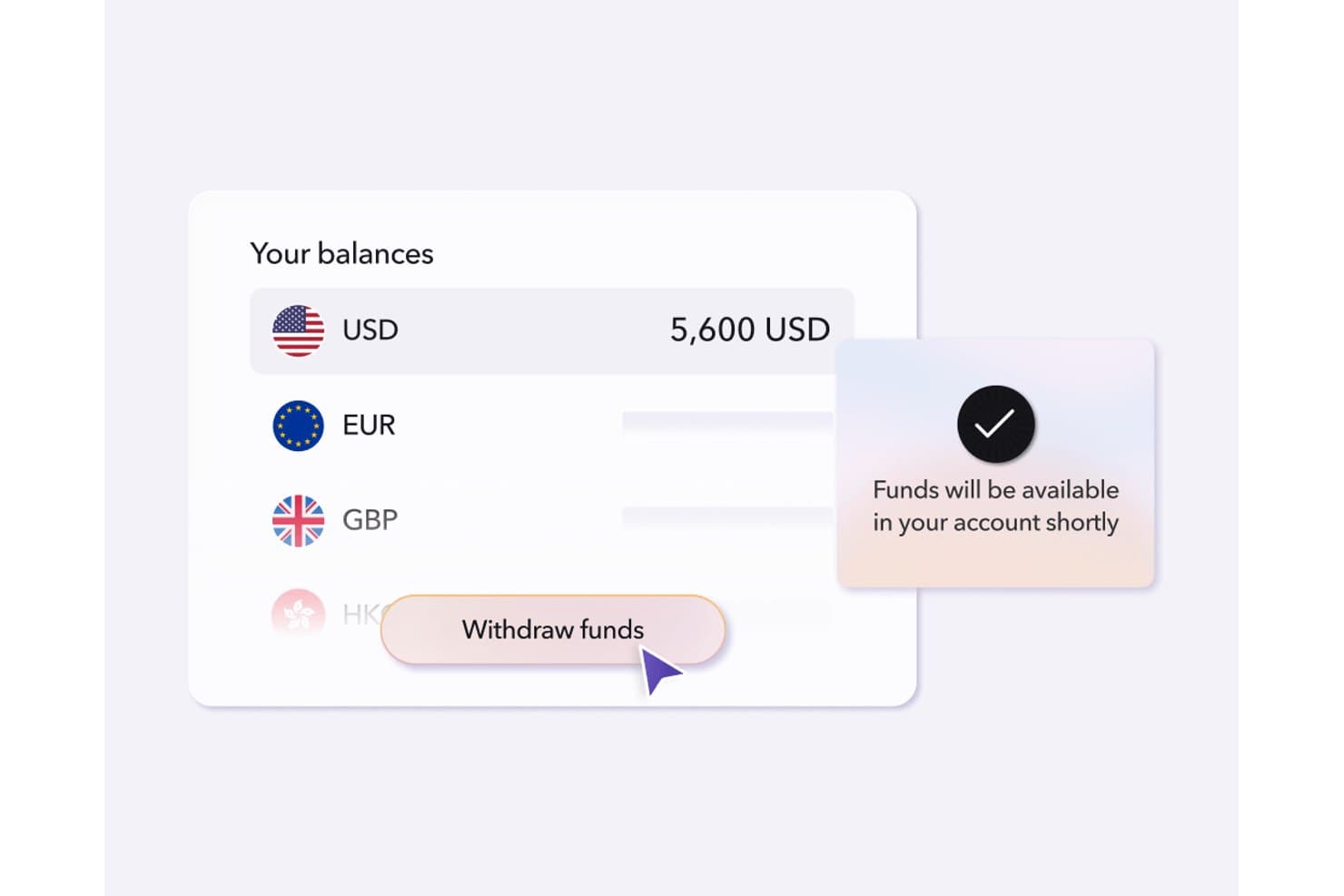
Payoneer lets users manage and withdraw multi-currency balances in one place. Payoneer is a cross-border payments platform that lets you hold balances in 10 currencies, collect payments via local receiving accounts in 13 currencies, and send mass payouts to recipients in 190+ countries across 70+ currencies.
Who Is Payoneer Best For?
Payoneer is a natural fit for marketplace sellers and businesses running large contractor or affiliate networks across multiple countries.
Why I Picked Payoneer
Payoneer earns its spot on my shortlist because of how well it handles high-volume payouts to global contractor and affiliate networks. I particularly like the Mass Payouts feature, which lets you disburse payments to recipients across 190+ countries via CSV upload or API, with built-in tax form collection (W-8, W-9, 1099, and 1042 filing) baked into the same workflow. Marketplace sellers running large contractor networks will also appreciate the local receiving accounts in 13 currencies, which let you collect payments like a local entity without setting up foreign subsidiaries.
Payoneer Key Features
- Smart FX target-rate auto-conversion: Set a target exchange rate and Payoneer automatically converts your balance when the market hits it, so you're not watching rates manually.
- Multi-currency corporate cards: Issue unlimited virtual and physical Mastercards funded directly from your Payoneer balances in USD, EUR, GBP, CAD, or JPY, with per-card spend limits and freeze controls.
- VAT payment support: Pay VAT authorities across multiple countries directly from your Payoneer account without needing separate local banking arrangements.
- Automated payee KYC: Payoneer handles identity verification for new payees in 25 languages using biometric ID checks, so you can onboard contractors globally without managing that compliance step yourself.
Payoneer Integrations
Payoneer offers native integrations with QuickBooks, Xero, and Zoho Books, plus connections to 100+ marketplaces, including Amazon, eBay, and Walmart. Its Payment API supports custom payout and payee-management integrations.
Pros and Cons
Pros:
- Target FX rate auto-conversion available
- Local account details in 13 currencies
- Mass payouts in 190+ countries supported
Cons:
- No mid-market FX or hedging options
- Reported account freezing and payment delays
Learn more about Payoneer: Best for embedded multi-currency infrastructure
- Not available
- Pricing upon request
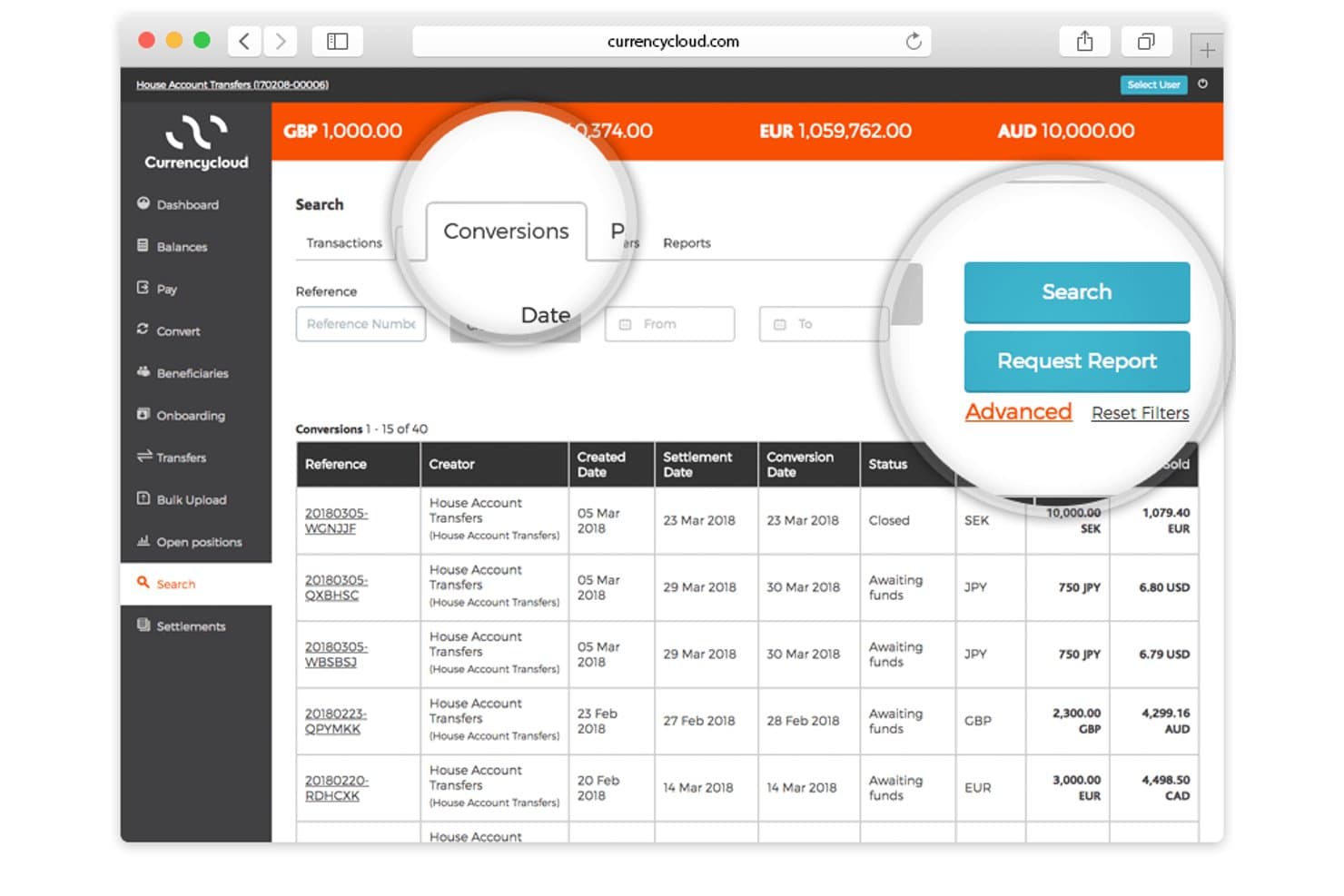
Currency Cloud lets users search and filter currency conversions by date and reference. Currencycloud is an API-first, embedded multi-currency infrastructure platform that supports holding balances in 35+ currencies, issuing named IBANs in 33 currencies, cross-border payments to 180+ countries, and FX conversion with forward contracts of up to 12 months.
Who Is Currencycloud Best For?
Currencycloud is a strong fit for fintechs, banks, and financial institutions with developer resources that need to embed multi-currency payment infrastructure into their own platforms.
Why I Picked Currencycloud
I've included Currencycloud in my top picks because it's genuinely the infrastructure layer that powers multi-currency operations at scale. What sets it apart is Currencycloud Spark's ability to issue named IBANs in 33 currencies, so businesses can receive funds locally in markets like the US, UK, EU, Singapore, and Mexico without routing everything through a single base currency. I also rate the forward contract feature highly: locking in exchange rates for up to 12 months is a real treasury tool for managing FX exposure on predictable outflows.
Currencycloud Key Features
- Batch payment processing: Send payments to multiple beneficiaries in bulk via API or Currencycloud Direct, supporting payroll, vendor, and marketplace disbursement workflows.
- Configurable FX markup: Set custom FX markups at the sub-account level, with markup profits aggregated to the house account and reconciled as monthly commissions.
- White-label UI via Currencycloud Direct: Deploy a brandable, ready-made interface for international payment operations without building full custom API infrastructure.
- Confirmation of Payee validation: Verify beneficiary account details before sending payments using Confirmation of Payee (UK) and Verification of Payee (EU) to reduce misdirected transfers.
Currencycloud Integrations
Native integrations are not publicly listed. Currencycloud supports custom connectivity through its REST API, webhooks, push notifications, CSV exports, and Currencycloud Direct.
Pros and Cons
Pros:
- Batch payments supported via API
- Forward contracts for FX hedging
- Named IBANs in 33 currencies
Cons:
- Customer support reviews are consistently poor
- No native accounting software integrations
Learn more about Currency Cloud:
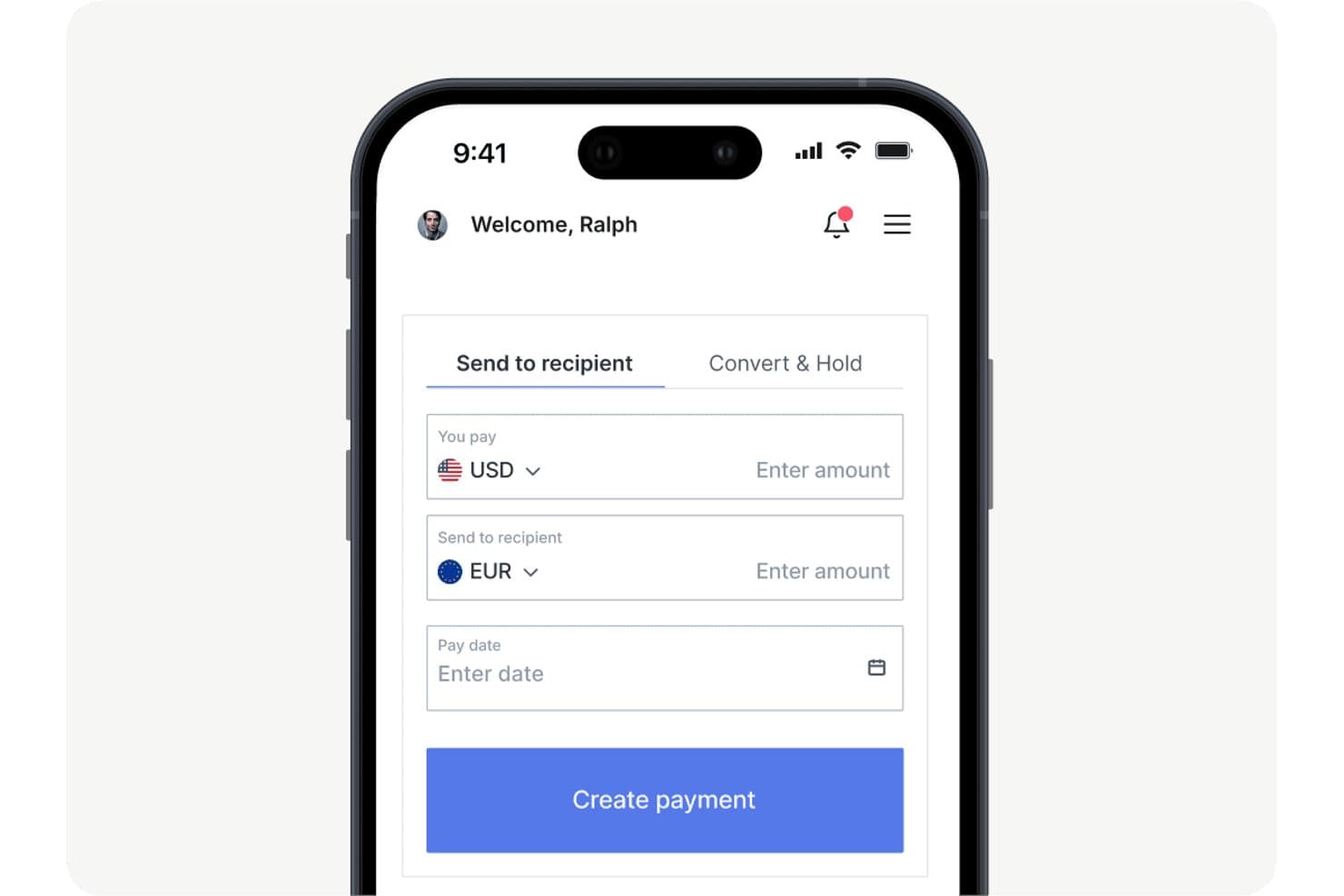
OFX lets users send money internationally with currency conversion. OFX is a multi-currency business account that combines multi-currency holding in 30+ currencies, cross-border payments to 170+ countries, FX hedging tools, corporate cards, and AP automation.
Who Is OFX Best For?
OFX is a strong fit for treasury managers and finance teams that need to actively manage FX risk alongside their cross-border payments.
Why I Picked OFX
I picked OFX as one of the best because it's the only multi-currency account on my shortlist that puts FX hedging tools front and center alongside everyday payments. I use Forward Contracts to lock in rates up to 12 months out, which matters when you're budgeting cross-border costs against volatile currencies. Limit Orders let me set a target rate and convert automatically when the market hits it, without watching screens all day.
OFX Key Features
- Multi-currency corporate cards: Issue unlimited physical and virtual cards tied directly to your multi-currency balances, with no foreign transaction fees and 1% cashback on everyday spend.
- Batch payments: Upload a CSV to pay up to 500 recipients across 170+ countries in 30+ currencies, with one-click bulk approval via built-in approval workflows.
- AP and bill automation: Capture invoices via OCR, auto-code them with AI, and route them through approval workflows with two-way sync to QuickBooks Online or Xero.
- 24/7 FX specialist access: Reach a live human FX specialist by phone or email around the clock, with dedicated account managers available on Full Suite and Custom plans.
OFX Integrations
OFX offers two native integrations, QuickBooks Online and Xero, plus marketplace integrations with Amazon and eBay. Its RESTful Payments API includes sandbox access for custom integrations.
Pros and Cons
Pros:
- Multi-currency cards with spend controls
- 24/7 access to human FX specialists
- FX hedging tools built into business account
Cons:
- FX rate margins not visible pre-login
- Limited local account details for collections
Learn more about OFX: Best for enterprise FX hedging across 60+ currencies
- Not available
- Pricing upon request
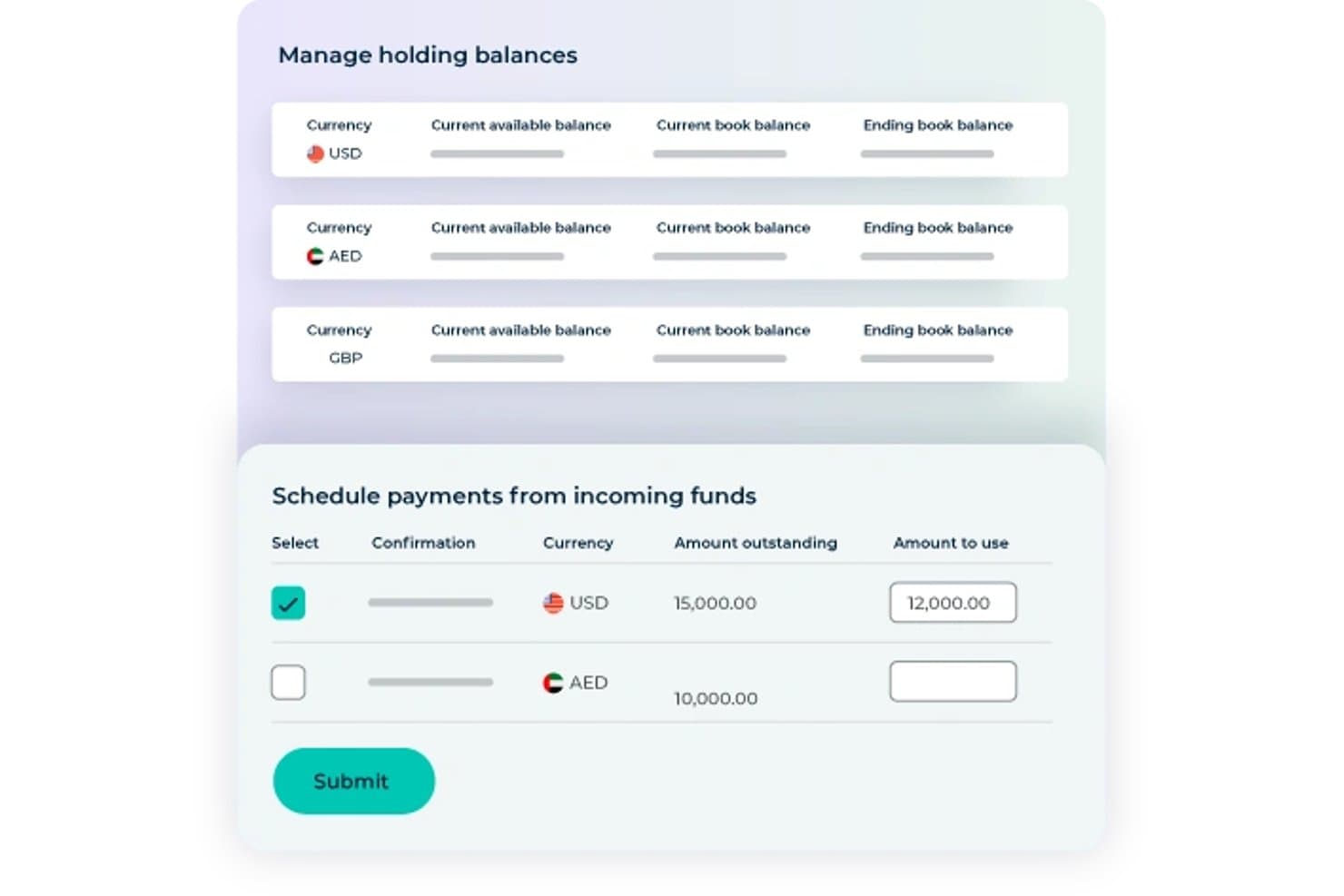
Convera lets users schedule payments from incoming multi-currency funds. Convera is a cross-border payments platform that lets businesses hold balances in 60+ currencies, send payments to 200+ countries, and manage FX exposure through forward contracts, options, swaps, and market orders.
Who Is Convera Best For?
Convera is a strong fit for treasury and finance teams at mid-to-large enterprises that need to actively manage FX exposure across multiple currencies, not just send and receive payments.
Why I Picked Convera
I've included Convera in my top picks because it's the only non-bank provider I know of that pairs 60+ currency holdings with a full FX hedging suite: forward contracts in 44 currencies lockable up to two years out, vanilla and structured options, and rate-triggered market orders that execute automatically when your target rate is hit. If your treasury team is managing supplier payments across volatile currency corridors, that combination is genuinely hard to replicate elsewhere at this scale.
Convera Key Features
- Bulk payment uploads: Submit up to 10,000 payment lines in a single CSV or XML file for high-volume AP runs, payroll cycles, or vendor disbursements.
- SWIFT GPI tracking: Monitor payments in real time across the full payment chain, with automated status alerts and proof-of-payment reporting.
- Multi-team approval workflows: Configure role-based user access, maker-checker controls, and audit trails across teams and entities for payment and FX conversion sign-off.
- Alternative payment method collection: Accept inbound payments via Klarna, AliPay, WeChat Pay, UnionPay, and other local methods across 230+ countries and territories.
Convera Integrations
Convera supports native integrations with Piteco TMS, GTreasury, and SAP Concur. It also offers REST APIs, webhooks, and CSV/XML file uploads for custom connections to ERP, accounting, treasury, AP, and payroll systems.
Pros and Cons
Pros:
- Handles high-volume cross-border payments
- Hold 60+ currencies without forced conversion
- Full FX hedging tools for enterprises
Cons:
- No corporate cards linked to balances
- FX rate spreads are not transparent
Learn more about Convera:
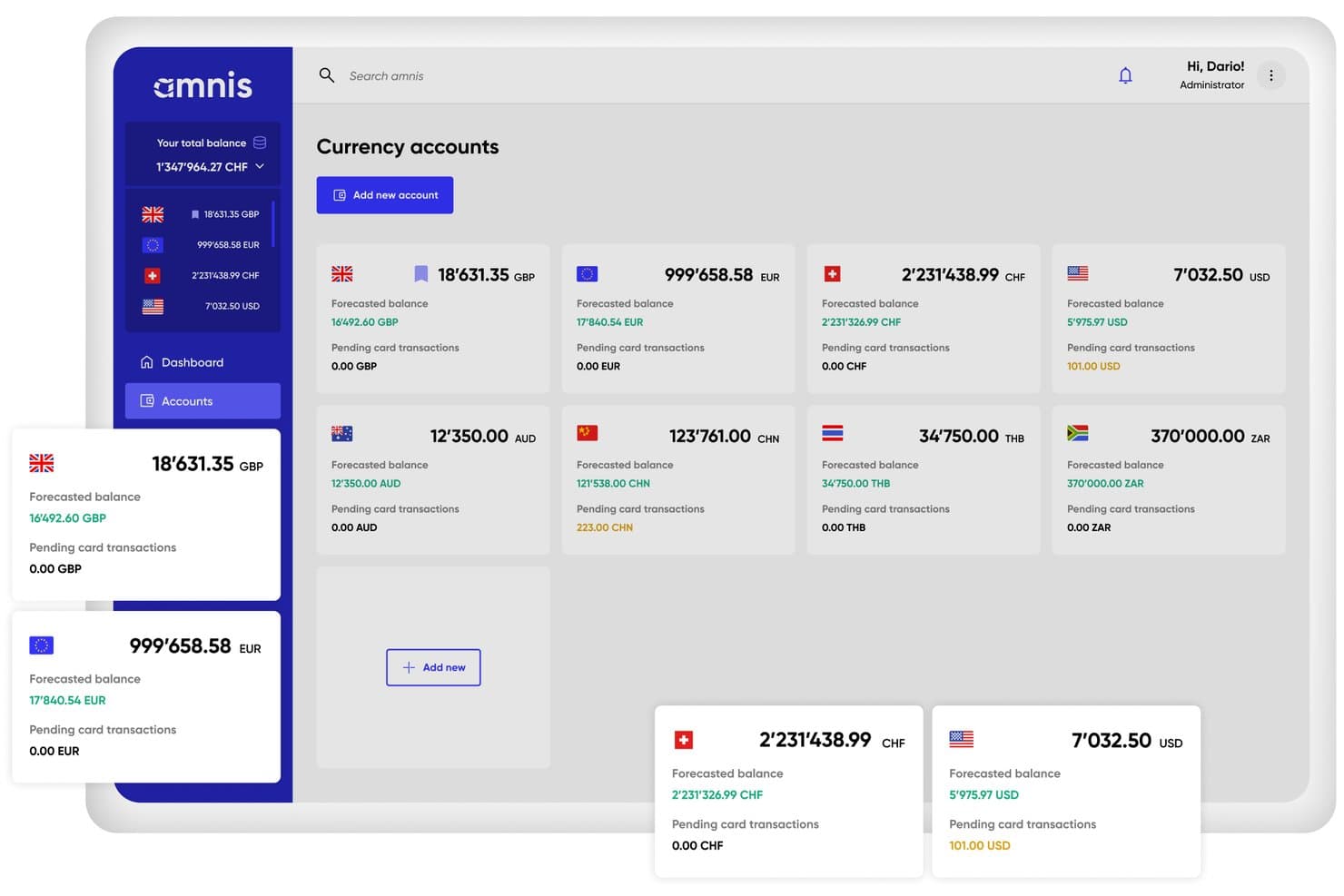
Amnis displays multiple currency account balances in one dashboard. Amnis is a multi-currency business account platform that lets you hold 20+ currencies, make cross-border payments to 200+ countries, manage FX with forward contracts and limit orders, and connect to ERP systems like SAP, NetSuite, and Xero.
Who Is Amnis Best For?
Amnis is a strong fit for European finance teams managing cross-border treasury operations who need deep ERP connectivity alongside multi-currency payment and FX tools.
Why I Picked Amnis
I've included Amnis in my top picks because it's built specifically for European treasury teams that need both multi-currency payment infrastructure and deep ERP connectivity in one place. I particularly like how it supports forward contracts and limit orders alongside 20+ currency holdings, so your team can hedge exposure without switching platforms. Native connections to SAP, NetSuite, and DATEV mean multi-currency transactions sync directly into your existing reporting environment.
Amnis Key Features
- Balance cashback: Amnis pays interest on safeguarded foreign currency balances held in EUR, USD, GBP, and CZK accounts.
- Payment AI: Upload invoices as PDFs or images and Amnis automatically extracts supplier details, IBAN, amount, currency, and due date for your review before payment.
- Unlimited multi-currency debit cards: Issue unlimited physical and virtual debit cards across all plans, with 0% FX fees on card transactions in supported currencies.
- Cash management automation rules: Configure up to 25 automated rules for FX execution, reconciliation, and fund movement, with rule limits scaling by plan tier.
Amnis Integrations
Amnis offers integrations with NetSuite, SAP, Xero, Odoo, Exact Online, DATEV, bexio, Abacus, and PayPal. It also provides a read/write REST API, webhooks, H2H/SFTP, and an MCP server for custom connectivity.
Pros and Cons
Pros:
- Native ERP integration with SAP and NetSuite
- Transparent FX markups with sub-0.5% rates
- Unlimited multi-currency virtual and physical cards
Cons:
- Limited SWIFT payments on basic plans
- EEA-only onboarding restricts global eligibility
Learn more about Amnis: Best for enterprise FX hedging and ERP sync
- Free demo available
- Pricing upon request
Visit WebsiteCustomer Rating:4.6/5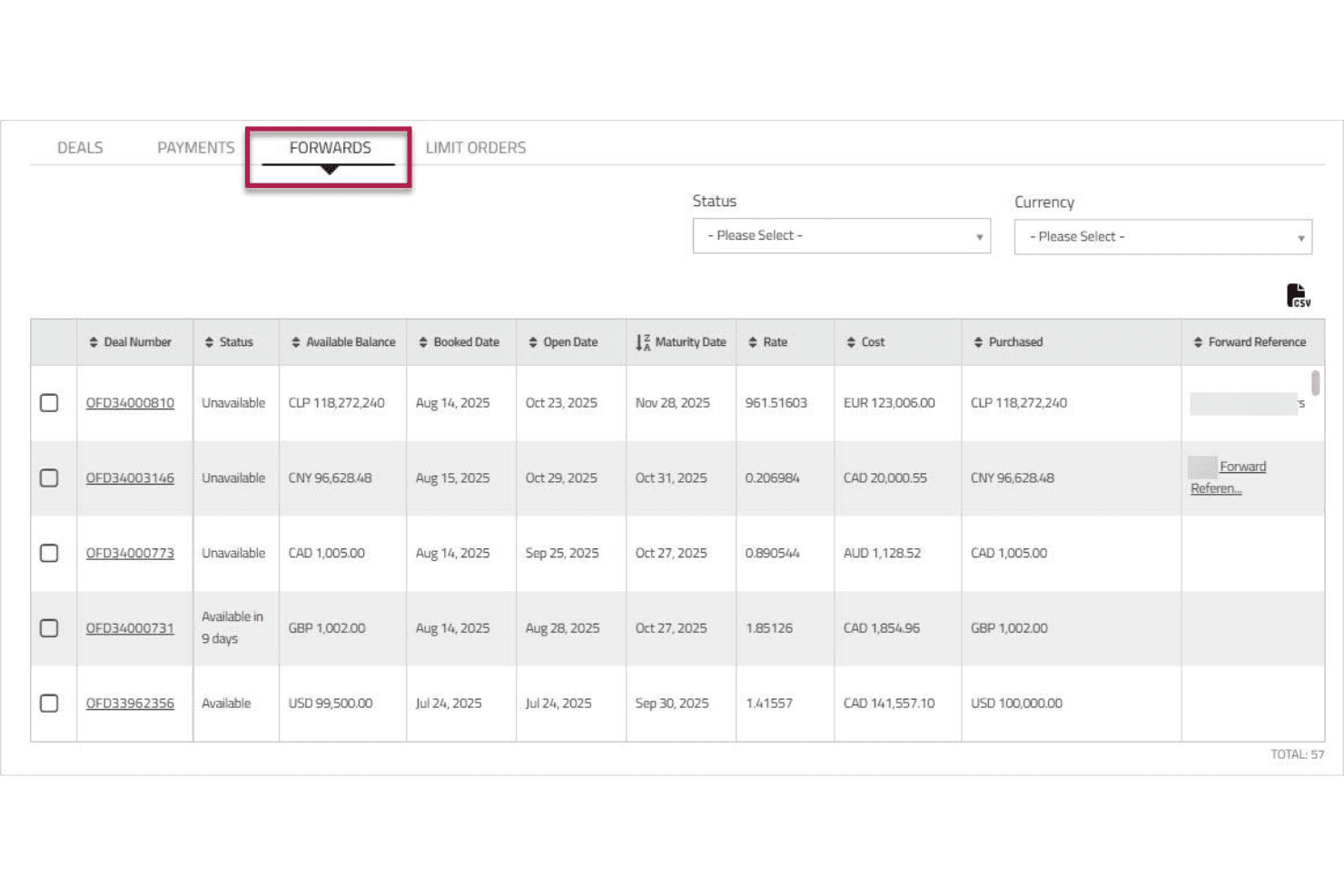
Corpay lets users track and manage forward currency contracts in one view. Corpay Cross-Border is a multi-currency accounts and cross-border payments platform that lets businesses hold balances in 25 currencies, send payments to 200+ countries, manage FX exposure through spot, forward, and options contracts, and sync transactions with 180+ ERP systems.
Who Is Corpay Best For?
Corpay Cross-Border is a strong fit for enterprise finance teams that need to manage FX exposure through hedging instruments while syncing multi-currency transactions with complex ERP environments.
Why I Picked Corpay
I picked Corpay as one of the best because its FX risk management toolkit goes well beyond basic spot conversion. I've used the Risk Visualizer to map open currency exposures in real time, then locked in rates using forward contracts or options strategies before a payment run. That combination of hedging instruments, paired with two-way sync across 180+ ERPs including a certified NetSuite SuiteApp, makes Corpay the clearest fit for enterprise treasury teams managing multi-currency exposure at scale.
Corpay Key Features
- Named accounts with unique IBANs: Hold and receive funds in your business's name with a dedicated IBAN or account number per currency, without opening local bank accounts abroad.
- Batch payment processing: Upload bulk payment files to execute mass vendor, payroll, or contractor disbursements across 145+ currencies in a single run.
- AI-powered OCR invoice capture: Extract header and line-item data from invoices automatically, feeding cross-border payables directly into your AP workflow.
- Configurable multi-level approval workflows: Set approval rules by vendor, invoice amount, department, or entity, with role-based permissions to enforce payment controls.
Corpay Integrations
Corpay supports 180+ ERP and accounting integrations, including NetSuite, Sage Intacct, QuickBooks Online, Microsoft Dynamics 365, SAP, and Xero. Its Cross-Border RESTful API and webhooks support custom payment and reconciliation workflows.
Pros and Cons
Pros:
- Real-time multi-currency ledger visibility
- Advanced FX risk management with hedging contracts
- Named IBANs support local currency collection
Cons:
- Named accounts not supported in all regions
- FX pricing not published for enterprise users
Learn more about Corpay: Best for batch payouts across 120+ countries
- Free plan + free demo available
- From $12/user/month
Visit WebsiteCustomer Rating:4.4/5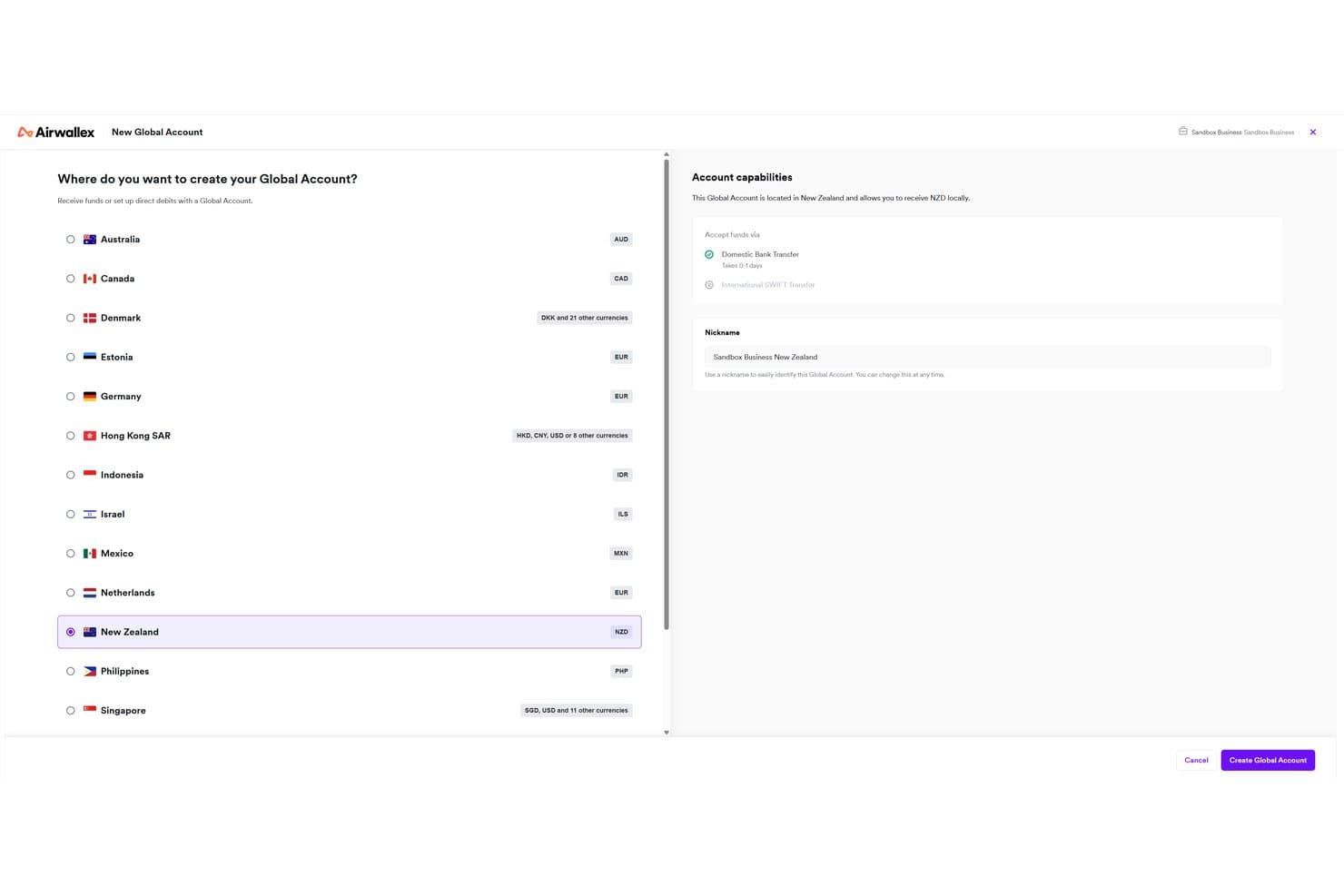
Airwallex lets users open global accounts in multiple countries and currencies. Airwallex is a multi-currency business account platform that lets you hold balances in 20+ currencies, collect funds via local account details in 16+ countries, convert FX at interbank-based rates, and send batch payments to 120+ countries.
Who Is Airwallex Best For?
Airwallex is a strong fit for finance teams at high-growth companies that manage vendor payments, payroll, or marketplace disbursements across multiple countries at once.
Why I Picked Airwallex
I picked Airwallex as one of the best because its Batch Transfers feature lets you pay up to 1,000 recipients across 120+ countries in a single file upload, which is genuinely rare at this scale. I also like that outbound local transfers go through local payment rails rather than SWIFT, so recipients get paid faster and without the $15–$25 SWIFT fee eating into each transaction. Pair that with a fully programmable Payouts API, and high-volume disbursements like vendor runs or contractor payroll become repeatable, automated workflows.
Airwallex Key Features
- Multi-currency wallets: Hold balances in 20+ currencies simultaneously without forced auto-conversion to a base currency.
- FX rate alerts: Set target rates on specific currency pairs and receive instant notifications when market rates hit your specified level.
- Approval workflows: Configure multi-condition approval rules by amount, department, entity, or payment type to control spend across your team.
- Yield on USD balances: Earn up to 3.49% APY on uninvested USD funds held in your account, with no lock-up period.
Airwallex Integrations
Airwallex offers native integrations with Xero, QuickBooks, NetSuite, Microsoft Dynamics 365 Business Central, Sage, Odoo, Shopify, and WooCommerce. It also supports custom connections through REST APIs and Zapier.
Pros and Cons
Pros:
- Customizable multi-condition approval workflows
- Holds 20+ currencies without forced conversion
- Batch payouts to 1,000 recipients worldwide
Cons:
- No dedicated forward contracts for US businesses
- Account freezes reported with little communication

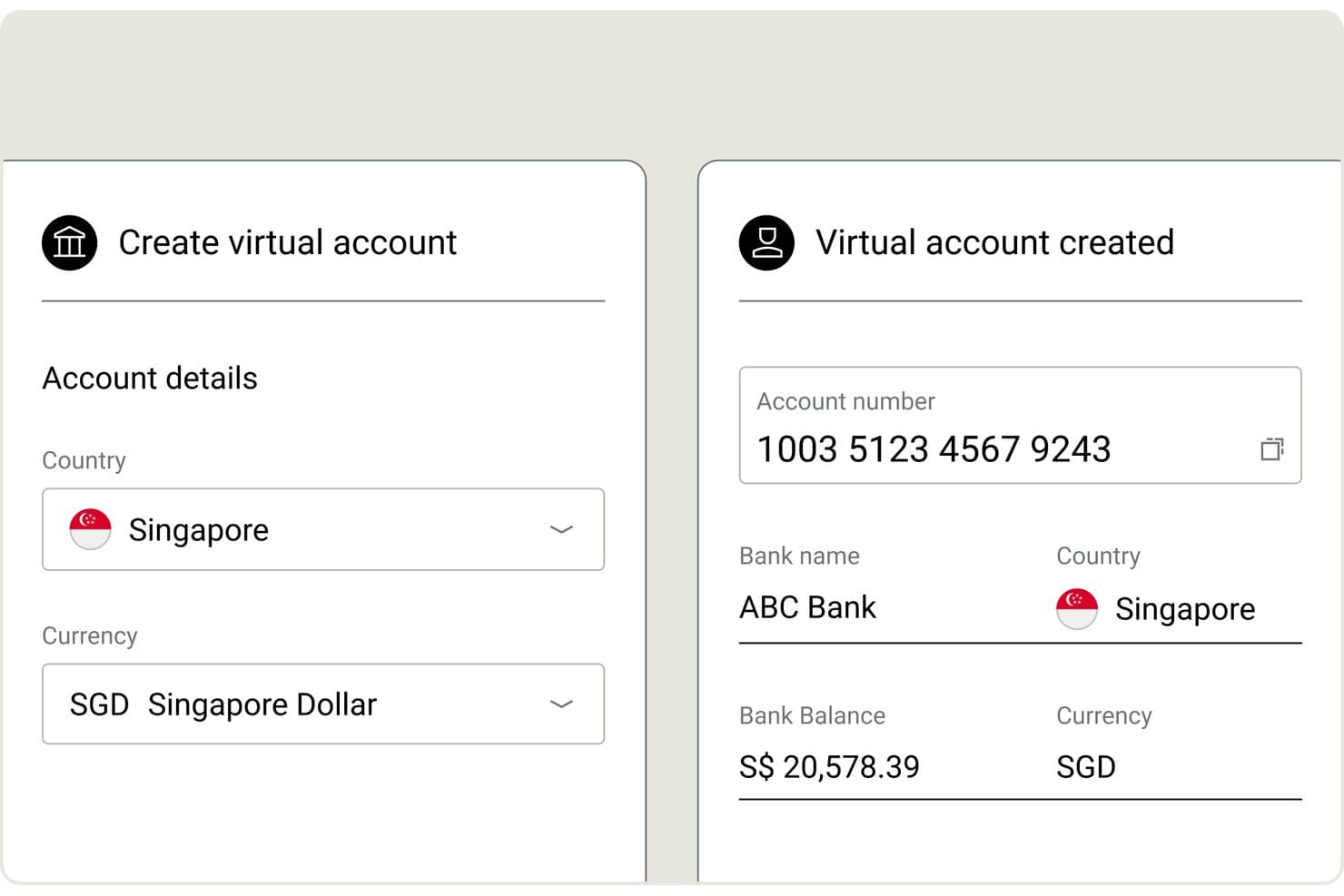
Nium lets users create virtual accounts in SGD with instant details. Nium is a B2B payments infrastructure platform built for enterprises, banks, and embedded finance providers, offering multi-currency account holding across 100+ currencies, cross-border payouts to 190+ countries, local account details in 20+ currencies, FX conversion at interbank rates, batch payouts, and virtual and physical card issuance.
Who Is Nium Best For?
Nium is a strong fit for enterprises, banks, and fintech platforms that need to embed multi-currency payment infrastructure at scale rather than access a ready-made account interface.
Why I Picked Nium
I've included Nium in my top picks because it operates at a scale most multi-currency account providers simply can't match: 100+ currencies held natively, payouts to 190+ countries, and 40+ regulatory licenses covering the FCA, MAS, and more. I particularly like the 24-hour FX rate lock across 125+ currencies, which lets treasury teams fix costs before running cross-border payroll without touching a forward contract. The no-code Batch Payouts feature adds maker/checker approval workflows and partial-batch processing, so large multi-currency disbursements don't require custom development to govern properly.
Nium Key Features
- Local virtual account numbers (VANs): Receive funds via local payment rails in 20+ currencies—including SEPA, ACH, Faster Payments, and FAST—without an in-country banking presence.
- Programmable FX rules: Define when and how currency conversions trigger by currency, counterparty, or transaction type, so funds aren't auto-converted at receipt.
- USDC stablecoin support: Hold treasury balances in USDC and fund cross-border payouts or payroll in stablecoin via Coinbase and Circle integrations.
- SWIFT GPI tracking: Monitor SWIFT transactions end-to-end in real time, with full payment status visibility throughout the transaction lifecycle.
Nium Integrations
Native integrations are not publicly listed. It supports custom integrations through its REST API and webhooks, plus connectivity with SWIFT, Visa, Mastercard, Coinbase, and Circle.
Pros and Cons
Pros:
- Enables batch payouts with maker/checker workflow
- Offers 24-hour FX rate lock
- Holds 100+ currencies with no forced conversion
Cons:
- Lacks native accounting software integrations
- No self-serve account onboarding available
Learn more about Nium: Best for interbank FX with treasury hedging tools
- Free plan available
- From $9.99/month
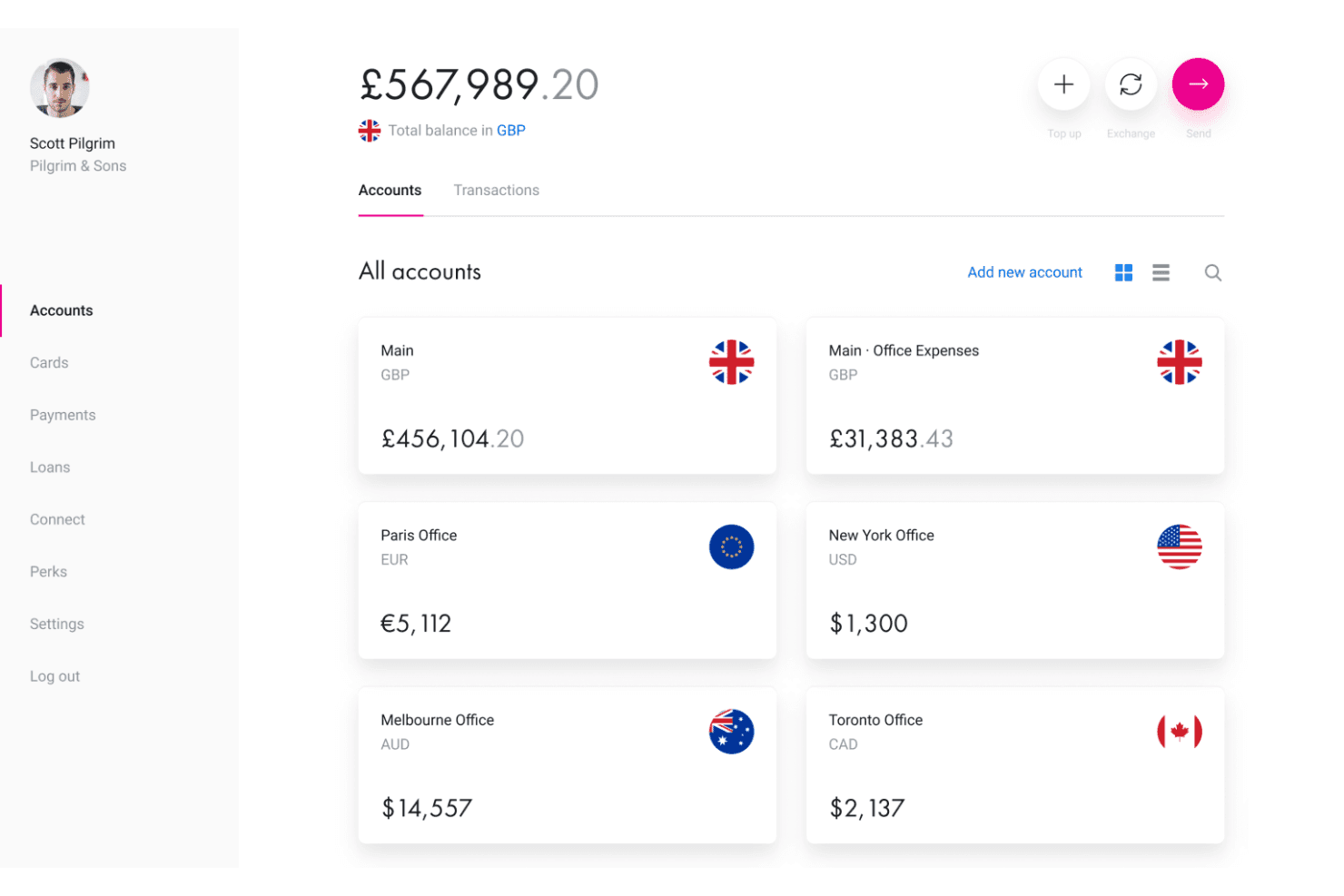
Revolut Business lets users manage multi-currency accounts across global offices. Revolut Business is a multi-currency business account that lets you hold balances in 25–35+ currencies, send payments to 100+ countries, issue corporate cards, manage FX conversions at interbank rates, and hedge currency exposure with forward contracts and limit orders.
Who Is Revolut Business Best For?
Revolut Business is a strong fit for finance and treasury teams that actively manage currency exposure and need hedging tools like forward contracts and limit orders alongside their multi-currency accounts.
Why I Picked Revolut Business
Revolut Business earns its spot on my shortlist because of how seriously it treats FX risk management, which most multi-currency account providers treat as an afterthought. I particularly like the combination of interbank-rate conversions within monthly allowances and the ability to lock in rates up to two years out using FX Forwards. Layer in limit and stop orders that trigger conversions automatically at a target rate, and treasury teams get real hedging tools, not just a currency wallet.
Revolut Business Key Features
- Bulk payment processing: Send payments to up to 1,000 recipients in a single batch, useful for payroll runs and multi-vendor disbursements.
- Multi-level approval workflows: Set maker-checker rules and role-based permissions to control who can authorize payments and FX conversions.
- Corporate card controls: Issue virtual and physical cards with per-card spending limits, category restrictions, and instant freeze/unfreeze via the app.
- Accounting integrations: Sync transactions automatically with Xero, QuickBooks, NetSuite, Sage, Dynamics 365, and 10+ other platforms.
Revolut Business Integrations
Revolut Business offers 45+ native integrations, including Xero, QuickBooks, Sage, Microsoft Dynamics 365, Zoho Books, FreshBooks, and Odoo. It also provides a Business API, webhook support, Make, and Zapier.
Pros and Cons
Pros:
- Bulk payments up to 1,000 recipients
- Hold 25–35+ currencies without forced conversion
- Interbank FX rates with limit and stop orders
Cons:
- FX forwards unavailable for US businesses
- Recurring account freezes and fund holds reported
Learn more about Revolut Business: Best for mid-market FX rates at scale
- Free demo available
- Pricing upon request
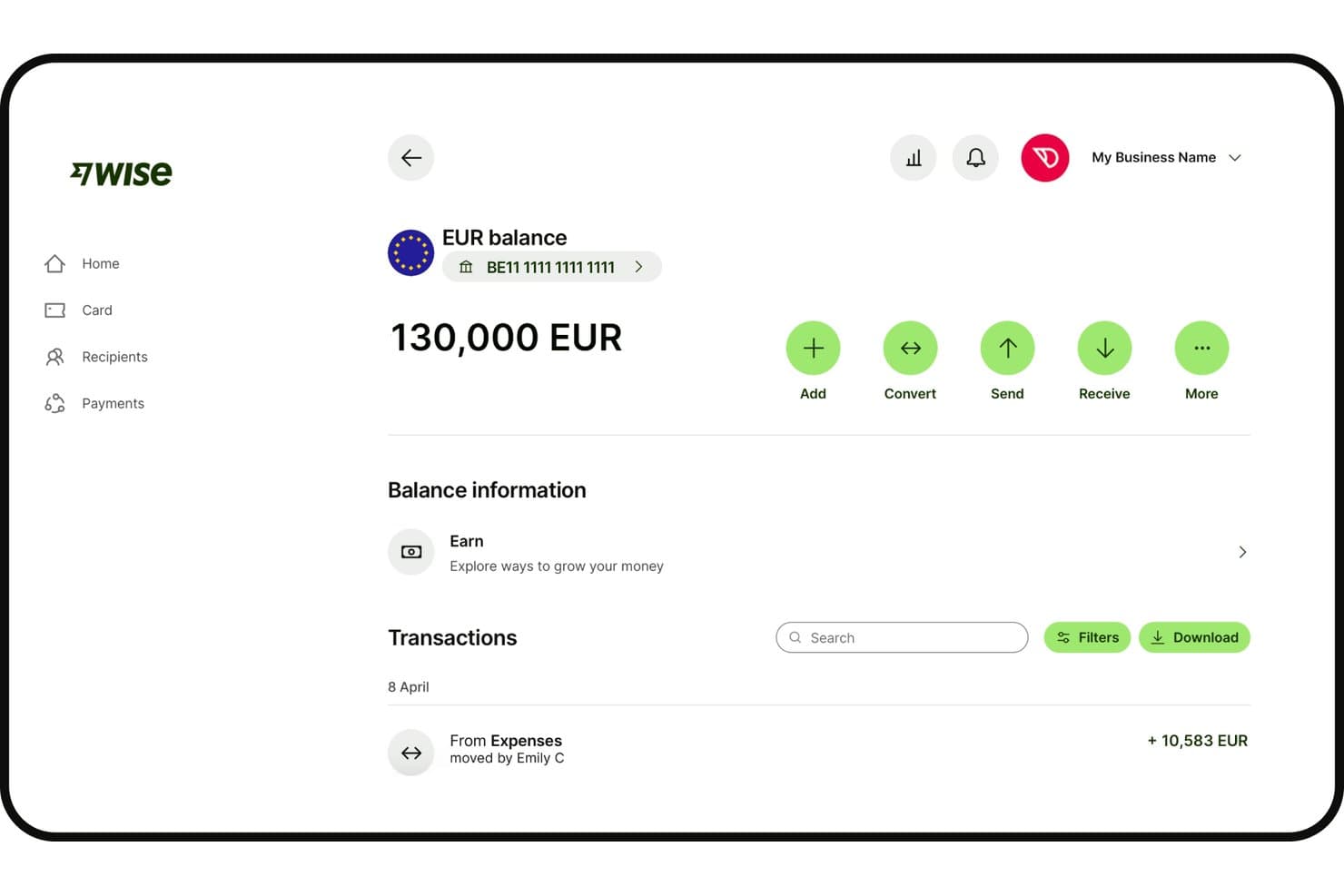
Wise Business displays EUR balance with multi-currency account details. Wise Business is a multi-currency account platform that lets you hold 40+ currencies, send payments to 160+ countries, collect funds via local account details in 10 regions, and sync transactions with your accounting stack through native and bank feed integrations.
Who Is Wise Business Best For?
Wise Business is a strong fit for finance teams at mid-market companies that run high-volume cross-border payments across multiple currencies and need clean accounting integration without paying bank-level FX markups.
Why I Picked Wise Business
Wise Business earns its spot on my shortlist because it passes payments through at the true mid-market rate, with fees starting from 0.23% and no hidden FX markup baked into the exchange rate. I've used BatchTransfer to push up to 1,000 international payee payments in a single CSV upload, which is a real advantage when running cross-border contractor payroll or marketplace disbursements at volume. Volume discounts kick in above $25,000 per conversion, so the rate advantage compounds as your payment runs scale.
Wise Business Key Features
- Multi-currency balance holding: Hold 40+ currencies simultaneously in a single account with full balance segregation and no automatic conversion between currencies.
- Role-based approval workflows: Assign Viewer, Payer, or Admin roles to team members and configure multi-level payment approvals before transactions execute.
- Opt-in interest on balances: Earn variable APY on USD, GBP, and EUR balances with instant access to funds, backed by pass-through FDIC insurance via JPMorgan Chase.
- Open API with sandbox environment: Automate recurring payments, payroll runs, and invoice disbursements via a REST API with full sandbox access for pre-live integration testing.
Wise Business Integrations
Wise Business offers native integrations with Xero, QuickBooks, and FreeAgent, plus bank-feed connections to 16 listed platforms, including NetSuite, Sage, Microsoft Dynamics 365, and DATEV. Its REST API includes a sandbox for custom integrations.
Pros and Cons
Pros:
- Batch pay up to 1,000 recipients
- Holds 40+ currencies with segregated balances
- No hidden markup on FX conversion
Cons:
- Account freezes reported in some reviews
- No forward contracts or FX hedging
Learn more about Wise Business:
Andre kontoer med flere valutaer
Her er noen andre kontoer med flere valutaer som ikke kom med på kortlisten min, men som likevel er verdt å undersøke:
- 11WorldFirstBest for global e-commerce currency collection
- 12PayhawkBest for ERP-connected multi-currency spend management
- 13StripeBest for payment-led multi-currency settlement
- 14TipaltiBest for AP-driven global vendor disbursements
- 15AspireBest for SEA-based teams managing multi-currency ops
- 16iBanFirstBest for FX hedging with a dedicated specialist
- 17InstaremBest for APAC-anchored cross-border batch payouts
- 18Equals MoneyBest for UK treasury teams hedging in 35+ currencies
How I Evaluate Multi-Currency Accounts
I split my evaluation into baseline criteria—like holding 30+ currencies, local account details, and ERP sync—and differentiators like FX hedging tools, batch payment scale, and approval workflows.
Core Functionality (Table Stakes For This List)
When I'm selecting tools for my list, I rank each one on a scale from 0 (does not offer the functionality) to 5 (excels in this area) for each core functionality listed below. I then calculate the tool's total score into a percentage, using 65% as a benchmark to help assess its overall fit for the list.
- Multi-currency holding: I check how many currencies you can hold natively without forced conversion, and whether balances stay segregated so your treasury team controls when and how FX conversions happen.
- Local account details: Having IBANs, ACH routing numbers, or SWIFT details in-country matters for collecting payments like a local entity. I evaluate the breadth of countries and formats each platform supports.
- FX conversion and rates: I look for transparent, mid-market or near-mid-market rates with clearly disclosed markups, plus tools like forward contracts or rate alerts that give finance teams more control over hedging.
- Cross-border payments: The range of supported currencies, payment rails, and batch payment capabilities all factor in. Platforms that route through local rails instead of defaulting to SWIFT tend to deliver faster, cheaper transfers.
- Accounting integrations: I evaluate native connections to major accounting and ERP systems like QuickBooks, Xero, NetSuite, and Sage, focusing on whether multi-currency transactions sync automatically for reconciliation.
- Regulatory and security compliance: Licensing across key jurisdictions, fund safeguarding, and certifications like SOC 2 or PCI DSS signal the kind of operational trust a CFO expects before onboarding a treasury platform.
Once I have a list of tools that meet the criteria, I consider what sets each platform apart.
Differentiating Factors (What Sets Vendors Apart)
Here's how I compare and contrast different vendors:
Standout Features
Approval workflows matter a lot here. I look for multi-level maker-checker controls and role-based permissions that align with SOX requirements—especially when payments and conversions are initiated across distributed teams. Batch payment support is another separator. Some platforms handle bulk runs of thousands of payees in a single file, which is essential for scaling contractor payroll or marketplace disbursements. I also evaluate real-time FX alerts and forward contracts, since locking target rates on planned outflows can meaningfully reduce currency exposure between budget cycles.
Beyond Features
Fee transparency matters more than headline rates. I check whether FX markups are disclosed against the mid-market rate and whether correspondent bank deductions on SWIFT payments erode the value of outbound transfers. Regulatory licensing is just as important—I confirm each platform's coverage across the jurisdictions your business operates in, since gaps mean you can't legally hold or move funds there. I also evaluate ERP fit, specifically whether connectors to systems like NetSuite or Sage Intacct handle automatic multi-currency revaluation and gain/loss posting, not just transaction sync.
Slik velger du en konto med flere valutaer
Det å finne ut hvilken konto med flere valutaer som passer for virksomheten din, handler om å matche de operative behovene dine med plattformens betalings-, valuta- og integrasjonsmuligheter:
| Hvis prioriteten din er... | Se etter... |
|---|---|
| Hvis prioriteten din er...Automatisering av regnskaps- og ERP-arbeidsflyter | Se etter...Integrasjoner som synkroniserer transaksjoner i flere valutaer |
| Hvis prioriteten din er...Å minimere valutapåslag og skjulte gebyrer | Se etter...Åpne valutakurser basert på midtkursen, med offentliggjorte påslag |
| Hvis prioriteten din er...Å gjennomføre betalinger til globale leverandører eller oppdragstakere | Se etter...Mulighet for masseutbetalinger og støtte for lokale betalingssystemer |
| Hvis prioriteten din er...Å håndtere globale saldoer uten tvungen valutaveksling | Se etter...Separate valutalommebøker og verktøy for kontrollert konvertering |
| Hvis prioriteten din er...Å muliggjøre innbetalinger i lokal valuta | Se etter...IBAN, ACH eller lokale kontodetaljer i det aktuelle landet |
Slik vurderer du kortlisten din
- Gjennomfør en avstemmingstest: Koble kontoen til ERP- eller regnskapssystemet ditt, og synkroniser mer enn 20 transaksjoner i flere valutaer for å bekrefte automatiseringen.
- Be om en oversikt over valutakursen: Be om et dokument for valutahandelen som viser midtkursen, påslaget og den endelige oppgjørskursen for minst tre nylige handler.
- Test en masseutbetaling: Send inn en fil for masseutbetaling med mer enn 10 mottakere i minst tre valutaer for å kontrollere arbeidsflyten og samsvarskontrollene.
- Be om dokumentasjon på tillatelser: Be om oppdaterte regulatoriske tillatelser og sertifiseringer, for eksempel SOC 2 eller regionale e-pengetillatelser.
- Avveining – spesialister kontra skalerbarhet: Velg mellom plattformer som er utviklet for kontroll over likviditet (ERP-synkronisering og detaljerte tilgangstillatelser), og plattformer som er rettet mot raske betalinger i stort volum (markedsplass- eller oppdragstakerutbetalinger i stor skala).
Hva er kontoer med flere valutaer?
Flervalutakontoer er finansielle kontoer som lar deg holde, motta og sende penger i flere valutaer fra én enkelt plattform. De brukes av bedrifter til å håndtere betalinger, innbetalinger og saldoer på tvers av ulike land – uten at valutaene må konverteres automatisk. Disse kontoene hjelper deg med å kontrollere kostnader knyttet til valuta, få bedre oversikt over kontantbeholdningen og forenkle avstemmingen når du samarbeider med globale leverandører, kunder eller oppdragstakere.
Funksjoner
Når du velger flervalutakontoer, bør du se etter følgende viktige funksjoner:
- Beholdning av flere valutaer: Hold, administrer og følg med på saldoer i dusinvis av valutaer uten tvungne konverteringer. Dette lar teamet ditt bestemme når penger skal konverteres, basert på budsjettet, betalingstidspunktet og valutastrategien.
- Lokale kontodetaljer: Få lokal bankinformasjon – som IBAN, ACH-rutingsnumre eller SWIFT-koder – for flere land. Dette gir deg mulighet til å motta betalinger og sende overføringer som om du hadde en fysisk banktilstedeværelse i disse regionene.
- Åpen valutakonvertering: Få tilgang til tydelige valutakurser basert på midtkurs eller nær midtkurs, med transparente påslag som vises før du konverterer. Dette hjelper deg med å håndtere kostnader ved valutakonvertering og kontrollere utgifter i utenlandsk valuta.
- Støtte for massebetalinger: Start masseutbetalinger til leverandører, oppdragstakere eller ansatte i ulike valutaer gjennom én enkelt fil eller arbeidsflyt. Denne funksjonen er avgjørende for å skalere global lønnsutbetaling, utbetalinger fra markedsplasser eller leverandørbetalinger.
- Integrasjoner med regnskapssystemer: Synkroniser transaksjoner automatisk med ERP- eller regnskapssystemer som QuickBooks, Xero, NetSuite eller Sage. Dette effektiviserer avstemmingen og reduserer manuell dataregistrering og risikoen for feil.
- Etterlevelse av regelverk og sikring av midler: Plattformene bør være lisensiert i alle regioner der de opererer, og midlene bør oppbevares på sikrede eller adskilte kontoer. Denne etterlevelsen reduserer finansiell risiko og sikrer at du alltid opererer innenfor lovens rammer.
- Godkjenningsarbeidsflyter og tillatelser: Definer detaljerte godkjenningsprosesser i flere trinn for betalinger og valutakonverteringer. Denne kontrollen bidrar til å oppfylle SOX- eller interne revisjonsstandarder, særlig for distribuerte team eller team som arbeider på tvers av landegrenser.
- Kontantoversikt i sanntid: Overvåk saldoer, innbetalinger, utbetalinger og valutaposisjoner på tvers av alle valutaer fra ett dashbord. Denne oppdaterte oversikten hjelper deg med å optimalisere arbeidskapitalen og håndtere likviditeten proaktivt.
- Tilpassbare valutaverktøy: Bruk kursvarsler, terminkontrakter eller planlagte konverteringer til å håndtere valutaeksponering. Disse verktøyene lar deg låse valutakurser eller automatisere konverteringer i tråd med prognosene for pengebruk.
- Fleksible betalingskanaler: Send og motta penger via lokale betalingskanaler, ikke bare SWIFT, slik at du reduserer overføringsgebyrer og fremskynder oppgjør når du flytter penger internasjonalt. Dette gjør betalinger på tvers av landegrenser både raskere og billigere.
Vanlige AI-funksjoner
I tillegg til standardfunksjonene for flervalutakontoer som er oppført ovenfor, tar mange av disse løsningene i bruk AI-funksjoner som:
- AI-drevet svindeloppdagelse: Bruker maskinlæring til å analysere transaksjonsmønstre og flagge mistenkelig aktivitet i sanntid, slik at teamet ditt kan redusere risikoen for uautoriserte overføringer eller kontobrudd.
- Automatisert optimalisering av valutakurser: Overvåker kontinuerlig globale valutamarkeder og anbefaler de beste tidspunktene for å konvertere penger, slik at du kan minimere valutakostnadene uten manuell oppfølging.
- Prediktiv analyse av kontantstrøm: Bruker historiske transaksjonsdata og eksterne markedssignaler til å prognostisere fremtidige kontantposisjoner på tvers av valutaer, slik at du får tidlige varsler om mulige likviditetsmangler.
- Smarte avstemmingsassistenter: Bruker naturlig språkbehandling og mønstergjenkjenning til å koble innkommende og utgående betalinger med fakturaer og regnskapsoppføringer, noe som reduserer manuelt avstemmingsarbeid.
- AI-drevet overvåking av regelverksetterlevelse: Skanner transaksjoner etter regulatoriske varselsignaler og oppdaterte sanksjonslister, og varsler teamet ditt om mulige problemer med regelverksetterlevelse før de eskalerer.
- Personlig tilpasset innsikt og varsler: Gir skreddersydde anbefalinger og varsler basert på bedriftens transaksjonshistorikk, slik at du kan oppdage trender, avvik eller sparemuligheter på tvers av de globale kontoene dine.
Fordeler
Implementering av flervalutakontoer gir flere fordeler for teamet og virksomheten din. Her er noen av fordelene du kan se frem til:
- Bedre oversikt over kontantbeholdningen: Få en sanntidsoversikt over globale valutabeholdninger, innbetalinger og utbetalinger i ett dashbord.
- Fleksibel valutastyring: Bestem når valutaer skal konverteres ved hjelp av funksjoner som separate lommebøker, kursvarsler eller terminkontrakter, i stedet for å bare bruke automatiske konverteringer.
- Reduserte transaksjons- og valutakostnader: Minimer unødvendige valutapåslag og unngå skjulte gebyrer gjennom transparente priser basert på midtkursen og tilgang til lokale betalingsnettverk.
- Raskere og billigere globale betalinger: Bruk lokale bankopplysninger og betalingsruter for å gjennomføre grensekryssende transaksjoner raskere og til lavere kostnader enn ved å basere seg utelukkende på SWIFT.
- Automatisert regnskapsføring og ERP-synkronisering: Reduser behovet for manuell avstemming med integrasjoner som automatisk overfører transaksjoner i flere valutaer til regnskaps- eller ERP-systemet ditt.
- Økt sikkerhet og trygghet for regulatorisk etterlevelse: Oppfyll kravene til etterlevelse og reduser risikoen ved å samarbeide med plattformer som har lisens i viktige jurisdiksjoner og tilbyr sikkerhetskontroller på foretaksnivå.
- Bedre betalingskontroll og styring: Sett opp godkjenningsarbeidsflyter i flere nivåer og detaljerte tillatelser for å støtte SOX-etterlevelse og sikre distribuerte betalingsoperasjoner.
Kostnader og priser
Når du velger kontoer i flere valutaer, må du forstå de ulike prismodellene og abonnementene som er tilgjengelige. Kostnadene varierer basert på funksjoner, teamstørrelse, tilleggstjenester og mer. Tabellen nedenfor oppsummerer vanlige abonnementer, gjennomsnittsprisene deres og typiske funksjoner som er inkludert i kontoer i flere valutaer:
Sammenligningstabell for abonnementer for kontoer i flere valutaer
| Abonnementstype | Gjennomsnittspris | Vanlige funksjoner |
|---|---|---|
| AbonnementstypeGratisabonnement | Gjennomsnittspris$0 | Vanlige funksjonerGrunnleggende beholdning i flere valutaer, begrensede betalingsalternativer, grunnleggende rapportering og tilgang til standard kundestøttekanaler. |
| AbonnementstypePrivatabonnement | Gjennomsnittspris$5–$15 per måned | Vanlige funksjonerLommebøker i flere valutaer, grunnleggende valutakonvertering, ACH- og SWIFT-overføringer samt kundestøtte via e-post. |
| AbonnementstypeBedriftsabonnement | Gjennomsnittspris$25–$75 per måned | Vanlige funksjonerTilgang for flere brukere, støtte for massebetalinger, lokale kontoopplysninger, valutakurser basert på midtkursen, regnskapsintegrasjoner og godkjenningsarbeidsflyter. |
| AbonnementstypeStorbedriftsabonnement | Gjennomsnittspris$100–$300 per måned | Vanlige funksjonerAvanserte tillatelser, SOX-tilpassede kontroller, API-tilgang, dedikert kundeansvarlig, tilpassede integrasjoner samt forbedrede verktøy for sikkerhet og etterlevelse. |
Vanlige spørsmål om kontoer i flere valutaer
Her er svar på noen vanlige spørsmål om kontoer i flere valutaer:
Hvordan håndterer kontoer i flere valutaer valutakurser?
Kontoer i flere valutaer bruker vanligvis valutakurser i sanntid eller tilnærmet sanntid, hentet fra markedsdata, men den faktiske kursen du får, kan inkludere et påslag fra plattformen. Be alltid leverandøren om en oversikt som viser midtkursen i markedet, påslaget deres og den endelige avregningskursen. Dette hjelper deg med å budsjettere mer nøyaktig og unngå overraskelser når du veksler store beløp.
Kan jeg foreta lokale betalinger fra en konto i flere valutaer?
Ja, de fleste kontoer i flere valutaer lar deg foreta lokale betalinger ved hjelp av opplysninger fra det aktuelle landet, for eksempel IBAN eller ACH-rutingsnumre. Det betyr at du kan betale leverandører, oppdragstakere eller underleverandører som om virksomheten din hadde tilstedeværelse i landet, noe som ofte reduserer overføringstid og kostnader sammenlignet med grensekryssende SWIFT-overføringer.
Hvilke ERP- og regnskapsintegrasjoner bør jeg forvente?
Se etter kontoer i flere valutaer som tilbyr integrasjoner med ledende regnskapsplattformer som QuickBooks, Xero, NetSuite eller Sage. De beste løsningene synkroniserer transaksjoner i flere valutaer direkte, automatiserer omvurderinger og hjelper med bokføring av gevinster og tap. Gjennomfør alltid en avstemmingstest før du bestemmer deg, særlig hvis du har komplekse økonomiske arbeidsflyter.
Finnes det begrensninger på hvilke valutaer eller land som støttes?
Ja, alle leverandører har ulike lister over hvilke valutaer og land som støttes for oppbevaring, sending og mottak av penger. Sjekk de oppdaterte listene deres for å bekrefte at de støtter valutaene og landene virksomheten din trenger. Noen kan tilby dusinvis av alternativer, mens andre fokuserer snevert på viktige markeder.
Hvor sikre og regelverksetterlevende er plattformer for kontoer i flere valutaer?
Anerkjente plattformer for kontoer i flere valutaer investerer i etterlevelse av regelverket – se etter e-pengetillatelser, SOC 2, PCI DSS og regionale sertifiseringer. Midlene bør oppbevares på sikrede eller segregerte kontoer. Be om oppdatert dokumentasjon for å sikre at likviditetsstyringen din forblir i samsvar med loven og redusere finansiell risiko.