

Programvare for skyfakturering automatiserer abonnementsadministrasjon, fakturering og betalingsbehandling for virksomheter som bruker digitale tjenester. Hvis du leter etter den beste programvaren for skyfakturering, står du sannsynligvis overfor komplekse prismodeller, tilbakevendende faktureringssykluser eller globale skattekrav – samtidig som du ønsker nøyaktig økonomirapportering og bedre kontroll.
I denne veiledningen får du målrettet innsikt i dagens ledende plattformer, hva som skiller dem fra hverandre, og hvordan du finner det riktige verktøyet for virksomhetens prioriteringer. Enten fokuset ditt er å skalere abonnementer eller integrere faktureringen med økonomidriften, vil du kunne ta et tryggere og mer velinformert valg.
Hvorfor du kan stole på våre programvareanbefalinger
6,700+
Reviews
20
Industry experts
16+
Evaluation factors
14
Years
Teamet vårt har testet og anmeldt programvare siden 2012. Vi er selv økonomiledere, så vi vet hvor vanskelig og hvor viktig det er å velge riktig programvare.
I denne guiden har vi vurdert verktøyene gjennom praktisk testing og uavhengig research og gitt dem poeng ut fra våre utvelgelseskriterier.
Anmeldelsene våre bygger på vår egen redaksjonelle vurdering. De er ikke et salgsargument.
Sammenligningstabell for programvare for skyfakturering
Tabellen nedenfor sammenligner prisopplysningene for mine utvalgte alternativer innen programvare for skyfakturering.
| Tool | Best For | Trial Info | Price | ||
|---|---|---|---|---|---|
| 1 | Best for global SaaS payments | Free trial available | Pricing upon request | Website | |
| 2 | Best for AI-powered financial reporting | Free demo available | From £1,200/month | Website | |
| 3 | Best for subscriber retention tools | 90-day free trial | From $249/month | Website | |
| 4 | Best for enterprise-grade billing automation | Free demo available | Pricing upon request | Website | |
| 5 | Best for open-source billing customization | Free demo available | Pricing upon request | Website | |
| 6 | Best for merchant of record billing worldwide | Free demo available | From $0.50 + 5% per transaction | Website | |
| 7 | Best for rapid pricing experiments at scale | Free plan available | Pricing upon request | Website | |
| 8 | Best for deep SaaS financial integrations | Free demo available | From $599/month | Website | |
| 9 | Best for complex quote-to-cash automation | Free demo available | Pricing upon request | Website | |
| 10 | Best for flexible hybrid pricing models | Not available | From $0.7% of billing volume per month | Website |


Anmeldelser av den beste programvaren for skyfakturering
Nedenfor finner du mine detaljerte sammendrag av den beste programvaren for skyfakturering som kom med på kortlisten min. Anmeldelsene mine gir en grundig gjennomgang av funksjonene, prisene og integrasjonene til hver plattform, slik at du kan finne den beste løsningen for deg.
 Best for global SaaS payments
- Free trial available
- Pricing upon request
Visit WebsiteCustomer Rating:4.5/5
FastSpring offers a merchant dashboard displaying net sales, orders, MRR, refunds, and account balance in one unified view. FastSpring is a merchant-of-record platform for SaaS and digital software companies that combines subscription billing, localized checkout, global payment processing, and automated tax collection and remittance across multiple jurisdictions.
Who Is FastSpring Best For?
FastSpring is a strong fit for small to mid-sized SaaS and software companies that sell digital products across multiple countries and need to offload tax compliance.
Why I Picked FastSpring
FastSpring earns its spot on my shortlist because its Merchant of Record model handles VAT, GST, and sales tax collection and remittance across jurisdictions automatically. I picked it for SaaS finance teams who need to sell globally without registering for tax in every market they operate in. Its localized checkout adapts currency, language, and payment method per buyer region, and the subscription billing engine covers automated renewals, payment retries, and dunning.
FastSpring Key Features
- Branded checkout customization: Build fully branded, localized checkout flows using the Store Builder Library and embedded widgets.
- Affiliate management: Track referrals and manage commission payments for global affiliate campaigns directly through the platform.
- Interactive quotes (IQ): Create, send, and track personalized sales quotes that convert directly into purchases.
- REST API and webhooks: Connect billing data and trigger workflows programmatically with REST API access and real-time webhooks.
FastSpring Integrations
FastSpring offers native integrations with tools like Asana, Calendly, ClickUp, Constant Contact, Drip, Eventbrite, GitHub, Intercom, Jotform, and Google Analytics 360. An API and webhooks are available for custom integrations.
Pros and Cons
Pros:
- Handles subscription renewals and dunning automatically
- Localized checkout adapts currency and payment method
- Automatic global tax remittance across jurisdictions
Cons:
- Limited prebuilt ERP and accounting connectors
- No native ASC 606 revenue recognition support
Learn more about FastSpring: Best for AI-powered financial reporting
- Free demo available
- From £1,200/month
Visit WebsiteCustomer Rating:4.3/5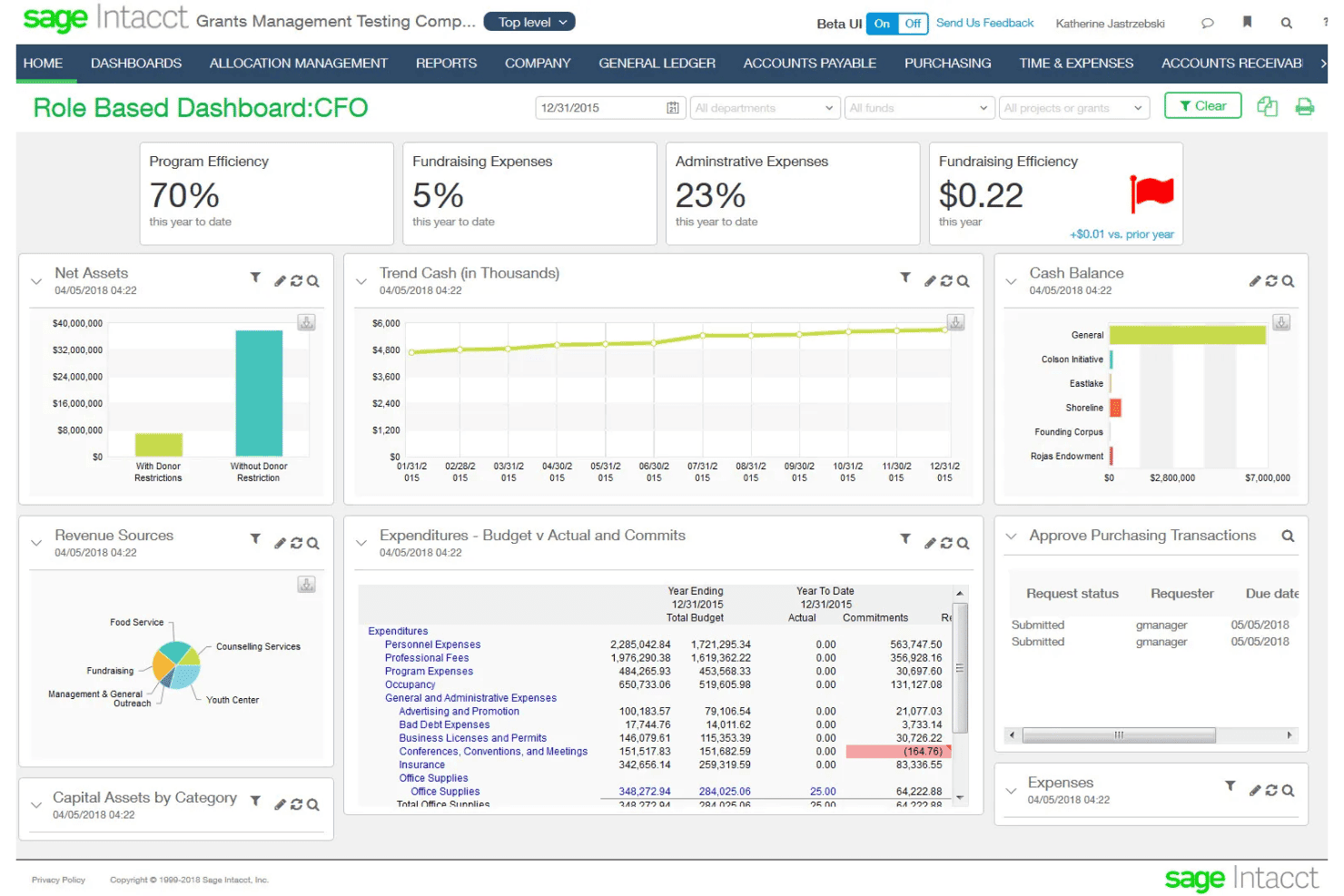
Sage Intacct offers a CFO role-based dashboard displaying key financial metrics including program efficiency, fundraising expenses, net assets, cash balance, and budget vs. actual expenditures. Sage Intacct is a cloud ERP and financial management platform built for subscription businesses, combining subscription billing, usage-based billing, multi-entity accounting, and native ASC 606/IFRS 15 revenue recognition.
Who Is Sage Intacct Best For?
It's a strong fit for mid-market SaaS and professional services finance teams managing complex billing, multi-entity structures, and revenue recognition requirements.
Why I Picked Sage Intacct
Sage Intacct earns its spot on my shortlist because of how well its AI agents work alongside billing and revenue data. The Financial Intelligence agent lets me query financial data in plain language, while the Financial Assurance agent flags unusual journal entries in real time. When a billing run closes, I can move straight into reporting without hunting for anomalies manually.
Sage Intacct Key Features
- Subscription billing automation: Automates contract-based recurring invoices, renewals, and usage charges.
- Multi-entity accounting: Supports consolidated financials and intercompany billing for organizations with multiple subsidiaries.
- ASC 606/IFRS 15 revenue recognition: Handles complex revenue schedules and contract modifications for compliance.
- Marketplace integrations: Connects directly with solutions like Salesforce, Avalara, ADP, Bill.com, and Workday HCM.
Sage Intacct Integrations
Sage Intacct offers 350+ marketplace integrations, including native integrations with Salesforce, Avalara, ADP, Rippling, Bill.com, and Workday HCM. An API is available for custom integrations.
Pros and Cons
Pros:
- AI agents surface anomalies in real time
- Consolidates multi-entity billing and financials natively
- Native ASC 606 revenue recognition built in
Cons:
- Custom report building requires configuration
- Implementation takes weeks
Learn more about Sage Intacct: Best for subscriber retention tools
- 90-day free trial
- From $249/month
Visit WebsiteCustomer Rating:4.3/5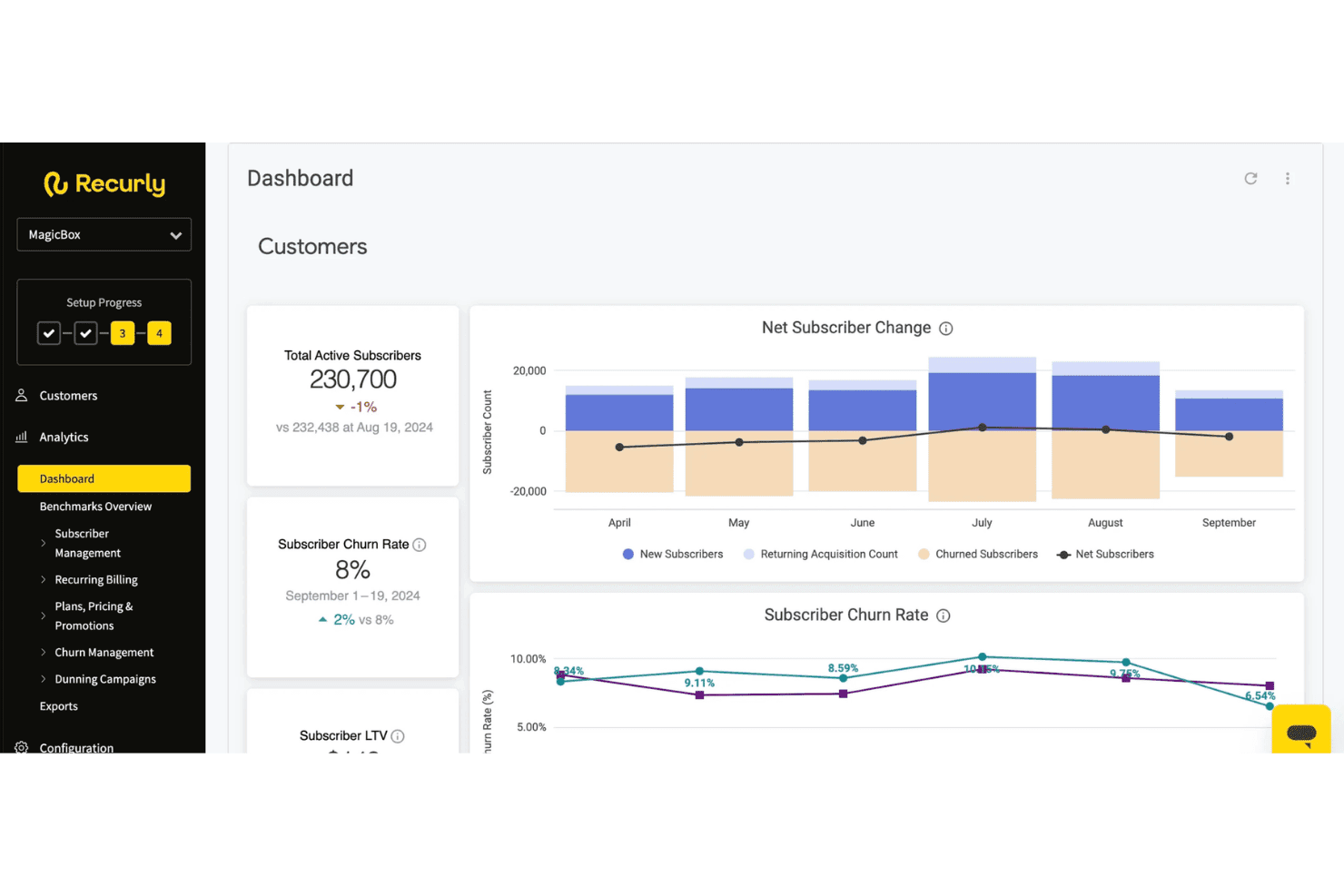
Recurly provides a dashboard displaying total active subscribers, churn rate, net subscriber changes, and subscriber LTV metrics. Recurly is a subscription management and billing platform that handles recurring billing automation, dunning, usage-based pricing, revenue recognition, payments orchestration, and subscriber lifecycle management across the full subscription cycle.
Who Is Recurly Best For?
Recurly is a strong fit for mid-market and enterprise subscription businesses in SaaS, media, and consumer services managing recurring revenue at scale.
Why I Picked Recurly
I've included Recurly in my top picks because its retention toolset goes well beyond standard dunning. The Engage module uses AI-powered propensity-to-churn modeling to trigger personalized cancel-save flows and win-back offers before a subscriber actually churns. I also like that these prompts connect directly to billing in real time, so a retention action taken in-app, like accepting a pause offer, is reflected in the billing system instantly without any manual intervention.
Recurly Key Features
- Revenue recognition automation: Handles ASC 606 and IFRS 15 compliance with automated contract modifications and audit-ready reporting.
- Multi-currency and tax support: Processes payments in 140+ currencies and integrates with Avalara or Vertex for jurisdiction-specific tax calculation.
- Payment gateway network: Connects to 20+ global payment gateways and supports card, ACH, and digital wallet methods.
- Self-service portal: Lets end customers manage subscriptions, update payment methods, and download invoices without contacting support.
Recurly Integrations
Recurly offers native integrations with Stripe, PayPal, Adyen, GoCardless, Avalara, Vertex, Zendesk, Snowflake, and ChartMogul. An API is available for custom integrations.
Pros and Cons
Pros:
- Supports hybrid and usage-based pricing models
- Automated ASC 606 rev rec reporting
- AI-powered cancel-save flows reduce churn
Cons:
- ERP sync depth lags some competitors
- Custom reporting options are limited
Learn more about Recurly: Best for enterprise-grade billing automation
- Free demo available
- Pricing upon request
Visit WebsiteCustomer Rating:4.8/5
BillingPlatform offers an AI-powered dashboard that surfaces unbilled usage and under-invoiced accounts with revenue exposure, AR aging, and overdue invoice queuing. BillingPlatform is an enterprise cloud billing and revenue management platform that handles subscription billing, usage-based rating, AR automation, payment processing, and ASC 606/IFRS 15 revenue recognition across complex, multi-model pricing structures.
Who Is BillingPlatform Best For?
It's a strong fit for large enterprises in telecom, SaaS, financial services, and media that manage high-volume, multi-model billing across multiple entities and currencies.
Why I Picked BillingPlatform
BillingPlatform earns its spot as one of the best on my shortlist because of how it handles billing complexity that most platforms simply can't configure. I particularly like its metadata-driven architecture, which lets billing teams define custom objects, pricing rules, and workflow logic without writing code. The built-in mediation layer also impresses me, ingesting and rating high-volume usage data across diverse sources when billing spans multiple consumption dimensions.
BillingPlatform Key Features
- Self-service customer portal: Lets customers view invoices, manage payment methods, and download tax documents online.
- Native dunning automation: Schedules retries, manages collections, and updates cards automatically for failed or overdue payments.
- ASC 606/IFRS 15 revenue recognition: Creates audit-ready revenue schedules, contract modifications, and detailed disclosure reports.
- Multi-currency and tax engine integration: Handles transactions in global currencies and calculates sales tax, VAT, and GST automatically via external providers.
BillingPlatform Integrations
BillingPlatform offers native integrations with Salesforce, Oracle NetSuite, and Microsoft Dynamics. An API is available for custom integrations, and tax engine connectivity is supported via providers like Avalara.
Pros and Cons
Pros:
- Multi-entity billing across separate legal entities
- Automated contract modification handling
- Configurable mediation engine
Cons:
- Requires professional services for initial setup
- Sandbox testing environment has limitations
Learn more about BillingPlatform:
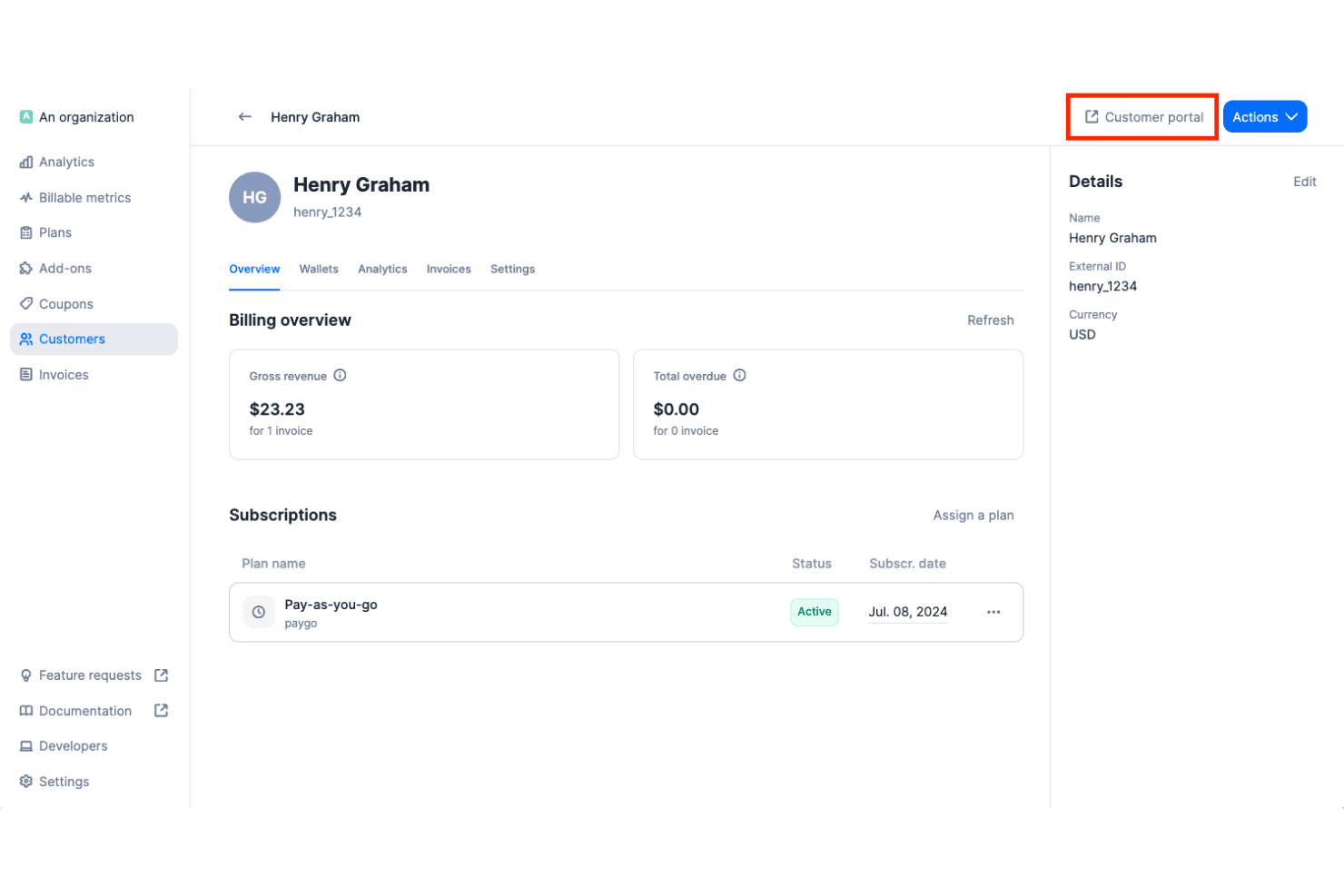
Lago offers a customer billing overview page showing gross revenue, overdue amounts, active subscriptions, and a customer portal access button. Lago is an open-source cloud billing platform that handles usage-based, subscription, and hybrid pricing models, with real-time event metering, automated invoicing, dunning workflows, and integrations across payment, tax, and accounting systems.
Who Is Lago Best For?
Lago is a strong fit for engineering-led SaaS and AI companies that need full control over their billing infrastructure, especially those with data sovereignty requirements or complex usage-based pricing.
Why I Picked Lago
Lago earns its spot on my shortlist because no other cloud billing platform gives you this level of access to the underlying billing logic. I can define custom billable metrics, build hybrid plans that mix subscriptions with consumption-based charges, and deploy the entire stack inside my own VPC. That matters when you're running AI workloads or handling GDPR-sensitive data and can't afford vendor lock-in on the billing layer.
Lago Key Features
- Multiple payment gateway integrations: Connects natively with Stripe, Adyen, GoCardless, and MoneyHash for global payments.
- Automated tax calculation: Integrates with Avalara and Anrok to handle sales tax, VAT, and GST across jurisdictions.
- Native NetSuite and Xero integration: Syncs invoices, payments, and customer data directly to leading accounting platforms.
- Customer-facing billing portal: Lets end customers view invoices, manage payment methods, and access billing history.
Lago Integrations
Lago offers native integrations with Stripe, Adyen, GoCardless, MoneyHash, Avalara, Anrok, NetSuite, Xero, HubSpot, Salesforce, and Zapier. An API is available for custom integrations.
Pros and Cons
Pros:
- Fully configurable billable metrics
- Real-time metering for high-volume event ingestion
- Fully self-hostable for data sovereignty needs
Cons:
- Missing native QuickBooks connectors
- No native ASC 606 revenue recognition
Learn more about Lago: Best for merchant of record billing worldwide
- Free demo available
- From $0.50 + 5% per transaction
Visit WebsiteCustomer Rating:4.6/5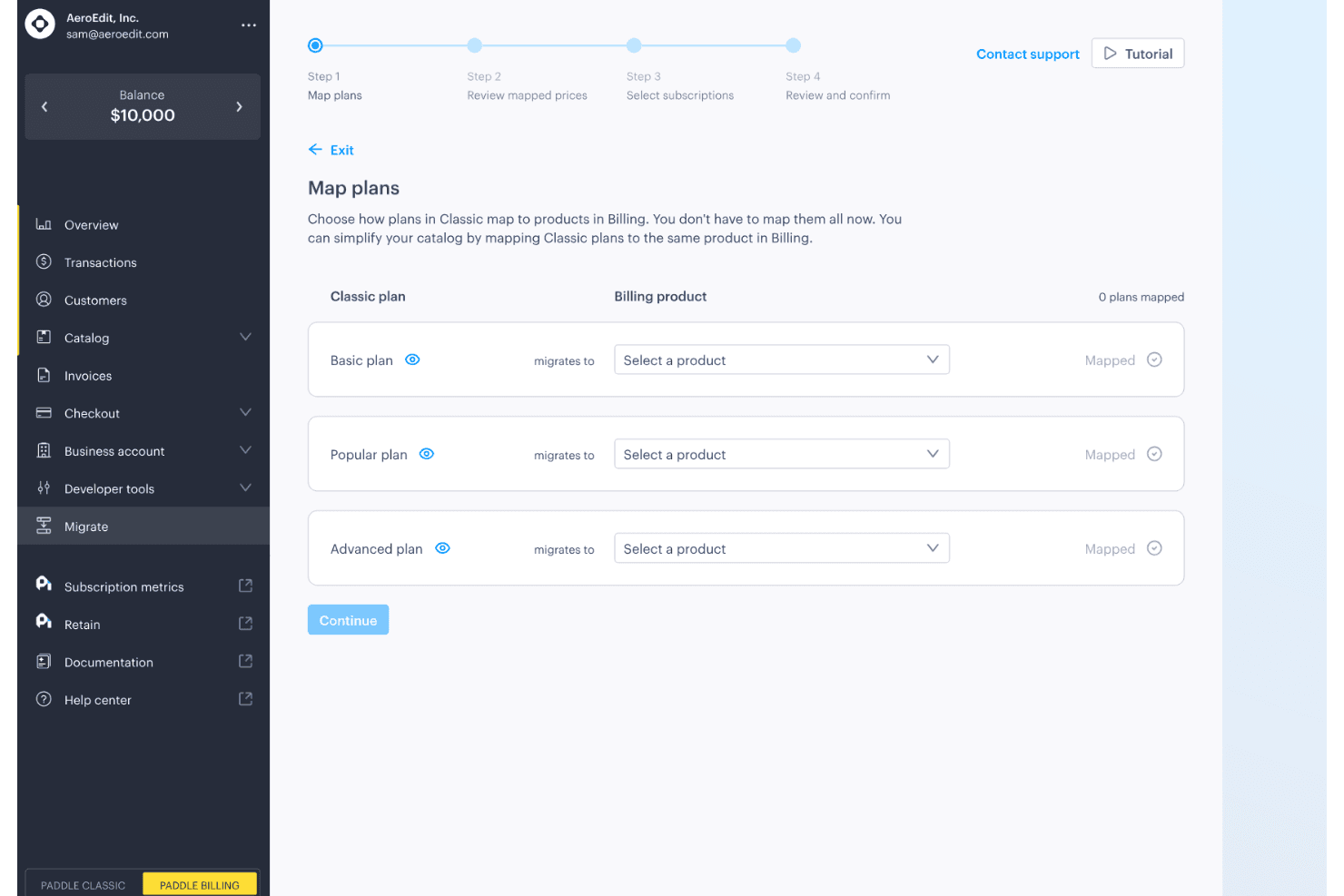
Paddle offers a guided migration flow that maps Classic plans to Billing products across Basic, Popular, and Advanced tiers. Paddle is a cloud billing platform for SaaS and digital product companies that combines subscription management, checkout, recurring billing, invoicing, and global tax compliance under a single merchant of record model.
Who Is Paddle Best For?
Paddle is a strong fit for growth-stage SaaS companies selling digital products across multiple countries who need tax compliance and billing handled without building in-house infrastructure.
Why I Picked Paddle
I picked Paddle as one of the best because no other cloud billing platform handles tax liability quite the same way. As the merchant of record, Paddle calculates, collects, files, and remits VAT and GST across 100+ jurisdictions automatically, so my team isn't managing a separate tax compliance stack on top of billing. I also use Paddle's Retain module to run dunning workflows, including smart payment retries and cancellation recovery flows, without any manual intervention.
Paddle Key Features
- Self-service customer portal: Customers can update payment methods and manage subscriptions without assistance.
- Multi-currency checkout: Paddle supports localized checkout in over 20 currencies.
- Automated invoicing: International and SaaS invoicing is built in, with taxes automatically applied.
- ProfitWell Metrics integration: Native analytics and SaaS metrics reporting connects directly to your financial data.
Paddle Integrations
Paddle offers native integrations with ProfitWell Metrics, HubSpot, Intercom, and Databox. An API is available for custom integrations.
Pros and Cons
Pros:
- Dunning workflows recover failed payments automatically
- Built-in merchant of record removes tax liability
- Handles global tax filing automatically across jurisdictions
Cons:
- Revenue recognition features lack ASC 606 depth
- No prebuilt ERP or accounting system connectors
Learn more about Paddle: Best for rapid pricing experiments at scale
- Free plan available
- Pricing upon request
Visit WebsiteCustomer Rating:4.4/5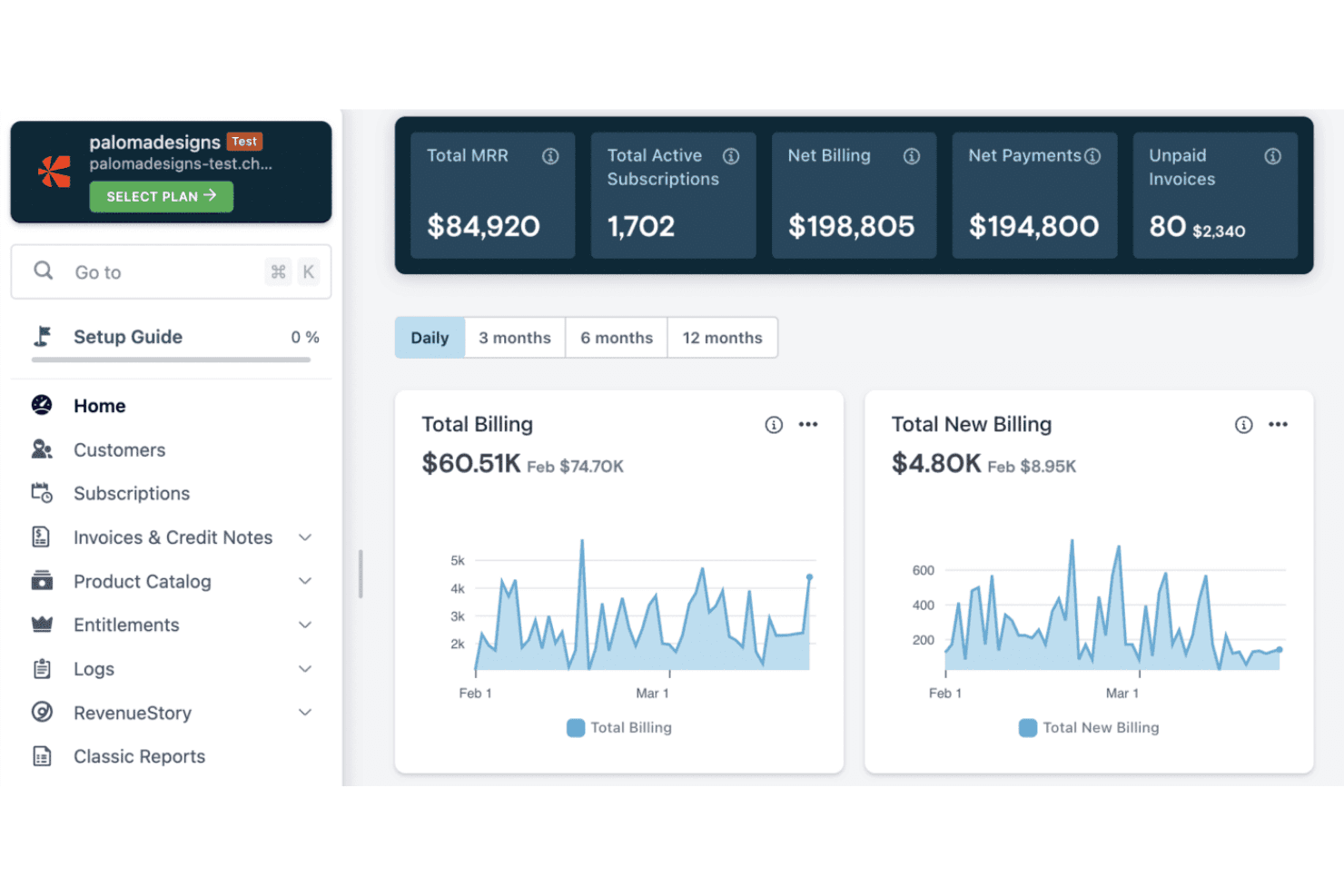
Chargebee features a billing dashboard with MRR, active subscriptions, net billing, payments, and unpaid invoices alongside daily billing trend charts. Chargebee is a cloud billing and revenue management platform that handles subscription billing, usage-based metering, CPQ, revenue recognition, and payment collection across 40+ gateways and 100+ currencies.
Who Is Chargebee Best For?
Chargebee is a strong fit for SaaS finance and revenue operations teams at growth-stage and mid-market companies managing subscription and usage-based billing.
Why I Picked Chargebee
Chargebee earns its spot on my shortlist because of how it handles pricing model iteration without pulling in engineering every time. The Price Book lets me manage tiered, usage-based, flat-fee, and hybrid pricing in one centralized catalog, so I can launch a new pricing tier and test it against existing segments without a code change. I also like the Growth module's AI-powered offer builder, which lets me run upgrade, upsell, and trial conversion experiments across subscriber cohorts.
Chargebee Key Features
- Dunning automation: Smart retry schedules and payment recovery workflows reduce failed transactions with minimal manual effort.
- Self-service customer portal: End customers can view invoices, update payment methods, and manage subscriptions independently.
- Multi-currency and tax engine: Supports 100+ currencies and automates VAT, GST, and sales tax calculation for global compliance.
- Native ERP and accounting integrations: Direct connectors to NetSuite, QuickBooks, and Xero sync billing and revenue data seamlessly.
Chargebee Integrations
Chargebee offers over 40 native payment gateway integrations, and has native integrations with Salesforce, HubSpot, NetSuite, QuickBooks Online, Xero, Apple App Store, and Google Play Store. An API is available for custom integrations.
Pros and Cons
Pros:
- Dunning handles failed payments with smart retries
- Customer self-service portal included natively
- ASC 606 revenue recognition fully automated
Cons:
- Advanced metering setup takes significant time
- Custom reporting requires workarounds
 Best for deep SaaS financial integrations
- Free demo available
- From $599/month
Visit WebsiteCustomer Rating:4.3/5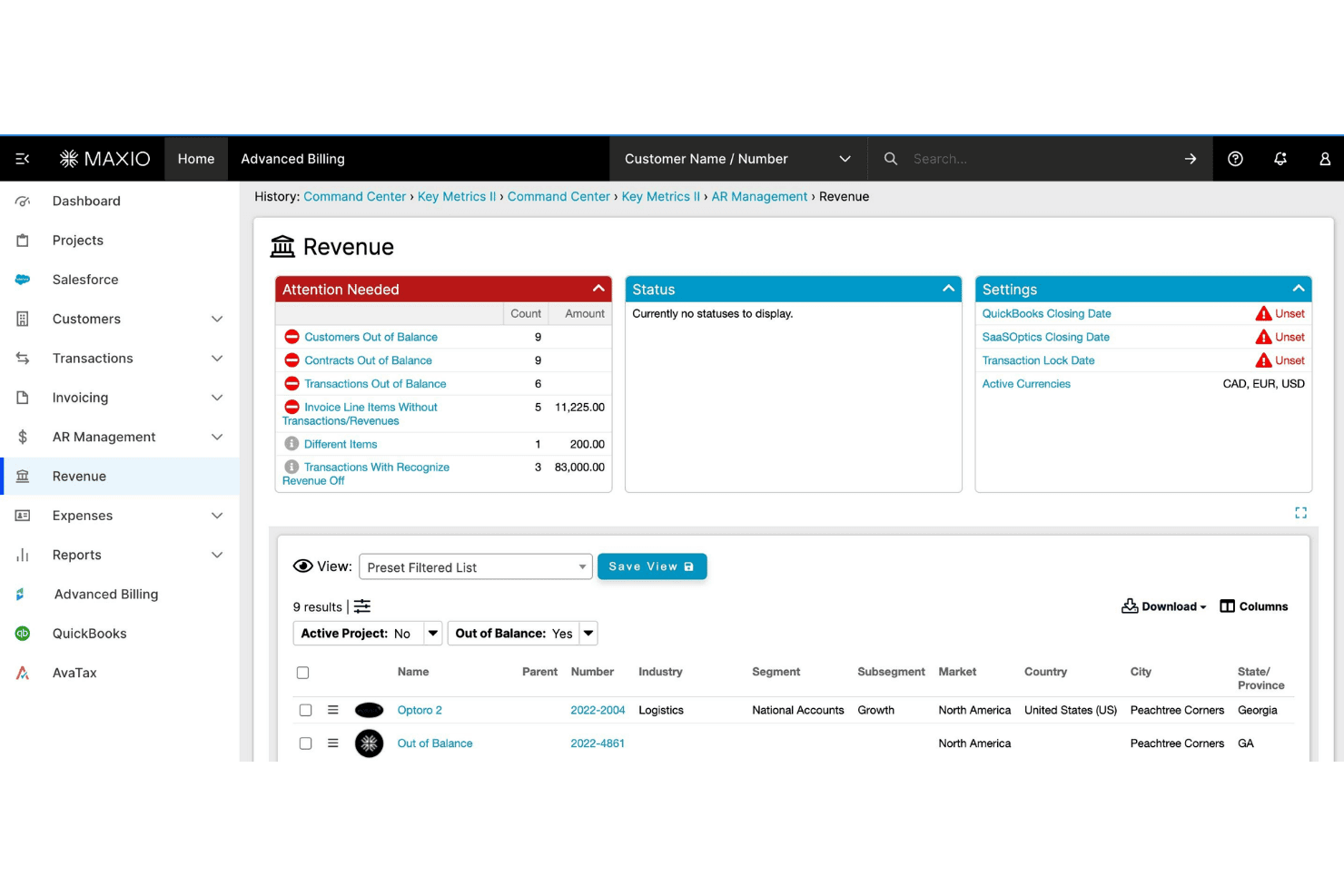
Maxio offers a Revenue management dashboard with attention-needed alerts, balance tracking, and customer filtering capabilities. Maxio is a subscription billing and financial operations platform built for B2B SaaS companies, covering usage-based billing, revenue recognition, A/R management, and SaaS metrics reporting.
Who Is Maxio Best For?
Maxio is a strong fit for finance and RevOps teams at B2B SaaS companies managing complex subscription contracts, usage-based pricing, or multi-entity billing structures.
Why I Picked Maxio
Maxio earns its spot on my shortlist because of how deeply it connects billing data to the financial systems SaaS teams already rely on. Native integrations with NetSuite, Sage Intacct, and QuickBooks include GL mapping and bidirectional sync, so close cycles don't require manual reconciliation. I also like the revenue recognition engine, which handles SSP allocation and contract modifications automatically under ASC 606 and IFRS 15.
Maxio Key Features
- Self-service customer portal: Lets customers view invoices, update payment methods, and manage subscriptions directly online.
- Configurable dunning automation: Enables you to set customized retry logic and automated recovery workflows for overdue accounts.
- Hybrid pricing model support: Allows combining flat-rate, per-seat, and usage-based charges on a single invoice.
- Multi-entity billing management: Supports separate catalogs, gateways, and reporting for subsidiaries or business units.
Maxio Integrations
Maxio offers 85+ native integrations, including NetSuite, QuickBooks Online, Xero, Sage Intacct, Salesforce, HubSpot, Pipedrive, Stripe, Avalara, and TaxJar. Zapier and an API are available for custom integrations.
Pros and Cons
Pros:
- Built-in investor-grade SaaS metrics reporting
- Strong ASC 606 revenue recognition automation
- Handles complex usage-based pricing natively
Cons:
- Steeper onboarding for smaller finance teams
- Implementation requires significant setup time
Learn more about Maxio: Best for complex quote-to-cash automation
- Free demo available
- Pricing upon request
Visit WebsiteCustomer Rating:3.8/5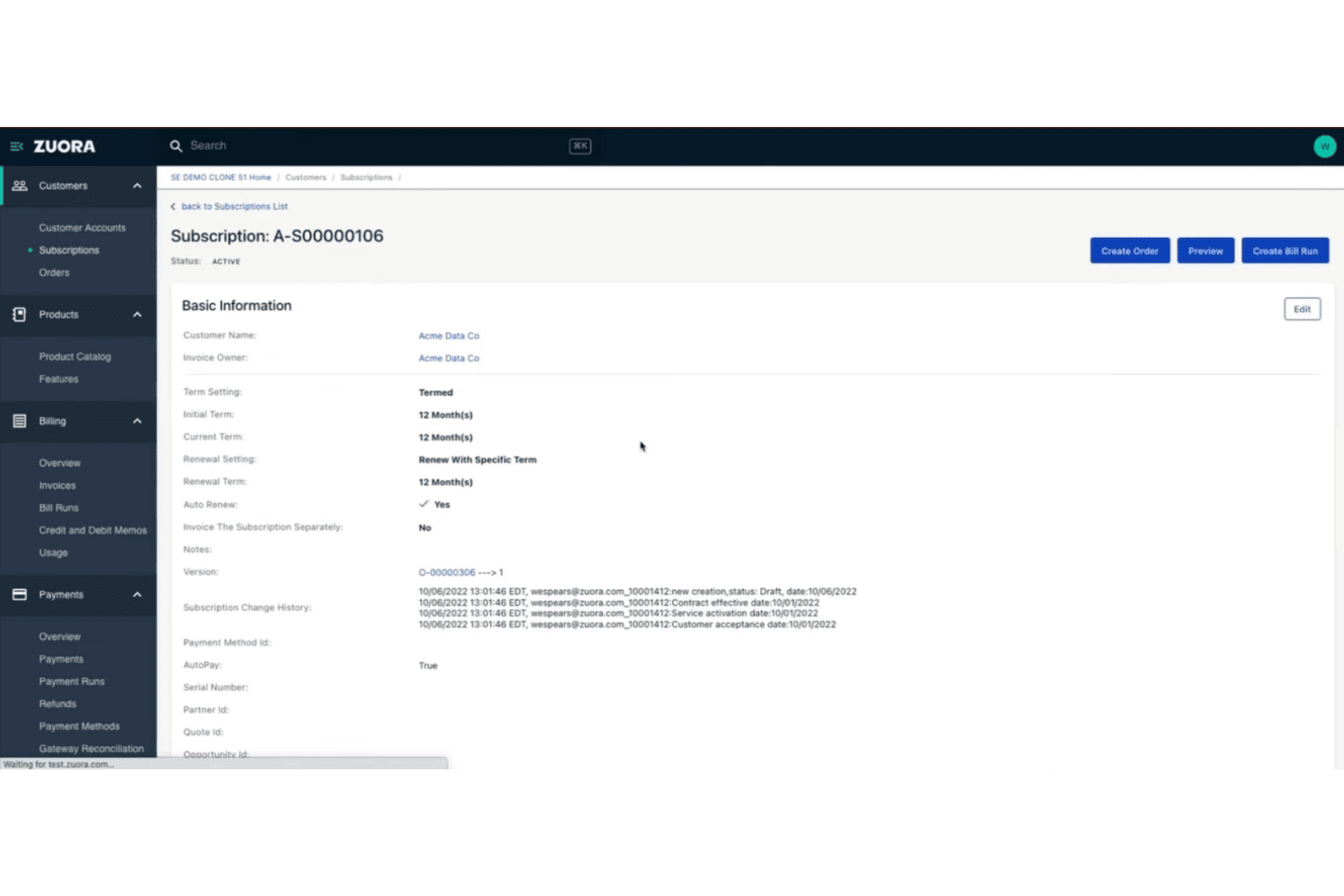
Zuora offers a detailed subscription management page with billing terms, renewal settings, and change history for a customer account. Zuora is an enterprise cloud billing platform built around subscription and usage-based monetization, covering quote-to-cash workflows, revenue recognition, payment processing, and AR automation.
Who Is Zuora Best For?
Zuora is a strong fit for enterprise finance and revenue operations teams at subscription businesses managing complex, high-volume billing across multiple products, pricing models, or markets.
Why I Picked Zuora
Zuora earns its spot as one of the best on my shortlist because of how tightly it connects the CPQ, billing, and revenue recognition layers into a single quote-to-cash workflow. I like that Zuora CPQ syncs directly with Zuora Billing, so pricing changes in a quote flow through to invoicing without manual reconciliation. The automated revenue recognition in Zuora Revenue handles contract modifications under ASC 606 and IFRS 15 without requiring custom workarounds.
Zuora Key Features
- Multi-currency and tax management: Supports global operations with multi-currency invoicing and automated tax calculation through integrated tax engines.
- Payment gateway integrations: Connects with 40+ payment gateways covering credit card, ACH, and regional payment methods.
- Self-service customer portal: Lets customers view invoices, manage payment methods, and handle subscription changes online.
- Customizable product catalog: Enables teams to manage complex product offerings, pricing experiments, add-ons, and bundling in one place.
Zuora Integrations
Zuora offers native integrations with Salesforce, NetSuite, and over 40 payment gateways including Stripe, Adyen, Braintree, and PayPal. An API is available for custom integrations.
Pros and Cons
Pros:
- Supports high-volume usage event ingestion
- Built-in ASC 606 and IFRS 15 compliance
- Handles complex subscription pricing models natively
Cons:
- Requires developer resources
- Long implementation timeline for enterprises
Learn more about Zuora: Best for flexible hybrid pricing models
- Not available
- From $0.7% of billing volume per month
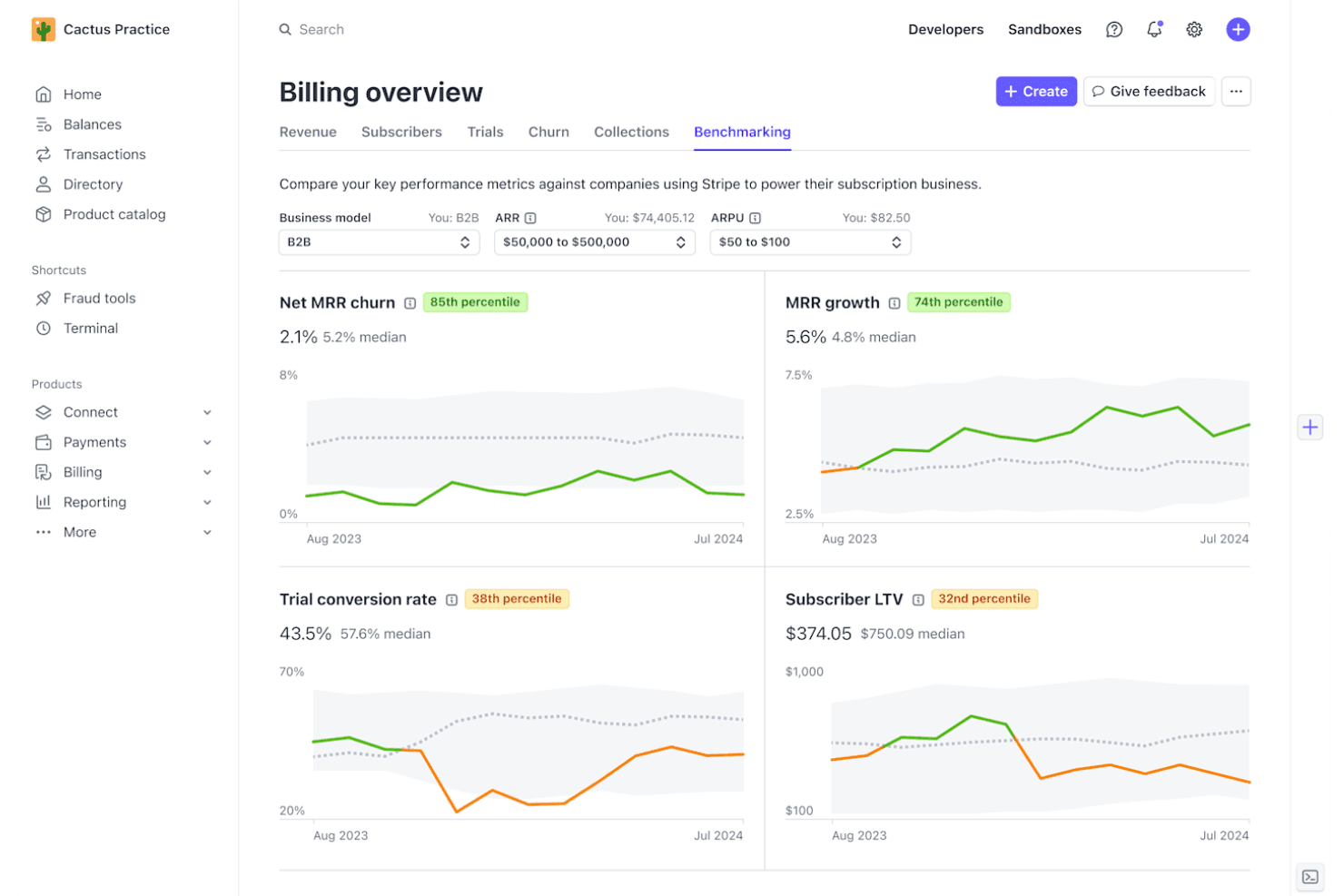
Stripe Billing offers a Benchmarking dashboard that compares key subscription metrics like Net MRR churn, MRR growth, trial conversion rate, and Subscriber LTV against industry peers. Stripe Billing is a cloud billing platform that handles subscription management, usage-based billing, invoicing, and payment collection across 15+ pricing models and 135+ currencies.
Who Is Stripe Billing Best For?
Stripe Billing is a strong fit for SaaS and technology companies that need to run multiple pricing models — subscriptions, metered usage, or both — within a single billing system.
Why I Picked Stripe Billing
I picked Stripe Billing as one of the best because it's the only platform I've used where you can genuinely mix subscription and consumption pricing within a single customer contract. That means setting a base recurring fee, layering metered usage charges on top, and configuring proration rules for mid-cycle plan changes, all within one system. The Meters API handles real-time event ingestion at up to 100,000 events per second, so metered charges stay accurate even at high transaction volumes.
Stripe Billing Key Features
- Self-service customer portal: Lets customers view invoices, update payment info, and manage subscriptions without contacting support.
- Automated tax calculation: Applies correct VAT, GST, or sales tax to invoices across 50+ countries.
- Integrated revenue recognition: Automatically generates ASC 606/IFRS 15-compliant revenue schedules and reports.
- Native NetSuite connector: Syncs invoices, payments, and reconciliation data directly with NetSuite accounts.
Stripe Billing Integrations
Stripe Billing offers native integrations with Salesforce, NetSuite, SAP Digital Payments Add-on, Snowflake, and Amazon Redshift. An API is available for custom integrations.
Pros and Cons
Pros:
- Real-time usage metering at massive scale
- Smart retry logic recovers failed payments
- Supports 15+ pricing models in one system
Cons:
- No native QuickBooks or Sage Intacct sync
- Revenue recognition lacks depth
Learn more about Stripe Billing:
Annen programvare for skyfakturering
Her er noen flere alternativer innen programvare for skyfakturering som ikke kom med på kortlisten min, men som likevel er verdt å se nærmere på:
- 11MetronomeBest for real-time usage-based billing
- 12OrbBest for dynamic revenue design flexibility
- 13OrdwayBest for multi-model billing and SaaS metrics
- 14ZenskarBest for AI-driven contract-to-cash automation
- 15Zoho BillingBest for built-in global tax and localization
- 16YouniumBest for centralized quote-to-revenue management
- 17Aria SystemsBest for high-volume real-time charging engines
- 18Agentforce Revenue ManagementBest for unified CRM billing experience
- 19ZoneBillingBest for billing automation inside NetSuite
- 20Oracle NetSuite SuiteBillingBest for native ERP subscription lifecycle control
How I Evaluate Cloud Billing Software
I split my evaluation into baseline requirements—recurring billing, usage rating, and rev rec compliance—and the differentiators that separate one platform from another for SaaS finance teams.
Core Functionality (Table Stakes for This List)
When I'm selecting tools for my list, I rank each one on a scale from 0 (does not offer the functionality) to 5 (excels in this area) for each core functionality listed below. Then, I calculate the tool's total score into a percentage. Each tool needs to achieve a minimum total score of 65% to be considered for inclusion.
- Recurring Billing Automation: I look for platforms that handle invoice generation, renewal logic, and dunning retries without manual touchpoints—like auto-prorating mid-cycle upgrades.
- Usage-Based Billing: Metered and consumption models need accurate rating engines. I evaluate how each tool ingests high-volume events like API calls or compute hours.
- Payment Gateway Integration: I check gateway breadth across cards, ACH, wallets, and direct debit. Tools like Stripe Billing and Chargebee differ in how many regional processors they support.
- Tax & Multi-Currency Support: Global billing means handling VAT, GST, and sales tax across dozens of jurisdictions. I look at whether tax is native or relies on integrations like Avalara.
- Accounting & ERP Integration: I evaluate sync depth with systems like NetSuite, QuickBooks, and Sage Intacct—especially bidirectional GL mapping that keeps billing and ledger data aligned.
- Revenue Recognition Compliance: ASC 606 and IFRS 15 schedules should automate contract modifications, SSP allocations, and deferred revenue waterfall reporting for month-end close.
Once I have a list of tools that meet the criteria, I consider what sets each platform apart.
Differentiating Factors (What Sets Vendors Apart)
Here's how I compare and contrast different vendors:
Standout Features
Dunning automation is a key differentiator. I look at how each platform handles retry logic, smart card updaters, and recovery workflows for failed payments. Usage-based metering matters for teams billing on API calls or compute hours—real-time event ingestion at scale separates strong tools from limited ones. Self-service customer portals are worth evaluating too, letting subscribers update payment methods, switch plans, and pull tax documents without filing a support ticket.
Beyond Features
Pricing model flexibility is a big one—I evaluate whether a platform can combine flat subscriptions, per-seat, and usage components on a single invoice without engineering rework. Integration ecosystem depth matters just as much, especially native connectors to ERPs like NetSuite and QuickBooks alongside REST APIs for data warehouse syncing. I also check pricing transparency, looking at how clearly vendors disclose platform fees, transaction costs, and implementation charges so you can forecast total cost of ownership.
Slik velger du programvare for skyfakturering
Det er lett å gå seg vill i lange funksjonslister og komplekse prisstrukturer. For å hjelpe deg med å holde fokus mens du går gjennom den unike prosessen med å velge programvare, får du her en sjekkliste over faktorer du bør ha i mente:
| Faktor | Hva du bør vurdere |
|---|---|
| FaktorSkalerbarhet | Hva du bør vurdereVil plattformen håndtere brukstopper og virksomhetens vekst? Se gjennom grensene for transaksjonsvolum og fleksibiliteten i faktureringsmodellen. |
| FaktorIntegrasjoner | Hva du bør vurdereKan den kobles sømløst til ERP-systemet, CRM-systemet og betalingsleverandørene dine? Vurder hvor omfattende integrasjonene er, ikke bare om de finnes. |
| FaktorTilpasningsmuligheter | Hva du bør vurdereKan du tilpasse faktureringsarbeidsflyter, skatteregler og fakturamal uten hjelp fra utviklere? Bekreft hvor mye du kan tilpasse direkte i løsningen. |
| FaktorBrukervennlighet | Hva du bør vurdereHvor raskt kan økonomi- og driftsteam konfigurere og administrere faktureringen? Se etter enkle godkjenninger, planoppsett og rapportering. |
| FaktorImplementering og oppstart | Hva du bør vurdereHvor mye tid og arbeid kreves for å ta løsningen i bruk? Spør om støtte til datamigrering, opplæring og tilgang til en tydelig plan for oppstart. |
| FaktorKostnad | Hva du bør vurdereEr plattform-, transaksjons- og overforbruksgebyrene tydelige? Se etter tilbakevendende kostnader og skjulte utgifter som kan komme som en overraskelse. |
| FaktorSikkerhetstiltak | Hva du bør vurdereOppfyller leverandøren behovene dine for PCI DSS, SOC 2, GDPR eller krav til datalagring? Spør hvordan sikkerheten administreres og revideres. |
| FaktorInternasjonale funksjoner | Hva du bør vurdereVil løsningen støtte valutaer, skattejurisdiksjoner og behov for selvbetjening hos kundene hvis virksomheten ekspanderer til nye markeder? |
Hva er programvare for skyfakturering?
Programvare for skyfakturering er en digital plattform som automatiserer fakturering, abonnementsadministrasjon og betalingsbehandling for tilbakevendende eller bruksbaserte forretningsmodeller. Den forenkler håndteringen av fakturering i flere valutaer, global skatteoverholdelse og integrasjoner med regnskapssystemer. Økonomiteam bruker disse verktøyene til å effektivisere inntektsprosessene, redusere manuelt arbeid og støtte revisjonsklar økonomirapportering på tvers av komplekse abonnements- og forbruksbaserte tilbud.
Funksjoner i skybasert faktureringsprogramvare
Når du velger skybasert faktureringsprogramvare, bør du se etter følgende nøkkelfunksjoner:
- Automatisering av gjentakende fakturering: Genererer abonnementsfakturaer, administrerer fornyelser og behandler betalinger etter en fast tidsplan uten manuell inntasting.
- Bruksbasert prising: Sporer kundeaktivitet eller forbruk, beregner kostnader og støtter bruksbaserte, trinnvise eller hybride faktureringsmodeller.
- Integrasjon med betalingsløsninger: Kobler til flere betalingsformidlere for å motta betalinger via kredittkort, ACH, bankoverføringer og regionale betalingsmetoder.
- Global avgiftsberegning: Håndterer overholdelse av regler for merverdiavgift, VAT og GST på tvers av land ved hjelp av innebygde motorer eller tredjepartsintegrasjoner.
- Støtte for flere valutaer: Utsteder fakturaer og mottar betalinger i ulike valutaer, med automatisk bruk av vekslingskurser.
- Rutiner for purring og innkreving: Automatiserer påminnelser, nye betalingsforsøk og tiltak for å få inn mislykkede eller forfalte betalinger, slik at inntektstapet reduseres.
- Selvbetjeningsportal for kunder: Gir kundene mulighet til å se fakturaer, oppdatere betalingsmåter og administrere abonnementene sine på nettet.
- Overholdelse av krav til inntektsføring: Støtter kravene i ASC 606 og IFRS 15 med automatiserte tidsplaner for nøyaktig inntektsføring og opprettelse av rapporter som er klare for revisjon.
- Integrasjon med ERP- og regnskapssystemer: Synkroniserer faktureringsdata med populære regnskaps- og ERP-plattformer for å sikre nøyaktige økonomiske poster og mer effektive avslutningsprosesser.
- Tilpassbare fakturaer: Gjør det mulig for økonomiteam å tilpasse fakturamalene, merkevareprofileringen og linjeelementene etter spesifikke forretningskrav og kundenes forventninger.
Fordeler med skybasert faktureringsprogramvare
Implementering av skybasert faktureringsprogramvare gir flere fordeler for teamet og virksomheten din. Her er noen av fordelene du kan se frem til:
- Raskere faktureringssykluser: Automatisert fakturering og fornyelser hjelper teamet med å sende ut fakturaer raskt, med færre manuelle trinn.
- Nøyaktig inntektsføring: Innebygd overholdelse av ASC 606/IFRS 15 sikrer at regnskapet gjenspeiler oppdaterte tidsplaner for inntektsføring.
- Større global rekkevidde: Fakturering i flere valutaer og automatisering av avgifter gjør det enklere å betjene kunder i nye land uten ekstra administrasjon.
- Færre mislykkede betalinger: Purrerutiner og intelligente nye betalingsforsøk bidrar til å hente inn inntekter fra mislykkede eller forsinkede betalingsforsøk.
- Bedre oversikt og kontroll: Dashbord i sanntid, revisjonsspor og detaljerte rapporter gir den økonomiske innsikten som trengs for beslutningskraftig virksomhetsstyring.
- Bedre kundeopplevelse: Selvbetjeningsportaler lar kundene administrere abonnementer, se fakturaer og laste ned betalingshistorikk når de trenger det.
Kostnader og priser for skybasert faktureringsprogramvare
Valg av skybasert faktureringsprogramvare krever en forståelse av de ulike prismodellene og abonnementene som er tilgjengelige. Kostnadene varierer basert på funksjoner, teamstørrelse, tillegg og mer. Tabellen nedenfor oppsummerer vanlige abonnementer, gjennomsnittsprisene deres og typiske funksjoner som inngår i skybaserte faktureringsløsninger:
Sammenligningstabell for abonnementer for skybasert faktureringsprogramvare
| Abonnementstype | Gjennomsnittspris | Vanlige funksjoner |
|---|---|---|
| AbonnementstypeGratisabonnement | Gjennomsnittspris$0 | Vanlige funksjonerGrunnleggende fakturering, begrenset betalingsintegrasjon, manuelle faktureringsoppgaver og kundestøtte på nybegynnernivå. |
| AbonnementstypePersonlig abonnement | Gjennomsnittspris$25–$75/måned | Vanlige funksjonerGjentakende fakturering, enkel bruksbasert prising, støtte for flere valutaer og grunnleggende integrasjoner. |
| AbonnementstypeForretningsabonnement | Gjennomsnittspris$200–$600/måned | Vanlige funksjonerAvansert purring, automatisering av avgifter, inntektsføring, selvbetjeningsportaler, regnskapsintegrasjoner og rapportering. |
| AbonnementstypeVirksomhetsabonnement | Gjennomsnittspris$1,000+/måned | Vanlige funksjonerTilpassede arbeidsflyter, måling av stort bruksvolum, prioritert kundestøtte, verktøy for regelverksetterlevelse, API-tilgang og omfattende ERP-integrasjoner. |
Vanlige spørsmål om programvare for skyfakturering
Her er noen svar på vanlige spørsmål om programvare for skyfakturering:
Hvordan håndterer programvare for skyfakturering bruksbasert fakturering?
De fleste plattformer sporer API-kall, beregningstimer eller andre bruksmålinger ved hjelp av sanntidsdata, og beregner deretter kostnadene automatisk. Dette gjør det mulig for en SaaS-virksomhet eller leverandør av programvare som en tjeneste å tilby detaljerte prismodeller uten å være avhengig av manuelle prosesser eller komplekse regneark. Ved å eliminere manuell registrering bidrar moderne skybaserte faktureringsløsninger til å optimalisere de overordnede faktureringsprosessene og sikre nøyaktig fakturabehandling.
Kan programvare for skyfakturering integreres med regnskaps- og ERP-systemene mine?
Ja, ledende faktureringsprogramvare tilbyr integrasjonsmuligheter med innebygde koblinger til ERP-systemer som NetSuite og Sage Intacct, samt regnskapsprogramvare som QuickBooks og Xero. Hvor omfattende synkroniseringen er, varierer, så undersøk om dataene flyter én vei eller begge veier, og om tilpasset kartlegging er tilgjengelig. Ved å gå fra stiv, eldre lokal infrastruktur til skybasert faktureringsprogramvare sikrer du at økonomisystemene dine holdes automatisk synkronisert.
Hva bør jeg være oppmerksom på når det gjelder skjulte kostnader?
I tillegg til grunnleggende prisplaner bør du se etter transaksjonsgebyrer, inntektsbaserte kostnader, prioritert kundestøtte og tilleggsmoduler. Du kan også møte på ekstra kostnader for oppsett eller bestemte funksjoner, som gjentakende betalinger og automatiserte varsler. Be alltid om en detaljert kostnadsoversikt på forhånd, og avklar hva som er inkludert før du kjøper, spesielt hvis du opererer med en abonnementsbasert inntektsmodell.
Er programvare for skyfakturering sikker for håndtering av betalinger?
Ja, de fleste skybaserte produkter er PCI DSS-kompatible og tilbyr kryptering sammen med tilgangskontroller basert på roller. Sikring av flere betalingsalternativer – fra kredittkort til ACH – er avgjørende for å beskytte kundedata. Det er lurt å kontrollere sertifiseringer og forstå hvordan betalingsdata tokeniseres eller beskyttes i enhver løsning du vurderer, slik at du beskytter lønnsomheten og bygger tillit.
Hvor raskt kan vi komme i gang med disse plattformene?
Implementeringen kan ta alt fra noen få dager for enkle oppsett til flere uker for komplekse migreringer, særlig hvis du importerer eldre faktureringsdata eller trenger tilpassede integrasjoner. Omfattende støtte for oppstart og migrering kan utgjøre en stor forskjell.