

Lei av programvare for tidsregistrering og fakturering som føles som mer arbeid enn det er verdt? Rotete timelister, feil på fakturaer og forsinkede betalinger gjør ikke bare arbeidet tregere – de går ut over bunnlinjen. Du trenger et verktøy som registrerer timer uten anstrengelser, automatiserer faktureringen og holder kontantstrømmen stabil uten ekstra bryderi.
Jeg har brukt flere år som økonomiansvarlig på å gå gjennom programvare som lover automatisering, men som ender opp med å skape mer stress. De beste verktøyene gjør faktisk hverdagen enklere – de sparer deg for tid, forbedrer nøyaktigheten og sørger for at faktureringen ikke blir frustrerende.
For å gjøre søket enklere har jeg testet og vurdert den beste programvaren for tidsregistrering og fakturering som finnes. Disse anbefalingene gjør tidsregistreringen enklere, fremskynder faktureringen og hjelper deg med å holde oversikt over økonomien. La oss finne den rette løsningen for deg!
Hvorfor du kan stole på våre programvareanbefalinger
6,700+
Reviews
20
Industry experts
16+
Evaluation factors
14
Years
Teamet vårt har testet og anmeldt programvare siden 2012. Vi er selv økonomiledere, så vi vet hvor vanskelig og hvor viktig det er å velge riktig programvare.
I denne guiden har vi vurdert verktøyene gjennom praktisk testing og uavhengig research og gitt dem poeng ut fra våre utvelgelseskriterier.
Anmeldelsene våre bygger på vår egen redaksjonelle vurdering. De er ikke et salgsargument.
Sammenligningstabell for programvare for tidsregistrering og fakturering
Denne sammenligningstabellen oppsummerer prisdetaljene for mine beste utvalgte programmer for tidsregistrering og fakturering:
| Tool | Best For | Trial Info | Price | ||
|---|---|---|---|---|---|
| 1 | Best for tracking hours and billing clients | 14-day free trial | From $5/user/month | Website | |
| 2 | Best for billing across mixed client models | 14-day free trial available | From $17/user/month | Website | |
| 3 | Best for real-time profitability tracking | 14-day free trial | From $10/user/month | Website | |
| 4 | Best for visual labor cost reports | Free plan available; 30-day free trial; Free demo available | From $9/user/month | Website | |
| 5 | Best for built-in billing & invoicing tools | Free plan + 30-day free trial + free demo available | From $5/user/month (billed annually) | Website | |
| 6 | Best for customizable time-to-invoice tracking | Free plan + 7-day free trial available | From $4.99/user/month | Website | |
| 7 | Best for automatic time tracking | 14-day free trial + free plan + free demo available | From $3.99/user/month (billed annually) | Website | |
| 8 | Best for accounting firms | Free demo available | From $79/user/month | Website | |
| 9 | Best for detailed billing reports | Free plan available + 14-day free trial | From $5.83/user/month (billed annually) | Website | |
| 10 | Best for small business accounting | Not available | From $27/month | Website |


Vurdering av den beste programvaren for tidsregistrering og fakturering
Nedenfor finner du mine detaljerte sammendrag av den beste programvaren for tidsregistrering og fakturering som kom med på kortlisten min. Vurderingene mine gir et grundig innblikk i de viktigste funksjonene, fordeler & ulemper, integrasjoner og ideelle bruksområder for hvert verktøy, slik at du kan finne det beste alternativet for deg.
 Best for tracking hours and billing clients
- 14-day free trial
- From $5/user/month
Visit WebsiteCustomer Rating:5/5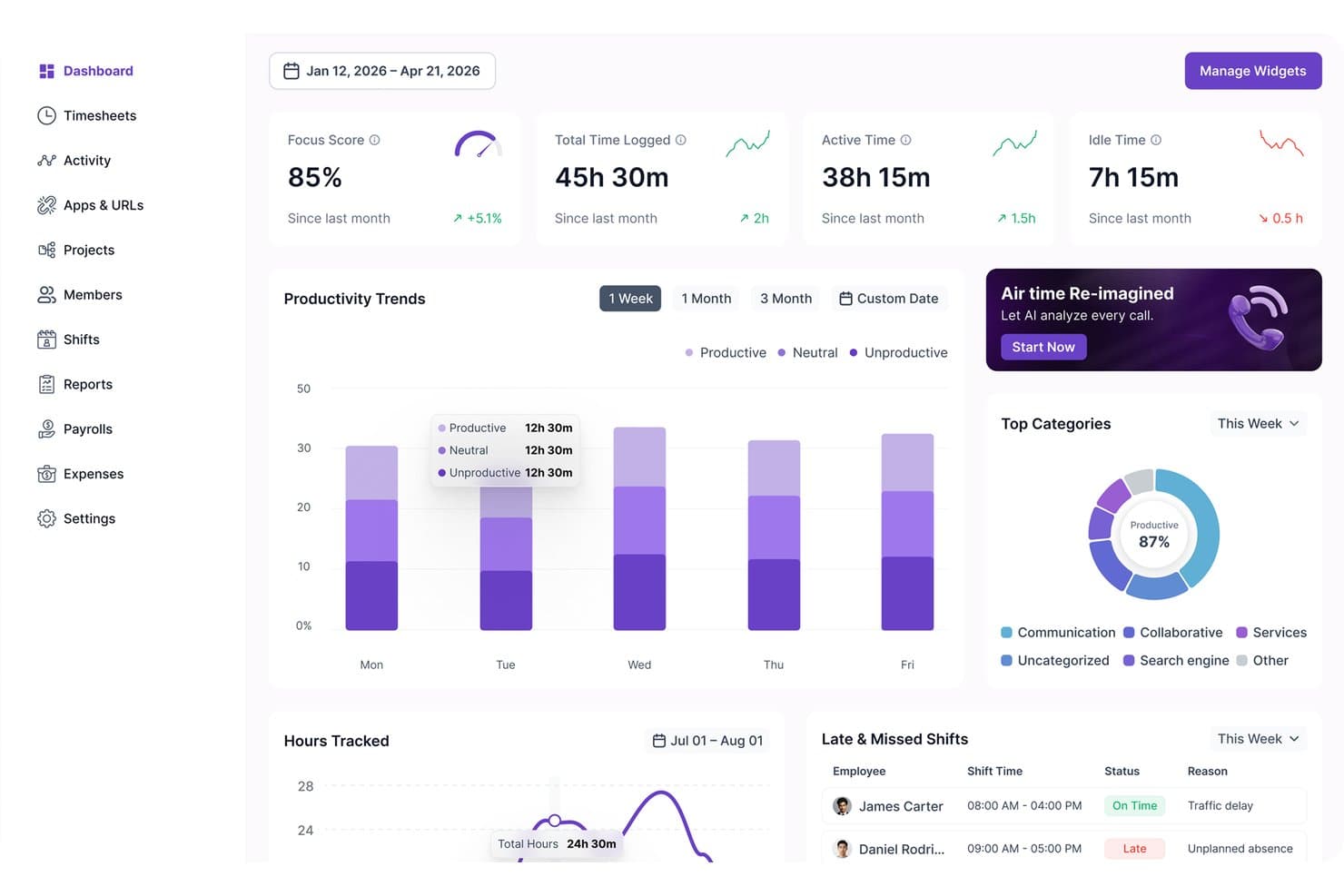
Modge tracks productivity trends, focus scores, and shift statuses in one dashboard. Modge is a time tracking and invoicing platform that combines automatic desktop time capture, timesheet approvals, client billing, Stripe-based payment collection, and profitability reporting in a single tool.
Who Is Modge Best For?
Modge is a strong fit for small business owners and team managers who need to track employee hours, approve timesheets, and bill clients without juggling multiple tools.
Why I Picked Modge
I picked Modge as one of the best because it keeps tracked hours and client billing inside the same workflow, so nothing falls through the cracks between a logged session and a sent invoice. I love that once a timesheet is approved, Modge can automatically generate a branded invoice and charge the client on a recurring cycle—no copy-pasting hours into a separate billing tool. Project budget alerts add another layer, flagging overspend before it hits the invoice.
Modge Key Features
- Automatic desktop time tracking: The desktop agent records session start, end, project, and active apps without requiring a manual timer start.
- Timesheet approvals with pay-period locking: Employees submit timesheets for manager review, and approved pay periods lock so figures can't change after sign-off.
- Profitability reporting: Calculates revenue, labor cost, and margin by project, client, team, or member using your configured billing rates.
- Shift scheduling and attendance tracking: Creates one-time or recurring shift patterns and scores each member's attendance as on-time, late, or absent against the schedule.
Modge Integrations
Modge offers one documented native integration: Stripe, for card and ACH invoice payments. Wise and PayPal are payroll export formats, not live integrations; a Public API is mentioned, but its availability and capabilities aren’t documented.
Pros and Cons
Pros:
- Approvals reduce manual billing follow-ups
- Profitability reports clarify project costs
- Tracked hours flow into client invoices
Cons:
- No trust accounting or WIP workflows
- Employee monitoring may feel intrusive
Learn more about Modge: Best for billing across mixed client models
- 14-day free trial available
- From $17/user/month
Visit WebsiteCustomer Rating:4.5/5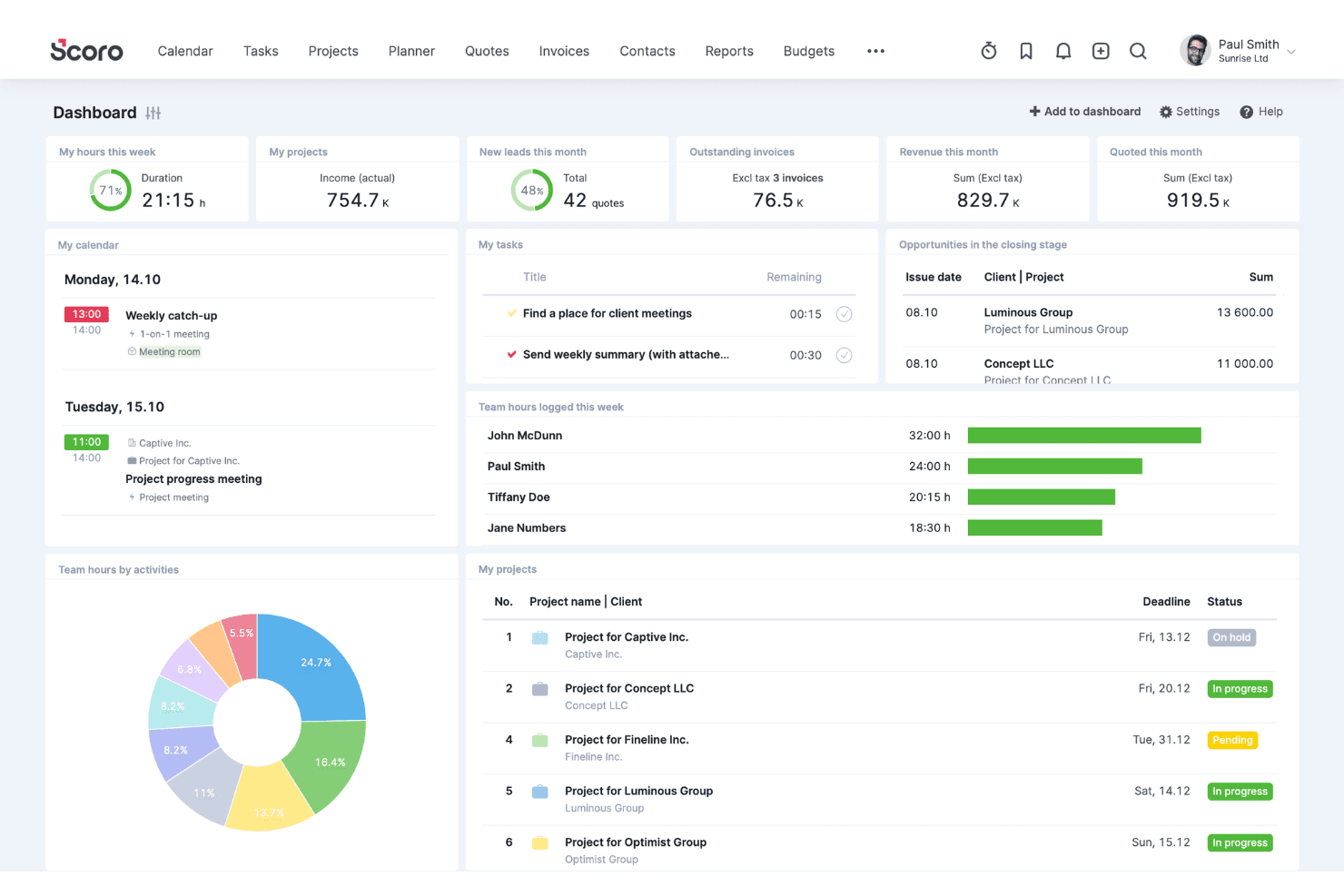
Scoro coordinates clients, sales, projects, resources, time, and billing. Scoro is a professional services automation platform that combines time tracking, invoicing, project budgeting, and billing management—supporting hourly, fixed-fee, retainer, and capped T&M arrangements within a single system.
Who Is Scoro Best For?
Scoro is a strong fit for fractional CFOs, controllers, and advisory firm teams managing clients across hourly, retainer, and fixed-fee billing arrangements simultaneously.
Why I Picked Scoro
I've included Scoro in my top picks because it handles mixed billing models better than almost anything else I've seen: hourly, fixed-fee, retainer, capped T&M, and milestone billing can all run within a single project without workarounds. What I find most valuable is how time entries flow directly into invoices at the correct rate, whether that's a role-based rate for one client or a flat retainer for another, without any manual re-entry between systems.
Scoro Key Features
- Timesheet approval workflows: Managers can review and approve submitted timesheets before hours flow into invoices, with automated reminders for unsubmitted entries covering up to the past eight weeks.
- Quote Estimation Matrix: Build proposals broken down by role, deliverable, and effort—with cost and margin visibility—before carrying those terms directly into project budgets and billing.
- Utilization dashboards: Real-time reports show billable versus non-billable hours and team productivity trends, helping you spot overservicing and manage capacity.
- Two-way accounting sync: Scoro connects bidirectionally with QuickBooks Online, Xero, Sage Intacct, and Exact Online to keep project financials and accounting records aligned without manual re-entry.
Scoro Integrations
Scoro offers native integrations with QuickBooks Online, Xero, Sage Intacct, Exact Online, and Stripe. It also connects with Salesforce, Google Calendar, Microsoft 365, Slack, and Jira, with a REST API, marketplace integrations, and Zapier support.
Pros and Cons
Pros:
- Direct time entry to invoice workflow
- Real-time project profitability tracking dashboards
- Handles mixed billing models in one project
Cons:
- No passive or automated time capture
- No client self-service or payment portal
 Best for real-time profitability tracking
- 14-day free trial
- From $10/user/month
Visit WebsiteCustomer Rating:4.6/5
Productive connects time tracking with real-time profitability insights to support more accurate invoicing. In the fast-paced world of business, Productive emerges as a versatile solution tailored for agencies, consultancies, and service-oriented businesses seeking to optimize their time tracking and invoicing processes. If you are looking to enhance operational efficiency and profitability, Productive offers real-time insights and centralized communication, addressing the critical need for seamless project and financial management. With its focus on industries like IT services, architecture, and accounting, Productive is designed to help you streamline operations and make informed decisions with confidence.
Why I Picked Productive
I picked Productive for its targeted approach to solving the intricate challenges of time tracking and invoicing. The platform stands out with its real-time profitability tracking, allowing you to monitor costs, revenue, and margins. Additionally, its invoicing features are tailored for multi-currency support and automated reminders for late payments, addressing the common need for efficient financial management. These features, combined with its seamless integration with accounting tools like Xero and QuickBooks, make Productive an ideal choice for businesses looking to simplify their billing and financial processes.
Productive Key Features
In addition to its standout invoicing capabilities, I also found several other features that enhance its utility as a time tracking and invoicing tool.
- Resource Planning: This feature helps you allocate resources effectively to avoid bottlenecks and optimize team schedules.
- Project Management: Track project progress and coordinate tasks seamlessly with built-in project management tools.
- Budgeting: Gain insights into your financial health with budgeting tools that allow you to plan and forecast with precision.
- Reporting: Access tailored reports for better visibility into business performance and profitability insights.
Productive Integrations
Integrations include Xero, Slack, QuickBooks, Google Calendar, Jira, Asana, Trello, Microsoft Teams, Dropbox, and HubSpot. An API is available for custom integrations.
Pros and Cons
Pros:
- Integrated time and billing
- Multi-currency invoicing support
- Real-time profitability visibility
Cons:
- Learning curve for small teams
- No free plan available
Learn more about Productive: Best for visual labor cost reports
- Free plan available; 30-day free trial; Free demo available
- From $9/user/month
Visit WebsiteCustomer Rating:4.7/5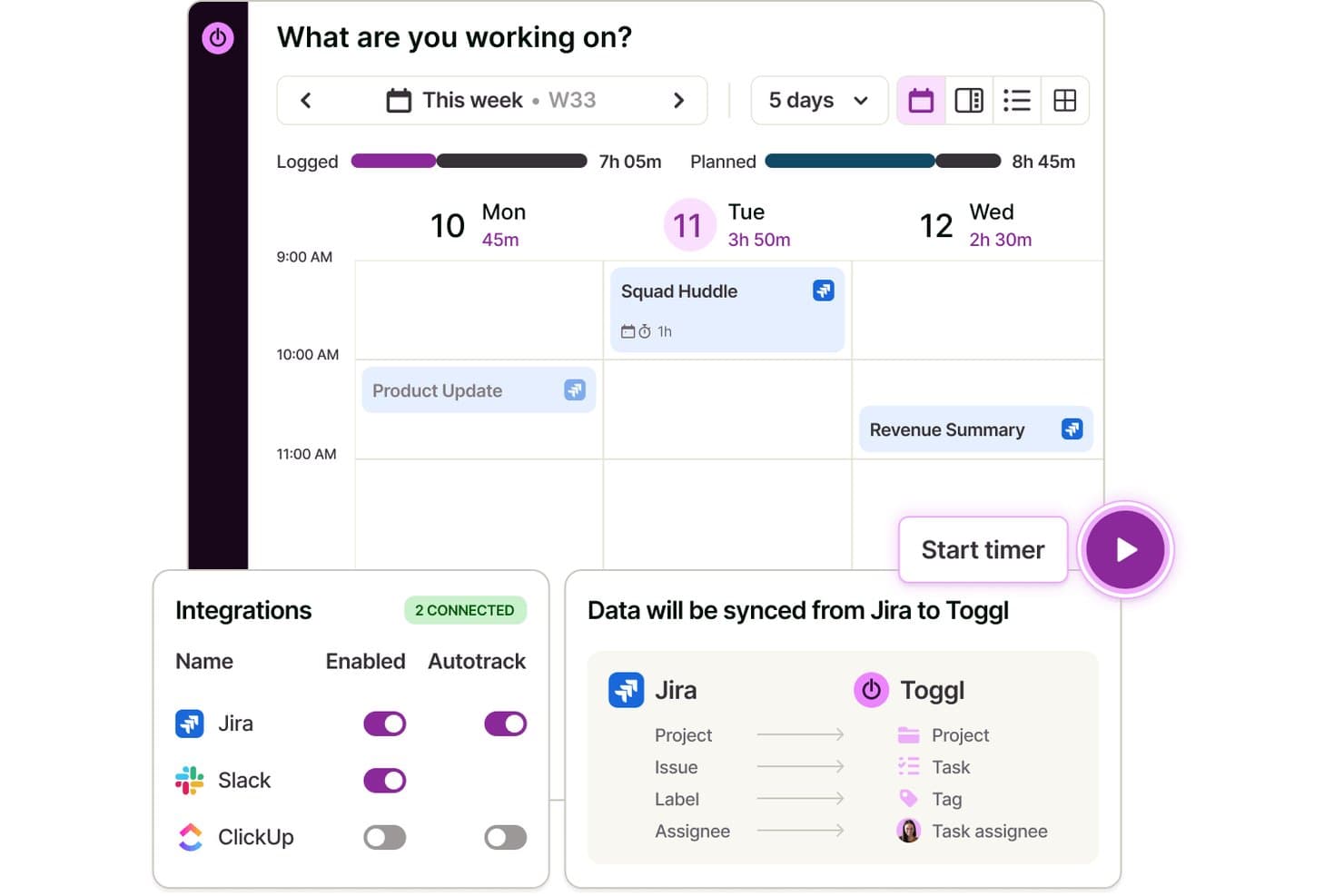
Toggl syncs Jira data automatically to track time on tasks. Toggl is a time tracking, capacity planning, and invoicing tool that lets you capture billable hours across clients and projects, assign billing rates, manage tasks visually, and analyze labor costs and team profitability.
Who Is Toggl Best For?
Toggl suits teams and freelancers who need a straightforward way to track billable hours, manage tasks and projects, and understand where project time and money are going.
Why I Picked Toggl
I picked Toggl as one of the best because its Premium reporting suite gives you a genuinely visual breakdown of where labor costs are landing across every project, client, and team member. I particularly like assigning a cost rate per team member and then viewing that data sliced in a pivot table or grouped bar chart, so I can immediately spot which engagements are eating into profit margins. You can also schedule these reports to send automatically as PDFs, which saves a real step when reporting on team utilization each month.
Toggl Key Features
- Project and client management: Organize tracked time by unlimited clients, projects, and sub-tasks with custom billing rates.
- Multi-platform time tracking: Track time on web, desktop, mobile, and browser extensions, all synced automatically.
- Billable rates and invoice creation: Apply billable or non-billable status to tracked hours and generate invoices from billable entries.
- Calendar integrations: Sync with Google and Outlook calendars to turn scheduled meetings into time entries.
Toggl Integrations
Toggl offers over 100 native integrations, including Jira, Asana, GitHub, Todoist, Google Calendar, Outlook, among others.
Pros and Cons
Pros:
- Auto-tracking time from desktop or browser
- Assign custom billing rates per project or client
- Visual labor cost and profitability reports
Cons:
- Recurring invoices and retainers not supported
- No built-in payment collection tools
Learn more about Toggl: Best for built-in billing & invoicing tools
- Free plan + 30-day free trial + free demo available
- From $5/user/month (billed annually)
Visit WebsiteCustomer Rating:4.6/5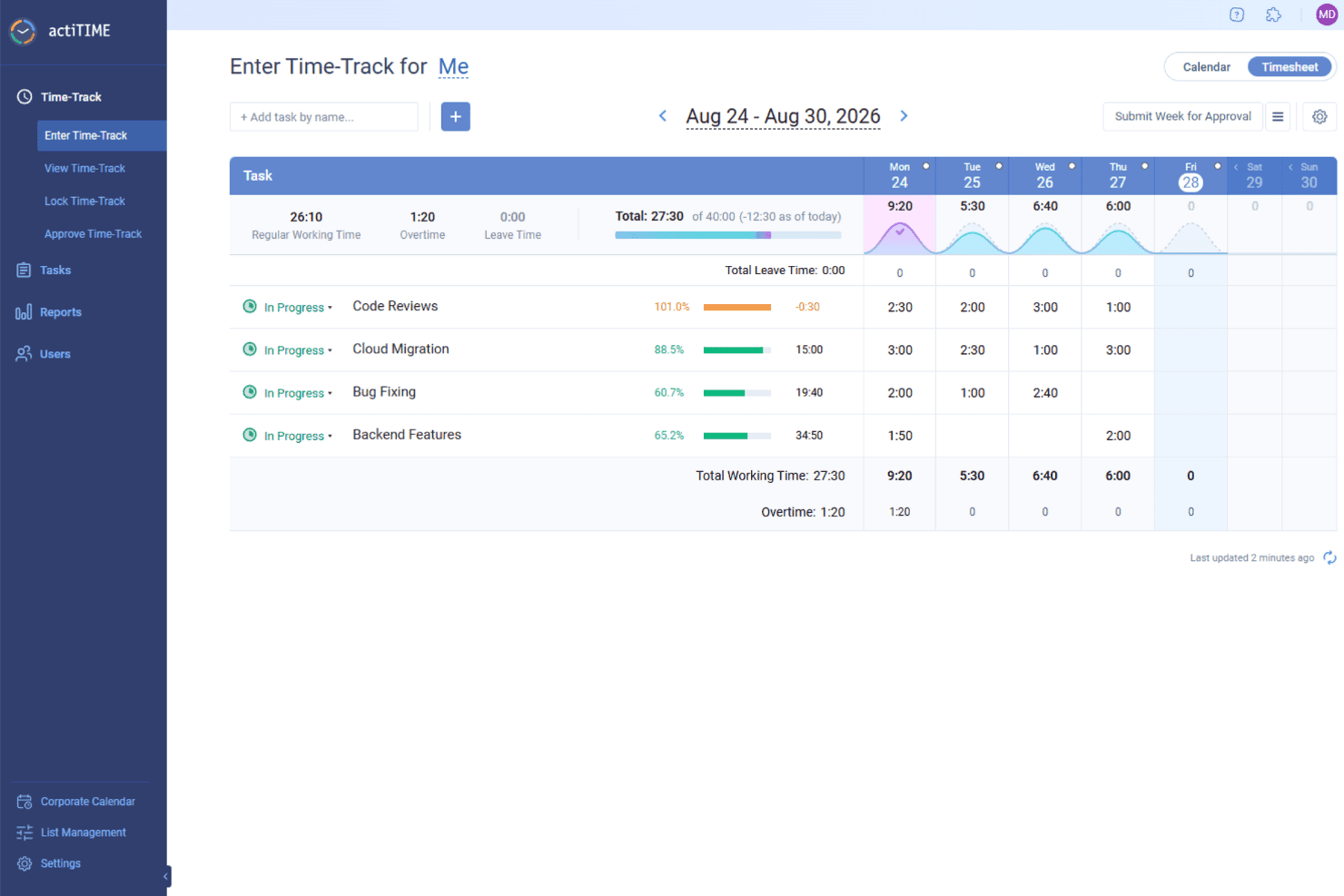
actiTIME tracks billable hours by task and project, helping teams calculate charges and generate client invoices. actiTIME is a versatile software that offers solutions for time tracking and invoicing, making it a valuable tool for businesses looking to manage their projects and finances. It's designed to cater to various industries, providing the necessary features to keep track of time and manage billing.
Why I Picked actiTIME: I picked actiTIME because it helps you track time accurately across tasks and projects, so you always know where your team’s efforts are going. You can log hours, manage workloads, and stay aligned with project timelines. The built-in billing and invoicing tools also make it easier to handle client payments and reduce manual work. I also like that you can track budgets and project progress in real time, which helps you avoid overspending and keep things moving smoothly. Plus, the customizable workflows let you tailor the system to match how your team works best.
Standout Features & Integrations:
Features include performance analytics, which provides insights into productivity trends and project profitability, helping you understand where improvements can be made. The leave management feature offers customizable leave policies and automated PTO tracking, ensuring that team resources are managed effectively without manual intervention. Billing and cost analysis generate billing reports and calculate payroll, streamlining the financial aspects of your projects and ensuring that you can focus on the work that matters.
Integrations include QuickBooks and Zapier.
Pros and Cons
Pros:
- Simple manual time entries
- Easy project setup
- Customizable billing rates
Cons:
- Limited advanced features
- Basic user interface
Learn more about actiTIME: Best for customizable time-to-invoice tracking
- Free plan + 7-day free trial available
- From $4.99/user/month
Visit WebsiteCustomer Rating:4.8/5
Clockify offers unlimited time tracking with easy invoicing for teams. Clockify is a time tracking software that caters to businesses of all sizes, offering features that help manage time and billing. It allows teams to track work hours (billable and non-billable hours), manage projects, and generate detailed reports.
Why I picked Clockify: I selected Clockify because it simplifies your end-to-end billing pipeline by turning logged project hours into custom, itemized invoices. You can configure billable rates by role, client, or specific task, and enforce timesheet approvals before invoices are issued. This eliminates discrepancies between logged work and client billing, protecting your profit margins while saving your finance team hours of manual reconciliation.
Standout features & integrations:
Features include a visual timesheet that helps you see where time is going. The project dashboard gives you an overview of your team's activities and progress, while its customizable reports let you analyze data to improve productivity.
Integrations include Asana, Trello, Slack, Jira, monday.com, QuickBooks, Notion, Microsoft Teams, Todoist, and Google Calendar.
Pros and Cons
Pros:
- Customizable reports for insights
- Flexible for team growth
- Detailed project dashboard
Cons:
- Limited offline capabilities
- Learning curve for new users
Learn more about Clockify: Best for automatic time tracking
- 14-day free trial + free plan + free demo available
- From $3.99/user/month (billed annually)
Visit WebsiteCustomer Rating:4.7/5
TimeCamp automates time tracking with one-click invoicing and analytics. TimeCamp is a time tracking and invoicing software aimed at freelancers and small businesses. It automates time tracking and helps manage billing, making it easier to keep track of work hours and invoices.
Why I picked TimeCamp: TimeCamp offers automatic time tracking, which minimizes manual input and saves you time. The platform’s main features allows you to track time spent on different tasks without having to start or stop the timer manually. It also generates detailed reports, providing insights into productivity and time usage. Plus, TimeCamp’s invoicing capabilities help you convert tracked hours into invoices effortlessly.
Standout features & integrations:
Features include a graphical timesheet that provides a visual overview of your work hours. The attendance tracking feature helps you monitor team presence and punctuality. TimeCamp also offers project budgeting, allowing you to keep track of costs and ensure projects stay within budget.
Integrations include Trello, Asana, Slack, QuickBooks, Xero, monday.com, Jira, GitHub, Evernote, and Google Calendar.
Pros and Cons
Pros:
- Attendance tracking for team monitoring
- Detailed productivity reports available
- Invoicing capabilities for tracked hours
Cons:
- Initial setup can be complex
- Occasional performance lags
Learn more about TimeCamp:

Karbon simplifies client work with collaborative time tracking and billing. Karbon is a practice management software designed for accounting firms and professional service teams. It helps manage workflows, tasks, and improve collaboration among team members.
Why I picked Karbon: Karbon is best for accounting firms offering features like email integration and task management. The email integration option allows you to manage client communications directly within the platform, which is important for maintaining organized correspondence. Additionally, its task management feature helps you assign and track tasks efficiently across your team.
Standout features & integrations:
Features include workflow automation, which reduces manual work and increases efficiency. The time tracking feature helps you monitor billable hours accurately. Karbon also offers detailed analytics, providing insights into team performance and project progress.
Integrations include QuickBooks Online, Xero, Slack, Microsoft 365, Google Workspace, Outlook, Gmail, Zapier, Practice Ignition, and TSheets.
Pros and Cons
Pros:
- Email integration for client communication
- Centralized platform for document sharing
- Task management for efficient workflow
Cons:
- Complex initial setup process
- Mobile app lacks full functionality
Learn more about Karbon: Best for detailed billing reports
- Free plan available + 14-day free trial
- From $5.83/user/month (billed annually)
Visit WebsiteCustomer Rating:4.5/5
TMetric tracks billable hours with project-based invoicing and reporting. TMetric is a time tracking and billing software designed for freelancers and small to medium-sized businesses. It helps users track time, manage tasks, and generate detailed billing reports.
Why I picked TMetric: TMetric offers detailed billing reports, which are essential for accurate invoicing and financial management. The software’s time tracking feature allows you to log hours with precision, ensuring you bill clients accurately. It also provides project management capabilities, helping you keep tasks organized and on track.
Standout features & integrations:
Features include manual time entry, which allows you to add time entries for past work. The budgeting feature helps you set financial limits for projects to avoid overspending. TMetric also offers activity tracking, providing insights into how time is spent on tasks.
Integrations include Asana, Trello, Jira, Slack, QuickBooks, GitHub, Bitbucket, Freshdesk, Microsoft Outlook, and Google Calendar.
Pros and Cons
Pros:
- Detailed billing reports for accurate invoicing
- Manual time entry for flexibility
- Budgeting feature for project limits
Cons:
- Initial setup can be complex
- Learning curve for new users
Learn more about TMetric: 10Best for small business accounting
Xero
- Not available
- From $27/month
Visit WebsiteCustomer Rating:4.4/5
Xero syncs accounting with invoicing and time tracking for smooth billing. Xero is an accounting software designed for small businesses and sole traders. It handles bookkeeping, invoicing, and financial management, making it a valuable tool for those needing efficient accounting solutions.
Why I picked Xero: Xero’s particularly suited for small business accounting, offering features like automated bookkeeping and smart data insights. The software provides secure cloud storage, which is essential for businesses looking to protect their financial data. It also includes tools tailored to industries like construction and retail, giving you flexibility in managing your finances.
Standout features & integrations:
Features include automated bookkeeping, which saves you time by handling routine tasks. Xero’s smart data insights help you make financial decisions, while its secure cloud storage ensures your data is protected and accessible when you need it.
Integrations include Shopify, HubSpot, Square, Stripe, PayPal, Gusto, Mailchimp, Vend, WorkflowMax, and Expensify.
Pros and Cons
Pros:
- Smart insights for financial decisions
- Secure cloud storage for data protection
- Onboarding support and expert advisors
Cons:
- Limited customization options
- Learning curve for new users
Learn more about Xero:
Annen programvare for tidsregistrering og fakturering
Her er noen flere alternativer for tidsregistrering og fakturering som ikke kom med på kortlisten min, men som likevel er verdt å se nærmere på:
- 11FunctionFoxBest for creative teams
- 12Zoho InvoiceBest for invoicing automation
- 13AppolyeBest for remote team tracking
- 14SynerionBest for workforce management
- 15InsightfulBest for automatic time mapping
- 16MonitaskBest for online timesheets
- 17PaymoBest for project management integration
- 18HubstaffBest for custom invoicing
- 19IntelogosBest with AI-driven workforce analytics
- 20RipplingBest for employee management
- 21QuickBooks OnlineBest for accounting integration
- 22Deltek Replicon TimeBest for enterprise time tracking
- 23HarvestBest for project time tracking
- 24ClioBest for legal practice management
- 25TeamworkBest for team collaboration
- 26KeeperBest for secure password protection
How I Evaluate Time Tracking and Invoicing Software
I evaluate tools on two layers: the baseline capabilities—billable time capture, invoicing, and AR tracking—every tool must have, and the differentiators that make one platform a better fit than another.
Core Functionality (Table Stakes For This List)
When I'm selecting tools for my list, I rank each one on a scale from 0 (does not offer the functionality) to 5 (excels in this area) for each core functionality listed below. Then, I calculate the tool's total score into a percentage. Each tool needs to achieve a minimum total score of 65% to be considered for inclusion.
- Billable Time Tracking: I look for timers and manual entry options that let you tag hours as billable to a specific client or engagement, like logging advisory work separately from tax prep for the same client.
- Invoice Generation: Each tool should convert approved time entries and expenses into customizable invoices with tax handling, so a bookkeeper can bill monthly hours without re-keying data.
- Client & Project Management: I check whether you can set up multiple clients with distinct billing rates per project, staff member, or service type, since most firms juggle varied rate structures.
- Online Payments & AR Tracking: Payment collection matters, so I evaluate whether a tool supports card and ACH payments, tracks invoice status, and provides AR aging views to flag overdue balances.
- Recurring & Retainer Billing: For firms on monthly retainers or subscription engagements, I look at how each platform handles automated recurring invoices and retainer balance drawdowns.
- Accounting & Financial Reporting: Strong tools sync with platforms like QuickBooks or Xero and offer reports on utilization, revenue, and AR aging that a fractional CFO can actually use during a close cycle.
Once I have a list of tools that meet the criteria, I consider what sets each platform apart.
Differentiating Factors (What Sets Vendors Apart)
Here's how I compare and contrast different vendors:
Standout Features
Time-to-billing automation is a big one. I look for tools that convert approved timesheets into draft invoices on a set cadence, so a firm billing 30 clients monthly doesn't create each invoice by hand. Profitability analytics also carry weight, especially dashboards that surface realization rates and write-offs by client or staff member. For firms that pass expenses through to clients, expense capture with mobile receipt scanning and markup that flows directly onto invoices cuts out a lot of manual re-entry.
Beyond Features
Accounting tech stack integrations matter a lot here. I check whether a tool offers two-way sync with platforms like QuickBooks or Xero, because one-way exports create reconciliation headaches during month-end close. Pricing structure also shapes fit—a solo bookkeeper and a 15-person CPA firm have very different needs, so I evaluate whether per-user pricing stays reasonable as you add seats. For tools handling sensitive client financials, I look at audit trails, role-based access controls, and PCI-DSS compliance for stored payment data.
Slik velger du programvare for tidsregistrering og fakturering
Det er lett å gå seg vill i lange funksjonslister og kompliserte prismodeller. For å hjelpe deg med å holde fokus mens du går gjennom din unike prosess for valg av programvare, har jeg laget en sjekkliste over faktorer du bør ha i mente:
| Faktor | Hva du bør vurdere |
| Skalerbarhet | Forsikre deg om at programvaren kan vokse sammen med virksomheten din. Se etter løsninger som kan håndtere et økende antall brukere og større datamengder uten redusert ytelse. |
| Integrasjoner | Kontroller om programvaren integreres med verktøyene du allerede bruker, for eksempel regnskapsprogramvare, apper for prosjektstyring og CRM-systemer, slik at arbeidsflyten blir smidigere. |
| Tilpasningsmuligheter | Vurder om du kan tilpasse programvaren til dine spesifikke behov. Tilpassbare maler og rapporter kan være spesielt nyttige for unike krav i virksomheten. |
| Brukervennlighet | Vurder om grensesnittet i programvaren er enkelt å bruke. Teamet ditt bør kunne navigere i løsningen uten omfattende opplæring, slik at dere sparer tid og reduserer frustrasjon. |
| Budsjett | Sammenlign prisplanene med budsjettet ditt. Se etter tydelige priser, og vurder kostnaden per bruker, særlig hvis du har et stort team. |
| Sikkerhetstiltak | Prioriter programvare med robuste sikkerhetsfunksjoner som datakryptering og tofaktorautentisering for å beskytte sensitiv informasjon. |
| Støttealternativer | Kontroller hvilke støttekanaler som er tilgjengelige, for eksempel direktechat eller telefonstøtte, slik at du kan få hjelp ved behov. |
| Rapporteringsmuligheter | Se etter programvare som tilbyr detaljerte rapporteringsfunksjoner, slik at du kan analysere tids- og faktureringsdata effektivt. |
Trender innen programvare for tidsregistrering og fakturering
I arbeidet med undersøkelsen min hentet jeg inn utallige produktoppdateringer, pressemeldinger og lanseringslogger fra ulike leverandører av programvare for tidsregistrering og fakturering. Her er noen av de fremvoksende trendene jeg følger med på:
- AI-drevne innsikter: Flere verktøy bruker AI til å analysere tids- og faktureringsdata, gi innsikt i produktivitetsmønstre og hjelpe team med å ta bedre beslutninger. Denne trenden er nyttig for virksomheter som ønsker å optimalisere driften og redusere ineffektivitet.
- Funksjoner for talekommandoer: Noe programvare lar nå brukere starte og stoppe tidtakere ved hjelp av talekommandoer. Dette er spesielt verdifullt for fagpersoner som må håndtere tidsregistrering mens de utfører flere oppgaver samtidig.
- Blokkjede for sikkerhet: Noen få leverandører utforsker blokkjedeteknologi for å styrke datasikkerheten og åpenheten i transaksjoner. Denne trenden er særlig relevant for virksomheter som håndterer sensitive økonomiske data og trenger et ekstra beskyttelseslag.
- Samarbeid i sanntid: Verktøy tilbyr i økende grad funksjoner som legger til rette for samarbeid i sanntid om fakturaer og prosjekter, slik at flere brukere kan jobbe sammen og gjøre oppdateringer umiddelbart.
- Abonnementsbaserte faktureringsmodeller: Leverandører innlemmer funksjoner for abonnementsfakturering, slik at virksomheter kan automatisere gjentakende fakturaer og administrere abonnementer effektivt. Denne trenden imøtekommer den økende etterspørselen etter abonnementsbaserte tjenester på tvers av ulike bransjer.
Hva er programvare for tidsregistrering og fakturering?
Programvare for tidsregistrering og fakturering er et verktøy som hjelper virksomheter med å administrere arbeidstimer og faktureringsprosesser effektivt. Fagpersoner som frilansere, eiere av små virksomheter og prosjektledere bruker vanligvis disse verktøyene for å sikre nøyaktig fakturering og effektiv tidsstyring.
Disse verktøyene omfatter vanligvis viktige funksjoner som automatisk tidsregistrering, faktureringsfunksjoner og samarbeid i sanntid for å støtte produktiviteten og hjelpe brukerne med å administrere arbeidet og økonomien effektivt. Alt i alt gir programvare for tidsregistrering og fakturering betydelig verdi ved å forenkle administrative oppgaver og forbedre den økonomiske nøyaktigheten.
Funksjoner
Her er de viktigste funksjonene all god programvare for tidsregistrering og fakturering bør ha:
- Automatisk tidsregistrering: Registrerer arbeidstimer uten manuell inntasting, noe som sikrer presis og effektiv fakturering og tidsstyring.
- Faktureringsfunksjoner: Oppretter fakturaer basert på registrert tid og effektiviserer faktureringsprosessen.
- Samarbeid i sanntid: Lar flere brukere jobbe sammen med fakturaer og prosjekter, noe som styrker samarbeidet og effektiviteten.
- AI-drevne innsikter: Analyserer data for å gi innsikt i produktivitetsmønstre og støtte beslutningstaking.
- Tilpassbare maler: Gjør det mulig å tilpasse fakturaer og rapporter slik at de samsvarer med virksomhetens merkevareprofil.
- Abonnementsfakturering: Automatiserer gjentakende fakturaer og forenkler administrasjonen av abonnementer for virksomheter.
- Registrering av inaktivitet: Varsler brukerne når tidsregistreringen er inaktiv, slik at nøyaktige tidslogger sikres.
- Funksjoner for talekommandoer: Tilbyr håndfri tidsstyring, noe som er nyttig for fagpersoner som utfører flere oppgaver samtidig.
- Sikkerhetstiltak: Beskytter sensitive data med kryptering og tilgangskontroller, slik at informasjonen holdes sikker.
Fordeler
Implementering av programvare for tidsregistrering og fakturering gir flere fordeler for teamet og virksomheten din. Her er noen av fordelene du kan se frem til:
- Nøyaktig fakturering: Automatisk tidsregistrering og faktureringsfunksjoner sikrer at alle fakturerbare timer blir tatt med, noe som reduserer feil i kundefaktureringen.
- Økt produktivitet: AI-drevne innsikter og samarbeid i sanntid hjelper team med å identifisere ineffektivitet og samarbeide mer effektivt.
- Tidsbesparelser: Funksjoner som talekommandoer og registrering av inaktivitet reduserer manuelle oppgaver og frigjør tid til viktigere arbeid.
- Bedre økonomistyring: Verktøy for prosjektbudsjettering holder oversikt over utgifter, bidrar til å forhindre overforbruk og optimaliserer ressursallokering og lønnsomhet.
- Forbedret sikkerhet: Sikkerhetstiltak beskytter sensitive data og sikrer samsvar med personvernstandarder.
- Effektiv abonnementsadministrasjon: Abonnementsfakturering automatiserer gjentakende fakturaer og gjør det enklere å administrere løpende kunderelasjoner.
- Tilpasset merkevareprofil: Tilpassbare maler lar deg personliggjøre og opprette fakturaer og rapporter, slik at en konsekvent merkevareprofil opprettholdes.
Kostnader og priser
Valg av programvare for tidsregistrering og fakturering krever en forståelse av de ulike prismodellene og planene som er tilgjengelige, fra gratisalternativer til tilpassede kostnader. Kostnadene varierer basert på funksjoner, teamstørrelse, tillegg og mer. Tabellen nedenfor oppsummerer vanlige planer, gjennomsnittsprisene deres og typiske funksjoner som er inkludert i programvareløsninger for tidsregistrering og fakturering:
Sammenligningstabell for programvare for tidsregistrering og fakturering
| Plantype | Gjennomsnittspris | Vanlige funksjoner |
| Gratisplan | $0 | Grunnleggende tidsregistrering, faktureringsfunksjoner og begrensede rapporter. |
| Personlig plan | $5-$25 per bruker per måned | Tidsregistrering, fakturering, prosjektstyring og grunnleggende rapportering. |
| Bedriftsplan | $25-$50 per bruker per måned | Avansert rapportering, integrasjoner, teamsamarbeid og prosjektbudsjettering. |
| Virksomhetsplan | $50-$100+ per bruker per måned | Tilpassbare funksjoner, dedikert kundestøtte, forbedret sikkerhet og skalerbarhet. |
Vanlige spørsmål
Her er noen svar på vanlige spørsmål om programvare for tidsregistrering og fakturering:
Hva er den beste tidsregistreringen for fakturering?
Den beste programvaren for tidsregistrering til fakturering avhenger av dine spesifikke behov, men populære alternativer som Clockify tilbyr omfattende funksjoner for registrering og fakturering av fakturerbare timer. Se etter verktøy som automatiserer fakturaer og integreres med de eksisterende systemene dine, slik at prosessen blir enklere.
Hva er fordelene med tidsregistrering i sanntid?
Tidsregistrering i sanntid gir oppdatert informasjon om fremdriften i arbeidet og hjelper deg med å styre prosjekter mer effektivt. Den gjør det mulig å foreta justeringer i tide og øker produktiviteten ved å gi nøyaktig innsikt i hvordan ressursene brukes. Denne funksjonen er nyttig for team som ønsker å optimalisere arbeidsflyten.
Hva er den primære metoden for å registrere tiden du bruker på å levere tjenester til en kunde?
Timelister brukes vanligvis til å registrere tiden som brukes på kundetjenester, særlig i tjenestebaserte bransjer. De gir en detaljert oversikt over aktivitetene og sikrer korrekt fakturering basert på det faktiske arbeidet som er utført. Denne metoden bidrar til å opprettholde åpenhet overfor kundene og støtter presis fakturering.
Hvordan kan tidsregistrering forbedre produktiviteten?
Tidsregistrering bidrar til å identifisere hvor tiden brukes, og fremhever områder med ineffektivitet. Ved å analysere disse dataene kan du ta informerte beslutninger for å optimalisere arbeidsflyter og fordele ressursene bedre. Dette fører til økt produktivitet og mer effektiv prosjektstyring for teamet ditt.