

Lønnsprogramvare automatiserer lønnsutbetalinger, skatteberegninger, innrapportering og betalingsbehandling, samtidig som lønnsdataene holdes koblet til regnskapsarbeidsflytene dine. Den beste lønnsprogramvaren for virksomheten din avhenger av faktorer som selskapsstørrelse, hvor de ansatte befinner seg, krav til etterlevelse og systemene du allerede bruker.
Små bedrifter kan prioritere automatisert skatterapportering og enkle lønnskjøringer, mens større økonomiteam kan ha behov for lønn på tvers av flere delstater eller land, integrasjoner med hovedbok og støtte for flere juridiske enheter. Jeg sammenlignet de ledende lønnsplattformene ut fra disse behovene for å hjelpe deg med å finne den løsningen som passer best.
Hvorfor du kan stole på våre programvareanbefalinger
6,700+
Reviews
20
Industry experts
16+
Evaluation factors
14
Years
Teamet vårt har testet og anmeldt programvare siden 2012. Vi er selv økonomiledere, så vi vet hvor vanskelig og hvor viktig det er å velge riktig programvare.
I denne guiden har vi vurdert verktøyene gjennom praktisk testing og uavhengig research og gitt dem poeng ut fra våre utvelgelseskriterier.
Anmeldelsene våre bygger på vår egen redaksjonelle vurdering. De er ikke et salgsargument.
Sammenligningstabell: Lønnsprogramvare
Denne sammenligningstabellen oppsummerer prisdetaljene for mine beste utvalgte lønnssystemer.
| Tool | Best For | Trial Info | Price | ||
|---|---|---|---|---|---|
| 1 | Best for time-tracking-linked payroll at low cost | 30-day free trial + free demo available | From $80/month | Website | |
| 2 | Best for multi-country payroll and ERP sync | Free demo available | From $29/user/month | Website | |
| 3 | Best for multi-EIN with NetSuite or Sage Intacct | Free demo available | Pricing upon request | Website | |
| 4 | Best for multi-entity payroll at enterprise scale | Free demo available | Pricing upon request | Website | |
| 5 | Best for enterprise multi-entity payroll at scale | Free demo available | Pricing upon request | Website | |
| 6 | Best for multi-entity payroll and GL sync | Free demo available | From $8/user/month | Website | |
| 7 | Best for SMB payroll with tax penalty coverage | Free demo available | From $49/month | Website | |
| 8 | Best for QuickBooks-native payroll and tax filing | Not available | From $50 + $7/employee | Website | |
| 9 | Best for multi-state payroll with ERP sync | Free demo available | Pricing upon request | Website | |
| 10 | Best for mid-market multi-state tax compliance | Free demo available | Pricing upon request | Website |


Anmeldelser av lønnsprogramvare
Nedenfor finner du mine detaljerte sammendrag av den beste lønnsprogramvaren som kom med på kortlisten min. Anmeldelsene mine gir en grundig gjennomgang av funksjonene, de beste bruksområdene og integrasjonene til hver plattform, slik at du kan finne den som passer best for deg.
 Best for time-tracking-linked payroll at low cost
- 30-day free trial + free demo available
- From $80/month
Visit WebsiteCustomer Rating:4.5/5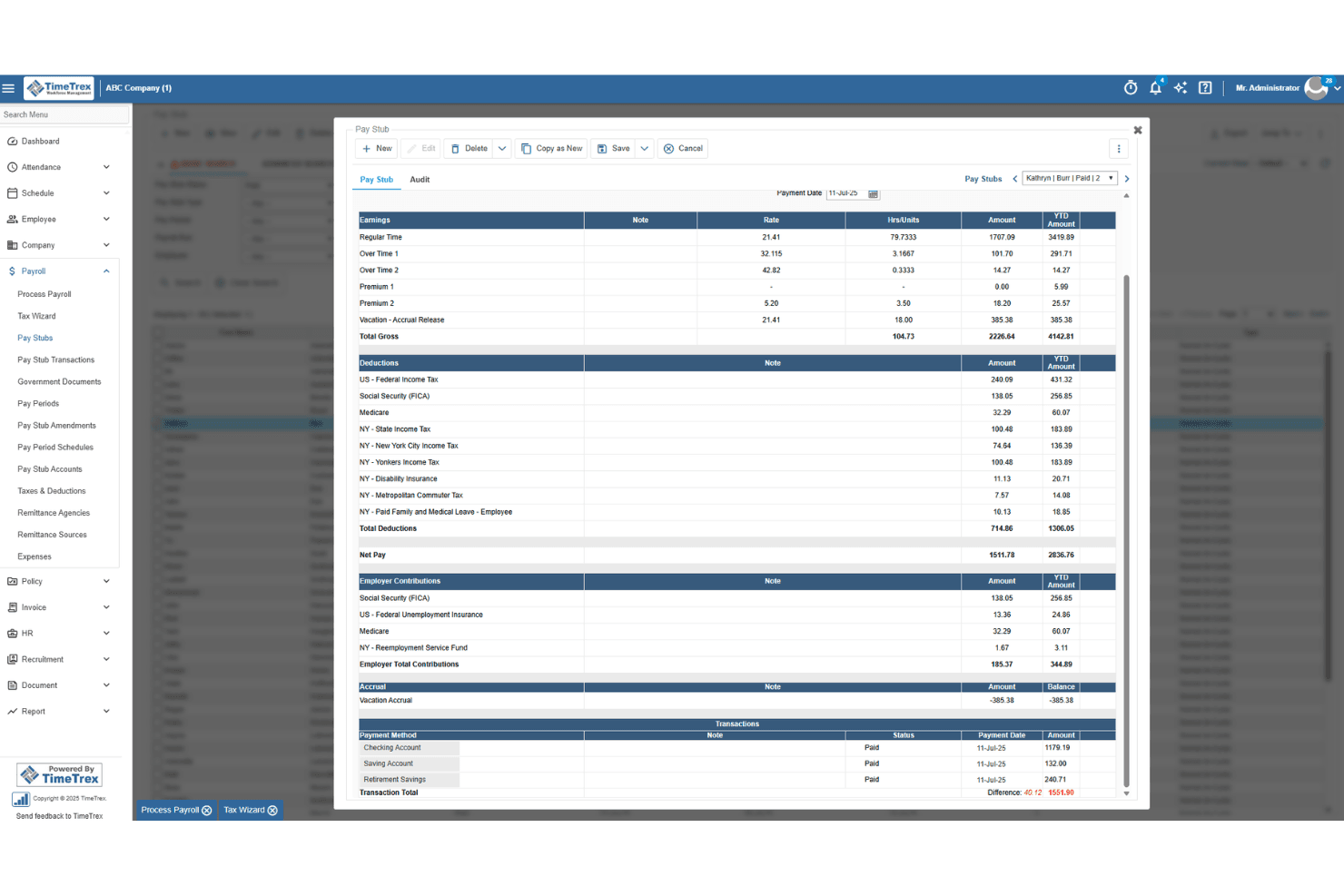
TimeTrex generates detailed pay stubs with earnings, deductions, and taxes. TimeTrex is a payroll and workforce management platform that bundles time and attendance tracking, employee scheduling, leave management, HR tools, and payroll processing in a single system.
Who Is TimeTrex Best For?
TimeTrex is a strong fit for small businesses that want time tracking and payroll managed in one place without paying for separate systems.
Why I Picked TimeTrex
I've included TimeTrex in my top picks because it connects time tracking directly to payroll, so the hours your team logs feed straight into pay calculations without manual re-entry. I particularly like the Payroll Processing Wizard, which walks you through timesheet verification, exception resolution, and pay-stub review before any transactions are processed. The deduction engine also handles benefits, garnishments, and accruals with configurable formulas, including 401(k) limits and loan paydowns, all at a starting price of $50/month.
TimeTrex Key Features
- Employee scheduling: AI-powered shift planning tools help managers build schedules around availability, skills, and demand while flagging overtime and labor-law conflicts.
- Leave and absence management: Centralizes time-off requests, balances, and scheduling impacts so payroll reflects accurate worked hours.
- Pay Stub Summary Report: Generates earnings, deductions, accruals, and net pay across a selected period, with grouping options by employee, department, branch, and pay period.
- Multi-entity payroll setup: Lets you configure payroll for one legal entity and copy it to similar entities, then adjust for differences across locations.
TimeTrex Integrations
TimeTrex offers native integrations with Intuit QuickBooks, Sage, ADP, Paychex, and Ceridian, plus IRS and Canada Revenue Agency connections. It also offers a REST API for custom integrations.
Pros and Cons
Pros:
- Reviewers praise responsive, patient support
- Reports expose labor-cost and attendance patterns
- Payroll hours feed directly into calculations
Cons:
- Setup and navigation can take time
- Employers handle tax filings themselves
Learn more about TimeTrex: Best for multi-country payroll and ERP sync
- Free demo available
- From $29/user/month
Visit WebsiteCustomer Rating:4.9/5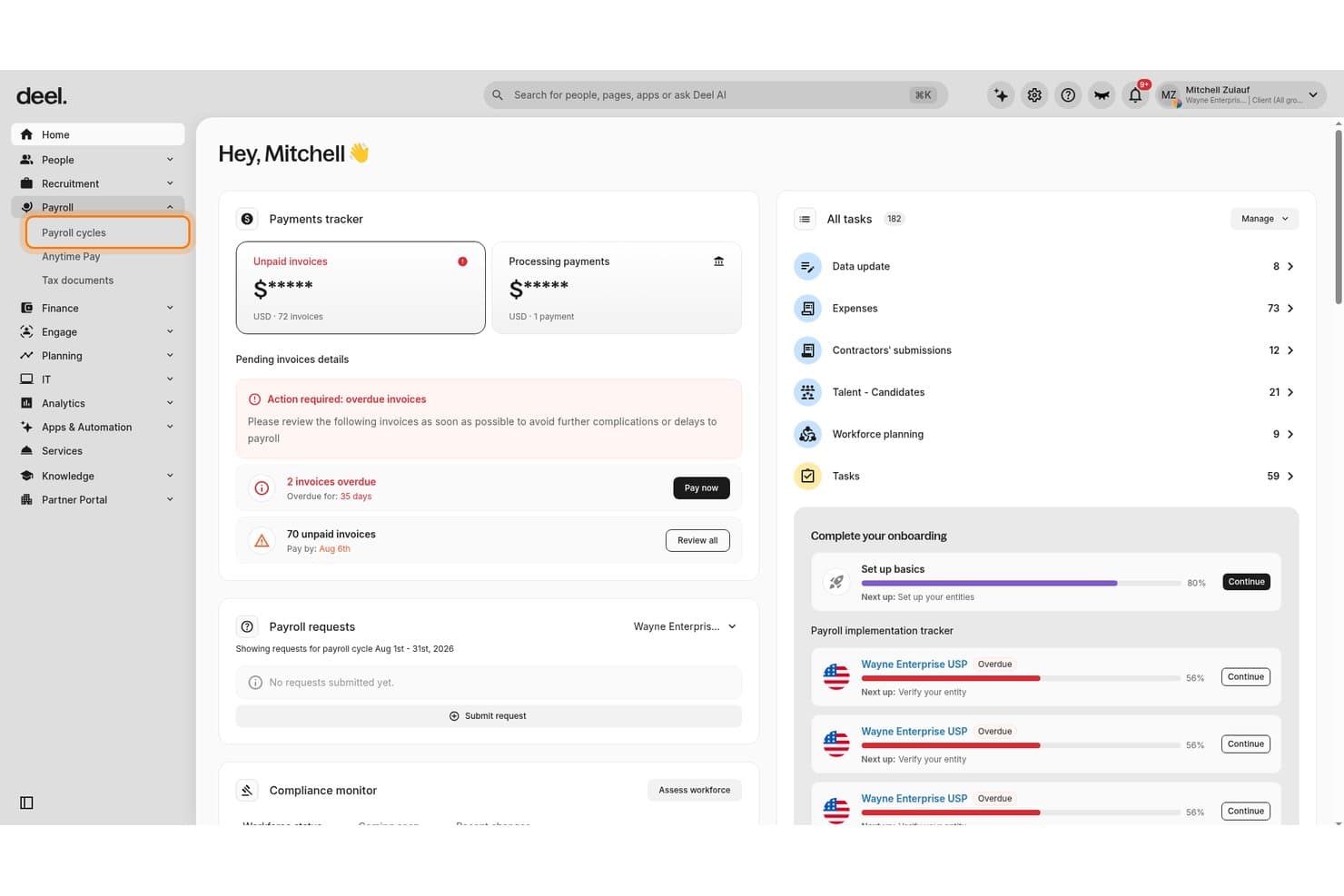
Deel Payroll centralizes payroll cycles, invoice tracking, and tasks for CFOs. Deel is a global payroll platform that handles multi-country payroll processing, contractor management, employer of record services, and ERP integrations across 150+ countries.
Who Is Deel Payroll Best For?
Deel Payroll is a strong fit for finance teams at mid-size to enterprise companies managing payroll across multiple countries or legal entities.
Why I Picked Deel Payroll
I picked Deel Payroll because it's built for payroll across borders and offers strong ERP sync capabilities. Deel's GL Sync pushes payroll journal entries directly into NetSuite, Sage, SAP, or Microsoft Dynamics. You can customize mapping by department, cost center, and location, which reduces manual work for multi-entity cost allocation. Additionally, its AI-powered anomaly detection flags missing data and jurisdiction-specific risks before you submit a payroll run.
Deel Payroll Key Features
- Multi-currency direct deposit: Pay workers in 120+ currencies across 150+ countries, funding payroll in one currency while distributing payments in local currencies.
- Off-cycle payroll runs: Process bonus payments, corrections, or last-minute pay runs at no additional cost, outside of the standard pay schedule.
- Worker classification tools: AI-powered misclassification risk assessment evaluates contractor vs. employee status using localized, jurisdiction-specific models.
- Unified worker management: Manage direct employees, EOR workers, and independent contractors within a single platform and shared data model.
Deel Payroll Integrations
Deel Payroll offers 68+ native integrations, including NetSuite (certified SuiteApp), QuickBooks, Xero, Sage, SAP, Microsoft Dynamics Finance, BambooHR, Workday, HiBob, and Expensify, with an open API available for custom integrations.
Pros and Cons
Pros:
- Unlimited off-cycle runs at no charge
- AI flags missing data before submission
- Handles payroll across 150+ countries
Cons:
- Not suitable for simple domestic payroll needs
- No employee-initiated earned wage access
Learn more about Deel Payroll: Best for multi-EIN with NetSuite or Sage Intacct
- Free demo available
- Pricing upon request
Visit WebsiteCustomer Rating:4.4/5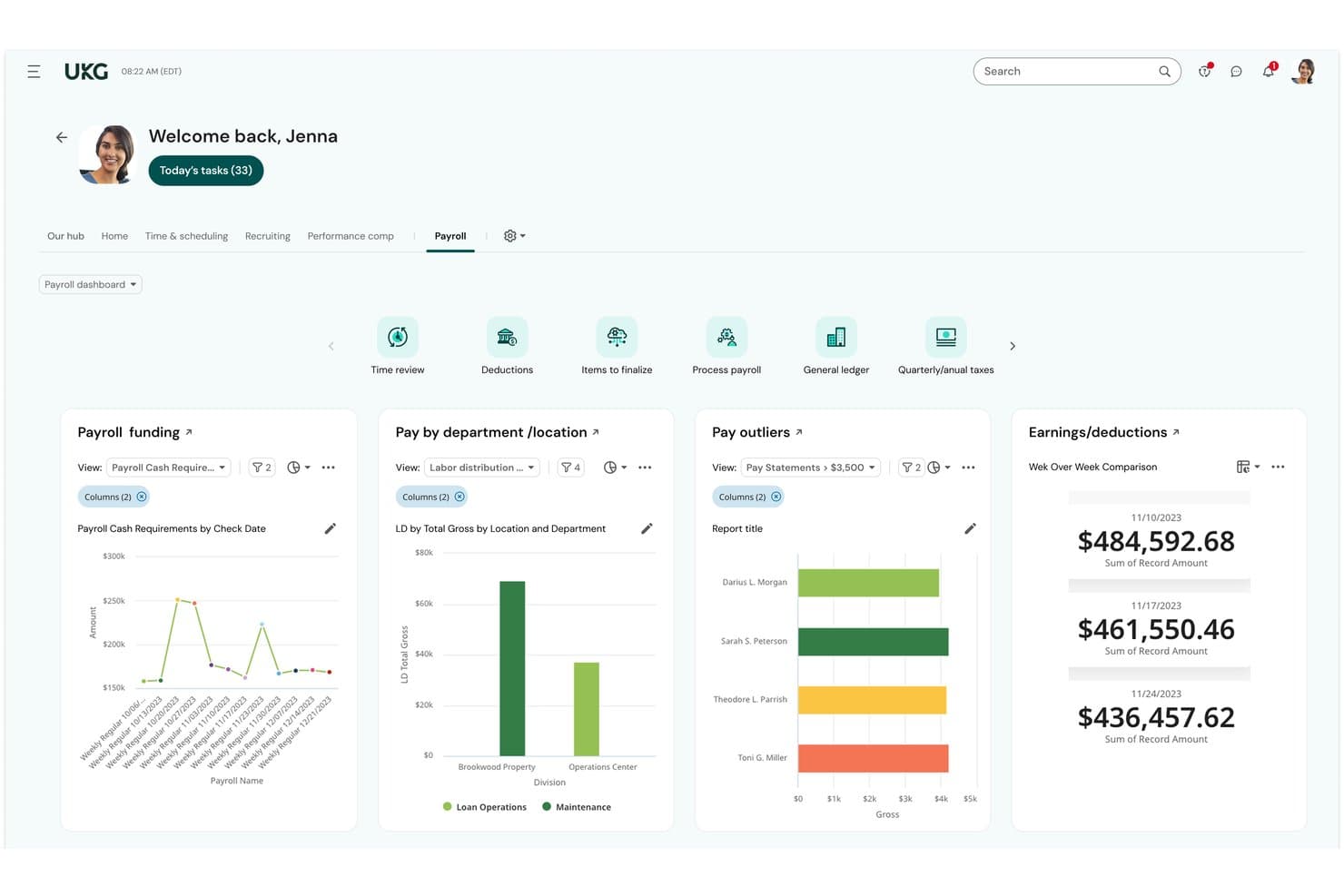
UKG Ready centralizes payroll funding, outliers, and earnings for CFOs. UKG Ready is an all-in-one HCM and payroll platform that handles payroll processing, tax filing, time tracking, benefits administration, and workforce scheduling in a single system with a unified employee record.
Who Is UKG Ready Best For?
UKG Ready is a strong fit for mid-market finance and HR teams managing multiple EINs who need payroll, time tracking, and benefits on one unified record—especially if NetSuite or Sage Intacct is already in the accounting stack.
Why I Picked UKG Ready
I've included UKG Ready because it handles multi-EIN payroll natively without workarounds. This makes it a strong fit for organizations running multiple legal entities. I also like that payroll calculations run continuously using a unified employee record. As a result, HR or timesheet changes are reflected before the pay run closes. Finally, native integrations with NetSuite and Sage Intacct move payroll journal entries directly into your accounting system without middleware.
UKG Ready Key Features
- Bryte AI anomaly detection: An AI layer that scans payroll data continuously and flags outlier variances, discrepancies, and compliance risks before you submit a pay run.
- UKG Wallet earned wage access: A built-in mobile banking app that lets employees access accrued wages before payday, alongside a VISA payroll card, bill pay, and savings tools.
- ACA compliance management: Automatically tracks measurement periods, populates 1094-C and 1095-C forms, and supports filing directly from within the platform.
- 500+ pre-built reports: A reporting library covering payroll, workforce, and HR analytics, with external benchmarking and configurable filters for finance and HR teams.
UKG Ready Integrations
UKG Ready offers native integrations with QuickBooks Online, Oracle NetSuite, Sage Intacct, Sage, Employee Navigator, Indeed, and TurboTax, plus 401(k) and TPA connections through its Payroll Integrations marketplace app. Additional connectivity is available through the UKG Marketplace and an open API for custom integrations, with middleware support via Workato, Celigo, and MindCloud.
Pros and Cons
Pros:
- AI flags payroll and compliance anomalies
- Earned wage access via built-in banking app
- Background payroll runs update with HR changes
Cons:
- Add-on fees for common payroll activities
- No tax penalty protection guarantee
Learn more about UKG Ready: Best for multi-entity payroll at enterprise scale
- Free demo available
- Pricing upon request
Visit WebsiteCustomer Rating:4.3/5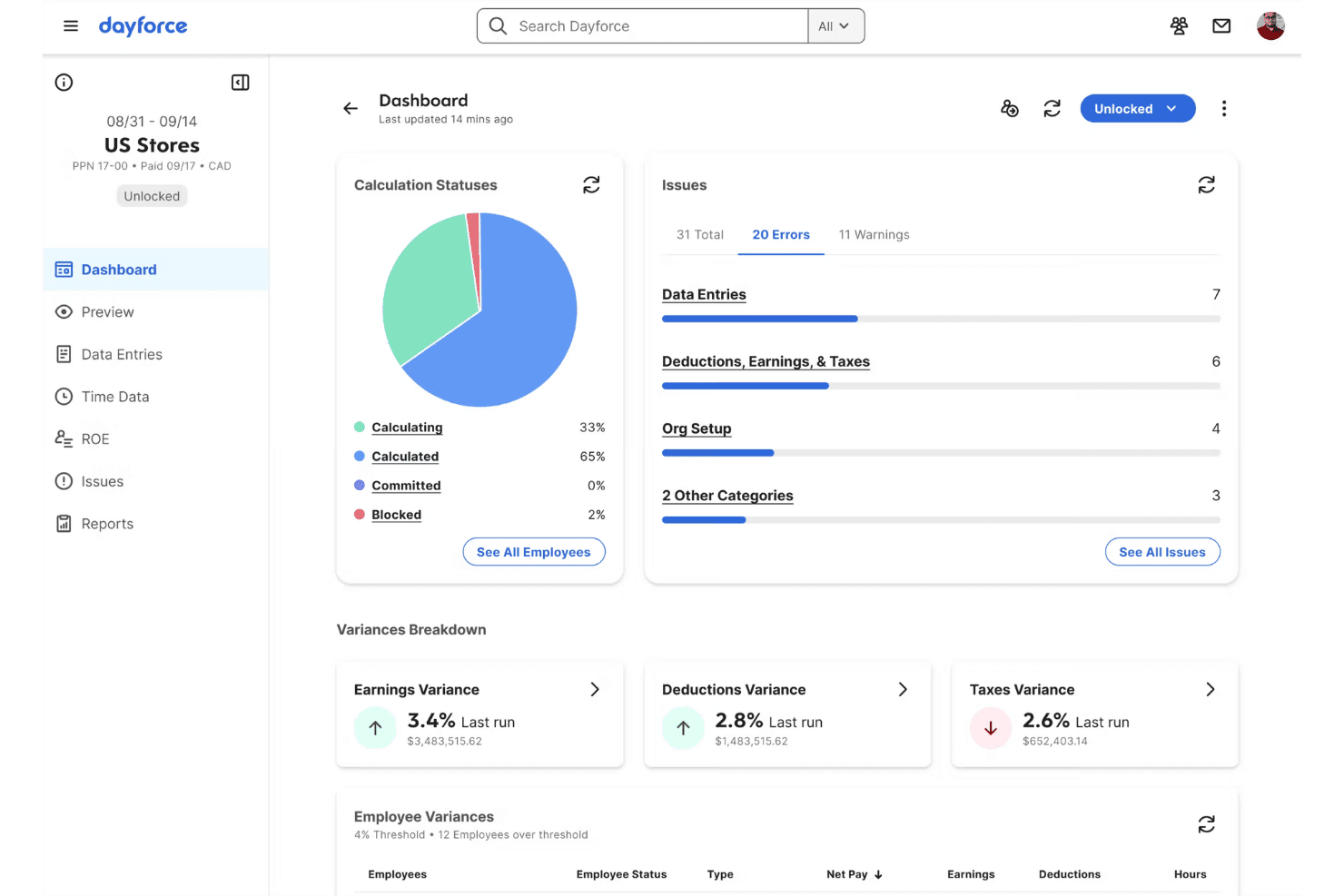
Dayforce surfaces payroll errors and variances on a unified dashboard. Dayforce is a payroll and HCM platform built on a single data model that handles payroll calculation, tax filing, time and attendance, benefits administration, and earned wage access across multi-entity and global organizations.
Who Is Dayforce Best For?
Dayforce is built for mid-market and enterprise organizations—typically 350 or more employees—running payroll across multiple entities, states, or countries on a single platform.
Why I Picked Dayforce
I've included Dayforce because its continuous calculation engine recalculates payroll in real time as time data is recorded. As a result, teams can catch errors before the end of a pay period. That matters for organizations running payroll across multiple entities, states, or countries. I also rate its single-data-model architecture highly. HR, time, benefits, and payroll share one record, which reduces reconciliation work across systems.
Dayforce Key Features
- Dayforce Wallet: A prepaid Mastercard that lets employees access up to 100% of their net earned pay before payday, with automatic tax and garnishment handling on every withdrawal.
- Managed payroll services: A fully outsourced payroll execution option where Dayforce's in-house experts handle tax filings, local compliance, and day-to-day payroll administration on your behalf.
- AI-powered anomaly detection: Dayforce Co-Pilot runs continuous payroll simulations to flag unusual pay variances, duplicate payments, or tax discrepancies before you submit a pay run.
- Multi-jurisdictional tax filing: Dayforce calculates, withholds, files, and remits payroll taxes across thousands of U.S. jurisdictions and 200+ countries, with funds held in an AAA-rated tax trust account.
Dayforce Integrations
Dayforce offers native integrations through the Dayforce Exchange marketplace, including NetSuite, Microsoft Dynamics 365, SAP SuccessFactors, WEX, ForUsAll, HireRight, Checkr, LinkedIn Learning, Culture Amp, and Microsoft Azure AD, with Dayforce Integration Studio and an open API available for custom integrations. Native connectors to QuickBooks, Xero, and Sage Intacct aren't documented, so those connections typically require middleware like Celigo.
Pros and Cons
Pros:
- Earned wage access features included for employees
- Global payroll coverage in over 200 countries
- Real-time payroll recalculation eliminates batch errors
Cons:
- Not usable for small or simple businesses
- No guaranteed coverage for tax filing errors
Learn more about Dayforce: Best for enterprise multi-entity payroll at scale
- Free demo available
- Pricing upon request
Visit WebsiteCustomer Rating:4.3/5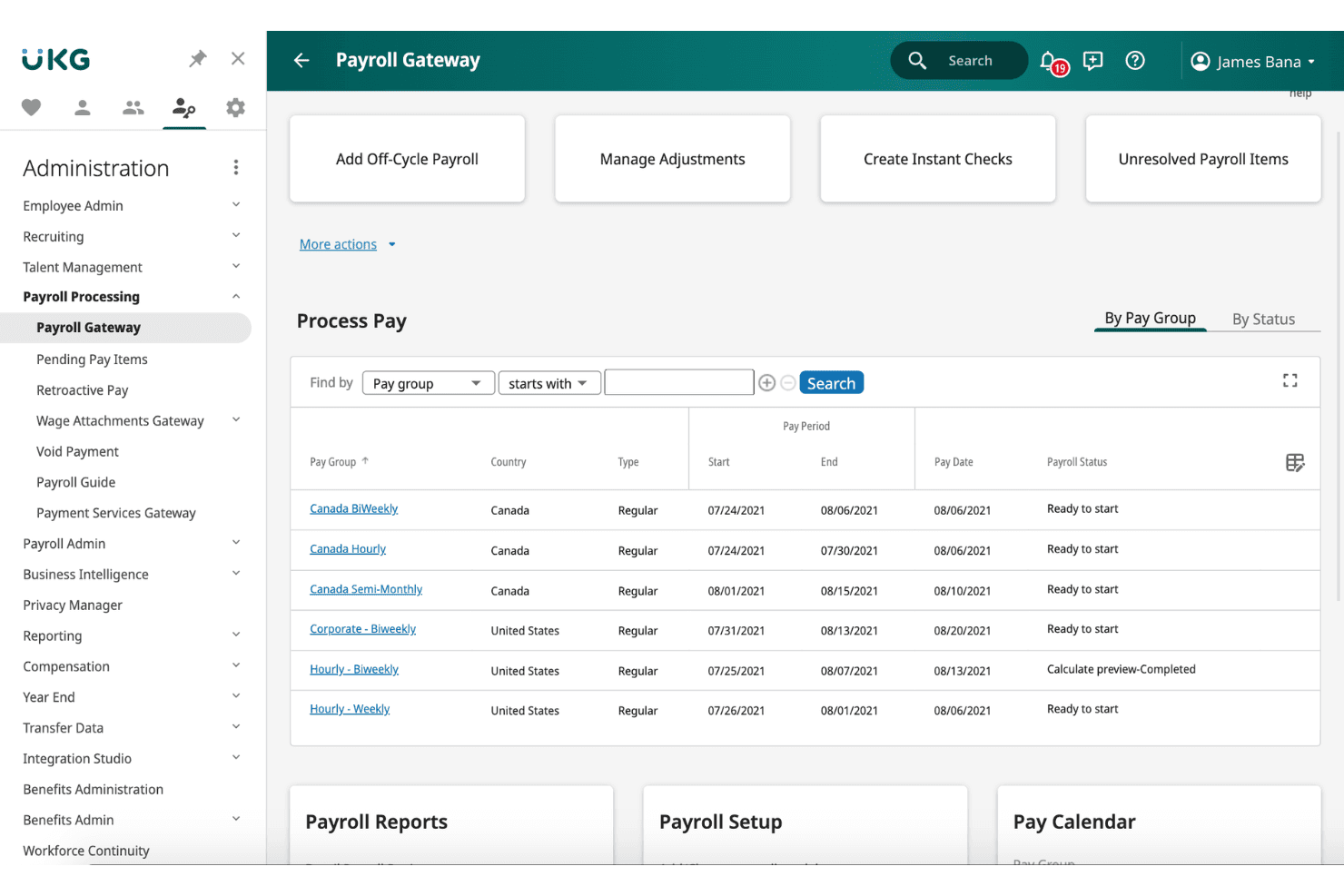
UKG Pro centralizes payroll processing across multiple pay groups and countries. UKG Pro is an enterprise HCM platform with a native payroll engine that handles multi-entity payroll, real-time gross-to-net calculations, tax filing, earned wage access, and built-in time and benefits administration.
Who Is UKG Pro Best For?
UKG Pro is built for mid-market and enterprise organizations with thousands of employees managing payroll across multiple entities, pay groups, or EINs.
Why I Picked UKG Pro
UKG Pro earns its spot on my shortlist because its paymaster interface handles multiple EINs and pay groups from a single screen, which is exactly what enterprise payroll teams need when running payroll across several legal entities simultaneously. I also rate its Bryte AI layer highly: it flags anomalies and payroll variances before submission, catching errors that would otherwise surface as amended returns or penalty filings. The real-time, continuous gross-to-net engine rounds this out, supporting retroactive pay, garnishments, and off-cycle runs without disrupting scheduled payroll.
UKG Pro Key Features
- UKG Wallet: A native earned wage access tool that lets employees draw on wages before payday via a mobile app, with a fee-free Visa payroll card, bill pay, and goal-based savings built in.
- Smart Tax Search: Automatically applies the correct tax jurisdiction based on each employee's work location, covering federal, state, and local tax calculations without manual lookups.
- Garnishment deduction wizard: A built-in tool that automates complex garnishment calculations and deductions directly within the payroll workflow.
- TurboTax W-2 integration: Employees can import their W-2 data directly from UKG Pro into TurboTax at tax time, without manual data entry.
UKG Pro Integrations
UKG Pro offers 550+ marketplace integrations, including native connectors with Oracle NetSuite, Sage Intacct, SAP, Workday, Microsoft Dynamics 365, QuickBooks, Employee Navigator, TurboTax, Okta, and DocuSign. A REST API is available for custom integrations.
Pros and Cons
Pros:
- Native earned wage access through UKG Wallet
- AI-powered payroll anomaly and variance detection
- Real-time gross-to-net calculations for payroll
Cons:
- Customer support inconsistencies reported by users
- No public or transparent pricing available
Learn more about UKG Pro: Best for multi-entity payroll and GL sync
- Free demo available
- From $8/user/month
Visit WebsiteCustomer Rating:4.9/5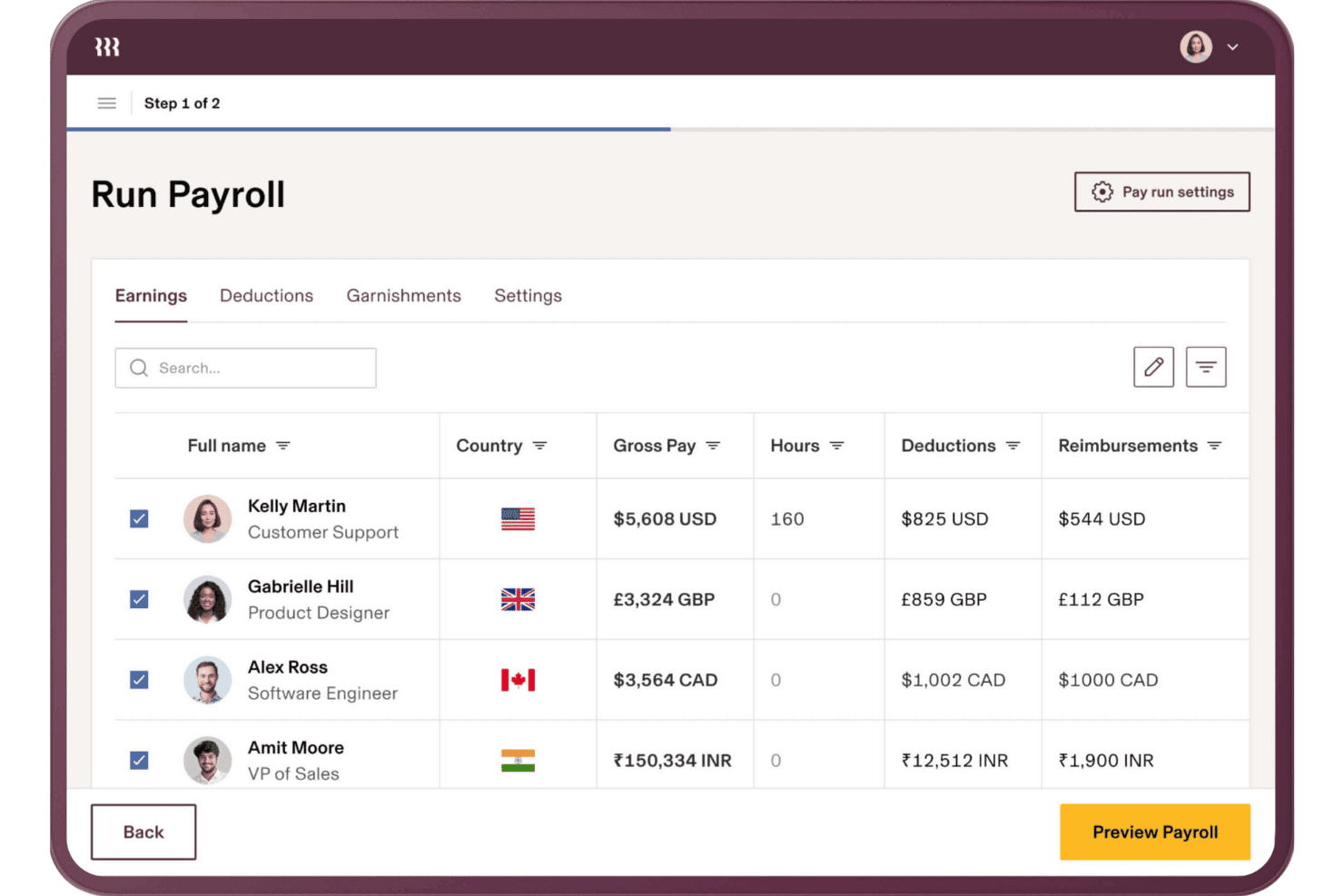
Rippling lets users run global payroll across multiple currencies at once. Rippling is a payroll and HR platform that handles multi-entity payroll processing, tax filing, benefits administration, time tracking, and accounting integrations across domestic and global workforces.
Who Is Rippling Best For?
Rippling is a strong fit for finance and HR teams at mid-market companies managing payroll across multiple entities, states, or countries from a single platform.
Why I Picked Rippling
Rippling earns its spot on my shortlist because of how well it handles multi-entity payroll and GL sync in one place. I like that it offers native, bi-directional integrations with NetSuite, Sage Intacct, QuickBooks, and Xero, with automated journal entries posted after each payroll run and customizable GL mapping by department, class, or location. Running payroll across multiple EINs without manually reconciling entries into your ERP is where Rippling genuinely pulls ahead.
Rippling Key Features
- Tax accuracy indemnification: Rippling covers IRS penalties and interest caused by filing errors made on the platform's end.
- Workflow Studio automation: A no-code workflow builder that lets admins create multi-step automations across payroll, HR, IT, and finance with custom triggers.
- Multi-currency global contractor payments: Rippling pays contractors in 185+ countries across 50+ currencies, with automatic invoice generation.
- AI anomaly detection: The platform flags payroll discrepancies—like duplicate punches or missed clock-outs—before each payroll run is submitted.
Rippling Integrations
Rippling offers 650+ marketplace integrations, including native bi-directional connections with QuickBooks Online, Xero, NetSuite, and Sage Intacct for automated journal entries and GL mapping. An open API supports custom integrations.
Pros and Cons
Pros:
- Multi-entity controls improve financial reporting visibility
- Tax indemnification limits payroll filing exposure
- Automated journal entries reduce reconciliation work
Cons:
- Support escalation can frustrate administrators
- Implementation requires substantial payroll configuration
 Best for SMB payroll with tax penalty coverage
- Free demo available
- From $49/month
Visit WebsiteCustomer Rating:4.6/5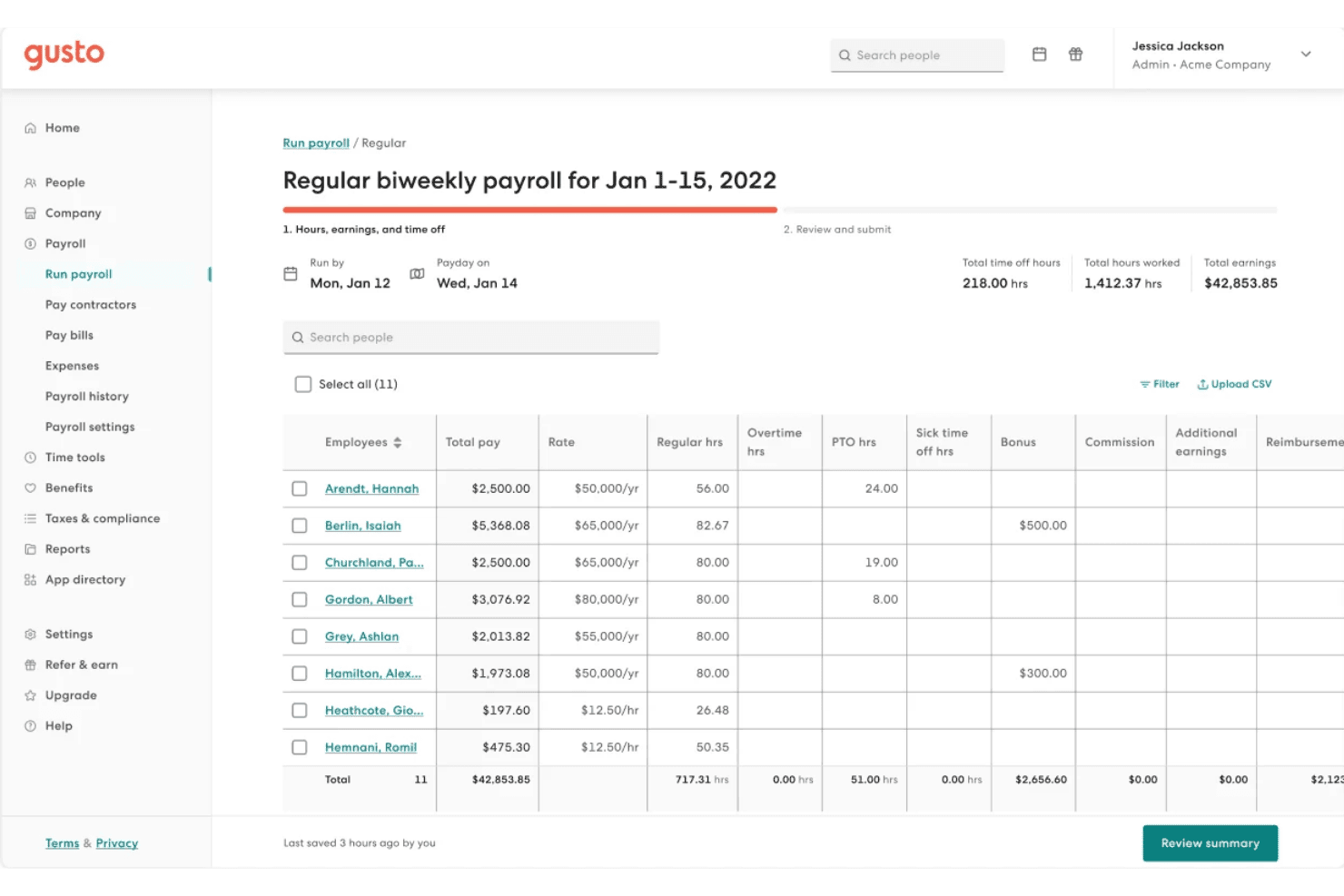
Gusto lets users review and manage employee hours and earnings before submitting payroll. Gusto is a payroll platform for small to mid-sized businesses that handles automated payroll runs, multi-state tax filing, contractor payments, benefits administration, and time tracking in a single system.
Who Is Gusto Best For?
Gusto is a strong fit for small to mid-sized businesses that need payroll, benefits, and tax compliance managed in one place without dedicated HR infrastructure.
Why I Picked Gusto
I picked Gusto because its Tax Penalty Protection covers IRS penalties and interest resulting from its filing errors. Additionally, its Assisted Payroll Prep feature flags unusual payroll amounts and irregular timecards before each run. This can help teams catch errors before payroll is submitted.
Gusto Key Features
- AutoPilot™ automated payroll: Set recurring payroll to run automatically on a fixed schedule without manual input each cycle.
- Multi-state tax filing: Gusto calculates, files, and remits payroll taxes across all 50 states at no extra charge, regardless of how many states your employees work in.
- Global contractor payments: Pay contractors in 120+ countries in local currencies for $5 per payment, with no monthly per-contractor fee.
- Workforce cost reports: Access built-in payroll cost reporting broken down by department, available on the Plus plan and above.
Gusto Integrations
Gusto offers 150+ native integrations, including QuickBooks Online, QuickBooks Desktop, Xero, FreshBooks, Homebase, Hubstaff, Expensify, Checkr, Clover, and Shopify. An API is available for custom integrations through Gusto Embedded Payroll, though native connectors for enterprise ERPs like NetSuite and Sage Intacct are not available.
Pros and Cons
Pros:
- Built-in earned wage access for employees
- Unlimited payroll runs at no extra cost
- Tax penalty coverage included for employer peace of mind
Cons:
- Customer support quality often inconsistent
- Lacks deep integrations with enterprise ERPs
 Best for QuickBooks-native payroll and tax filing
- Not available
- From $50 + $7/employee
Visit WebsiteCustomer Rating:4.4/5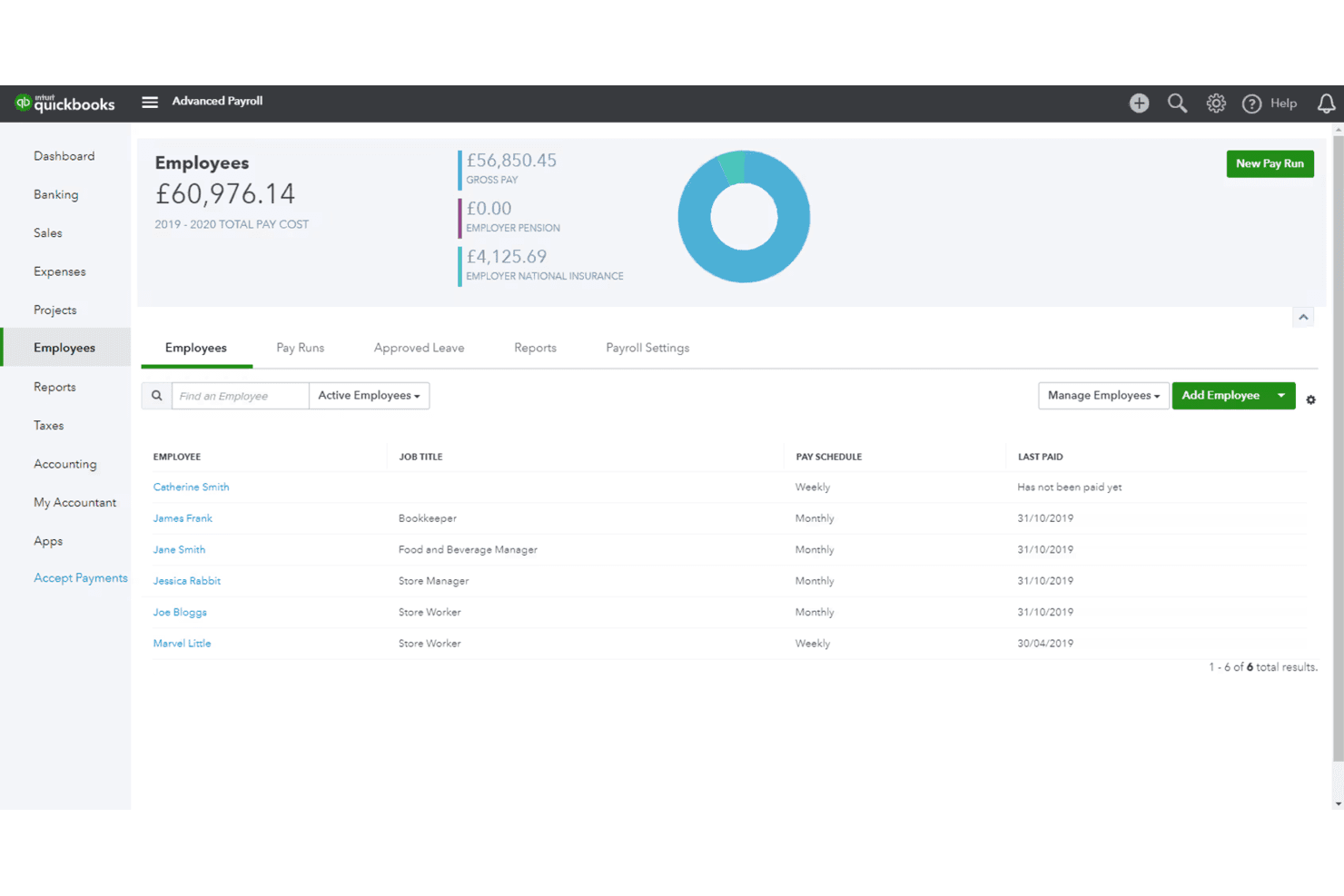
QuickBooks Payroll tracks employee pay schedules and total payroll costs. QuickBooks Payroll is a U.S.-based payroll solution that handles automated pay calculations, tax filing, direct deposit, and benefits administration, with native integration built directly into the QuickBooks Online accounting ecosystem.
Who Is QuickBooks Payroll Best For?
QuickBooks Payroll is a natural fit for small to midsize businesses already running QuickBooks Online that want payroll and accounting tightly connected without third-party workarounds.
Why I Picked QuickBooks Payroll
QuickBooks Payroll earns its spot on my shortlist because the GL sync with QuickBooks Online is genuinely seamless for finance teams already in that ecosystem: payroll expenses, liabilities, and payments post directly to the chart of accounts without any manual journal entries. I also rate the Elite plan's Tax Penalty Protection highly, since Intuit covers up to $25,000 per year in IRS penalties and handles agency correspondence directly on your behalf. On top of that, Payroll AI drafts pre-approved payroll by collecting time data and flagging anomalies before you ever hit submit.
QuickBooks Payroll Key Features
- Auto Payroll: Automatically drafts and submits payroll for salaried employees when direct deposit is active, requiring only admin approval before processing.
- Multi-jurisdictional tax filing: Automatically calculates, files, and remits federal, state, and local payroll taxes, with full local coverage available on Premium and Elite plans.
- QuickBooks Time integration: Built-in time tracking with GPS, geofencing, and scheduling feeds directly into payroll calculations on Premium and Elite plans.
- Payroll reporting suite: Generates reports covering tax liability, wage summaries, deductions, PTO balances, workers' compensation, and multiple worksite data.
QuickBooks Payroll Integrations
QuickBooks Payroll offers native integrations with QuickBooks Online and QuickBooks Time. Marketplace integrations through the QuickBooks App Store include Shopify, PayPal, Bill.com, and Expensify.
Pros and Cons
Pros:
- Payroll AI flags anomalies before processing
- Tax Penalty Protection up to $25,000
- Payroll auto-syncs with QuickBooks Online GL
Cons:
- Manual local tax filing on entry plan
- No support for global payroll needs
Learn more about QuickBooks Payroll: Best for multi-state payroll with ERP sync
- Free demo available
- Pricing upon request
Visit WebsiteCustomer Rating:4.2/5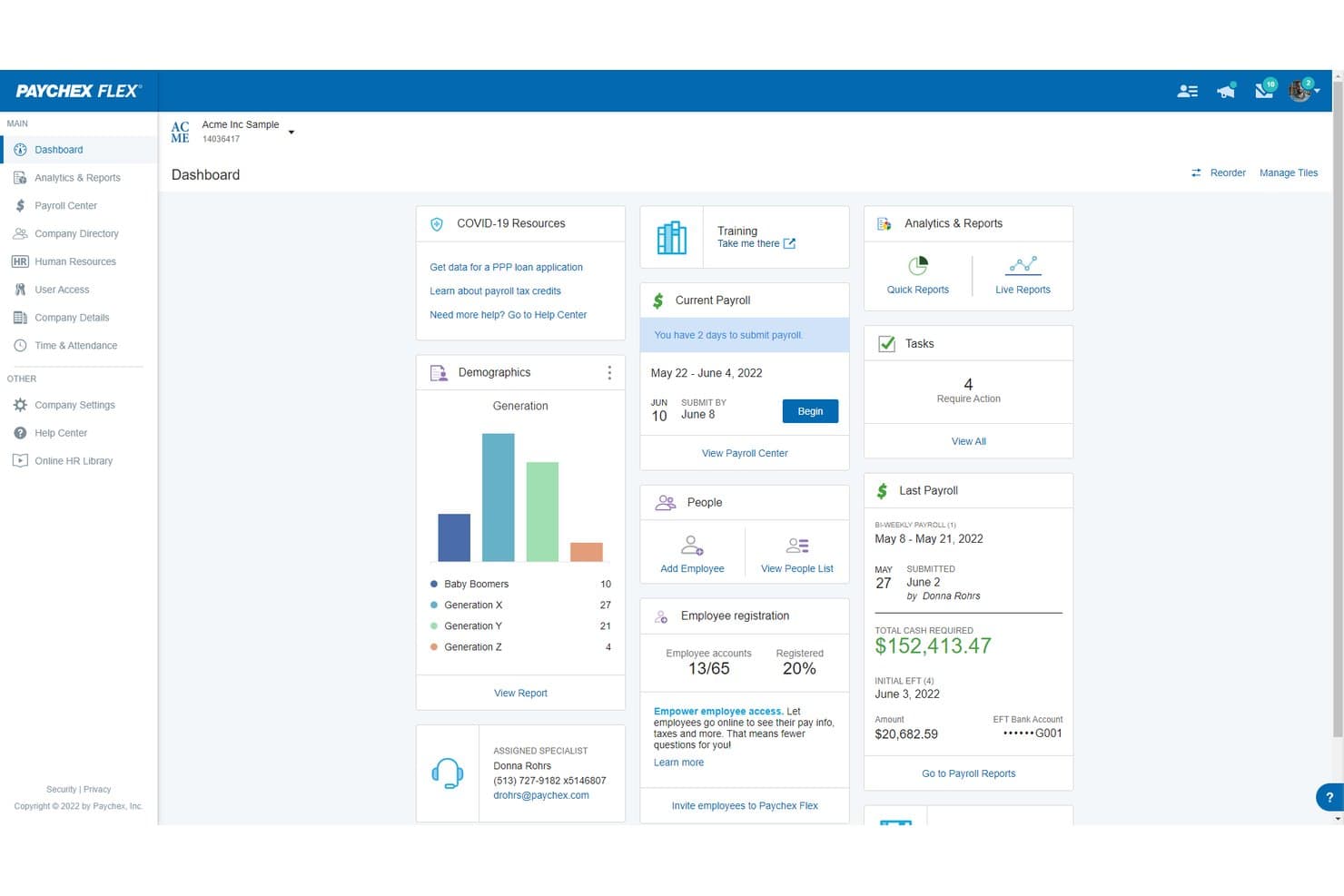
Paychex Flex centralizes payroll, HR, and workforce data in one dashboard. Paychex Flex is a U.S.-focused payroll platform that handles automated gross-to-net calculations, multi-state tax filing, benefits administration, and GL sync with major ERP systems like NetSuite and Sage Intacct.
Who Is Paychex Flex Best For?
Paychex Flex is a strong fit for U.S.-based mid-market businesses managing payroll across multiple states and needing tight GL sync with ERP systems like NetSuite or Sage Intacct.
Why I Picked Paychex Flex
Paychex Flex earns its spot on my shortlist because it handles multi-state payroll and GL sync with ERP systems like NetSuite and Sage Intacct better than most. I particularly like the Taxpay® system, which automates tax calculation, filing, and remittance across every U.S. jurisdiction, and the WISE AI engine, which flags payroll anomalies before a run is finalized. That combination means fewer post-close corrections and cleaner data hitting your general ledger.
Paychex Flex Key Features
- Paychex Pre-check℠: Lets employees review their own paychecks before a payroll run is finalized, catching errors before they hit the ledger.
- WISE anomaly detection: An AI engine trained on 50+ years of Paychex data that flags missing hours, data mismatches, and compliance risks before you submit payroll.
- Tax Center dashboard: A centralized view of tax deadlines, compliance notifications, and penalty notice tracking across all U.S. jurisdictions.
- Paychex Promise®: An add-on that provides a 7-day payroll funding buffer and same-day ACH processing to cover cash flow gaps during payroll cycles.
Paychex Flex Integrations
Paychex Flex offers five documented native integrations with QuickBooks, Xero, Sage Intacct, Oracle NetSuite, and Jirav. Its Developer Center provides open APIs for custom integrations, while the Paychex Marketplace adds partner connections.
Pros and Cons
Pros:
- Deep GL sync with leading ERP platforms
- AI engine flags payroll and compliance errors
- Handles multi-state payroll and tax compliance
Cons:
- Opaque quote-based pricing and add-on fees
- No native global payroll or EOR
Learn more about Paychex Flex: Best for mid-market multi-state tax compliance
- Free demo available
- Pricing upon request
Visit WebsiteCustomer Rating:4.1/5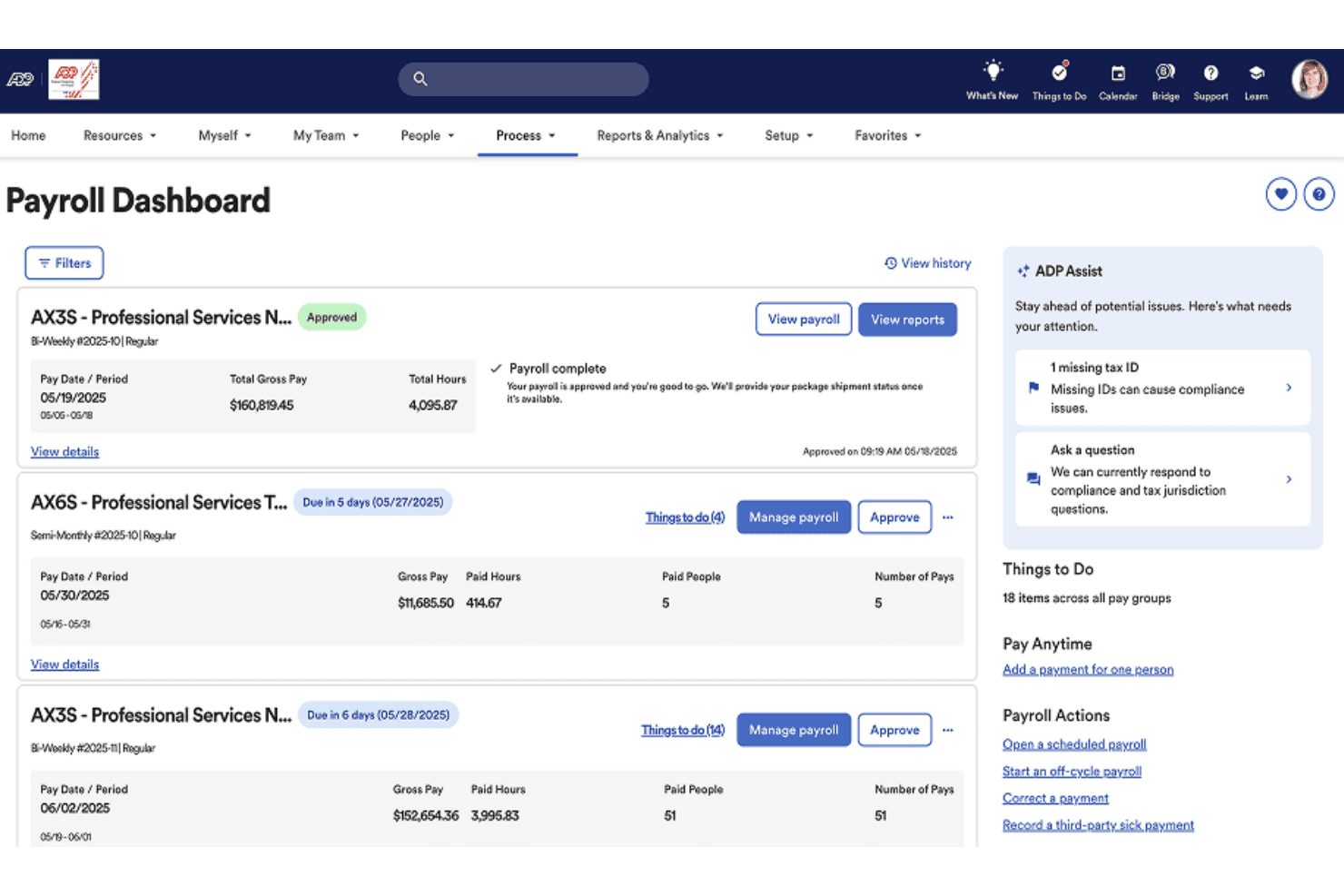
ADP Workforce Now centralizes payroll processing and approvals in one dashboard. ADP Workforce Now is a mid-market payroll and HCM platform that handles gross-to-net payroll processing, multi-jurisdiction tax filing, benefits administration, time tracking, and workforce analytics in one system.
Who Is ADP Workforce Now Best For?
ADP Workforce Now is a strong fit for mid-market companies with 50–1,000+ employees that run payroll across multiple states or jurisdictions and need automated tax filing built into the core system.
Why I Picked ADP Workforce Now
ADP Workforce Now earns its spot because it handles multi-state tax compliance at scale. It automatically calculates, withholds, files, and remits taxes across federal, state, and local jurisdictions. Additionally, ADP covers fines if it makes a filing error on your behalf. ADP Assist also flags payroll inconsistencies before submission, helping teams catch issues earlier in each pay cycle.
ADP Workforce Now Key Features
- Employee self-service portal: Employees can view pay stubs, update direct deposit details, adjust tax withholding, and manage PTO requests through a mobile-accessible portal.
- Wisely pay cards: ADP's native prepaid pay card supports early direct deposit, on-demand pay, and mobile wallet compatibility for unbanked employees.
- Pay-by-Pay workers' compensation: Automatically calculates and remits workers' comp premiums each payroll cycle, eliminating manual reconciliation at year end.
- ADP Marketplace integrations: Connects to 400+ pre-built apps, including NetSuite, Sage Intacct, and earned wage access providers like Payactiv and DailyPay.
ADP Workforce Now Integrations
ADP Workforce Now offers native GL integrations with QuickBooks, Xero, and Wave, plus 400+ marketplace integrations through the ADP Marketplace, including NetSuite, Sage Intacct, Microsoft Dynamics, Payactiv, DailyPay, ZayZoon, JP Morgan, and ZipRecruiter. An open API is available for custom integrations.
Pros and Cons
Pros:
- Handles pay-by-pay workers’ comp payments
- Flags payroll errors with AI detection
- Covers multi-state payroll and tax compliance
Cons:
- Complex workflows slow down initial adoption
- Customer support response time is inconsistent
Learn more about ADP Workforce Now:
Annen lønnsprogramvare
Her er noen flere alternativer for lønnsprogramvare som ikke kom med på kortlisten min, men som likevel er verdt å se nærmere på:
- 11Workday PayrollBest for enterprise payroll and finance on one platform
- 12PaylocityBest for mid-market payroll with AI anomaly checks
- 13Papaya GlobalBest for global payroll across 180+ countries
- 14PaycomBest for employee-verified payroll at mid-market scale
- 15TriNetBest for PEO-backed payroll compliance risk transfer
- 16BambooHRBest for HR-led payroll with native ERP sync
- 17PaycorBest for unified HCM payroll with earned wage access
- 18JustworksBest for ERP-connected payroll with bundled benefits
- 19RemoteBest for paying global teams across 100+ countries
- 20OnPayBest for tax penalty protection at flat pricing
How I Evaluate Payroll Software
I split my evaluation into baseline functionality every tool must cover—accurate gross-to-net calculations, tax filing, GL sync—and the differentiators, like multi-entity support and AI anomaly detection, that separate good from great.
Core Functionality (Table Stakes For This List)
When I'm selecting tools for my list, I rank each one on a scale from 0 (does not offer the functionality) to 5 (excels in this area) for each core functionality listed below. I then calculate the tool's total score into a percentage, using 75% as a benchmark to help assess its overall fit for the list.
- Payroll processing and calculation: I evaluate how each tool handles gross-to-net across pay types like hourly, salaried, commissions, and bonuses—including off-cycle and retroactive runs.
- Tax filing and compliance: Each tool's ability to calculate, withhold, file, and remit taxes across multiple jurisdictions matters, along with year-end form generation like W-2s and 1099s.
- Payment distribution: I check whether the platform supports direct deposit to multiple accounts, pay cards, and check printing—plus faster payment options like same-day or next-day processing.
- Employee self-service portal: The portal should give employees mobile access to pay stubs, tax forms, and direct deposit changes without looping in your payroll team for routine requests.
- Accounting and GL integration: I look at how payroll journal entries sync with your GL—whether it's a native connection to platforms like QuickBooks, NetSuite, or Sage Intacct with custom dimension mapping.
- Time and benefits integration: Accurate pay runs depend on clean hours and deduction data, so I evaluate how each tool pulls in time-tracking records and benefits elections without manual imports.
Once I have a list of tools that meet the criteria, I consider what sets each platform apart.
Differentiating Factors (What Sets Vendors Apart)
Here's how I compare and contrast different vendors:
Standout Features
Tax penalty protection is a big one—I check whether the vendor guarantees filing accuracy and covers penalties or interest when errors are on their end. That's real risk transfer for your finance team. I also evaluate AI-powered anomaly detection, which flags duplicate payments, misclassifications, or unusual variances before a pay run posts. For global teams, I look at native contractor payment support across local currencies with built-in compliance, since manual FX and filing workarounds break down fast at scale.
Beyond Features
Integration depth with your finance stack matters most. I check whether each tool offers bi-directional GL sync with custom dimension mapping—department, class, location—so your cost allocation stays clean without manual journal entries. Pricing models also vary widely; PEPM fees look simple until you factor in add-ons for off-cycle runs, year-end filings, or multi-state processing. I evaluate total cost of ownership across those scenarios. For security, SOC 1 and SOC 2 Type II reports are baseline, but I also look for role-based access controls, SSO, and documented uptime SLAs to protect uninterrupted pay cycles.
Slik velger du lønnsprogramvare
Den beste lønnsprogramvaren for virksomheten din avhenger av selskapsstørrelsen, arbeidsstyrkens struktur, kravene til etterlevelse og regnskapsoppsettet ditt. Små bedrifter kan prioritere automatisert skatterapportering og enkel lønnsbehandling, mens voksende og større organisasjoner kan ha behov for lønn på tvers av flere delstater, integrasjoner med hovedbok, støtte for flere juridiske enheter eller globale lønnsmuligheter.
Bruk prioriteringene nedenfor for å snevre inn alternativene basert på hva lønnsprosessen din faktisk krever.
| Hvis prioriteten din er … | Se etter … |
|---|---|
| Hvis prioriteten din er …Nøyaktige lønnsutbetalinger på tvers av delstater eller land | Se etter …Innebygd skatteetterlevelse og støtte for lokale regler |
| Hvis prioriteten din er …Rask og pålitelig synkronisering med hovedboken | Se etter …Direkte integrasjoner med bedriftens økonomisystem |
| Hvis prioriteten din er …Få feil og færre manuelle korrigeringer | Se etter …Automatisering og innebygde revisjonslogger |
| Hvis prioriteten din er …Redusert risiko for skattesanksjoner | Se etter …Skriftlige nøyaktighetsgarantier og dekning av sanksjoner |
| Hvis prioriteten din er …Datasikkerhet og revisjonsberedskap | Se etter …SOC 1/SOC 2 Type II-sertifiseringer |
Slik vurderer du kortlisten din
- Kjør en direkte lønnstest: Behandle lønn for minst 2 enheter eller lokasjoner ved hjelp av sandkassedata eller reelle (maskerte) data.
- Be om integrasjonsdokumentasjon: Be om veiledninger for GL-tilordning og en liste over tilkoblinger til økonomisystemer, slik at du kan sammenligne dem med ERP-systemet ditt.
- Send inn en supportsak for et særtilfelle: Test responstid og nøyaktighet (for eksempel en nyansatt på tvers av flere delstater eller aksjebasert godtgjørelse).
- Be om et verifisert samsvarsbevis: Be om den nyeste SOC 1/SOC 2 Type II-rapporten og eksempler på bekreftelser på innsendte skatteoppgaver.
- Gjør avveiningen: Vurder enkel integrasjon og automatisering opp mot fleksibilitet – ønsker du rask implementering med standardiserte arbeidsflyter, eller full tilpasning med økt kompleksitet?
Hva er lønnsprogramvare?
Lønnsprogramvare er en digital løsning som automatiserer beregning, behandling og utbetaling av ansattes lønn. Den håndterer beregninger fra bruttolønn til nettolønn, skattetrekk, rapportering av samsvar og utbetalinger. Lønnsprogramvare reduserer manuelle feil, gir ansatte sikker selvbetjent tilgang til lønnsinformasjon og integreres med regnskapssystemer for en effektiv avslutning av måneden. Økonomiteam bruker lønnsprogramvare for å sikre korrekte utbetalinger, forenkle arbeidet med å overholde regelverk og opprettholde kontroll over sensitive lønns- og skattedata.
Funksjoner i lønnsprogramvare
Når du velger lønnsprogramvare, bør du se etter følgende nøkkelfunksjoner:
- Lønnsbehandling og -beregning: Automatiserer beregninger fra bruttolønn til nettolønn for timelønnede, fastlønnede, provisjonslønnede og bonusutbetalinger, inkludert ekstrakjøringer og etterberegninger, slik at lønnen blir nøyaktig og konsekvent i hver lønnsperiode.
- Skatteinnrapportering og samsvar: Beregner, trekker, rapporterer og innbetaler skatt i flere jurisdiksjoner, og genererer årsoppgaver som W-2s og 1099s for å hjelpe deg med å oppfylle komplekse regulatoriske krav.
- Utbetaling: Støtter direkte innbetaling til flere kontoer, utbetaling via lønnskort og utskrift av sjekker, samtidig som den tilbyr alternativer for utbetaling samme dag eller neste dag, slik at ansatte mottar lønnen sin pålitelig.
- Selvbetjeningsportal for ansatte: Gir ansatte sikker, mobiltilpasset tilgang til lønnsslipper og skattedokumenter, samt mulighet til å oppdatere opplysninger om direkte innbetaling eller personopplysninger uten å involvere lønnsteamet.
- Integrasjon med regnskap og hovedbok: Synkroniserer lønnsposter med regnskapsplattformen eller ERP-systemet ditt, slik at hovedboken oppdateres nøyaktig og i sanntid, og månedsavslutningen blir ryddigere.
- Integrasjon med tidsregistrering: Henter automatisk inn data fra systemer for tidsregistrering, noe som reduserer manuell registrering og bidrar til å unngå lønnsfeil som skyldes avvikende eller manglende timeantall.
- Integrasjon med administrasjon av personalgoder: Kobler lønn til ordninger for personalgoder slik at fradrag og bidrag beregnes nøyaktig, gjenspeiler de ansattes valg og sikrer samsvar med virksomhetens retningslinjer og lovverket.
- Støtte for flere enheter og valutaer: Håndterer lønn for selskaper med flere forretningsenheter, lokasjoner eller valutaer, slik at du kan betale ansatte korrekt på tvers av delstater eller land.
- Rapportering og analyse: Tilbyr innebygde rapporteringsverktøy som følger lønnskostnader, skatter og andre viktige lønnsberegninger, og støtter revisjoner og økonomisk planlegging.
- Sikkerhet og tilgangskontroller: Tilbyr rollebaserte tillatelser, alternativer for enkel pålogging og samsvar med bransjestandarder, noe som bidrar til å beskytte sensitive lønnsdata og opprettholde revisjonsberedskap.
Vanlige AI-funksjoner i lønnsprogramvare
I tillegg til standardfunksjonene i lønnsprogramvare som er nevnt ovenfor, tar mange av disse løsningene i bruk AI med funksjoner som:
- AI-basert avviksdeteksjon: Bruker maskinlæring til å flagge uvanlige lønnsmønstre, som doble utbetalinger, feilklassifiserte ansatte eller uvanlige lønnsendringer, før lønnen ferdigstilles. Dette hjelper teamet med å oppdage feil og forhindre kostbare problemer med samsvar.
- AI-drevet overvåking av skattesamsvar: Skanner kontinuerlig endringer i skattelover og forskrifter, oppdaterer lønnsregler automatisk og varsler deg om potensiell risiko for manglende samsvar. Dette reduserer behovet for manuell undersøkelse og hjelper deg med å ligge i forkant av regulatoriske endringer.
- Prediktiv lønnsprognostisering: Analyserer historiske lønnsdata og forretningstrender for å prognostisere fremtidige lønnskostnader, slik at du kan planlegge budsjetter og forutse behov for kontantstrøm med større nøyaktighet.
- Spørringsassistenter på naturlig språk: Lar deg stille lønnsrelaterte spørsmål med et vanlig språk – for eksempel «Vis meg overtidskostnadene for forrige kvartal» – og få svar eller rapporter umiddelbart, slik at lønnsdata blir mer tilgjengelige for ikke-tekniske brukere.
- Automatisert dokumentklassifisering: Bruker AI til å sortere og kategorisere lønnsdokumenter, som timelister og skattedokumenter, noe som reduserer manuell arkivering og gjør det enklere å hente frem dokumentasjon under revisjoner eller gjennomganger.
Fordeler med lønnssystemer
Implementering av et lønnssystem gir flere fordeler for teamet og virksomheten din. Her er noen av fordelene du kan se frem til:
- Reduserte feil: Automatiserte beregninger fra brutto til netto, integrasjon med tidsregistrering og funksjoner for innsending av skatterapportering hjelper deg med å unngå vanlige manuelle feil og kostbare feil i forbindelse med etterlevelse.
- Trygghet for etterlevelse: Innebygde verktøy for skatteetterlevelse og SOC 1/SOC 2 Type II-sertifiseringer sørger for at lønnsprosessene dine er i tråd med gjeldende regelverk og standarder for databeskyttelse.
- Bedre økonomisk innsikt: Funksjoner for rapportering og analyse lar deg følge med på lønnskostnader, skatter og nøkkeltall, noe som gir mer nøyaktige prognoser og revisjoner.
- Raskere lønnskjøringer: Direkte integrasjon med hovedboken og økonomi-ERP-systemet ditt fremskynder bokføringen av lønnsposter og hjelper deg med å avslutte regnskapet i tide hver måned.
- Større selvstendighet for ansatte: Sikre selvbetjeningsportaler gir ansatte tilgang til lønnsslipper og skatteskjemaer, samt mulighet til å administrere opplysninger om direkte lønnsutbetaling selvstendig.
- Sentralisert administrasjon av flere enheter: Støtte for flere enheter og valutaer gjør det mulig å behandle lønn på tvers av ulike forretningsenheter, lokasjoner og land uten omveier.
- Proaktiv risikostyring: KI-drevet avviksdeteksjon og skriftlig beskyttelse mot gebyrer identifiserer potensielle feil eller risikoer knyttet til etterlevelse før lønnskjøringen ferdigstilles.
Kostnader og priser for lønnssystemer
Prisene på lønnssystemer varierer etter virksomhetens størrelse, antall ansatte, lønnens kompleksitet og inkluderte HR- eller samsvarsfunksjoner. Mange leverandører av lønnssystemer for små bedrifter krever en månedlig grunnavgift i tillegg til en avgift per ansatt, mens plattformer for mellomstore og store virksomheter vanligvis tilbyr tilpassede priser.
Sammenligningstabell for abonnementer for lønnssystemer
| Abonnementstype | Gjennomsnittlig pris | Vanlige funksjoner |
|---|---|---|
| AbonnementstypeGratisabonnement | Gjennomsnittlig pris$0-$10/bruker/måned | Vanlige funksjonerStøtter grunnleggende lønnsbehandling, begrenset skatteetterlevelse, selvbetjeningsportal og grunnleggende rapporter. |
| AbonnementstypePersonlig abonnement | Gjennomsnittlig pris$10-$20/bruker/måned | Vanlige funksjonerInkluderer alle funksjonene i gratisabonnementet, samt innsending av skatterapportering, direkte lønnsutbetaling, integrasjon med tidsregistrering og grunnleggende kundestøtte. |
| AbonnementstypeBedriftsabonnement | Gjennomsnittlig pris$20-$40/bruker/måned | Vanlige funksjonerTilbyr avansert lønnsautomatisering, skatteinnsending i flere delstater, integrasjon med hovedbok, administrasjon av personalgoder og analysetavler. |
| AbonnementstypeVirksomhetsabonnement | Gjennomsnittlig pris$40-$60/bruker/måned | Vanlige funksjonerTilbyr tilpassede arbeidsflyter, administrasjon av flere enheter, avansert sikkerhet, API-tilgang og prioritert kundestøtte. |