

A strong Rippling alternative combines reliable human resources (HR), payroll functionality, and workforce management features with flexibility to match your business’s unique needs. If you’re searching for Rippling alternatives, you’re likely weighing options that can handle complex compliance, automate routine processes, and provide clear workforce insights—without sacrificing ease of use or integration with your existing systems. This list will help you compare leading workforce management platforms, so you can confidently choose a solution that fits your operational requirements, supports your team, and keeps your startups or large enterprises moving forward.
What Is Rippling?
Rippling is a workforce management software that unifies HR, payroll, benefits administration, and IT management in a single platform. It helps businesses automate employee onboarding, manage compliance, and centralize workforce data. Rippling is designed for organizations that want to streamline core HR processes, connect with third-party tools, and maintain visibility across their workforce. Its flexibility and integration options make it a popular choice for companies with evolving operational needs.
Rippling Alternatives Comparison Table
This comparison table summarizes pricing details for my top Rippling alternative selections:
| Tool | Best For | Trial Info | Price | ||
|---|---|---|---|---|---|
| 1 | Best for employee-managed payroll data accuracy | Free demo available | Pricing upon request | Website | |
| 2 | Best for dedicated payroll managers per client | Free demo available | From $29/user/month | Website | |
| 3 | Best with 150+ pre-built software integrations | Free demo available | From $10/user/month | Website | |
| 4 | Best for custom time tracking rules | 30-day free trial | From $50/month | Website | |
| 5 | Best for enterprise-scale workforce planning | Free demo available | Pricing upon request | Website | |
| 6 | Best for organizational visualization | Free demo + free plan available | From $5/employee/month (billed annually) | Website | |
| 7 | Best for unified HR and finance analytics | 30-day free trial + demo available | Pricing upon request | Website | |
| 8 | Best for continuous pay calculation | Free demo available | Pricing upon request | Website | |
| 9 | Best for payroll and tax automation | Free demo available | Pricing upon request | Website | |
| 10 | Best for AI-driven scheduling optimization | Free demo available | Pricing upon request | Website |


Why Trust Our Software Recommendations
6,700+
Reviews
20
Industry experts
16+
Evaluation factors
14
Years
Our team has been testing and reviewing software since 2012. As finance leaders ourselves, we know how difficult—and important—it is to choose the right software.
For this guide, we evaluated tools using hands-on testing and independent research, scoring tools using our selection criteria.
Our reviews reflect our human editorial judgment, not a sales pitch.
Best Rippling Alternatives Reviews
Below are my detailed summaries of the Rippling alternatives that made it onto my shortlist. My reviews offer a detailed look at the features, best use cases, and integrations of each platform to help you find the best one for you.
 Best for employee-managed payroll data accuracy
- Free demo available
- Pricing upon request
Visit WebsiteCustomer Rating:4.3/5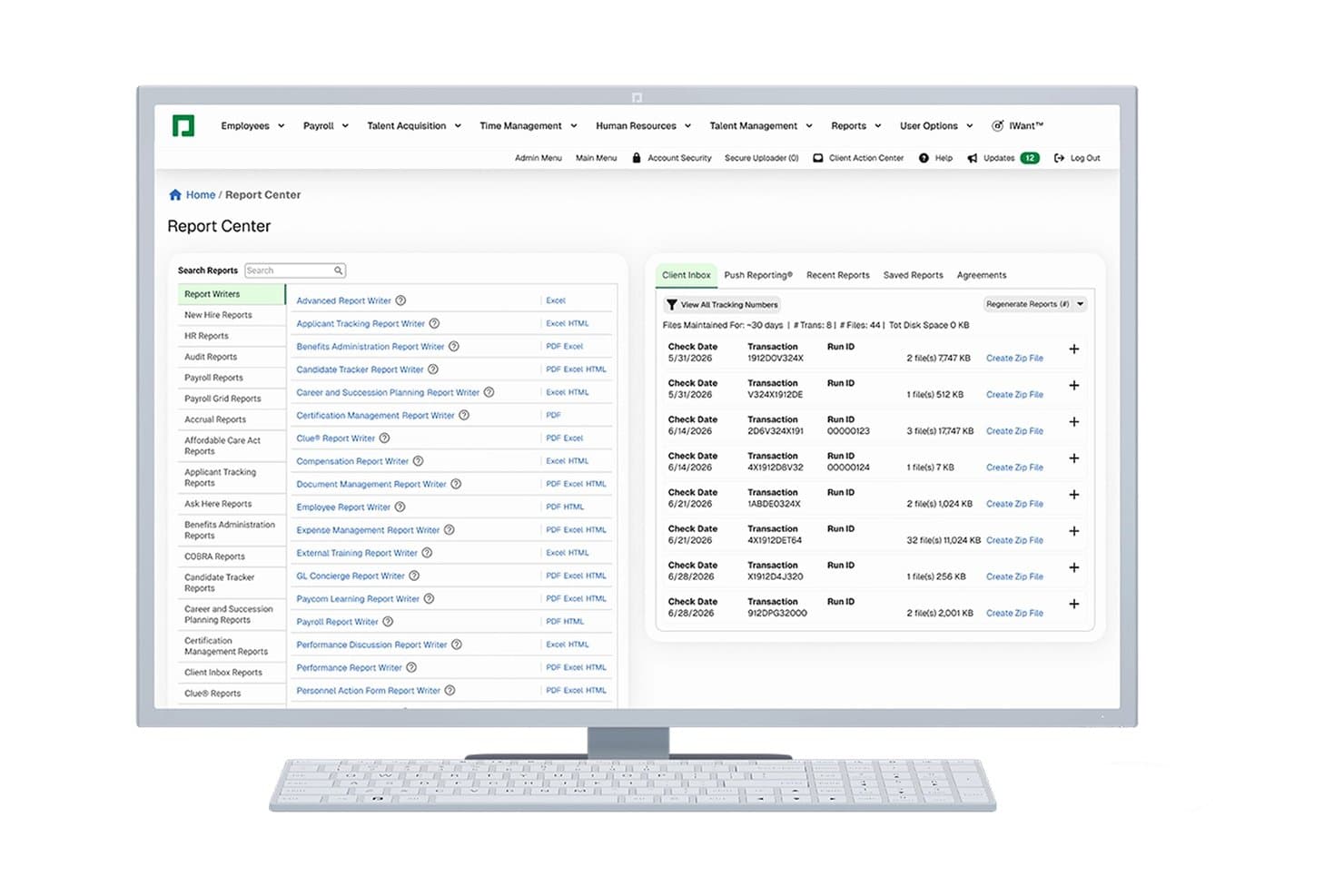
Paycom offers a centralized Report Center with multiple report writers, a searchable report list, and a Client Inbox showing payroll transaction history. Paycom is a single-database HCM platform built for U.S. mid-market employers who want to manage payroll, HR, benefits, and time tracking without stitching together multiple systems.
Who Is Paycom Best For?
Paycom suits payroll managers and HR teams at U.S.-based companies with 50 to 1,000 employees who need a single platform to own the full employee lifecycle.
Why Paycom Is a Good Rippling Alternative
I've included Paycom in my top picks because of Beti®, its employee-driven payroll feature that routes flagged discrepancies back to employees before submission. Rather than HR catching mistakes after the fact, employees review and correct their own data in real time. That closed-loop approach, built on Paycom's single database, means submitted payroll is cleaner from the start without a manual review cycle sitting between the employee and the final run.
Paycom Key Features
- GL Concierge: Map payroll data directly to general ledger accounts to simplify journal entry prep and export.
- Direct Data Exchange: View and benchmark HR process efficiency with built-in reporting dashboards across the HCM stack.
- Manager on-the-Go mobile app: Approve time-off, expenses, and personnel actions securely from a mobile device.
- ACA and COBRA compliance tools: Track eligibility and automatically manage required filings for ACA and COBRA regulations.
Paycom Integrations
Native integrations are not currently listed. A REST API is available for custom integrations and connections.
Pros and Cons
Pros:
- ACA compliance built into workflows
- GL Concierge maps payroll to accounting systems
- Employees can self-correct payroll errors
Cons:
- Limited support for global payroll processing
- Lacks built-in corporate card management
Learn more about Paycom: Best for dedicated payroll managers per client
- Free demo available
- From $29/user/month
Visit WebsiteCustomer Rating:4.9/5
Deel unifies payroll, compliance, and employee data to simplify payments for global teams in one platform. Deel Payroll offers a global payroll and compliance platform designed for businesses managing international teams or contractors. If your organization needs to pay employees across multiple countries while staying compliant with local regulations, Deel Payroll addresses these challenges directly. The platform stands out among Rippling alternatives by supporting multi-currency payments, contractor onboarding, and automated compliance in over 100 countries.
Who Is Deel Payroll Best For?
Deel Payroll is a good fit for global companies or HR teams that want dedicated payroll support for managing international employees and contractors.
Why Deel Payroll Is a Good Rippling Alternative
One reason I picked Deel Payroll as a Rippling alternative is its commitment to providing each client with a dedicated payroll manager. This approach gives your team a single point of contact for payroll questions, compliance issues, and process guidance, which can be especially valuable for companies with complex international operations. I appreciate that Deel Payroll’s dedicated managers help navigate local labor laws and ensure timely, accurate payments across multiple countries. This level of personalized support is not always available with other payroll platforms, making Deel Payroll a strong choice for organizations that value hands-on service.
Deel Payroll Key Features
Some other features in Deel Payroll that may interest finance and HR teams include:
- Multi-currency payroll processing: Pay employees and contractors in over 150 currencies directly from the platform.
- Automated tax document generation: Generate and distribute tax forms and compliance documents for each country where you operate.
- Contractor onboarding workflows: Simplify onboarding with automated contract creation, document collection, and e-signature support.
- Global benefits administration: Offer localized benefits packages to employees in different countries through Deel’s benefits management tools.
Deel Payroll Integrations
Integrations include SAP SuccessFactors, NetSuite, Slack, Google Workspace, Humaans, Ramp, FaceUp, CrowdStrike, Human Interest, Hofy, and more.
Pros and Cons
Pros:
- Automated contractor classification and documentation
- Rapid onboarding for SMBs in a short period of time
- Global compliance coverage in multiple countries
Cons:
- Reporting customization options are limited
- No built-in benefits administration for US employees
Learn more about Deel Payroll: Best with 150+ pre-built software integrations
- Free demo available
- From $10/user/month
Visit WebsiteCustomer Rating:4.5/5
BambooHR® dashboard showing employee profiles, benefits enrollment, time-off tracking, and payroll management features. BambooHR is a cloud-based HR platform designed for small and midsize businesses that want to centralize employee data, automate HR tasks, and improve workforce management. You’ll find it especially useful if you need to streamline onboarding, track time off, and manage compliance in one place.
Who Is BambooHR® Best For?
HR teams at small to midsize businesses that need broad integration options with their existing software stack.
Why BambooHR® Is a Good rippling alternatives
I picked BambooHR® because my team can connect it with over 150 business tools without custom development. I like that we can sync HR data with payroll, benefits, and recruiting platforms we already use. In practice, that means onboarding and employee changes flow automatically between systems. This level of integration saves us time and reduces manual errors compared to other HR platforms.
BambooHR® Key Features
- Employee self-service portal: Employees can update personal information and access documents directly.
- Customizable approval workflows: Set up multi-step approvals for time-off, changes, and requests.
- Performance management module: Track goals, run reviews, and gather feedback in one place.
- Document storage and e-signatures: Store HR files securely and collect digital signatures from staff.
BambooHR® Integrations
BambooHR offers over 150 native integrations, including ADP, QuickBooks, Slack, Greenhouse, Checkr, Okta, Zapier, Lattice, PayScale, and Indeed. An API is available for custom integrations.
Pros and Cons
Pros:
- Automated time-off tracking and approvals
- Employee self-service portal with mobile access
- Built-in compliance and document management features
Cons:
- Performance management tools require an add-on purchase
- No built-in IT provisioning or device management
Learn more about BambooHR: Best for custom time tracking rules
- 30-day free trial
- From $50/month
Visit WebsiteCustomer Rating:4.5/5
TimeTrex shows detailed employee attendance records with overtime and regular hours. TimeTrex offers businesses a flexible workforce management platform tailored for tracking time, attendance, and payroll. It’s a solid option if you’re looking for a Rippling alternative that puts control and configurability at the center of employee tracking.
Who Is TimeTrex Best For?
TimeTrex is ideal for payroll administrators and operations teams managing hourly staff with unique attendance and overtime requirements.
Why TimeTrex Is a Good Rippling Alternative
I picked TimeTrex specifically because of how far it lets you go with time-tracking rule configuration. You can build custom overtime policies, define rounding rules, and set up complex accrual schedules that reflect your actual pay practices—not just generic defaults. In practice, that means teams with variable shifts, multiple pay rates, or industry-specific compliance needs can model their real workflows directly in the system. I think that level of control is hard to find in most all-in-one HR platforms, including Rippling.
TimeTrex Key Features
- Employee self-service portal: Employees can submit time-off requests, access paystubs, and update personal information directly through their own portal.
- Job costing: Assign labor hours and costs to specific projects or tasks to track profitability in real time.
- GPS and geofencing: Set location-based boundaries so employees can only clock in when they're physically on-site or within a defined job site perimeter.
- ACA and FMLA compliance tracking: Automatically track employee hours and leave to support Affordable Care Act reporting and Family and Medical Leave Act administration.
TimeTrex Integrations
TimeTrex offers native integrations with QuickBooks, ADP, Sage, and more. It also provides an API for custom integrations.
Pros and Cons
Pros:
- Offers advanced accrual calculations
- Supports both cloud and on-premise use
- Highly configurable time tracking policies
Cons:
- Fewer HR modules than all-in-one solutions
- Interface feels outdated to some users
Learn more about TimeTrex: Best for enterprise-scale workforce planning
- Free demo available
- Pricing upon request
Visit WebsiteCustomer Rating:4.6/5
Oracle delivers cloud-based ERP for managing finance, supply chains, and workforce. For organizations managing large, complex workforces, Oracle offers a suite of tools designed for enterprise-scale workforce planning and analytics. It’s especially well-suited for global businesses and HR leaders who need to align talent, budgets, and business strategy across multiple locations. Unlike Rippling, Oracle provides advanced modeling, scenario planning, and deep integration with financial systems to support long-term workforce decisions.
Why Oracle Is a Good Rippling Alternative
If your business needs to manage workforce planning at an enterprise scale, Oracle stands out for its advanced modeling and analytics capabilities. I picked Oracle because it lets you forecast headcount, model different workforce scenarios, and align staffing plans with business goals.
Its platform supports complex organizational structures and provides deep visibility into labor costs and resource allocation. For companies that need more than basic HR features and payroll management, Oracle offers the strategic planning and employee management tools that Rippling doesn’t cover.
Oracle Key Features
Some other features that make Oracle valuable for workforce management include:
- Time and Labor Management: Track employee hours, attendance, and scheduling across multiple locations.
- Global Payroll Processing: Handle payroll compliance and payments in different countries from a single platform.
- Talent Acquisition Suite: Manage recruiting, applicant tracking, and onboarding workflows.
- Employee Self-Service Portal: Let employees update personal information, view pay slips, and request time off.
Oracle Integrations
Integrations include Salesforce, SAP, Workday, Microsoft Office 365, ServiceNow, and Adobe Sign.
Pros and Cons
Pros:
- Built-in compliance for global regulatory requirements
- Deep integration with financial planning modules
- Advanced workforce modeling
Cons:
- Limited HR and payroll features for small businesses
- Requires significant IT resources
Learn more about Oracle: Best for organizational visualization
- Free demo + free plan available
- From $5/employee/month (billed annually)
Visit WebsiteCustomer Rating:4.4/5
ChartHop visualizes workforce data to support HR planning and people analytics. For finance and in-house HR teams that need a clear view of their organization’s structure, ChartHop offers advanced org chart and visualization tools. It’s especially useful for companies managing rapid growth, complex reporting lines, or remote teams. Unlike Rippling, ChartHop lets you layer in headcount planning, DEI data, and compensation insights directly onto dynamic org charts.
Why ChartHop Is a Good Rippling Alternative
If you need more advanced organizational visualization than what Rippling provides, ChartHop is a strong choice. I picked ChartHop because it lets you build interactive org charts that update automatically as your workforce changes. You can also overlay headcount planning, compensation data, and DEI metrics directly onto your org structure for deeper analysis. This level of visualization and data layering helps finance and HR teams make more informed decisions about workforce planning and organizational design.
ChartHop Key Features
Some other features that stood out to me in ChartHop include:
- Custom Reporting Builder: Create tailored reports using workforce, compensation, and demographic data.
- Manager-Driven Update Workflows: Managers can submit and track changes to employee records directly in the platform.
- Role-Based Access Controls: Set granular permissions for different users and teams to protect sensitive data.
- Employee Profile Pages: Store and display detailed employee information, including job history and performance notes.
ChartHop Integrations
Integrations include ADP, BambooHR, Greenhouse, Gusto, Justworks, and Workday.
Pros and Cons
Pros:
- Transparent company-wide directory
- Real-time headcount planning tools
- Stunning org chart visualization
Cons:
- Initial data cleanup is tedious
- High price point for small teams
Learn more about ChartHop: Best for unified HR and finance analytics
- 30-day free trial + demo available
- Pricing upon request
Visit WebsiteCustomer Rating:4.3/5
Workday supports HCM, finance, and analytics in a unified enterprise cloud. Workday brings HR and finance data together in a single cloud platform, making it a strong fit for organizations that want unified analytics and reporting. This solution is especially useful for finance and HR leaders who need to connect workforce planning with budgeting, forecasting, and operational insights. If your business is looking to improve cross-functional decision-making, Workday offers a level of integration that goes beyond what most workforce management tools provide.
Why Workday Is a Good Rippling Alternative
For organizations that want to unify HR and finance analytics, Workday offers a level of integration that’s hard to match. I picked Workday because it connects workforce management, payroll, and financial planning in one platform, allowing you to analyze headcount, costs, and performance side by side.
Its real-time analytics and customizable dashboards help finance and HR teams collaborate on forecasting and resource allocation. If you need a workforce management solution that breaks down data silos between HR and finance, Workday is a strong alternative to Rippling.
Workday Key Features
Some other features that make Workday appealing for workforce management include:
- Talent Management Suite: Manage recruiting, onboarding, performance, and learning in one place.
- Time Tracking: Capture employee hours, attendance, and absences with built-in tools.
- Mobile App: Give employees and managers access to HR and finance tasks on the go.
- Compliance Monitoring: Track regulatory changes and automate compliance tasks across regions.
Workday Integrations
Integrations include Salesforce, Microsoft Teams, Slack, ServiceNow, ADP, and Google Workspace.
Pros and Cons
Pros:
- Talent management suite
- Mobile app allows remote access
- Built-in compliance tools for global requirements
Cons:
- Lacks transparent pricing
- Custom reporting setup can require technical expertise
 Best for continuous pay calculation
- Free demo available
- Pricing upon request
Visit WebsiteCustomer Rating:4.2/5
Dayforce manages payroll, workforce, and talent in one platform for HR teams. Dayforce stands out for organizations that need real-time payroll accuracy and up-to-date labor cost insights. It’s especially useful for finance and HR teams in industries with complex scheduling or variable pay, like retail, manufacturing, and healthcare. Unlike Rippling, Dayforce calculates pay continuously, so you can spot errors and manage compliance before payroll deadlines.
Why Dayforce Is a Good Rippling Alternative
What sets Dayforce apart is its continuous pay calculation engine, which updates payroll data in real time as hours are worked and changes occur. I picked Dayforce for teams that need to catch payroll errors early and manage compliance risks before payroll is finalized.
The HR platform’s single data record system means time, attendance, and pay are always in sync, reducing manual reconciliation. If you want more control and visibility over payroll throughout the pay cycle, Dayforce is a strong alternative to Rippling.
Dayforce Key Features
In addition to its real-time payroll capabilities, I also found these features valuable:
- Workforce Scheduling: Build, manage, and adjust employee schedules based on business needs and labor rules.
- Mobile App Access: Employees and managers can review schedules, request time off, and approve changes from their mobile devices.
- Document Management: Store, organize, and access employee documents securely within the platform.
- Analytics and Reporting: Generate detailed workforce and payroll reports to support compliance and decision-making.
Dayforce Integrations
Native integrations are not currently listed by Dayforce.
Pros and Cons
Pros:
- Advanced scheduling features
- Mobile app to manage schedules and requests
- Single data record keeps HR and pay in sync
Cons:
- Slow loading and laggy performance
- Clunky, non user-friendly interface
Learn more about Dayforce: 9Best for payroll and tax automation
ADP
- Free demo available
- Pricing upon request
Visit WebsiteCustomer Rating:4.1/5
ADP handles payroll, HR, and talent management for teams of all sizes. When payroll accuracy and tax compliance are top priorities, ADP offers automation tools designed to reduce manual work and risk. It’s a strong fit for finance teams and HR professionals in businesses of all sizes that need to manage complex payroll, deductions, and government remittances. Unlike Rippling, ADP specializes in automating payroll calculations and tax filings across multiple jurisdictions, helping you stay compliant as your workforce grows.
Why ADP Is a Good Rippling Alternative
For businesses that need a reliable payroll solution and tax automation, ADP delivers specialized tools that go beyond what Rippling offers. I picked ADP because it automatically calculates payroll, manages deductions, and files taxes in compliance with local, state, and federal regulations.
Its platform also handles year-end tax forms and supports multi-jurisdiction payroll, which is essential for companies with employees in different regions. If you want to reduce manual payroll work and minimize compliance risks, ADP is a strong alternative to consider.
ADP Key Features
Some other features that make ADP useful for workforce management include:
- Employee Self-Service Portal: Employees can access pay statements, update personal details, and manage direct deposit information.
- Time and Attendance Tracking: Track employee hours, manage schedules, and monitor attendance in real time.
- Benefits Administration: Manage health, dental, retirement, and other employee benefits from a centralized dashboard.
- Recruitment and Onboarding Tools: Post jobs, track applicants, and automate onboarding workflows for new hires.
ADP Integrations
Integrations include QuickBooks, Xero, Sage, Microsoft Dynamics 365, Oracle, SAP SuccessFactors, and Salesforce.
Pros and Cons
Pros:
- Integrates with major accounting and HR software platforms
- Supports multi-country payroll
- Automated payroll tax filing
Cons:
- Reporting tools may require additional training
- Inconsistent customer support response times
 10Best for AI-driven scheduling optimization
Legion
- Free demo available
- Pricing upon request
Visit WebsiteCustomer Rating:4.4/5
Legion optimizes scheduling, time tracking, and labor for hourly workforce teams. If you’re looking for workforce management software that uses AI to optimize scheduling, Legion is worth a close look. Retailers, restaurants, and other businesses with hourly staff can use Legion to match labor to demand and reduce over- or understaffing. Unlike Rippling, Legion’s AI-driven engine automatically generates schedules that balance business needs, compliance, and employee preferences.
Why Legion Is a Good Rippling Alternative
Legion stands out for its AI-driven scheduling optimization, which is especially valuable for businesses with fluctuating staffing needs. I picked Legion because its machine learning models forecast demand and automatically generate shift schedules that align labor with real-time business requirements.
The platform also factors in employee preferences and compliance rules, reducing manual scheduling work and potential conflicts. If you want to move beyond manual or rules-based scheduling, Legion offers a level of automation and intelligence that Rippling doesn’t match.
Legion Key Features
Some other features I found useful in Legion include:
- Employee Self-Service Portal: Staff can view schedules, swap shifts, and request time off directly from the portal.
- Automated Time and Attendance Tracking: The system records employee hours and attendance, reducing manual entry.
- Labor Cost Management: Track and manage labor costs in real time to stay within budget.
- Compliance Monitoring: Built-in tools help ensure schedules comply with labor laws and company policies.
Legion Integrations
Integrations include Workday, SAP SuccessFactors, ADP, UKG, and Zipline.
Pros and Cons
Pros:
- Reduces labor cost and waste
- Intuitive mobile app for staff
- AI-driven precision scheduling
Cons:
- Complex integration process
- Occasional AI forecast errors
Learn more about Legion:
Other Rippling Alternatives
Here are some additional rippling alternatives that didn’t make it onto my shortlist, but are still worth checking out:
- 11ZendeskBest for integrating employee support tickets
- 12Workforce SoftwareBest for global compliance management
- 13ActivTrakBest for workforce productivity insights
- 14Workforce.comBest for real-time labor cost tracking
- 15HomebaseBest for hourly team scheduling
- 16DeputyBest for shift swapping by frontline staff
- 17ConnecteamBest for mobile-first employee communication
Related Reviews
How I Evaluate Rippling Alternatives
I split my evaluation into two layers: the baseline every tool must clear—payroll, HRIS, GL sync—and the differentiators that set the best options apart for your team's specific needs.
Core Functionality (Table Stakes For This List)
When I'm selecting tools for my list, I rank each one on a scale from 0 (does not offer the functionality) to 5 (excels in this area) for each core functionality listed below. Then, I calculate the tool's total score into a percentage. Each tool needs to achieve a minimum total score of 75% to be considered for inclusion.
- Full-Service Payroll Processing: I check whether each platform handles tax calculation, filing, and payment natively rather than outsourcing it to a third-party engine behind the scenes.
- HRIS Employee Data Management: A solid employee system of record matters here—I look for onboarding workflows, org charts, compensation history, and lifecycle tracking.
- Benefits Administration: Each tool should support benefits enrollment with carrier connections and deduction syncing to payroll, not just manual tracking in a spreadsheet-style view.
- Accounting & GL Integrations: I evaluate how each platform syncs payroll and expense data to tools like NetSuite, QuickBooks, Sage Intacct, or Xero with configurable journal entry mapping.
- Spend & Expense Management: Corporate cards, reimbursements, or bill pay tied to employee records and cost centers are what I look for—not just a basic receipt upload feature.
- Multi-Entity & Global Support: Teams running payroll across multiple legal entities or paying contractors abroad need real infrastructure for it, so I check each tool's coverage depth.
Once I have a list of tools that meet this criteria, I consider what sets each platform apart.
Differentiating Factors (What Sets Vendors Apart)
Here's how I compare and contrast different vendors:
Standout Features
Real-time cost reporting is a big one for me. I look for headcount-driven dashboards that slice burn rate by department, entity, or project without exporting to Excel first. Workflow automation builders also matter—tools like Gusto and Deel let you trigger approval chains for comp changes or expense reviews with no-code rules. I also evaluate global contractor payment capabilities, since paying freelancers in local currencies without third-party wires saves finance teams real time during close.
Beyond Features
Pricing transparency is one of the first things I evaluate. Some vendors bundle payroll and HRIS into a single per-employee fee, while others charge for each module separately—this adds up fast when you layer in benefits, spend, and global payroll. I also look closely at compliance and security certifications, especially SOC 1 and SOC 2 reports, since finance teams handling payroll data need audit-ready controls. Implementation support matters too. A clean migration of tax history and GL mappings can mean the difference between a two-week rollout and months of reconciliation headaches.
Why Look For a Rippling Alternative?
While Rippling is a good choice of workforce management software, there are a number of reasons why some users seek out alternative solutions. You might be looking for a Rippling alternative because…
- You need more advanced hourly scheduling tools
- Your business operates outside Rippling’s supported countries
- You want a cost-effective solution focused on shift-based or frontline teams
- You require deeper payroll integration with local providers
- Your team needs built-in communication or messaging features
- You require payroll services and benefits management for international hiring
If any of these sound like you, you’ve come to the right place. My list contains several workforce and HR management software options that are better suited for teams facing these challenges with Rippling and looking for alternative solutions.
Rippling Key Features
Here are some of the key features of Rippling, to help you contrast and compare what alternative solutions offer:
- Automated payroll processing for salaried and hourly employees
- Employee onboarding workflows with document management
- Time and attendance tracking with geolocation support
- Benefits administration and open enrollment tools
- Integrated HRIS for employee data and compliance
- Customizable workflow automation for HR and IT tasks
- Global workforce management with multi-country support
- Built-in app marketplace for connecting third-party tools
- Role-based access controls and permissions management
- Reporting capabilities and analytics dashboards for workforce data