

Anaplan-beoordeling: voor- en nadelen, functies en prijzen
Anaplan blinkt uit in flexibiliteit en samenwerking, waardoor het een uitstekende keuze is voor uw dynamische behoeften op het gebied van financiële prognoses.

We review tools independently, and commissions help fund our testing. See our transparency policy, our methodology, or suggest a tool.
Anaplan is a forecasting software built for finance and operations teams that need to plan across multiple business functions at once. If your forecasting touches sales, supply chain, and workforce planning alongside finance, Anaplan's cross-functional modeling environment gives you more flexibility than Workday Adaptive Planning, which tends to be more finance-centric by design. I'd consider it specifically when your organization needs a single planning layer that connects data and assumptions across departments, not just within the finance team.
Anaplan Evaluation Summary
4.5/5
- Pricing upon request
- Free demo available
Waarom u onze softwareaanbevelingen kunt vertrouwen
6,700+
Reviews
20
Industry experts
16+
Evaluation factors
14
Years
Onze reviews weerspiegelen ons onafhankelijke oordeel — geen verkooppraatje. Ontdek hoe we transparant blijven.
Voor deze gids hebben we tools geëvalueerd met behulp van praktijktests en onafhankelijk onderzoek, waarbij we tools beoordeelden aan de hand van onze selectiecriteria.
Onze reviews weerspiegelen ons menselijke redactionele oordeel, geen verkooppraatje.
Anaplan Overview
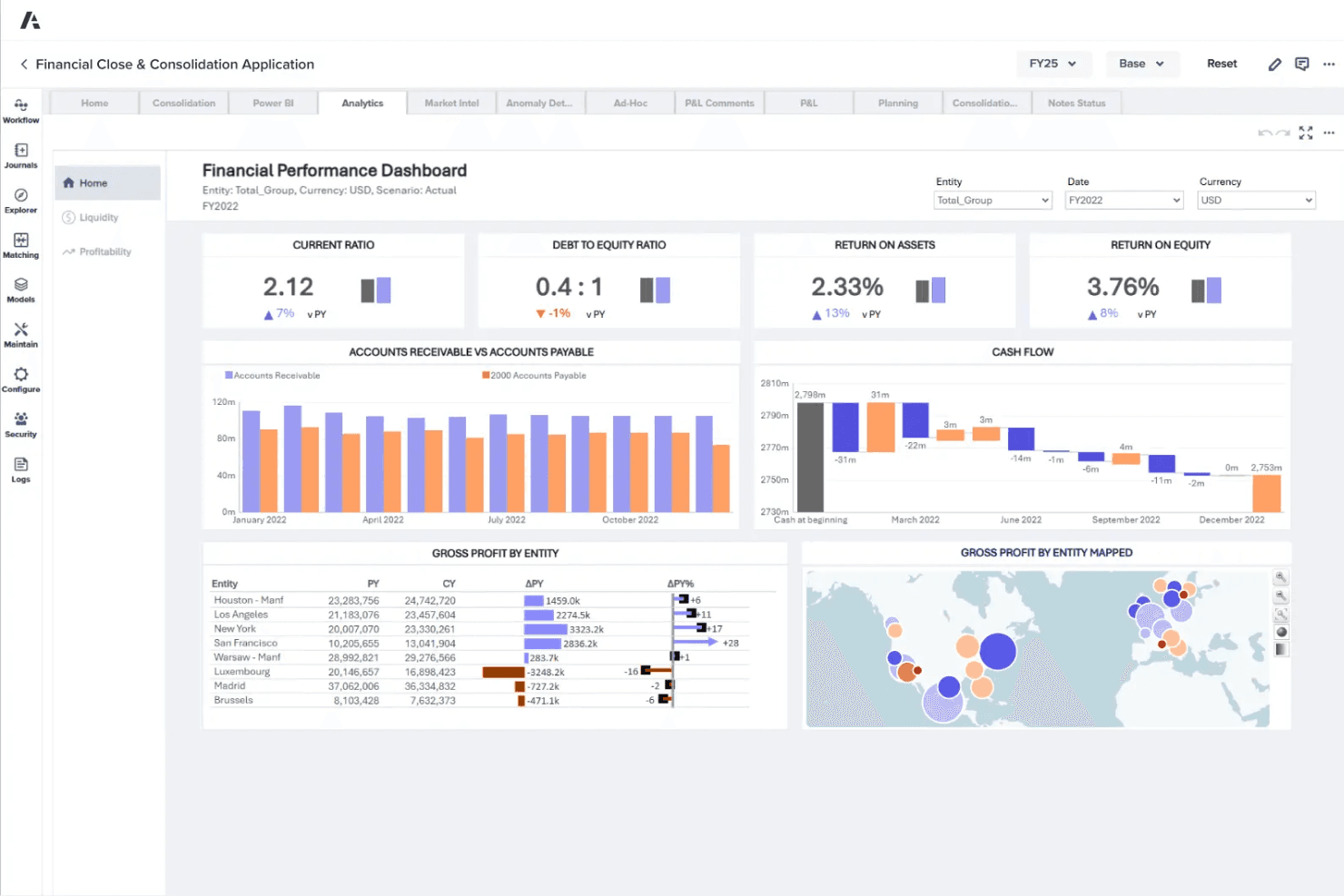
In my opinion, Anaplan offers a strong platform for financial forecasting, particularly excelling in flexibility and real-time collaboration. Compared to other SaaS software solutions, it stands out with its dynamic modeling capabilities and advanced data integration, making it ideal for large enterprises with complex planning processes. However, its interface can be challenging for new users, and the pricing may be steep for smaller organizations. Anaplan is best suited for environments that need robust collaboration across departments like finance, operations, and workforce planning. If your team values flexibility, scalability, and advanced modeling, Anaplan is a worthy consideration.
Pros
- You can easily collaborate in real-time with your team on complex models.
- Anaplan's dynamic modeling lets you adapt quickly to changing business needs.
- It offers excellent flexibility for customizing financial forecasts to fit your requirements.
Cons
- The interface can be complex and hard to navigate for new users.
- Your team might face a steep learning curve during initial onboarding and setup.
- It may take some time to integrate into your workflow fully.
Is Anaplan Right For Your Needs?
Who Would be a Good Fit for Anaplan?
Anaplan suits large enterprises in industries like retail or manufacturing, where complex financial modeling and supply chain management are key. If your team works across departments needing real-time collaboration, Anaplan’s flexibility and dynamic modeling will meet your needs. Its ability to adapt to changes, unify business planning, and customize forecasts makes it ideal for organizations with multiple variables and scenario modeling to manage.
- Large EnterprisesAnaplan handles complex financial scenarios and large datasets efficiently, making it perfect for big companies.
- Retail IndustryRetail teams benefit from Anaplan’s ability to model dynamic demand forecasting and inventory management, helping to streamline the supply chain.
- Manufacturing SectorManufacturers use Anaplan for supply chain optimization and production planning due to its predictive analytics and integrated modules.
- Finance DepartmentsAs a measure of customer success, finance teams appreciate Anaplan’s real-time data integration and collaboration features for precise FP&A and performance management.
- Operations TeamsOperations departments use Anaplan for workforce planning, resource allocation, and scenario modeling, thanks to its adaptability and automation capabilities.
- Business AnalystsAnalysts find value in Anaplan’s advanced analytics, scenario planning, and visualization tools for detailed insights to benefit key stakeholders.
Who Would be a Bad Fit for Anaplan?
Anaplan isn’t ideal for small businesses or startups with limited budgets and resources. If your team lacks technical expertise, the learning curve and complexity of Anaplan may be overwhelming. Businesses with simple forecasting needs might find Anaplan’s advanced modules unnecessary. Additionally, if you need immediate implementation without extensive training, Anaplan might not be the best choice for fast deployment or nontechnical end users.
- Small BusinessesSmall businesses may find Anaplan’s complexity and cost overwhelming compared to their simpler needs.
- StartupsStartups often need fast, straightforward solutions, making Anaplan’s extensive planning platform excessive.
- Non-Technical TeamsTeams without technical expertise might struggle with Anaplan’s complex setup and user experience.
- Simple ForecastingOrganizations requiring only basic forecasting functions won’t benefit from Anaplan’s advanced capabilities.
- Limited IT ResourcesCompanies with minimal IT support might find Anaplan’s data integration and api setup challenging.
- Immediate ImplementationIf your business needs quick deployment, Anaplan’s onboarding process could be too time-consuming.
How We Test & Score Tools
We’ve spent years building, refining, and improving our software testing and scoring system. The rubric is designed to capture the nuances of software selection and what makes a tool effective, focusing on critical aspects of the decision-making process.
Below, you can see exactly how our testing and scoring works across seven criteria. It allows us to provide an unbiased evaluation of the software based on core functionality, standout features, ease of use, onboarding, customer support, integrations, customer reviews, and value for money.
Core Functionality (25% of final scoring)
The starting point of our evaluation is always the core functionality of the tool. Does it have the basic features and functions that a user would expect to see? Are any of those core features locked to higher-tiered pricing plans? At its core, we expect a tool to stand up against the baseline capabilities of its competitors.
Standout Features (25% of final scoring)
Next, we evaluate uncommon standout features that go above and beyond the core functionality typically found in tools of its kind. A high score reflects specialized or unique features that make the product faster, more efficient, or offer additional value to the user.
We also evaluate how easy it is to integrate with other tools typically found in the tech stack to expand the functionality and utility of the software. Tools offering plentiful native integrations, 3rd party connections, and API access to build custom integrations score best.
Ease of Use (10% of final scoring)
We consider how quick and easy it is to execute the tasks defined in the core functionality using the tool. High scoring software is well designed, intuitive to use, offers mobile apps, provides templates, and makes relatively complex tasks seem simple.
Onboarding (10% of final scoring)
We know how important rapid team adoption is for a new platform, so we evaluate how easy it is to learn and use a tool with minimal training. We evaluate how quickly a team member can get set up and start using the tool with no experience. High scoring solutions indicate little or no support is required.
Customer Support (10% of final scoring)
We review how quick and easy it is to get unstuck and find help by phone, live chat, or knowledge base. Tools and companies that provide real-time support score best, while chatbots score worst.
Customer Reviews (10% of final scoring)
Beyond our own testing and evaluation, we consider the net promoter score from current and past customers. We review their likelihood, given the option, to choose the tool again for the core functionality. A high scoring software reflects a high net promoter score from current or past customers.
Value for Money (10% of final scoring)
Lastly, in consideration of all the other criteria, we review the average price of entry level plans against the core features and consider the value of the other evaluation criteria. Software that delivers more, for less, will score higher.
Core Features
Dynamic Modeling: Anaplan lets you build and adjust financial models in real-time, adapting to your changing business needs. You can easily test different scenarios and see immediate impacts through scenario modeling and visualization.
Real-Time Collaboration**:** Your team can work together simultaneously on the same models, ensuring everyone stays updated with the latest data. This feature fosters better decision-making and teamwork across departments.
Scenario Planning**:** Anaplan allows you to create multiple “what-if” scenarios for areas such as sales planning, helping you assess different strategies. This capability aids in risk management and strategic optimization.
Data Integration**:** You can easily pull in data from various sources, including spreadsheets, CRM systems, and ERP systems, ensuring your forecasts remain accurate and comprehensive. Anaplan’s integration provides a single source of truth for all your planning data.
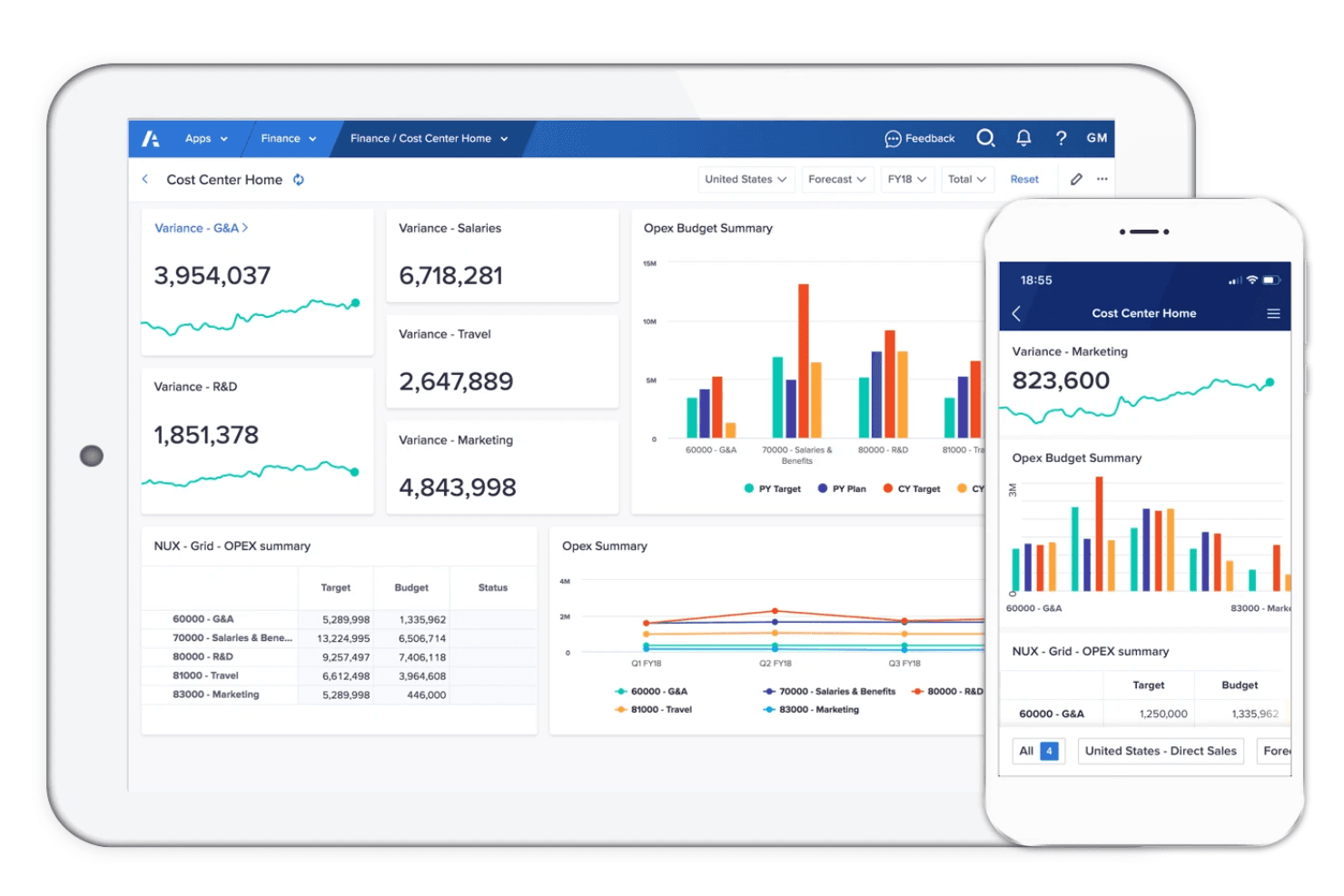
Customizable Dashboards: Customize dashboards to fit your team’s specific business processes, providing clear insights at a glance.
Advanced Analytics: Anaplan offers powerful analytics tools using machine learning to dig deep into large datasets for detailed insights, helping end users make informed financial decisions
Ease of Use
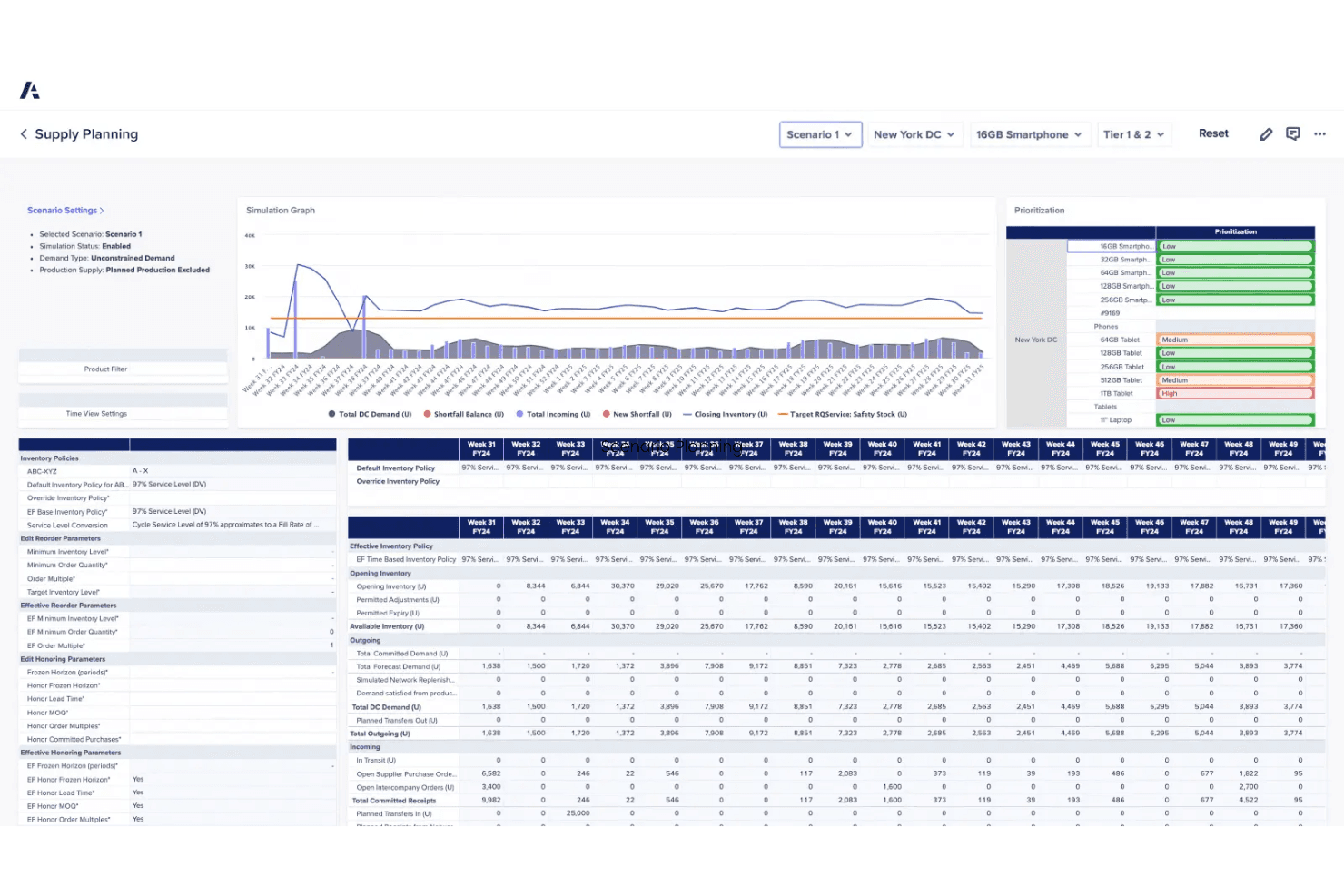
Anaplan's interface can be challenging for new users, featuring a steep learning curve that requires significant time and effort. However, once you get the hang of it, its powerful features and flexible modeling become invaluable. The complexity might be daunting initially, but the ability to customize and collaborate in real-time offers significant advantages. If your team is ready for an initial investment in training, Anaplan's capabilities will pay off in enhanced productivity and insights.
Integrations
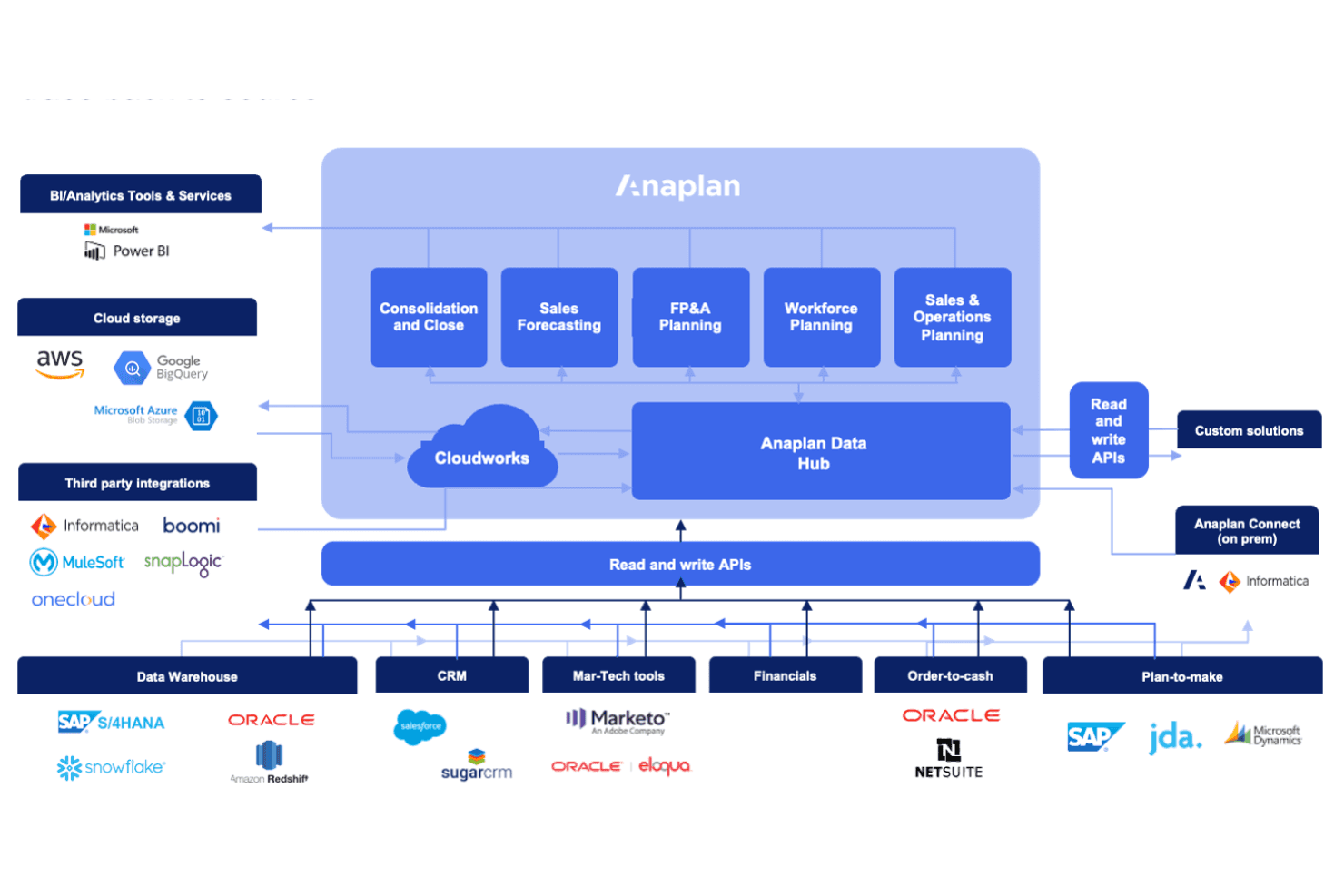
The Anaplan platform integrates with Salesforce, Workday, Microsoft 365, Google Cloud, Tableau, Power BI, MuleSoft, Informatica, Dell Boomi, and SnapLogic. Anaplan also provides an API and connects with third-party integration tools to facilitate seamless data management and integration.
Anaplan Specs
- 2-Factor Authentication: No
- Accounts Payable: No
- Accounts Receivable: No
- API: Yes
- Approval Workflows: No
- Balance Sheet: No
- Billing/Invoicing: No
- Budgeting: Yes
- Calendar Management: Yes
- Comparative Reporting: No
- CRM Integration: No
- Custom Reports: No
- Customer Management: No
- Dashboard: Yes
- Data Export: Yes
- Data Import: Yes
- Data Visualization: Yes
- Expense Tracking: No
- External Integrations: Yes
- Forecasting: Yes
- General Account Ledger: No
- Historical Data Analysis: No
- Inventory Tracking: Yes
- Multi-Currency: No
- Multi-User: No
- Notifications: Yes
- P&L: No
- Payroll: No
- Scenario Planning: No
- Scheduling: Yes
- Supplier Management: No
- Tax Management: No
- Time Management: No


