

Epicor Kinetic-beoordeling: voordelen, nadelen, functies en prijzen
Epicor Kinetic onderscheidt zich door zijn sterke focus op productie en flexibele cloudopties, waardoor het ideaal is voor middelgrote fabrikanten die een ERP-systeem op maat zoeken, maar het kan complex zijn voor kleinere teams.

We review tools independently, and commissions help fund our testing. See our transparency policy, our methodology, or suggest a tool.
Epicor Kinetic is a CFO ERP software built for mid-market manufacturers and distributors that need production, supply chain, and financial management in one system. I'd consider it over a general-purpose tool like NetSuite if your business runs complex manufacturing operations—Epicor Kinetic goes much deeper on shop floor controls, production scheduling, and bill of materials management than a platform designed to serve every industry equally.
Epicor Kinetic Evaluation Summary
3.9/5
- Pricing upon request
- Free demo available
Waarom u onze softwareaanbevelingen kunt vertrouwen
6,700+
Reviews
20
Industry experts
16+
Evaluation factors
14
Years
Onze reviews weerspiegelen ons onafhankelijke oordeel — geen verkooppraatje. Ontdek hoe we transparant blijven.
Voor deze gids hebben we tools geëvalueerd met behulp van praktijktests en onafhankelijk onderzoek, waarbij we tools beoordeelden aan de hand van onze selectiecriteria.
Onze reviews weerspiegelen ons menselijke redactionele oordeel, geen verkooppraatje.
Epicor Kinetic Overview
Epicor Kinetic stands out for its manufacturing-centric features, flexible cloud and on-premise options, and strong customization capabilities, making it a top choice for organizations with complex production needs. Its modern interface and deep industry integrations support detailed financial and operational workflows, though onboarding can be demanding for teams new to ERP.
Pricing is competitive for midsize businesses, but smaller companies may find it less accessible. When comparing ERP options, Epicor Kinetic excels in advanced manufacturing, compliance, and analytics, but may require more training and IT resources than simpler platforms.
Pros
- Flexible deployment with cloud, on-premise, or hybrid options.
- Strong financial reporting and analytics tools.
- Advanced manufacturing and production management capabilities.
Cons
- Smaller businesses may find pricing less accessible.
- Customization and setup require significant IT resources.
- Browser-only version can have stability issues.
Is Epicor Kinetic Right For Your Needs?
Who Would be a Good Fit for Epicor Kinetic?
Epicor Kinetic is best suited for organizations with complex manufacturing, distribution, or supply chain needs that require deep industry functionality and advanced process automation. Its strong financial controls, compliance features, and flexible deployment options make it a solid choice for midsize to large enterprises with dedicated IT resources.
Teams that need detailed production tracking, multi-site management, or regulatory reporting will find Epicor Kinetic’s capabilities especially valuable.
- Regulated IndustriesBuilt-in compliance and traceability tools address strict industry standards.
- Project-Based FirmsIntegrated project management and costing features track profitability and resources.
- Finance DepartmentsRobust financial reporting and compliance tools support audit and regulatory needs.
- Multi-Site EnterprisesCentralized data and process standardization help manage multiple locations efficiently.
- Industrial DistributionThe platform offers advanced inventory, warehouse, and order management features.
- Discrete ManufacturingEpicor Kinetic supports complex bill of materials, shop floor control, and production scheduling.
Who Would be a Bad Fit for Epicor Kinetic?
Epicor Kinetic may not be ideal for small businesses, startups, or organizations with simple operational needs due to its complexity, resource requirements, and pricing. Companies seeking lightweight, out-of-the-box ERP solutions or those without dedicated IT support may find implementation and ongoing management challenging. Service-based firms or teams with minimal manufacturing or inventory needs may not fully utilize its advanced features.
- Simple InventoryNeeds Basic inventory operations don’t justify the platform’s advanced capabilities.
- Minimal IT ResourcesImplementation and customization require ongoing technical support.
- Nonprofit OrganizationsAdvanced manufacturing and compliance features are unnecessary for most nonprofits.
- Service-Only FirmsLimited tools for pure service delivery or consulting workflows.
- Retail-Only BusinessesEpicor Kinetic lacks specialized retail POS and merchandising features.
- Small StartupsThe platform’s complexity and cost can overwhelm lean teams.
How We Test & Score Tools
We’ve spent years building, refining, and improving our software testing and scoring system. The rubric is designed to capture the nuances of software selection and what makes a tool effective, focusing on critical aspects of the decision-making process.
Below, you can see exactly how our testing and scoring works across seven criteria. It allows us to provide an unbiased evaluation of the software based on core functionality, standout features, ease of use, onboarding, customer support, integrations, customer reviews, and value for money.
Core Functionality (25% of final scoring)
The starting point of our evaluation is always the core functionality of the tool. Does it have the basic features and functions that a user would expect to see? Are any of those core features locked to higher-tiered pricing plans? At its core, we expect a tool to stand up against the baseline capabilities of its competitors.
Standout Features (25% of final scoring)
Next, we evaluate uncommon standout features that go above and beyond the core functionality typically found in tools of its kind. A high score reflects specialized or unique features that make the product faster, more efficient, or offer additional value to the user.
We also evaluate how easy it is to integrate with other tools typically found in the tech stack to expand the functionality and utility of the software. Tools offering plentiful native integrations, 3rd party connections, and API access to build custom integrations score best.
Ease of Use (10% of final scoring)
We consider how quick and easy it is to execute the tasks defined in the core functionality using the tool. High scoring software is well designed, intuitive to use, offers mobile apps, provides templates, and makes relatively complex tasks seem simple.
Onboarding (10% of final scoring)
We know how important rapid team adoption is for a new platform, so we evaluate how easy it is to learn and use a tool with minimal training. We evaluate how quickly a team member can get set up and start using the tool with no experience. High scoring solutions indicate little or no support is required.
Customer Support (10% of final scoring)
We review how quick and easy it is to get unstuck and find help by phone, live chat, or knowledge base. Tools and companies that provide real-time support score best, while chatbots score worst.
Customer Reviews (10% of final scoring)
Beyond our own testing and evaluation, we consider the net promoter score from current and past customers. We review their likelihood, given the option, to choose the tool again for the core functionality. A high scoring software reflects a high net promoter score from current or past customers.
Value for Money (10% of final scoring)
Lastly, in consideration of all the other criteria, we review the average price of entry level plans against the core features and consider the value of the other evaluation criteria. Software that delivers more, for less, will score higher.
Core Features
Advanced Production Management
Manage complex manufacturing processes with real-time shop floor control and scheduling. Users can track work orders, materials, and labor across multiple sites.
Financial Management
Handle general ledger, accounts payable, receivable, and fixed assets in one system. Built-in compliance and audit tools support regulatory requirements.
Inventory and Warehouse Control
Monitor inventory levels, automate replenishment, and manage multiple warehouses. Barcode scanning and lot tracking improve accuracy and traceability.
Supply Chain Management
Coordinate purchasing, supplier management, and demand planning from a central dashboard. Automated workflows help reduce lead times and stockouts.
Project Management
Plan, budget, and track project costs, resources, and timelines. Integrated reporting links project performance directly to financial outcomes.
Quality Management
Enforce quality standards with inspection plans, nonconformance tracking, and corrective actions. Real-time dashboards help identify and resolve quality issues quickly.
Ease of Use
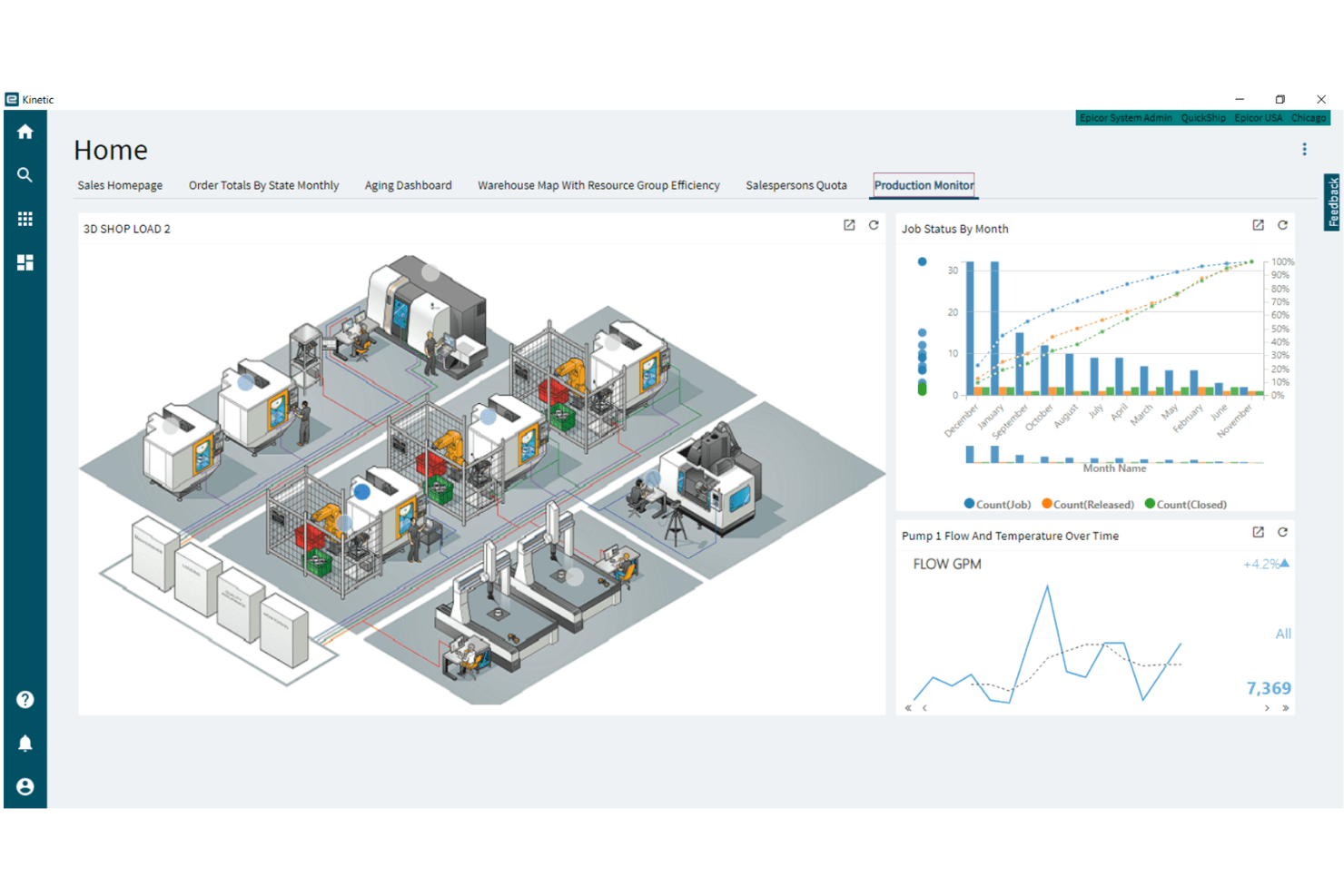
Epicor Kinetic offers a modern, browser-based interface with customizable dashboards, but its depth and complexity can be challenging for new users. Many reviewers note that navigation and workflow setup require training, especially for teams without prior ERP experience.
However, the low-code designer and in-app guidance help users adapt the system to their needs, making it more approachable over time for organizations with dedicated resources.
Integrations
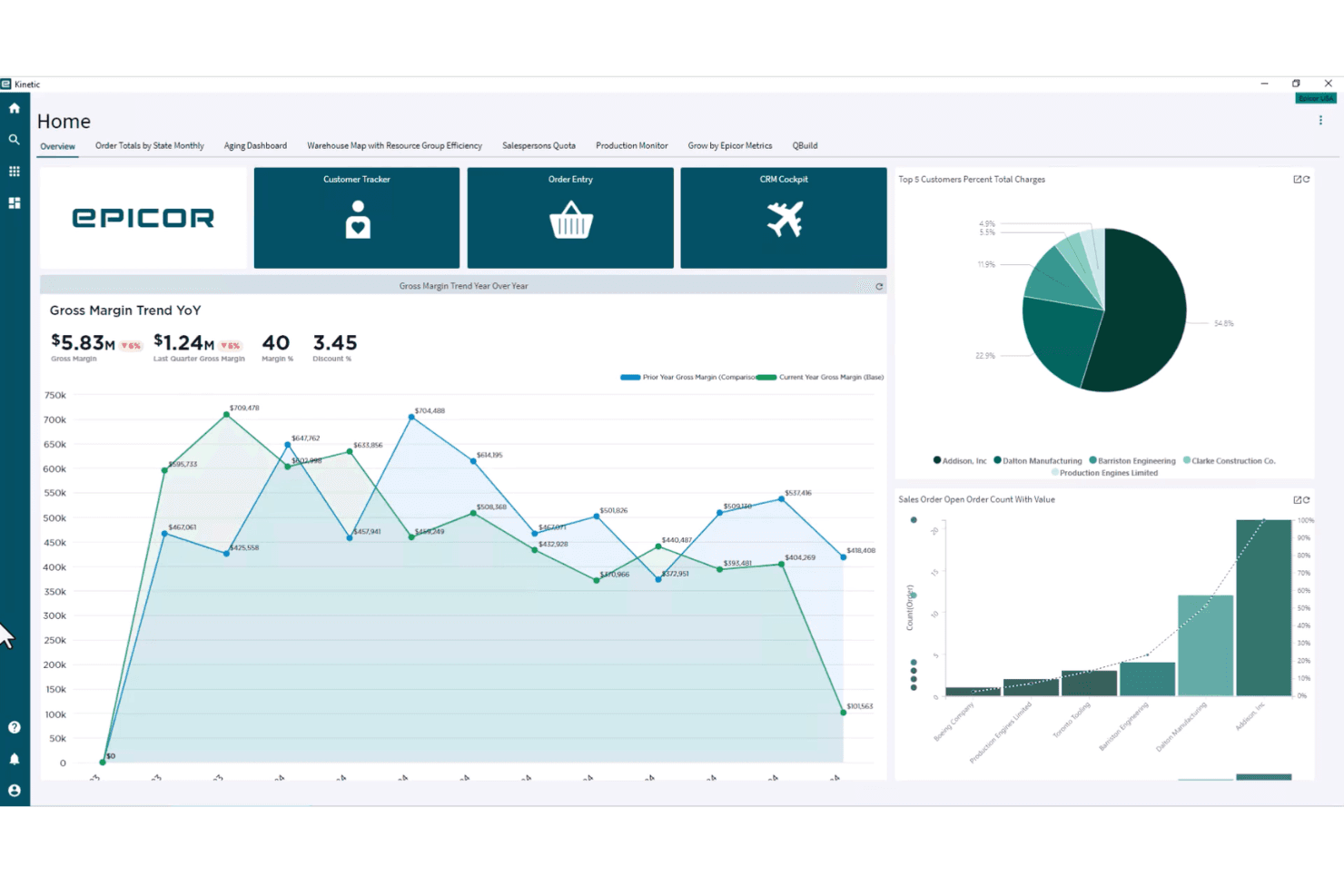
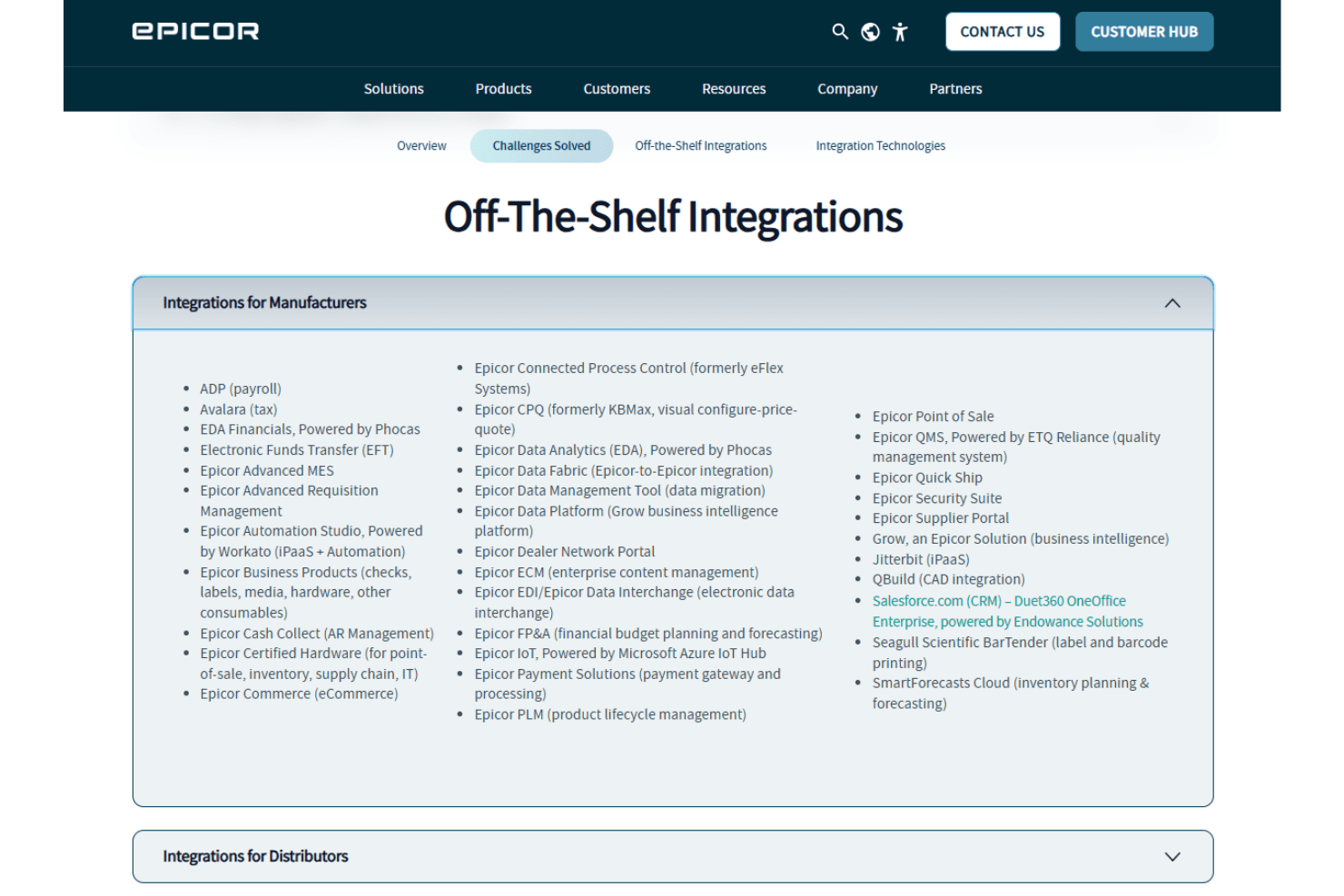
Epicor Kinetic integrates with Salesforce, Avalara, Microsoft Office 365, ADP, DocStar, CADLink, Shopify, Magento, Amazon, and SPS Commerce, among others.
Epicor Kinetic also offers a REST API and supports connections with third-party integration tools for custom workflows and data exchange.
Epicor Kinetic Specs
- Accounts Payable: Yes
- Accounts Receivable: Yes
- API: Yes
- Budgeting: Yes
- Calendar Management: No
- Compliance Tracking: Yes
- Customer Management: Yes
- Dashboard: Yes
- Data Export: Yes
- Data Import: Yes
- Data Visualization: Yes
- Expense Tracking: Yes
- External Integrations: Yes
- Financial Analysis: Yes
- Forecasting: Yes
- Inventory Tracking: Yes
- Multi-Currency: Yes
- Multi-User: Yes
- Notifications: Yes
- Order Management: Yes
- Payroll: Yes
- Project Management: Yes
- Purchase Orders: Yes
- Resource Management: Yes
- Scheduling: Yes
- Supplier Management: Yes
- Task Scheduling/Tracking: Yes
- Third-Party Plugins/Add-Ons: Yes
- Warehouse Management: Yes
- Workflow Management: Yes


