

Intuit Enterprise Suite versus Microsoft Dynamics 365 Business Central: Vergelijking en beoordelingen voor 2026

We review tools independently, and commissions help fund our testing. See our transparency policy, our methodology, or suggest a tool.
Op een gegeven moment beginnen de systemen die ooit goed werkten voor je bedrijf je te vertragen. Financiële rapportage duurt langer dan zou moeten, voorraadcijfers komen niet altijd overeen met de werkelijkheid en een duidelijk overzicht van je activiteiten vereist dat je gegevens uit meerdere tools samenbrengt. In plaats van je te helpen sneller te werken, begint je software knelpunten te veroorzaken.
Dat is het moment waarop veel bedrijven ERP-software gaan verkennen om alles op één plek samen te brengen. Maar het evalueren van platforms kan al snel overweldigend worden wanneer elke oplossing automatisering, inzicht en schaalbaarheid belooft. Als je moet kiezen tussen Intuit Enterprise Suite en Microsoft Dynamics 365 Business Central, biedt dit artikel een vergelijking van beide oplossingen naast elkaar, deskundige inzichten en praktische richtlijnen om je te helpen een zelfverzekerde, weloverwogen beslissing te nemen.
Intuit Enterprise Suite
4.6/5
- Free demo available
- Pricing upon request
Microsoft Dynamics 365 Business Central

4/5
- 30-day free trial
- From $80/user/month (billed annually)
Waarom u onze softwareaanbevelingen kunt vertrouwen
6,700+
Reviews
20
Industry experts
16+
Evaluation factors
14
Years
Onze reviews weerspiegelen ons onafhankelijke oordeel — geen verkooppraatje. Ontdek hoe we transparant blijven.
Voor deze gids hebben we tools geëvalueerd met behulp van praktijktests en onafhankelijk onderzoek, waarbij we tools beoordeelden aan de hand van onze selectiecriteria.
Onze reviews weerspiegelen ons menselijke redactionele oordeel, geen verkooppraatje.
| Intuit Enterprise Suite | Microsoft Dynamics 365 Business Central | |
|---|---|---|
| Free Trial | Free demo available | 30-day free trial |
| Pricing | Pricing upon request | From $80/user/month (billed annually) |
Prijzen en verborgen kosten van Intuit Enterprise Suite versus Microsoft Dynamics 365 Business Central
Intuit Enterprise Suite gebruikt een abonnementsmodel waarbij de kosten doorgaans afhangen van factoren zoals het aantal entiteiten, gebruikers en functies dat in je implementatie is opgenomen. Omdat de prijs vaak wordt aangepast aan de bedrijfsbehoeften, worden exacte kosten niet altijd openbaar vermeld. Je kunt ook extra kosten tegenkomen voor geavanceerde mogelijkheden, salarisadministratiediensten of integraties met toepassingen van derden.
Microsoft Dynamics 365 Business Central werkt ook met een abonnementsmodel, maar gebruikt vastgestelde licentieniveaus die variëren afhankelijk van het functionaliteitsniveau en de gebruikerstoegang. Hoewel het basisabonnement de belangrijkste ERP-mogelijkheden omvat, kunnen de totale kosten oplopen door implementatiediensten, aanpassingen, datamigratie en doorlopende ondersteuning—vooral als je samenwerkt met een Microsoft-partner om het systeem te implementeren en te onderhouden.
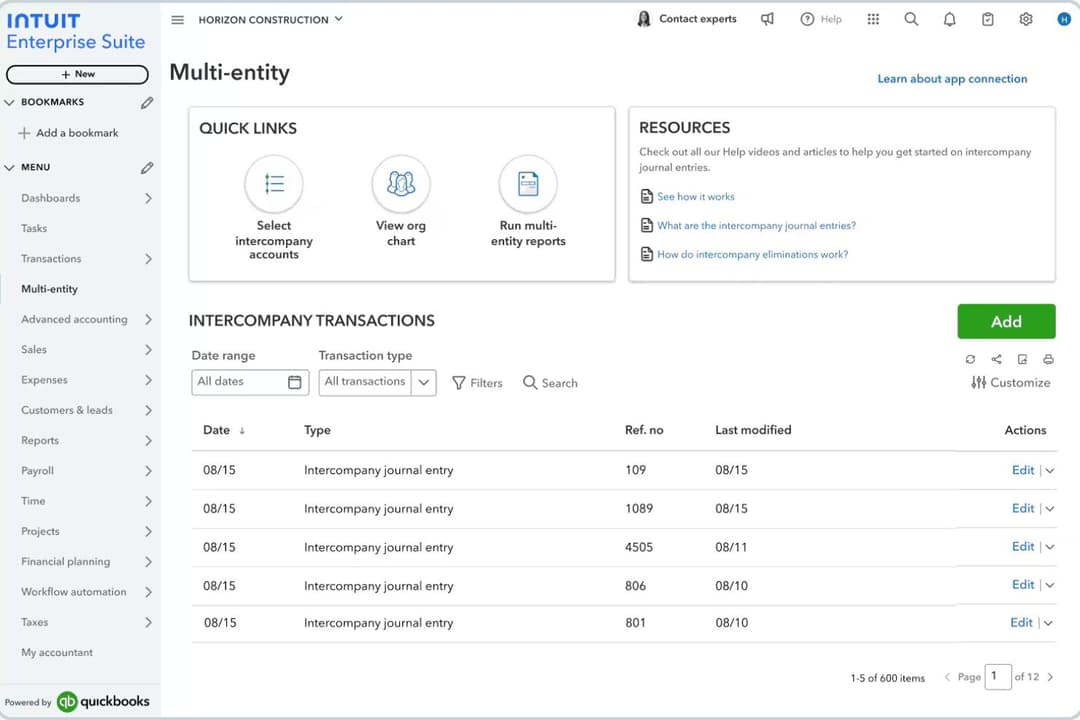
Intuit Enterprise Suite onderscheidt zich door financieel beheer voor meerdere entiteiten en geconsolideerde rapportage, waardoor het zeer geschikt is voor bedrijven die meerdere dochterondernemingen of bedrijfsonderdelen beheren. Het platform centraliseert financiële gegevens over entiteiten heen en automatiseert boekhoudkundige workflows, waardoor financiële teams minder handmatig hoeven te consolideren en een duidelijker overzicht van de organisatie krijgen.‘r’n’r’nMicrosoft Dynamics 365 Business Central onderscheidt zich door de brede operationele functionaliteit en de sterke integratie met het Microsoft-ecosysteem, waaronder tools zoals Excel, Outlook, Teams en Power BI. Het verbindt financiën, verkoop, toeleveringsketen en projectmanagement in één systeem. Beide platforms bieden ook belangrijke ERP-mogelijkheden, zoals financieel beheer, rapportage, voorraadbeheer en workflowautomatisering ter ondersteuning van de dagelijkse activiteiten.
| Intuit Enterprise Suite | Microsoft Dynamics 365 Business Central | |
|---|---|---|
| Accounts Payable | Yes | Yes |
| Accounts Receivable | Yes | Yes |
| API | Yes | Yes |
| Budgeting | Yes | Yes |
| Calendar Management | No | No |
| Customer Management | No | Yes |
| Dashboard | Yes | Yes |
| Data Export | Yes | Yes |
| Data Import | Yes | Yes |
| Data Visualization | Yes | Yes |
| Expense Tracking | Yes | Yes |
| External Integrations | Yes | Yes |
| Forecasting | Yes | Yes |
| Inventory Tracking | Yes | Yes |
| Multi-User | Yes | Yes |
| Notifications | Yes | Yes |
| Payroll | Yes | No |
| Project Management | Yes | Yes |
| Scheduling | No | Yes |
| Supplier Management | Yes | Yes |
| Third-Party Plugins/Add-Ons | Yes | Yes |
| Integratie | Intuit Enterprise Suite | Microsoft Dynamics 365 Business Central |
| Salesforce | ✅ | ✅ |
| Shopify | ✅ | ✅ |
| Avalara | ✅ | ✅ |
| HubSpot | ✅ | ✅ |
| PayPal | ✅ | ✅ |
| Bill.com | ✅ | ❌ |
| Expensify | ✅ | ❌ |
| Power BI | ❌ | ✅ |
| Microsoft Teams | ❌ | ✅ |
| ADP | ✅ | ❌ |
| API | ✅ | ✅ |
| Zapier | ✅ | ✅ |
Zowel Intuit Enterprise Suite als Microsoft Dynamics 365 Business Central ondersteunen integraties met veelgebruikte bedrijfstools, waaronder e-commerceplatforms, CRM-systemen, betalingsverwerkers en diensten voor belastingautomatisering. In veel gevallen kunnen verbindingen tot stand worden gebracht via native integraties, API's, middlewareplatforms of integratietools zoals Zapier, waardoor bedrijven hun ERP kunnen verbinden met de rest van hun technologiestack.
Waar de platforms doorgaans van elkaar verschillen, is de aansluiting op het ecosysteem. Microsoft Dynamics 365 Business Central heeft bijzonder sterke native integraties met Microsoft-producten zoals Power BI en Microsoft Teams, terwijl Intuit Enterprise Suite vaak directer verbinding maakt met financieel gerichte tools voor bijvoorbeeld onkostenbeheer, salarisadministratie en crediteurenadministratie, die vaak samen met QuickBooks worden gebruikt.
| Factor | Intuit Enterprise Suite | Microsoft Dynamics 365 Business Central |
| Gegevensversleuteling | Maakt gebruik van 128-bits SSL-versleuteling voor gegevens tijdens overdracht en in rust. | Versleutelt gegevens zowel in rust als tijdens overdracht via het beveiligingsframework van Microsoft Azure en cryptografie van ondernemingsniveau. |
| Regelgevingsnaleving | Wordt ondersteund door het bredere nalevingsframework van Intuit, waaronder standaarden zoals SOC 1, SOC 2, ISO 27001 en PCI DSS in de gehele cloudinfrastructuur. | Valt onder de wereldwijde nalevingsprogramma's van Microsoft, waaronder ISO-certificeringen, SOC-standaarden en ondersteuning voor de AVG, aangevuld met extra regelgevingsframeworks via Azure. |
| Toegangsbeheer | Op rollen gebaseerde machtigingen en gebruikersauthenticatie voor toegang tot gevoelige gegevens. | Gedetailleerde, op rollen gebaseerde machtigingen geïntegreerd met Microsoft Entra ID (Azure AD), voor eenmalige aanmelding, beleid voor voorwaardelijke toegang en meervoudige authenticatie. |
| Beschikbaarheid & betrouwbaarheid | Cloudinfrastructuur met back-ups, monitoring en voorzieningen voor noodherstel die zijn ontworpen om de beschikbaarheid van de service te handhaven. | Gebouwd op de wereldwijde infrastructuur van Microsoft Azure, met geautomatiseerde back-ups, redundantie en een SLA van 99,9% beschikbaarheid voor de online service. |
Beide platforms bieden sterke beveiligingsfundamenten met versleuteling, op rollen gebaseerde toegangscontroles en ondersteuning voor naleving. Microsoft Dynamics 365 Business Central profiteert van de wereldwijde cloudinfrastructuur en uitgebreide nalevingsportfolio van Microsoft Azure, terwijl Intuit Enterprise Suite zich richt op veilige financiële workflows en governancecontroles binnen het Intuit-ecosysteem. In de praktijk hangt de betere keuze vaak af van de vraag of uw organisatie de voorkeur geeft aan de bredere enterprise-cloudomgeving van Microsoft of aan het geïntegreerde, op financiën gerichte platform van Intuit.
| Factor | Intuit Enterprise Suite | Microsoft Dynamics 365 Business Central |
| Gebruikersinterface | Een overzichtelijke, op financiën gerichte interface die vertrouwd aanvoelt voor teams die gewend zijn aan moderne boekhoudsoftware. | Modern, aanpasbaar dashboard met diepe integratie met Microsoft 365. |
| Introductie | Begeleide installatie en tips in de app helpen nieuwe gebruikers snel aan de slag. | Stapsgewijze wizards en uitgebreide documentatie ondersteunen het introductieproces. |
| Aanpassing | Configureerbare workflows, integraties en rapportageopties, terwijl het gebruik relatief eenvoudig blijft. | Uiterst aanpasbare workflows en velden om aan complexe behoeften te voldoen. |
| Ondersteuning | Toegang tot ondersteuningsbronnen en documentatie van Intuit, plus hulp via ondersteuningskanalen en implementatiepartners. | Ondersteuning wordt doorgaans geleverd via Microsoft-partners, met aanvullende documentatie, communitybronnen en beschikbare Microsoft-ondersteuningsplannen. |
| Leercurve | Minimale leercurve voor gebruikers die vertrouwd zijn met boekhoudsoftware. | De bredere functionaliteit kan leiden tot een steilere leercurve, maar maakt geavanceerdere operationele workflows mogelijk. |
Intuit Enterprise Suite is doorgaans gemakkelijker snel te adopteren voor op financiën gerichte teams, dankzij de gestroomlijnde interface en het boekhoudkundige ontwerp. Microsoft Dynamics 365 Business Central biedt meer flexibiliteit en uitgebreidere operationele mogelijkheden, maar organisaties hebben mogelijk meer tijd nodig voor configuratie, training en implementatie om het platform volledig te benutten.
Intuit Enterprise Suite
- Multi-entity management supports complex organizational structures.
- AI-powered forecasting and insights help businesses analyze financial data.
- Built-in migration tools support transitions from QuickBooks Desktop and Advanced.
- The platform lacks sufficient training for new releases.
- Features can feel overwhelming.
- Reports take longer than expected to load.
Microsoft Dynamics 365 Business Central
- It offers extensive customization options to fit your business needs.
- The financial management tools provide comprehensive insights for better decision-making.
- It seamlessly integrates with other Microsoft products, enhancing your team's productivity.
- Some users find the initial setup complex and time-consuming.
- The user interface can feel outdated compared to other modern ERP solutions.
- There may be a learning curve for teams not already familiar with Microsoft products.
Intuit Enterprise Suite
- Multi-Entity BusinessesCompanies managing multiple subsidiaries, brands, or locations that need consolidated financial visibility while maintaining separate books.
- Finance Teams Focused on ForecastingOrganizations that rely on financial planning and projections to guide budgeting, expansion, and strategic decisions.
- Businesses With Structured Financial WorkflowsCompanies with complex approval processes that want to automate financial workflows and improve internal controls.
- Growing Service BusinessesService businesses needing project profitability tracking, workforce management, and consolidated financial planning across departments benefit significantly.
- Product-Based BusinessesCompanies that manage inventory and sales orders and need accounting, inventory, and order workflows connected in one system.
- Construction FirmsConstruction companies tracking job costing, project budgets, and multi-entity structures gain stronger operational visibility.
Microsoft Dynamics 365 Business Central
- Retail BusinessesYou can streamline inventory management and gain valuable insights into sales trends with its comprehensive reporting tools.
- Manufacturing CompaniesYour production processes can become more efficient with its detailed planning and scheduling functionalities.
- Service ProvidersYou can manage projects more effectively with its integrated project management features.
- Finance DepartmentsYour team will benefit from advanced financial reporting and analysis capabilities, providing deeper insights into financial health.
- Operations ManagersYou can tailor the system to your specific operational needs with its extensive customization options.
- Microsoft Product UsersYour work becomes more seamless with its native integration with other Microsoft applications, boosting overall productivity.
Wie zou Intuit Enterprise Suite moeten gebruiken en wie Microsoft Dynamics 365 Business Central?
Intuit Enterprise Suite is het meest geschikt voor groeiende middelgrote bedrijven die tools zoals QuickBooks zijn ontgroeid en behoefte hebben aan krachtiger financieel beheer van meerdere entiteiten, automatisering en geconsolideerde rapportage zonder een volledig traditioneel ERP-systeem te implementeren.
Microsoft Dynamics 365 Business Central is ideaal voor kleine tot middelgrote organisaties die een uitgebreider ERP-systeem willen voor het beheren van financiën, voorraad, verkoop en activiteiten—vooral als ze al gebruikmaken van Microsoft-tools zoals Excel, Teams en Outlook.
| Intuit Enterprise Suite | Microsoft Dynamics 365 Business Central | |
|---|---|---|
| Automation | Intuit Enterprise Suite Financial workflow automation and AI-driven insights focused on accounting processes. | Microsoft Dynamics 365 Business Central Advanced automation across finance, supply chain, approvals, and operational workflows. |
| Core Focus | Intuit Enterprise Suite Financial management platform with strong multi-entity accounting and consolidated reporting for growing businesses. | Microsoft Dynamics 365 Business Central Full ERP designed to manage finance, operations, sales, inventory, and projects in one system. |
| Customization | Intuit Enterprise Suite Configurable workflows and integrations with moderate customization. | Microsoft Dynamics 365 Business Central Highly customizable with extensions, workflows, and partner-built apps. |
| Inventory Management | Intuit Enterprise Suite Provides basic inventory visibility for financial tracking. | Microsoft Dynamics 365 Business Central Advanced inventory, warehouse, and supply chain management tools. |
| Learning Curve | Intuit Enterprise Suite Easier adoption for teams familiar with accounting software. | Microsoft Dynamics 365 Business Central Steeper learning curve due to broader operational functionality. |
| Cloud-Based Access | Both offer secure, cloud-based platforms, letting teams access financial data and workflows from anywhere; each provides mobile and web interfaces. |
|---|---|
| Financial Reporting | Each solution includes robust financial reporting tools, with customizable templates and real-time dashboards for tracking performance. |
| Role-Based Permissions | Both platforms allow you to set user roles and permissions, helping control access to sensitive financial data and workflows. |
| Third-Party Integrations | Both support integrations with CRM, ecommerce, and business productivity tools through APIs, connectors, and integration platforms. |
| Workflow Approvals | Both allow businesses to set approval processes for transactions, expenses, or financial workflows. |