

VOGSY-recensie: voordelen, nadelen, belangrijkste functies en prijsgids
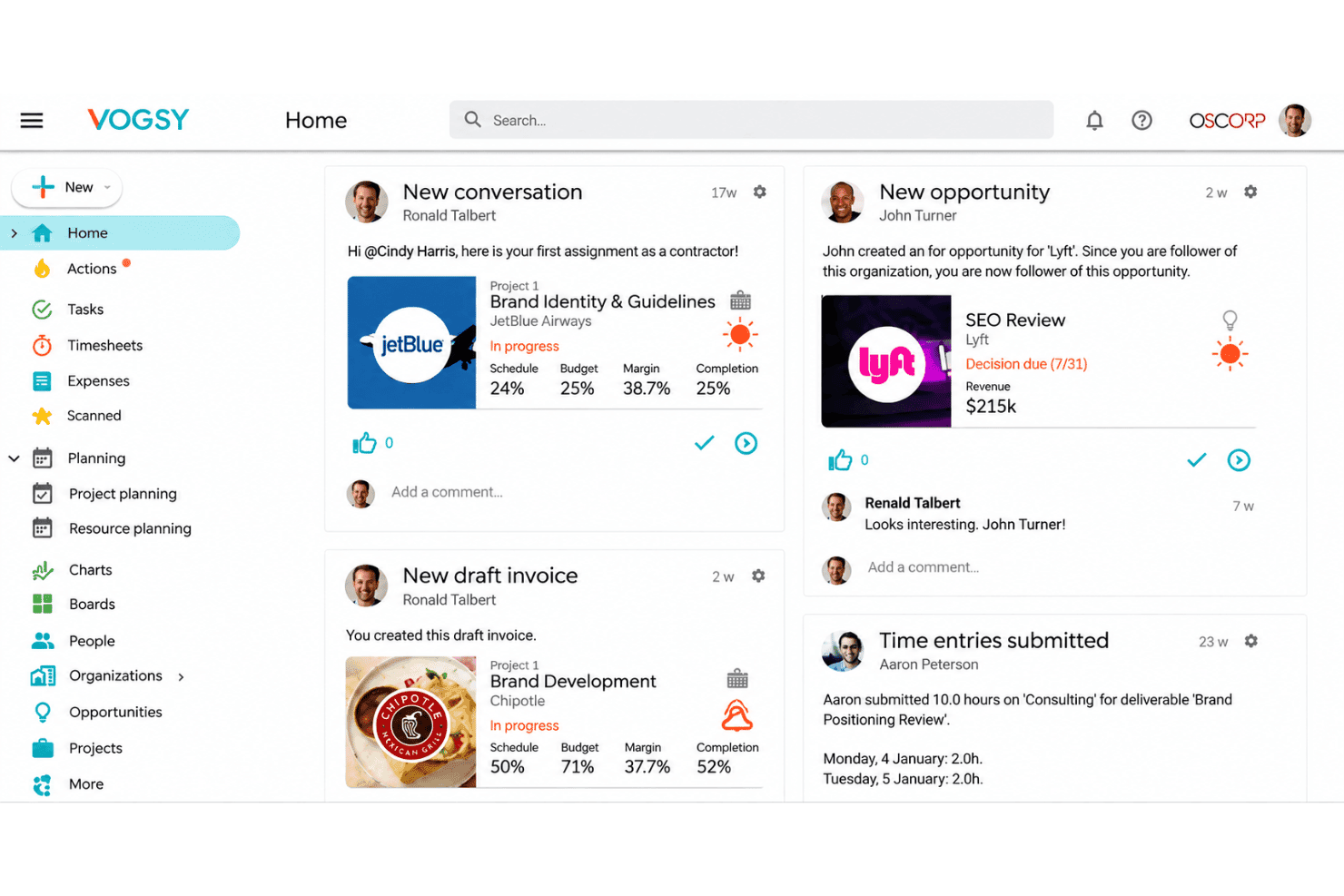
I see VOGSY as a strong agentic ERP built for professional services firms, pairing a governed operational data foundation with AI agents for selling, staffing, billing, and close, especially for teams that value connected delivery over broad customization.

We review tools independently, and commissions help fund our testing. See our transparency policy, our methodology, or suggest a tool.
VOGSY is an agentic ERP software platform for professional services firms that need to connect project delivery, time tracking, billing, and financial reporting, with AI agents handling much of the prep work. I'd consider it when your team wants one governed system for client work and finance that AI tools can safely act on. Compared with Kantata, VOGSY is the better choice if your business already works in Google Workspace and wants AI agents tied directly to its lead-to-cash data.
VOGSY Evaluation Summary
4.6/5
- From $16/user/month (billed annually)
- Free trial available
Waarom u onze softwareaanbevelingen kunt vertrouwen
6,700+
Reviews
20
Industry experts
16+
Evaluation factors
14
Years
Onze reviews weerspiegelen ons onafhankelijke oordeel — geen verkooppraatje. Ontdek hoe we transparant blijven.
Voor deze gids hebben we tools geëvalueerd met behulp van praktijktests en onafhankelijk onderzoek, waarbij we tools beoordeelden aan de hand van onze selectiecriteria.
Onze reviews weerspiegelen ons menselijke redactionele oordeel, geen verkooppraatje.
VOGSY Overview
I'd choose VOGSY for professional services firms that want sales, resourcing, project delivery, billing, and financial reporting in one system, with AI agents that draft the work and leave the final call to people. Its connected workflows, project accounting, and multi-entity controls compare favorably with broader ERP platforms, and it works alongside Google Workspace or Microsoft 365. Pricing deserves careful comparison because implementation and user requirements affect the total cost. Onboarding is guided and comparatively quick, though finance configuration still requires planning. Support and reporting suit growing firms, but customization and industry breadth may lag behind larger ERP systems.
Pros
- Project accounting tracks profitability across entities and currencies.
- Lead-to-cash workflows link sales, staffing, delivery, and invoicing.
- AI agents flag staffing, billing, and close issues for human review.
Cons
- Mandatory onboarding and a 20-user minimum raise entry costs.
- Reviewers report occasional performance issues during everyday use.
- Internal help content can leave users without clear answers.
Is VOGSY Right For Your Needs?
Who Would be a Good Fit for VOGSY?
VOGSY suits project-based organizations that need sales, staffing, project delivery, billing, and financial controls in one ERP, particularly those that want to apply AI to those workflows with proper governance. It fits teams working in Google Workspace or Microsoft 365 and finance departments managing lead-to-cash processes, multiple entities, or connected accounting systems.
- Professional ServicesVOGSY connects opportunities, quotes, projects, timesheets, invoicing, budgets, and reporting for services firms managing client engagements.
- Google And Microsoft UsersTeams using Google Workspace or Microsoft 365 will find familiar workflows across project management, collaboration, timesheets, and financial reporting.
- Finance DepartmentsFinance teams can use invoicing, accounts receivable, accounts payable, budgets, reports, and master data controls within one platform, with agents checking invoices and keeping month-end figures ready.
- Multi-Company GroupsOrganizations with multiple companies can use VOGSY's finance configuration to manage entity-level billing and reporting across countries and currencies.
- Project ManagersProject managers gain access to project planning, resource management, tasks, budgets, timesheets, and dashboards connected to financial data, plus agent-suggested replans when schedules slip.
- Lead-To-Cash TeamsRevenue operations teams can connect opportunity and quote management with project delivery, invoicing, and accounting integrations, feeding qualified deals into forecasts.
Who Would be a Bad Fit for VOGSY?
VOGSY is a poor fit for small teams, simple businesses, and buyers seeking a low-touch implementation. Its 20-user minimum, mandatory $5,900 onboarding fee, paid integrations, and finance configuration requirements create unnecessary cost for simpler needs.
- Small TeamsCompanies with fewer than 20 users cannot fit VOGSY’s minimum user requirement without paying for unused capacity.
- Simple BookkeepingBusinesses needing basic accounting alone will likely find invoicing, project controls, dashboards, and finance configuration unnecessary.
- Solo ConsultantsSolo consultants may struggle to justify VOGSY’s mandatory $5,900 onboarding fee and ERP-level feature set for limited project volume.
- Self-Service BuyersTeams wanting fully independent setup may find VOGSY restrictive, because the onboarding pack remains mandatory even with a free trial and in-product setup assistant available.
- Low-Budget FirmsOrganizations with limited software budgets must account for onboarding, user subscriptions, dashboard add-ons, and paid integrations.
- Nonproject BusinessesRetailers or operational businesses without client projects or recurring service contracts may gain little from VOGSY's timesheets, project planning, resource management, and quote-to-cash workflows.
How We Test & Score Tools
We’ve spent years building, refining, and improving our software testing and scoring system. The rubric is designed to capture the nuances of software selection and what makes a tool effective, focusing on critical aspects of the decision-making process.
Below, you can see exactly how our testing and scoring works across seven criteria. It allows us to provide an unbiased evaluation of the software based on core functionality, standout features, ease of use, onboarding, customer support, integrations, customer reviews, and value for money.
Core Functionality (25% of final scoring)
The starting point of our evaluation is always the core functionality of the tool. Does it have the basic features and functions that a user would expect to see? Are any of those core features locked to higher-tiered pricing plans? At its core, we expect a tool to stand up against the baseline capabilities of its competitors.
Standout Features (25% of final scoring)
Next, we evaluate uncommon standout features that go above and beyond the core functionality typically found in tools of its kind. A high score reflects specialized or unique features that make the product faster, more efficient, or offer additional value to the user.
We also evaluate how easy it is to integrate with other tools typically found in the tech stack to expand the functionality and utility of the software. Tools offering plentiful native integrations, 3rd party connections, and API access to build custom integrations score best.
Ease of Use (10% of final scoring)
We consider how quick and easy it is to execute the tasks defined in the core functionality using the tool. High scoring software is well designed, intuitive to use, offers mobile apps, provides templates, and makes relatively complex tasks seem simple.
Onboarding (10% of final scoring)
We know how important rapid team adoption is for a new platform, so we evaluate how easy it is to learn and use a tool with minimal training. We evaluate how quickly a team member can get set up and start using the tool with no experience. High scoring solutions indicate little or no support is required.
Customer Support (10% of final scoring)
We review how quick and easy it is to get unstuck and find help by phone, live chat, or knowledge base. Tools and companies that provide real-time support score best, while chatbots score worst.
Customer Reviews (10% of final scoring)
Beyond our own testing and evaluation, we consider the net promoter score from current and past customers. We review their likelihood, given the option, to choose the tool again for the core functionality. A high scoring software reflects a high net promoter score from current or past customers.
Value for Money (10% of final scoring)
Lastly, in consideration of all the other criteria, we review the average price of entry level plans against the core features and consider the value of the other evaluation criteria. Software that delivers more, for less, will score higher.
Core Features
Project Management
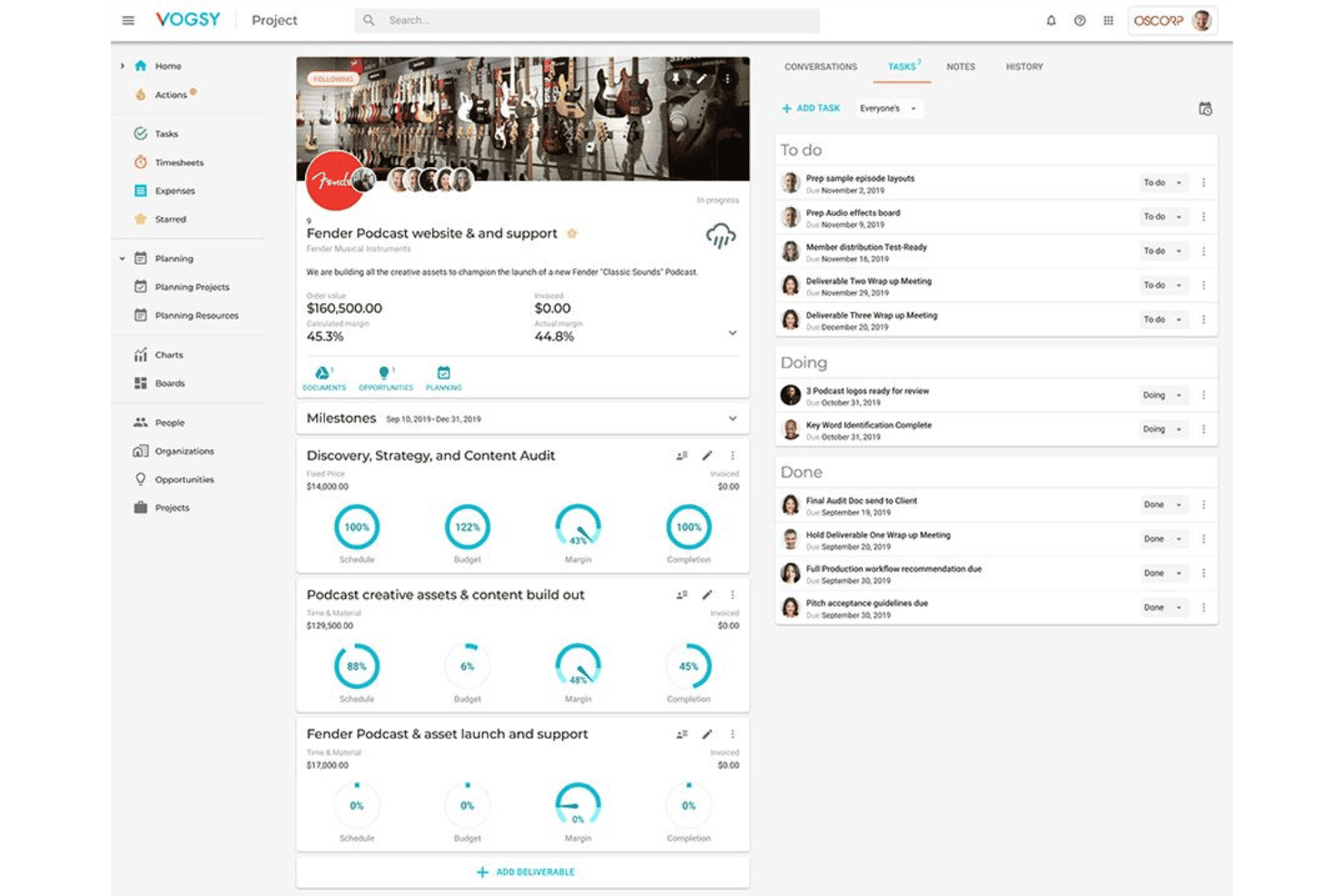
VOGSY organizes work through projects, work breakdown structures, deliverables, tasks, milestones, budgets, schedules, and billing methods. You can compare planned work with tracked hours and invoicing, giving project managers and finance teams one view of delivery and project status.
Resource Management
Resource management assigns employees, contractors, or placeholders to project work using skills, availability, working hours, and billability targets. Utilization forecasts flag capacity gaps early, and the Capacity Agent can suggest revised staffing when unplanned hours pile up, respecting each person's schedule and waiting for a planner's approval.
Time And Leave Tracking
VOGSY records weekly timesheets, project timers, billable and non-billable hours, leave requests, overtime, and approval status, and it can bring in time logged through Jira. Prepopulated timesheets and time locking support more complete billing data and help finance teams protect closed-period records.
Project Accounting
Project accounting tracks financial budgets, revenue streams, costs, work in progress, revenue recognition, margins, and forecasts. Multi-company and multi-currency reporting shows profitability across projects and entities, while a Monthly Close Agent keeps revenue and cost figures current throughout the month.
Invoicing And Billing
VOGSY supports time and materials, fixed-price, subscription, retainer, and mixed billing, with invoice reminders and work-in-progress controls. Its Invoicing Agent checks each draft invoice for consistency with logged hours, agreed rates, and completed work, and subscription businesses can use it to surface only unusual license changes for review.
Expense And Purchase Management
VOGSY captures project expenses in multiple currencies and routes them through approval workflows, while purchase invoices and purchase orders can be allocated to projects. This gives finance teams a clearer view of project costs before calculating margins or billing clients.
Ease of Use
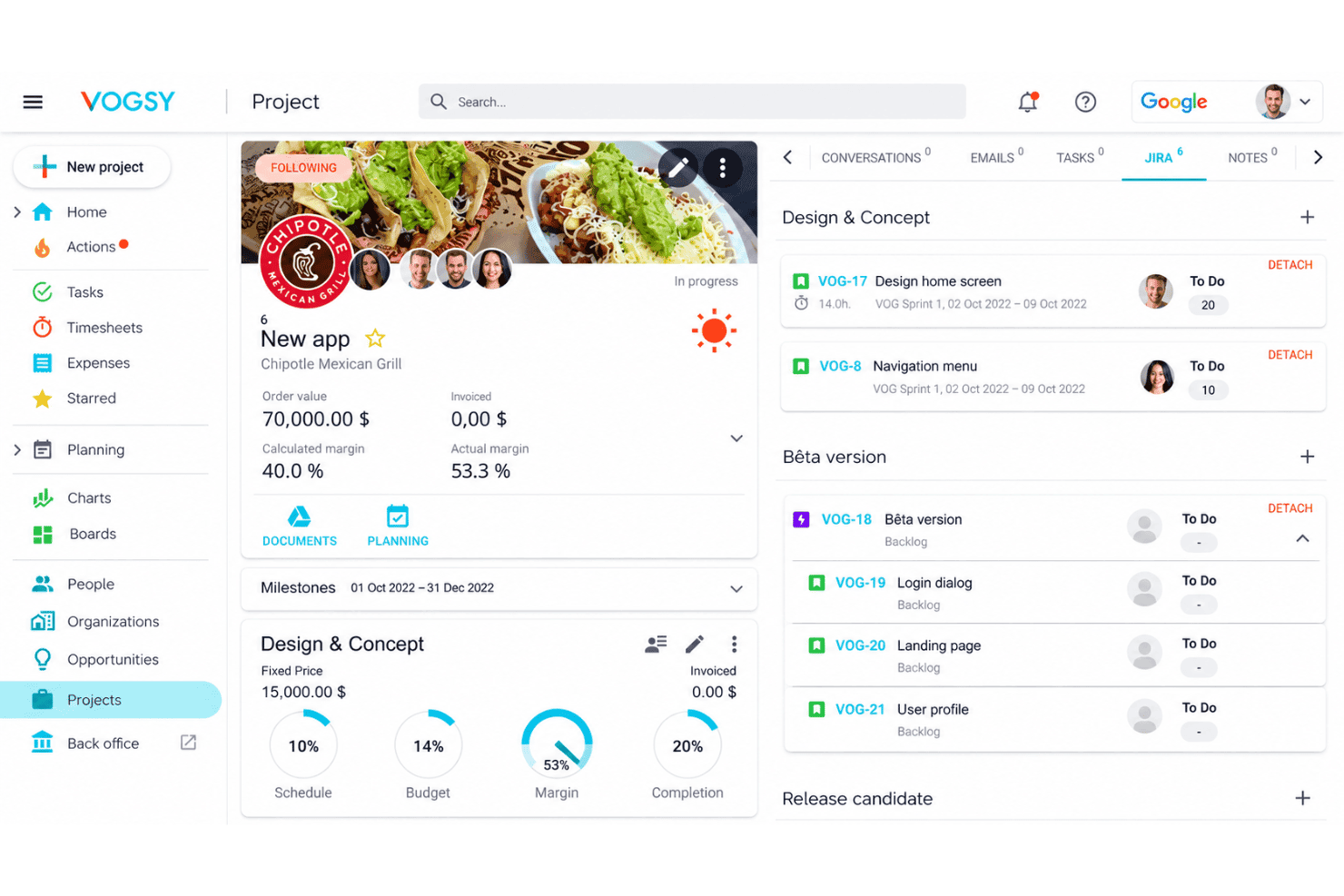
VOGSY is reasonably user-friendly for teams already working in Google Workspace or Microsoft 365, with familiar navigation and connected workflows for projects, timesheets, billing, and reporting. I'd rate its overall usability as mixed: a setup assistant and agents that handle routine preparation reduce manual effort, but finance configuration requires planning, and mandatory onboarding adds effort. User reviews also mention occasional performance issues and help content that doesn't always answer practical questions, making day-to-day troubleshooting harder than the interface suggests.
Integrations
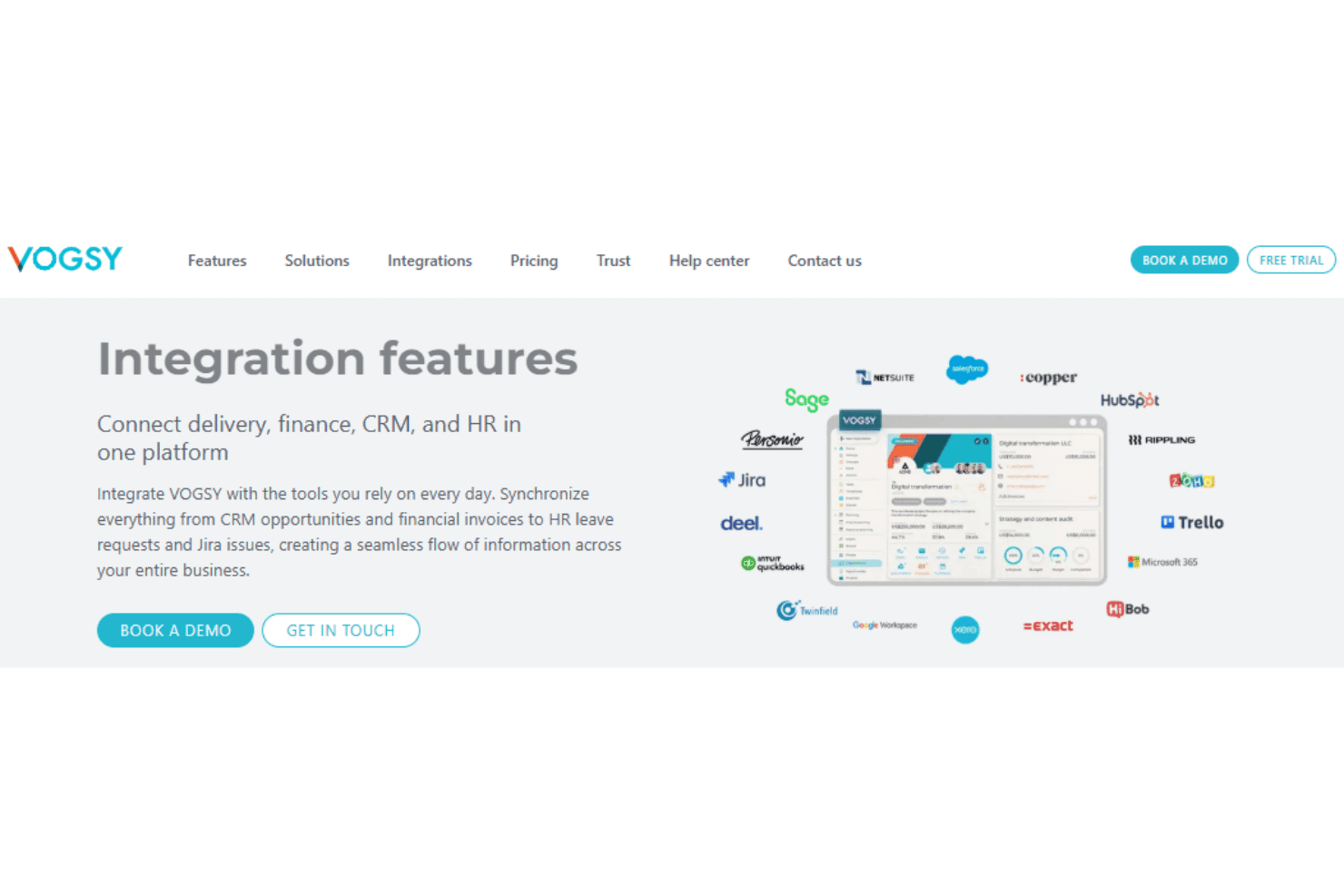
VOGSY integrates with Google Workspace, Microsoft 365, Slack, Xero, QuickBooks Online, NetSuite, Sage, Exact, DATEV, Salesforce, Copper, HubSpot, Jira, Power BI, and Looker, among others.
VOGSY also provides an open API for custom integrations, used by some customers to connect HR tools such as BambooHR, plus an MCP server that lets AI tools like Gemini, Claude, and Copilot work with VOGSY data under each user's permissions.
New Product Updates from VOGSY
VOGSY Adds Velocity Agent Verdicts for Quote Approvals
VOGSY extends the Velocity agent to pre-check quote approvals and return approve, caution, or reject verdicts based on discount and opportunity margin. Teams can customize the thresholds to match their pricing policy while keeping the final decision with the approver. Highlights include:
- Quote Approval Verdicts: Classify requests as approve without risk, approve with caution, or reject.
- Margin and Discount Checks: Evaluate quote risk using opportunity margin and discount levels.
- Reasoning: Show the factors behind each verdict so approvers understand the recommendation.
- Custom Thresholds: Adjust margin and discount rules to match internal pricing policies.
- Human Approval: Keep the final quote decision with the approver.
Visit VOGSY’s official site for more details.
VOGSY Adds Employee-Based Price Lists
VOGSY adds employee-based price lists that let teams set sales rates per employee and period, then link them to customers or individual projects. Updated rates can also take effect from a chosen date and apply automatically when invoicing hours. Highlights include:
- Employee-Based Rates: Set sales rates for individual employees instead of activities.
- Time-Based Pricing: Define rates by period and apply new rates from a selected date.
- Customer and Project Assignment: Use employee-based price lists as a customer default or link them to a specific project.
- Rate Indexing: Update rates during a project and apply the new values automatically to future invoiced hours.
- Bottom-Up Project Support: Price projects based on the rates of allocated employees.
Visit VOGSY’s official site for more details.
VOGSY Adds Practices and Financial Totals in Planning Views
VOGSY adds Practices and Financial Totals in planning views to improve reporting and project financial visibility. These updates help teams access consolidated performance insights and monitor project finances without switching between reports. Highlights include:
- Practices: Group companies and departments into higher-level categories to filter reports and view consolidated performance.
- Financial Totals: View revenue and cost totals directly in planning views for faster financial insights.
Visit VOGSY’s official site for more details.
VOGSY Adds AI Replanning Agent for Project Planning
VOGSY adds AI Replanning Agent in project planning to simplify schedule adjustments and resource planning. This update helps teams generate replanning suggestions, refine changes, and update project plans faster. Highlights include:
- AI Replanning Agent: Reschedule project work directly from deliverables using AI-powered suggestions.
- Guided Replanning Prompts: Use predefined prompts to generate schedule adjustments faster.
- Change Review: Review and refine AI-suggested updates before applying changes to project plans.
Visit VOGSY's official site for more details.
VOGSY Improves Operations and Forecasting
VOGSY introduces APIs for managing employee data and enhances sales probability with 1% increments. These updates improve efficiency by enabling automated HR workflows and providing more precise revenue forecasting. Highlights include:
- Employee Management APIs: Automates onboarding and offboarding through external HR system integrations.
- Precise Sales Probability: Allows 1% increments for more accurate forecasting and pipeline reporting.
Visit VOGSY’s official site for more details.
VOGSY Enhances AI for Project and Invoicing
VOGSY enhances its AI capabilities with automated invoice scheduling, improved retainer project setup, and faster response times with real-time progress updates. These updates improve efficiency by reducing manual work and providing clearer visibility during AI processing. Highlights include:
- AI Invoice Scheduling: Generates invoicing schedules using natural language for fixed-price deliverables.
- Enhanced AI Project Creation: Creates more complete and reliable retainer project setups in a single request.
- Faster AI Responses: Improves processing speed with real-time progress indicators during requests.
Visit VOGSY’s official site for more details.
VOGSY Enhances Data Control and Revenue Management
VOGSY introduces permission-based data isolation and revenue type restrictions by company or department. These updates improve governance by controlling data visibility and reducing errors in financial data entry. Highlights include:
- Permission-Based Data Isolation: Restricts access to projects, opportunities, and financial data by company or department.
- Revenue Type Restrictions: Limits selectable revenue types based on organizational context to reduce entry errors.
Visit VOGSY’s official site for more details.
VOGSY Specs
- Accounts Payable: Yes
- Accounts Receivable: Yes
- API: Yes
- Budgeting: Yes
- Calendar Management: Yes
- Compliance Tracking: Yes
- Customer Management: Yes
- Dashboard: Yes
- Data Export: Yes
- Data Import: Yes
- Data Visualization: Yes
- Expense Tracking: Yes
- External Integrations: Yes
- Financial Analysis: Yes
- Forecasting: Yes
- Inventory Tracking: Yes
- Multi-Currency: Yes
- Multi-User: Yes
- Notifications: Yes
- Order Management: Yes
- Payroll: Yes
- Project Management: Yes
- Purchase Orders: Yes
- Resource Management: Yes
- Scheduling: Yes
- Supplier Management: Yes
- Task Scheduling/Tracking: Yes
- Third-Party Plugins/Add-Ons: Yes
- Warehouse Management: Yes
- Workflow Management: Yes


