

Oprogramowanie do obsługi należności pomaga automatyzować, zarządzać i monitorować procesy fakturowania, windykacji oraz alokacji płatności. Jeśli kierujesz działem finansowym w rozwijającej się firmie, znalezienie odpowiedniego narzędzia może zdecydować o tym, czy zmagasz się z problemami z przepływami pieniężnymi, czy cieszysz się przejrzystością finansową.
Ten przewodnik pomija ogólne funkcje i koncentruje się na tym, co najważniejsze dla dyrektorów finansowych — automatyzacji, widoczności danych w czasie rzeczywistym, zgodności z przepisami oraz integracji z obecnym stosem technologicznym. Dowiesz się, które rozwiązania najlepiej wspierają strategiczny rozwój i radzą sobie z trudnymi realiami zarządzania należnościami, dzięki czemu dokonasz wyboru z pełnym przekonaniem.
Why Trust Our Software Recommendations
6,700+
Reviews
20
Industry experts
16+
Evaluation factors
14
Years
Our team has been testing and reviewing software since 2012. As finance leaders ourselves, we know how difficult—and important—it is to choose the right software.
For this guide, we evaluated tools using hands-on testing and independent research, scoring tools using our selection criteria.
Our reviews reflect our human editorial judgment, not a sales pitch.
Tabela porównawcza programów do obsługi należności
Ta tabela porównawcza zawiera podsumowanie informacji o cenach wybranych przeze mnie najlepszych programów do obsługi należności:
| Tool | Best For | Trial Info | Price | ||
|---|---|---|---|---|---|
| 1 | Best for real-time cash flow forecasting | Free demo available | Pricing upon request | Website | |
| 2 | Best for fast AR automation deployment | Free demo available | Pricing upon request | Website | |
| 3 | Best for AI-based order-to-cash process automation | Free demo available | Pricing upon request | Website | |
| 4 | Best for enterprise cash management integration | Free demo available | Pricing upon request | Website | |
| 5 | Best for mid-market dunning process automation | Free demo available | Pricing upon request | Website | |
| 6 | Best for B2B invoice-to-cash digitization | Free demo available | Pricing upon request | Website | |
| 7 | Best for global e-invoicing compliance | Free demo available | Pricing upon request | Website | |
| 8 | Best for AI-powered payment matching automation | Free demo available | Pricing upon request | Website | |
| 9 | Best for collaborative AR with customer portals | Free demo available | Pricing upon request | Website | |
| 10 | Best for ERP-integrated AR automation | Free demo available | Pricing upon request | Website |


Recenzje programów do obsługi należności
Poniżej znajdziesz moje szczegółowe podsumowania najlepszych programów do obsługi należności, które trafiły na moją listę. W recenzjach dokładnie omawiam funkcje, integracje i najlepsze zastosowania każdej platformy, aby pomóc Ci znaleźć rozwiązanie najlepiej dopasowane do Twoich potrzeb.
 Best for real-time cash flow forecasting
- Free demo available
- Pricing upon request
Visit WebsiteCustomer Rating:4.7/5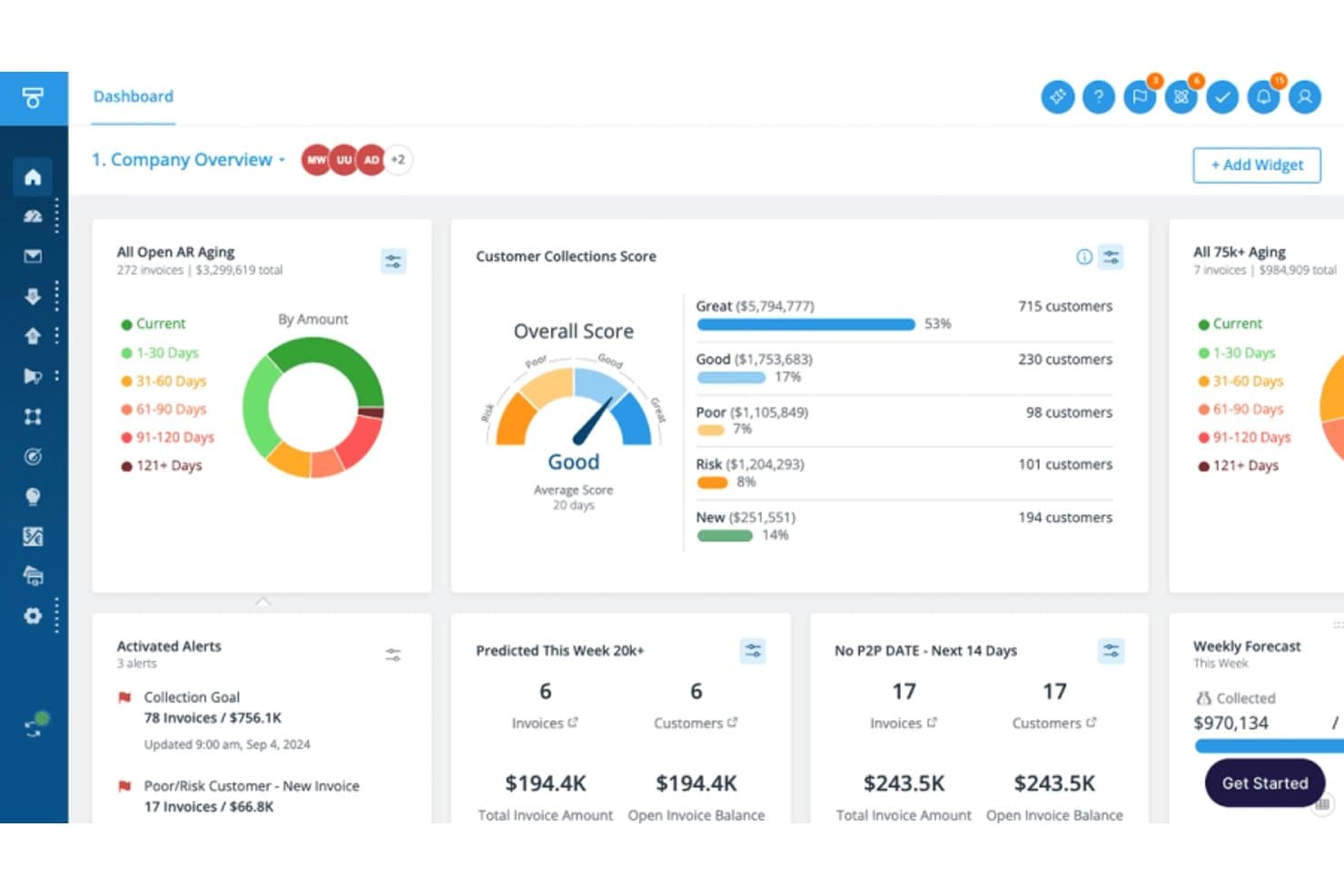
Tesorio tracks AR aging, collections scores, and weekly forecasts. Tesorio is an AI-driven accounts receivable platform that combines collections automation, cash application, automated dunning, and ML-powered cash flow forecasting into a connected financial operations system.
Who Is Tesorio Best For?
Tesorio is a strong fit for mid-market and enterprise finance teams where controllers and AR managers need real-time cash visibility alongside automated collections at scale.
Why I Picked Tesorio
Tesorio earns its spot on my shortlist because its ML-powered AR forecast is built on live ERP data, not stale batch exports. I like that the 13-week cash forecast pulls directly from real-time collections activity, so when my team logs a payment promise or closes out a payment match, the forecast reflects it immediately. That tight connection between collections workflows and cash forecasting is what separates Tesorio from tools that treat those two problems independently.
Tesorio Key Features
- Collections Agent: Drafts personalized email follow-ups and manages payment promise tracking from customer replies.
- Supplier portal integration: Connects directly with Coupa and Ariba for invoice submission and remittance download.
- Automated dunning engine: Runs multi-step, rule-based reminder campaigns with escalation and segmentation.
- ERP bidirectional sync: Writes notes, payments, and actions directly back to NetSuite, Sage Intacct, QuickBooks, and more.
Tesorio Integrations
Tesorio offers native integrations with NetSuite, Sage Intacct, QuickBooks, Workday, Zuora, Salesforce, Coupa, and Ariba, and provides an API for custom integrations.
Pros and Cons
Pros:
- Collector workload prioritization built into the platform
- ML-driven payment prediction flags at-risk accounts
- Live cash flow forecast tied to AR activity
Cons:
- Requires custom flat-file file transfers for non-standard ERP connections
- Limits automated payment matching capabilities
Learn more about Tesorio:
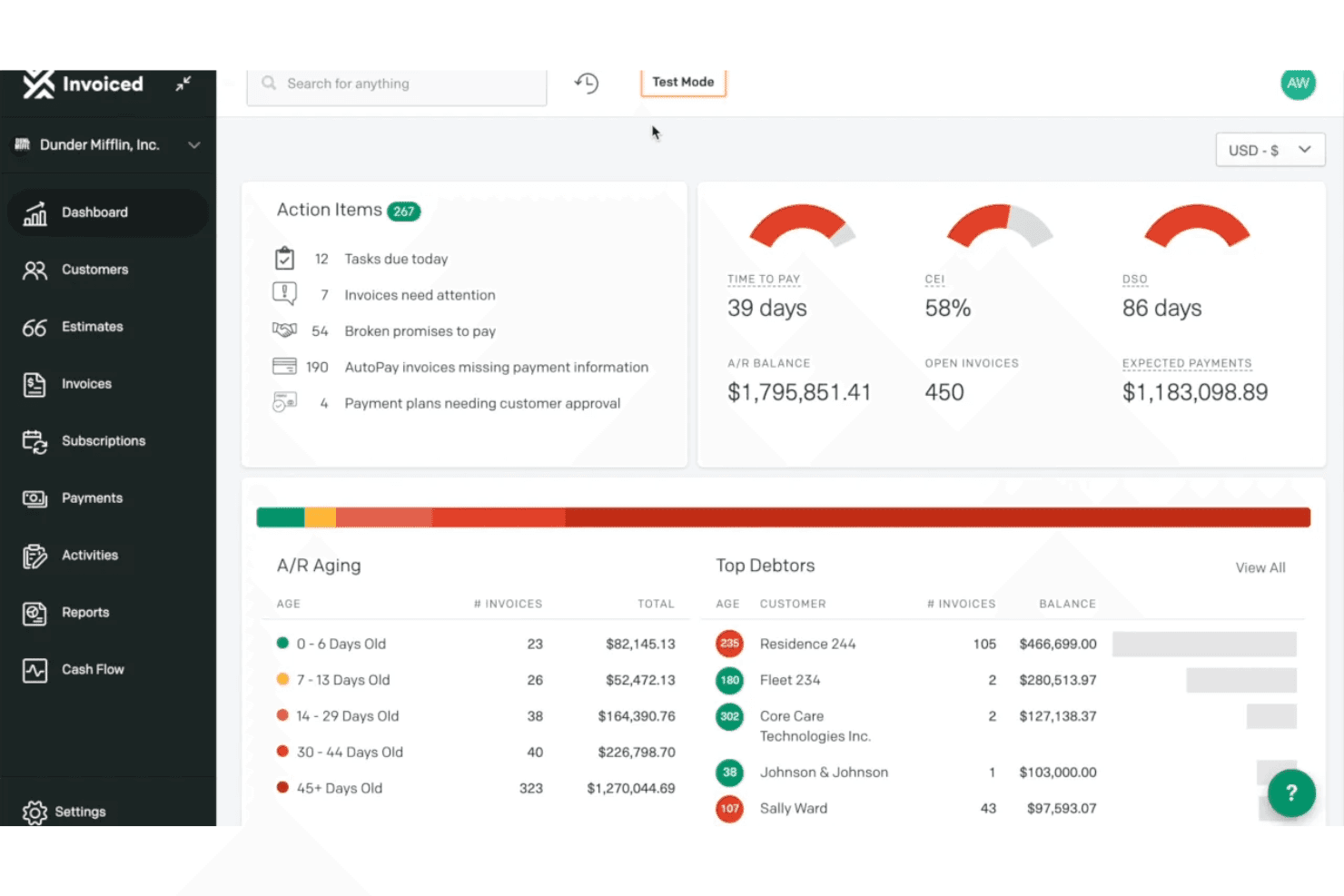
Invoiced provides an accounts receivable dashboard with action items, A/R aging breakdown, top debtors, and key metrics like DSO and CEI. Invoiced is an AI-native accounts receivable platform that covers invoice automation, cash application, collections workflows, payment processing, and AR analytics for B2B finance teams.
Who Is Invoiced Best For?
It's a strong fit for mid-market finance teams that need to scale AR transaction volume without growing headcount.
Why I Picked Invoiced
I've included Invoiced in my top picks because its multi-agent AI architecture gets AR automation running faster than most platforms I've tested. Smart Chasing adapts dunning cadences to each customer's actual payment history rather than fixed schedules, and Cashmatch AI handles cash application even when remittance details are missing or a single wire covers multiple invoices. Neither feature requires heavy configuration to go live, which is the core of its fast deployment advantage.
Invoiced Key Features
- Customer portal: Customers can view invoices, download statements, dispute charges, and make payments online.
- Subscription billing: Automate recurring invoice schedules, billing cycles, and renewal management for subscription customers.
- Integration studio: Connect Invoiced to 1,000+ apps and ERP systems with no-code workflows and real-time sync.
- Custom workflow automation: Build tailored internal processes for tasks like reminder scheduling and invoice status changes using an automation studio.
Invoiced Integrations
Invoiced offers native integrations with NetSuite, Sage Intacct, Microsoft Dynamics 365, QuickBooks, Xero, Workday, and Salesforce, and provides an API for custom integrations.
Pros and Cons
Pros:
- Fast deployment compared to enterprise AR platforms
- Collections prioritization adapts to payment behavior
- AI cash application handles unstructured remittance data
Cons:
- Enforces strict user and invoice monthly plan quotas
- Limits phone support access to higher subscription tiers
Learn more about Invoiced: Best for AI-based order-to-cash process automation
- Free demo available
- Pricing upon request
Visit WebsiteCustomer Rating:3.5/5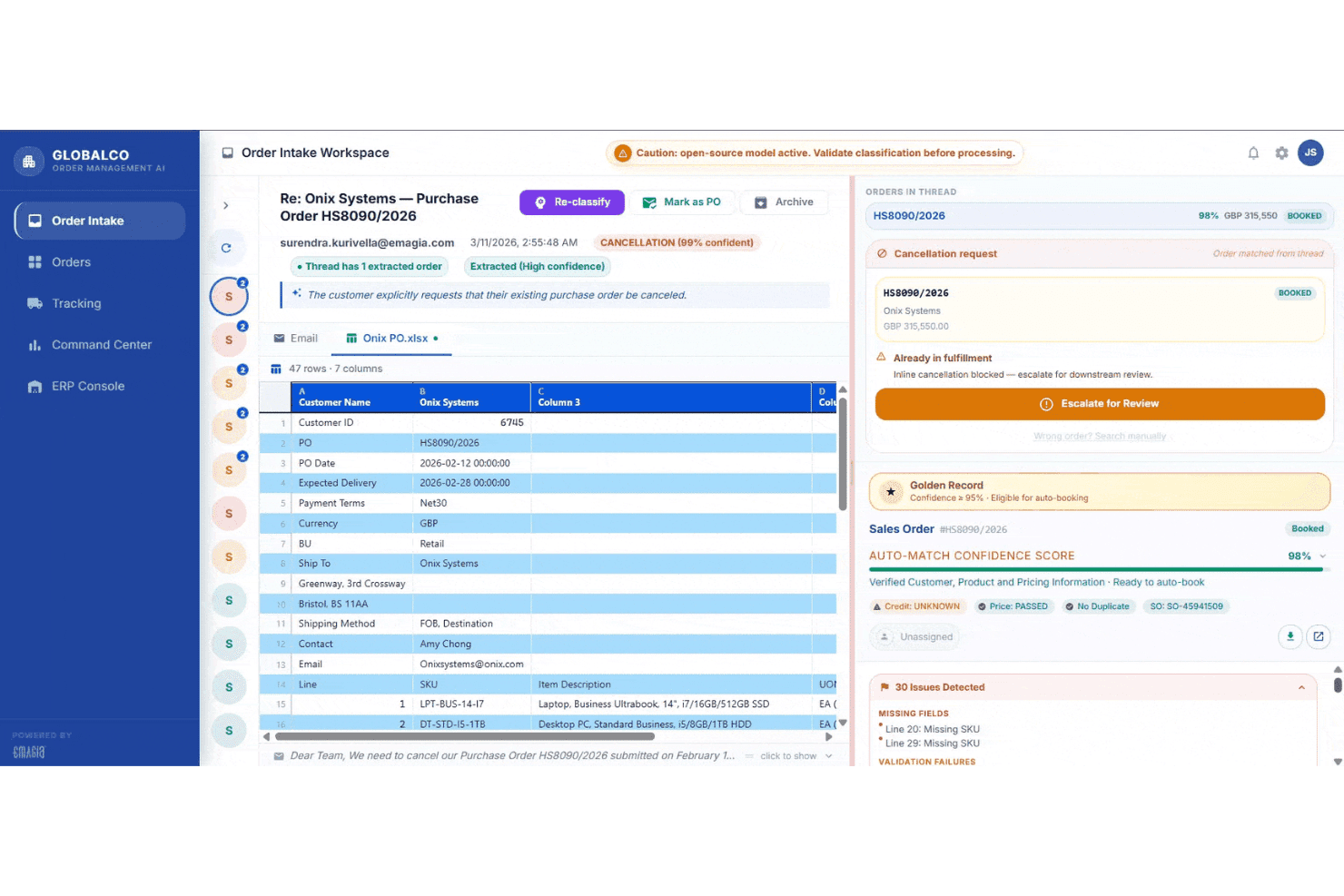
Emagia's Order Intake Workspace displays AI-powered purchase order classification, cancellation detection, and auto-match confidence scoring for streamlined order-to-cash processing. Emagia is an AI-native order-to-cash platform that covers credit management, invoicing, cash application, collections, deductions management, and AR analytics through a suite of autonomous AI agents.
Who Is Emagia Best For?
Emagia is built for mid-to-large enterprises managing high-volume, multi-ERP receivables operations across multiple geographies and currencies.
Why I Picked Emagia
Emagia earns its spot as one of the best on my shortlist because no other platform I've evaluated pushes O2C automation this far end-to-end. I'm particularly impressed by Gia Collect, which conducts AI-powered outbound collection calls autonomously, complete with real-time sentiment analysis and promise-to-pay capture, without any human agent involvement. I also like the Cash App Agent's 95%-plus straight-through posting rate, which means my team isn't manually reconciling remittance files every day.
Emagia Key Features
- Customer self-service portal: Lets customers view invoices, download statements, dispute charges, and make payments in a secure online portal.
- Automated dunning workflows: Supports multi-step reminder sequences and escalations tailored by customer segment and invoice age.
- Deductions and dispute management: Centralizes tracking and resolution of short-pays and disputes with documentation support.
- ERP connectivity: Offers native integration with SAP, Oracle, NetSuite, JD Edwards, PeopleSoft, Microsoft Dynamics, and more.
Emagia Integrations
Emagia offers native integrations with SAP, Oracle, NetSuite, JD Edwards, PeopleSoft, Microsoft Dynamics, Sage, and Workday, and also provides an API for custom integrations.
Pros and Cons
Pros:
- Covers full order-to-cash cycle in one platform
- Cash application matching rates exceed 95% straight-through
- Autonomous AI agents handle collections outreach end-to-end
Cons:
- Configuration updates frequently depend on vendor support teams
- Third-party AP portal invoice delivery lacks native support
Learn more about Emagia: Best for enterprise cash management integration
- Free demo available
- Pricing upon request
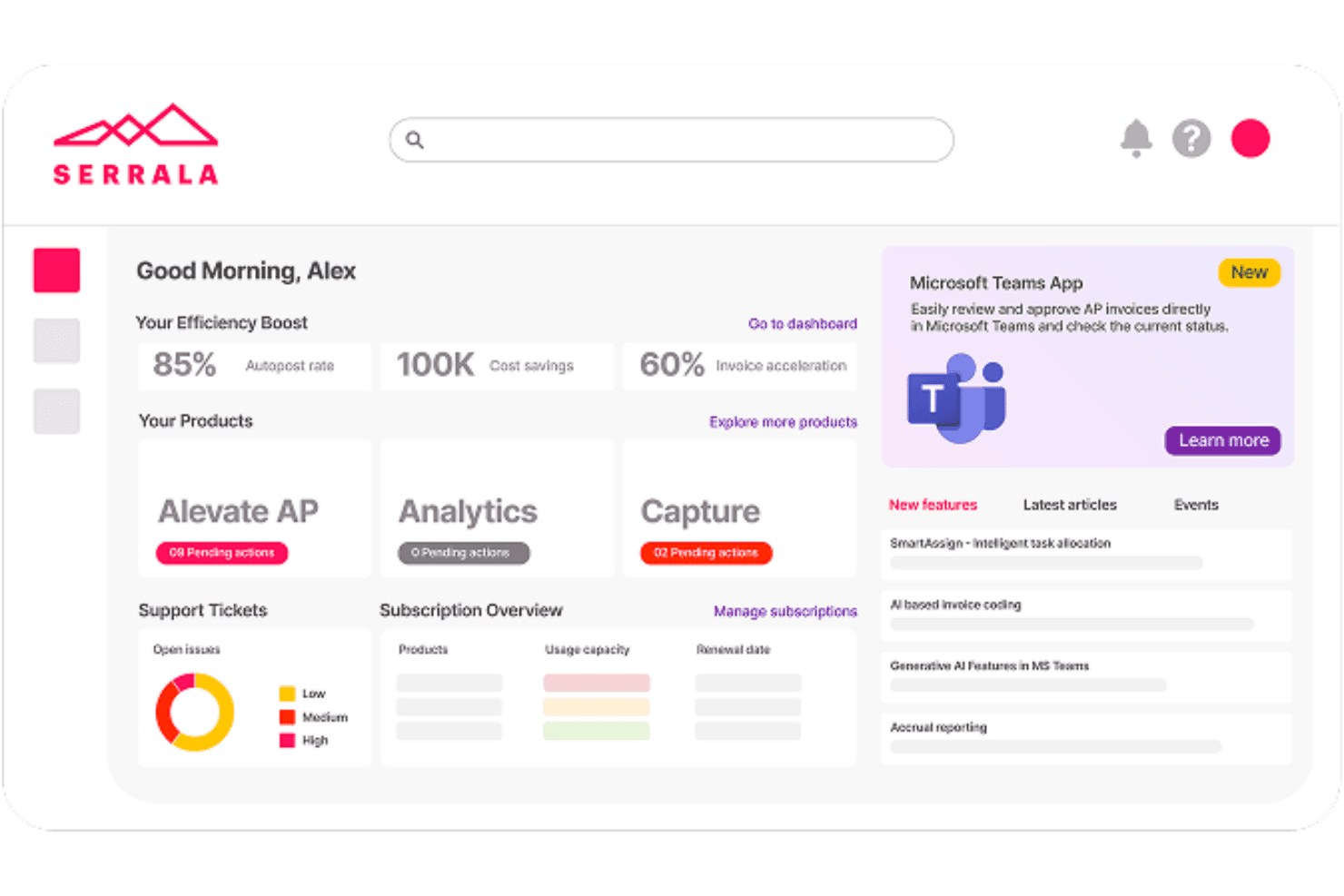
Serrala centralizes AP automation, analytics, and invoice tracking in one dashboard. Serrala is an enterprise order-to-cash automation platform that covers cash application, collections management, credit and risk management, bill presentment, and payment processing across SAP and other major ERP environments.
Who Is Serrala Best For?
Serrala is a strong fit for large enterprises running SAP or complex multi-ERP environments that need end-to-end AR automation at scale.
Why I Picked Serrala
Serrala earns its spot as one of the best on my shortlist because its cash application engine automates up to 99% of payment matching using AI that improves with every transaction. What I particularly like is how Serrala connects AR directly to treasury and payments, giving my team real-time cash visibility across the full O2C cycle in one place. The lockbox integration and remittance parsing mean we're not manually chasing unidentified payments at month-end.
Serrala Key Features
- Invoice automation across multiple channels: Generate and deliver electronic invoices via email, customer portal, or EDI with real-time tracking.
- Automated dunning workflows: Configure and trigger multi-step payment reminders based on customer risk or invoice status.
- Customer self-service portal: Allow customers to view statements, download invoices, dispute charges, and pay online.
- ERP integration flexibility: Sync customer, invoice, and payment data with SAP, Oracle, Microsoft Dynamics, and other leading ERPs in real time.
Serrala Integrations
Serrala offers native integrations with SAP, Oracle, Microsoft Dynamics, NetSuite, Infor, Sage, Epicor, and more, and provides an API for custom integrations.
Pros and Cons
Pros:
- Collections prioritization adapts to customer payment behavior
- Deep SAP integration supports large-scale AR operations
- Ensures global mandate compliance for e-invoicing
Cons:
- Depends on separate licenses for full analytics
- Demands distinct modules for complete O2C coverage
Learn more about Serrala: Best for mid-market dunning process automation
- Free demo available
- Pricing upon request
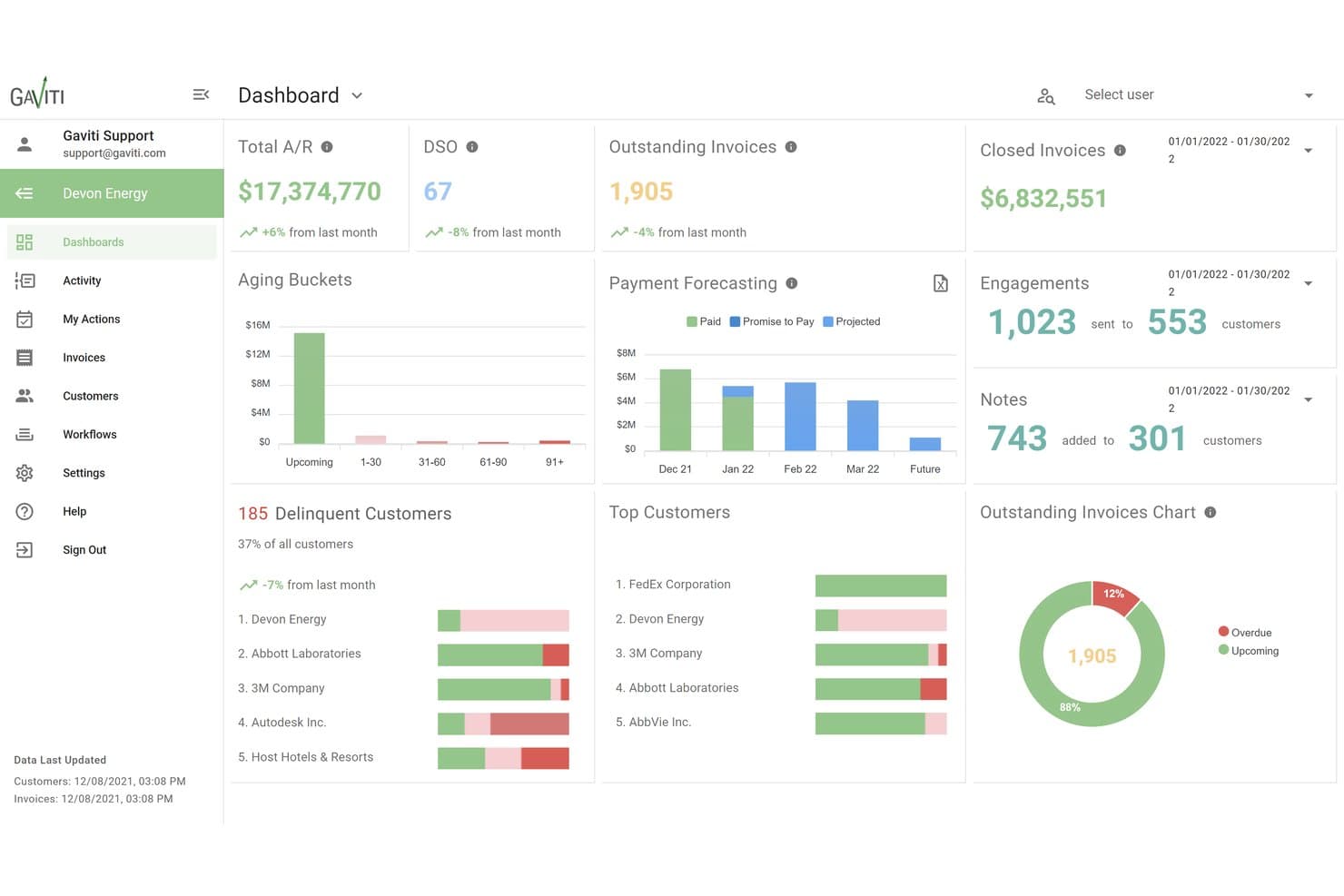
Gaviti centralizes A/R metrics like DSO, aging, and forecasting in one dashboard. Gaviti is an AI-powered accounts receivable platform that combines dunning automation, cash application, credit management, dispute tracking, and a B2B payer portal into a single invoice-to-cash workflow.
Who Is Gaviti Best For?
Gaviti is a strong fit for mid-market B2B finance teams managing high invoice volumes who need structured, automated collections without the complexity of enterprise AR platforms.
Why I Picked Gaviti
Gaviti earns its spot on my shortlist because its dunning engine uses AI to optimize follow-up timing per customer, rather than sending the same reminder on day 30 to everyone. I like that I can build no-code workflow variations for different customer segments, so a high-value account gets a different escalation path than a habitual late payer. The built-in B2B payer portal with zero-fee ACH gives customers a direct path to pay from within the dunning flow itself, which keeps the entire cycle contained in one place.
Gaviti Key Features
- AI assistant for AR teams: Chat-enabled AI helps automate tasks, generate workflows, and optimize communications internally.
- Real-time AR aging dashboards: Monitor invoice aging, DSO metrics, and collector activity with live, customizable dashboards.
- Credit risk management tools: Set enforceable credit limits, track credit utilization, and receive automated alerts of changes in customer credit status.
- Dispute management module: Track, log, and resolve customer payment disputes with full activity and payment documentation in one place.
Gaviti Integrations
Gaviti offers over 20 native integrations with ERP and accounting systems, including NetSuite, SAP, SAP Business One, and FreshBooks. An API is available for custom integrations.
Pros and Cons
Pros:
- Self-service payer portal with ACH payment support
- AI-optimized follow-up timing per account
- Dunning workflows configurable by customer segment
Cons:
- Lacks native out-of-the-box AP portal payment submission features
- Restricts premium automation features to Pro and Expert tiers
Learn more about Gaviti: Best for B2B invoice-to-cash digitization
- Free demo available
- Pricing upon request
Visit WebsiteCustomer Rating:4.4/5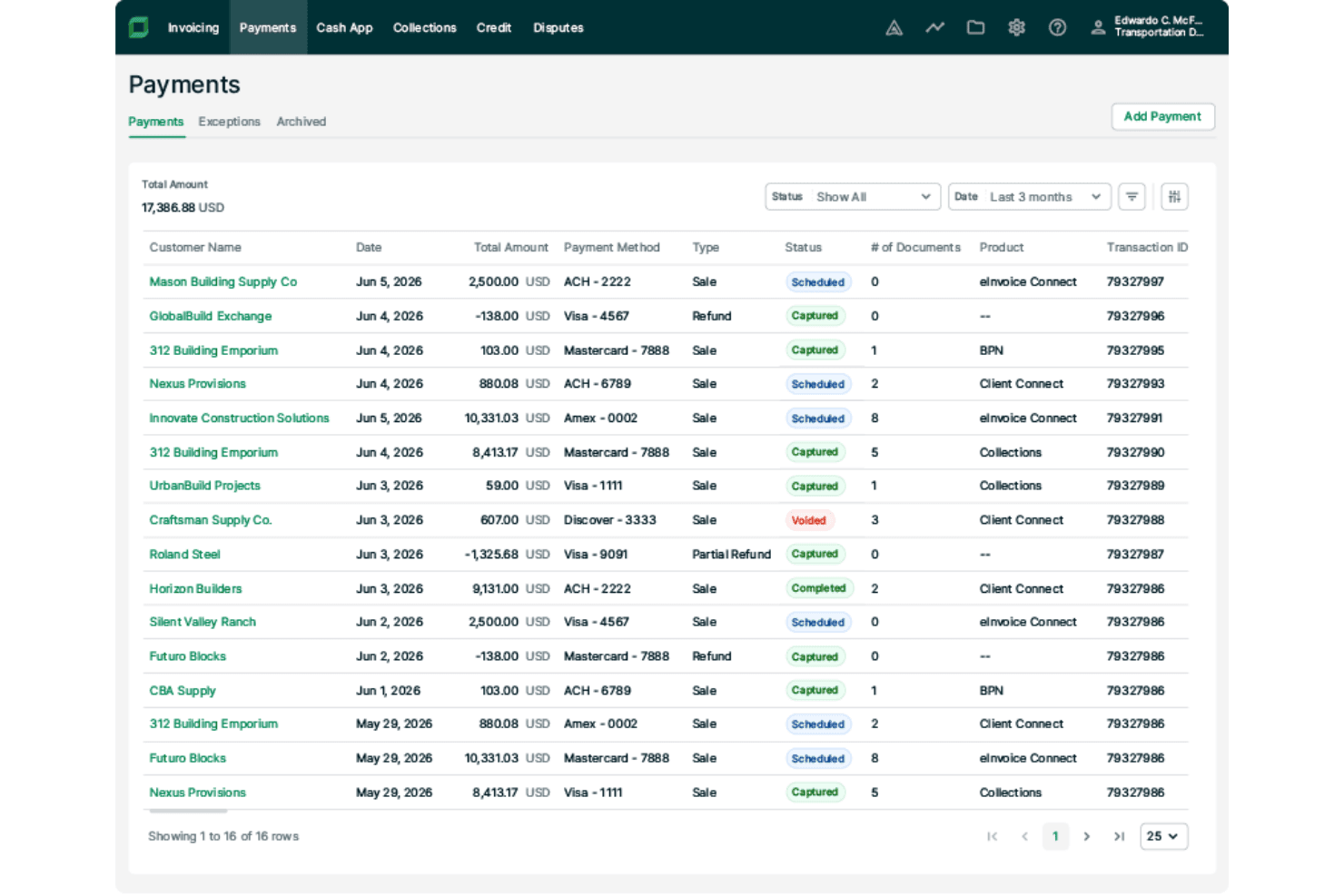
Billtrust lets users track and manage payment transactions in one place. Billtrust is a B2B accounts receivable platform that covers the full invoice-to-cash cycle, including multi-channel invoicing, payment processing, AI-driven cash application, credit management, and collections workflow automation.
Who Is Billtrust Best For?
It's a strong fit for mid-market and enterprise B2B companies in manufacturing, distribution, and business services that handle high invoice volumes across multiple customer payment channels.
Why I Picked Billtrust
Billtrust earns its spot as one of the best on my shortlist because no other AR platform matches its depth of B2B invoice delivery infrastructure. I particularly like its connections to 260+ AP portals, including Ariba, Coupa, and Tungsten, which means invoices reach buyers through the exact channels they already use. Its ML-driven cash application consistently hits 95%+ straight-through processing rates, which cuts the manual matching work my team would otherwise spend hours on each week.
Billtrust Key Features
- Customer self-service portal: Lets customers view invoices, download statements, dispute charges, and pay online via multiple payment methods.
- Automated dunning workflows: Supports configurable reminder sequences with escalation rules based on customer segment and invoice behavior.
- ERP and accounting system integration: Offers pre-built, bidirectional connectors for NetSuite, SAP, Oracle, Microsoft Dynamics, and more.
- Multi-currency and entity support: Handles invoicing and payments for multiple currencies and subsidiaries within a single platform.
Billtrust Integrations
Billtrust offers native integrations with NetSuite, Oracle, SAP, Microsoft Dynamics 365, Coupa, Ariba, and Basware, and provides an API for custom integrations.
Pros and Cons
Pros:
- Deductions and dispute workflows are fully centralized
- Automates credit scoring decisions and personalized collections
- ML cash application hits 95%+ auto-match rates
Cons:
- Lacks out-of-the-box self-service onboarding for small businesses
- Requires separate transaction and processing fees
Learn more about Billtrust: Best for global e-invoicing compliance
- Free demo available
- Pricing upon request
Visit WebsiteCustomer Rating:4.5/5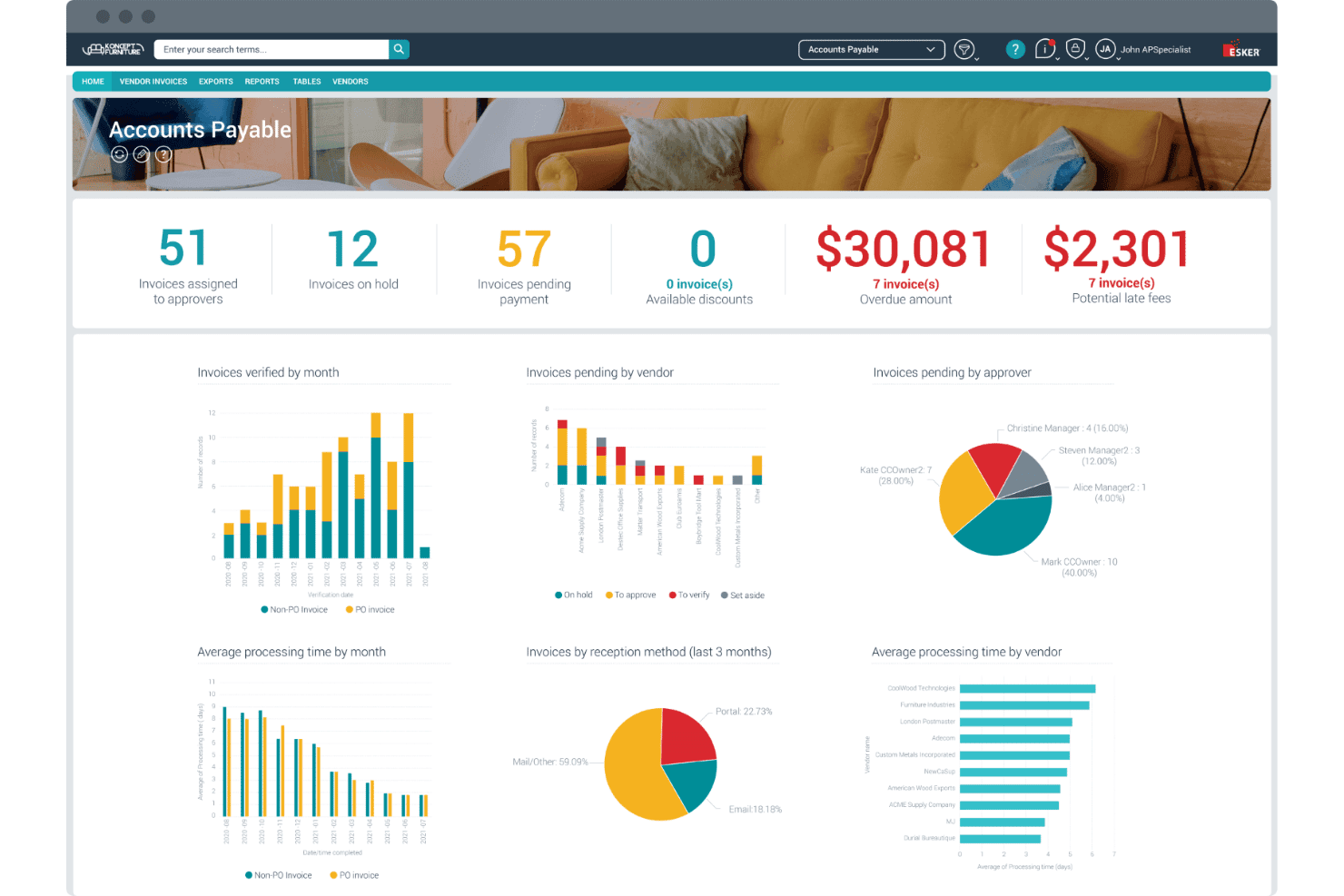
Esker's AP dashboard centralizes invoice tracking, approvals, and overdue amounts. Esker is a cloud-based accounts receivable platform with modular, AI-driven tools spanning credit management, invoice delivery, cash application, collections, and deductions management — built to handle cross-border invoicing across 60+ countries.
Who Is Esker Best For?
Esker suits mid-market and enterprise finance teams operating across multiple countries with complex cross-border invoicing and regulatory compliance requirements.
Why I Picked Esker
Esker earns its spot as one of the best on my shortlist because of how it handles cross-border e-invoicing compliance at scale. The Invoice Delivery module supports regulation-ready compliance across 60+ countries, covering mandates like Peppol, EU ViDA, and LATAM CFDI without requiring separate tools or manual workarounds. I also like that Esker Synergy AI handles cash application with AI-driven payment matching and remittance parsing built directly into the same platform.
Esker Key Features
- Configurable dunning workflows: Set up custom, automated reminder sequences and escalation rules for overdue accounts.
- Customer self-service portal: Give customers direct access to invoices, statements, and online payment options in 40+ countries.
- Real-time AR analytics dashboards: Track AR aging, DSO, collection performance, and dispute status with customizable reports.
- Multi-ERP integration suite: Connect bidirectionally to SAP, Oracle, Microsoft Dynamics, Sage, and over 70 other ERP platforms.
Esker Integrations
Esker offers native integrations with SAP, Oracle, Microsoft Dynamics 365, NetSuite, Sage, QAD, Epicor, Infor, Salesforce, and Coupa. An API is also available for custom integrations.
Pros and Cons
Pros:
- Resolves trade and non-trade deductions via AI workflows
- AI-driven cash application with high matching rates
- E-invoicing compliance across 60+ countries
Cons:
- Non-integrated ERPs require custom flat-file file transfers
- Split into five separate modules for full capability
Learn more about Esker: Best for AI-powered payment matching automation
- Free demo available
- Pricing upon request
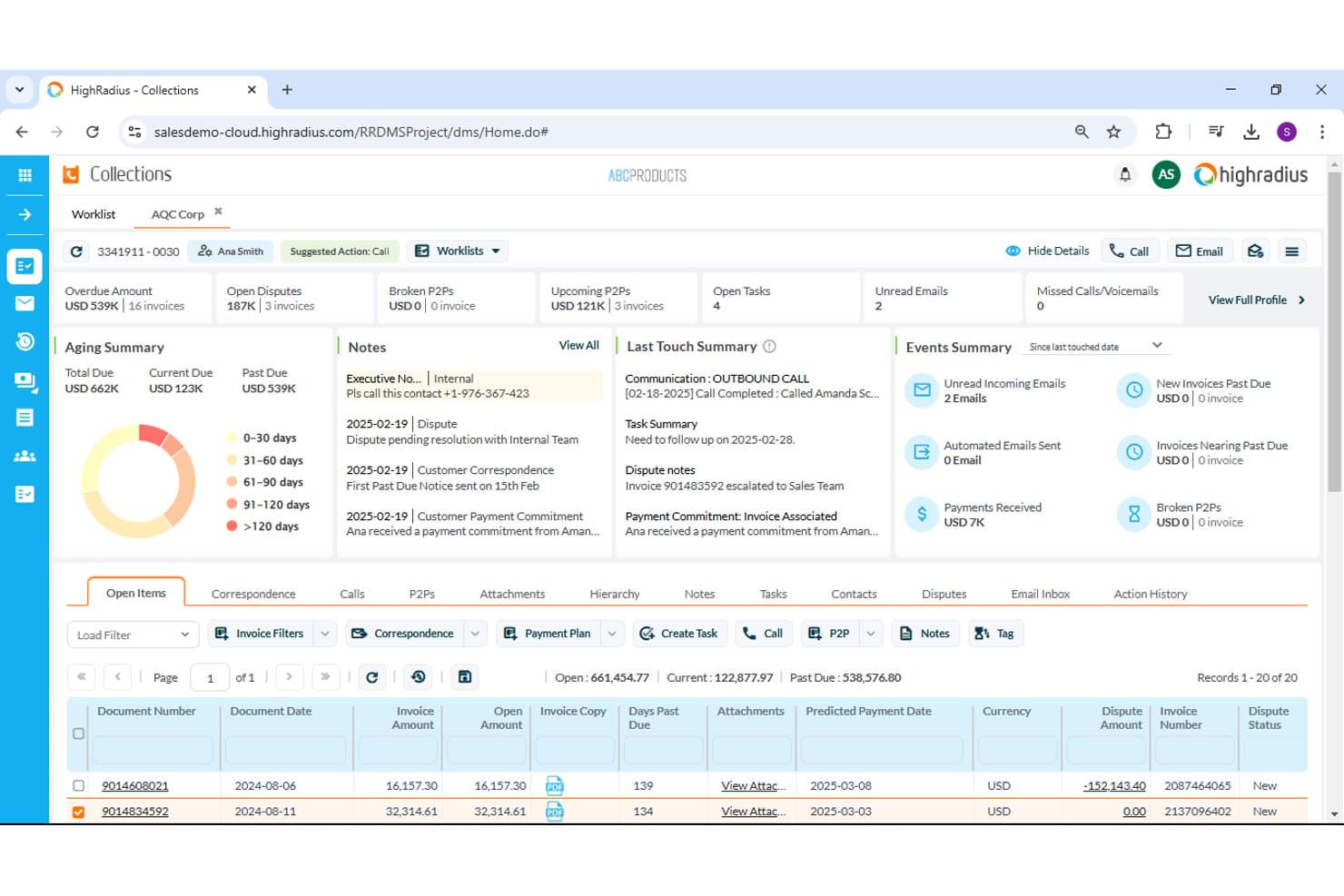
HighRadius offers a collections dashboard with aging and dispute tracking. HighRadius is an AI-native accounts receivable platform that covers cash application, collections management, credit decisioning, deductions workflows, and e-invoicing across a single integrated suite.
Who Is HighRadius Best For?
HighRadius is a strong fit for enterprise and upper-mid-market finance teams managing high invoice volumes across multiple business units or ERP environments.
Why I Picked HighRadius
I picked HighRadius as one of the best because its AI-driven cash application module delivers up to 95% no-touch posting rates across checks, ACH, and wires. The system parses remittance data from multiple formats automatically, so my team isn't manually chasing down payment details. It also includes a bank reconciliation add-in that ties matched payments back to open invoices without any manual intervention required.
HighRadius Key Features
- Automated dunning workflows: Set up multi-sequence reminders and dynamic escalation rules for overdue accounts.
- Customer self-service portal: Let customers view invoices, pay online, and dispute charges using a branded web portal.
- Deductions and dispute management: Centralize short-pay research, documentation, coding, and resolution routing.
- Predictive collections analytics: Forecast payment patterns and prioritize worklists using customer history and behavioral insights.
HighRadius Integrations
HighRadius offers native integrations with SAP, Oracle, NetSuite, Microsoft Dynamics, Sage Intacct, and Workday, and provides an API for custom integrations.
Pros and Cons
Pros:
- Self-service portal reduces inbound customer inquiries
- Predictive collections flags high-risk accounts automatically
- AI cash application hits near-perfect match rates
Cons:
- Reporting customization requires vendor support
- Long implementation timelines for enterprise deployments
Learn more about HighRadius: Best for collaborative AR with customer portals
- Free demo available
- Pricing upon request
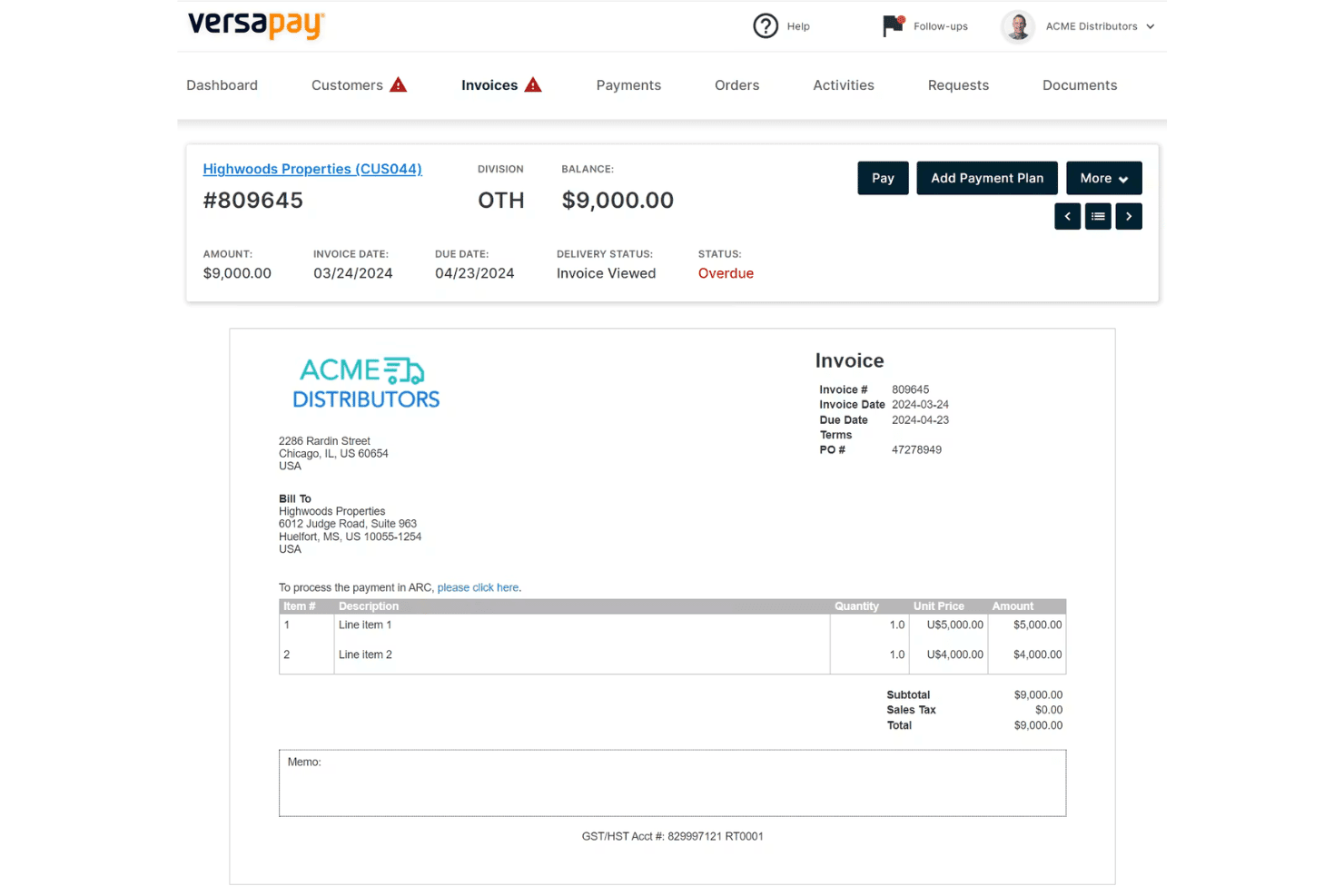
Versapay displays a detailed invoice view with payment options, line items, and overdue status tracking for accounts receivable management. Versapay is a collaborative accounts receivable platform that automates invoice delivery, payment collection, cash application, and collections management through a shared customer-facing portal and native ERP integrations.
Who Is Versapay Best For?
Versapay is a strong fit for mid-market B2B companies whose AR teams need to manage high invoice volumes across a large customer base.
Why I Picked Versapay
Versapay earns its spot on my shortlist because of how it handles buyer-seller collaboration directly inside the AR workflow. I love that customers can log into a shared portal to view invoices, flag disputes, and exchange messages with my team, all without a single email chain. Versapay's Collections Automation module also predicts which accounts are at risk of going delinquent, so my team can prioritize outreach before a payment is missed rather than chasing it after the fact.
Versapay Key Features
- AI-powered cash application: Uses machine learning to match payments to invoices and parse remittance data across formats.
- Automated dunning workflows: Allows you to configure multi-stage reminder sequences triggered by invoice aging and customer payment habits.
- Branded customer self-service portal: Lets customers view invoices, pay online, dispute charges, and download statements in one place.
- Native ERP integrations: Supports real-time bidirectional data sync with NetSuite, Sage Intacct, and Microsoft Dynamics 365.
Versapay Integrations
Versapay offers native integrations with NetSuite, Sage Intacct, and Microsoft Dynamics 365. An API is available for custom integrations.
Pros and Cons
Pros:
- ML-driven cash application handles multiple remittance formats
- Customer portal reduces inbound payment status inquiries
- Dispute resolution happens directly within invoices
Cons:
- Requires manual workflow setup for custom collections triggers
- Imposes platform processing fees with standard acquiring charges
Learn more about Versapay: Best for ERP-integrated AR automation
- Free demo available
- Pricing upon request
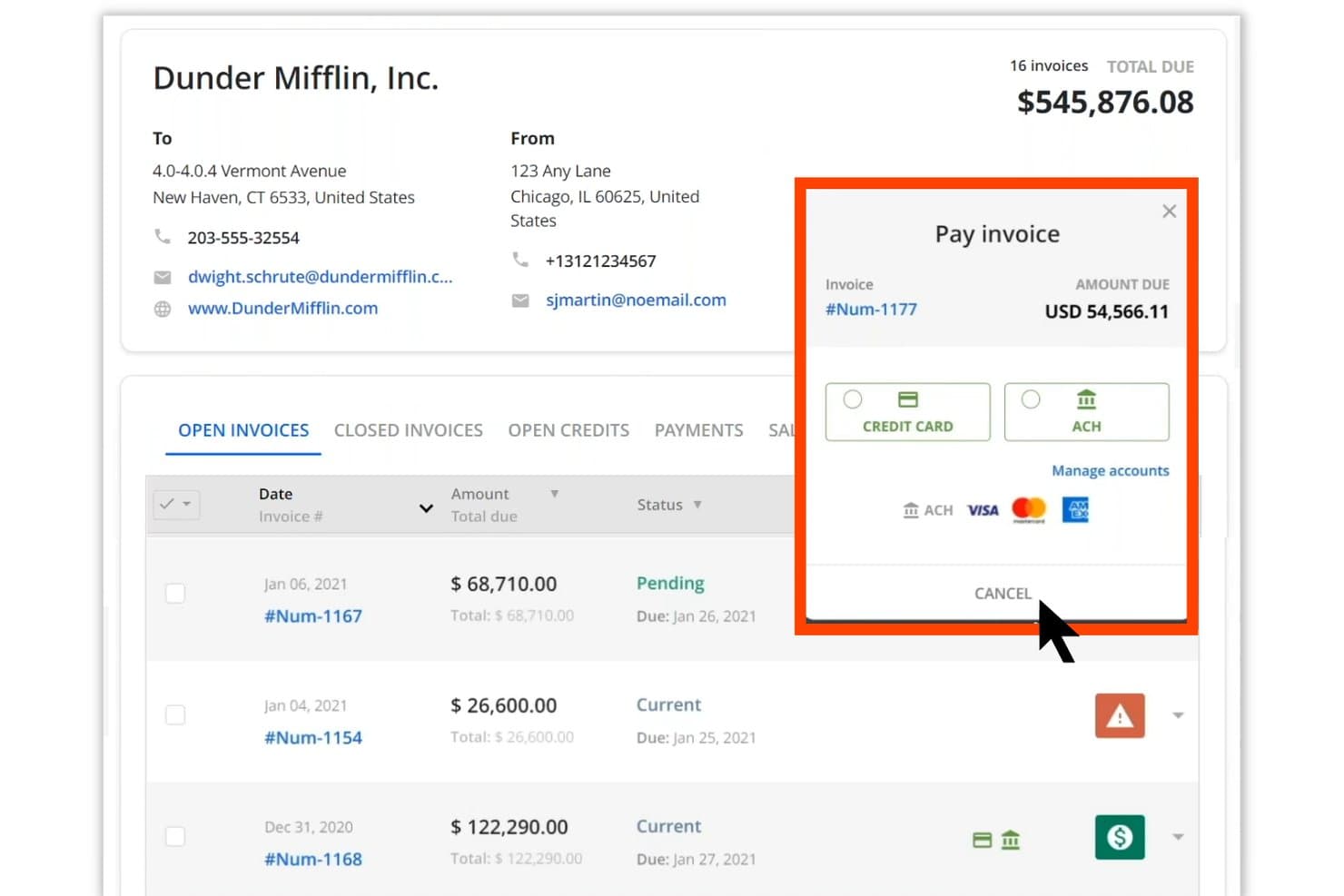
Quadient AR Automation offers a pay invoice modal with ACH and credit card options. Quadient AR Automation is a B2B accounts receivable platform that covers credit management, collections workflows, dispute tracking, cash application, and AI-driven payment forecasting within a single credit-to-cash system.
Who Is Quadient AR Automation Best For?
It's a strong fit for mid-market and enterprise B2B finance teams running complex ERP environments who need a unified system across collections, cash application, and credit management.
Why I Picked Quadient AR Automation
Quadient AR Automation earns its spot on my shortlist because of how deeply it connects to ERP systems. It ships with pre-built, bidirectional connectors for 10+ platforms, including NetSuite, SAP, Microsoft Dynamics, and Acumatica, so customer records, invoice data, and payment status stay in sync without manual exports. I also rely on the AI-driven cash forecasting module, which pulls directly from that live ERP data to project incoming collections with up to 94% accuracy.
Quadient AR Automation Key Features
- Customer self-service payment portal: Lets customers view invoices, download statements, and pay online using preferred payment methods.
- Automated dunning workflows: Enables customizable, multi-stage sequences for reminders and escalations tied to invoice status or customer segment.
- Dispute and deductions management: Provides centralized tools to log, research, and resolve invoice disputes or short pays with documentation trails.
- Real-time AR aging dashboards: Displays aging buckets, DSO metrics, and payment trends with live data for cash flow visibility.
Quadient AR Automation Integrations
Quadient AR Automation has native integrations with NetSuite, Sage Intacct, Sage X3, Sage 300, SAP, SAP Business One, Microsoft Dynamics, Acumatica, QuickBooks, Xero, Salesforce, and Zuora. An API is also available for custom integrations.
Pros and Cons
Pros:
- Dispute resolution centralizes documentation and approvals
- Provides self-service customer portal with payment options
- AI cash application handles complex remittance formats
Cons:
- Limits advanced BI reporting module to tiers
- Requires additional setup for custom ERP fields
Learn more about Quadient AR Automation:
Inne programy do obsługi należności
Oto kilka dodatkowych programów do obsługi należności, które nie trafiły na moją listę, ale nadal warto się z nimi zapoznać:
- 11SidetradeBest for predictive collections using analytics
- 12BlackLine Invoice-to-CashBest for finance-first cash application workflows
- 13ChaserBest for automated follow-up scheduling
- 14UpflowBest for cash collection team collaboration
- 15Paystand Best for no-fee digital payment acceptance
- 16KollenoBest for centralized communication and payments
- 17GrowfinBest for unified workflow management and analytics
- 18CorcentricBest for B2B transaction processing compliance
- 19BILL ARBest for integrated invoicing and payment tracking
- 20Centime AR AutomationBest for AR, AP, and cash flow in one platform
How I Evaluate Accounts Receivable Software
When I evaluate AR software, I look for a baseline of core capabilities—cash application, dunning, ERP integration—then assess the differentiators that make one platform the right fit.
Core Functionality (Table Stakes For This List)
When I'm selecting tools for my list, I rank each one on a scale from 0 (does not offer the functionality) to 5 (excels in this area) for each core functionality listed below. I then calculate the tool's total score into a percentage, using 65% as a benchmark to help assess its overall fit for the list.
- Invoice Automation: I look for multi-channel delivery options—email, portal, EDI—plus multi-currency support for teams billing customers across regions.
- Payment Processing: The platform should accept ACH, card, wire, and check payments with gateway integration so customers can pay how they prefer.
- Cash Application: Matching payments to open invoices manually is a grind. I evaluate how well each tool auto-matches using remittance data and AI.
- Collections Management: Automated dunning sequences, overdue account prioritization, and dispute tracking help teams focus on high-risk balances first.
- AR Aging & Reporting: Real-time aging reports and DSO dashboards are table stakes. I check for drill-down capability and predictive cash forecasting.
- ERP/Accounting Integration: Bidirectional sync with systems like NetSuite, SAP, or Microsoft Dynamics keeps invoice and payment data aligned with the GL.
Once I have a list of tools that meet the criteria, I consider what sets each platform apart.
Differentiating Factors (What Sets Vendors Apart)
Here's how I compare and contrast different vendors:
Standout Features
AI-powered cash application is a major differentiator. I look for platforms that auto-match payments across lockbox files, ACH, and emailed remittances—not just simple one-to-one matching. Predictive collections analytics also separates top-tier tools from the pack, giving collectors prioritized worklists based on actual payment behavior rather than static aging buckets. Customer self-service portals matter too, especially when your buyers want to pull invoices, raise disputes, and pay without calling your AR team.
Beyond Features
Implementation timelines vary widely—some platforms deploy in weeks with self-serve onboarding, while enterprise tools can take months and require dedicated project managers for data migration. I also evaluate pricing models closely, since some vendors charge by invoice volume and others by user seats or entities, which changes the math fast as you scale. Compliance readiness matters too. I check for SOC 1 and SOC 2 Type II certifications, audit trails, and role-based access controls that support segregation of duties during external audits.
Jak wybrać program do obsługi należności
Czy próbujesz upewnić się, że Twoje kolejne rozwiązanie do obsługi należności rzeczywiście przyspieszy przepływy pieniężne, uprości uzgadnianie i wesprze unikalne potrzeby związane z fakturowaniem?
| Jeśli Twoim priorytetem jest... | Poszukaj... |
|---|---|
| Jeśli Twoim priorytetem jest...Automatyzacja wielokanałowej wysyłki faktur | Poszukaj...Natywne wsparcie poczty e-mail, EDI i portali klienta |
| Jeśli Twoim priorytetem jest...Ograniczenie ręcznej pracy związanej z alokacją płatności | Poszukaj...Dopasowywanie płatności oparte na sztucznej inteligencji i przechwytywanie informacji o przekazach |
| Jeśli Twoim priorytetem jest...Zarządzanie windykacją w wielu jednostkach działających na całym świecie | Poszukaj...Windykacja w wielu walutach i narzędzia zapewniające zgodność z przepisami regionalnymi |
| Jeśli Twoim priorytetem jest...Prognozowanie przepływów pieniężnych z pełnym przekonaniem | Poszukaj...Wiekowanie należności w czasie rzeczywistym, monitorowanie DSO i analityka predykcyjna |
| Jeśli Twoim priorytetem jest...Ścisła integracja z systemem ERP lub księgą główną | Poszukaj...Gotowa, dwukierunkowa synchronizacja z platformą księgową |
Jak zweryfikować swoją listę
- Przetestuj możliwości portalu: Poproś członka zespołu o wykonanie przykładowej płatności i zadania dotyczącego sporu w portalu samoobsługowym klienta w ciągu 24 godzin.
- Zweryfikuj deklaracje dotyczące integracji: Poproś o demonstrację rzeczywistego przepływu danych, pokazującą synchronizację faktur i płatności między narzędziem do obsługi należności a systemem ERP, z wykorzystaniem danych rzeczywistych lub zamaskowanych.
- Potwierdź elastyczność przepływów pracy: Utwórz i uruchom niestandardową sekwencję windykacyjną, obejmującą co najmniej dwie reguły eskalacji oparte na wieku faktury, w wersji próbnej lub środowisku testowym.
- Poproś o dowody zgodności: Poproś o dokumentację potwierdzającą certyfikację SOC 2 Type II oraz przykładowe eksporty ścieżki audytu.
- Rozważ kompromis: Zdecyduj, czy głęboka integracja z systemem ERP i zgodność na poziomie bankowym są warte większej złożoności i zaangażowania zasobów w porównaniu z szybkimi we wdrożeniu, wyspecjalizowanymi narzędziami do obsługi należności.
Czym jest oprogramowanie do zarządzania należnościami?
Oprogramowanie do zarządzania należnościami to kategoria platform finansowych, które automatyzują dostarczanie faktur, pobieranie płatności i uzgadnianie transakcji między przedsiębiorstwami. Narzędzia te pomagają zarządzać procesami windykacji, śledzić przeterminowanie należności, generować raporty na potrzeby prognozowania przepływów pieniężnych oraz synchronizować dane z systemem ERP lub księgowym. Dzięki centralizacji i automatyzacji kluczowych zadań związanych z należnościami oprogramowanie zwiększa widoczność, ogranicza pracę ręczną i wspiera zgodność w całym procesie od zamówienia do otrzymania płatności.
Funkcje oprogramowania do zarządzania należnościami
Wybierając oprogramowanie do zarządzania należnościami, zwróć uwagę na następujące kluczowe funkcje:
- Automatyzacja fakturowania: Automatycznie generuj, wysyłaj i śledź faktury elektroniczne, ograniczając pracę ręczną i zapewniając klientom prawidłowe rozliczenia dzięki oprogramowaniu do automatyzacji należności.
- Obsługa płatności różnymi metodami: Przyjmuj i rejestruj płatności za pomocą przelewu bankowego, karty kredytowej, czeku lub przelewu elektronicznego, przy czym niektóre platformy obsługują także płatności automatyczne i rozliczenia cykliczne.
- Księgowanie wpłat: Dopasowuj otrzymane płatności do otwartych faktur, w tym płatności częściowych, oraz obsługuj dane dotyczące przekazów, aby zapewnić dokładne uzgodnienia.
- Automatyczne procesy monitowania: Planuj i wysyłaj przypomnienia o płatnościach oraz powiadomienia o eskalacji, które pomagają ograniczać zaległe salda i nieściągalne należności, a także wspierają zespoły windykacyjne.
- Portal samoobsługi klienta: Udostępniaj klientom bezpieczne centrum online, w którym mogą przeglądać, pobierać i opłacać faktury, sprawdzać zestawienia oraz zarządzać sporami bez bezpośredniego zaangażowania pracowników.
- Raportowanie przeterminowania należności i DSO: Zapewniaj śledzenie w czasie rzeczywistym oraz pulpity z informacjami o nieuregulowanych należnościach, harmonogramach przeterminowania i wskaźnikach liczby dni sprzedaży oczekującej na płatność (DSO), aby lepiej zarządzać przepływami pieniężnymi i raportowaniem finansowym.
- Zarządzanie kredytem kupieckim i windykacją: Zarządzaj warunkami kredytowymi, monitoruj limity kredytowe i ustalaj priorytety działań windykacyjnych na podstawie ryzyka oraz statusu konta.
- Śledzenie i rozwiązywanie sporów: Rejestruj, monitoruj i rozwiązuj spory dotyczące płatności, dokumentując interakcje, status oraz wyniki.
- Integracja z systemami ERP i księgowymi: Synchronizuj dwukierunkowo klientów, faktury i dane dotyczące płatności z głównym systemem księgowym, eliminując konieczność ręcznego ponownego wprowadzania danych.
- Ścieżki audytu i kontrola użytkowników: Prowadź przejrzysty rejestr działań użytkowników, zmian i zatwierdzeń, wspierając zgodność i ułatwiając audyty.
Typowe funkcje AI w oprogramowaniu do zarządzania należnościami
Poza wymienionymi powyżej standardowymi funkcjami oprogramowania do zarządzania należnościami wiele takich rozwiązań wykorzystuje AI w funkcjach takich jak:
- Księgowanie wpłat wspomagane przez AI: Wykorzystuje uczenie maszynowe do automatycznego dopasowywania płatności do faktur w wielu formatach danych dotyczących przekazów, ograniczając konieczność ręcznych uzgodnień i liczbę błędów.
- Analityka predykcyjna windykacji: Analizuje historię i zachowania płatnicze klientów, aby prognozować daty płatności, oznaczać konta wysokiego ryzyka i ustalać priorytety na listach zadań windykatorów.
- Automatyczne rozwiązywanie sporów: Wykorzystuje AI do kategoryzowania sporów dotyczących płatności, kierowania ich do odpowiednich osób oraz sugerowania rozwiązań, przyspieszając proces i zwiększając dokładność.
- Dynamiczna optymalizacja monitowania: Stale udoskonala czas wysyłania przypomnień, treść komunikatów i ścieżki eskalacji na podstawie reakcji klientów oraz wzorców płatności.
- Wykrywanie anomalii w płatnościach: Identyfikuje w czasie rzeczywistym nietypową aktywność płatniczą lub rozbieżności, pomagając zespołom wykrywać błędy lub potencjalne oszustwa, zanim wpłyną one na przepływy pieniężne.
Korzyści z oprogramowania do zarządzania należnościami
Wdrożenie oprogramowania do zarządzania należnościami zapewnia zespołowi i firmie wiele korzyści. Oto kilka z nich:
- Przyspieszony przepływ gotówki: Automatyczne fakturowanie, przetwarzanie płatności i windykacja prowadzą do szybszego otrzymywania płatności oraz skrócenia okresu spływu należności.
- Mniejsze obciążenie pracą manualną: Funkcje takie jak księgowanie wpłat i automatyczne procesy monitowania pozwalają zaoszczędzić zespołowi wiele godzin ręcznego wprowadzania danych i uzgadniania.
- Lepsza widoczność: Dostępne w czasie rzeczywistym zestawienia wiekowania należności, wskaźniki DSO i konfigurowalne pulpity zapewniają pełniejszy wgląd w zaległe salda oraz prognozy przepływów pieniężnych.
- Lepsze doświadczenia klientów: Portale samoobsługowe i wiele opcji płatności ułatwiają klientom regulowanie należności, przeglądanie faktur i rozwiązywanie sporów.
- Większa zgodność z przepisami i ścieżka audytu: Bezpieczne integracje, oparte na rolach mechanizmy kontroli użytkowników i szczegółowe dzienniki pomagają firmie być gotową do audytu oraz spełniać wymogi regulacyjne.
- Skalowalność wspierająca rozwój: Obsługa wielu jednostek, walut i faktur o dużym wolumenie dostosowuje się do rozwoju lub rosnącej złożoności działalności operacyjnej.
- Lepsze zarządzanie ryzykiem: Analityka predykcyjna i automatyczne alerty pomagają zespołowi identyfikować konta wysokiego ryzyka oraz rozwiązywać spory, zanim problemy się nasilą.
Koszty i ceny oprogramowania do obsługi należności
Wybór oprogramowania do obsługi należności wymaga zrozumienia różnych dostępnych modeli cenowych i planów. Koszty różnią się w zależności od funkcji, wielkości zespołu, dodatków i innych czynników. Poniższa tabela podsumowuje typowe plany, ich średnie ceny oraz standardowe funkcje dostępne w rozwiązaniach do obsługi należności:
Tabela porównawcza planów oprogramowania do obsługi należności
| Rodzaj planu | Średnia cena | Typowe funkcje |
|---|---|---|
| Rodzaj planuPlan bezpłatny | Średnia cena$0 | Typowe funkcjePodstawowe fakturowanie, ograniczone śledzenie płatności i proste raportowanie. |
| Rodzaj planuPlan osobisty | Średnia cena$10–$30/użytkownika/miesiąc | Typowe funkcjeAutomatyczne fakturowanie, przyjmowanie płatności wieloma metodami, podstawowe zestawienia wiekowania należności i pomoc przez e-mail. |
| Rodzaj planuPlan biznesowy | Średnia cena$40–$75/użytkownika/miesiąc | Typowe funkcjeKsięgowanie wpłat, automatyczne monitowanie, portale samoobsługowe, integracja z ERP i konfigurowalne raportowanie. |
| Rodzaj planuPlan dla przedsiębiorstw | Średnia cena$100–$200/użytkownika/miesiąc | Typowe funkcjeObsługa wielu jednostek, zaawansowana automatyzacja przepływów pracy, analityka predykcyjna, dedykowane wdrożenie i pełne ścieżki audytu. |
Najczęściej zadawane pytania dotyczące oprogramowania do obsługi należności
Oto odpowiedzi na niektóre często zadawane pytania dotyczące oprogramowania do obsługi należności:
W jaki sposób oprogramowanie do obsługi należności integruje się z platformami ERP i księgowymi?
Większość rozwiązań oferuje gotowe konektory do systemów takich jak NetSuite, QuickBooks, Sage Intacct i Microsoft Dynamics. Integracje te umożliwiają synchronizowanie faktur, klientów, płatności i not kredytowych, często w czasie rzeczywistym lub za pomocą zaplanowanych aktualizacji wsadowych.
Czy oprogramowanie do obsługi należności może obsługiwać wiele walut i jednostek?
Tak, wiele platform obsługuje transakcje w wielu walutach i rozliczenia dla wielu jednostek. Jest to niezbędne, jeśli zarządzasz należnościami w różnych krajach, spółkach zależnych lub jednostkach biznesowych.
Jakich standardów bezpieczeństwa i zgodności należy szukać?
Należy szukać dostawców posiadających certyfikaty SOC 1 lub SOC 2 Type II, zgodność z PCI DSS w zakresie danych płatniczych oraz wbudowane ścieżki audytu. Pomagają one zespołowi zachować integralność finansową i spełniać wymagania audytów zewnętrznych.
Jak właściwie działają automatyczne procesy monitowania?
Automatyczne procesy monitowania wykorzystują wyzwalacze oparte na regułach do wysyłania wiadomości przypominających, eskalowania niezapłaconych faktur lub planowania działań następczych. Zazwyczaj można dostosować harmonogram i reguły eskalacji według segmentu klienta lub wieku faktury.
Jak szybko można wdrożyć oprogramowanie do obsługi należności?
Terminy wdrożenia zależą od platformy i środowiska użytkownika, ale narzędzia przeznaczone dla małych i średnich firm mogą zostać uruchomione w ciągu kilku tygodni, podczas gdy wdrożenia korporacyjne mogą potrwać kilka miesięcy ze względu na migrację danych i potrzeby związane z niestandardowymi integracjami.