

Oprogramowanie do zarządzania wydatkami na SaaS pozwala Twojemu zespołowi śledzić, kontrolować i optymalizować każdego dolara wydawanego w całym stosie oprogramowania chmurowego. Jeśli jesteś jak większość liderów finansowych, wiesz, że niemonitorowane subskrypcje SaaS, brak punktów odniesienia dla umów i niejasne warunki odnowienia mogą po cichu uszczuplać budżet i utrudniać przejrzyste raportowanie finansowe.
W tym przewodniku pomogę Ci porównać najlepsze narzędzia do zarządzania wydatkami na SaaS, które ujawniają ukryte koszty, oferują gotowe dla zarządu analizy oszczędności, gwarantują ROI i zapewniają rzeczywistą przewagę negocjacyjną. Zobaczysz dokładnie, które rozwiązania mogą ujednolicić wydatki na SaaS, uwidocznić niezatwierdzone narzędzia IT i zapewnić precyzję planowania finansowego, gotowość do audytu oraz pewną prezentację podczas spotkań z kadrą kierowniczą.
Why Trust Our Software Recommendations
6,700+
Reviews
20
Industry experts
16+
Evaluation factors
14
Years
Our team has been testing and reviewing software since 2012. As finance leaders ourselves, we know how difficult—and important—it is to choose the right software.
For this guide, we evaluated tools using hands-on testing and independent research, scoring tools using our selection criteria.
Our reviews reflect our human editorial judgment, not a sales pitch.
Tabela porównawcza oprogramowania do zarządzania wydatkami na SaaS
Ta tabela porównawcza podsumowuje szczegóły cenowe mojego wyboru najlepszych programów do zarządzania wydatkami na SaaS:
| Tool | Best For | Trial Info | Price | ||
|---|---|---|---|---|---|
| 1 | Best for AI token spend visibility by team | 14-day free trial | From $2.99/month (billed annually) | Website | |
| 2 | Best for SaaS renewal negotiation benchmarks | Free demo available | Pricing upon request | Website | |
| 3 | Best for finance-led SaaS renewal negotiation | Free demo available | From $75/month | Website | |
| 4 | Best for board-ready SaaS savings with ROI guarantee | Free demo available | From €12.5K/year (billed annually) | Website | |
| 5 | Best for SaaS discovery with Shadow AI detection | Free plan + free demo available | From €3/user/month (billed annually) | Website | |
| 6 | Best for SaaS cost vs. spend discrepancy tracking | Free demo available | Pricing upon request | Website | |
| 7 | Best for guaranteed savings on vendor contracts | Free demo available | Pricing upon request | Website | |
| 8 | Best for benchmarked renewal negotiations | Free trial + free demo available | Pricing upon request | Website | |
| 9 | Best for embedded SaaS ops and renewals management | Free demo available | Pricing upon request | Website | |
| 10 | Best for peer-benchmarked renewal negotiations | Free demo available | Pricing upon request | Website |


Recenzje najlepszego oprogramowania do zarządzania wydatkami na SaaS
Poniżej znajdują się moje szczegółowe podsumowania najlepszego oprogramowania do zarządzania wydatkami na SaaS, które znalazło się na mojej krótkiej liście. W recenzjach szczegółowo omawiam funkcje, możliwości i najlepsze zastosowania każdej platformy, aby pomóc Ci znaleźć rozwiązanie najlepiej dopasowane do Twoich potrzeb.
 Best for AI token spend visibility by team
- 14-day free trial
- From $2.99/month (billed annually)
Visit WebsiteCustomer Rating:4.7/5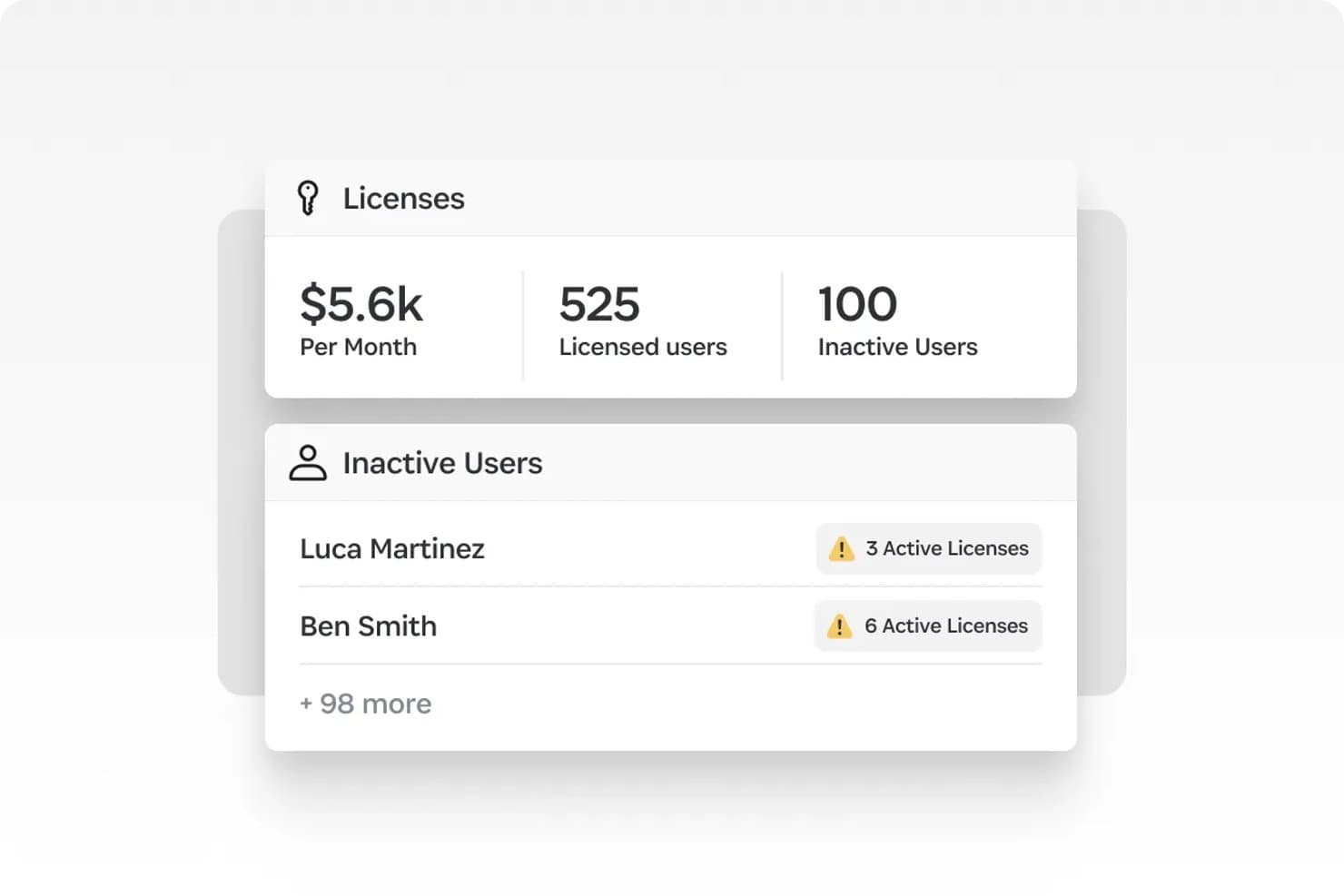
1Password tracks inactive users with active licenses to cut SaaS waste. 1Password SaaS Manager is a SaaS management platform that combines multi-source app discovery, license usage tracking, automated lifecycle workflows, and AI token spend attribution across tools like OpenAI, Anthropic, and Cursor.
Who Is 1Password Best For?
1Password SaaS Manager is a strong fit for IT and FinOps teams that need to manage both traditional SaaS licenses and AI tool spend across a growing, distributed app stack.
Why I Picked 1Password
I picked 1Password SaaS Manager as one of the best because its AI token spend attribution is something I haven't seen matched elsewhere: it breaks down Cursor, OpenAI, and Anthropic costs by user, team, and model, with daily burn-rate updates and budget alerts before prepaid balances run out. Pair that with multi-source shadow AI discovery across IdP, finance systems, device agents, and browser extensions, and you get a clear picture of what your teams are actually spending on AI tools versus what's approved.
1Password Key Features
- 40,000+ app profile library: Auto-classifies discovered apps with built-in context including compliance certifications, app categories, and similar tool suggestions.
- No-code lifecycle workflow builder: Creates automated onboarding, offboarding, and license reclamation workflows without engineering support, triggered by HRIS events or app discovery signals.
- Granular deprovisioning actions: Lets you suspend, deactivate, or delete user licenses individually, with content transfer where APIs support it.
- Slack and Teams approval bots: Embeds access request approvals directly into Slack, Microsoft Teams, and Discord so approvers can act without leaving their existing tools.
1Password Integrations
1Password SaaS Manager offers 400+ integrations via direct APIs, including Okta, Microsoft Entra ID, Workday, Coupa, Jira Service Management, Slack, Microsoft Teams, and Splunk. Custom app connectors are available for apps with open APIs.
Pros and Cons
Pros:
- Slack and Teams-native approval workflows
- Multi-source shadow IT and SaaS discovery
- AI token spend tracked by user and team
Cons:
- Lacks ERP or GL integration for finance teams
- No vendor negotiation or price benchmarking
Learn more about 1Password: Best for SaaS renewal negotiation benchmarks
- Free demo available
- Pricing upon request
Visit WebsiteCustomer Rating:4.6/5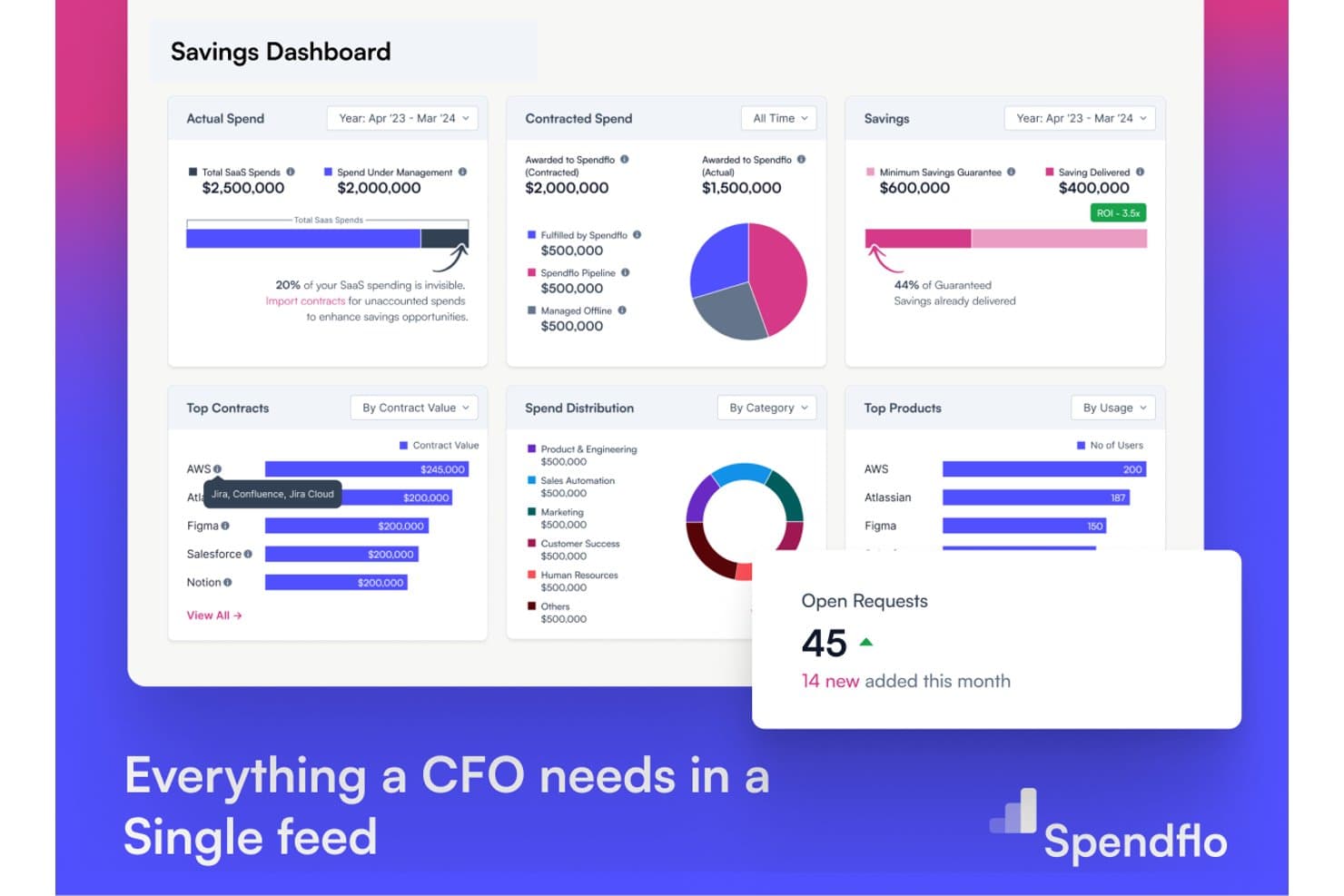
Spendflo gives CFOs a unified savings dashboard for SaaS spend. Spendflo is a SaaS spend management platform that combines contract repository management, AI-driven renewal tracking, vendor price benchmarking, procurement intake workflows, and third-party risk scoring.
Who Is Spendflo Best For?
Spendflo is a strong fit for mid-market procurement and finance teams that need data-backed leverage at SaaS contract renewal time.
Why I Picked Spendflo
I picked Spendflo as one of the best because its vendor price benchmarking database, built from 10,000+ real SaaS contracts, gives your team defensible data at renewal time rather than gut-feel negotiating. I especially like how AI auto-renewal detection flags contracts 60–90 days out and pairs each alert with market rate comparisons, so you're never caught unprepared. Spendflo also offers managed negotiation services, meaning expert human negotiators back your team when the stakes are high.
Spendflo Key Features
- AI contract ingestion: AI OCR automatically extracts metadata from MSAs, order forms, SOWs, and invoices uploaded via email or bulk upload.
- No-code workflow studio: Build multi-level, parallel, and conditional approval workflows by spend threshold or cost center without writing any code.
- Third-party risk scoring: Automated vendor risk scoring across financial, cybersecurity, operational, and compliance dimensions with risk-based approval routing.
- Slack and Gmail-native approvals: Approvers can review and action procurement requests directly inside Slack or Gmail without logging into the platform.
Spendflo Integrations
Spendflo offers integrations with NetSuite, Coupa, Sage, Workday Financials, Okta, Slack, Vanta, OneTrust, DocuSign, and Ironclad. Enterprise plans support custom connectors for additional systems.
Pros and Cons
Pros:
- Managed negotiation services with expert support
- Vendor price benchmarking from 10,000+ contracts
- AI-driven contract ingestion and clause detection
Cons:
- No browser extension for shadow IT discovery
- Reporting features lack advanced analytics capabilities
Learn more about Spendflo: Best for finance-led SaaS renewal negotiation
- Free demo available
- From $75/month
Visit WebsiteCustomer Rating:4.6/5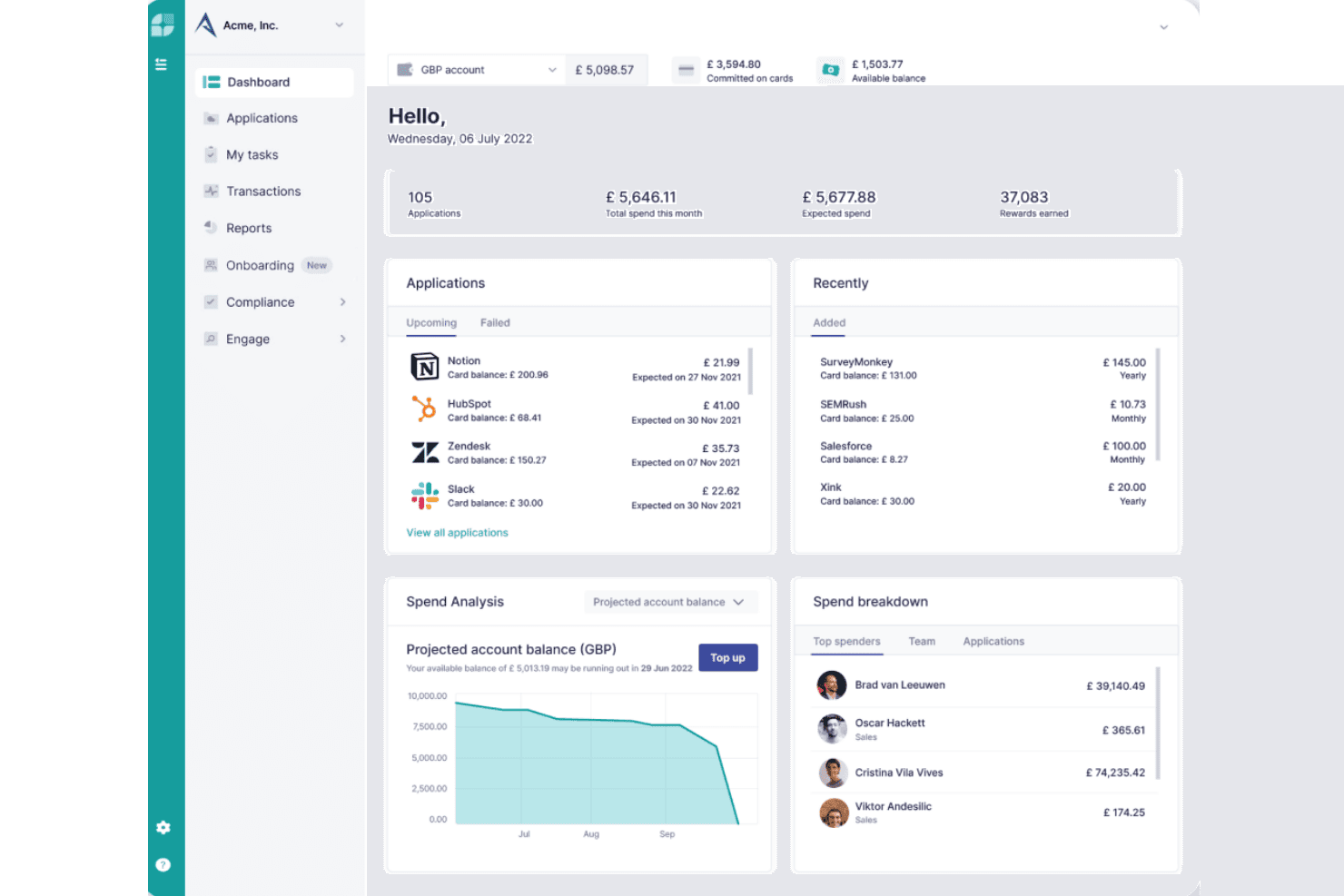
Cledara centralizes SaaS spend, subscriptions, and team budgets in one dashboard. Cledara is a SaaS spend management platform that combines virtual card payment controls, subscription tracking, shadow IT discovery, and AI-powered renewal negotiation into a single finance-led system.
Who Is Cledara Best For?
Cledara is a strong fit for finance teams at SMB and mid-market companies that want direct payment control over SaaS spend alongside renewal tracking and negotiation tools.
Why I Picked Cledara
I picked Cledara as one of the best because its AI Negotiation Copilot genuinely sets it apart for finance teams handling SaaS renewals. The Copilot drafts vendor emails automatically and backs every suggestion with pricing data from 250,000+ real SaaS transactions, so you're negotiating from actual benchmarks rather than guesswork. Pair that with per-subscription virtual cards that enforce spend limits and enable one-click cancellation, and your finance team has direct payment control that most discovery-only tools simply don't offer.
Cledara Key Features
- Application Directory: A centralized system of record that displays each subscription's costs, budgets, assigned owners, renewal dates, compliance status, and payment history in one interface.
- Vendor compliance scoring: Checks vendor ISO 27001 and SOC 2 certification status and supports customizable compliance questionnaire templates that can be delegated to internal stakeholders or external vendors.
- Accounting automation: Automatically captures invoices for every software payment, matches them to transactions, and syncs data in real time to Xero, QuickBooks, NetSuite, and Tripletex.
- Multi-step approval workflows: Routes new software purchase requests through configurable approval chains with intake forms, stakeholder notifications via Slack, and delegated compliance questionnaires.
Cledara Integrations
Cledara offers 35+ HRIS integrations, including Workday, BambooHR, HiBob, Personio, and Gusto, plus Xero, QuickBooks Online, NetSuite, Tripletex, Okta, Google, Slack, Gmail, and Microsoft 365. An open REST API supports custom integrations.
Pros and Cons
Pros:
- Browser extension uncovers shadow IT applications
- Per-subscription virtual cards enable direct payment control
- AI Copilot sources pricing from 250,000+ renewals
Cons:
- Microsoft Teams integration is not supported
- Automated license reclamation is not included
Learn more about Cledara: Best for board-ready SaaS savings with ROI guarantee
- Free demo available
- From €12.5K/year (billed annually)
Visit WebsiteCustomer Rating:4.6/5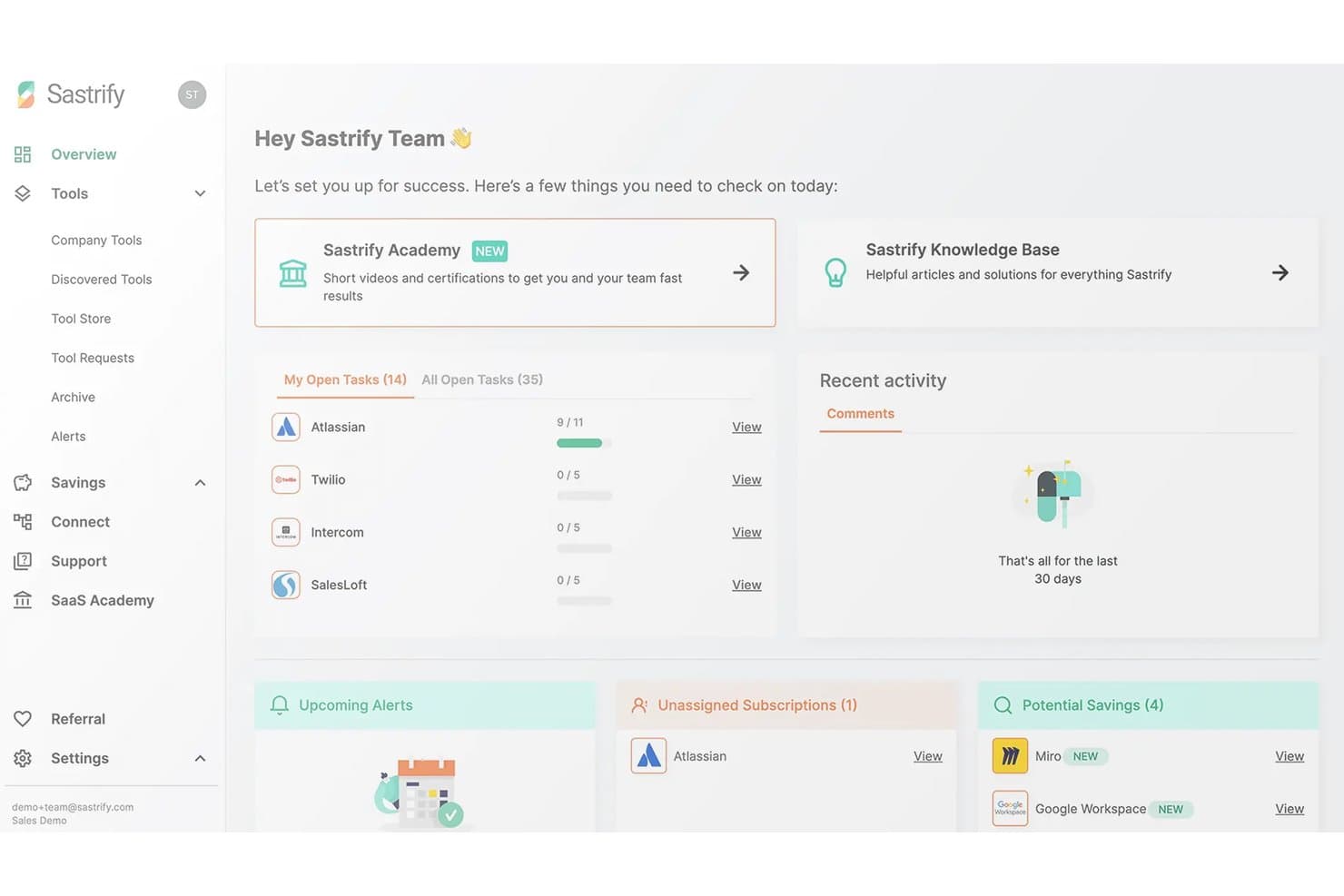
Sastrify centralizes SaaS task tracking, alerts, and savings opportunities for CFOs. Sastrify is a SaaS spend management platform that combines automated software discovery, license usage tracking, renewal management, vendor benchmarking, and procurement workflows—including an optional fully managed procurement service.
Who Is Sastrify Best For?
Sastrify is a strong fit for mid-market finance and procurement teams in Europe that need board-ready SaaS spend visibility and want the option to outsource vendor negotiations entirely.
Why I Picked Sastrify
I picked Sastrify as one of the best because it's the only platform I've seen that combines board-ready savings reporting with an explicit ROI guarantee backed by $6B+ in real benchmark data. In practice, that means my team can walk into a board meeting with auditable savings numbers, not estimates. The vendor benchmarking feature surfaces specific negotiation levers per vendor, and the optional managed procurement service lets certified experts handle negotiations entirely on your behalf.
Sastrify Key Features
- Shadow IT and shadow AI detection: The browser extension monitors endpoints in real time to surface unauthorized apps and hidden generative AI tools across your organization.
- No-code workflow builder: Build intake forms, conditional approval chains, and license provisioning workflows using a drag-and-drop editor without writing any code.
- SastriMarket software marketplace: Access pre-negotiated discounts on popular SaaS tools—including Salesforce, Microsoft 365, and Google Workspace—directly through the platform.
- Compliance intelligence tracking: Automated monitoring of vendor certifications against frameworks like DORA, NIS2, and the EU AI Act flags expiring attestations and missing compliance documents.
Sastrify Integrations
Sastrify offers native integrations with Microsoft Entra ID, Okta, NetSuite, SAP, Workday, QuickBooks, Ramp, Brex, ServiceNow, and Jira. Its Open API supports custom connections.
Pros and Cons
Pros:
- AI-driven shadow IT and shadow AI detection
- Certified procurement experts for full vendor negotiation
- Board-ready SaaS savings reporting with ROI guarantee
Cons:
- Primarily focused on mid-market and European companies
- No free trial or free plan available
Learn more about Sastrify: Best for SaaS discovery with Shadow AI detection
- Free plan + free demo available
- From €3/user/month (billed annually)
Visit WebsiteCustomer Rating:4.9/5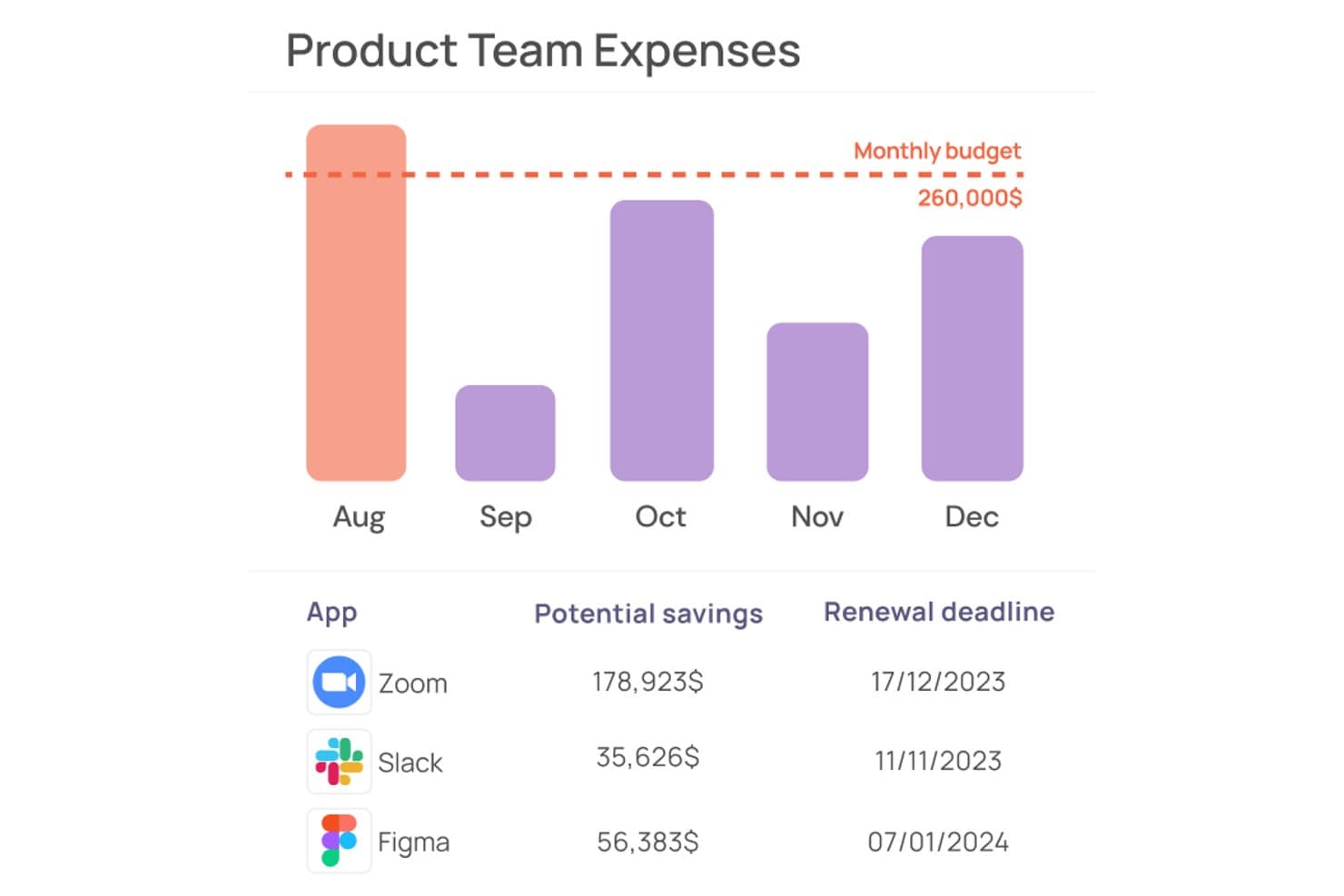
Corma tracks team app expenses and flags potential savings by renewal date. Corma is a SaaS management platform that combines multi-source app discovery, license usage tracking, contract management, and access governance with automated provisioning and approval workflows.
Who Is Corma Best For?
Corma is a strong fit for IT and finance teams at mid-market companies with 50–500 employees that need to get SaaS spend and access under control without deploying an enterprise-grade platform.
Why I Picked Corma
I picked Corma as one of the best because its proprietary Extractor Agent catches SaaS apps that no other discovery method would surface, including Shadow AI tools like ChatGPT and Claude, within minutes of deployment. Most platforms stop at SSO and finance data; Corma's browser-automation agent pulls admin-panel data directly from apps with no API support at all. That means your app inventory is genuinely complete, not just a best guess.
Corma Key Features
- Renewal calendar: Tracks upcoming SaaS renewal dates and sends automated alerts so your team can act before auto-renewals hit.
- Self-service employee app store: Employees request access to sanctioned apps through a branded portal, with multi-step approval routing via Slack, Teams, or your ITSM tool.
- OCR-based contract ingestion: Upload invoices and contracts and Corma auto-extracts supplier details, license counts, pricing tiers, and renewal dates without manual data entry.
- No-code workflow builder: Build custom automation sequences with a drag-and-drop interface, triggered by joiner/mover/leaver events, inactivity alerts, or upcoming renewals.
Corma Integrations
Corma offers 200+ integrations, including Google Workspace, Microsoft Entra ID, Okta, BambooHR, QuickBooks Online, Spendesk, Jira, Slack, Microsoft Teams, and AWS. Enterprise plans support custom integrations and an SDK.
Pros and Cons
Pros:
- OCR contract upload eliminates manual entry
- Unified IAM and SAM for app governance
- Detects Shadow IT and AI apps rapidly
Cons:
- No native ERP or AP system integration
- Lacks vendor negotiation benchmarking tools
Learn more about Corma: Best for SaaS cost vs. spend discrepancy tracking
- Free demo available
- Pricing upon request
Visit WebsiteCustomer Rating:4.9/5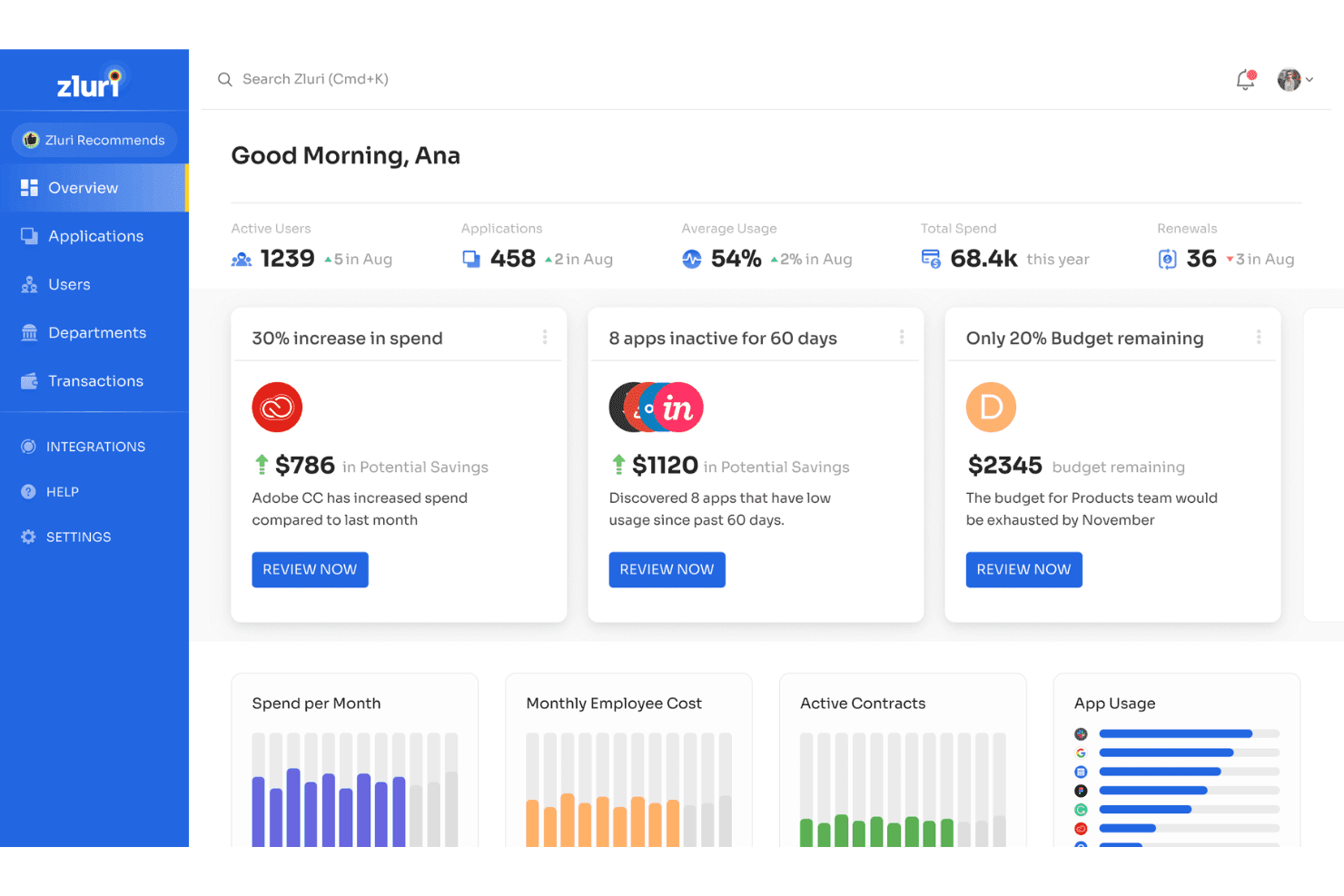
Zluri surfaces spend alerts and savings opportunities for CFOs. Zluri is a SaaS management platform that combines multi-source app discovery, license usage tracking, contract management, spend analytics, and procurement workflow automation.
Who Is Zluri Best For?
Zluri is a strong fit for finance and IT teams at mid-market and enterprise companies that need to reconcile what they're contracted to pay for SaaS against what they're actually being billed.
Why I Picked Zluri
I picked Zluri because it's the only platform I've used that separates contractual cost from actual billed spend, surfacing discrepancies that other tools miss entirely. Its Zluri Mapping AI automatically reconciles unmatched transactions, and the cost center chargeback module attributes spend by department and application without manual effort. When a vendor overbills mid-cycle, Zluri catches it.
Zluri Key Features
- Multi-source SaaS discovery: AuthKnox identifies apps across up to nine independent sources—SSO, finance systems, browser extensions, desktop agents, HRIS, CASB, and MDM—covering 239,000+ apps including shadow AI tools.
- AI-assisted contract ingestion: Automatically extracts pricing tiers, renewal windows, and liability terms from uploaded contracts, distinguishing between subscriptions, perpetuals, and fixed-term agreements.
- Automated license reclamation workflows: Detects unassigned or inactive seats and triggers employee consent prompts before revoking access, then syncs updated counts directly with vendor APIs.
- Vendor price benchmarking: Surfaces market-standard pricing data per vendor so your team enters renewal negotiations with comparable peer pricing on hand.
Zluri Integrations
Zluri offers 300+ direct API integrations, including NetSuite, QuickBooks, Zoho Books, Workday, Okta, Jira Service Management, Slack, and Microsoft Teams. It also supports webhooks, SAML, SCIM, and custom integrations through its Universal Identity Connector.
Pros and Cons
Pros:
- Automated chargeback by department and app
- Slack-based approval and access request workflow
- Surfaced SaaS cost vs. spend discrepancies
Cons:
- Implementation takes up to several months
- Custom pricing only available after demo
Learn more about Zluri: Best for guaranteed savings on vendor contracts
- Free demo available
- Pricing upon request
Visit WebsiteCustomer Rating:4.6/5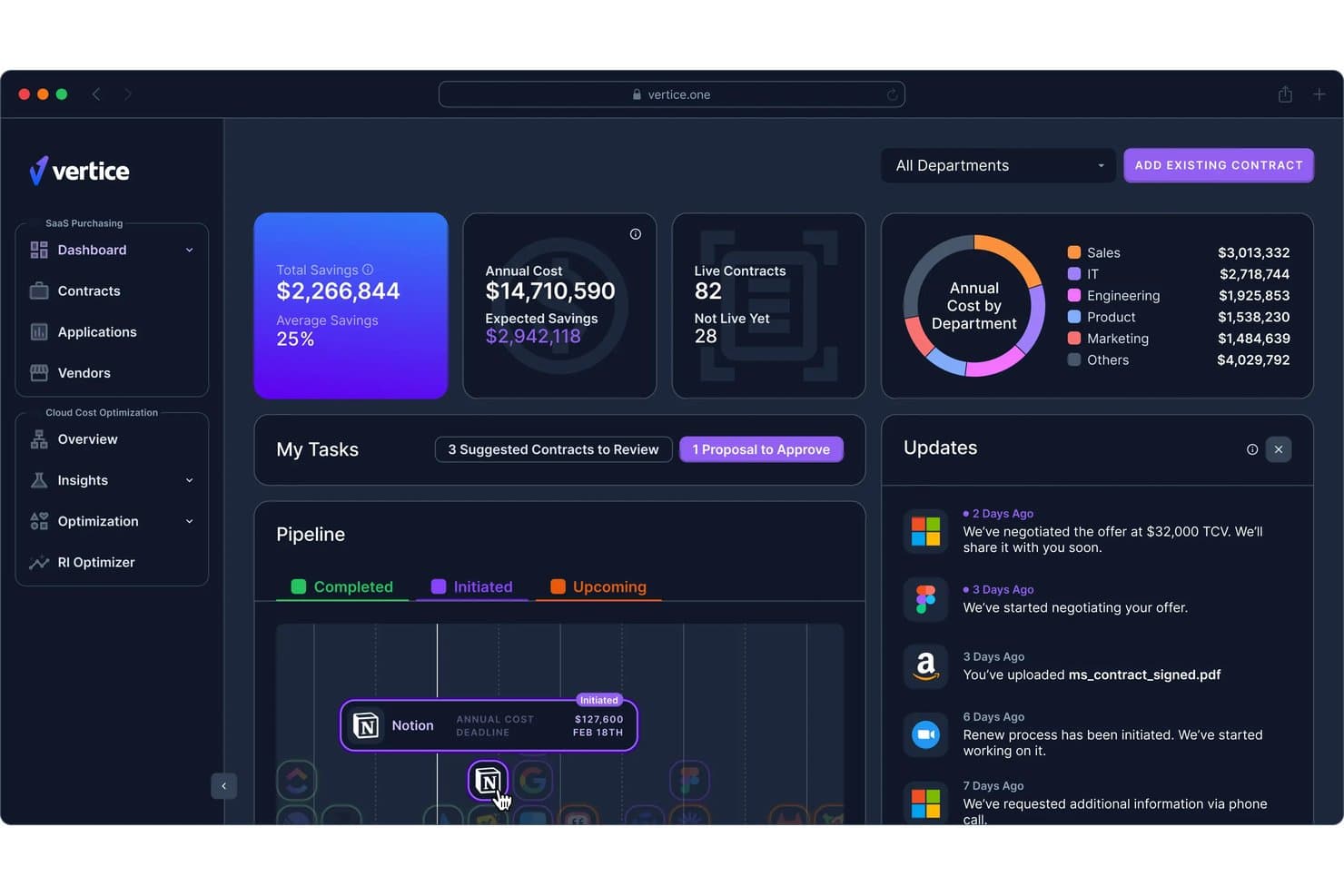
Vertice centralizes SaaS spend, savings, and contract data for CFOs. Vertice is a SaaS spend management platform that combines contract repository, license usage tracking, renewal management, procurement workflows, and AI-driven vendor negotiation into a single system.
Who Is Vertice Best For?
Vertice is a strong fit for finance and procurement teams at mid-market to enterprise companies that want a managed negotiation service alongside their SaaS spend management platform.
Why I Picked Vertice
Vertice earns its spot on my shortlist because it's one of the only SaaS spend management platforms that contractually guarantees a minimum 20% savings on vendor contracts. I love that it backs this up with a proprietary benchmark database covering 32,000+ vendors and 2 million+ real-world pricing points, so your team walks into every renewal negotiation with hard data. On top of that, Vertice's expert buying team negotiates directly with vendors on your behalf using detailed vendor playbooks, which is something I haven't seen matched elsewhere in this category.
Vertice Key Features
- Intake-to-Procure workflow builder: A no-code, drag-and-drop tool for building multi-step approval workflows with conditional routing logic for new software purchase requests.
- Insights Hub spend analytics: A centralized dashboard that aggregates vendor spend, tracks budget variance, flags anomalies, and models chargeback/showback by department via HRIS mapping.
- SSO-based shadow IT detection: Connects to identity providers like Okta, Entra ID, and Google Workspace to surface unauthorized SaaS applications across your environment.
- AI negotiation agent (Ana): An autonomous agent that conducts multi-round vendor negotiations over email under human-defined guardrails, without requiring manual outreach from your team.
Vertice Integrations
Vertice offers integrations with NetSuite, Coupa, SAP Ariba, Workday, Sage Intacct, Google Workspace, Okta, Slack, Microsoft Teams, and Anaplan. It also connects with HRIS, contract lifecycle management, and third-party risk management platforms.
Pros and Cons
Pros:
- Contract and vendor data benchmarked against market
- Managed negotiation service led by procurement experts
- Guarantees 20% minimum savings on contracts
Cons:
- No free trial or public pricing available
- Implementation and workflow setup can be lengthy
Learn more about Vertice: Best for benchmarked renewal negotiations
- Free trial + free demo available
- Pricing upon request
Visit WebsiteCustomer Rating:4.6/5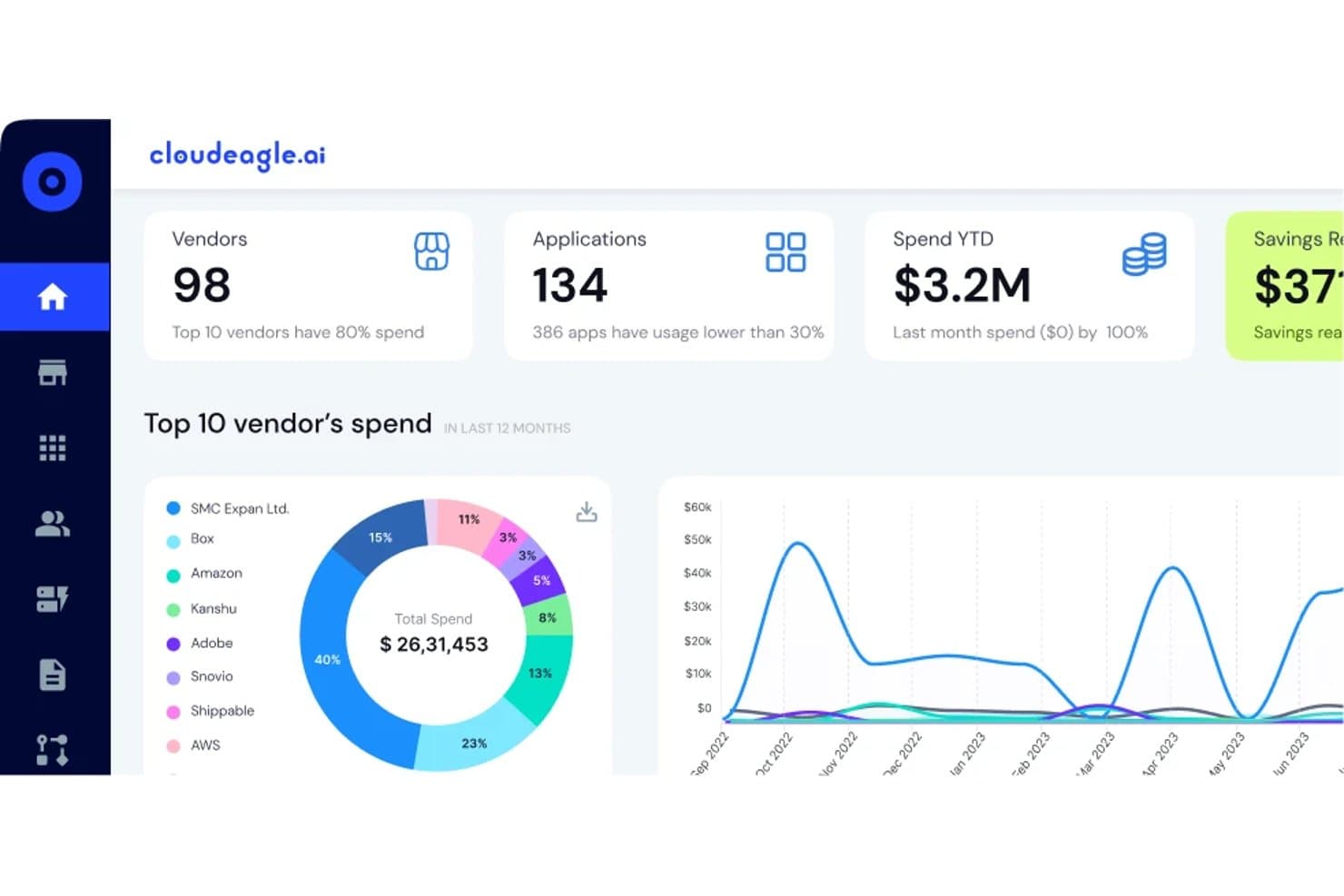
CloudEagle.ai tracks vendor spend and app usage across your SaaS stack. CloudEagle.ai is a SaaS spend management platform that combines multi-source app discovery, contract and renewal management, license usage tracking, and procurement approval workflows with built-in vendor price benchmarking.
Who Is CloudEagle.ai Best For?
CloudEagle.ai is a strong fit for mid-market and enterprise procurement and finance teams who need data-backed leverage when renegotiating SaaS contracts.
Why I Picked CloudEagle.ai
I've included CloudEagle.ai in my top picks because its vendor price benchmarking feature gives procurement and finance teams real negotiating leverage at renewal time. Instead of guessing at fair pricing, you get anonymized peer data showing what comparable companies actually pay per seat. Pair that with the Assisted Buying team, who negotiates on your behalf, and you have a credible path to outcomes like Sapphire Ventures' 30% renewal savings.
CloudEagle.ai Key Features
- Shadow IT and shadow AI detection: Surfaces unsanctioned apps purchased outside formal procurement by pulling data from browser agents, firewall feeds, and expense platforms.
- Automated license reclamation workflows: Detects inactive users and triggers deprovisioning or seat downgrades directly in the connected SaaS app without manual intervention.
- Slack-native intake and approval bots: Lets employees request new software and approvers review requests without leaving Slack.
- AI spend tracking: Monitors AI tool usage and cost by model, user, and department across tools like Claude, Cursor, ChatGPT, Copilot, and Gemini.
CloudEagle.ai Integrations
CloudEagle.ai supports 500+ direct integrations, including Okta, Azure Active Directory, Google Workspace, Coupa, Zip, Jira, ServiceNow, Slack, Workday HCM, Zscaler, and CrowdStrike. It also connects with finance systems, HRIS platforms, expense feeds, and cloud marketplaces.
Pros and Cons
Pros:
- Slack-native intake and approval for procurements
- Automated license reclamation triggers direct in apps
- Peer price benchmarks inform renewal negotiations
Cons:
- English-only interface limits global usability
- Advanced workflows require significant upfront configuration
Learn more about CloudEagle.ai:
Zylo centralizes SaaS app spending and usage data for CFO visibility. Zylo is a SaaS spend management platform built on financial transaction data—pulling from accounts payable, expense systems, and reseller feeds—to give finance and IT teams a unified view of software discovery, license tracking, contract management, and renewal optimization.
Who Is Zylo Best For?
Zylo is a strong fit for enterprise finance and IT teams that need SaaS spend visibility rooted in financial transaction data rather than browser-based discovery.
Why I Picked Zylo
Zylo earns its spot on my shortlist because of its SaaS Operations managed service, which embeds a dedicated SaaS expert directly into your team to run governance, renewal lifecycle management, and license tracking on your behalf. I particularly like the structured 120/90/60/30-day renewal lifecycle framework, which turns renewals from reactive scrambles into a systematic process backed by real vendor pricing benchmarks from $75B+ in transaction data. The SaaS Negotiator add-on goes even further, handling end-to-end vendor negotiations with a 100% ROI guarantee.
Zylo Key Features
- AI-powered contract ingestion: The Contract Assist Agent extracts structured metadata from uploaded contracts and flags missing data with confidence warnings.
- Zylo Clarity AI natural language querying: Ask questions about your software portfolio in plain language and get prioritized savings opportunities and license positions instantly.
- Showback and chargeback reporting: Automatically attribute SaaS costs to departments, cost centers, and business units using financial, contract, and usage data.
- AI spend monitoring: Track consumption-based pricing for AI tools like OpenAI, Anthropic, Databricks, and Snowflake alongside your traditional SaaS subscriptions.
Zylo Integrations
Zylo offers 18+ native integrations, including Microsoft 365, Okta, Microsoft Entra, Salesforce, NetSuite, SAP Concur, ServiceNow, Jira, Slack, and Snowflake. Usage Connect and a RESTful API support custom usage data.
Pros and Cons
Pros:
- AI contract assistant highlights missing metadata
- Embedded SaaS expert runs renewals for you
- Discovers SaaS spend using financial transaction data
Cons:
- Onboarding takes longer than many competitors
- No public pricing available for buyers
Learn more about Zylo:
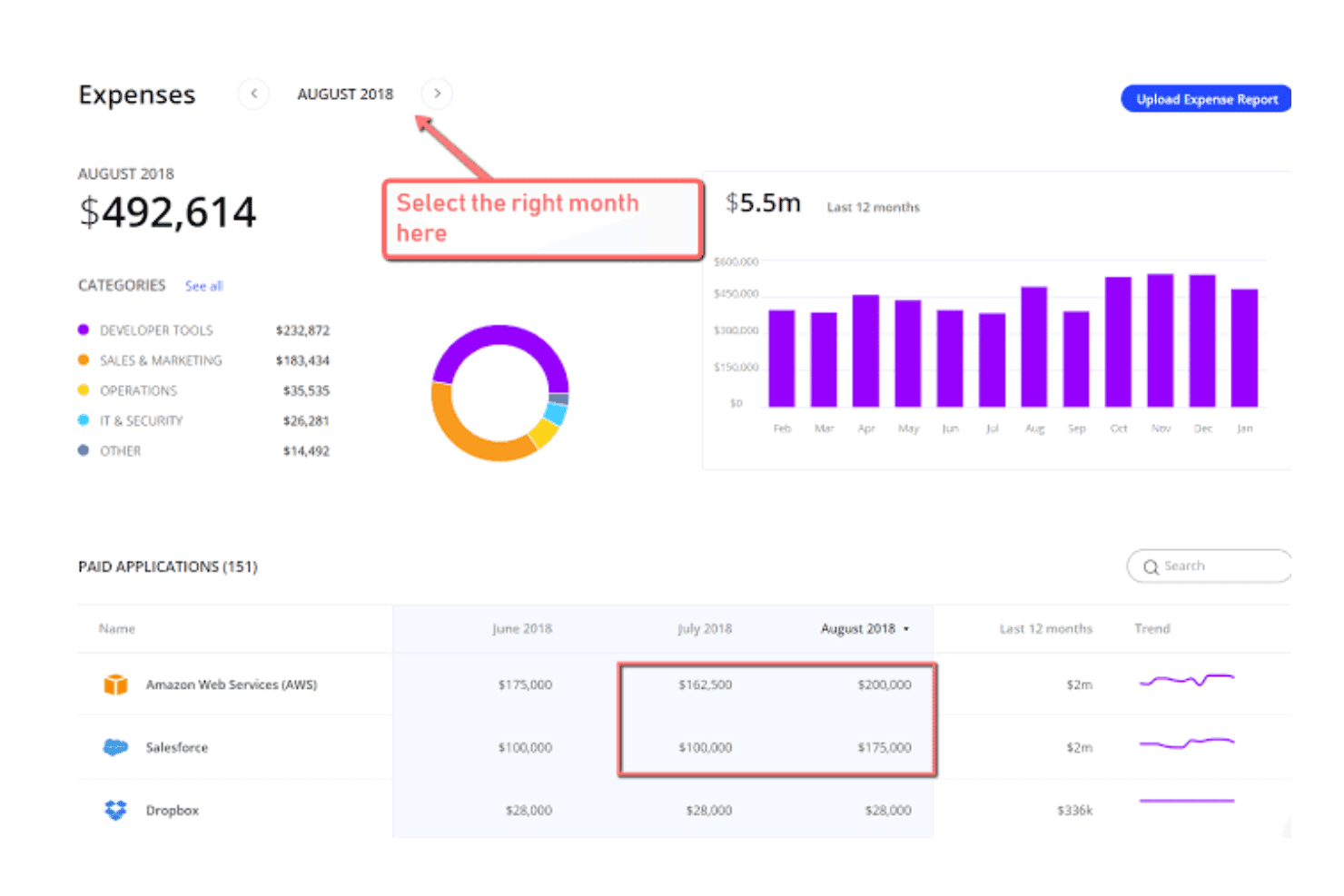
Torii tracks monthly SaaS expenses by category and application for CFOs. Torii is a SaaS management platform that centralizes app discovery, contract management, license usage tracking, and renewal workflows across IT, finance, and procurement teams.
Who Is Torii Best For?
Torii is a strong fit for mid-market and enterprise IT and procurement teams that need peer benchmarking data to negotiate SaaS renewals with confidence.
Why I Picked Torii
I picked Torii as one of the best because its vendor price benchmarking is genuinely hard to replicate manually. Torii aggregates anonymized spend data from its customer base to surface median pricing, 25th and 75th percentile ranges, and typical discount rates per SKU, so I can walk into a renewal negotiation knowing exactly whether I'm overpaying relative to peers. Pair that with AI-powered guided negotiation playbooks that pull seat counts, usage data, and contract dates into one view, and renewal conversations shift from gut-feel to evidence-backed.
Torii Key Features
- Multi-source SaaS discovery: Torii pulls app data from seven-plus sources—including SSO, HRMS, finance systems, MDM, OAuth grants, and a browser extension—to surface both managed and shadow IT apps continuously.
- AI-powered contract ingestion: Upload contracts directly or email up to 10 at once to have AI automatically extract line items, pricing tiers, cancellation windows, and auto-renewal clauses.
- Automated license reclamation workflows: No-code workflows detect inactive users and trigger seat downgrades or deprovisioning directly within source applications when inactivity thresholds are met.
- AI spend monitoring dashboard: Track foundation model token consumption, AI tool usage by user and department, overlapping AI tools, and ROI of custom AI projects from a dedicated dashboard.
Torii Integrations
Torii offers hundreds of integrations, including NetSuite, Sage Intacct, Oracle Financials Cloud, Workday, Ramp, Brex, Coupa, Okta, Microsoft Entra ID, and Ironclad. It also supports custom connections through its REST API, CSV imports, and custom AI builder.
Pros and Cons
Pros:
- Cross-functional dashboards for IT, finance, procurement
- AI-powered contract ingestion and renewal alerts
- Peer-benchmarked vendor price negotiation insights
Cons:
- Pricing transparency is limited for most plans
- Reporting lacks advanced analytics customization options
Learn more about Torii:
Inne oprogramowanie do zarządzania wydatkami na SaaS
Oto kilka dodatkowych opcji oprogramowania do zarządzania wydatkami na SaaS, które nie znalazły się na mojej krótkiej liście, ale nadal warto je sprawdzić:
- 11BetterCloudBest for benchmarked SaaS renewal negotiations
- 12TropicBest for benchmarked SaaS negotiations
- 13JosysBest for IT-led SaaS license reclamation workflows
- 14RampBest for finance ops with peer spend benchmarking
- 15LumosBest for identity-led SaaS license reclamation
- 16SpendHoundBest for SaaS spend with a savings guarantee
- 17Flexera One SaaS ManagementBest for unified SaaS and IT asset spend oversight
- 18ServiceNow SAM ProBest for enterprise SAM and SaaS license governance
How I Evaluate SaaS Spend Management Software
I split my evaluation into baseline capabilities every tool must cover, and differentiators that separate a capable platform from one a CFO can actually build strategy around.
Core Functionality (Table Stakes for This List)
When I'm selecting tools for my list, I rank each one on a scale from 0 (does not offer the functionality) to 5 (excels in this area) for each core functionality listed below. I then calculate the tool's total score into a percentage, using 65% as a benchmark to help assess its overall fit for the list.
- SaaS Discovery: I check how many discovery sources a platform connects to, from SSO and expense systems to browser agents, and whether it flags shadow IT automatically rather than relying on manual imports.
- Contract Repository: A centralized record of every vendor contract, renewal date, and owner matters here. Platforms like Zylo and Tropic offer structured metadata and contract parsing, which I evaluate against basic list-only approaches.
- License Usage Tracking: I look for integrations that pull actual login and activity data across apps so you can spot inactive seats and act on reclamation opportunities before renewal deadlines hit.
- Renewal Management: The best tools pair a renewal calendar with configurable alerts, task assignments, and negotiation prep workflows. I evaluate whether a platform can surface benchmarking data alongside upcoming renewals to strengthen your position.
- Spend Analytics & Reporting: I evaluate dashboard depth, specifically whether a tool supports cost center mapping, budget vs. actual comparisons, and trend analysis that finance teams can present directly to the board.
- Procurement & Approval Workflows: Intake forms and single-approver routing are table stakes, but I look for multi-step approval chains, Slack or Teams integration, and policy enforcement that connects back to your ERP or AP system.
Once I have a list of tools that meet the criteria, I consider what sets each platform apart.
Differentiating Factors (What Sets Vendors Apart)
Here's how I compare and contrast different vendors:
Standout Features
Vendor price benchmarking is where I spend the most time. I look for platforms that surface anonymized peer pricing so your team walks into a renewal knowing what similar companies pay per seat. Automated license reclamation also matters. Tools like Zylo and BetterCloud can detect inactive users and trigger deprovisioning directly in the source app, turning usage data into real savings without manual intervention. I also evaluate vendor risk and compliance scoring, since platforms that bundle SOC 2, ISO, and GDPR profiles into the procurement workflow save finance and IT from chasing documentation separately.
Beyond Features
I look for native ERP and expense platform connectors, since a tool that syncs directly with your GL, AP, and corporate card feeds means spend data flows into cost centers without manual reconciliation. Savings guarantees and time-to-value matter too. Vendors like Sastrify and Vertice offer success-based pricing or documented ROI timelines, which makes internal cost justification far easier. I also check for SOC 2 Type II compliance and role-based access controls, because any platform handling contract and pricing data needs to satisfy SOX and internal audit requirements out of the box.
Jak wybrać oprogramowanie do zarządzania wydatkami na SaaS
Kluczem do znalezienia odpowiedniego oprogramowania do zarządzania wydatkami na SaaS jest dopasowanie funkcji platformy do problemów procesowych zespołu, potrzeb w zakresie widoczności i oczekiwań dotyczących zgodności:
| Jeśli Twoim priorytetem jest… | Poszukaj… |
|---|---|
| Jeśli Twoim priorytetem jest…Silniejsza pozycja negocjacyjna przy odnowieniu umowy | Poszukaj…Wzorcowych cen opartych na danych innych klientów i zautomatyzowanych procesów odnowienia |
| Jeśli Twoim priorytetem jest…Szybkie raportowanie finansowe | Poszukaj…Eksportów pulpitów nawigacyjnych gotowych dla zarządu oraz segmentacji centrów kosztów |
| Jeśli Twoim priorytetem jest…Praktyczne zarządzanie licencjami | Poszukaj…Bezpośrednich integracji umożliwiających monitorowanie wykorzystania stanowisk i automatyczne odzyskiwanie licencji |
| Jeśli Twoim priorytetem jest…Ograniczenie korzystania z niezatwierdzonych narzędzi IT | Poszukaj…Wykrywania za pośrednictwem SSO, źródeł danych kart płatniczych i rozszerzeń przeglądarki |
| Jeśli Twoim priorytetem jest…Zgodność gotowa do audytu | Poszukaj…Dokumentacji SOC 2 typu II, ścieżek zatwierdzeń i konektorów ERP |
Jak ocenić swoją krótką listę
- Sprawdź zakres wykrywania: Podczas okresu próbnego połącz co najmniej dwa źródła danych do wykrywania i potwierdź automatyczne oznaczanie niezatwierdzonych narzędzi IT w ciągu jednego tygodnia.
- Zweryfikuj raportowanie dla zarządu: Po ukończeniu jednego pokazu platformy wyeksportuj raport wydatków w preferowanym formacie, z mapowaniem centrów kosztów.
- Przeprowadź audyt procesów odnowienia: Utwórz zdarzenie odnowienia i potwierdź, że system pokazuje wzorcowe ceny oraz wysyła alerty w określonych odstępach.
- Poproś o dowody zgodności: Przed podpisaniem umowy poproś o aktualny raport SOC 2 typu II oraz możliwość pobrania w aplikacji ścieżek audytu zatwierdzeń.
- Kompromis między kosztami a kontrolą: Zdecyduj, czy gwarantowane oszczędności i wsparcie negocjacyjne są warte większego zaangażowania dostawcy, czy też potrzebujesz maksymalnej kontroli wewnętrznej nad danymi i procesami.
Czym jest oprogramowanie do zarządzania wydatkami na SaaS?
Oprogramowanie do zarządzania wydatkami na SaaS to platforma, która pomaga zespołom finansowym i operacyjnym śledzić, analizować i kontrolować wydatki organizacji na oprogramowanie jako usługę (SaaS). Narzędzia te centralizują dane dotyczące subskrypcji, wskazują nieużywane lub zduplikowane licencje, monitorują odnowienia i umożliwiają przejrzyste raportowanie kosztów. Korzystanie z oprogramowania do zarządzania wydatkami na SaaS pomaga zapewnić dokładne budżetowanie, zapobiega nieplanowanym odnowieniom i wspiera lepsze negocjowanie umów dotyczących całego stosu oprogramowania w firmie.
Funkcje
Oto najważniejsze funkcje, które powinno mieć każde dobre oprogramowanie do zarządzania wydatkami na SaaS:
- Wykrywanie SaaS: Identyfikuje i tworzy wykaz każdej używanej aplikacji chmurowej — na podstawie danych o wydatkach, SSO i rozszerzeń przeglądarki — dzięki czemu dokładnie wiesz, za co płaci Twoja firma, w tym za rozwiązania shadow IT.
- Repozytorium umów: Centralizuje wszystkie umowy z dostawcami, daty odnowień i metadane dotyczące właścicieli, zapewniając łatwy dostęp oraz lepszy nadzór nad przyszłymi zobowiązaniami finansowymi i negocjacjami.
- Śledzenie wykorzystania licencji: Monitoruje aktywność stanowisk i dane logowania, aby ujawnić nieużywane lub niewykorzystywane w pełni licencje, pomagając dopasować rozmiar subskrypcji przed ich odnowieniem.
- Zarządzanie odnowieniami: Zapewnia automatyczne kalendarze, alerty i narzędzia do obsługi przepływów pracy, dzięki czemu nigdy nie przegapisz terminu odnowienia i możesz odpowiednio wcześnie przygotować się do negocjacji.
- Analityka i raportowanie wydatków: Udostępnia pulpity nawigacyjne rozbijające wydatki na oprogramowanie według centrum kosztów, trendów wykorzystania i dostawcy, ułatwiając raportowanie wyników kierownictwu i zarządowi.
- Przepływy pracy związane z zakupami i zatwierdzaniem: Oferuje formularze zgłoszeniowe i wielopoziomowe ścieżki zatwierdzania połączone z zasadami oraz systemami finansowymi, zwiększając kontrolę nad wszystkimi nowymi zakupami i odnowieniami.
- Porównywanie cen z podobnymi firmami: Udostępnia rzeczywiste dane cenowe od podobnych firm, zapewniając przewagę negocjacyjną i pomagając uniknąć przepłacania za oprogramowanie.
- Ocena ryzyka dostawców i zgodności: Ocenia i sygnalizuje kluczowe wymagania dotyczące zgodności — takie jak SOC 2 Type II lub RODO — dzięki czemu możesz łatwiej zarządzać ryzykiem dostawców i spełniać wymogi audytowe.
- Integracje z systemami ERP i finansowymi: Łączy się bezpośrednio z księgą główną, systemami zobowiązań i narzędziami do zarządzania wydatkami, dzięki czemu wszystkie dane o wydatkach są automatycznie uzgadniane między systemami.
- Automatyczne odzyskiwanie licencji: Wykrywa nieaktywnych użytkowników i uruchamia usunięcie stanowiska lub odebranie uprawnień w aplikacji źródłowej, bezpośrednio łącząc dane o wykorzystaniu z kontrolą kosztów i eliminując dodatkową pracę ręczną.
Korzyści
Wdrożenie oprogramowania do zarządzania wydatkami na SaaS zapewnia zespołowi i firmie wiele korzyści. Oto kilka z nich:
- Pełny wgląd w wykorzystanie SaaS: Identyfikuj każdą używaną aplikację SaaS — w tym rozwiązania shadow IT — dzięki integracjom z SSO, źródłami danych kart płatniczych i rozszerzeniami przeglądarki.
- Kontrola umów i odnowień: Śledź każdą umowę z dostawcą, przypisuj odpowiedzialność i otrzymuj terminowe alerty przed terminami odnowień, aby ograniczyć nieplanowane wydatki.
- Dokładne zarządzanie licencjami: Monitoruj dane logowania i wykorzystania we wszystkich narzędziach, aby wykrywać nieaktywne stanowiska i odzyskiwać licencje, zanim wygenerują niepotrzebne koszty.
- Wzorce cenowe na podstawie podobnych firm: Porównuj kwotę płaconą przez firmę za każde stanowisko z anonimowymi danymi podobnych firm, zyskując przewagę podczas negocjowania umów i odnowień.
- Nadzór nad zgodnością gotowy na audyt: Dokumentuj przepływy pracy związane z zatwierdzaniem, utrzymuj zgodność z SOC 2 Type II i generuj ścieżki audytowe wspierające spełnianie wymogów regulacyjnych organizacji.
- Automatyczne raportowanie wydatków: Rozbijaj wydatki na oprogramowanie według dostawcy, centrum kosztów i okresu, korzystając z pulpitów nawigacyjnych oraz eksportów ułatwiających raportowanie na poziomie zarządu.
- Usprawnione przepływy pracy związane z zakupami: Centralizuj zgłoszenia, łącz zatwierdzenia z zasadami i integruj nowe zakupy z systemem ERP lub systemami finansowymi, aby zwiększyć kontrolę nad procesami.
Koszty i ceny
Wybór oprogramowania do zarządzania wydatkami na SaaS wymaga zrozumienia różnych dostępnych modeli cenowych i planów. Koszty różnią się w zależności od funkcji, wielkości zespołu, dodatków i innych czynników. Poniższa tabela podsumowuje typowe plany, ich średnie ceny oraz standardowe funkcje zawarte w rozwiązaniach do zarządzania wydatkami na SaaS:
Tabela porównawcza planów oprogramowania do zarządzania wydatkami na SaaS
| Typ planu | Średnia cena | Typowe funkcje |
|---|---|---|
| Typ planuPlan bezpłatny | Średnia cena$0 | Typowe funkcjePodstawowe śledzenie wydatków, ograniczone wykrywanie aplikacji, ograniczony dostęp do repozytorium umów i podstawowe raportowanie. |
| Typ planuPlan osobisty | Średnia cena$10-$25/użytkownika/miesiąc | Typowe funkcjeWykrywanie aplikacji, przechowywanie umów, śledzenie wykorzystania licencji, ograniczona analiza wydatków i pojedynczy obieg zatwierdzania. |
| Typ planuPlan biznesowy | Średnia cena$25-$60/użytkownika/miesiąc | Typowe funkcjeZaawansowana analiza wydatków, zarządzanie odnowieniami, wielopoziomowe obiegi zatwierdzania, integracje z systemami ERP i alerty. |
| Typ planuPlan dla przedsiębiorstw | Średnia cena$60-$120/użytkownika/miesiąc | Typowe funkcjeNiestandardowe integracje, porównywanie cen z podobnymi firmami, automatyczne odzyskiwanie licencji, ocena ryzyka dostawców i zgodność z SOC 2. |
Najczęściej zadawane pytania
Oto odpowiedzi na często zadawane pytania dotyczące oprogramowania do zarządzania wydatkami na SaaS:
Jak zapewnić dokładność danych dotyczących licencji podczas korzystania z oprogramowania do zarządzania wydatkami na SaaS?
W miarę możliwości należy połączyć oprogramowanie bezpośrednio z dostawcą tożsamości, SSO lub interfejsami API aplikacji. Takie podejście pobiera rzeczywiste dane dotyczące logowania i użytkowania zamiast polegać wyłącznie na ręcznym wprowadzaniu danych lub arkuszach kalkulacyjnych. Pomaga wykrywać nieaktywne stanowiska, identyfikować zduplikowane subskrypcje i odpowiednio wcześnie odzyskiwać niewykorzystane licencje przed odnowieniem umów.
Jakich rodzajów integracji należy szukać?
Szukaj integracji z systemem ERP, systemem księgowym, dostawcą tożsamości (takim jak Okta lub Azure AD) oraz narzędziami do zarządzania wydatkami. Bezpośrednie integracje umożliwiają szybsze uzgadnianie wydatków, przypisywanie ich do centrów kosztów i wyświetlanie każdej używanej aplikacji SaaS — w tym niezatwierdzonych narzędzi IT, które nie przechodzą przez formalne kanały.
Jak zarządzać ryzykiem odnowienia za pomocą oprogramowania do zarządzania wydatkami na SaaS?
Utwórz scentralizowany kalendarz i skonfiguruj automatyczne alerty dotyczące odnowień dla każdej umowy. Dobre narzędzia wskazują również właścicieli umów i porównania cen z podobnymi firmami na długo przed odnowieniem. Uwzględnienie przygotowań do negocjacji w procesie odnowienia pozwala uniknąć nieoczekiwanych odnowień i uzyskać korzystniejsze ceny.
Czy można zautomatyzować zatwierdzanie zakupów SaaS?
Tak, wiele platform oferuje konfigurowalne formularze zgłoszeniowe, wieloetapowe ścieżki zatwierdzania i integrację z zasadami. Ułatwia to egzekwowanie kontroli wydatków, kierowanie zatwierdzeń do właściwych interesariuszy oraz powiązanie każdego zakupu SaaS z systemem finansowym.
Jakich funkcji zgodności należy oczekiwać od wiodących platform?
Należy oczekiwać dokumentacji zgodności z SOC 2 Typ II, możliwych do pobrania ścieżek audytu oraz kontroli dostępu opartej na rolach. Funkcje te pokazują, że platforma może pomóc w spełnieniu wymagań SOX, potrzeb audytowych i standardów kontroli wewnętrznej dotyczących wydatków na oprogramowanie oraz zatwierdzeń.