

O Bonsai reúne faturação, contratos, controlo de tempo e gestão de projetos numa só plataforma, mas não será a opção certa para todas as empresas. Poderá precisar de uma faturação mais flexível, relatórios financeiros mais robustos, melhores integrações contabilísticas ou de uma plataforma capaz de suportar necessidades mais complexas à medida que a sua empresa cresce.
Ao avaliar alternativas ao Bonsai, presto particular atenção aos fluxos de trabalho financeiros e administrativos que podem rapidamente tornar-se complicados à medida que uma empresa cresce. A faturação e os pagamentos, o tempo e as despesas faturáveis, os relatórios e as integrações contabilísticas são importantes, mas também o são os contratos, a gestão de clientes e as ferramentas de fluxo de trabalho que mantêm as operações diárias a funcionar sem problemas.
Neste guia, comparei as melhores alternativas ao Bonsai nestas áreas para o ajudar a encontrar uma plataforma que ofereça o equilíbrio certo entre controlo financeiro, gestão de clientes e flexibilidade operacional.
O que é o Bonsai?
O Bonsai é um software de gestão empresarial para trabalhadores independentes, concebido para ajudar trabalhadores independentes e proprietários de pequenas empresas a gerir os seus projetos, faturas e contratos. É habitualmente utilizado por profissionais criativos, consultores e trabalhadores independentes que precisam de manter as operações da sua empresa organizadas. Funcionalidades como o controlo de tempo, a faturação e a gestão de contratos ajudam a simplificar as tarefas administrativas, permitindo-lhe concentrar-se no seu trabalho. No geral, o Bonsai disponibiliza uma plataforma centralizada para gerir as operações da sua atividade como trabalhador independente.
Tabela de comparação das alternativas ao Bonsai
Esta tabela de comparação apresenta os preços e as opções de teste gratuito das minhas principais alternativas ao Bonsai, para o ajudar a encontrar uma solução adequada ao seu orçamento e às necessidades da sua empresa.
| Tool | Best For | Trial Info | Price | ||
|---|---|---|---|---|---|
| 1 | Best for free invoicing tools | Free plan available | From $11.67/month (billed annually) | Website | |
| 2 | Best for all-in-one productivity | Free plan + free trial + free demo available | From $12/user/month | Website | |
| 3 | Best for document management speed | Free plan + 14-day free trial + free demo available | From $19/user/month | Website | |
| 4 | Best for creative business management | Free trial + free demo available | From $28/month (billed annually) | Website | |
| 5 | Best for all-in-one service management | Free trial + free demo available | From $29/month | Website | |
| 6 | Best for agency operations management | Free trial available | From $39/month (billed annually) | Website | |
| 7 | Best for service business automation | Free demo available | Pricing upon request | Website | |
| 8 | Best for independent professionals | Free trial available | From $29/month (billed annually) | Website | |
| 9 | Best for AI-driven work efficiency | 14-day free trial | From $9/seat/month (billed annually) | Website | |
| 10 | Best for flexible database management | Free plan + free demo available | From $20/user/month (billed annually) | Website |


Why Trust Our Software Recommendations
6,700+
Reviews
20
Industry experts
16+
Evaluation factors
14
Years
Our team has been testing and reviewing software since 2012. As finance leaders ourselves, we know how difficult—and important—it is to choose the right software.
For this guide, we evaluated tools using hands-on testing and independent research, scoring tools using our selection criteria.
Our reviews reflect our human editorial judgment, not a sales pitch.
Avaliações das melhores alternativas ao Bonsai
Seguem-se os meus resumos detalhados das melhores alternativas ao Bonsai que entraram na minha lista restrita. As minhas avaliações apresentam uma análise detalhada das principais funcionalidades, vantagens e desvantagens, integrações e casos de utilização ideais de cada ferramenta, para o ajudar a encontrar a melhor opção para si.
 Best for free invoicing tools
- Free plan available
- From $11.67/month (billed annually)
Visit WebsiteCustomer Rating:4.7/5
Invoice Ninja is an invoicing and billing tool for freelancers to manage invoices, expenses, and payments. Invoice Ninja is an invoicing and billing software tailored for freelancers and small businesses. It offers tools for invoice creation, expense tracking, and payment management.
Why it's a good Bonsai alternative: Invoice Ninja differentiates itself with free invoicing tools that are ideal for cost-conscious freelancers. You can create professional invoices with ease and track expenses without additional costs. The platform supports multiple payment gateways, providing flexibility in how you manage payments. Invoice Ninja's user-friendly interface makes it simple to get started and manage your billing processes.
Standout features & integrations:
Features include customizable invoice templates to match your brand, time-tracking to ensure accurate billing, and expense management to keep finances organized.
Integrations include Stripe, PayPal, Authorize.Net, WePay, Braintree, Slack, Zapier, Xero, QuickBooks, and Google Wallet.
Pros and Cons
Pros:
- Customizable and brandable invoice templates
- Supports multiple payment gateways
- Free invoicing features
Cons:
- Customer support is limited to paid tiers
- Accounting is limited to enterprise-level users
Learn more about Invoice Ninja: Best for all-in-one productivity
- Free plan + free trial + free demo available
- From $12/user/month
Visit WebsiteCustomer Rating:4.7/5
ClickUp is a productivity platform for managing tasks, docs, goals, and time tracking. ClickUp is a productivity and project management tool designed for teams of all sizes. It helps users manage tasks, documents, goals, and time tracking.
Why it's a good Bonsai alternative: ClickUp offers an all-in-one platform that combines task management with document collaboration and time tracking. Its customizable features cater to diverse team needs, enhancing productivity. You can manage multiple projects within a single interface, reducing the need for multiple tools. ClickUp's flexible views and automation capabilities further support efficient team workflows.
Standout features & integrations:
Features include goal tracking to keep your team focused, custom dashboards to visualize your projects, and time tracking to monitor productivity.
Integrations include Slack, Google Drive, Dropbox, Microsoft Teams, Outlook, Zoom, GitHub, Salesforce, HubSpot, and Evernote.
Pros and Cons
Pros:
- End-to-end project, task management suite
- Supports goal tracking End-to-end project, task management suite
- Real-time collaboration tools
Cons:
- Notification overload from high data volume
- Mobile interface lacks key screens Notification overload from high data volume
Learn more about ClickUp: Best for document management speed
- Free plan + 14-day free trial + free demo available
- From $19/user/month
Visit WebsiteCustomer Rating:4.5/5
PandaDoc is a document automation software for creating and managing simplified workflows. PandaDoc is a document automation software that caters to businesses needing efficient document creation and management. It serves sales teams, HR departments, and anyone requiring efficient document workflows.
Why it's a good Bonsai alternative: PandaDoc excels in speeding up document management processes with its automation features. You can create, send, and e-sign documents quickly, reducing time spent on paperwork. Its built-in analytics provide insights into document performance, helping you understand what works best. The software's templates and editing tools further increase efficiency, making it a strong choice for your document needs.
Standout features & integrations:
Features include a library of customizable templates to fit your business needs, real-time tracking to monitor document status, and e-signature capabilities to finalize contracts faster.
Integrations include Salesforce, HubSpot, Zoho CRM, Pipedrive, Microsoft Dynamics, Slack, Google Drive, Dropbox, Stripe, and QuickBooks.
Pros and Cons
Pros:
- End-to-end encryption and secure hosting
- Built-in document tracking
- Advanced activity reporting and analytics
Cons:
- Advanced features are restricted to upper tiers
- Lacks essential editing and formatting tools
Learn more about PandaDoc: Best for creative business management
- Free trial + free demo available
- From $28/month (billed annually)

Dubsado is a business management tool for freelancers to handle clients, projects, and billing. Dubsado is a business management solution crafted for creative entrepreneurs and freelancers. It helps users manage client relationships, projects, and billing processes.
Why it's a good Bonsai alternative: Dubsado offers creative business management features that cater to the unique needs of freelancers. Its customizable workflows allow you to tailor processes to your specific requirements. You can automate client communications and manage projects efficiently with its suite of tools. Dubsado's invoicing and contract management features also strengthen your business operations, making it a versatile choice.
Standout features & integrations:
Features include customizable workflows to fit your business model, automated client communication to save time, and complete project management tools to keep everything organized.
Integrations include QuickBooks, Xero, Stripe, Square, Zapier, Google Calendar, Gmail, Mailchimp, Zoom, and Slack.
Pros and Cons
Pros:
- Dashboards with dynamic to-do lists
- Client portals for returning clients
- Customizable, legally binding contract templates
Cons:
- No multi-currency support in invoicing
- Basic reporting without advanced analytics
Learn more about Dubsado: Best for all-in-one service management
- Free trial + free demo available
- From $29/month
Visit WebsiteCustomer Rating:4.7/5
OneSuite is an all-in-one platform for agencies to manage clients, projects, invoicing, and docs. OneSuite is an all-in-one platform tailored for service-based businesses, especially agencies, to upgrade client management and operational efficiency. It provides tools for project management, CRM, invoicing, and document management.
Why it's a good Bonsai alternative: OneSuite offers thorough service management with features that cater to agencies' needs. Its client portal fosters transparency and improves client interactions. The platform's invoicing system supports online payments, ensuring smoother financial transactions. Additionally, OneSuite's project management tools help simplify operations from onboarding to off-boarding, making it a versatile choice for agencies.
Standout features & integrations:
Features include customizable invoicing for easy financial management, a document hub for managing contracts and proposals, and a client portal for secure collaboration.
Integrations include Stripe, PayPal, QuickBooks, Google Calendar, Zapier, Slack, Zoom, Mailchimp, Microsoft Teams, and HubSpot.
Pros and Cons
Pros:
- Multi-payment gateway support
- Client self-service capabilities
- Secure file storage and sharing
Cons:
- Limited workflow automation features
- Mobile app lacks full desktop features
Learn more about Onesuite: Best for agency operations management
- Free trial available
- From $39/month (billed annually)

ManyRequests is a client portal platform for agencies to manage projects, clients, and billing. ManyRequests is a platform designed for agencies to manage clients, projects, and billing. It caters mainly to service businesses like design, marketing, and development agencies. Key functions include a branded client portal, project management, and billing.
Why it's a good Bonsai alternative: ManyRequests offers a branded client portal, time-tracking, and CRM features that support agency operations management. You can efficiently handle client requests and track project progress. The platform's billing features mean that you can synchronize payments and project management in one place without additional tools. Its reporting tools provide valuable insights into client satisfaction and financial stats.
Standout features & integrations:
Features include a client portal for centralized client interaction, time-tracking for accurate billing, and project management tools to keep everything organized.
Integrations include Zapier, Calendly, HiBob, Xero, Stripe, Google Calendar, Slack, QuickBooks, Asana, and HubSpot.
Pros and Cons
Pros:
- Multi-language client support
- Invoicing that integrates with billing
- Custom-branded client portal and domains
Cons:
- No task hierarchies or subtask delegation
- Limited reporting and data-gathering features
Learn more about ManyRequests: Best for service business automation
- Free demo available
- Pricing upon request
Visit WebsiteCustomer Rating:4.4/5
Accelo is a cloud platform that automates client work and boosts service team productivity. Accelo is a cloud-based service operations automation platform designed for service businesses. It helps manage client work, centralize operations, and improve team productivity.
Why it's a good Bonsai alternative: Accelo offers service business automation with features like project management, client tracking, and billing. Its automated workflows ensure efficient task management and reduce manual work. The platform's real-time reporting provides insights into your business performance, helping you make informed decisions. Accelo's client portal improves communication, making it a complete solution for your service business needs.
Standout features & integrations:
Features include automated workflows to save time, real-time reporting for better decision-making, and a client portal to improve communication.
Integrations include QuickBooks, Xero, Slack, Google Workspace, Office 365, Salesforce, HubSpot, Mailchimp, Stripe, and PayPal.
Pros and Cons
Pros:
- Resource management tools
- Real-time reporting
- Project management integrated with invoicing
Cons:
- Project data is siloed and fragmented
- Limited mobile app functionality
 Best for independent professionals
- Free trial available
- From $29/month (billed annually)
Visit WebsiteCustomer Rating:5/5
HoneyBook is an AI client platform for managing projects, payments, and business growth. HoneyBook is an AI-powered client relationship platform designed for independent professionals in the U.S. and Canada. It offers tools for managing clients, projects, payments, and business growth.
Why it's a good Bonsai alternative: HoneyBook provides a complete client relationship management system that caters specifically to independent professionals. Its AI tools increase productivity by automating tasks like proposals, scheduling, and invoicing. The platform's CRM capabilities help you manage client interactions efficiently. Additionally, HoneyBook's focus on project and financial management supports business growth and organization.
Standout features & integrations:
Features include project management tools to keep your work organized, AI-driven automations to save you time, and a centralized platform for contracts and invoices. Honeybook Academy, which provides an extensive library of masterclasses, webinars, and tutorials, is an added advantage.
Integrations include QuickBooks, Google Calendar, Zapier, Mailchimp, Gmail, Square, Slack, Zoom, Outlook, and Stripe.
Pros and Cons
Pros:
- Customizable workflow automation
- Access to Honeybook Academy learning tools
- AI-powered CRM tools
Cons:
- Pricing can increase with add-ons
- Limited to the U.S. and Canada
Learn more about HoneyBook: Best for AI-driven work efficiency
- 14-day free trial
- From $9/seat/month (billed annually)
Visit WebsiteCustomer Rating:5/5
monday.com’s Work Management is a flexible platform for teams to plan, track, and manage projects efficiently. monday.com Work Management platform is designed for team collaboration and project management. It serves businesses of all sizes by offering tools to plan, track, and deliver work efficiently.
Why it's a good Bonsai alternative: monday.com’s work management software provides AI-driven tools that increase work efficiency and collaboration. Its customizable dashboards allow you to tailor views according to your team's needs. Automation features reduce manual tasks, freeing up your time for more important work. The platform's visual timelines and progress tracking keep everyone aligned and on schedule.
Standout features & integrations:
Features include automation to reduce repetitive tasks, visual timelines for project tracking, and customizable dashboards to suit your specific needs.
Integrations include Slack, Microsoft Teams, Google Calendar, Dropbox, Zoom, Excel, Outlook, Jira, Salesforce, and Trello.
Pros and Cons
Pros:
- Track portfolios and project updates
- Cross-functional collaboration tools
- Visual project timelines and customizable dashboards
Cons:
- Advanced features need setup
- Admin tools locked to premium plans
Learn more about monday.com: 10Best for flexible database management
Airtable
- Free plan + free demo available
- From $20/user/month (billed annually)
Visit WebsiteCustomer Rating:4.6/5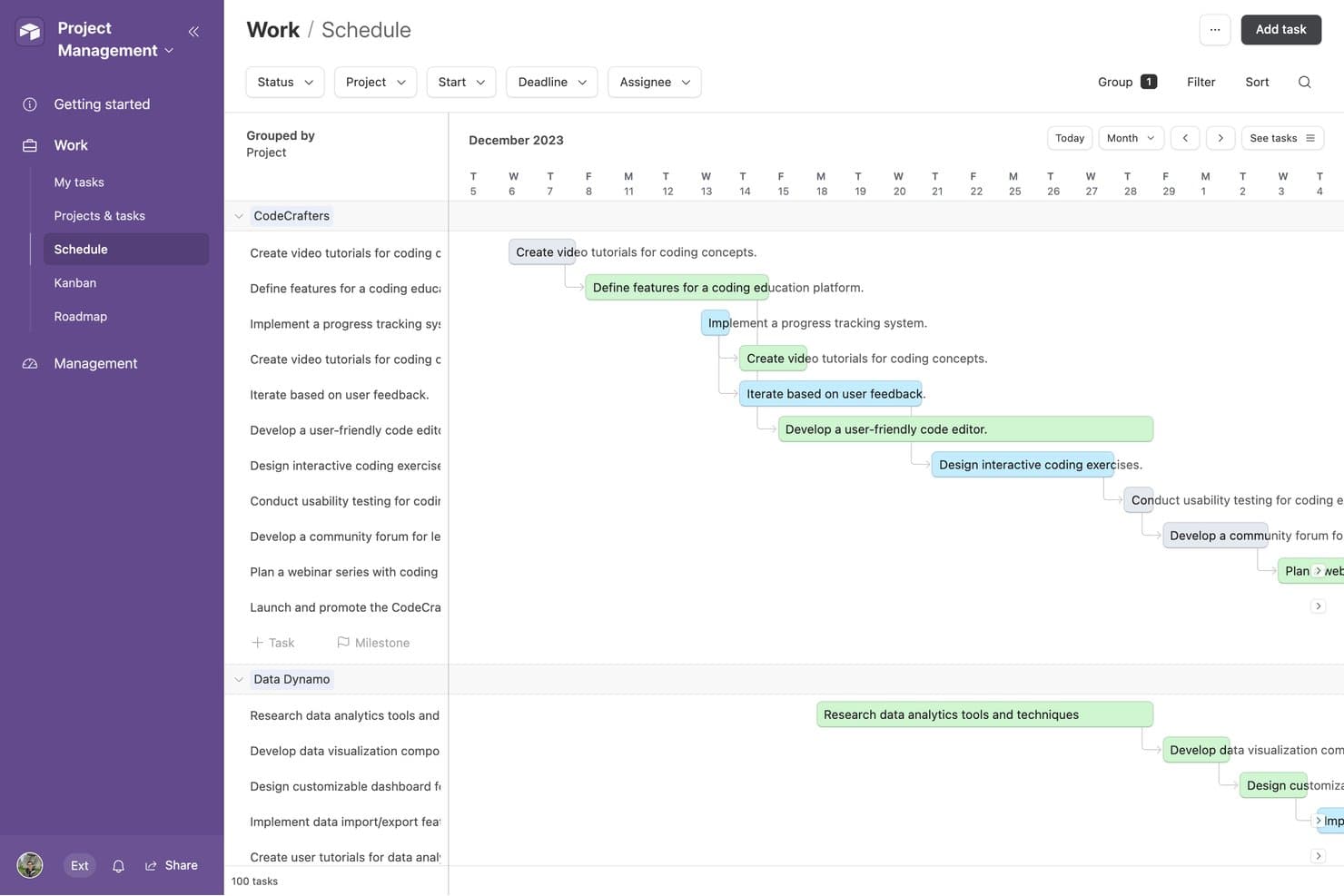
Airtable offers a Schedule view that displays project tasks grouped by project with dependency arrows and color-coded timelines across a monthly calendar layout. Airtable is a no-code relational database platform designed for freelancers, agencies, and operations teams. It offers tools for building custom workflows, tracking clients and projects, and organizing connected data without requiring coding expertise.
Why it’s a good Bonsai alternative: Airtable provides a flexible approach to client, project, and workflow management through its relational database model. You can link client records, projects, and deliverables across your workspace, making it more adaptable than a standard spreadsheet. Its 40+ field types, including duration, currency, and barcode fields, help teams structure data around their specific processes. Visual tools such as Gantt and timeline views also make it easier to plan projects and manage operational workflows.
Standout features & integrations:
Features include customizable forms for collecting client and project information, granular permission controls for managing collaborator access, and change history and audit logs for tracking edits and restoring previous versions. Airtable also offers multiple visual views, including Gantt and timeline views, for managing projects and workflows.
Integrations include Google Workspace, Slack, Salesforce, Jira, GitHub, Dropbox, and Zapier. Airtable also provides an API for building custom integrations.
Pros and Cons
Pros:
- Automations reduce repetitive admin tasks
- Multiple views for organizing client data
- Highly flexible relational database structure
Cons:
- Financial reporting requires significant manual setup
- No native invoicing or billing tools
Learn more about Airtable:
Outras alternativas ao Bonsai
Eis algumas alternativas adicionais ao Bonsai que não entraram na minha lista restrita, mas que vale a pena conhecer:
- 11TogglBest for simple time tracking
- 12Brain LinkBest for note-taking and collaboration
How I Evaluate Bonsai Alternatives
I evaluate each tool against baseline requirements—invoicing, e-signatures, time tracking—and then look for differentiators like tax automation and client portals.
Core Functionality (Table Stakes For This List)
When I'm selecting tools for my list, I rank each one on a scale from 0 (does not offer the functionality) to 5 (excels in this area) for each core functionality listed below. Then, I calculate the tool's total score into a percentage. Each tool needs to achieve a minimum total score of 65% to be considered for inclusion.
- Invoicing & Payments: I check whether you can create branded invoices, set up recurring billing cycles, and collect payments through multiple gateways like Stripe or PayPal.
- Proposals & Contracts: Each tool should let you draft proposals, attach contracts, and capture e-signatures so clients can approve and sign without leaving the platform.
- Time & Expense Tracking: I look for a built-in timer, billable rate assignments per client or project, and expense logging that feeds directly into invoices.
- Client & Project Management: A centralized client database paired with project tracking matters here—organizing deliverables, deadlines, and files by engagement.
- Financial Reporting & Accounting: I evaluate whether the tool generates profit-and-loss summaries, tracks income and expenses by category, and produces tax-ready reports.
- Task & Workflow Automation: Automated triggers for things like sending invoice reminders, onboarding new clients, or creating follow-up tasks save real administrative hours.
Once I have a list of tools that meet this criteria, I consider what sets each platform apart.
Differentiating Factors (What Sets Vendors Apart)
Here's how I compare and contrast different vendors:
Standout Features
Tax automation is a big differentiator—I look for tools that handle quarterly estimates, deduction tracking, and 1099 generation without needing a separate platform. A client portal also matters, especially for accountants managing multiple engagements where clients need to review invoices or upload documents on their own. I also evaluate how well each tool integrates with accounting software like QuickBooks or Xero, since duplicate data entry across disconnected systems creates real reconciliation headaches.
Beyond Features
Pricing structure matters for this category. I evaluate whether a tool scales reasonably as you add clients or team members, since many freelancers and small firm owners start solo and grow over time. Security is another factor I weigh—handling sensitive financial data means I check for encryption standards, role-based access, and compliance certifications. I also consider onboarding experience, because a solo bookkeeper without IT support needs guided setup and migration paths from tools like Bonsai, not a multi-week implementation process.
Por que motivo procurar uma alternativa ao Bonsai?
Embora o Bonsai seja uma boa opção de software de gestão empresarial para trabalhadores independentes, existem vários motivos pelos quais alguns utilizadores procuram soluções alternativas. Poderá estar à procura de uma alternativa ao Bonsai porque…
- Precisa de mais opções de personalização
- A sua equipa é maior do que o Bonsai consegue suportar
- Precisa de cumprir requisitos específicos do seu setor
- Procura melhores capacidades de integração
- Precisa de suporte para várias moedas
- Está fora da área geográfica de disponibilidade do Bonsai
Se alguma destas situações lhe é familiar, veio ao lugar certo. A minha lista inclui várias opções de software de gestão empresarial para trabalhadores independentes mais adequadas a equipas que enfrentam estes desafios com o Bonsai e procuram soluções alternativas.
Principais funcionalidades do Bonsai
Eis algumas das principais funcionalidades do Bonsai, para o ajudar a comparar e a avaliar o que as soluções alternativas oferecem:
- Automatização: Automatiza a gestão de tarefas, a faturação e os fluxos de trabalho de projetos para melhorar a produtividade.
- Ferramentas de colaboração: Oferece espaços de trabalho partilhados para a colaboração entre equipas e a interação com clientes.
- Controlo de acesso: Fornece gestão de permissões e funções de utilizador personalizadas para garantir a segurança dos dados.
- Interface intuitiva: Inclui uma navegação intuitiva e um design responsivo para facilitar a utilização em vários dispositivos.
- Gestão de faturas: Permite a numeração personalizada das faturas e incrementos automáticos para manter os registos financeiros organizados.
- Integração de pagamentos: Suporta várias plataformas e opções de pagamento para transações seguras.
- Faturas personalizáveis: Permitem designs de faturas personalizados e uma gestão flexível dos itens de linha.
- Fluxos de trabalho personalizados: Facilitam fluxos de trabalho personalizados e acionadores de automatização para uma prestação consistente de serviços.
- Portal de pagamentos do cliente: Oferece um portal online seguro para os clientes gerirem pagamentos e faturas.
- Ciclos de faturação flexíveis: Permitem calendários de faturação personalizáveis e processos de faturação automatizados.