

O software de faturação na nuvem automatiza a gestão de subscrições, a emissão de faturas e o processamento de pagamentos para empresas que utilizam serviços digitais. Se está à procura do melhor software de faturação na nuvem, é provável que esteja a lidar com modelos de preços complexos, ciclos de faturação recorrentes ou requisitos fiscais globais — tudo isto enquanto procura obter relatórios financeiros rigorosos e controlos mais apertados.
Neste guia, encontrará informações direcionadas sobre as principais plataformas atuais, o que as distingue e como escolher a ferramenta certa de acordo com as prioridades da sua empresa. Quer o seu objetivo seja expandir as subscrições ou integrar a faturação com as operações financeiras, poderá fazer uma escolha segura e informada.
Why Trust Our Software Recommendations
6,700+
Reviews
20
Industry experts
16+
Evaluation factors
14
Years
Our team has been testing and reviewing software since 2012. As finance leaders ourselves, we know how difficult—and important—it is to choose the right software.
For this guide, we evaluated tools using hands-on testing and independent research, scoring tools using our selection criteria.
Our reviews reflect our human editorial judgment, not a sales pitch.
Tabela de comparação de software de faturação na nuvem
A tabela abaixo compara os detalhes de preços das minhas principais escolhas de software de faturação na nuvem.
| Tool | Best For | Trial Info | Price | ||
|---|---|---|---|---|---|
| 1 | Best for global SaaS payments | Free trial available | Pricing upon request | Website | |
| 2 | Best for AI-powered financial reporting | Free demo available | From £1,200/month | Website | |
| 3 | Best for subscriber retention tools | 90-day free trial | From $249/month | Website | |
| 4 | Best for enterprise-grade billing automation | Free demo available | Pricing upon request | Website | |
| 5 | Best for open-source billing customization | Free demo available | Pricing upon request | Website | |
| 6 | Best for merchant of record billing worldwide | Free demo available | From $0.50 + 5% per transaction | Website | |
| 7 | Best for rapid pricing experiments at scale | Free plan available | Pricing upon request | Website | |
| 8 | Best for deep SaaS financial integrations | Free demo available | From $599/month | Website | |
| 9 | Best for complex quote-to-cash automation | Free demo available | Pricing upon request | Website | |
| 10 | Best for flexible hybrid pricing models | Not available | From $0.7% of billing volume per month | Website |


Avaliações do melhor software de faturação na nuvem
Abaixo encontram-se os meus resumos detalhados do melhor software de faturação na nuvem que integrou a minha seleção. As minhas avaliações apresentam uma análise detalhada das funcionalidades, dos preços e das integrações de cada plataforma, para o ajudar a encontrar a melhor opção para si.
 Best for global SaaS payments
- Free trial available
- Pricing upon request
Visit WebsiteCustomer Rating:4.5/5
FastSpring offers a merchant dashboard displaying net sales, orders, MRR, refunds, and account balance in one unified view. FastSpring is a merchant-of-record platform for SaaS and digital software companies that combines subscription billing, localized checkout, global payment processing, and automated tax collection and remittance across multiple jurisdictions.
Who Is FastSpring Best For?
FastSpring is a strong fit for small to mid-sized SaaS and software companies that sell digital products across multiple countries and need to offload tax compliance.
Why I Picked FastSpring
FastSpring earns its spot on my shortlist because its Merchant of Record model handles VAT, GST, and sales tax collection and remittance across jurisdictions automatically. I picked it for SaaS finance teams who need to sell globally without registering for tax in every market they operate in. Its localized checkout adapts currency, language, and payment method per buyer region, and the subscription billing engine covers automated renewals, payment retries, and dunning.
FastSpring Key Features
- Branded checkout customization: Build fully branded, localized checkout flows using the Store Builder Library and embedded widgets.
- Affiliate management: Track referrals and manage commission payments for global affiliate campaigns directly through the platform.
- Interactive quotes (IQ): Create, send, and track personalized sales quotes that convert directly into purchases.
- REST API and webhooks: Connect billing data and trigger workflows programmatically with REST API access and real-time webhooks.
FastSpring Integrations
FastSpring offers native integrations with tools like Asana, Calendly, ClickUp, Constant Contact, Drip, Eventbrite, GitHub, Intercom, Jotform, and Google Analytics 360. An API and webhooks are available for custom integrations.
Pros and Cons
Pros:
- Handles subscription renewals and dunning automatically
- Localized checkout adapts currency and payment method
- Automatic global tax remittance across jurisdictions
Cons:
- Limited prebuilt ERP and accounting connectors
- No native ASC 606 revenue recognition support
Learn more about FastSpring: Best for AI-powered financial reporting
- Free demo available
- From £1,200/month
Visit WebsiteCustomer Rating:4.3/5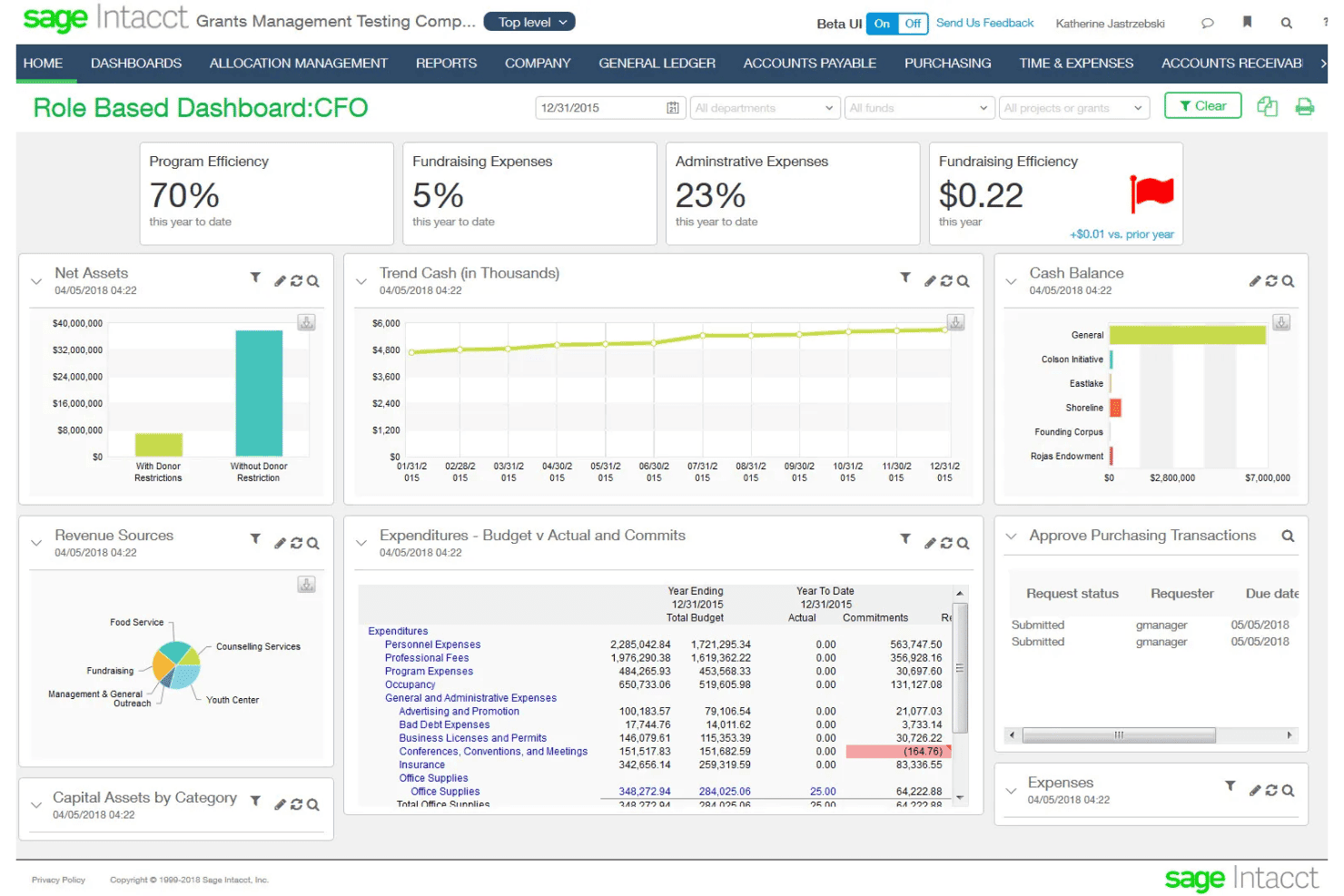
Sage Intacct offers a CFO role-based dashboard displaying key financial metrics including program efficiency, fundraising expenses, net assets, cash balance, and budget vs. actual expenditures. Sage Intacct is a cloud ERP and financial management platform built for subscription businesses, combining subscription billing, usage-based billing, multi-entity accounting, and native ASC 606/IFRS 15 revenue recognition.
Who Is Sage Intacct Best For?
It's a strong fit for mid-market SaaS and professional services finance teams managing complex billing, multi-entity structures, and revenue recognition requirements.
Why I Picked Sage Intacct
Sage Intacct earns its spot on my shortlist because of how well its AI agents work alongside billing and revenue data. The Financial Intelligence agent lets me query financial data in plain language, while the Financial Assurance agent flags unusual journal entries in real time. When a billing run closes, I can move straight into reporting without hunting for anomalies manually.
Sage Intacct Key Features
- Subscription billing automation: Automates contract-based recurring invoices, renewals, and usage charges.
- Multi-entity accounting: Supports consolidated financials and intercompany billing for organizations with multiple subsidiaries.
- ASC 606/IFRS 15 revenue recognition: Handles complex revenue schedules and contract modifications for compliance.
- Marketplace integrations: Connects directly with solutions like Salesforce, Avalara, ADP, Bill.com, and Workday HCM.
Sage Intacct Integrations
Sage Intacct offers 350+ marketplace integrations, including native integrations with Salesforce, Avalara, ADP, Rippling, Bill.com, and Workday HCM. An API is available for custom integrations.
Pros and Cons
Pros:
- AI agents surface anomalies in real time
- Consolidates multi-entity billing and financials natively
- Native ASC 606 revenue recognition built in
Cons:
- Custom report building requires configuration
- Implementation takes weeks
Learn more about Sage Intacct: Best for subscriber retention tools
- 90-day free trial
- From $249/month
Visit WebsiteCustomer Rating:4.3/5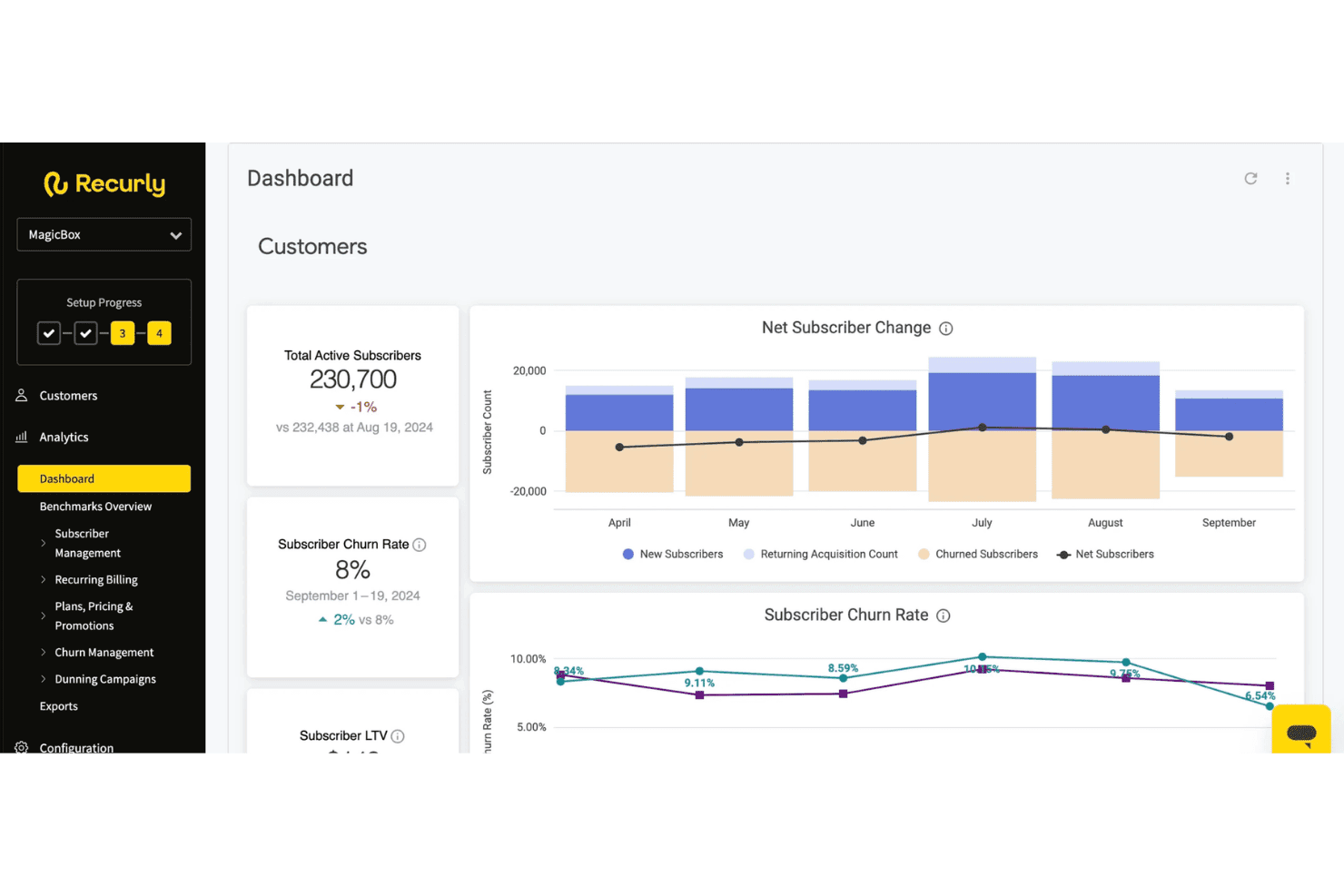
Recurly provides a dashboard displaying total active subscribers, churn rate, net subscriber changes, and subscriber LTV metrics. Recurly is a subscription management and billing platform that handles recurring billing automation, dunning, usage-based pricing, revenue recognition, payments orchestration, and subscriber lifecycle management across the full subscription cycle.
Who Is Recurly Best For?
Recurly is a strong fit for mid-market and enterprise subscription businesses in SaaS, media, and consumer services managing recurring revenue at scale.
Why I Picked Recurly
I've included Recurly in my top picks because its retention toolset goes well beyond standard dunning. The Engage module uses AI-powered propensity-to-churn modeling to trigger personalized cancel-save flows and win-back offers before a subscriber actually churns. I also like that these prompts connect directly to billing in real time, so a retention action taken in-app, like accepting a pause offer, is reflected in the billing system instantly without any manual intervention.
Recurly Key Features
- Revenue recognition automation: Handles ASC 606 and IFRS 15 compliance with automated contract modifications and audit-ready reporting.
- Multi-currency and tax support: Processes payments in 140+ currencies and integrates with Avalara or Vertex for jurisdiction-specific tax calculation.
- Payment gateway network: Connects to 20+ global payment gateways and supports card, ACH, and digital wallet methods.
- Self-service portal: Lets end customers manage subscriptions, update payment methods, and download invoices without contacting support.
Recurly Integrations
Recurly offers native integrations with Stripe, PayPal, Adyen, GoCardless, Avalara, Vertex, Zendesk, Snowflake, and ChartMogul. An API is available for custom integrations.
Pros and Cons
Pros:
- Supports hybrid and usage-based pricing models
- Automated ASC 606 rev rec reporting
- AI-powered cancel-save flows reduce churn
Cons:
- ERP sync depth lags some competitors
- Custom reporting options are limited
Learn more about Recurly: Best for enterprise-grade billing automation
- Free demo available
- Pricing upon request
Visit WebsiteCustomer Rating:4.8/5
BillingPlatform offers an AI-powered dashboard that surfaces unbilled usage and under-invoiced accounts with revenue exposure, AR aging, and overdue invoice queuing. BillingPlatform is an enterprise cloud billing and revenue management platform that handles subscription billing, usage-based rating, AR automation, payment processing, and ASC 606/IFRS 15 revenue recognition across complex, multi-model pricing structures.
Who Is BillingPlatform Best For?
It's a strong fit for large enterprises in telecom, SaaS, financial services, and media that manage high-volume, multi-model billing across multiple entities and currencies.
Why I Picked BillingPlatform
BillingPlatform earns its spot as one of the best on my shortlist because of how it handles billing complexity that most platforms simply can't configure. I particularly like its metadata-driven architecture, which lets billing teams define custom objects, pricing rules, and workflow logic without writing code. The built-in mediation layer also impresses me, ingesting and rating high-volume usage data across diverse sources when billing spans multiple consumption dimensions.
BillingPlatform Key Features
- Self-service customer portal: Lets customers view invoices, manage payment methods, and download tax documents online.
- Native dunning automation: Schedules retries, manages collections, and updates cards automatically for failed or overdue payments.
- ASC 606/IFRS 15 revenue recognition: Creates audit-ready revenue schedules, contract modifications, and detailed disclosure reports.
- Multi-currency and tax engine integration: Handles transactions in global currencies and calculates sales tax, VAT, and GST automatically via external providers.
BillingPlatform Integrations
BillingPlatform offers native integrations with Salesforce, Oracle NetSuite, and Microsoft Dynamics. An API is available for custom integrations, and tax engine connectivity is supported via providers like Avalara.
Pros and Cons
Pros:
- Multi-entity billing across separate legal entities
- Automated contract modification handling
- Configurable mediation engine
Cons:
- Requires professional services for initial setup
- Sandbox testing environment has limitations
Learn more about BillingPlatform:
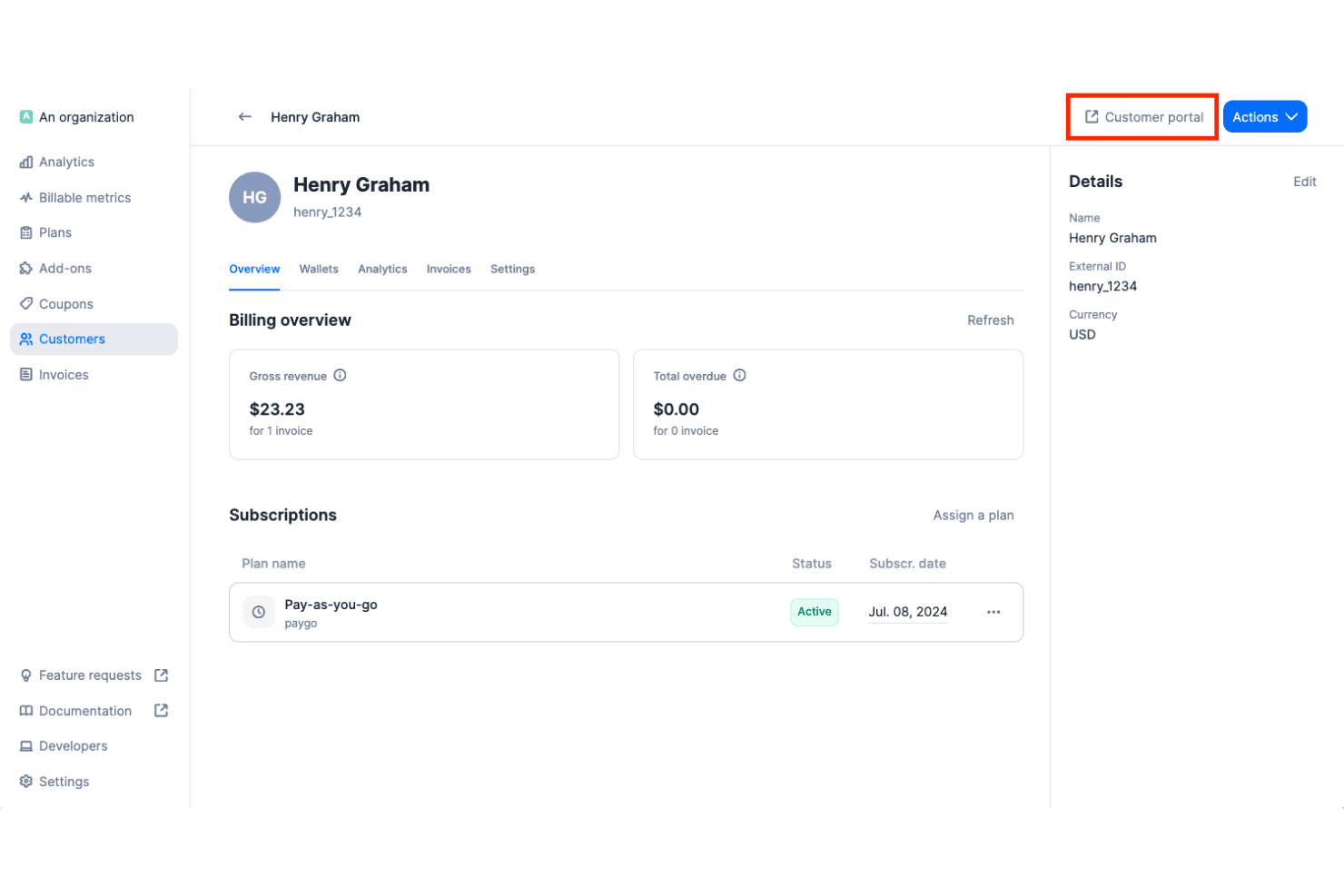
Lago offers a customer billing overview page showing gross revenue, overdue amounts, active subscriptions, and a customer portal access button. Lago is an open-source cloud billing platform that handles usage-based, subscription, and hybrid pricing models, with real-time event metering, automated invoicing, dunning workflows, and integrations across payment, tax, and accounting systems.
Who Is Lago Best For?
Lago is a strong fit for engineering-led SaaS and AI companies that need full control over their billing infrastructure, especially those with data sovereignty requirements or complex usage-based pricing.
Why I Picked Lago
Lago earns its spot on my shortlist because no other cloud billing platform gives you this level of access to the underlying billing logic. I can define custom billable metrics, build hybrid plans that mix subscriptions with consumption-based charges, and deploy the entire stack inside my own VPC. That matters when you're running AI workloads or handling GDPR-sensitive data and can't afford vendor lock-in on the billing layer.
Lago Key Features
- Multiple payment gateway integrations: Connects natively with Stripe, Adyen, GoCardless, and MoneyHash for global payments.
- Automated tax calculation: Integrates with Avalara and Anrok to handle sales tax, VAT, and GST across jurisdictions.
- Native NetSuite and Xero integration: Syncs invoices, payments, and customer data directly to leading accounting platforms.
- Customer-facing billing portal: Lets end customers view invoices, manage payment methods, and access billing history.
Lago Integrations
Lago offers native integrations with Stripe, Adyen, GoCardless, MoneyHash, Avalara, Anrok, NetSuite, Xero, HubSpot, Salesforce, and Zapier. An API is available for custom integrations.
Pros and Cons
Pros:
- Fully configurable billable metrics
- Real-time metering for high-volume event ingestion
- Fully self-hostable for data sovereignty needs
Cons:
- Missing native QuickBooks connectors
- No native ASC 606 revenue recognition
Learn more about Lago: Best for merchant of record billing worldwide
- Free demo available
- From $0.50 + 5% per transaction
Visit WebsiteCustomer Rating:4.6/5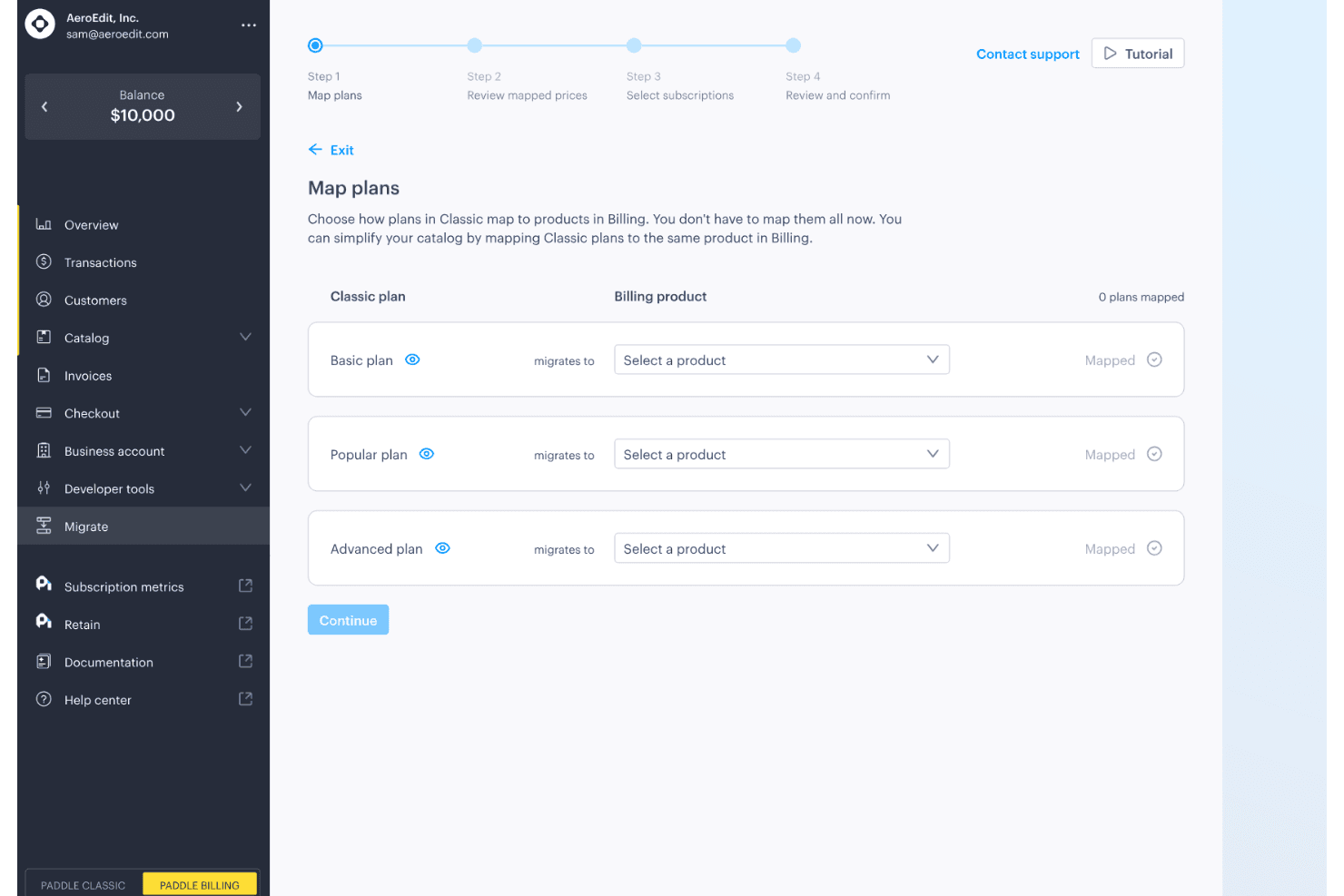
Paddle offers a guided migration flow that maps Classic plans to Billing products across Basic, Popular, and Advanced tiers. Paddle is a cloud billing platform for SaaS and digital product companies that combines subscription management, checkout, recurring billing, invoicing, and global tax compliance under a single merchant of record model.
Who Is Paddle Best For?
Paddle is a strong fit for growth-stage SaaS companies selling digital products across multiple countries who need tax compliance and billing handled without building in-house infrastructure.
Why I Picked Paddle
I picked Paddle as one of the best because no other cloud billing platform handles tax liability quite the same way. As the merchant of record, Paddle calculates, collects, files, and remits VAT and GST across 100+ jurisdictions automatically, so my team isn't managing a separate tax compliance stack on top of billing. I also use Paddle's Retain module to run dunning workflows, including smart payment retries and cancellation recovery flows, without any manual intervention.
Paddle Key Features
- Self-service customer portal: Customers can update payment methods and manage subscriptions without assistance.
- Multi-currency checkout: Paddle supports localized checkout in over 20 currencies.
- Automated invoicing: International and SaaS invoicing is built in, with taxes automatically applied.
- ProfitWell Metrics integration: Native analytics and SaaS metrics reporting connects directly to your financial data.
Paddle Integrations
Paddle offers native integrations with ProfitWell Metrics, HubSpot, Intercom, and Databox. An API is available for custom integrations.
Pros and Cons
Pros:
- Dunning workflows recover failed payments automatically
- Built-in merchant of record removes tax liability
- Handles global tax filing automatically across jurisdictions
Cons:
- Revenue recognition features lack ASC 606 depth
- No prebuilt ERP or accounting system connectors
Learn more about Paddle: Best for rapid pricing experiments at scale
- Free plan available
- Pricing upon request
Visit WebsiteCustomer Rating:4.4/5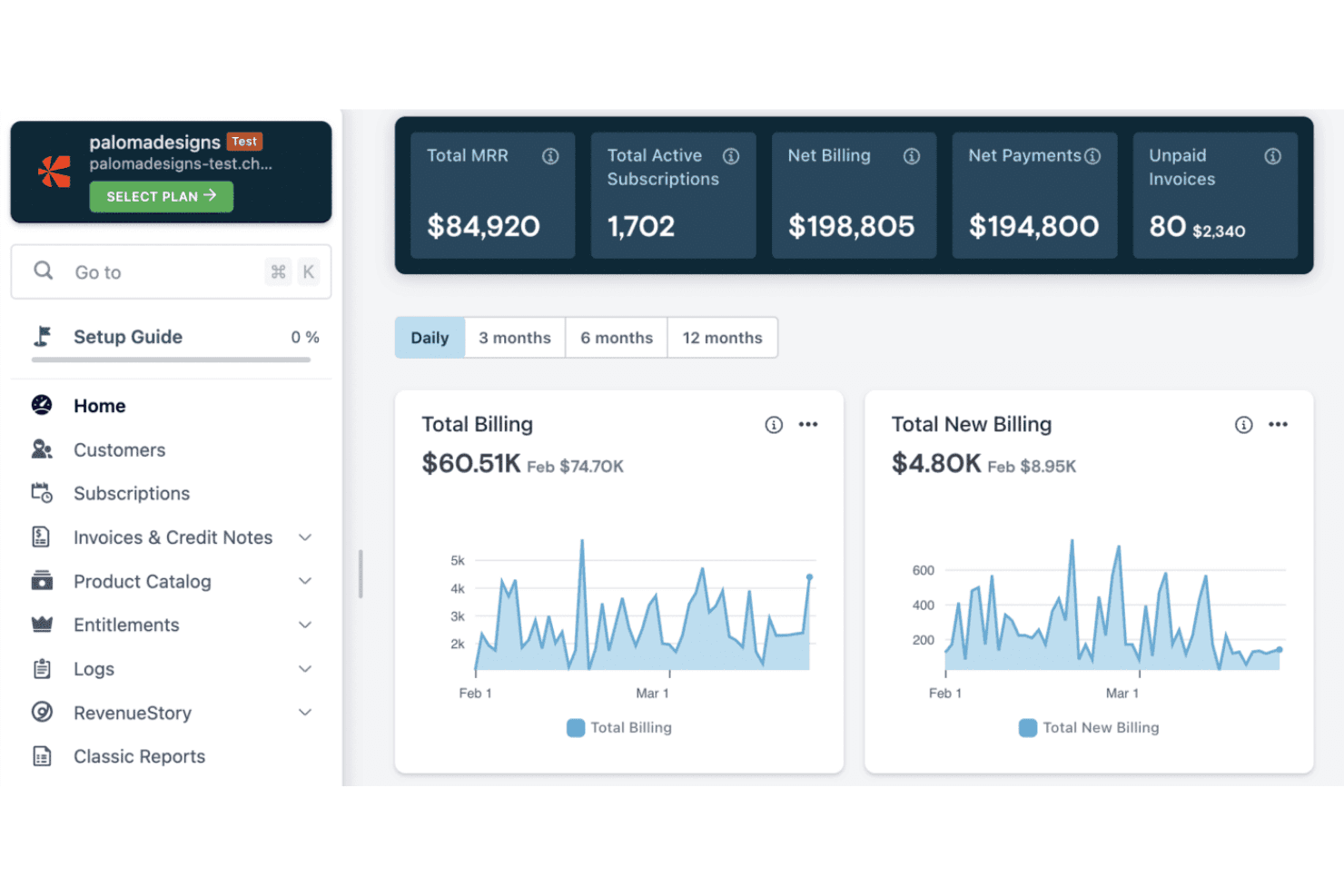
Chargebee features a billing dashboard with MRR, active subscriptions, net billing, payments, and unpaid invoices alongside daily billing trend charts. Chargebee is a cloud billing and revenue management platform that handles subscription billing, usage-based metering, CPQ, revenue recognition, and payment collection across 40+ gateways and 100+ currencies.
Who Is Chargebee Best For?
Chargebee is a strong fit for SaaS finance and revenue operations teams at growth-stage and mid-market companies managing subscription and usage-based billing.
Why I Picked Chargebee
Chargebee earns its spot on my shortlist because of how it handles pricing model iteration without pulling in engineering every time. The Price Book lets me manage tiered, usage-based, flat-fee, and hybrid pricing in one centralized catalog, so I can launch a new pricing tier and test it against existing segments without a code change. I also like the Growth module's AI-powered offer builder, which lets me run upgrade, upsell, and trial conversion experiments across subscriber cohorts.
Chargebee Key Features
- Dunning automation: Smart retry schedules and payment recovery workflows reduce failed transactions with minimal manual effort.
- Self-service customer portal: End customers can view invoices, update payment methods, and manage subscriptions independently.
- Multi-currency and tax engine: Supports 100+ currencies and automates VAT, GST, and sales tax calculation for global compliance.
- Native ERP and accounting integrations: Direct connectors to NetSuite, QuickBooks, and Xero sync billing and revenue data seamlessly.
Chargebee Integrations
Chargebee offers over 40 native payment gateway integrations, and has native integrations with Salesforce, HubSpot, NetSuite, QuickBooks Online, Xero, Apple App Store, and Google Play Store. An API is available for custom integrations.
Pros and Cons
Pros:
- Dunning handles failed payments with smart retries
- Customer self-service portal included natively
- ASC 606 revenue recognition fully automated
Cons:
- Advanced metering setup takes significant time
- Custom reporting requires workarounds
 Best for deep SaaS financial integrations
- Free demo available
- From $599/month
Visit WebsiteCustomer Rating:4.3/5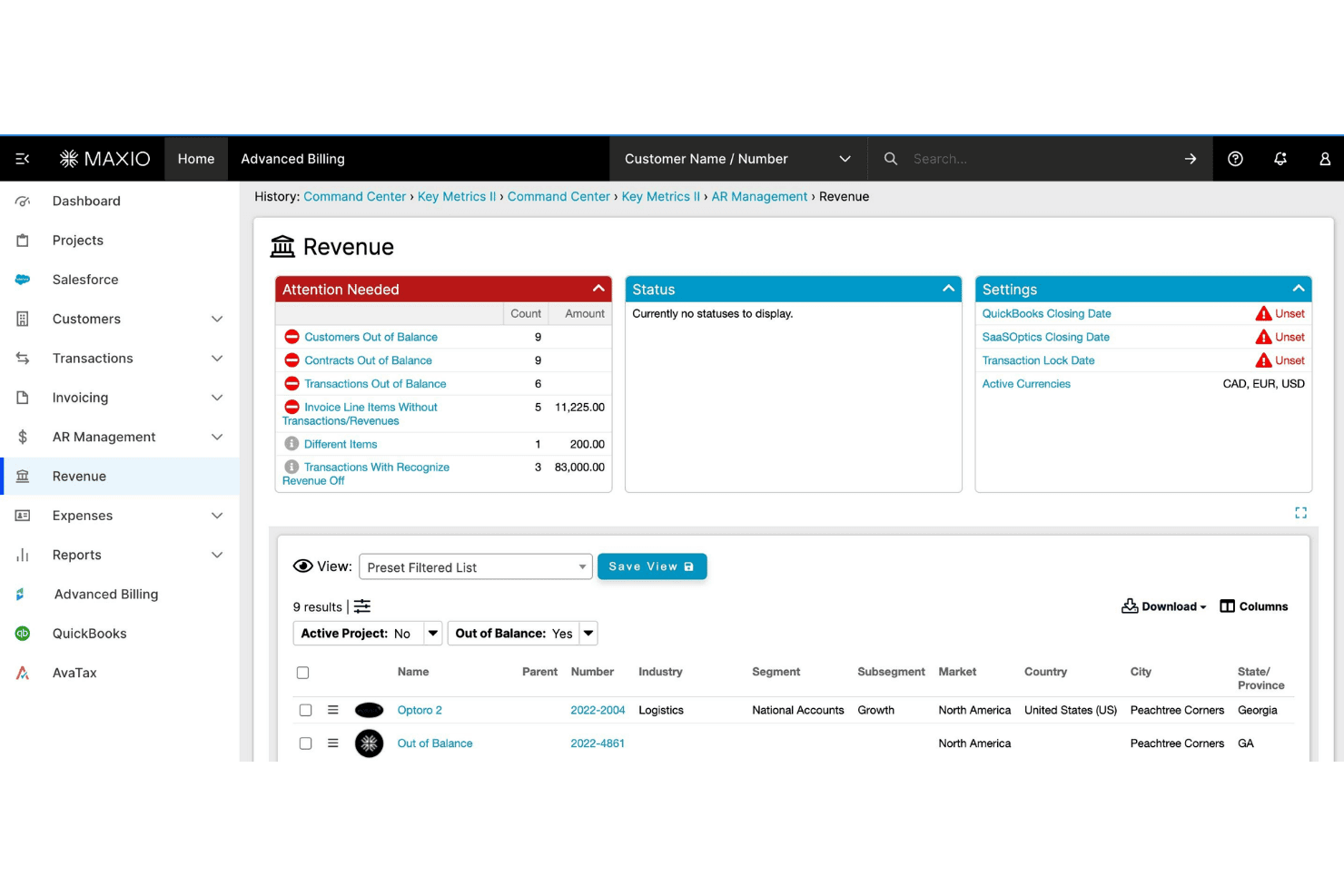
Maxio offers a Revenue management dashboard with attention-needed alerts, balance tracking, and customer filtering capabilities. Maxio is a subscription billing and financial operations platform built for B2B SaaS companies, covering usage-based billing, revenue recognition, A/R management, and SaaS metrics reporting.
Who Is Maxio Best For?
Maxio is a strong fit for finance and RevOps teams at B2B SaaS companies managing complex subscription contracts, usage-based pricing, or multi-entity billing structures.
Why I Picked Maxio
Maxio earns its spot on my shortlist because of how deeply it connects billing data to the financial systems SaaS teams already rely on. Native integrations with NetSuite, Sage Intacct, and QuickBooks include GL mapping and bidirectional sync, so close cycles don't require manual reconciliation. I also like the revenue recognition engine, which handles SSP allocation and contract modifications automatically under ASC 606 and IFRS 15.
Maxio Key Features
- Self-service customer portal: Lets customers view invoices, update payment methods, and manage subscriptions directly online.
- Configurable dunning automation: Enables you to set customized retry logic and automated recovery workflows for overdue accounts.
- Hybrid pricing model support: Allows combining flat-rate, per-seat, and usage-based charges on a single invoice.
- Multi-entity billing management: Supports separate catalogs, gateways, and reporting for subsidiaries or business units.
Maxio Integrations
Maxio offers 85+ native integrations, including NetSuite, QuickBooks Online, Xero, Sage Intacct, Salesforce, HubSpot, Pipedrive, Stripe, Avalara, and TaxJar. Zapier and an API are available for custom integrations.
Pros and Cons
Pros:
- Built-in investor-grade SaaS metrics reporting
- Strong ASC 606 revenue recognition automation
- Handles complex usage-based pricing natively
Cons:
- Steeper onboarding for smaller finance teams
- Implementation requires significant setup time
Learn more about Maxio: Best for complex quote-to-cash automation
- Free demo available
- Pricing upon request
Visit WebsiteCustomer Rating:3.8/5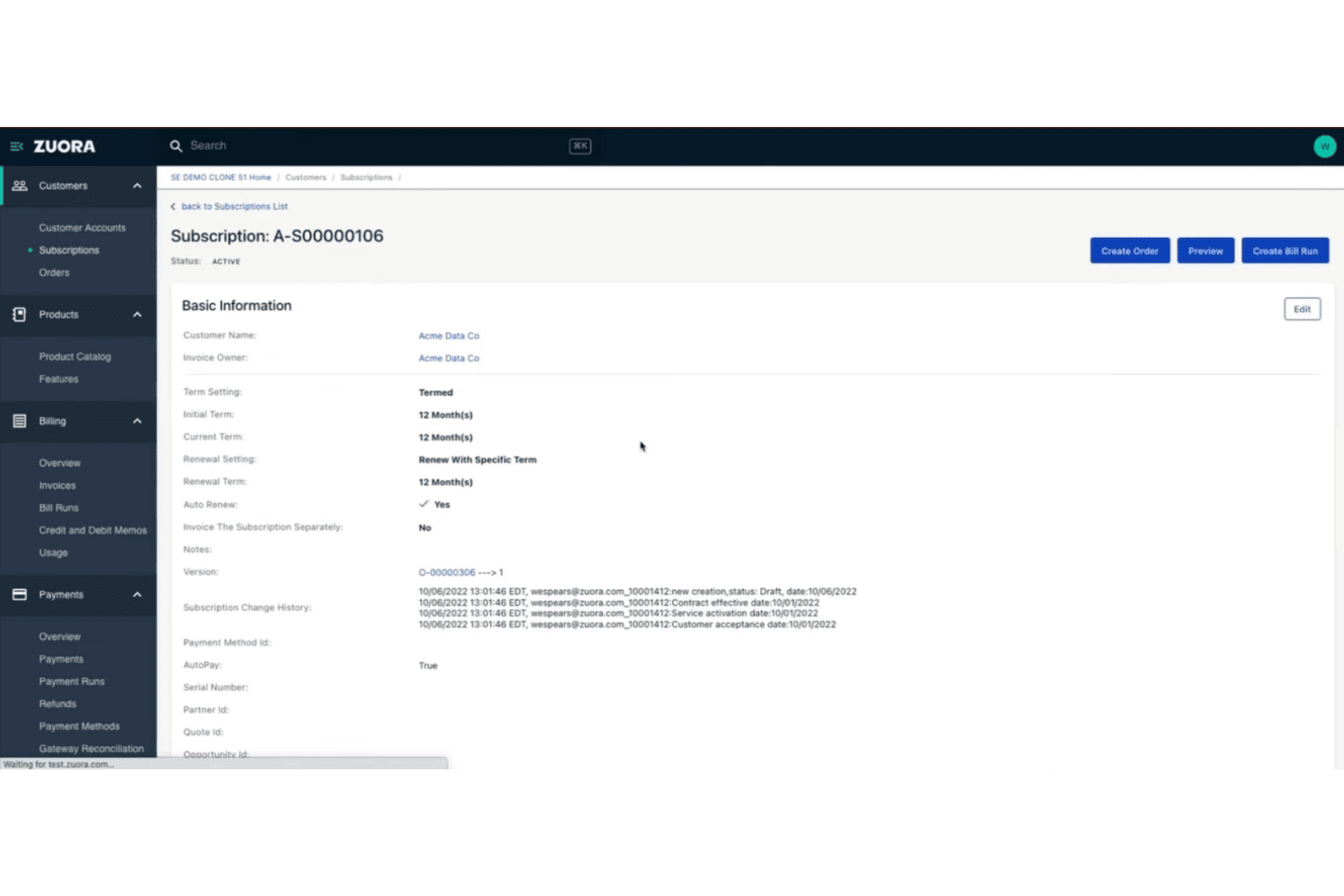
Zuora offers a detailed subscription management page with billing terms, renewal settings, and change history for a customer account. Zuora is an enterprise cloud billing platform built around subscription and usage-based monetization, covering quote-to-cash workflows, revenue recognition, payment processing, and AR automation.
Who Is Zuora Best For?
Zuora is a strong fit for enterprise finance and revenue operations teams at subscription businesses managing complex, high-volume billing across multiple products, pricing models, or markets.
Why I Picked Zuora
Zuora earns its spot as one of the best on my shortlist because of how tightly it connects the CPQ, billing, and revenue recognition layers into a single quote-to-cash workflow. I like that Zuora CPQ syncs directly with Zuora Billing, so pricing changes in a quote flow through to invoicing without manual reconciliation. The automated revenue recognition in Zuora Revenue handles contract modifications under ASC 606 and IFRS 15 without requiring custom workarounds.
Zuora Key Features
- Multi-currency and tax management: Supports global operations with multi-currency invoicing and automated tax calculation through integrated tax engines.
- Payment gateway integrations: Connects with 40+ payment gateways covering credit card, ACH, and regional payment methods.
- Self-service customer portal: Lets customers view invoices, manage payment methods, and handle subscription changes online.
- Customizable product catalog: Enables teams to manage complex product offerings, pricing experiments, add-ons, and bundling in one place.
Zuora Integrations
Zuora offers native integrations with Salesforce, NetSuite, and over 40 payment gateways including Stripe, Adyen, Braintree, and PayPal. An API is available for custom integrations.
Pros and Cons
Pros:
- Supports high-volume usage event ingestion
- Built-in ASC 606 and IFRS 15 compliance
- Handles complex subscription pricing models natively
Cons:
- Requires developer resources
- Long implementation timeline for enterprises
Learn more about Zuora: Best for flexible hybrid pricing models
- Not available
- From $0.7% of billing volume per month
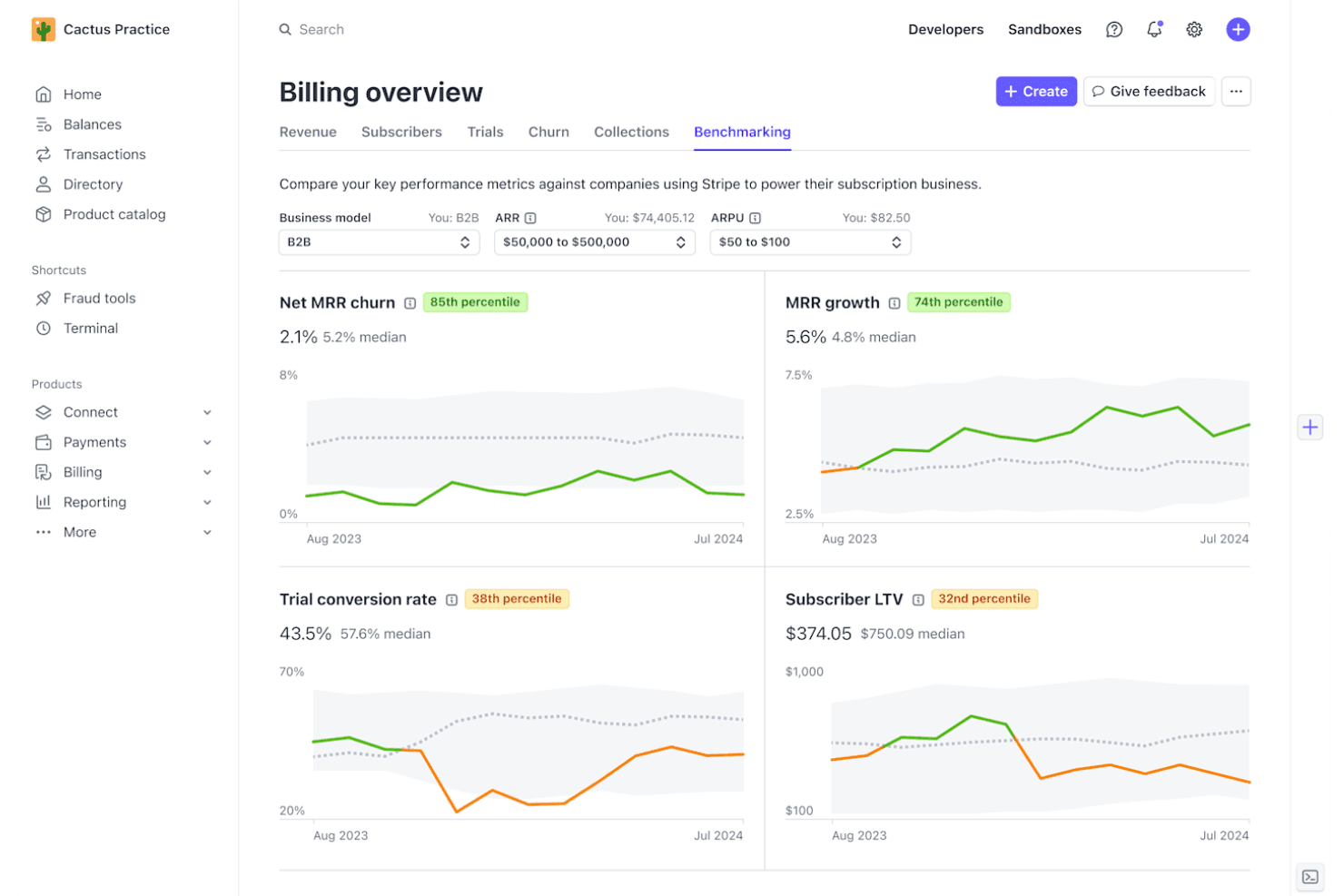
Stripe Billing offers a Benchmarking dashboard that compares key subscription metrics like Net MRR churn, MRR growth, trial conversion rate, and Subscriber LTV against industry peers. Stripe Billing is a cloud billing platform that handles subscription management, usage-based billing, invoicing, and payment collection across 15+ pricing models and 135+ currencies.
Who Is Stripe Billing Best For?
Stripe Billing is a strong fit for SaaS and technology companies that need to run multiple pricing models — subscriptions, metered usage, or both — within a single billing system.
Why I Picked Stripe Billing
I picked Stripe Billing as one of the best because it's the only platform I've used where you can genuinely mix subscription and consumption pricing within a single customer contract. That means setting a base recurring fee, layering metered usage charges on top, and configuring proration rules for mid-cycle plan changes, all within one system. The Meters API handles real-time event ingestion at up to 100,000 events per second, so metered charges stay accurate even at high transaction volumes.
Stripe Billing Key Features
- Self-service customer portal: Lets customers view invoices, update payment info, and manage subscriptions without contacting support.
- Automated tax calculation: Applies correct VAT, GST, or sales tax to invoices across 50+ countries.
- Integrated revenue recognition: Automatically generates ASC 606/IFRS 15-compliant revenue schedules and reports.
- Native NetSuite connector: Syncs invoices, payments, and reconciliation data directly with NetSuite accounts.
Stripe Billing Integrations
Stripe Billing offers native integrations with Salesforce, NetSuite, SAP Digital Payments Add-on, Snowflake, and Amazon Redshift. An API is available for custom integrations.
Pros and Cons
Pros:
- Real-time usage metering at massive scale
- Smart retry logic recovers failed payments
- Supports 15+ pricing models in one system
Cons:
- No native QuickBooks or Sage Intacct sync
- Revenue recognition lacks depth
Learn more about Stripe Billing:
Outro software de faturação na nuvem
Eis algumas opções adicionais de software de faturação na nuvem que não entraram na minha seleção, mas que ainda vale a pena consultar:
- 11MetronomeBest for real-time usage-based billing
- 12OrbBest for dynamic revenue design flexibility
- 13OrdwayBest for multi-model billing and SaaS metrics
- 14ZenskarBest for AI-driven contract-to-cash automation
- 15Zoho BillingBest for built-in global tax and localization
- 16YouniumBest for centralized quote-to-revenue management
- 17Aria SystemsBest for high-volume real-time charging engines
- 18Agentforce Revenue ManagementBest for unified CRM billing experience
- 19ZoneBillingBest for billing automation inside NetSuite
- 20Oracle NetSuite SuiteBillingBest for native ERP subscription lifecycle control
How I Evaluate Cloud Billing Software
I split my evaluation into baseline requirements—recurring billing, usage rating, and rev rec compliance—and the differentiators that separate one platform from another for SaaS finance teams.
Core Functionality (Table Stakes for This List)
When I'm selecting tools for my list, I rank each one on a scale from 0 (does not offer the functionality) to 5 (excels in this area) for each core functionality listed below. Then, I calculate the tool's total score into a percentage. Each tool needs to achieve a minimum total score of 65% to be considered for inclusion.
- Recurring Billing Automation: I look for platforms that handle invoice generation, renewal logic, and dunning retries without manual touchpoints—like auto-prorating mid-cycle upgrades.
- Usage-Based Billing: Metered and consumption models need accurate rating engines. I evaluate how each tool ingests high-volume events like API calls or compute hours.
- Payment Gateway Integration: I check gateway breadth across cards, ACH, wallets, and direct debit. Tools like Stripe Billing and Chargebee differ in how many regional processors they support.
- Tax & Multi-Currency Support: Global billing means handling VAT, GST, and sales tax across dozens of jurisdictions. I look at whether tax is native or relies on integrations like Avalara.
- Accounting & ERP Integration: I evaluate sync depth with systems like NetSuite, QuickBooks, and Sage Intacct—especially bidirectional GL mapping that keeps billing and ledger data aligned.
- Revenue Recognition Compliance: ASC 606 and IFRS 15 schedules should automate contract modifications, SSP allocations, and deferred revenue waterfall reporting for month-end close.
Once I have a list of tools that meet the criteria, I consider what sets each platform apart.
Differentiating Factors (What Sets Vendors Apart)
Here's how I compare and contrast different vendors:
Standout Features
Dunning automation is a key differentiator. I look at how each platform handles retry logic, smart card updaters, and recovery workflows for failed payments. Usage-based metering matters for teams billing on API calls or compute hours—real-time event ingestion at scale separates strong tools from limited ones. Self-service customer portals are worth evaluating too, letting subscribers update payment methods, switch plans, and pull tax documents without filing a support ticket.
Beyond Features
Pricing model flexibility is a big one—I evaluate whether a platform can combine flat subscriptions, per-seat, and usage components on a single invoice without engineering rework. Integration ecosystem depth matters just as much, especially native connectors to ERPs like NetSuite and QuickBooks alongside REST APIs for data warehouse syncing. I also check pricing transparency, looking at how clearly vendors disclose platform fees, transaction costs, and implementation charges so you can forecast total cost of ownership.
Como escolher software de faturação na nuvem
É fácil perder-se em listas extensas de funcionalidades e estruturas de preços complexas. Para o ajudar a manter o foco enquanto analisa o seu processo específico de seleção de software, eis uma lista de fatores a ter em conta:
| Fator | O que deve considerar |
|---|---|
| FatorEscalabilidade | O que deve considerarA plataforma consegue lidar com picos de utilização e com o crescimento da empresa? Analise os limites do volume de transações e a flexibilidade do modelo de faturação. |
| FatorIntegrações | O que deve considerarConsegue ligar-se facilmente ao seu ERP, CRM e processadores de pagamentos? Avalie a profundidade da integração, não apenas a sua existência. |
| FatorPersonalização | O que deve considerarConsegue adaptar os fluxos de trabalho de faturação, a lógica fiscal e os modelos de faturas sem a ajuda de programadores? Confirme até que ponto pode personalizar a solução de forma nativa. |
| FatorFacilidade de utilização | O que deve considerarCom que rapidez as equipas financeiras e operacionais conseguem configurar e gerir a faturação? Procure processos simples de aprovação, configuração de planos e elaboração de relatórios. |
| FatorImplementação e integração inicial | O que deve considerarQuanto tempo e esforço são necessários para entrar em funcionamento? Informe-se sobre o apoio à migração de dados, a formação e o acesso a um plano claro de integração inicial. |
| FatorCusto | O que deve considerarAs taxas da plataforma, das transações e dos excedentes são transparentes? Verifique se existem custos recorrentes e despesas ocultas que possam surpreendê-lo. |
| FatorMedidas de segurança | O que deve considerarO fornecedor cumpre os seus requisitos relativos à PCI DSS, SOC 2, RGPD ou residência dos dados? Informe-se sobre a forma como a segurança é gerida e auditada. |
| FatorCapacidades internacionais | O que deve considerarA solução suporta as moedas, jurisdições fiscais e necessidades de autosserviço dos clientes caso a sua empresa se expanda para novos mercados? |
O que é o software de faturação na nuvem?
O software de faturação na nuvem é uma plataforma digital que automatiza a emissão de faturas, a gestão de subscrições e o processamento de pagamentos para modelos de negócio recorrentes ou baseados na utilização. Simplifica a gestão da faturação em várias moedas, do cumprimento fiscal global e das integrações com sistemas de contabilidade. As equipas financeiras utilizam estas ferramentas para otimizar as operações de receitas, minimizar o trabalho manual e apoiar a elaboração de relatórios financeiros preparados para auditorias em ofertas complexas baseadas em subscrições e consumo.
Funcionalidades do software de faturação na cloud
Ao selecionar um software de faturação na cloud, tenha em atenção as seguintes funcionalidades principais:
- Automatização da faturação recorrente: Gera faturas de subscrição, gere renovações e processa pagamentos segundo um calendário definido, sem introdução manual.
- Preços baseados no consumo: Regista a atividade ou o consumo dos clientes, calcula os custos e suporta modelos de faturação medidos, escalonados ou híbridos.
- Integração com gateways de pagamento: Liga-se a vários processadores para aceitar pagamentos através de cartão de crédito, ACH, transferências bancárias e métodos de pagamento regionais.
- Cálculo global de impostos: Gere a conformidade com o imposto sobre vendas, o IVA e o GST em vários países, utilizando motores integrados ou integrações de terceiros.
- Suporte para várias moedas: Emite faturas e aceita pagamentos em diferentes moedas, aplicando automaticamente as taxas de câmbio.
- Processos de cobrança e recuperação: Automatiza lembretes, novas tentativas e etapas de recuperação para pagamentos falhados ou vencidos, ajudando a reduzir a perda de receitas.
- Portal de cliente de autoatendimento: Permite aos clientes consultar faturas, atualizar métodos de pagamento e gerir as suas subscrições online.
- Conformidade com o reconhecimento de receitas: Suporta os requisitos da ASC 606 e da IFRS 15, com calendários automatizados para reconhecer receitas com precisão e criar relatórios preparados para auditoria.
- Integração com ERP e contabilidade: Sincroniza os dados de faturação com plataformas de contabilidade e ERP populares, garantindo registos financeiros precisos e processos de fecho simplificados.
- Faturação personalizável: Permite às equipas financeiras adaptar modelos de fatura, elementos de marca e linhas de detalhe para responder a requisitos empresariais específicos e às expectativas dos clientes.
Benefícios do software de faturação na cloud
A implementação de um software de faturação na cloud proporciona vários benefícios à sua equipa e à sua empresa. Eis alguns dos que pode esperar:
- Ciclos de faturação mais rápidos: A faturação e as renovações automatizadas ajudam a sua equipa a enviar as faturas rapidamente, com menos etapas manuais.
- Reconhecimento preciso das receitas: A conformidade integrada com a ASC 606/IFRS 15 garante que os seus dados financeiros refletem calendários de receitas em tempo real.
- Maior alcance global: A faturação em várias moedas e a automatização dos impostos facilitam o atendimento a clientes em novos países, sem custos adicionais significativos.
- Redução das falhas de pagamento: Os processos de cobrança e as novas tentativas inteligentes ajudam a recuperar receitas de tentativas de pagamento falhadas ou tardias.
- Maior visibilidade e controlo: Os painéis em tempo real, as pistas de auditoria e os relatórios detalhados fornecem os conhecimentos financeiros necessários para uma gestão empresarial decisiva.
- Melhoria da experiência do cliente: Os portais de autoatendimento permitem aos clientes gerir subscrições, consultar faturas e transferir registos de pagamento sempre que necessário.
Custos e preços do software de faturação na cloud
A seleção de um software de faturação na cloud exige uma compreensão dos vários modelos de preços e planos disponíveis. Os custos variam consoante as funcionalidades, a dimensão da equipa, os complementos e outros fatores. A tabela abaixo resume os planos mais comuns, os seus preços médios e as funcionalidades normalmente incluídas nas soluções de software de faturação na cloud:
Tabela de comparação de planos de software de faturação na cloud
| Tipo de plano | Preço médio | Funcionalidades comuns |
|---|---|---|
| Tipo de planoPlano gratuito | Preço médio$0 | Funcionalidades comunsFaturação básica, integração limitada com pagamentos, tarefas de faturação manuais e apoio ao cliente de nível básico. |
| Tipo de planoPlano pessoal | Preço médio$25–$75/mês | Funcionalidades comunsFaturação recorrente, preços simples baseados no consumo, suporte para várias moedas e integrações básicas. |
| Tipo de planoPlano empresarial | Preço médio$200–$600/mês | Funcionalidades comunsProcessos de cobrança avançados, automatização de impostos, reconhecimento de receitas, portais de autoatendimento, integrações contabilísticas e relatórios. |
| Tipo de planoPlano empresarial de grande dimensão | Preço médio$1,000+/mês | Funcionalidades comunsProcessos personalizados, medição de utilização em grande volume, suporte premium, ferramentas de conformidade, acesso à API e integrações avançadas com ERP. |
Perguntas frequentes sobre software de faturação na nuvem
Eis algumas respostas a perguntas comuns sobre software de faturação na nuvem:
Como é que o software de faturação na nuvem gere a faturação baseada na utilização?
A maioria das plataformas monitoriza chamadas à API, horas de computação ou outras métricas de utilização através de dados em tempo real e, em seguida, calcula os encargos automaticamente. Isto permite que uma empresa SaaS ou um fornecedor de software como serviço ofereça modelos de preços detalhados sem depender de processos manuais ou folhas de cálculo complexas. Ao eliminar a introdução manual de dados, as soluções modernas de faturação na nuvem ajudam a otimizar os processos gerais de faturação e a garantir um processamento preciso das faturas.
O software de faturação na nuvem pode integrar-se nos meus sistemas de contabilidade e ERP?
Sim, os principais softwares de faturação oferecem capacidades de integração com conectores incorporados para ERPs como o NetSuite e o Sage Intacct, bem como com software de contabilidade como o QuickBooks e o Xero. A profundidade da sincronização varia, por isso, verifique se os dados fluem num único sentido ou bidirecionalmente e se está disponível um mapeamento personalizado. A migração de uma infraestrutura rígida e local herdada para software de faturação baseado na nuvem garante que os seus sistemas financeiros permanecem sincronizados automaticamente.
A que custos ocultos devo estar atento?
Para além dos planos de preços básicos, esteja atento a taxas de transação, encargos baseados nas receitas, suporte premium e módulos adicionais. Poderá também deparar-se com custos adicionais de configuração ou de funcionalidades específicas, como pagamentos recorrentes e notificações automatizadas. Peça sempre antecipadamente uma discriminação detalhada dos custos e esclareça o que está incluído antes de comprar, especialmente se operar com um modelo de receitas baseado em subscrições.
O software de faturação na nuvem é seguro para processar pagamentos?
Sim, a maioria dos produtos baseados na nuvem está em conformidade com a norma PCI DSS e disponibiliza encriptação, juntamente com controlos de acesso baseados em funções. Proteger várias opções de pagamento — desde cartões de crédito a ACH — é fundamental para proteger os dados dos clientes. É aconselhável verificar as certificações e compreender de que forma os dados de pagamento são tokenizados ou protegidos em qualquer solução que considere, para proteger os seus resultados financeiros e criar confiança.
Com que rapidez podemos começar a utilizar estas plataformas?
A implementação pode variar entre alguns dias, no caso de configurações simples, e várias semanas, no caso de migrações complexas, especialmente se estiver a importar dados de faturação antigos ou precisar de integrações personalizadas. Um suporte detalhado durante a integração e a migração pode fazer uma grande diferença.