

Está cansado de softwares de controlo de tempo e faturação que parecem dar mais trabalho do que valem? Folhas de horas desorganizadas, erros nas faturas e pagamentos atrasados não só lhe fazem perder tempo — também prejudicam os seus resultados. Precisa de uma ferramenta que registe as horas sem esforço, automatize a faturação e mantenha o fluxo de caixa estável sem complicações adicionais.
Ao longo dos anos, enquanto controller financeiro, passei muito tempo a analisar softwares que prometem automatização, mas acabam por criar ainda mais stress. As melhores ferramentas tornam realmente a vida mais fácil — permitem poupar tempo, melhorar a precisão e manter a faturação livre de frustrações.
Para tornar a sua pesquisa mais fácil, testei e analisei os melhores softwares de controlo de tempo e faturação disponíveis. Estas escolhas simplificam o registo de horas, aceleram a faturação e ajudam-no a manter as suas finanças sob controlo. Vamos encontrar a opção certa para si!
Why Trust Our Software Recommendations
6,700+
Reviews
20
Industry experts
16+
Evaluation factors
14
Years
Our team has been testing and reviewing software since 2012. As finance leaders ourselves, we know how difficult—and important—it is to choose the right software.
For this guide, we evaluated tools using hands-on testing and independent research, scoring tools using our selection criteria.
Our reviews reflect our human editorial judgment, not a sales pitch.
Tabela comparativa de softwares de controlo de tempo e faturação
Esta tabela comparativa resume os detalhes de preços das minhas principais escolhas de software de controlo de tempo e faturação:
| Tool | Best For | Trial Info | Price | ||
|---|---|---|---|---|---|
| 1 | Best for tracking hours and billing clients | 14-day free trial | From $5/user/month | Website | |
| 2 | Best for billing across mixed client models | 14-day free trial | From $17/user/month | Website | |
| 3 | Best for online timesheets | Free trial available | From $6.49/user/month (billed annually) | Website | |
| 4 | Best for real-time profitability tracking | 14-day free trial | From $10/user/month (billed annually) | Website | |
| 5 | Best for visual labor cost reports | Free plan available; 30-day free trial; Free demo available | From $9/user/month | Website | |
| 6 | Best for built-in billing & invoicing tools | Free plan + Free trial + Free demo available | From $6/user/month | Website | |
| 7 | Best for customizable time-to-invoice tracking | Free plan + 7-day trial + demo available | From $3.99/user/month (billed annually) | Website | |
| 8 | Best for automatic time tracking | Free plan + free trial + free demo available | From $3.99/user/month (billed annually) | Website | |
| 9 | Best for accounting firms | Free demo available | From $79/user/month | Website | |
| 10 | Best for detailed billing reports | Free plan available + 14-day free trial | From $5.83/user/month (billed annually) | Website |


Análise dos melhores softwares de controlo de tempo e faturação
Segue-se um resumo detalhado dos melhores softwares de controlo de tempo e faturação que entraram na minha lista restrita. As minhas análises apresentam uma visão aprofundada das principais funcionalidades, vantagens & desvantagens, integrações e casos de utilização ideais de cada ferramenta, para o ajudar a encontrar a melhor opção para si.
 Best for tracking hours and billing clients
- 14-day free trial
- From $5/user/month
Visit WebsiteCustomer Rating:5/5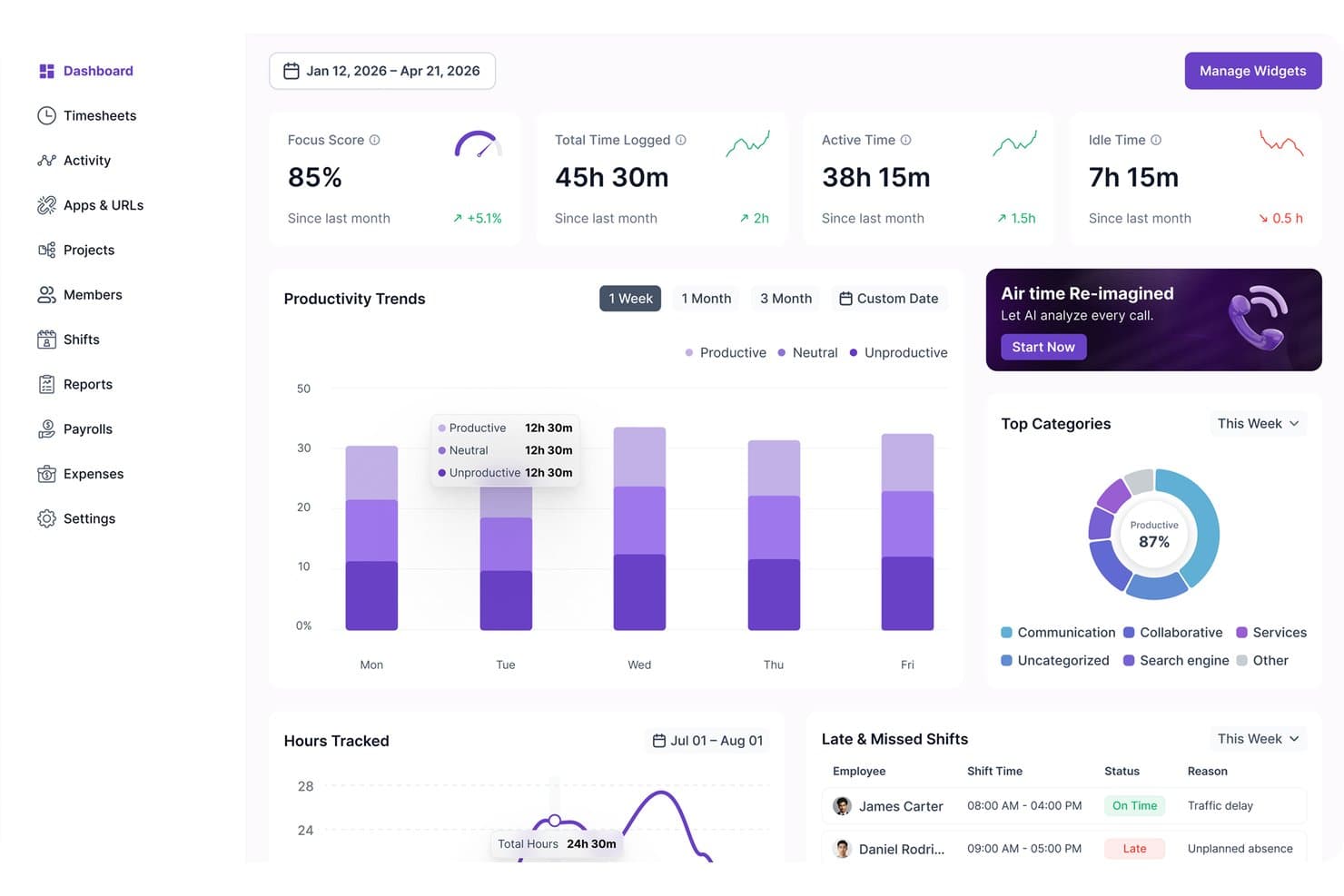
Modge tracks productivity trends, focus scores, and shift statuses in one dashboard. Modge is a time tracking and invoicing platform that combines automatic desktop time capture, timesheet approvals, client billing, Stripe-based payment collection, and profitability reporting in a single tool.
Who Is Modge Best For?
Modge is a strong fit for small business owners and team managers who need to track employee hours, approve timesheets, and bill clients without juggling multiple tools.
Why I Picked Modge
I picked Modge as one of the best because it keeps tracked hours and client billing inside the same workflow, so nothing falls through the cracks between a logged session and a sent invoice. I love that once a timesheet is approved, Modge can automatically generate a branded invoice and charge the client on a recurring cycle—no copy-pasting hours into a separate billing tool. Project budget alerts add another layer, flagging overspend before it hits the invoice.
Modge Key Features
- Automatic desktop time tracking: The desktop agent records session start, end, project, and active apps without requiring a manual timer start.
- Timesheet approvals with pay-period locking: Employees submit timesheets for manager review, and approved pay periods lock so figures can't change after sign-off.
- Profitability reporting: Calculates revenue, labor cost, and margin by project, client, team, or member using your configured billing rates.
- Shift scheduling and attendance tracking: Creates one-time or recurring shift patterns and scores each member's attendance as on-time, late, or absent against the schedule.
Modge Integrations
Modge offers one documented native integration: Stripe, for card and ACH invoice payments. Wise and PayPal are payroll export formats, not live integrations; a Public API is mentioned, but its availability and capabilities aren’t documented.
Pros and Cons
Pros:
- Approvals reduce manual billing follow-ups
- Profitability reports clarify project costs
- Tracked hours flow into client invoices
Cons:
- No trust accounting or WIP workflows
- Employee monitoring may feel intrusive
Learn more about Modge: Best for billing across mixed client models
- 14-day free trial
- From $17/user/month
Visit WebsiteCustomer Rating:4.5/5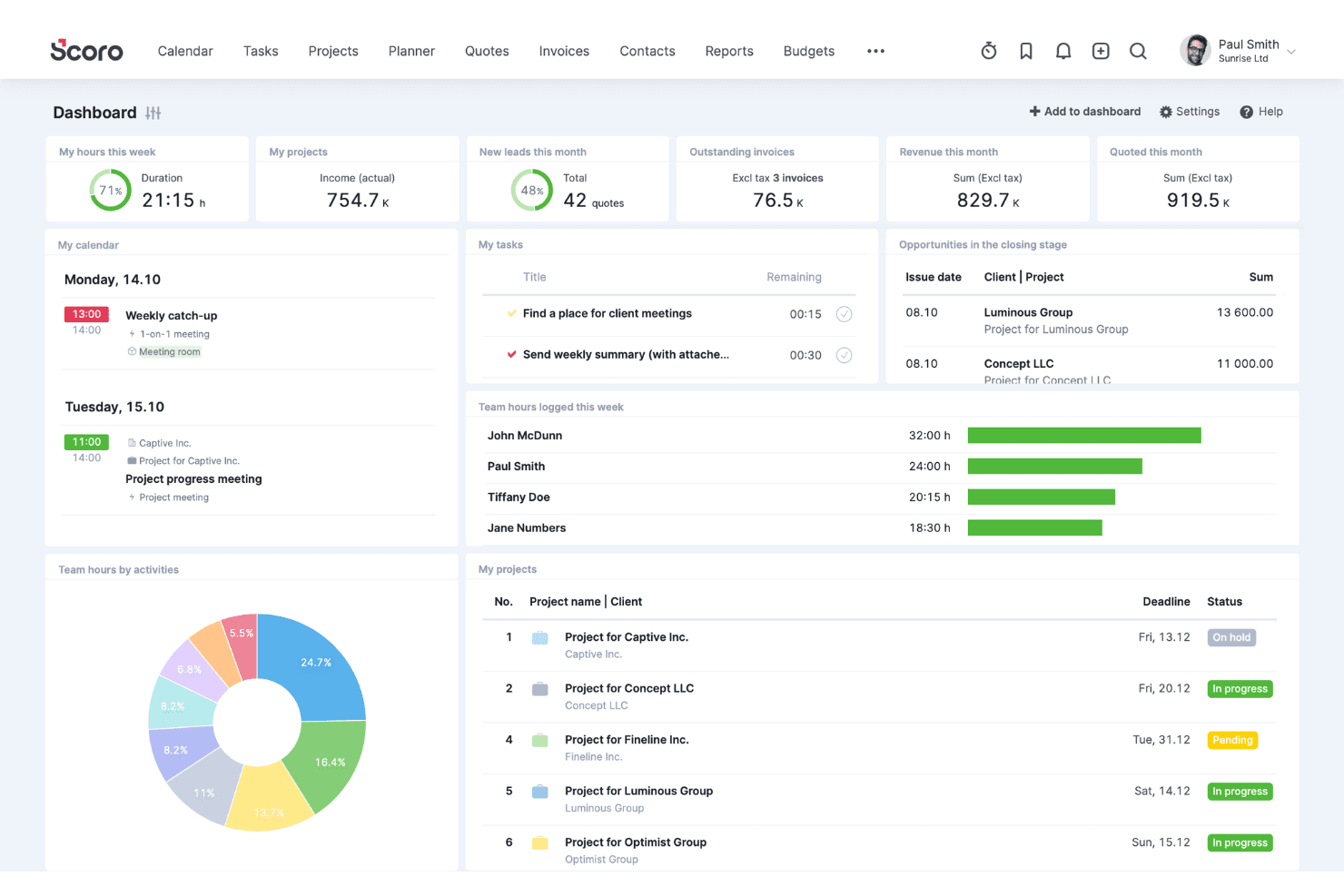
Scoro coordinates clients, sales, projects, resources, time, and billing. Scoro is a professional services automation platform that combines time tracking, invoicing, project budgeting, and billing management—supporting hourly, fixed-fee, retainer, and capped T&M arrangements within a single system.
Who Is Scoro Best For?
Scoro is a strong fit for fractional CFOs, controllers, and advisory firm teams managing clients across hourly, retainer, and fixed-fee billing arrangements simultaneously.
Why I Picked Scoro
I've included Scoro in my top picks because it handles mixed billing models better than almost anything else I've seen: hourly, fixed-fee, retainer, capped T&M, and milestone billing can all run within a single project without workarounds. What I find most valuable is how time entries flow directly into invoices at the correct rate, whether that's a role-based rate for one client or a flat retainer for another, without any manual re-entry between systems.
Scoro Key Features
- Timesheet approval workflows: Managers can review and approve submitted timesheets before hours flow into invoices, with automated reminders for unsubmitted entries covering up to the past eight weeks.
- Quote Estimation Matrix: Build proposals broken down by role, deliverable, and effort—with cost and margin visibility—before carrying those terms directly into project budgets and billing.
- Utilization dashboards: Real-time reports show billable versus non-billable hours and team productivity trends, helping you spot overservicing and manage capacity.
- Two-way accounting sync: Scoro connects bidirectionally with QuickBooks Online, Xero, Sage Intacct, and Exact Online to keep project financials and accounting records aligned without manual re-entry.
Scoro Integrations
Scoro offers native integrations with QuickBooks Online, Xero, Sage Intacct, Exact Online, and Stripe. It also connects with Salesforce, Google Calendar, Microsoft 365, Slack, and Jira, with a REST API, marketplace integrations, and Zapier support.
Pros and Cons
Pros:
- Direct time entry to invoice workflow
- Real-time project profitability tracking dashboards
- Handles mixed billing models in one project
Cons:
- No passive or automated time capture
- No client self-service or payment portal
 Best for online timesheets
- Free trial available
- From $6.49/user/month (billed annually)
Visit WebsiteCustomer Rating:4.8/5
Monitask shows detailed time tracking and activity breakdowns that can help managers identify consistent performance patterns for data-informed recognition. Monitask targets professionals and businesses that want to simplify time tracking and invoicing. It works for freelancers managing multiple clients as well as managers overseeing remote teams. The interface is straightforward, making it easy to track hours and manage projects. Its customizable invoicing tools let you convert tracked time into professional invoices, helping ensure accurate billing while supporting day-to-day productivity.
Why I Picked Monitask
I picked Monitask because it directly connects time tracking with invoicing, which is especially useful for anyone handling both. The time tracking interface is easy to use and makes it simple to record hours accurately. Monitask also includes customizable invoicing, so invoices can be adjusted to meet specific client needs. Together, these features address the common challenge of keeping time tracking and billing in sync, making Monitask a practical choice for this use case.
Monitask Key Features
In addition to its invoicing capabilities, Monitask provides several other features that enhance its utility as a time tracking and invoicing software:
- Online Timesheets: Generate and manage timesheets easily for all employees.
- Remote Monitoring: Use proof-of-work screenshots and activity tracking to efficiently manage remote teams.
- Employee Attendance Software: Track attendance to ensure accurate workforce management.
- Workforce Analytics Software: Gain insights to optimize productivity and staffing.
Monitask Integrations
Native integrations are not currently listed by Monitask.
Pros and Cons
Pros:
- Useful for remote team oversight
- Detailed time tracking reports
- Clear productivity performance data
Cons:
- Lacks rewards or incentives
- No built-in recognition tools
Learn more about Monitask: Best for real-time profitability tracking
- 14-day free trial
- From $10/user/month (billed annually)
Visit WebsiteCustomer Rating:4.6/5
Productive connects time tracking with real-time profitability insights to support more accurate invoicing. In the fast-paced world of business, Productive emerges as a versatile solution tailored for agencies, consultancies, and service-oriented businesses seeking to optimize their time tracking and invoicing processes. If you are looking to enhance operational efficiency and profitability, Productive offers real-time insights and centralized communication, addressing the critical need for seamless project and financial management. With its focus on industries like IT services, architecture, and accounting, Productive is designed to help you streamline operations and make informed decisions with confidence.
Why I Picked Productive
I picked Productive for its targeted approach to solving the intricate challenges of time tracking and invoicing. The platform stands out with its real-time profitability tracking, allowing you to monitor costs, revenue, and margins. Additionally, its invoicing features are tailored for multi-currency support and automated reminders for late payments, addressing the common need for efficient financial management. These features, combined with its seamless integration with accounting tools like Xero and QuickBooks, make Productive an ideal choice for businesses looking to simplify their billing and financial processes.
Productive Key Features
In addition to its standout invoicing capabilities, I also found several other features that enhance its utility as a time tracking and invoicing tool.
- Resource Planning: This feature helps you allocate resources effectively to avoid bottlenecks and optimize team schedules.
- Project Management: Track project progress and coordinate tasks seamlessly with built-in project management tools.
- Budgeting: Gain insights into your financial health with budgeting tools that allow you to plan and forecast with precision.
- Reporting: Access tailored reports for better visibility into business performance and profitability insights.
Productive Integrations
Integrations include Xero, Slack, QuickBooks, Google Calendar, Jira, Asana, Trello, Microsoft Teams, Dropbox, and HubSpot. An API is available for custom integrations.
Pros and Cons
Pros:
- Integrated time and billing
- Multi-currency invoicing support
- Real-time profitability visibility
Cons:
- Learning curve for small teams
- No free plan available
Learn more about Productive: Best for visual labor cost reports
- Free plan available; 30-day free trial; Free demo available
- From $9/user/month
Visit WebsiteCustomer Rating:4.7/5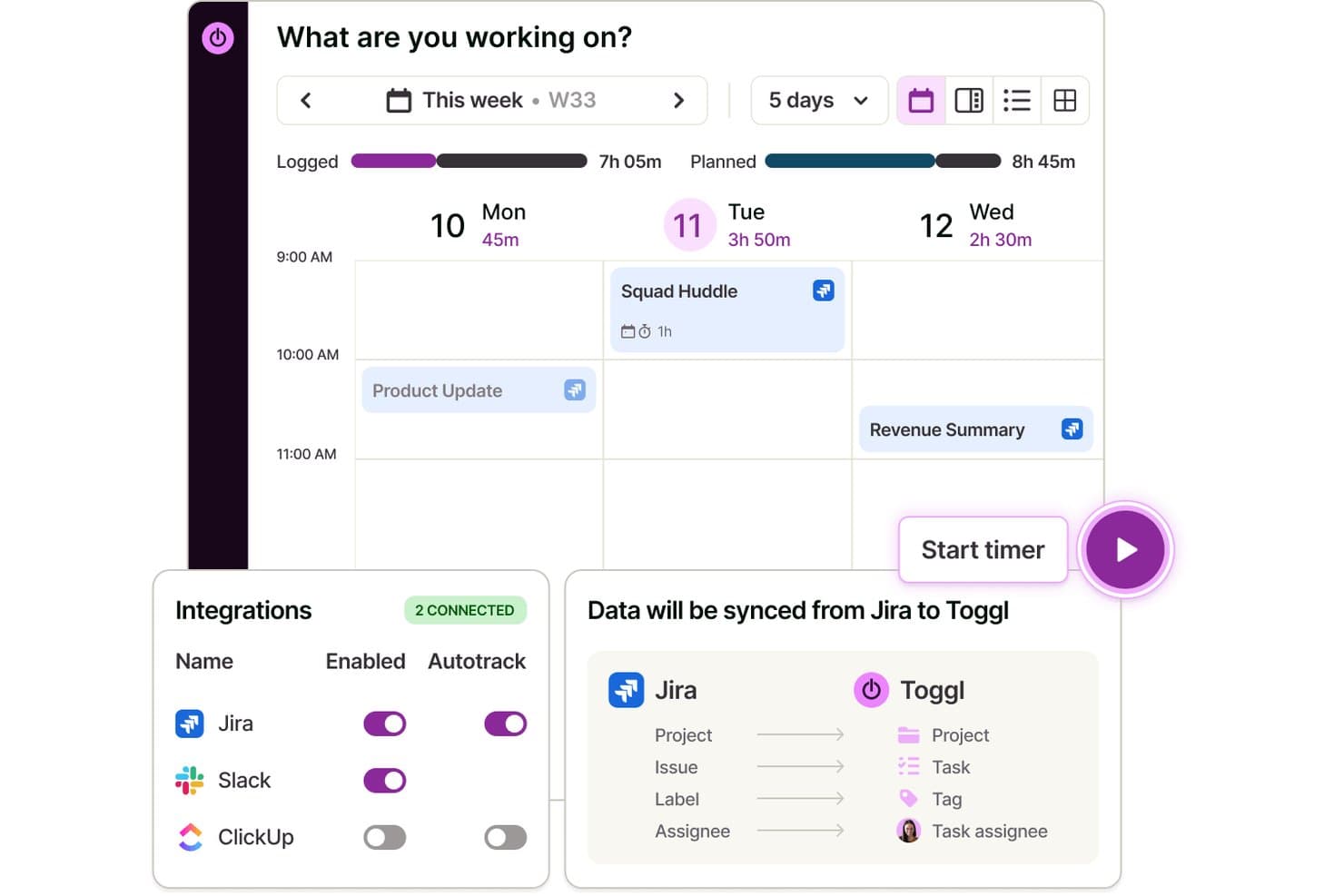
Toggl syncs Jira data automatically to track time on tasks. Toggl is a time tracking, capacity planning, and invoicing tool that lets you capture billable hours across clients and projects, assign billing rates, manage tasks visually, and analyze labor costs and team profitability.
Who Is Toggl Best For?
Toggl suits teams and freelancers who need a straightforward way to track billable hours, manage tasks and projects, and understand where project time and money are going.
Why I Picked Toggl
I picked Toggl as one of the best because its Premium reporting suite gives you a genuinely visual breakdown of where labor costs are landing across every project, client, and team member. I particularly like assigning a cost rate per team member and then viewing that data sliced in a pivot table or grouped bar chart, so I can immediately spot which engagements are eating into profit margins. You can also schedule these reports to send automatically as PDFs, which saves a real step when reporting on team utilization each month.
Toggl Key Features
- Project and client management: Organize tracked time by unlimited clients, projects, and sub-tasks with custom billing rates.
- Multi-platform time tracking: Track time on web, desktop, mobile, and browser extensions, all synced automatically.
- Billable rates and invoice creation: Apply billable or non-billable status to tracked hours and generate invoices from billable entries.
- Calendar integrations: Sync with Google and Outlook calendars to turn scheduled meetings into time entries.
Toggl Integrations
Toggl offers over 100 native integrations, including Jira, Asana, GitHub, Todoist, Google Calendar, Outlook, among others.
Pros and Cons
Pros:
- Auto-tracking time from desktop or browser
- Assign custom billing rates per project or client
- Visual labor cost and profitability reports
Cons:
- Recurring invoices and retainers not supported
- No built-in payment collection tools
Learn more about Toggl: Best for built-in billing & invoicing tools
- Free plan + Free trial + Free demo available
- From $6/user/month
Visit WebsiteCustomer Rating:4.6/5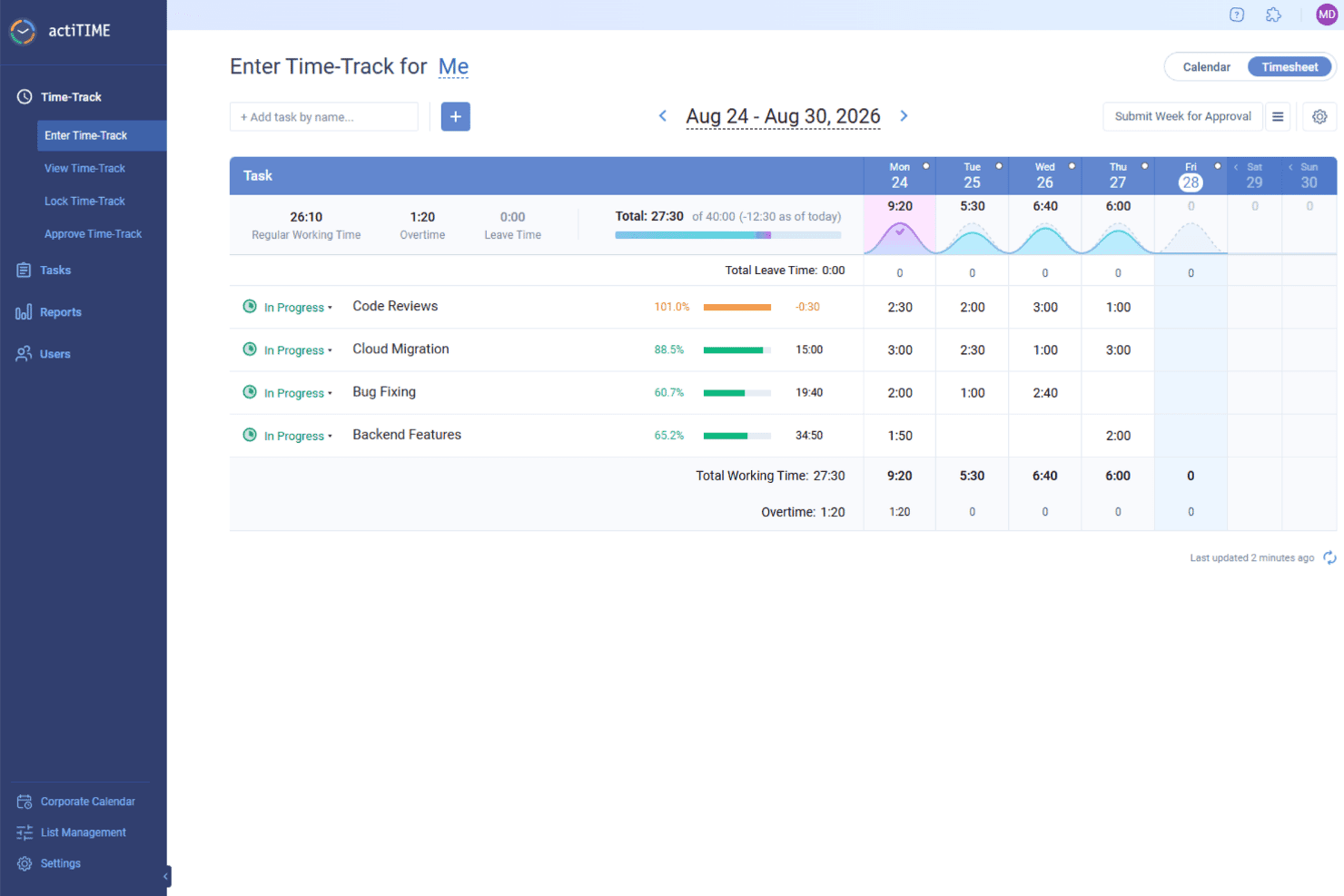
actiTIME tracks billable hours by task and project, helping teams calculate charges and generate client invoices. actiTIME is a versatile software that offers solutions for time tracking and invoicing, making it a valuable tool for businesses looking to manage their projects and finances. It's designed to cater to various industries, providing the necessary features to keep track of time and manage billing.
Why I Picked actiTIME: I picked actiTIME because it helps you track time accurately across tasks and projects, so you always know where your team’s efforts are going. You can log hours, manage workloads, and stay aligned with project timelines. The built-in billing and invoicing tools also make it easier to handle client payments and reduce manual work. I also like that you can track budgets and project progress in real time, which helps you avoid overspending and keep things moving smoothly. Plus, the customizable workflows let you tailor the system to match how your team works best.
Standout Features & Integrations:
Features include performance analytics, which provides insights into productivity trends and project profitability, helping you understand where improvements can be made. The leave management feature offers customizable leave policies and automated PTO tracking, ensuring that team resources are managed effectively without manual intervention. Billing and cost analysis generate billing reports and calculate payroll, streamlining the financial aspects of your projects and ensuring that you can focus on the work that matters.
Integrations include QuickBooks and Zapier.
Pros and Cons
Pros:
- Simple manual time entries
- Easy project setup
- Customizable billing rates
Cons:
- Limited advanced features
- Basic user interface
Learn more about actiTIME: Best for customizable time-to-invoice tracking
- Free plan + 7-day trial + demo available
- From $3.99/user/month (billed annually)
Visit WebsiteCustomer Rating:4.8/5
Clockify offers unlimited time tracking with easy invoicing for teams. Clockify is a time tracking software that caters to businesses of all sizes, offering features that help manage time and billing. It allows teams to track work hours (billable and non-billable hours), manage projects, and generate detailed reports.
Why I picked Clockify: I selected Clockify because it simplifies your end-to-end billing pipeline by turning logged project hours into custom, itemized invoices. You can configure billable rates by role, client, or specific task, and enforce timesheet approvals before invoices are issued. This eliminates discrepancies between logged work and client billing, protecting your profit margins while saving your finance team hours of manual reconciliation.
Standout features & integrations:
Features include a visual timesheet that helps you see where time is going. The project dashboard gives you an overview of your team's activities and progress, while its customizable reports let you analyze data to improve productivity.
Integrations include Asana, Trello, Slack, Jira, monday.com, QuickBooks, Notion, Microsoft Teams, Todoist, and Google Calendar.
Pros and Cons
Pros:
- Customizable reports for insights
- Flexible for team growth
- Detailed project dashboard
Cons:
- Limited offline capabilities
- Learning curve for new users
Learn more about Clockify: Best for automatic time tracking
- Free plan + free trial + free demo available
- From $3.99/user/month (billed annually)
Visit WebsiteCustomer Rating:4.7/5
TimeCamp automates time tracking with one-click invoicing and analytics. TimeCamp is a time tracking and invoicing software aimed at freelancers and small businesses. It automates time tracking and helps manage billing, making it easier to keep track of work hours and invoices.
Why I picked TimeCamp: TimeCamp offers automatic time tracking, which minimizes manual input and saves you time. The platform’s main features allows you to track time spent on different tasks without having to start or stop the timer manually. It also generates detailed reports, providing insights into productivity and time usage. Plus, TimeCamp’s invoicing capabilities help you convert tracked hours into invoices effortlessly.
Standout features & integrations:
Features include a graphical timesheet that provides a visual overview of your work hours. The attendance tracking feature helps you monitor team presence and punctuality. TimeCamp also offers project budgeting, allowing you to keep track of costs and ensure projects stay within budget.
Integrations include Trello, Asana, Slack, QuickBooks, Xero, monday.com, Jira, GitHub, Evernote, and Google Calendar.
Pros and Cons
Pros:
- Attendance tracking for team monitoring
- Detailed productivity reports available
- Invoicing capabilities for tracked hours
Cons:
- Initial setup can be complex
- Occasional performance lags
Learn more about TimeCamp:

Karbon simplifies client work with collaborative time tracking and billing. Karbon is a practice management software designed for accounting firms and professional service teams. It helps manage workflows, tasks, and improve collaboration among team members.
Why I picked Karbon: Karbon is best for accounting firms offering features like email integration and task management. The email integration option allows you to manage client communications directly within the platform, which is important for maintaining organized correspondence. Additionally, its task management feature helps you assign and track tasks efficiently across your team.
Standout features & integrations:
Features include workflow automation, which reduces manual work and increases efficiency. The time tracking feature helps you monitor billable hours accurately. Karbon also offers detailed analytics, providing insights into team performance and project progress.
Integrations include QuickBooks Online, Xero, Slack, Microsoft 365, Google Workspace, Outlook, Gmail, Zapier, Practice Ignition, and TSheets.
Pros and Cons
Pros:
- Email integration for client communication
- Centralized platform for document sharing
- Task management for efficient workflow
Cons:
- Complex initial setup process
- Mobile app lacks full functionality
Learn more about Karbon: 10Best for detailed billing reports
TMetric
- Free plan available + 14-day free trial
- From $5.83/user/month (billed annually)
Visit WebsiteCustomer Rating:4.5/5
TMetric tracks billable hours with project-based invoicing and reporting. TMetric is a time tracking and billing software designed for freelancers and small to medium-sized businesses. It helps users track time, manage tasks, and generate detailed billing reports.
Why I picked TMetric: TMetric offers detailed billing reports, which are essential for accurate invoicing and financial management. The software’s time tracking feature allows you to log hours with precision, ensuring you bill clients accurately. It also provides project management capabilities, helping you keep tasks organized and on track.
Standout features & integrations:
Features include manual time entry, which allows you to add time entries for past work. The budgeting feature helps you set financial limits for projects to avoid overspending. TMetric also offers activity tracking, providing insights into how time is spent on tasks.
Integrations include Asana, Trello, Jira, Slack, QuickBooks, GitHub, Bitbucket, Freshdesk, Microsoft Outlook, and Google Calendar.
Pros and Cons
Pros:
- Detailed billing reports for accurate invoicing
- Manual time entry for flexibility
- Budgeting feature for project limits
Cons:
- Initial setup can be complex
- Learning curve for new users
Learn more about TMetric:
Outros softwares de controlo de tempo e faturação
Eis algumas opções adicionais de software de controlo de tempo e faturação que não entraram na minha lista restrita, mas que ainda assim vale a pena conhecer:
- 11XeroBest for small business accounting
- 12FunctionFoxBest for creative teams
- 13Zoho InvoiceBest for invoicing automation
- 14AppolyeBest for remote team tracking
- 15SynerionBest for workforce management
- 16InsightfulBest for automatic time mapping
- 17PaymoBest for project management integration
- 18HubstaffBest for custom invoicing
- 19IntelogosBest with AI-driven workforce analytics
- 20RipplingBest for employee management
- 21QuickBooks OnlineBest for accounting integration
- 22Deltek Replicon TimeBest for enterprise time tracking
- 23HarvestBest for project time tracking
- 24ClioBest for legal practice management
- 25TeamworkBest for team collaboration
- 26KeeperBest for secure password protection
How I Evaluate Time Tracking and Invoicing Software
I evaluate tools on two layers: the baseline capabilities—billable time capture, invoicing, and AR tracking—every tool must have, and the differentiators that make one platform a better fit than another.
Core Functionality (Table Stakes For This List)
When I'm selecting tools for my list, I rank each one on a scale from 0 (does not offer the functionality) to 5 (excels in this area) for each core functionality listed below. Then, I calculate the tool's total score into a percentage. Each tool needs to achieve a minimum total score of 65% to be considered for inclusion.
- Billable Time Tracking: I look for timers and manual entry options that let you tag hours as billable to a specific client or engagement, like logging advisory work separately from tax prep for the same client.
- Invoice Generation: Each tool should convert approved time entries and expenses into customizable invoices with tax handling, so a bookkeeper can bill monthly hours without re-keying data.
- Client & Project Management: I check whether you can set up multiple clients with distinct billing rates per project, staff member, or service type, since most firms juggle varied rate structures.
- Online Payments & AR Tracking: Payment collection matters, so I evaluate whether a tool supports card and ACH payments, tracks invoice status, and provides AR aging views to flag overdue balances.
- Recurring & Retainer Billing: For firms on monthly retainers or subscription engagements, I look at how each platform handles automated recurring invoices and retainer balance drawdowns.
- Accounting & Financial Reporting: Strong tools sync with platforms like QuickBooks or Xero and offer reports on utilization, revenue, and AR aging that a fractional CFO can actually use during a close cycle.
Once I have a list of tools that meet the criteria, I consider what sets each platform apart.
Differentiating Factors (What Sets Vendors Apart)
Here's how I compare and contrast different vendors:
Standout Features
Time-to-billing automation is a big one. I look for tools that convert approved timesheets into draft invoices on a set cadence, so a firm billing 30 clients monthly doesn't create each invoice by hand. Profitability analytics also carry weight, especially dashboards that surface realization rates and write-offs by client or staff member. For firms that pass expenses through to clients, expense capture with mobile receipt scanning and markup that flows directly onto invoices cuts out a lot of manual re-entry.
Beyond Features
Accounting tech stack integrations matter a lot here. I check whether a tool offers two-way sync with platforms like QuickBooks or Xero, because one-way exports create reconciliation headaches during month-end close. Pricing structure also shapes fit—a solo bookkeeper and a 15-person CPA firm have very different needs, so I evaluate whether per-user pricing stays reasonable as you add seats. For tools handling sensitive client financials, I look at audit trails, role-based access controls, and PCI-DSS compliance for stored payment data.
Como escolher um software de controlo de tempo e faturação
É fácil perder-se em listas extensas de funcionalidades e estruturas de preços complexas. Para o ajudar a manter o foco enquanto analisa o seu processo específico de seleção de software, eis uma lista de fatores a ter em conta:
| Fator | O que considerar |
| Escalabilidade | Certifique-se de que o software consegue crescer com a sua empresa. Procure soluções capazes de lidar com um número crescente de utilizadores e dados sem perda de desempenho. |
| Integrações | Verifique se o software se integra com as ferramentas que já utiliza, como software de contabilidade, aplicações de gestão de projetos e sistemas de CRM, para obter fluxos de trabalho mais simples. |
| Personalização | Considere se pode adaptar o software às suas necessidades específicas. Os modelos e relatórios personalizáveis podem ser particularmente úteis para requisitos empresariais específicos. |
| Facilidade de utilização | Avalie a simplicidade da interface do software. A sua equipa deve conseguir utilizá-lo sem formação extensiva, poupando tempo e reduzindo a frustração. |
| Orçamento | Compare os planos de preços com o seu orçamento. Procure preços transparentes e considere o custo por utilizador, especialmente se tiver uma equipa grande. |
| Medidas de segurança | Dê prioridade a software com funcionalidades de segurança robustas, como encriptação de dados e autenticação de dois fatores, para proteger informações sensíveis. |
| Opções de suporte | Verifique os canais de suporte disponíveis, como chat em direto ou suporte telefónico, para garantir que pode obter ajuda quando necessário. |
| Capacidades de elaboração de relatórios | Procure software que disponibilize funcionalidades de elaboração de relatórios detalhados para o ajudar a analisar eficazmente os dados de tempo e faturação. |
Tendências nos softwares de controlo de tempo e faturação
Na minha pesquisa, consultei inúmeras atualizações de produtos, comunicados de imprensa e registos de lançamentos de diferentes fornecedores de software de controlo de tempo e faturação. Eis algumas das tendências emergentes que estou a acompanhar:
- Informações baseadas em IA: Cada vez mais ferramentas utilizam IA para analisar dados de tempo e faturação, fornecendo informações sobre padrões de produtividade e ajudando as equipas a tomar melhores decisões. Esta tendência é útil para empresas que procuram otimizar as suas operações e reduzir ineficiências.
- Funcionalidades de comandos de voz: Alguns softwares permitem agora aos utilizadores iniciar e parar temporizadores através de comandos de voz. Isto é especialmente valioso para profissionais que precisam de gerir o controlo de tempo enquanto realizam várias tarefas em simultâneo.
- Blockchain para segurança: Alguns fornecedores estão a explorar a tecnologia blockchain para reforçar a segurança dos dados e a transparência nas transações. Esta tendência é particularmente relevante para empresas que lidam com dados financeiros sensíveis e necessitam de uma camada adicional de proteção.
- Colaboração em tempo real: As ferramentas oferecem cada vez mais funcionalidades que facilitam a colaboração em tempo real em faturas e projetos, permitindo que vários utilizadores trabalhem em conjunto e façam atualizações instantaneamente.
- Modelos de faturação por subscrição: Os fornecedores estão a integrar funcionalidades de faturação por subscrição, permitindo às empresas automatizar faturas recorrentes e gerir subscrições de forma eficiente. Esta tendência responde à crescente procura de serviços baseados em subscrições em vários setores.
O que é um software de controlo de tempo e faturação?
O software de controlo de tempo e faturação é uma ferramenta que ajuda as empresas a gerir eficazmente as horas de trabalho e os processos de faturação. Profissionais como freelancers, proprietários de pequenas empresas e gestores de projetos utilizam geralmente estas ferramentas para garantir uma faturação precisa e uma gestão eficaz do tempo.
Estas ferramentas incluem geralmente funcionalidades essenciais, como o controlo automático do tempo, capacidades de faturação e colaboração em tempo real, para apoiar a produtividade e ajudar os utilizadores a gerir o seu trabalho e as suas finanças de forma eficiente. De um modo geral, o software de controlo de tempo e faturação oferece um valor significativo ao simplificar as tarefas administrativas e melhorar a precisão financeira.
Funcionalidades
Eis as principais funcionalidades que qualquer excelente software de controlo de tempo e faturação deve ter:
- Controlo automático do tempo: Regista as horas de trabalho sem introdução manual, garantindo uma faturação e uma gestão do tempo precisas e simplificadas.
- Capacidades de faturação: Cria faturas a partir do tempo registado, melhorando o processo de faturação.
- Colaboração em tempo real: Permite que vários utilizadores trabalhem em conjunto em faturas e projetos, melhorando o trabalho em equipa e a eficiência.
- Informações baseadas em IA: Analisa dados para fornecer padrões de produtividade e apoio à tomada de decisões.
- Modelos personalizáveis: Permite personalizar faturas e relatórios de acordo com a imagem de marca da empresa.
- Faturação por subscrição: Automatiza faturas recorrentes, simplificando a gestão de subscrições das empresas.
- Deteção de inatividade: Avisa os utilizadores quando o controlo do tempo está inativo, garantindo registos de tempo precisos.
- Funcionalidades de comandos de voz: Oferece uma gestão do tempo sem recurso às mãos, útil para profissionais que realizam várias tarefas em simultâneo.
- Medidas de segurança: Protege dados sensíveis através de encriptação e controlos de acesso, garantindo a segurança das informações.
Vantagens
A implementação de software de controlo de tempo e faturação oferece várias vantagens à sua equipa e à sua empresa. Eis algumas que pode esperar:
- Faturação precisa: O controlo automático do tempo e as capacidades de faturação garantem que todas as horas faturáveis são contabilizadas, reduzindo os erros na faturação aos clientes.
- Maior produtividade: As informações baseadas em IA e a colaboração em tempo real ajudam as equipas a identificar ineficiências e a trabalhar em conjunto de forma mais eficaz.
- Poupança de tempo: Funcionalidades como os comandos de voz e a deteção de inatividade minimizam as tarefas manuais, libertando tempo para trabalhos mais importantes.
- Melhor gestão financeira: As ferramentas de orçamentação de projetos acompanham as despesas, ajudando a evitar gastos excessivos e a otimizar a afetação de recursos e a rentabilidade.
- Segurança reforçada: As medidas de segurança protegem os dados sensíveis, garantindo o cumprimento das normas de privacidade.
- Gestão eficiente de subscrições: A faturação por subscrição automatiza as faturas recorrentes, facilitando a gestão das relações contínuas com os clientes.
- Imagem de marca personalizada: Os modelos personalizáveis permitem personalizar e criar faturas e relatórios, mantendo uma imagem de marca consistente.
Custos e preços
Selecionar software de controlo de tempo e faturação requer uma compreensão dos vários modelos de preços e planos disponíveis, desde opções gratuitas a custos personalizados. Os custos variam consoante as funcionalidades, o tamanho da equipa, os complementos e muito mais. A tabela abaixo resume os planos comuns, os respetivos preços médios e as funcionalidades normalmente incluídas nas soluções de software de controlo de tempo e faturação:
Tabela comparativa de planos para software de controlo de tempo e faturação
| Tipo de plano | Preço médio | Funcionalidades comuns |
| Plano gratuito | $0 | Controlo básico do tempo, funcionalidades de faturação e relatórios limitados. |
| Plano pessoal | $5-$25 /utilizador /mês | Controlo do tempo, faturação, gestão de projetos e relatórios básicos. |
| Plano empresarial | $25-$50 /utilizador /mês | Relatórios avançados, integrações, colaboração entre equipas e orçamentação de projetos. |
| Plano empresarial de grande dimensão | $50-$100+/utilizador /mês | Funcionalidades personalizáveis, suporte dedicado, melhorias de segurança e escalabilidade. |
Perguntas frequentes
Eis algumas respostas a perguntas comuns sobre software de controlo de tempo e faturação:
Qual é o melhor controlo de tempo para faturação?
O melhor software de controlo de tempo para faturação dependerá das suas necessidades específicas, mas opções populares como o Clockify oferecem funcionalidades abrangentes para controlar e faturar horas faturáveis. Procure ferramentas que automatizem as faturas e se integrem nos seus sistemas existentes para tornar o processo mais simples.
Quais são as vantagens do controlo em tempo real?
O controlo em tempo real fornece informações atualizadas sobre o progresso do trabalho, ajudando a gerir projetos de forma mais eficaz. Permite fazer ajustes atempados e aumenta a produtividade ao fornecer informações precisas sobre a forma como os recursos são utilizados. Esta funcionalidade é benéfica para equipas que procuram otimizar o seu fluxo de trabalho.
Qual é o principal método para registar o seu tempo ao prestar serviços a um cliente?
As folhas de horas são normalmente utilizadas para registar o tempo despendido na prestação de serviços a clientes, especialmente em setores baseados em serviços. Fornecem uma discriminação detalhada das atividades, garantindo uma faturação precisa com base no trabalho efetivamente concluído. Este método ajuda a manter a transparência com os clientes e permite emitir faturas precisas.
Como pode o controlo do tempo melhorar a produtividade?
O controlo do tempo ajuda a identificar onde o tempo está a ser despendido e destaca áreas de ineficiência. Ao analisar estes dados, pode tomar decisões informadas para otimizar os fluxos de trabalho e alocar melhor os recursos. Isto resulta numa maior produtividade e numa gestão de projetos mais eficaz para a sua equipa.