

Enquanto diretor financeiro, tem de gerir a conformidade, a gestão de riscos e a eficiência. É muita coisa. O software de gestão de auditorias pode aliviar estes encargos ao organizar auditorias, acompanhar conclusões e garantir a conformidade com os regulamentos.
Testo e analiso software de forma independente, com um conhecimento profundo dos setores financeiro e contabilístico. O meu objetivo é apresentar-lhe uma análise imparcial e bem fundamentada das principais ferramentas de gestão de auditorias disponíveis.
Neste artigo, encontrará informações práticas sobre o software que melhor pode responder às necessidades da sua equipa. Abordarei funcionalidades, preços e as vantagens únicas que cada ferramenta oferece, para o ajudar a tomar uma decisão informada.
Why Trust Our Software Recommendations
6,700+
Reviews
20
Industry experts
16+
Evaluation factors
14
Years
Our team has been testing and reviewing software since 2012. As finance leaders ourselves, we know how difficult—and important—it is to choose the right software.
For this guide, we evaluated tools using hands-on testing and independent research, scoring tools using our selection criteria.
Our reviews reflect our human editorial judgment, not a sales pitch.
Tabela comparativa de software de gestão de auditorias
Esta tabela comparativa resume os detalhes de preços das minhas principais escolhas de software de gestão de auditorias:
| Tool | Best For | Trial Info | Price | ||
|---|---|---|---|---|---|
| 1 | Best for AI-powered audit assessments | Free demo available | Pricing upon request | Website | |
| 2 | Best for real-time AD auditing | 30-day free trial | Pricing upon request | Website | |
| 3 | Best for collaboration | Free demo available | Pricing upon request | Website | |
| 4 | Best for managing multiple compliance frameworks | Free demo available | Pricing upon request | Website | |
| 5 | Best for IT auditing | 20-day free trial | Pricing upon request | Website | |
| 6 | Best governance, risk, and compliance features | Free demo available | Pricing upon request | Website | |
| 7 | Best for collaborations | Free demo available | Pricing upon request | Website | |
| 8 | Best for automations | Free demo available | Pricing upon request | Website | |
| 9 | Best for financial audit and assurance firms | Not available | Pricing upon request | Website | |
| 10 | Best for worker safety auditing | Free plan available | From $24/user/month (billed annually) | Website |


Análises dos melhores softwares de gestão de auditorias
Seguem-se os meus resumos detalhados dos melhores softwares de gestão de auditorias que entraram na minha lista restrita. As minhas análises apresentam uma visão detalhada das principais funcionalidades, vantagens & desvantagens, integrações e casos de utilização ideais de cada ferramenta, para o ajudar a encontrar a melhor opção para si.
 Best for AI-powered audit assessments
- Free demo available
- Pricing upon request
Visit WebsiteCustomer Rating:4.1/5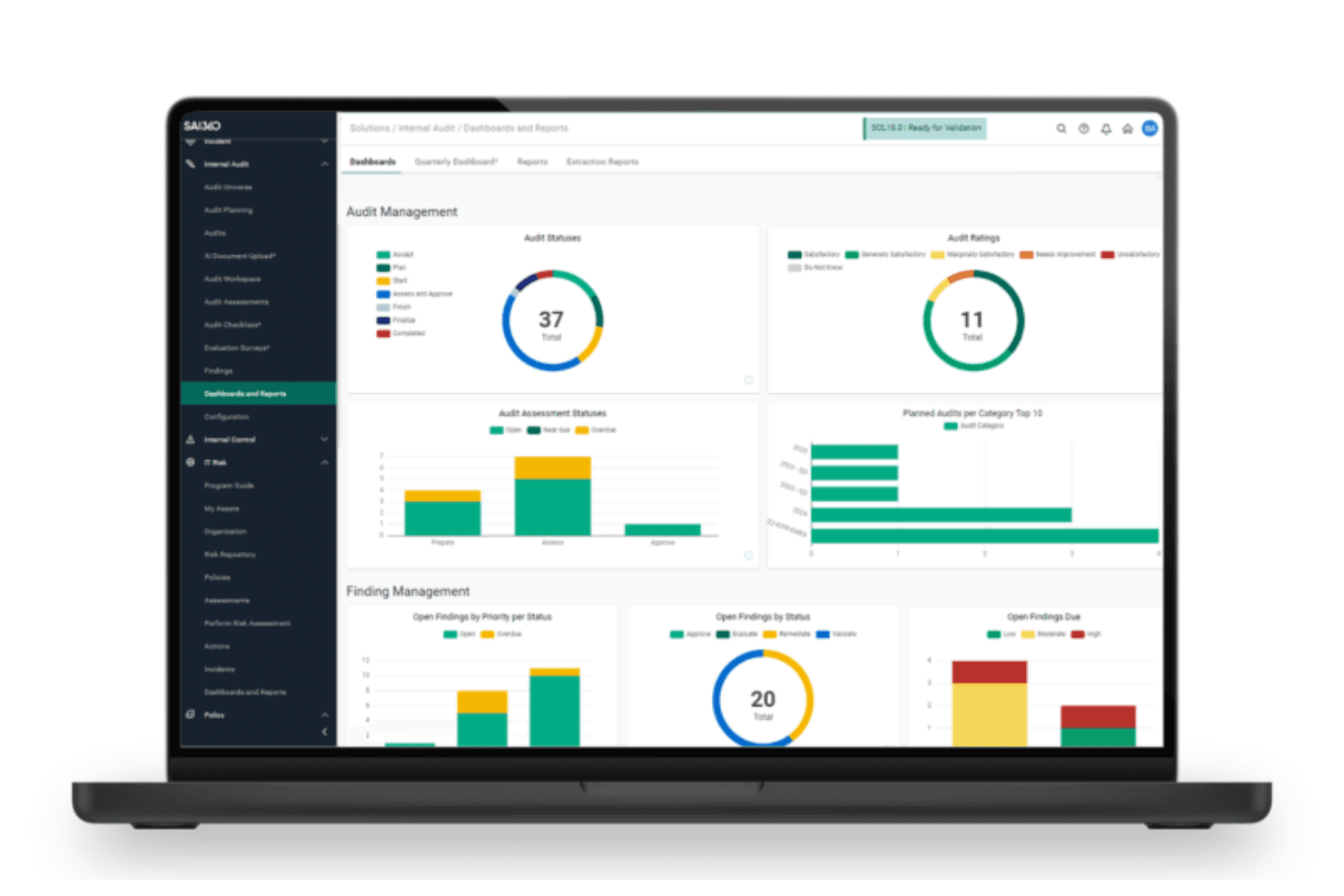
SAI360's Internal Audit Dashboard provides real-time visual insights into audit statuses, findings, and risk assessments. SAI360 is a cloud GRC suite that brings internal audit, controls testing, SOX compliance, and enterprise risk management together in one connected platform.
Who Is SAI360 Best For?
SAI360 is a strong fit for internal audit and compliance teams in regulated industries—particularly financial services—that need audit, controls, and risk management connected in one platform.
Why I Picked SAI360
SAI360 earns its spot on my shortlist because it leverages artificial intelligence to analyze enterprise risk domains and group related audit signals automatically. I especially like that I can generate real-time risk assessments and run automated scenarios without manually consolidating control data from multiple departments. Its dynamic risk-scoring engine flags potential compliance gaps before audits begin, allowing teams to address exposure points proactively.
SAI360 Key Features
- Risk-based audit scoping: Automatically ranks audit areas by exposure, frequency, and impact using previous ratings and risk factors.
- Multi-framework control mapping: Maps controls across COSO, SOX, ISO, and NIST simultaneously to identify overlaps and close gaps.
- Offline workpaper access: Lets auditors complete and sign off workpapers without an internet connection, then syncs changes automatically.
- Real-time audit dashboards: Delivers drillable, configurable views of findings, remediation status, and audit performance across the organization.
SAI360 Integrations
SAI360 connects with 100+ applications and content providers, including SAP, Oracle, NetSuite, Microsoft 365, SharePoint, ServiceNow, Salesforce, Power BI, and DocuSign.
Pros and Cons
Pros:
- Offline workpapers sync after fieldwork
- AI-assisted evidence review reduces documentation work
- Findings connect directly to risks and controls
Cons:
- No dedicated audit committee portal
- Complex reporting customization slows audit delivery
Learn more about SAI360: Best for real-time AD auditing
- 30-day free trial
- Pricing upon request
Visit WebsiteCustomer Rating:4.4/5
ManageEngine ADAudit Plus' system provides users with real-time alerting for any critical event. ManageEngine ADAudit Plus is a comprehensive Active Directory auditing tool designed to help organizations monitor changes and activities within their Windows ecosystem. It offers real-time auditing and alerting for Active Directory, Azure AD, file servers, Windows servers, and workstations.
Why I picked ManageEngine ADAudit Plus: I like that it provides real-time Active Directory auditing and alerting, ensuring that any changes within the Windows environment are promptly detected and addressed. The tool's capability to track user logins, monitor file changes, and manage permissions is crucial for maintaining security and compliance. Furthermore, its user behavior analytics and suspicious activity alerts stand out in preventing potential security breaches and ensuring adherence to regulations such as GDPR and HIPAA.
ManageEngine ADAudit Plus Standout Features and Integrations:
Standout features include detailed file server auditing, tracking access and modifications to files and folders across Windows and NetApp environments. Its account lockout and management feature also helps in identifying and resolving account lockout issues efficiently.
ADAudit Plus also includes comprehensive group policy auditing and advanced auditing for workstations, capturing user logon and logoff activities, software installations, and changes to local users and groups.
Integrations include ManageEngine ServiceDesk Plus, ManageEngine OpManager, ManageEngine Log360, ManageEngine EventLog Analyzer, Microsoft SCOM, Microsoft Azure, VMware, Office 365, and SIEM solutions like Splunk, IBM QRadar, and ArcSight.
Pros and Cons
Pros:
- Detailed insights into user behavior and system changes
- Reports can be customized to meet specific organizational needs.
- Offers compliance reporting to meet regulatory requirements
Cons:
- Limited support for non-Windows environments
- May be too complex for very small businesses with limited IT resources
Learn more about ManageEngine ADAudit Plus:

Workiva’s user-friendly dashboards have impressive data visualization capabilities. Workiva is a connected risk management, financial reporting, auditing, and ESG platform for large companies. It helps connect teams throughout the organization to improve collaboration and efficiency while aligning day-to-day projects with broader organizational goals.
Why I picked Workiva: I selected Workiva because of its collaboration features and user-friendliness, both of which combine to make this tool a good option for collaborating internally, and communicating with external auditors or regulators.
Workiva Standout Features and Integrations:
Standout features include centralized collaboration and communication tools within the Workiva platform, plus auto-syncing data sourcing from all your connected platforms.
I also like how Workiva connects audit and risk management workflows directly to financial reporting. The software also makes it easy to set role-based permissions, which facilitates more secure sharing and collaboration.
Integrations include BlackLine, Oracle, Google Drive, Excel, SAP, Microsoft Dynamics, and Workday.
Pros and Cons
Pros:
- Simple integrations with dozens of popular business tools
- Collaborative features
- Over 3,000 pre-built auditing templates
Cons:
- Overkill for small firms
Learn more about Workiva: Best for managing multiple compliance frameworks
- Free demo available
- Pricing upon request
Visit WebsiteCustomer Rating:4.6/5
Hyperproof provides dashboards and customizable reports to offer real-time visibility into audit activities. Hyperproof is a compliance operations platform that helps users automate workflows, prepare for audits, and manage risks. It provides tools for risk management, vendor management, and audit management and offers features like mapping controls to compliance requirements, automating evidence collection, and monitoring compliance posture.
Why I picked Hyperpoof: I chose Hyperproof because it supports over 100 compliance frameworks, including SOC 2, ISO 27001, GDPR, and HIPAA, and offers a centralized platform for tracking and managing all necessary compliance tasks and documentation to help with audit readiness.
Hyperproof Standout Features and Integrations:
Standout features include real-time compliance visibility that offers continuous monitoring and updates, keeping audit teams informed about their compliance status at all times.
Additionally, the platform provides tools to collect, prioritize, track, and mitigate risks. It includes a risk register, issues management, and reporting features.
Integrations include Jira, Slack, Microsoft Teams, Okta, OneDrive, Google Drive, AWS, Azure, GitHub, GitLab, Confluence, ServiceNow, Microsoft 365, Zoom, Box, Dropbox, Asana, Trello, Salesforce, and Smartsheet.
Pros and Cons
Pros:
- Intuitive UI design
- Pre-built frameworks for compliance management
- Automates evidence collection to save time during audits
Cons:
- Limits to customization on the platform
- Reporting limitations
Learn more about Hyperproof:

Netwrix’s UI is ultra-simple and a bit old-fashioned, but it’s easier to use than most other tools. Netwrix Auditor is an IT auditing software designed to help detect security threats, ensure compliance, and assist IT teams in maintaining stable deployments. It has a simple, straight-forward interface that should be easy for most people to learn how to use.
Why I picked Netwrix: I selected Netwrix Auditor for its focus on IT security, threat analysis, and IT auditing.
Netwrix Standout Features and Integrations:
Standout features include unified and centralized data collection and auditing of many common IT systems (Azure, Microsoft 365, etc.) to reduce the time needed to compile data from different sources.
I also like the predefined reports mapped out to comply with industry standards and legal regulations (GDPR, HIPAA, CJIS, etc.)
Integrations include SharePoint, Microsoft 365, Azure AD, Oracle Database, and SQL Server.
Pros and Cons
Pros:
- Anomalous activity alerts
- Identifies threat patterns and potential breach
- Tech regulation compliance support
Cons:
- Specifically designed for IT audits
Learn more about Netwrix Auditor: Best governance, risk, and compliance features
- Free demo available
- Pricing upon request
Visit WebsiteCustomer Rating:3.3/5
MetricStream has intuitive dashboards with solid data analytics and visualizations. MetricStream is a governance, risk, and compliance (GRC) software solution. Its connected product line offers tools for business GRC, internal audit management, ES GRC (environmental, social, and corporate GRC), and Cyber GRC workflows.
Why I picked MetricStream: I selected MetricStream because in addition to being an audit management tool, it also covers various components of governance, compliance, and risk management across both business operations and IT.
MetricStream Standout Features and Integrations:
Standout features include AI-enabled auditing features, which allows MetricStream to select random samples for testing, automatically reconcile general ledger accounts, and verify the mathematical accuracy of financial statement line items, totals, and subtotals.
Aside from the sharp-looking dashboards, I also like MetricStream’s audit reporting tools and templates, which make it easy to share findings with stakeholders.
Integrations include threat and vulnerability scanners, regulatory compliance tools, and security tools via MetricStream APIs.
Pros and Cons
Pros:
- Great reporting and dashboards
- Connected risk management, cyber security, internal auditing
- Relatively simple to use
Cons:
- Limited integrations
Learn more about MetricStream:

Archer’s auditing software takes a risk-based approach toward prioritization. Archer Audit Management is an internal auditing software built into the Archer integrated risk management platform. It’s designed to serve as a centralized system to manage the entire internal auditing life cycle.
Why I picked Archer Audit Management: I selected Archer Audit Management because of its collaboration features. Specifically, I like that it enables cross-functional collaboration by encouraging teams from auditing, risk, compliance, and management to work together. For large multinationals with siloed departmental teams, these collaboration features are a major selling point.
Archer Audit Management Standout Features and Integrations:
Standout features include built-in issues management workflows to escalate audit issues and remediate audit findings, audit engagement and workpaper creation tools, and self-serve information portals for external auditors.
I like that Archer’s audit plans are aligned with current Institute of Internal Audit (IIA) standards and Committee of Sponsoring Organizations (COSO) framework to ensure teams address relevant internal controls and operational risks.
Integrations include internal data congregation via direct imports, data feeds, and Archer’s API.
Pros and Cons
Pros:
- IIA and COSO compliant
- Flexible deployment
- Integrated cross-department tools that encourage collaboration
Cons:
- Limited integrations
Learn more about Archer:

SAP Internal Audit Management has centralized audit planning workflows to improve audit efficiency. SAP Internal Audit Management is a top audit management software that’s part of the SAP business tools suite. It’s specifically designed for internal auditing teams.
Why I picked SAP Internal Audit Management: I selected SAP Internal Audit Management because of its extensive automation features and internal control focus. I appreciate how SAP’s AI and machine learning-driven tools can help internal audit teams save time by automating some of the more mundane, repetitive audit procedures.
SAP Internal Audit Management Standout Features and Integrations:
Standout features include automated internal auditing procedures for documentation of evidence, working paper organization, and audit reporting.
I also like the versatility of SAP’s software—it can be deployed on-premise or in the cloud, giving teams access through any mobile devices or web browser.
Integrations include SAP Risk Management, SAP Process Control, and other SAP suite products.
Pros and Cons
Pros:
- AI and machine-learning tools
- Excellent data security infrastructure
- Flexible deployment via cloud or on-site buildout
Cons:
- Steep learning curve
Learn more about SAP Audit Management:

TeamMate’s dashboards are simple and easy to navigate TeamMate by Wolters Kluwer is a comprehensive audit software for large auditing firms and assurance practices. It’s used by internal audit teams, as well as public accounting firms and contractors.
Why I picked TeamMate: I selected TeamMate because it has a version specifically designed for internal audit teams and independent auditors conducting financial and compliance audits for large financial institutions.
Firms operating in the finance industry today are required to meet strict regulatory requirements and internal control standards, and TeamMate helps auditors ensure compliance.
TeamMate Standout Features and Integrations:
Standout features include a library with over 150 Computer Aided Audit Tools (CAATs) for data analytics. The TeamMate Analytics feature is equipped with data manipulation tools that quickly format raw data files so teams can perform in-depth analysis.
I really like the TeamMate University application too; it flattens the learning curve and helps teams get onboarded and learn the ins and outs of the different tools and features of the software.
Integrations include custom integrations via TeamMate APIs.
Pros and Cons
Pros:
- Quick onboarding
- Designed specifically for the financial services industry
- Extensive data analytics capabilities
Cons:
- Not well suited to small companies
- Expensive
Learn more about TeamMate: Best for worker safety auditing
- Free plan available
- From $24/user/month (billed annually)

SafetyCulture checklists help workers ensure safety regulations are met in the field. SafetyCulture is a safety and compliance management software designed with worker safety in mind.
The paid plan includes two different kinds of “seats”—the full seats have access to all the features, including management and inspections, but free seats are still able to create and complete tasks and send messages.
Why I picked SafetyCulture: I selected SafetyCulture because it’s specifically focused on worker safety and ensuring compliance with OSHA and other regulations.
SafetyCulture Standout Features and Integrations:
Standout features include easy checklists for employees to complete before and during fieldwork.
I really like how employees can use the mobile app to take and upload pictures, assign tasks to others (even non-SafetyCulture users), and check in with supervisors.
Integrations include Google and Microsoft suite products, Salesforce, SAP, and Zapier.
Pros and Cons
Pros:
- Very affordable
- Encourages a workplace culture of safety and policy compliance
- Mobile-first design is very user-friendly
Cons:
- Not a standalone internal audit software
- Less about auditing and more about worker safety
Learn more about SafetyCulture:
Outros softwares de gestão de auditorias
Eis algumas opções adicionais de software de gestão de auditorias que não entraram na minha lista restrita, mas que ainda vale a pena conhecer:
- 11DiligentBest for internal controls management
- 12AuditBoardBest for operational audits
- 13Ideagen Pentana AuditBest for audit planning
- 14MindBridgeBest for financial audits
- 15OnspringBest for high-volume auditing
- 16Mitratech AlyneBest for AI-driven risk assessments
- 17IBM OpenPagesBest for regulatory compliance auditing
- 18ThoropassBest auditing software with human expert guidance
- 19AutoAuditMost customizable audit management software
- 20FastpathBest SOX compliance software
How I Evaluate Audit Management Software
I evaluate each tool in two layers—core must-haves like audit planning and workpaper management, then differentiators that set SOX-focused platforms apart from general GRC tools.
Core Functionality (Table Stakes For This List)
When I'm selecting tools for my list, I rank each one on a scale from 0 (does not offer the functionality) to 5 (excels in this area) for each core functionality listed below. Then, I calculate the tool's total score into a percentage. Each tool needs to achieve a minimum total score of 65% to be considered for inclusion.
- Audit Planning & Scheduling: I look for tools that let you build a risk-based annual audit plan, assign engagements to team members, and adjust timelines as priorities shift mid-cycle.
- Workpaper & Evidence Management: A structured workpaper repository matters—I check whether you can link evidence to specific controls, maintain version history, and route files for review sign-off.
- Risk & Control Assessment: Each tool should support risk-control matrices and control testing workflows, especially for teams running SOX or COSO-aligned programs across multiple business units.
- Issue & Remediation Tracking: I evaluate how findings move from identification to resolution—owner assignment, due dates, escalation triggers, and the ability to verify remediation before closing.
- Audit Reporting & Dashboards: Clear reporting is what connects your audit team to leadership. I look for configurable dashboards and committee-ready outputs that summarize status, findings, and trends.
- Workflow & Review Approvals: Structured review stages with role-based sign-offs keep methodology consistent. I check for multi-tier approval chains and immutable audit trails that document every action.
Once I have a list of tools that meet this criteria, I consider what sets each platform apart.
Differentiating Factors (What Sets Vendors Apart)
Here's how I compare and contrast different vendors:
Standout Features
Continuous control monitoring is a major differentiator. I look for tools that pull live data from your ERP and flag control exceptions automatically instead of relying on quarterly sample testing. Multi-framework compliance mapping matters too—when a single control covers SOX, ISO, and COSO, it eliminates duplicate testing across programs. I also evaluate whether a platform uses AI-driven risk analytics to surface anomalies and recommend where to focus upcoming audit cycles.
Beyond Features
ERP and GRC integrations are a key consideration—I check whether a platform connects natively to systems like SAP, Oracle, or NetSuite for direct evidence pulls during fieldwork. Security certifications also carry weight, especially SOC 2 Type II and data residency options for teams handling sensitive financial data across regions. Implementation support is another factor I evaluate closely, including whether the vendor offers pre-configured IIA or IPPF methodology templates that shorten setup time for new audit teams.
Como escolher um software de gestão de auditorias
É fácil ficar preso a longas listas de funcionalidades e estruturas de preços complexas. Para o ajudar a manter-se concentrado enquanto percorre o seu processo específico de seleção de software, apresentamos uma lista de verificação dos fatores a ter em conta:
| Fator | O que considerar |
|---|---|
| FatorEscalabilidade | O que considerarO software acompanhará o crescimento da sua empresa? Considere se consegue lidar com um maior volume de dados e número de utilizadores sem problemas de desempenho. |
| FatorIntegrações | O que considerarFunciona com os seus sistemas atuais? Certifique-se de que se liga a ferramentas como ERP, CRM e outras que sejam essenciais para o seu fluxo de trabalho. |
| FatorPersonalização | O que considerarPode adaptar a ferramenta aos seus processos? Procure opções para ajustar fluxos de trabalho, campos e relatórios de acordo com as suas necessidades específicas. |
| FatorFacilidade de utilização | O que considerarÉ intuitivo para a sua equipa? Uma interface simples reduz o tempo de formação e facilita a adoção rápida em todos os departamentos. |
| FatorImplementação e integração inicial | O que considerarQuanto tempo demorará a configuração? Verifique se existe apoio disponível durante a integração inicial e recursos como guias ou sessões de formação para facilitar a transição. |
| FatorCusto | O que considerarEstá dentro do seu orçamento? Compare os planos de preços e verifique se existem custos ocultos ou custos adicionais para funcionalidades ou utilizadores extra. |
| FatorMedidas de segurança | O que considerarResponde às suas necessidades de segurança? Procure normas de encriptação, medidas de proteção de dados e conformidade com os regulamentos aplicáveis. |
| FatorRequisitos de conformidade | O que considerarEstá alinhado com as normas do setor? Certifique-se de que a ferramenta suporta as auditorias e verificações de conformidade necessárias e específicas do seu setor. |
O que é um software de gestão de auditorias?
O software de gestão de auditorias é uma ferramenta que ajuda a planear, realizar e acompanhar auditorias no local de trabalho. Os auditores, os responsáveis pela conformidade e as equipas de controlos internos utilizam-no para gerir calendários de auditorias, documentar conclusões e tratar de acompanhamentos, facilitando a organização e o cumprimento das normas. Mantém tudo num só lugar, tornando menos stressante acompanhar o que está concluído e o que ainda requer atenção.
Funcionalidades
Eis as principais funcionalidades que qualquer bom software de gestão de auditorias deve ter:
- Agendamento de auditorias: Automatiza o planeamento e o agendamento de auditorias, garantindo uma execução atempada e organizada.
- Acompanhamento de conclusões: Permite aos utilizadores documentar e monitorizar os resultados das auditorias, facilitando as ações de acompanhamento e a responsabilização.
- Geração de relatórios: Produz relatórios de auditoria abrangentes, facilitando a análise de dados e a partilha de conclusões com as partes interessadas.
- Verificações de conformidade: Apoia o cumprimento das normas e regulamentações do setor, reduzindo o risco de penalizações por incumprimento.
- Capacidades de integração: Liga-se a sistemas existentes, como ERP e CRM, melhorando o fluxo de dados e a eficiência operacional.
- Painéis de controlo personalizáveis: Fornecem vistas e informações adaptadas, ajudando os utilizadores a concentrarem-se nas informações de auditoria mais relevantes.
- Análise em tempo real: Disponibiliza informações imediatas sobre os dados das auditorias, permitindo uma tomada de decisões rápida e uma gestão proativa dos riscos.
- Acesso móvel: Permite aos utilizadores realizar e consultar auditorias em qualquer lugar, aumentando a flexibilidade e a capacidade de resposta.
- Notificações automatizadas: Mantêm as equipas informadas sobre o progresso e os prazos das auditorias, garantindo a conclusão atempada das tarefas.
- Interface intuitiva: Garante uma utilização simples, reduzindo o tempo de formação e incentivando a adoção generalizada pelas equipas.
Benefícios
A implementação de software de gestão de auditorias proporciona vários benefícios à sua equipa e à sua empresa. Eis alguns dos benefícios que pode esperar:
- Melhoria da conformidade: Ajuda a garantir o cumprimento das regulamentações através de verificações de conformidade integradas e alertas automatizados.
- Maior eficiência: Automatiza o agendamento e o acompanhamento, reduzindo o trabalho manual e acelerando o processo de auditoria.
- Maior precisão: Proporciona uma recolha de dados e uma elaboração de relatórios fiáveis, minimizando erros e melhorando a qualidade das auditorias.
- Melhor tomada de decisões: Disponibiliza análises e informações em tempo real, permitindo decisões rápidas e fundamentadas.
- Maior flexibilidade: O acesso móvel permite realizar auditorias em qualquer lugar, acomodando o trabalho remoto e as auditorias no terreno.
- Poupança de custos: Reduz a necessidade de processos em papel e de trabalho manual, diminuindo os custos operacionais.
- Colaboração reforçada: Facilita a comunicação e a responsabilização através de painéis de controlo partilhados e notificações automatizadas.
Custos e preços
A seleção de software de gestão de auditorias exige uma compreensão dos vários modelos de preços e planos disponíveis. Os custos variam consoante as funcionalidades, a dimensão da equipa, os complementos e outros fatores. A tabela abaixo resume os planos comuns, os respetivos preços médios e as funcionalidades habitualmente incluídas nas soluções de software de gestão de auditorias:
Tabela de comparação de planos de software de gestão de auditorias
| Tipo de plano | Preço médio | Funcionalidades comuns |
|---|---|---|
| Tipo de planoPlano gratuito | Preço médio$0 | Funcionalidades comunsAgendamento básico de auditorias, acompanhamento limitado e funcionalidades essenciais de elaboração de relatórios. |
| Tipo de planoPlano pessoal | Preço médio$10-$30/utilizador/mês | Funcionalidades comunsAgendamento e acompanhamento de auditorias, opções básicas de integração e capacidades padrão de elaboração de relatórios. |
| Tipo de planoPlano empresarial | Preço médio$30-$60/utilizador/mês | Funcionalidades comunsAgendamento avançado, acompanhamento abrangente, elaboração de relatórios melhorada e integração com sistemas ERP. |
| Tipo de planoPlano empresarial avançado | Preço médio$60-$120/utilizador/mês | Funcionalidades comunsPersonalização completa, análise avançada, acesso móvel e apoio ao cliente dedicado. |
Perguntas frequentes
Eis algumas respostas a perguntas comuns sobre software de gestão de auditorias:
Como é que o software de gestão de auditorias ajuda as equipas de auditoria interna?
O software de gestão de auditorias disponibiliza um local centralizado para planear, executar e supervisionar todo o ciclo de vida da auditoria. As melhores ferramentas também utilizam automatização e aprendizagem automática para detetar anomalias, implementar uma priorização baseada em regras e testar controlos. Além disso, estas soluções de software podem ajudar a alinhar os processos de auditoria interna com as políticas regulamentares e as normas empresariais, melhorar o alinhamento organizacional e incentivar a colaboração e a sincronização de dados entre as equipas de auditoria e de gestão.
Como são armazenados e acedidos os documentos de auditoria no software de gestão de auditorias?
O software de gestão de auditorias armazena todos os documentos num sistema centralizado com pastas, etiquetas ou filtros para facilitar o acesso. A sua equipa pode carregar documentos de trabalho, evidências ou relatórios e controlar quem vê cada conteúdo. Isto reduz a confusão e evita a perda de ficheiros.
O software de gestão de auditorias pode ser utilizado por equipas em diferentes localizações?
A maior parte do software de gestão de auditorias funciona online, pelo que as equipas em diferentes escritórios ou fusos horários podem utilizá-lo em conjunto. Todos veem os mesmos dados e atualizações em tempo real. Isto mantém as suas auditorias no caminho certo, independentemente do local a partir do qual a sua equipa trabalha.
Como é que o software de gestão de auditorias lida com o acesso baseado em funções e as permissões dos utilizadores?
O software de gestão de auditorias oferece normalmente acesso baseado em funções, para que diferentes membros da equipa tenham permissões adaptadas às suas responsabilidades (por ex., auditor, revisor, administrador). A sua equipa pode atribuir quem pode consultar, editar, aprovar ou encerrar tarefas e constatações de auditoria. Controlos de acesso claros reduzem o risco de alterações não autorizadas e ajudam a manter a integridade da auditoria.