

O alternativă solidă la Smartsheet oferă echipei tale urmărirea flexibilă a proiectelor, colaborare în timp real și fluxuri de lucru personalizabile — toate într-o platformă software de gestionare a proiectelor bazată pe cloud. Dacă ești în căutarea unor alternative disponibile la Smartsheet, probabil cauți instrumente care pot gestiona activități complexe, pot sprijini echipe interfuncționale și se pot adapta proceselor unice ale organizației tale. Multe platforme oferă, de asemenea, acces la API, funcții de prognoză și o combinație de planuri plătite sau opțiuni open-source, în funcție de nevoile tale tehnice și de buget. Cu atât de multe opțiuni disponibile, este esențial să găsești un software care să corespundă nevoilor tale de raportare, să se integreze cu sistemele existente și să mențină proiectele în desfășurare fără întreruperi. Această listă te va ajuta să compari principalele alternative, astfel încât să poți alege cu încredere soluția potrivită pentru provocările de gestionare a activității echipei tale în 2026.
Ce este Smartsheet?
Smartsheet este o platformă de gestionare a activității bazată pe cloud, concepută pentru urmărirea proiectelor, colaborare și automatizarea fluxurilor de lucru. Ajută echipele să organizeze sarcini, să gestioneze resurse și să distribuie actualizări în timp real într-un singur spațiu centralizat. Smartsheet oferă șabloane personalizabile, raportare și integrări cu instrumente de afaceri populare. Profesioniștii din domeniul financiar îl folosesc adesea pentru a coordona proiecte, a monitoriza termene-limită și a menține vizibilitatea asupra mai multor inițiative, ceea ce îl face o alegere populară pentru organizațiile care au nevoie de gestionarea flexibilă și scalabilă a activității.
Why Trust Our Software Recommendations
6,700+
Reviews
20
Industry experts
16+
Evaluation factors
14
Years
Our team has been testing and reviewing software since 2012. As finance leaders ourselves, we know how difficult—and important—it is to choose the right software.
For this guide, we evaluated tools using hands-on testing and independent research, scoring tools using our selection criteria.
Our reviews reflect our human editorial judgment, not a sales pitch.
Tabel comparativ al alternativelor la Smartsheet
Acest tabel comparativ evidențiază prețurile și opțiunile de testare gratuită pentru principalele mele alternative la Smartsheet, pentru a te ajuta să găsești soluția potrivită pentru bugetul și nevoile afacerii tale.
Sorted by: Default
| Tool | Starting Price | Website | |
|---|---|---|---|
Best for simple task organization | 4.5 out of 5 | $5/user/month Free plan + free trial available | Website |
Best for combining notes, databases, and project planning | 4.6 out of 5 | $10/user/month Free plan + 30-day trial available | Website |
Best for client-focused project management | 4.4 out of 5 | Pricing upon request Free plan available | Website |
Best for secure cloud file sharing | 4.3 out of 5 | $7/user/month Free plan + trial + demo available | Website |
Best for centralized team communication | 4.2 out of 5 | $29/month Free plan + 30-day free trial + free demo available | Website |
Best for real-time project tracking | 4.2 out of 5 | $15/user/month 30-day free trial + demo available | Website |
Best for advanced issue and project tracking | 4.3 out of 5 | $8.48/user/month Free plan available | Website |
Best for managing tasks and projects with timeline views | Not rated | $10.99/user/month Free plan + free trial + free demo available | Website |
Best for team messaging with project tool integrations | 4.6 out of 5 | $7.25/user/month Free plan available | Website |
Best with AI-powered finance workflow automation | 4.6 out of 5 | $9/user/month Free plan + 14-day free trial available | Book Demo |


Recenzii ale alternativelor la Smartsheet
Mai jos se află rezumatele mele detaliate ale alternativelor la Smartsheet care au ajuns pe lista mea scurtă. Recenziile mele oferă o analiză detaliată a funcțiilor, integrărilor și celor mai potrivite cazuri de utilizare ale fiecărei platforme, pentru a te ajuta să găsești cea mai bună soluție pentru tine.
 Best for simple task organization
- Free plan + free trial available
- From $5/user/month (billed annually)
Visit WebsiteCustomer Rating:4.5/5
Trello organizes tasks and workflows with a visual, drag-and-drop interface. Teams looking for a highly visual, card-based approach to managing work often turn to Trello. Its Kanban-style boards and drag-and-drop interface make it especially appealing for small teams, marketing teams, creative agencies, and businesses that need flexible workflows. Unlike Smartsheet, Trello stands out for its intuitive user interface and the ability to automate repetitive tasks with no-code rules and triggers. It also offers a free version for basic project tracking. While it doesn’t provide advanced features like relational databases found in more complex platforms, its simplicity means there’s little to no steep learning curve for new users.
Why Trello Is a Good Smartsheet Alternative
If you want a more visual way to organize projects, Trello’s Kanban boards offer a clear alternative to spreadsheet-style tools like Smartsheet. I picked Trello because its card-based system lets you map out workflows, assign tasks, and track progress at a glance. You can also automate repetitive actions using built-in rules and triggers, which helps teams keep work moving without manual updates. For anyone who prefers visual project management and flexible workflow automation, Trello brings a different approach to cloud-based work management.
Trello Key Features
Some other features in Trello that may be useful for managing work include:
- Custom Fields: Add extra data points to cards for tracking project-specific information.
- Calendar View: Visualize tasks and deadlines on a shared calendar.
- Card Checklists: Break down tasks into smaller, actionable steps within each card.
- Power-Ups Marketplace: Extend board functionality with add-ons for reporting, communication, and more.
Trello Integrations
Integrations include Slack, Jira Cloud, Miro, Dropbox, Clockify, Twitter, and more.
Pros and Cons
Pros:
- Custom fields track project data
- Card attachments enable file sharing
- Power-Ups add calendar and reporting
Cons:
- Task dependencies require add-ons
- Reporting is limited without Power-Ups
Learn more about Trello: Best for combining notes, databases, and project planning
- Free plan + 30-day trial available
- From $10/user/month (billed annually)
Visit WebsiteCustomer Rating:4.6/5
Notion centralizes notes, tasks, and projects for flexible team collaboration. Notion brings together documents, project management, and databases in a single, flexible workspace. It’s a strong fit for teams that want to blend structured project tracking with unstructured knowledge sharing, such as creative agencies, product teams, and startups. Unlike Smartsheet, Notion lets you build custom workflows and knowledge bases side by side, so you can manage projects and documentation without switching tools.
Why Notion Is a Good Smartsheet Alternative
If you want a workspace that combines project management with flexible documentation, Notion stands out as a strong option. I picked Notion because it lets you create custom databases, wikis, and project boards all in one place, so you can manage structured and unstructured work together. Its drag-and-drop page builder and linked databases make it easy to design workflows that fit your team’s unique needs. For teams that need more than just spreadsheets, Notion’s all-in-one approach offers a level of customization and knowledge management that Smartsheet doesn’t match.
Notion Key Features
Some other features in Notion that may be useful for managing work include:
- Real-Time Collaboration: Multiple users can edit pages and databases at the same time.
- Permissions and Sharing Controls: Set granular access levels for pages, databases, and workspaces.
- Template Gallery: Access a library of pre-built templates for project management, meeting notes, and more.
- Version History: Track changes and restore previous versions of any page or database.
Notion Integrations
Integrations include Box, Outlook, Slack, VibeFlow, Dropbox, GitHub, GitLab, Loom, Lucidchart, and more.
Pros and Cons
Pros:
- Real-time collaboration supports simultaneous editing
- Rich text embeds images and media
- Linked databases connect information across pages
Cons:
- Permissions are complex for large teams
- Gantt views are less advanced
Learn more about Notion: Best for client-focused project management
- Free plan available
- Pricing upon request
Visit WebsiteCustomer Rating:4.4/5
Teamwork.com improves project delivery and client collaboration for service teams. If your team manages client projects and needs built-in billing tools, Teamwork.com is worth a close look. Agencies, consultancies, and finance teams that track billable hours or handle client invoicing will find its advanced time tracking and billing features especially useful. Unlike Smartsheet, Teamwork.com brings project management and client financials together in one platform.
Why Teamwork.com Is a Good Smartsheet Alternative
Unlike many work management tools, Teamwork.com is built with client-focused project delivery in mind. I picked Teamwork.com because it combines advanced time tracking with integrated billing and invoicing, which is something Smartsheet doesn’t offer natively. You can log billable hours directly on tasks, generate invoices from tracked time, and manage client budgets all within the same platform. For teams that need to connect project work with client financials, Teamwork.com brings these workflows together in a way that’s hard to find elsewhere.
Teamwork.com Key Features
Some other features in Teamwork.com that may be helpful for project-based teams include:
- Portfolio View: See progress and status across multiple projects in one place.
- Task Dependencies: Set and manage relationships between tasks to control project flow.
- Document Management: Store, share, and collaborate on files directly within projects.
- Workload Planner: Visualize team capacity and allocate resources based on availability.
Teamwork.com Integrations
Integrations include Harvest, Slack, ChatGPT, Whid, BugHerd, Xero, Stripe, and more.
Pros and Cons
Pros:
- Workload planner shows team capacity
- Task dependencies enable detailed scheduling
- Portfolio view manages multiple projects
Cons:
- Gantt view less interactive than Smartsheet
- Notification customization options limited
Learn more about Teamwork.com: 4Best for secure cloud file sharing
Box
- Free plan + trial + demo available
- From $7/user/month
Visit WebsiteCustomer Rating:4.3/5
Box secures cloud file storage and sharing to support enterprise collaboration. If your business needs secure, centralized content management with advanced collaboration controls, Box is worth considering. Box is designed for organizations that handle sensitive documents and require strict compliance, making it a strong fit for finance, legal, and enterprise teams. Unlike Smartsheet, Box stands out for its granular file permissions, automated workflows, and integrations with document editing and e-signature tools.
Why Box Is a Good Smartsheet Alternative
When secure content management is your top priority, Box offers a different approach than spreadsheet-based work management tools. I picked Box because it provides enterprise-grade file encryption, granular permission settings, and detailed audit trails, which are essential for teams handling sensitive or regulated information. The platform also supports automated document workflows and integrates with e-signature tools, making it easier to manage contracts and approvals in one place. If your organization needs to control access and maintain compliance while collaborating in the cloud, Box delivers features that go beyond what Smartsheet offers.
Box Key Features
Some other features in Box that may be useful for managing work include:
- Box Notes: Collaborate on meeting notes, project plans, and documents in real time.
- Version History: Track and restore previous versions of files to prevent data loss.
- Task Assignment: Assign tasks to team members directly within files and folders.
- Mobile Access: Access, edit, and share files securely from mobile devices.
Box Integrations
Integrations include ServiceNow, Slack, Adobe, Salesforce, ChatGPT, and more.
Pros and Cons
Pros:
- Native e-signatures simplify contract management
- Version history tracks file changes
- Compliance certifications support regulated industries
Cons:
- Collaboration focused on documents
- No spreadsheet grid for data
Learn more about Box: Best for centralized team communication
- Free plan + 30-day free trial + free demo available
- From $29/month
Visit WebsiteCustomer Rating:4.2/5
Basecamp simplifies project organization and team communication in one platform. Basecamp offers a unified space for project communication, task tracking, and file sharing. It’s especially useful for teams that want to keep all project discussions, documents, and schedules in one place without relying on email or scattered tools. Unlike Smartsheet, Basecamp emphasizes centralized messaging and team visibility, making it a strong fit for agencies, consultancies, and cross-functional groups that need to stay aligned. Its user-friendly interface and overall ease of use help teams adopt it quickly, while third-party integrations and advanced features support more complex workflows as projects grow.
Why Basecamp Is a Good Smartsheet Alternative
For teams that want to centralize project communication and task management, Basecamp offers a focused approach that’s different from spreadsheet-based tools. I picked Basecamp because it brings together message boards, to-do lists, and file storage in a single workspace, so your team can keep all project details and conversations organized. The built-in group chat and automatic check-ins help everyone stay updated without relying on scattered emails or external chat apps. If you’re looking for a Smartsheet alternative that prioritizes team visibility and communication, Basecamp’s structure makes it easy to keep everyone on the same page.
Basecamp Key Features
Some other features in Basecamp that may be helpful for managing work include:
- Schedule Tool: Create and share project calendars with key dates and milestones.
- Document and File Storage: Upload, organize, and share files directly within each project.
- Client Access: Invite clients to specific projects with customizable permissions.
- Hill Charts: Visualize project progress with a unique charting tool for tracking work stages.
Basecamp Integrations
Integrations are not publicly listed.
Pros and Cons
Pros:
- Client access shares projects externally
- Hill Charts visualize project progress
- To-do lists track assigned tasks
Cons:
- No spreadsheet grid view
- No task dependencies or automation
Learn more about Basecamp: Best for real-time project tracking
- 30-day free trial + demo available
- From $15/user/month (billed annually)
Visit WebsiteCustomer Rating:4.2/5
ProjectManager handles project planning, time tracking, resource management, and collaboration. ProjectManager offers real-time project tracking and resource management designed for teams that need up-to-the-minute visibility across multiple projects. It’s a strong fit for finance professionals and project leads who manage distributed teams or complex workflows. As a comprehensive project management solution, it provides detailed reporting, live dashboards, and easy resource allocation, with plans that support unlimited users for collaborative project environments.
Why ProjectManager Is a Good Smartsheet Alternative
ProjectManager stands out for teams that need real-time project tracking and resource management, making it a strong alternative to Smartsheet. I picked it because its live dashboards let you monitor project progress and resource allocation as changes happen, which is essential for fast-paced finance and operations teams. The platform’s workload management tools help you balance assignments and avoid bottlenecks across multiple projects. If you’re looking for a solution that keeps everyone aligned with up-to-date data, ProjectManager delivers on that need.
ProjectManager Key Features
Some other features in ProjectManager that may interest finance and operations teams include:
- Gantt Charts: Build and adjust project timelines visually to map dependencies and track milestones.
- Timesheets: Log and approve time entries directly in the platform for accurate project costing.
- Document Management: Store, share, and collaborate on project files within a secure, centralized location.
- Portfolio Management: View and manage multiple projects at once to prioritize resources and align with business goals.
ProjectManager Integrations
Integrations include Microsoft Teams, Slack, Power BI, Jira, Azure DevOps, Trello, and more.
Pros and Cons
Pros:
- Built-in Gantt charts support planning
- Resource tools balance team workloads
- Real-time dashboards show project status
Cons:
- Large project files load slowly
- Custom reporting is less flexible
Learn more about ProjectManager: 7Best for advanced issue and project tracking
Jira
- Free plan available
- From $8.48/user/month (billed annually)
Visit WebsiteCustomer Rating:4.3/5
Jira supports agile project planning, bug tracking, and release management for dev teams. Jira is purpose-built for teams that need advanced issue tracking and agile project management in a cloud-based environment. It’s especially well-suited for software development, IT, and product teams who need to manage complex backlogs, sprints, and releases. Unlike Smartsheet, Jira offers deep support for agile methodologies, custom workflows, and granular issue tracking that can handle even the most technical projects.
Why Jira Is a Good Smartsheet Alternative
For teams that need more than spreadsheet-based project tracking, Jira’s advanced issue tracking and agile project management tools offer a clear advantage. I picked Jira because it lets you create custom workflows, manage detailed backlogs, and track issues with fields and statuses tailored to your process. Its agile boards support Scrum and Kanban, making it easy to plan sprints, assign tasks, and monitor progress in real time. If your projects require granular tracking and agile methodology support, Jira is a strong alternative to Smartsheet.
Jira Key Features
Some other features in Jira that may be valuable for managing work include:
- Advanced Reporting: Generate detailed reports on project progress, team performance, and issue resolution.
- Custom Issue Types: Define and configure unique issue types to match your team’s workflow.
- Automation Rules: Set up automated actions for repetitive tasks, notifications, and status changes.
- Permissions Management: Control user access and project visibility with granular permission settings.
Jira Integrations
Integrations include Slack, Google Calendar, Confluence, and more.
Pros and Cons
Pros:
- Automation rules reduce manual updates
- Custom issue types fit complex projects
- Agile boards support Scrum and Kanban
Cons:
- Interface overwhelming for non-developers
- Permissions complex for non-technical admins
Learn more about Jira: Best for managing tasks and projects with timeline views
- Free plan + free trial + free demo available
- From $10.99/user/month (billed annually)

Asana coordinates tasks, tracks progress, and improves team productivity. Designed for teams that want clarity and accountability, Asana offers a visual approach to managing projects and tasks. It’s especially useful for cross-functional teams, marketing departments, and organizations that need to coordinate work across multiple projects. Unlike Smartsheet, Asana emphasizes intuitive task tracking, flexible project views, and built-in collaboration tools that help teams stay aligned without relying on spreadsheets.
Why Asana Is a Good Smartsheet Alternative
For teams that want a more visual and collaborative way to manage work, Asana offers a clear advantage over spreadsheet-based tools. I picked Asana because its task and project management features are designed for transparency and accountability, making it easy to assign work, set deadlines, and track progress. The platform’s board, list, and timeline views let you organize projects in the way that best fits your team’s workflow. If you’re looking for a Smartsheet alternative that puts intuitive task tracking and cross-team collaboration front and center, Asana is worth considering.
Asana Key Features
Some other features in Asana that may be helpful for managing work include:
- Custom Fields: Add specific data points to tasks for tracking and reporting.
- Workload Management: Visualize team capacity and balance assignments across projects.
- Automated Rules: Set up triggers and actions to automate routine task updates.
- Project Templates: Use pre-built templates to quickly launch new projects with best-practice structures.
Asana Integrations
Integrations include Microsoft Teams, Okta, Claude, Salesforce, Power BI, Zapier, Looker, ServiceNow, Outlook, and more.
Pros and Cons
Pros:
- Comments and files centralize communication
- Automation rules reduce repetitive updates
- Multiple views support list and board
Cons:
- Reporting lacks advanced customization
- Spreadsheet editing is limited
Learn more about Asana: Best for team messaging with project tool integrations
- Free plan available
- From $7.25/user/month (billed annually)
Visit WebsiteCustomer Rating:4.6/5
Slack improves team collaboration with real-time messaging, channels, and file sharing. For teams that need fast, organized communication across projects, Slack offers a flexible messaging platform built for real-time collaboration. Slack is especially useful for distributed teams, finance professionals, and organizations that rely on quick decision-making and frequent updates. Unlike Smartsheet, Slack stands out for its channel-based messaging, extensive app integrations, and ability to centralize conversations, files, and notifications in one place.
Why Slack Is a Good Smartsheet Alternative
If your team relies on fast, ongoing communication to keep projects moving, Slack offers a different approach than spreadsheet-based work management. I picked Slack because its real-time messaging, organized channels, and direct messaging features help teams stay aligned and respond quickly to changes. You can create dedicated channels for projects, departments, or topics, making it easy to separate conversations and reduce noise. For organizations that need to centralize discussions, share files instantly, and keep everyone in the loop, Slack provides a level of immediacy and collaboration that Smartsheet doesn’t focus on.
Slack Key Features
Some other features in Slack that may be helpful for managing work include:
- Workflow Builder: Automate routine tasks and processes with custom workflows inside Slack.
- Message Search: Quickly find past conversations, files, or decisions using advanced search filters.
- Pinned Items: Pin important messages or files to channels for easy reference by the team.
- Guest Access: Invite external partners or clients to specific channels without giving them full workspace access.
Slack Integrations
Integrations include ChatGPT, Claude, Cursor, DocuSign, Loom, Donut, Zoom, Google Drive, Zapier, Outlook, and more.
Pros and Cons
Pros:
- Workflow automation reduces manual follow-ups
- Real-time notifications speed team responses
- Channel messaging organizes project discussions
Cons:
- High message volume hides decisions
- No visual timelines or dependencies
Learn more about Slack: Best with AI-powered finance workflow automation
- Free plan + 14-day free trial available
- From $9/user/month (billed annually)
Visit WebsiteCustomer Rating:4.6/5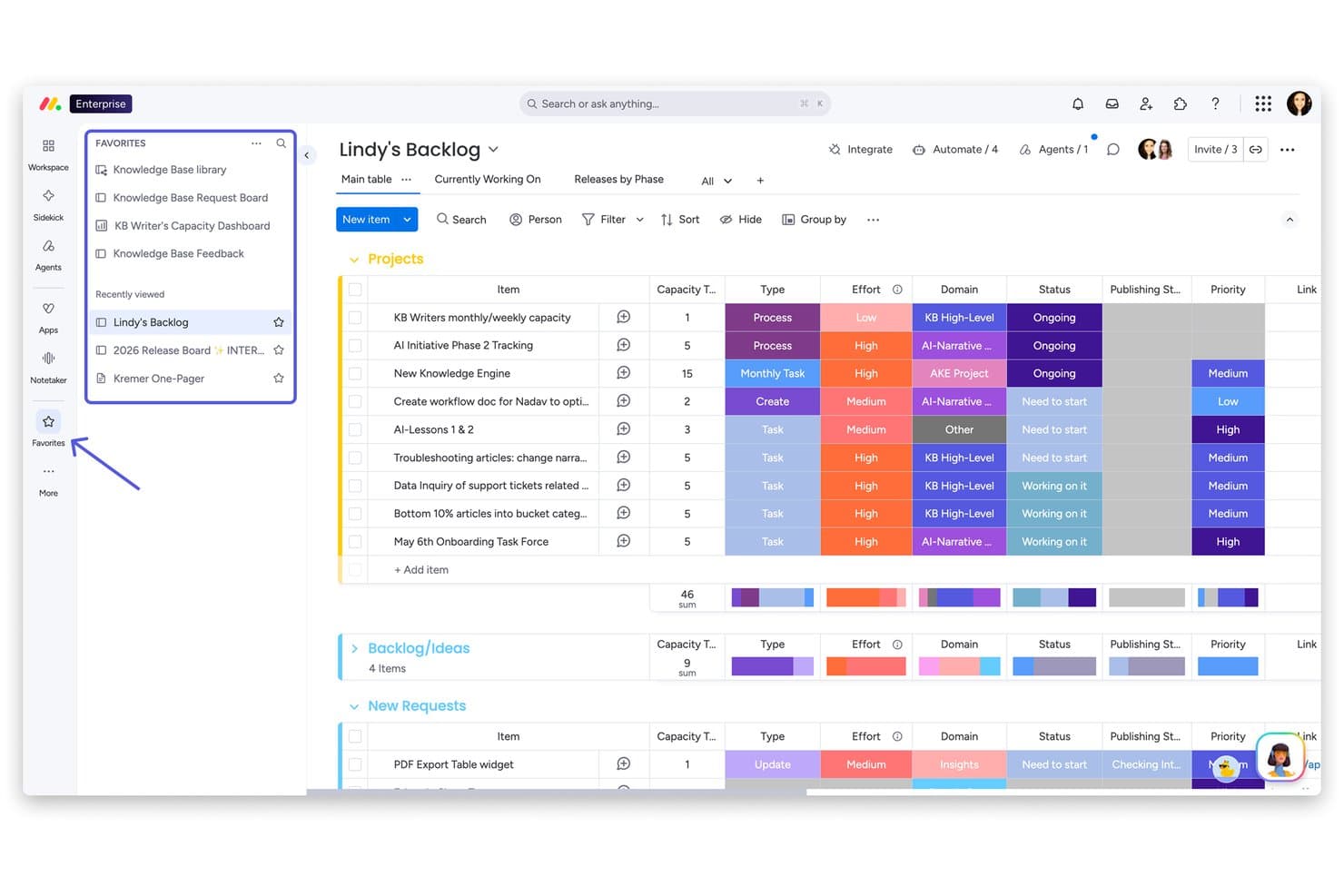
monday AI Workspace offers a project backlog board with grouped items, effort tracking, status columns, priority labels, and a favorites sidebar for quick navigation. monday AI Workspace is an AI-powered work management platform that combines project tracking, workflow automation, collaborative docs, and multi-view dashboards across boards built for cross-functional teams.
Who Is monday AI Workspace Best For?
It's a strong fit for SMB and mid-market finance teams that need to automate approvals, close workflows, and cross-functional reporting without relying on spreadsheets.
Why I Picked monday AI Workspace
monday AI Workspace earns its spot on my shortlist because of how its AI agents and AI workflow builder handle finance automation in ways Smartsheet simply doesn't match. I like that AI agents can autonomously route approval requests, update board statuses, and flag overdue close tasks without manual triggers. The AI workflow builder lets me set up conditional branching logic across multi-step processes, like cascading month-end sign-offs, without writing a single line of code.
monday AI Workspace Key Features
- Multi-view project dashboards: View projects in grid, Gantt, Kanban, timeline, and calendar modes for flexible finance project tracking.
- Granular permissions controls: Assign role-based, board-level permissions to manage who can view, edit, or approve sensitive financial data.
- Real-time collaborative docs: Create and update finance documentation and checklists directly inside the platform with live team collaboration.
- Native QuickBooks integration: Connect boards directly to QuickBooks to sync transactions and accounting data without third-party tools.
monday AI Workspace Integrations
monday AI Workspace offers native integrations with QuickBooks, Salesforce, HubSpot, Slack, Gmail, Google Drive, Microsoft Teams, OneDrive, Trello, Asana, and Zapier. An API is available for custom integrations.
Pros and Cons
Pros:
- Customizable approval chains for financial controls
- Multi-view boards for close and reporting cycles
- AI-powered workflow automation for finance processes
Cons:
- Audit logs unavailable on lowest plans
- Limited spreadsheet formula complexity vs Excel
Learn more about monday AI Workspace:
Alte alternative la Smartsheet
Iată câteva alternative suplimentare la Smartsheet care nu au ajuns pe lista mea scurtă, dar care merită totuși verificate:
- 11ClickUpBest for an all-in-one workspace
- 12WrikeBest for customizable workflows
- 13ProProfs ProjectBest for simple project management with time logging
- 14ScoroBest for all-in-one work management with built-in budgeting
Related Reviews
How I Evaluate Smartsheet Alternatives
I split my evaluation into baseline requirements—like grid views, workflow automation, and ERP integrations—and the differentiators that set one tool apart for finance teams.
Core Functionality (Table Stakes For This List)
When I'm selecting tools for my list, I rank each one on a scale from 0 (does not offer the functionality) to 5 (excels in this area) for each core functionality listed below. Then, I calculate the tool's total score into a percentage. Each tool needs to achieve a minimum total score of 65% to be considered for inclusion.
- Spreadsheet-Style Grid View: I look for a familiar grid interface with formulas, conditional formatting, and cross-sheet references so finance teams can transition from Excel.
- Workflow Automation: Automations for recurring tasks matter—think approval chains on budget requests, close-task reminders, or status updates triggered by due dates.
- Multi-View Project Tracking: I check for Gantt, Kanban, calendar, and dashboard views that let teams manage audit timelines or month-end close cycles their preferred way.
- Financial Data Integrations: Native connectors to platforms like QuickBooks, NetSuite, Xero, or Power BI show me a tool can fit into existing finance tech stacks.
- Reporting & Dashboards: I evaluate whether you can build custom dashboards with real-time roll-ups, variance tracking, and drill-downs instead of relying on static exports.
- Permissions & Audit Controls: Granular role-based access, cell-level locking, and version history are what I look for to confirm a tool can handle sensitive financial data.
Once I have a list of tools that meet this criteria, I consider what sets each platform apart.
Differentiating Factors (What Sets Vendors Apart)
Here's how I compare and contrast different vendors:
Standout Features
A strong formula engine makes a real difference. Tools with cross-sheet references and SUMIF logic let FP&A teams build rolling forecasts without exporting to Excel. I also evaluate approval workflows, since multi-tier sign-offs on journal entries or budget requests keep audit trails clean. AI-powered insights are increasingly worth considering too. Anomaly detection on spend data or auto-categorization of transactions can cut hours of manual review during close cycles.
Beyond Features
Compliance and security standards are where I start. Finance teams handling sensitive data need SOC 2 Type II certification and SOX-compliant audit trails at a minimum. Pricing structure matters too—I look for viewer/editor tier splits, since most finance workflows involve stakeholders who only need to review dashboards, not edit sheets. Scalability is another factor I weigh. A tool that handles a five-person accounting team's close checklist should also support multi-entity consolidation as the organization grows.
De ce să cauți o alternativă la Smartsheet?
Deși Smartsheet este o alegere bună pentru software-ul de gestionare a activității bazat pe cloud, există mai multe motive pentru care unii utilizatori caută soluții alternative. Este posibil să fii în căutarea unei alternative la Smartsheet deoarece…
- Ai nevoie de instrumente de automatizare sau de fluxuri de lucru mai avansate
- Echipa ta preferă funcții de colaborare bazate pe chat sau în timp real
- Îți dorești o vizualizare încorporată mai avansată a proiectelor, dincolo de vizualizările de tip grilă și Gantt
- Ai nevoie de integrări mai profunde cu software-uri specifice industriei
- Consideri că prețurile sau limitele de utilizatori ale Smartsheet sunt restrictive
- Ai nevoie de o soluție cu funcționalități mobile mai bune
Dacă oricare dintre aceste situații ți se pare familiară, ai ajuns în locul potrivit. Lista mea conține mai multe opțiuni de software pentru gestionarea activității bazat pe cloud, mai potrivite pentru echipele care se confruntă cu aceste provocări legate de Smartsheet și caută soluții alternative.
Funcțiile principale ale Smartsheet
Iată câteva dintre funcțiile principale ale Smartsheet, pentru a te ajuta să compari și să evaluezi ceea ce oferă soluțiile alternative:
- Vizualizări de proiect de tip grilă, Gantt, card și calendar
- Fluxuri de lucru automatizate și procese de aprobare
- Instrumente de gestionare și alocare a resurselor
- Colaborare și comentarii în timp real
- Fișiere atașate și partajarea documentelor
- Tablouri de bord și rapoarte personalizabile
- Formule la nivel de celulă și formatare condiționată
- Integrare cu Microsoft, Google și alte aplicații de afaceri
- Jurnale de activitate și piste de audit pentru conformitate
- Permisiuni bazate pe roluri și controale ale accesului utilizatorilor