

Software-ul pentru creanțe vă ajută să automatizați, să gestionați și să monitorizați procesele de facturare, colectare și alocare a încasărilor. Dacă vă ocupați de finanțele unei companii în creștere, găsirea instrumentului potrivit poate face diferența dintre problemele legate de fluxul de numerar și claritatea financiară.
Acest ghid trece dincolo de funcțiile generice și se concentrează pe ceea ce contează cel mai mult pentru directorii financiari — automatizare, vizibilitate în timp real, conformitate și integrarea cu stiva tehnologică actuală. Veți vedea ce soluții sunt cele mai potrivite pentru susținerea creșterii strategice și gestionarea realităților dificile ale administrării creanțelor, astfel încât să puteți alege cu încredere.
Why Trust Our Software Recommendations
6,700+
Reviews
20
Industry experts
16+
Evaluation factors
14
Years
Our team has been testing and reviewing software since 2012. As finance leaders ourselves, we know how difficult—and important—it is to choose the right software.
For this guide, we evaluated tools using hands-on testing and independent research, scoring tools using our selection criteria.
Our reviews reflect our human editorial judgment, not a sales pitch.
Tabel comparativ pentru software-ul de gestionare a creanțelor
Acest tabel comparativ sintetizează detaliile privind prețurile pentru selecțiile mele de top de software pentru creanțe:
Sorted by: Default
| Tool | Starting Price | Website | |
|---|---|---|---|
Best for real-time cash flow forecasting | 4.7 out of 5 | Pricing upon request Free demo available | Website |
Best for fast AR automation deployment | Not rated | Pricing upon request Free demo available | Website |
Best for AI-based order-to-cash process automation | 3.5 out of 5 | Pricing upon request Free demo available | Website |
Best for enterprise cash management integration | Not rated | Pricing upon request Free demo available | Website |
Best for mid-market dunning process automation | Not rated | Pricing upon request Free demo available | Website |
Best for B2B invoice-to-cash digitization | 4.4 out of 5 | Pricing upon request Free demo available | Website |
Best for global e-invoicing compliance | 4.5 out of 5 | Pricing upon request Free demo available | Website |
Best for AI-powered payment matching automation | Not rated | Pricing upon request Free demo available | Website |
Best for collaborative AR with customer portals | Not rated | Pricing upon request Free demo available | Website |
Best for ERP-integrated AR automation | Not rated | Pricing upon request Free demo available | Website |


Recenzii ale software-ului pentru creanțe
Mai jos sunt rezumatele mele detaliate ale celor mai bune soluții software pentru creanțe care au ajuns pe lista mea scurtă. Recenziile mele oferă o analiză detaliată a funcțiilor, integrărilor și celor mai bune cazuri de utilizare pentru fiecare platformă, pentru a vă ajuta să o găsiți pe cea mai potrivită pentru dumneavoastră.
 Best for real-time cash flow forecasting
- Free demo available
- Pricing upon request
Visit WebsiteCustomer Rating:4.7/5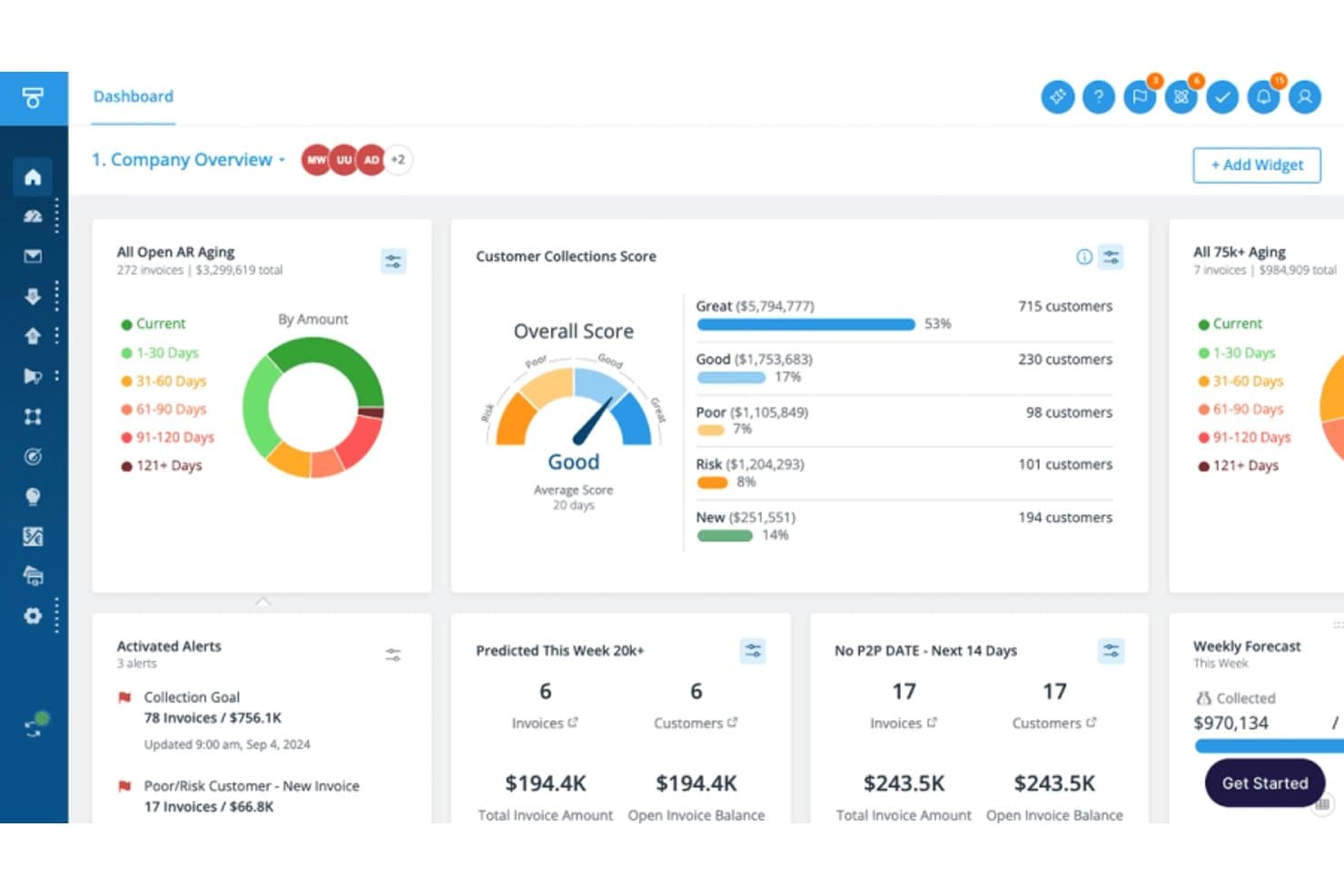
Tesorio tracks AR aging, collections scores, and weekly forecasts. Tesorio is an AI-driven accounts receivable platform that combines collections automation, cash application, automated dunning, and ML-powered cash flow forecasting into a connected financial operations system.
Who Is Tesorio Best For?
Tesorio is a strong fit for mid-market and enterprise finance teams where controllers and AR managers need real-time cash visibility alongside automated collections at scale.
Why I Picked Tesorio
Tesorio earns its spot on my shortlist because its ML-powered AR forecast is built on live ERP data, not stale batch exports. I like that the 13-week cash forecast pulls directly from real-time collections activity, so when my team logs a payment promise or closes out a payment match, the forecast reflects it immediately. That tight connection between collections workflows and cash forecasting is what separates Tesorio from tools that treat those two problems independently.
Tesorio Key Features
- Collections Agent: Drafts personalized email follow-ups and manages payment promise tracking from customer replies.
- Supplier portal integration: Connects directly with Coupa and Ariba for invoice submission and remittance download.
- Automated dunning engine: Runs multi-step, rule-based reminder campaigns with escalation and segmentation.
- ERP bidirectional sync: Writes notes, payments, and actions directly back to NetSuite, Sage Intacct, QuickBooks, and more.
Tesorio Integrations
Tesorio offers native integrations with NetSuite, Sage Intacct, QuickBooks, Workday, Zuora, Salesforce, Coupa, and Ariba, and provides an API for custom integrations.
Pros and Cons
Pros:
- Collector workload prioritization built into the platform
- ML-driven payment prediction flags at-risk accounts
- Live cash flow forecast tied to AR activity
Cons:
- Requires custom flat-file file transfers for non-standard ERP connections
- Limits automated payment matching capabilities
Learn more about Tesorio:
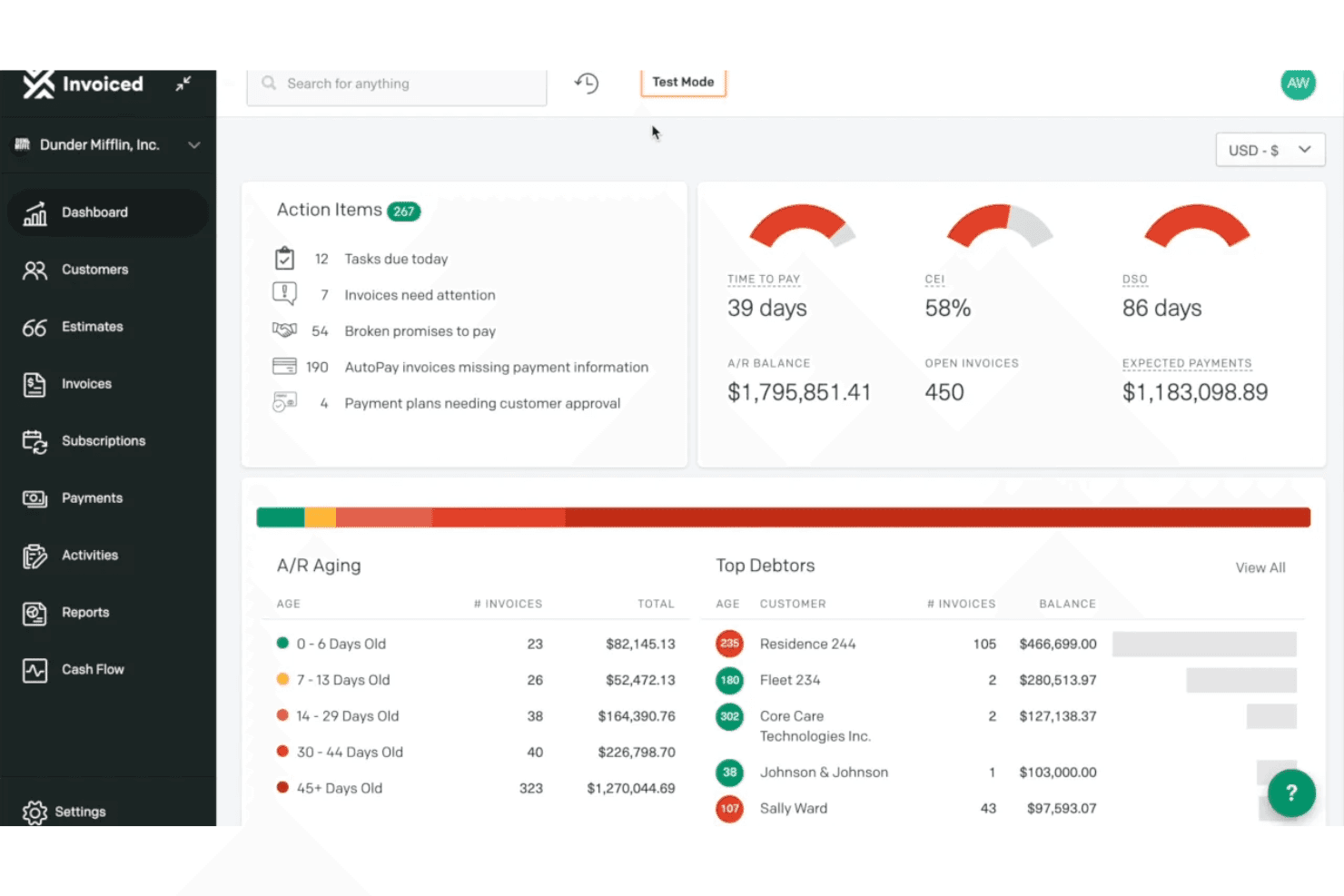
Invoiced provides an accounts receivable dashboard with action items, A/R aging breakdown, top debtors, and key metrics like DSO and CEI. Invoiced is an AI-native accounts receivable platform that covers invoice automation, cash application, collections workflows, payment processing, and AR analytics for B2B finance teams.
Who Is Invoiced Best For?
It's a strong fit for mid-market finance teams that need to scale AR transaction volume without growing headcount.
Why I Picked Invoiced
I've included Invoiced in my top picks because its multi-agent AI architecture gets AR automation running faster than most platforms I've tested. Smart Chasing adapts dunning cadences to each customer's actual payment history rather than fixed schedules, and Cashmatch AI handles cash application even when remittance details are missing or a single wire covers multiple invoices. Neither feature requires heavy configuration to go live, which is the core of its fast deployment advantage.
Invoiced Key Features
- Customer portal: Customers can view invoices, download statements, dispute charges, and make payments online.
- Subscription billing: Automate recurring invoice schedules, billing cycles, and renewal management for subscription customers.
- Integration studio: Connect Invoiced to 1,000+ apps and ERP systems with no-code workflows and real-time sync.
- Custom workflow automation: Build tailored internal processes for tasks like reminder scheduling and invoice status changes using an automation studio.
Invoiced Integrations
Invoiced offers native integrations with NetSuite, Sage Intacct, Microsoft Dynamics 365, QuickBooks, Xero, Workday, and Salesforce, and provides an API for custom integrations.
Pros and Cons
Pros:
- Fast deployment compared to enterprise AR platforms
- Collections prioritization adapts to payment behavior
- AI cash application handles unstructured remittance data
Cons:
- Enforces strict user and invoice monthly plan quotas
- Limits phone support access to higher subscription tiers
Learn more about Invoiced: Best for AI-based order-to-cash process automation
- Free demo available
- Pricing upon request
Visit WebsiteCustomer Rating:3.5/5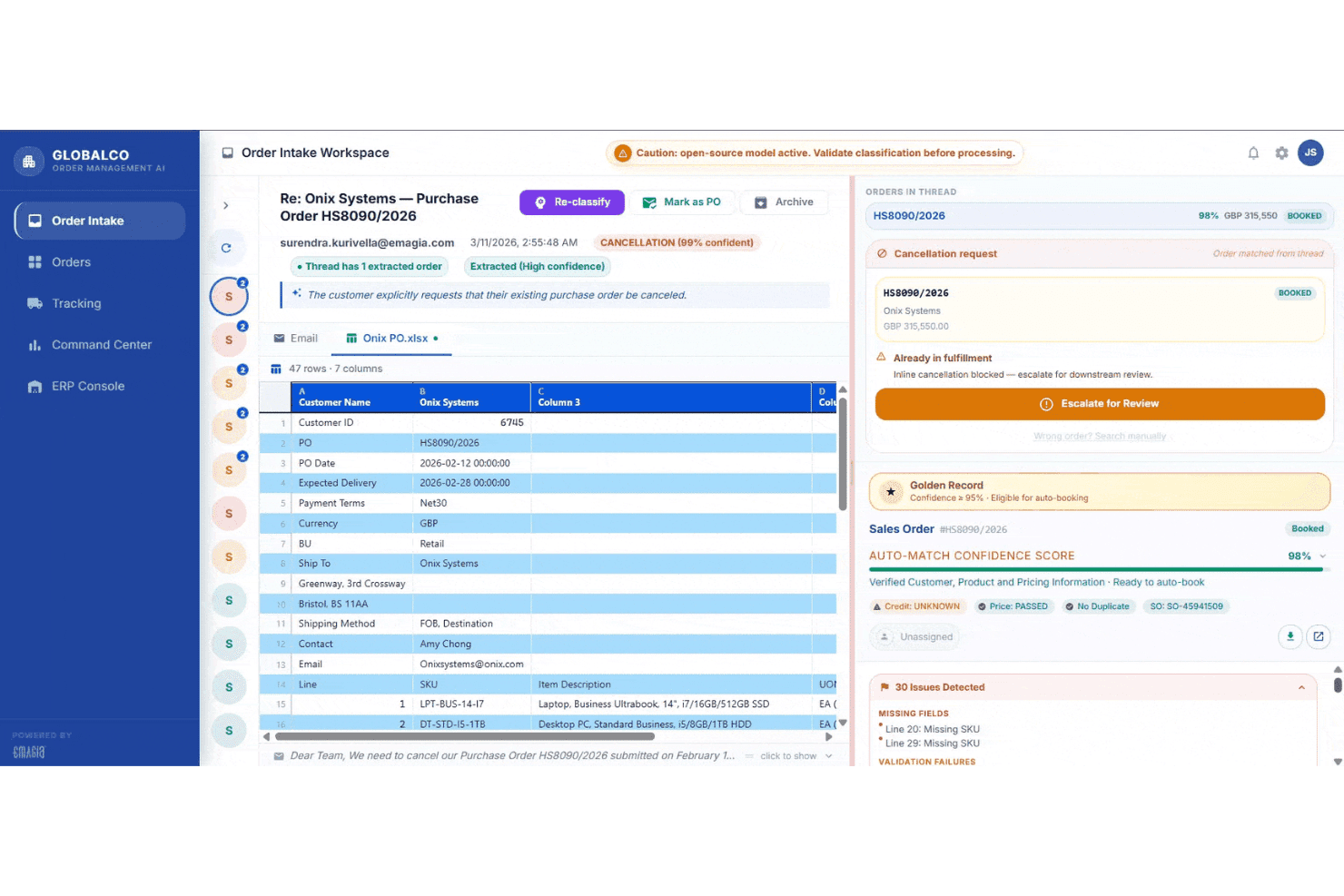
Emagia's Order Intake Workspace displays AI-powered purchase order classification, cancellation detection, and auto-match confidence scoring for streamlined order-to-cash processing. Emagia is an AI-native order-to-cash platform that covers credit management, invoicing, cash application, collections, deductions management, and AR analytics through a suite of autonomous AI agents.
Who Is Emagia Best For?
Emagia is built for mid-to-large enterprises managing high-volume, multi-ERP receivables operations across multiple geographies and currencies.
Why I Picked Emagia
Emagia earns its spot as one of the best on my shortlist because no other platform I've evaluated pushes O2C automation this far end-to-end. I'm particularly impressed by Gia Collect, which conducts AI-powered outbound collection calls autonomously, complete with real-time sentiment analysis and promise-to-pay capture, without any human agent involvement. I also like the Cash App Agent's 95%-plus straight-through posting rate, which means my team isn't manually reconciling remittance files every day.
Emagia Key Features
- Customer self-service portal: Lets customers view invoices, download statements, dispute charges, and make payments in a secure online portal.
- Automated dunning workflows: Supports multi-step reminder sequences and escalations tailored by customer segment and invoice age.
- Deductions and dispute management: Centralizes tracking and resolution of short-pays and disputes with documentation support.
- ERP connectivity: Offers native integration with SAP, Oracle, NetSuite, JD Edwards, PeopleSoft, Microsoft Dynamics, and more.
Emagia Integrations
Emagia offers native integrations with SAP, Oracle, NetSuite, JD Edwards, PeopleSoft, Microsoft Dynamics, Sage, and Workday, and also provides an API for custom integrations.
Pros and Cons
Pros:
- Covers full order-to-cash cycle in one platform
- Cash application matching rates exceed 95% straight-through
- Autonomous AI agents handle collections outreach end-to-end
Cons:
- Configuration updates frequently depend on vendor support teams
- Third-party AP portal invoice delivery lacks native support
Learn more about Emagia: Best for enterprise cash management integration
- Free demo available
- Pricing upon request
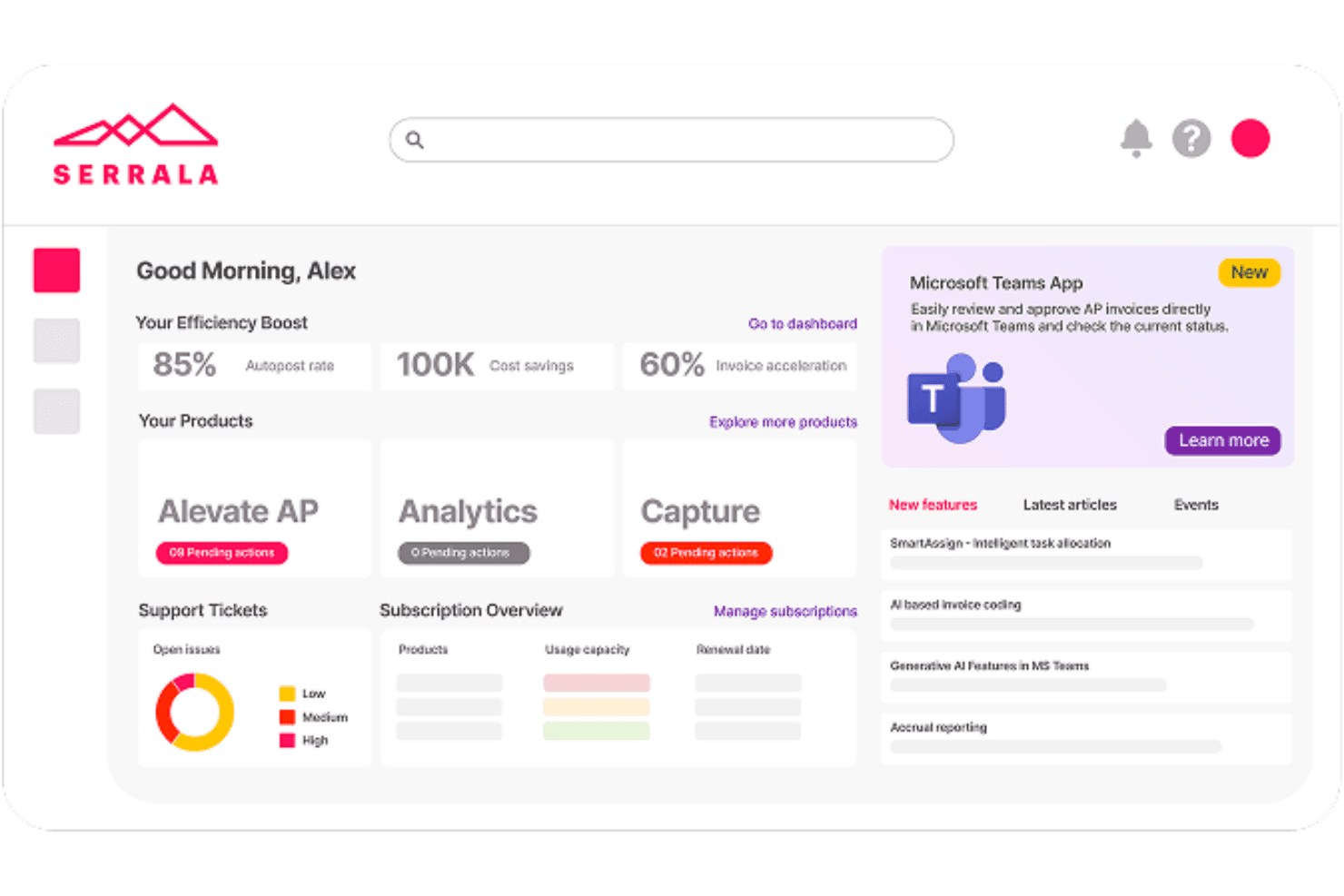
Serrala centralizes AP automation, analytics, and invoice tracking in one dashboard. Serrala is an enterprise order-to-cash automation platform that covers cash application, collections management, credit and risk management, bill presentment, and payment processing across SAP and other major ERP environments.
Who Is Serrala Best For?
Serrala is a strong fit for large enterprises running SAP or complex multi-ERP environments that need end-to-end AR automation at scale.
Why I Picked Serrala
Serrala earns its spot as one of the best on my shortlist because its cash application engine automates up to 99% of payment matching using AI that improves with every transaction. What I particularly like is how Serrala connects AR directly to treasury and payments, giving my team real-time cash visibility across the full O2C cycle in one place. The lockbox integration and remittance parsing mean we're not manually chasing unidentified payments at month-end.
Serrala Key Features
- Invoice automation across multiple channels: Generate and deliver electronic invoices via email, customer portal, or EDI with real-time tracking.
- Automated dunning workflows: Configure and trigger multi-step payment reminders based on customer risk or invoice status.
- Customer self-service portal: Allow customers to view statements, download invoices, dispute charges, and pay online.
- ERP integration flexibility: Sync customer, invoice, and payment data with SAP, Oracle, Microsoft Dynamics, and other leading ERPs in real time.
Serrala Integrations
Serrala offers native integrations with SAP, Oracle, Microsoft Dynamics, NetSuite, Infor, Sage, Epicor, and more, and provides an API for custom integrations.
Pros and Cons
Pros:
- Collections prioritization adapts to customer payment behavior
- Deep SAP integration supports large-scale AR operations
- Ensures global mandate compliance for e-invoicing
Cons:
- Depends on separate licenses for full analytics
- Demands distinct modules for complete O2C coverage
Learn more about Serrala: Best for mid-market dunning process automation
- Free demo available
- Pricing upon request
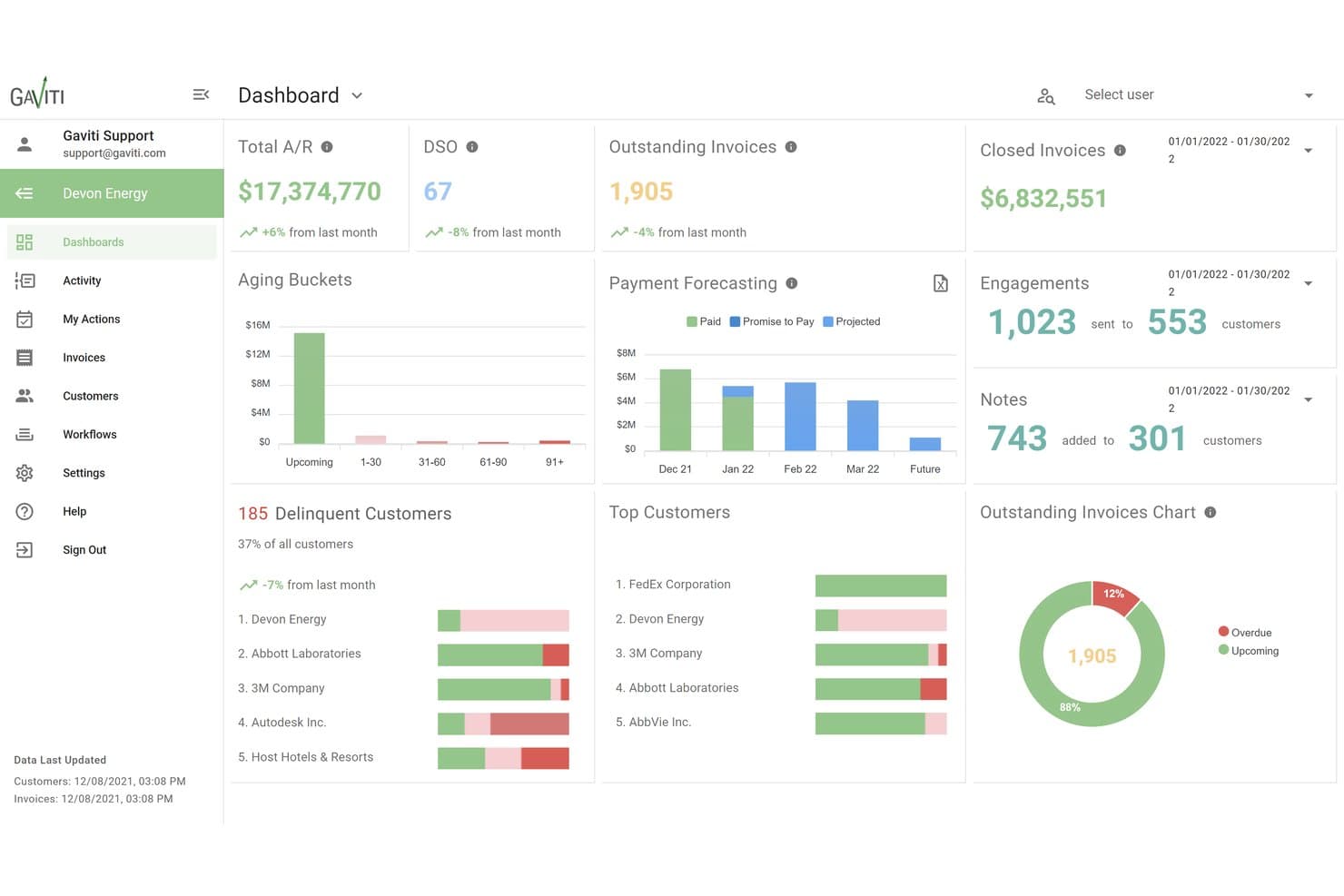
Gaviti centralizes A/R metrics like DSO, aging, and forecasting in one dashboard. Gaviti is an AI-powered accounts receivable platform that combines dunning automation, cash application, credit management, dispute tracking, and a B2B payer portal into a single invoice-to-cash workflow.
Who Is Gaviti Best For?
Gaviti is a strong fit for mid-market B2B finance teams managing high invoice volumes who need structured, automated collections without the complexity of enterprise AR platforms.
Why I Picked Gaviti
Gaviti earns its spot on my shortlist because its dunning engine uses AI to optimize follow-up timing per customer, rather than sending the same reminder on day 30 to everyone. I like that I can build no-code workflow variations for different customer segments, so a high-value account gets a different escalation path than a habitual late payer. The built-in B2B payer portal with zero-fee ACH gives customers a direct path to pay from within the dunning flow itself, which keeps the entire cycle contained in one place.
Gaviti Key Features
- AI assistant for AR teams: Chat-enabled AI helps automate tasks, generate workflows, and optimize communications internally.
- Real-time AR aging dashboards: Monitor invoice aging, DSO metrics, and collector activity with live, customizable dashboards.
- Credit risk management tools: Set enforceable credit limits, track credit utilization, and receive automated alerts of changes in customer credit status.
- Dispute management module: Track, log, and resolve customer payment disputes with full activity and payment documentation in one place.
Gaviti Integrations
Gaviti offers over 20 native integrations with ERP and accounting systems, including NetSuite, SAP, SAP Business One, and FreshBooks. An API is available for custom integrations.
Pros and Cons
Pros:
- Self-service payer portal with ACH payment support
- AI-optimized follow-up timing per account
- Dunning workflows configurable by customer segment
Cons:
- Lacks native out-of-the-box AP portal payment submission features
- Restricts premium automation features to Pro and Expert tiers
Learn more about Gaviti: Best for B2B invoice-to-cash digitization
- Free demo available
- Pricing upon request
Visit WebsiteCustomer Rating:4.4/5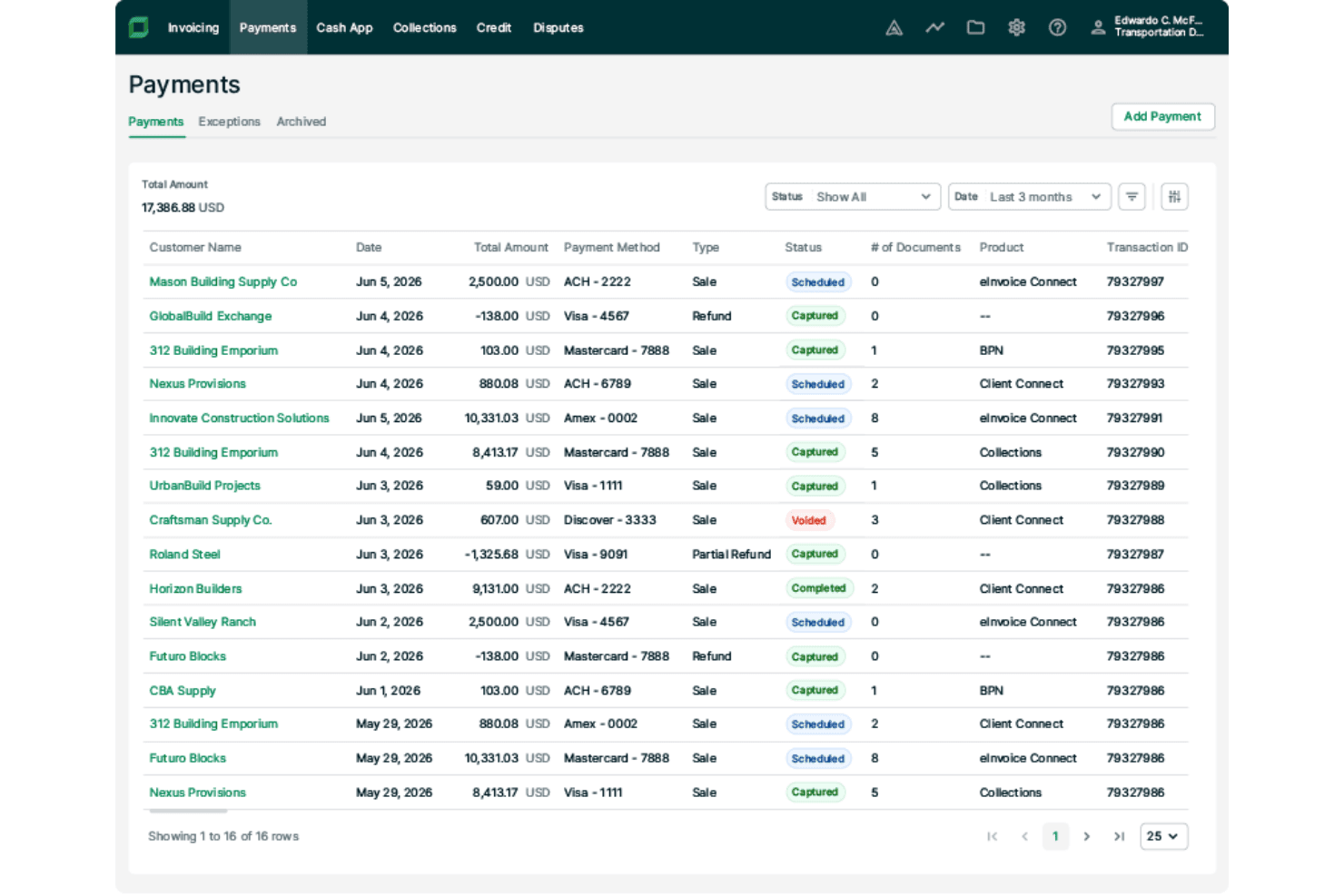
Billtrust lets users track and manage payment transactions in one place. Billtrust is a B2B accounts receivable platform that covers the full invoice-to-cash cycle, including multi-channel invoicing, payment processing, AI-driven cash application, credit management, and collections workflow automation.
Who Is Billtrust Best For?
It's a strong fit for mid-market and enterprise B2B companies in manufacturing, distribution, and business services that handle high invoice volumes across multiple customer payment channels.
Why I Picked Billtrust
Billtrust earns its spot as one of the best on my shortlist because no other AR platform matches its depth of B2B invoice delivery infrastructure. I particularly like its connections to 260+ AP portals, including Ariba, Coupa, and Tungsten, which means invoices reach buyers through the exact channels they already use. Its ML-driven cash application consistently hits 95%+ straight-through processing rates, which cuts the manual matching work my team would otherwise spend hours on each week.
Billtrust Key Features
- Customer self-service portal: Lets customers view invoices, download statements, dispute charges, and pay online via multiple payment methods.
- Automated dunning workflows: Supports configurable reminder sequences with escalation rules based on customer segment and invoice behavior.
- ERP and accounting system integration: Offers pre-built, bidirectional connectors for NetSuite, SAP, Oracle, Microsoft Dynamics, and more.
- Multi-currency and entity support: Handles invoicing and payments for multiple currencies and subsidiaries within a single platform.
Billtrust Integrations
Billtrust offers native integrations with NetSuite, Oracle, SAP, Microsoft Dynamics 365, Coupa, Ariba, and Basware, and provides an API for custom integrations.
Pros and Cons
Pros:
- Deductions and dispute workflows are fully centralized
- Automates credit scoring decisions and personalized collections
- ML cash application hits 95%+ auto-match rates
Cons:
- Lacks out-of-the-box self-service onboarding for small businesses
- Requires separate transaction and processing fees
Learn more about Billtrust: Best for global e-invoicing compliance
- Free demo available
- Pricing upon request
Visit WebsiteCustomer Rating:4.5/5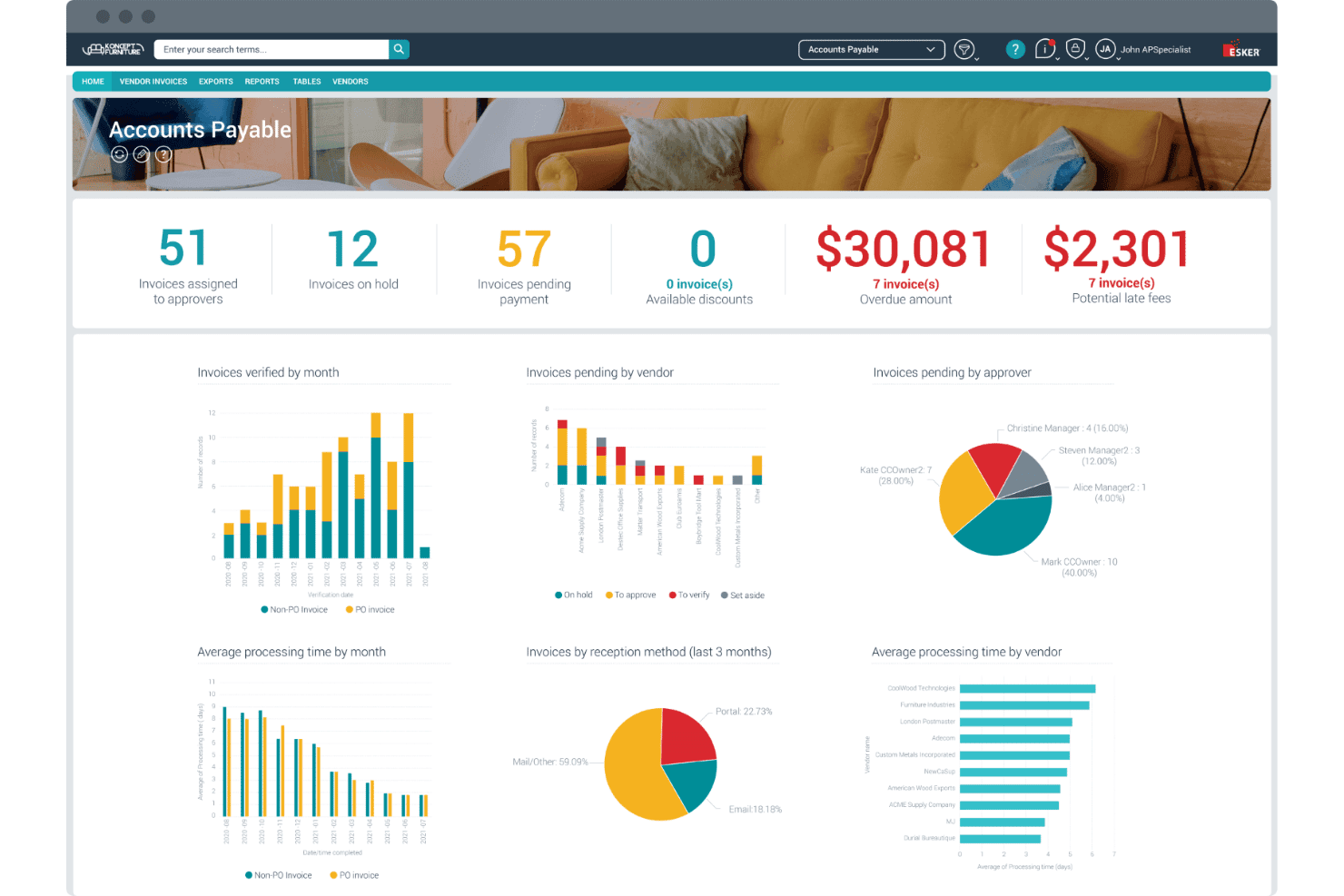
Esker's AP dashboard centralizes invoice tracking, approvals, and overdue amounts. Esker is a cloud-based accounts receivable platform with modular, AI-driven tools spanning credit management, invoice delivery, cash application, collections, and deductions management — built to handle cross-border invoicing across 60+ countries.
Who Is Esker Best For?
Esker suits mid-market and enterprise finance teams operating across multiple countries with complex cross-border invoicing and regulatory compliance requirements.
Why I Picked Esker
Esker earns its spot as one of the best on my shortlist because of how it handles cross-border e-invoicing compliance at scale. The Invoice Delivery module supports regulation-ready compliance across 60+ countries, covering mandates like Peppol, EU ViDA, and LATAM CFDI without requiring separate tools or manual workarounds. I also like that Esker Synergy AI handles cash application with AI-driven payment matching and remittance parsing built directly into the same platform.
Esker Key Features
- Configurable dunning workflows: Set up custom, automated reminder sequences and escalation rules for overdue accounts.
- Customer self-service portal: Give customers direct access to invoices, statements, and online payment options in 40+ countries.
- Real-time AR analytics dashboards: Track AR aging, DSO, collection performance, and dispute status with customizable reports.
- Multi-ERP integration suite: Connect bidirectionally to SAP, Oracle, Microsoft Dynamics, Sage, and over 70 other ERP platforms.
Esker Integrations
Esker offers native integrations with SAP, Oracle, Microsoft Dynamics 365, NetSuite, Sage, QAD, Epicor, Infor, Salesforce, and Coupa. An API is also available for custom integrations.
Pros and Cons
Pros:
- Resolves trade and non-trade deductions via AI workflows
- AI-driven cash application with high matching rates
- E-invoicing compliance across 60+ countries
Cons:
- Non-integrated ERPs require custom flat-file file transfers
- Split into five separate modules for full capability
Learn more about Esker: Best for AI-powered payment matching automation
- Free demo available
- Pricing upon request
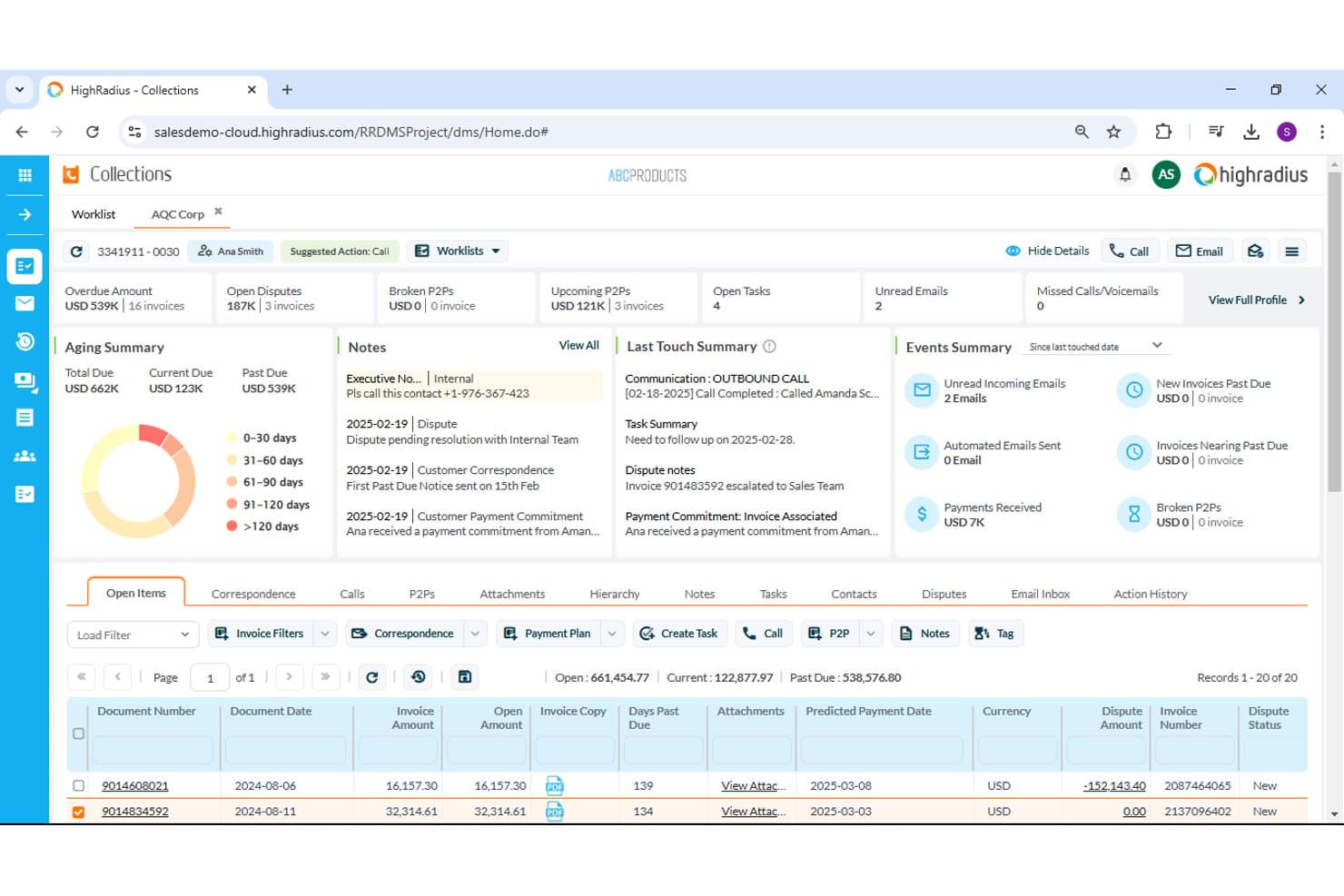
HighRadius offers a collections dashboard with aging and dispute tracking. HighRadius is an AI-native accounts receivable platform that covers cash application, collections management, credit decisioning, deductions workflows, and e-invoicing across a single integrated suite.
Who Is HighRadius Best For?
HighRadius is a strong fit for enterprise and upper-mid-market finance teams managing high invoice volumes across multiple business units or ERP environments.
Why I Picked HighRadius
I picked HighRadius as one of the best because its AI-driven cash application module delivers up to 95% no-touch posting rates across checks, ACH, and wires. The system parses remittance data from multiple formats automatically, so my team isn't manually chasing down payment details. It also includes a bank reconciliation add-in that ties matched payments back to open invoices without any manual intervention required.
HighRadius Key Features
- Automated dunning workflows: Set up multi-sequence reminders and dynamic escalation rules for overdue accounts.
- Customer self-service portal: Let customers view invoices, pay online, and dispute charges using a branded web portal.
- Deductions and dispute management: Centralize short-pay research, documentation, coding, and resolution routing.
- Predictive collections analytics: Forecast payment patterns and prioritize worklists using customer history and behavioral insights.
HighRadius Integrations
HighRadius offers native integrations with SAP, Oracle, NetSuite, Microsoft Dynamics, Sage Intacct, and Workday, and provides an API for custom integrations.
Pros and Cons
Pros:
- Self-service portal reduces inbound customer inquiries
- Predictive collections flags high-risk accounts automatically
- AI cash application hits near-perfect match rates
Cons:
- Reporting customization requires vendor support
- Long implementation timelines for enterprise deployments
Learn more about HighRadius: Best for collaborative AR with customer portals
- Free demo available
- Pricing upon request
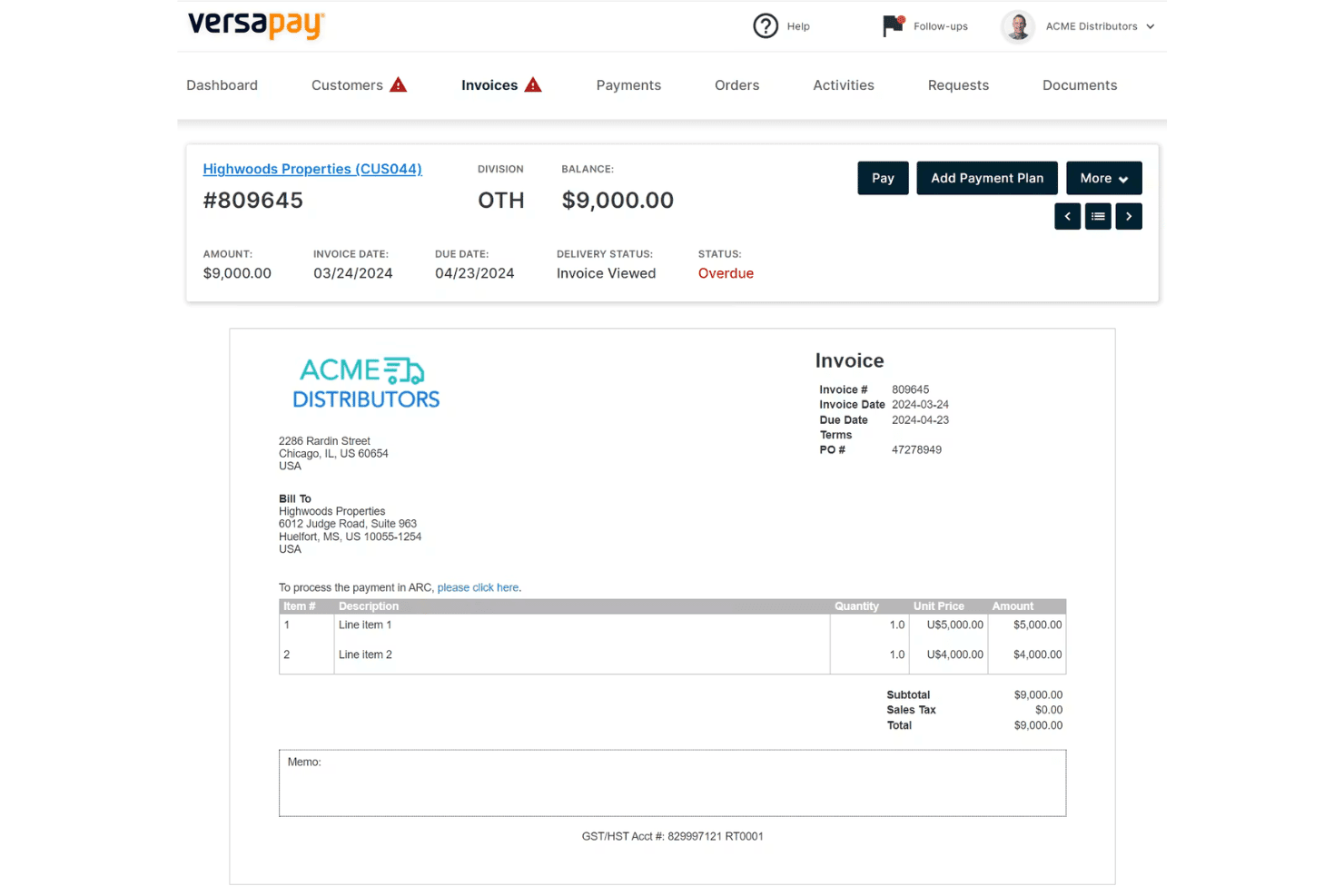
Versapay displays a detailed invoice view with payment options, line items, and overdue status tracking for accounts receivable management. Versapay is a collaborative accounts receivable platform that automates invoice delivery, payment collection, cash application, and collections management through a shared customer-facing portal and native ERP integrations.
Who Is Versapay Best For?
Versapay is a strong fit for mid-market B2B companies whose AR teams need to manage high invoice volumes across a large customer base.
Why I Picked Versapay
Versapay earns its spot on my shortlist because of how it handles buyer-seller collaboration directly inside the AR workflow. I love that customers can log into a shared portal to view invoices, flag disputes, and exchange messages with my team, all without a single email chain. Versapay's Collections Automation module also predicts which accounts are at risk of going delinquent, so my team can prioritize outreach before a payment is missed rather than chasing it after the fact.
Versapay Key Features
- AI-powered cash application: Uses machine learning to match payments to invoices and parse remittance data across formats.
- Automated dunning workflows: Allows you to configure multi-stage reminder sequences triggered by invoice aging and customer payment habits.
- Branded customer self-service portal: Lets customers view invoices, pay online, dispute charges, and download statements in one place.
- Native ERP integrations: Supports real-time bidirectional data sync with NetSuite, Sage Intacct, and Microsoft Dynamics 365.
Versapay Integrations
Versapay offers native integrations with NetSuite, Sage Intacct, and Microsoft Dynamics 365. An API is available for custom integrations.
Pros and Cons
Pros:
- ML-driven cash application handles multiple remittance formats
- Customer portal reduces inbound payment status inquiries
- Dispute resolution happens directly within invoices
Cons:
- Requires manual workflow setup for custom collections triggers
- Imposes platform processing fees with standard acquiring charges
Learn more about Versapay: Best for ERP-integrated AR automation
- Free demo available
- Pricing upon request
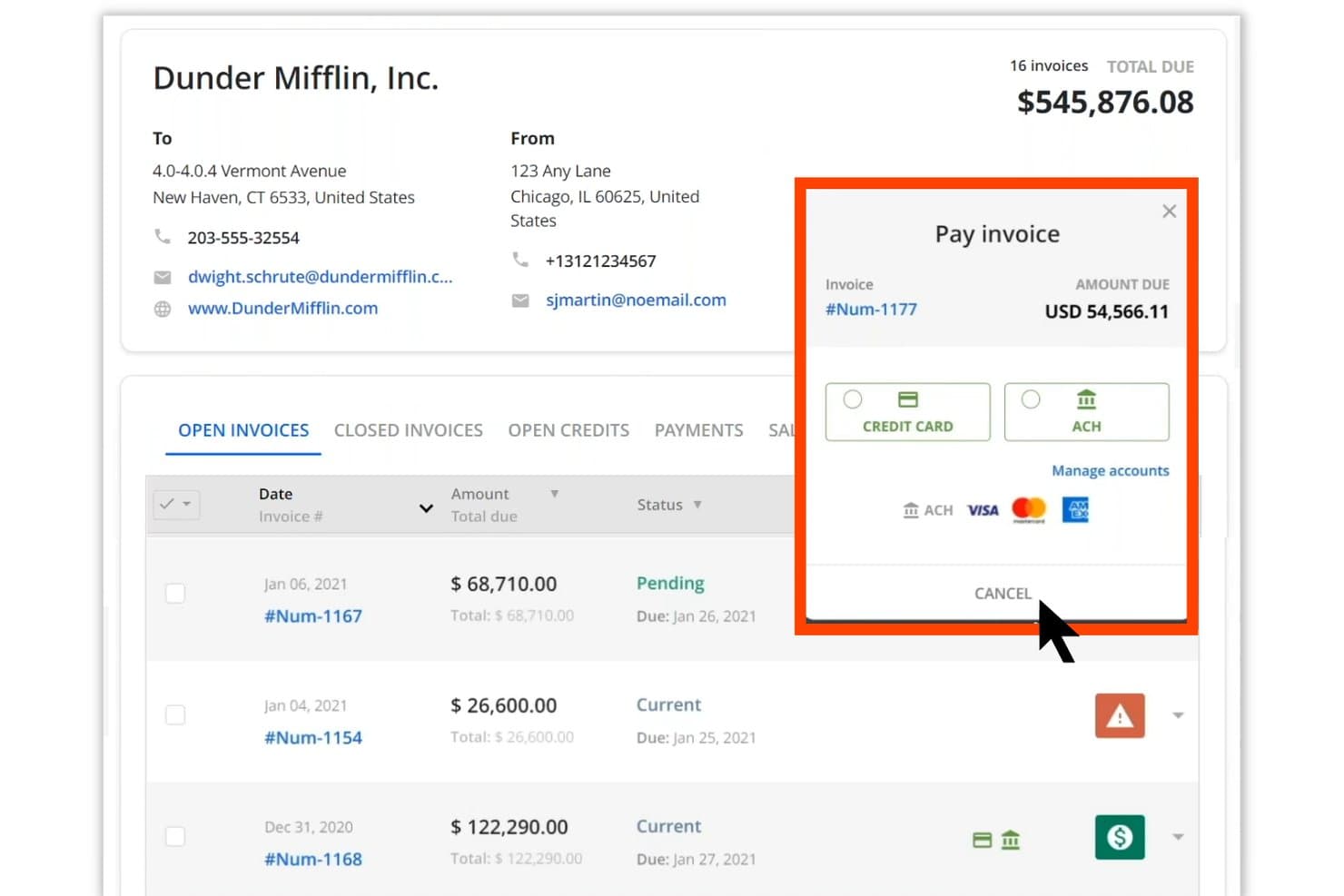
Quadient AR Automation offers a pay invoice modal with ACH and credit card options. Quadient AR Automation is a B2B accounts receivable platform that covers credit management, collections workflows, dispute tracking, cash application, and AI-driven payment forecasting within a single credit-to-cash system.
Who Is Quadient AR Automation Best For?
It's a strong fit for mid-market and enterprise B2B finance teams running complex ERP environments who need a unified system across collections, cash application, and credit management.
Why I Picked Quadient AR Automation
Quadient AR Automation earns its spot on my shortlist because of how deeply it connects to ERP systems. It ships with pre-built, bidirectional connectors for 10+ platforms, including NetSuite, SAP, Microsoft Dynamics, and Acumatica, so customer records, invoice data, and payment status stay in sync without manual exports. I also rely on the AI-driven cash forecasting module, which pulls directly from that live ERP data to project incoming collections with up to 94% accuracy.
Quadient AR Automation Key Features
- Customer self-service payment portal: Lets customers view invoices, download statements, and pay online using preferred payment methods.
- Automated dunning workflows: Enables customizable, multi-stage sequences for reminders and escalations tied to invoice status or customer segment.
- Dispute and deductions management: Provides centralized tools to log, research, and resolve invoice disputes or short pays with documentation trails.
- Real-time AR aging dashboards: Displays aging buckets, DSO metrics, and payment trends with live data for cash flow visibility.
Quadient AR Automation Integrations
Quadient AR Automation has native integrations with NetSuite, Sage Intacct, Sage X3, Sage 300, SAP, SAP Business One, Microsoft Dynamics, Acumatica, QuickBooks, Xero, Salesforce, and Zuora. An API is also available for custom integrations.
Pros and Cons
Pros:
- Dispute resolution centralizes documentation and approvals
- Provides self-service customer portal with payment options
- AI cash application handles complex remittance formats
Cons:
- Limits advanced BI reporting module to tiers
- Requires additional setup for custom ERP fields
Learn more about Quadient AR Automation:
Alte soluții software pentru creanțe
Iată câteva opțiuni suplimentare de software pentru creanțe care nu au ajuns pe lista mea scurtă, dar care merită totuși analizate:
- 11SidetradeBest for predictive collections using analytics
- 12BlackLine Invoice-to-CashBest for finance-first cash application workflows
- 13ChaserBest for automated follow-up scheduling
- 14UpflowBest for cash collection team collaboration
- 15Paystand Best for no-fee digital payment acceptance
- 16KollenoBest for centralized communication and payments
- 17GrowfinBest for unified workflow management and analytics
- 18CorcentricBest for B2B transaction processing compliance
- 19BILL ARBest for integrated invoicing and payment tracking
- 20Centime AR AutomationBest for AR, AP, and cash flow in one platform
How I Evaluate Accounts Receivable Software
When I evaluate AR software, I look for a baseline of core capabilities—cash application, dunning, ERP integration—then assess the differentiators that make one platform the right fit.
Core Functionality (Table Stakes For This List)
When I'm selecting tools for my list, I rank each one on a scale from 0 (does not offer the functionality) to 5 (excels in this area) for each core functionality listed below. I then calculate the tool's total score into a percentage, using 65% as a benchmark to help assess its overall fit for the list.
- Invoice Automation: I look for multi-channel delivery options—email, portal, EDI—plus multi-currency support for teams billing customers across regions.
- Payment Processing: The platform should accept ACH, card, wire, and check payments with gateway integration so customers can pay how they prefer.
- Cash Application: Matching payments to open invoices manually is a grind. I evaluate how well each tool auto-matches using remittance data and AI.
- Collections Management: Automated dunning sequences, overdue account prioritization, and dispute tracking help teams focus on high-risk balances first.
- AR Aging & Reporting: Real-time aging reports and DSO dashboards are table stakes. I check for drill-down capability and predictive cash forecasting.
- ERP/Accounting Integration: Bidirectional sync with systems like NetSuite, SAP, or Microsoft Dynamics keeps invoice and payment data aligned with the GL.
Once I have a list of tools that meet the criteria, I consider what sets each platform apart.
Differentiating Factors (What Sets Vendors Apart)
Here's how I compare and contrast different vendors:
Standout Features
AI-powered cash application is a major differentiator. I look for platforms that auto-match payments across lockbox files, ACH, and emailed remittances—not just simple one-to-one matching. Predictive collections analytics also separates top-tier tools from the pack, giving collectors prioritized worklists based on actual payment behavior rather than static aging buckets. Customer self-service portals matter too, especially when your buyers want to pull invoices, raise disputes, and pay without calling your AR team.
Beyond Features
Implementation timelines vary widely—some platforms deploy in weeks with self-serve onboarding, while enterprise tools can take months and require dedicated project managers for data migration. I also evaluate pricing models closely, since some vendors charge by invoice volume and others by user seats or entities, which changes the math fast as you scale. Compliance readiness matters too. I check for SOC 1 and SOC 2 Type II certifications, audit trails, and role-based access controls that support segregation of duties during external audits.
Cum să alegeți software-ul pentru creanțe
Încercați să vă asigurați că următoarea soluție pentru creanțe accelerează efectiv fluxul de numerar, simplifică reconcilierea și răspunde nevoilor dumneavoastră specifice de facturare?
| Dacă prioritatea dumneavoastră este... | Căutați... |
|---|---|
| Dacă prioritatea dumneavoastră este...Automatizarea transmiterii facturilor pe mai multe canale | Căutați...Suport nativ pentru e-mail, EDI și portaluri pentru clienți |
| Dacă prioritatea dumneavoastră este...Reducerea volumului de muncă manuală pentru alocarea încasărilor | Căutați...Potrivirea plăților bazată pe inteligență artificială și capturarea detaliilor remiterilor |
| Dacă prioritatea dumneavoastră este...Gestionarea colectării creanțelor pentru entități globale | Căutați...Notificări de plată în mai multe valute și instrumente de conformitate regională |
| Dacă prioritatea dumneavoastră este...Previzionarea fluxului de numerar cu încredere | Căutați...Îmbătrânirea creanțelor în timp real, urmărirea DSO și analize predictive |
| Dacă prioritatea dumneavoastră este...Integrarea strânsă cu ERP-ul sau registrul general | Căutați...Sincronizare bidirecțională preconfigurată cu platforma dumneavoastră de contabilitate |
Cum să vă evaluați lista scurtă
- Testați funcțiile portalului: Rugați un membru al echipei să efectueze o plată de test și să rezolve o sarcină de contestare în portalul de autoservire pentru clienți în termen de 24 de ore.
- Validați afirmațiile privind integrarea: Solicitați o demonstrație a fluxului de date dintr-un scenariu real, care să arate sincronizarea facturilor și plăților între instrumentul pentru creanțe și ERP-ul dumneavoastră, utilizând date reale sau anonimizate.
- Confirmați flexibilitatea fluxurilor de lucru: Creați și rulați o secvență personalizată de notificări pentru plată, care să includă cel puțin două reguli de escaladare bazate pe vechimea facturii, într-o versiune de test sau într-un mediu izolat.
- Solicitați dovezi privind conformitatea: Cereți documentația privind certificarea SOC 2 de tip II și exemple de exporturi ale jurnalelor de audit.
- Compromisul care trebuie evaluat: Decideți dacă integrarea avansată cu ERP-ul și conformitatea la nivel bancar merită complexitatea și resursele necesare, în comparație cu instrumentele specializate pentru creanțe, rapide de implementat.
Ce este software-ul pentru creanțe?
Software-ul pentru creanțe este o categorie de platforme financiare care automatizează transmiterea facturilor, colectarea plăților și reconcilierea pentru tranzacțiile între companii. Aceste instrumente vă ajută să gestionați fluxurile de lucru pentru colectarea creanțelor, să urmăriți vechimea creanțelor, să generați rapoarte pentru previzionarea fluxului de numerar și să sincronizați datele cu ERP-ul sau sistemul dumneavoastră de contabilitate. Prin centralizarea și automatizarea sarcinilor esențiale legate de creanțe, software-ul sporește vizibilitatea, reduce efortul manual și sprijină conformitatea pe parcursul procesului de la comandă la încasare.
Funcțiile software-ului pentru creanțe
Atunci când selectați software pentru creanțe, urmăriți următoarele funcții esențiale:
- Automatizarea facturării: Generați, trimiteți și urmăriți automat facturile electronice, reducând efortul manual și asigurându-vă că clienții primesc facturi corecte prin intermediul software-ului de automatizare a creanțelor comerciale.
- Procesarea plăților prin metode multiple: Acceptați și înregistrați plăți prin transfer bancar, card de credit, cec sau transfer interbancar, unele platforme oferind și suport pentru plata automată și facturarea recurentă.
- Alocarea încasărilor: Asociați plățile primite cu facturile neachitate, inclusiv plățile parțiale, și gestionați datele de remitere pentru o reconciliere corectă.
- Fluxuri de lucru automatizate pentru notificarea restanțelor: Programați și trimiteți mementouri de plată și notificări de escaladare, care contribuie la reducerea soldurilor restante și a creanțelor nerecuperabile, sprijinind în același timp echipele de colectare.
- Portal de autoservire pentru clienți: Oferiți clienților un spațiu online securizat în care să vizualizeze, să descarce și să plătească facturi, să verifice extrasele de cont și să gestioneze contestațiile fără implicarea directă a personalului.
- Raportarea vechimii creanțelor și a DSO: Oferiți urmărire în timp real și tablouri de bord pentru creanțele restante, scadențare și indicatorii privind numărul de zile până la încasarea vânzărilor (DSO), pentru o gestionare mai bună a fluxului de numerar și pentru raportarea financiară.
- Gestionarea creditelor și a colectării: Gestionați condițiile de creditare, monitorizați limitele de credit și prioritizați activitățile de colectare în funcție de risc și de starea contului.
- Urmărirea și soluționarea contestațiilor: Înregistrați, monitorizați și soluționați contestațiile privind plățile, documentând interacțiunile, starea și rezultatele.
- Integrarea cu sistemele ERP și de contabilitate: Sincronizați bidirecțional clienții, facturile și datele despre plăți cu sistemul principal de contabilitate, eliminând reintroducerea manuală a datelor.
- Jurnale de audit și controale pentru utilizatori: Păstrați o evidență clară a acțiunilor utilizatorilor, a modificărilor și a aprobărilor, sprijinind conformitatea și facilitând auditurile.
Funcții AI uzuale ale software-ului pentru creanțe comerciale
Pe lângă funcțiile standard ale software-ului pentru creanțe comerciale enumerate mai sus, multe dintre aceste soluții integrează inteligența artificială prin funcții precum:
- Alocarea încasărilor cu ajutorul inteligenței artificiale: Utilizează învățarea automată pentru a asocia automat plățile cu facturile în mai multe formate de remitere, reducând reconcilierea manuală și erorile.
- Analiză predictivă a colectării: Analizează istoricul și comportamentul de plată al clienților pentru a prognoza datele plăților, a semnala conturile cu risc ridicat și a prioritiza listele de lucru ale agenților de colectare.
- Soluționarea automatizată a contestațiilor: Utilizează inteligența artificială pentru a clasifica, direcționa și sugera soluții pentru contestațiile privind plățile, accelerând procesul și îmbunătățind precizia.
- Optimizarea dinamică a notificărilor de restanță: Ajustează continuu momentul trimiterii mementourilor, mesajele și etapele de escaladare pe baza receptivității clienților și a tiparelor de plată.
- Detectarea anomaliilor în plăți: Identifică în timp real activități neobișnuite de plată sau discrepanțe, ajutând echipele să depisteze erorile ori potențialele fraude înainte ca acestea să afecteze fluxul de numerar.
Beneficiile software-ului pentru creanțe comerciale
Implementarea software-ului pentru creanțe comerciale oferă mai multe beneficii echipei și companiei dumneavoastră. Iată câteva dintre acestea:
- Accelerarea fluxului de numerar: Facturarea, procesarea plăților și colectarea automatizate conduc la plăți mai rapide și la reducerea numărului de zile până la încasarea vânzărilor.
- Reducerea volumului de muncă manuală: Funcții precum alocarea încasărilor și fluxurile de lucru automatizate pentru notificarea restanțelor economisesc echipei dumneavoastră ore de introducere și reconciliere manuală a datelor.
- Vizibilitate îmbunătățită: Vechimea creanțelor în timp real, indicatorii DSO și tablourile de bord personalizabile oferă o perspectivă mai clară asupra soldurilor restante și a prognozelor fluxului de numerar.
- Experiență îmbunătățită pentru clienți: Portalurile de autoservire și multiplele opțiuni de plată le facilitează clienților plata, vizualizarea facturilor și soluționarea contestațiilor.
- Conformitate și jurnal de audit consolidate: Integrările securizate, controalele utilizatorilor bazate pe roluri și jurnalele detaliate ajută compania să fie pregătită pentru audit și să îndeplinească cerințele de reglementare.
- Scalabilitate pentru creștere: Suportul pentru mai multe entități, mai multe valute și facturarea unui volum mare se adaptează pe măsură ce operațiunile dumneavoastră se extind sau devin mai complexe.
- Gestionarea mai bună a riscurilor: Analiza predictivă și alertele automatizate ajută echipa să identifice conturile cu risc ridicat și să soluționeze contestațiile înainte ca problemele să escaladeze.
Costurile și prețurile software-ului pentru creanțe comerciale
Alegerea software-ului pentru creanțe comerciale necesită înțelegerea diferitelor modele de preț și planuri disponibile. Costurile variază în funcție de funcții, dimensiunea echipei, extensii și alți factori. Tabelul de mai jos prezintă pe scurt planurile uzuale, prețurile lor medii și funcțiile incluse de obicei în soluțiile software pentru creanțe comerciale:
Tabel comparativ al planurilor pentru software-ul destinat creanțelor comerciale
| Tipul planului | Preț mediu | Funcții uzuale |
|---|---|---|
| Tipul planuluiPlan gratuit | Preț mediu$0 | Funcții uzualeFacturare de bază, urmărire limitată a plăților și raportare simplă. |
| Tipul planuluiPlan personal | Preț mediu$10–$30/utilizator/lună | Funcții uzualeFacturare automatizată, acceptarea plăților prin metode multiple, vechimea de bază a creanțelor și asistență prin e-mail. |
| Tipul planuluiPlan pentru companii | Preț mediu$40–$75/utilizator/lună | Funcții uzualeAlocarea încasărilor, notificări automatizate pentru restanțe, portaluri de autoservire, integrare ERP și raportare personalizabilă. |
| Tipul planuluiPlan pentru întreprinderi | Preț mediu$100–$200/utilizator/lună | Funcții uzualeSuport pentru mai multe entități, automatizare avansată a fluxurilor de lucru, analiză predictivă, integrare asistată dedicată și jurnale de audit complete. |
Întrebări frecvente despre software-ul pentru creanțe comerciale
Iată câteva răspunsuri la întrebările frecvente despre software-ul pentru creanțe comerciale:
Cum se integrează software-ul pentru creanțe comerciale cu platformele ERP și de contabilitate?
Majoritatea soluțiilor oferă conectori preconfigurați pentru sisteme precum NetSuite, QuickBooks, Sage Intacct și Microsoft Dynamics. Aceste integrări vă permit să sincronizați facturile, clienții, plățile și notele de credit, adesea în timp real sau prin actualizări programate în loturi.
Poate software-ul pentru creanțe comerciale să gestioneze mai multe monede și entități?
Da, multe platforme acceptă tranzacții în mai multe monede și facturarea pentru mai multe entități. Acest lucru este esențial dacă gestionați creanțe comerciale în țări, filiale sau unități de afaceri diferite.
Ce standarde de securitate și conformitate ar trebui să caut?
Ar trebui să căutați furnizori cu certificări SOC 1 sau SOC 2 Type II, conformitate cu PCI DSS pentru datele de plată și piste de audit integrate. Acestea vă ajută echipa să mențină integritatea financiară și să îndeplinească cerințele auditurilor externe.
Cum funcționează, de fapt, fluxurile de lucru automatizate pentru notificarea și recuperarea creanțelor?
Fluxurile de lucru automatizate pentru notificarea și recuperarea creanțelor folosesc declanșatoare bazate pe reguli pentru a trimite e-mailuri de reamintire, a escalada facturile neachitate sau a programa acțiuni de urmărire. De obicei, puteți personaliza momentul și regulile de escaladare în funcție de segmentul de clienți sau de vechimea facturii.
Cât de repede pot implementa software-ul pentru creanțe comerciale?
Durata implementării depinde de platformă și de mediul dumneavoastră, însă instrumentele orientate către IMM-uri pot deveni operaționale în câteva săptămâni, în timp ce implementările pentru companii mari pot dura câteva luni, din cauza migrării datelor și a necesității unor integrări personalizate.