

Dacă Accelo nu oferă echipei dumneavoastră vizibilitatea sau flexibilitatea de care are nevoie, este posibil să căutați o alternativă. Pentru echipele financiare și operaționale, gestionarea activității cu clienții nu înseamnă doar menținerea proiectelor pe drumul cel bun — aveți nevoie și de o imagine clară asupra timpului facturabil, bugetelor, facturării și performanței generale a companiei.
Am analizat cele mai bune alternative la Accelo ținând cont de aceste nevoi și am urmărit modul în care fiecare platformă sprijină activitatea de zi cu zi din spatele administrării unei companii de servicii. Aceasta include gestionarea proiectelor și a clienților, urmărirea timpului, facturarea, raportarea și fluxurile de lucru care le conectează.
În acest ghid, prezint cele mai bune alegeri ale mele, domeniile în care se remarcă fiecare și tipurile de echipe cărora li se potrivesc cel mai bine, pentru a vă ajuta să găsiți soluția potrivită pentru compania dumneavoastră.
Ce este Accelo?
Accelo este un software de automatizare a serviciilor profesionale care ajută companiile să gestioneze proiectele, clienții și facturarea de pe o singură platformă. Este utilizat frecvent de consultanți, agenții și furnizori de servicii care trebuie să își centralizeze operațiunile și să își îmbunătățească eficiența. Funcțiile de gestionare a proiectelor, urmărire a clienților și facturare automată ajută la organizarea sarcinilor și la asigurarea livrărilor la timp. În general, Accelo oferă o soluție centralizată pentru a menține proiectele și interacțiunile cu clienții pe drumul cel bun.
Tabel comparativ al alternativelor la Accelo
Acest tabel comparativ sintetizează detaliile privind prețurile pentru principalele mele alegeri de alternative la Accelo.
Sorted by: Default
| Tool | Starting Price | Website | |
|---|---|---|---|
Best for real-time project margin visibility | 4.5 out of 5 | $17/user/month 14-day free trial | Book Demo |
Best for all-in-one business tools | 4.8 out of 5 | $12/user/month Free plan + 7-day trial + demo available | Website |
Best for unlimited team access | 4.8 out of 5 | $19/month 30-day free trial available | Website |
Best for end-to-end client operations | 4.6 out of 5 | $29/month 30-day free trial | Website |
Best for simple visual task boards | 4.5 out of 5 | $5/user/month Free plan + free trial available | Website |
Best for task automation features | 4.4 out of 5 | $10.99/user/month Free plan + free trial + free demo available | Website |
Best for team collaboration tools | 4.6 out of 5 | $11.95/month Free plan + 14-day free trial available | Website |
Best for small-service-business bookings | 4.4 out of 5 | $65/month 14-day free trial available | Website |
Best for MSP service teams | 4.0 out of 5 | Pricing upon request 7-day free trial | Website |
Best for customizable workflows | Not rated | $37/month Free plan + free demo + free trial available | Website |


Why Trust Our Software Recommendations
6,700+
Reviews
20
Industry experts
16+
Evaluation factors
14
Years
Our team has been testing and reviewing software since 2012. As finance leaders ourselves, we know how difficult—and important—it is to choose the right software.
For this guide, we evaluated tools using hands-on testing and independent research, scoring tools using our selection criteria.
Our reviews reflect our human editorial judgment, not a sales pitch.
Recenzii ale celor mai bune alternative la Accelo
Mai jos sunt prezentările mele detaliate ale celor mai bune alternative la Accelo care au ajuns pe lista mea scurtă. Recenziile mele oferă o analiză detaliată a funcțiilor principale, avantajelor și dezavantajelor, integrărilor și cazurilor de utilizare ideale pentru fiecare instrument, pentru a vă ajuta să îl găsiți pe cel mai potrivit pentru dumneavoastră.
 Best for real-time project margin visibility
- 14-day free trial
- From $17/user/month
Visit WebsiteCustomer Rating:4.5/5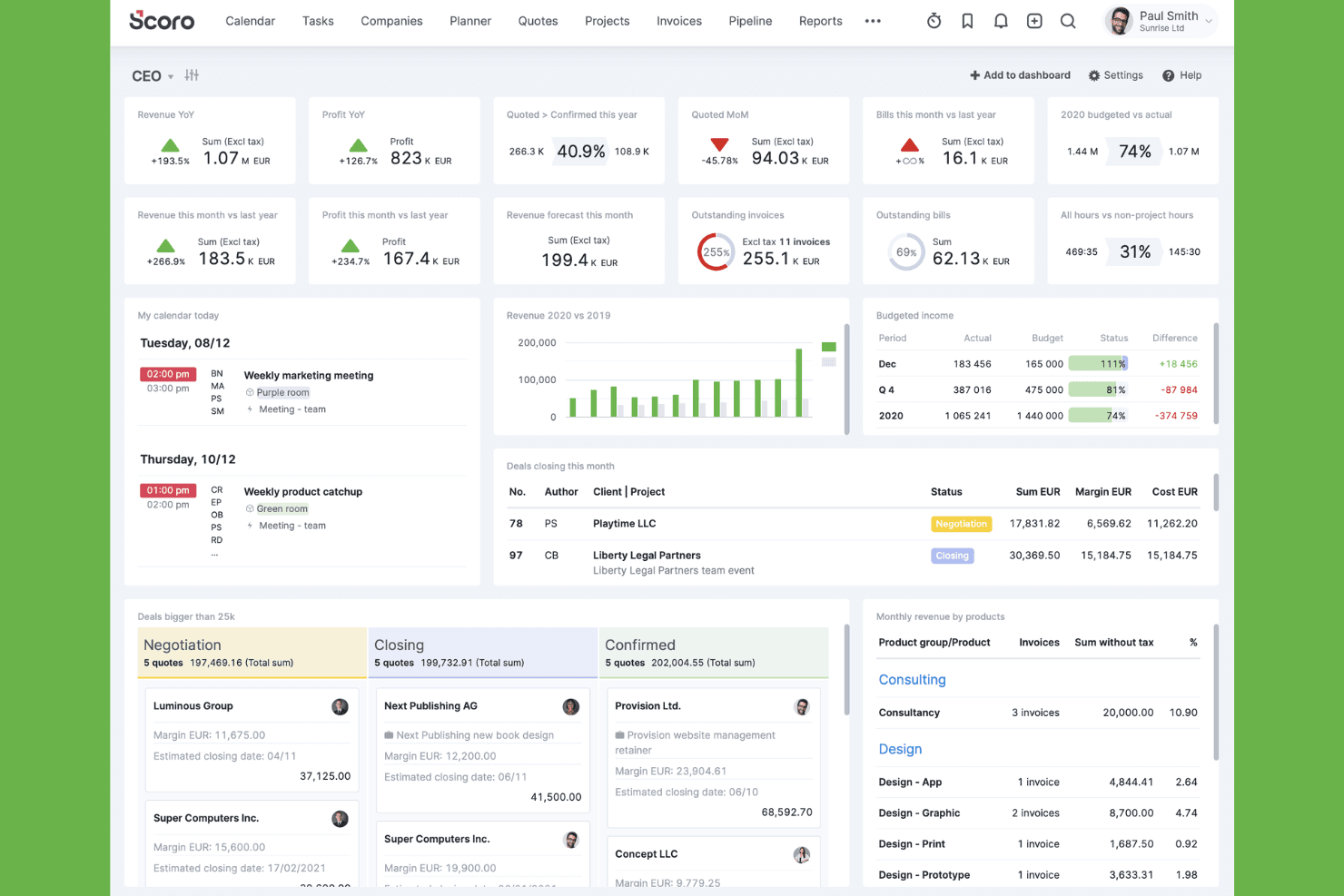
Scoro offers a detailed dashboard displaying real-time KPIs, revenue metrics, deal pipelines, and budgeted income in a single view. Scoro is a work management platform built for project-based teams who need tight control over budgets and workflows, especially in consulting, creative, and agency environments.
Who Is Scoro Best For?
Project-based teams in consulting, creative, or agency environments who need full visibility into budget performance and project margins.
Why Scoro Is a Good Accelo Alternative
I picked Scoro as one of the best because I really value how it surfaces real-time project margin data right on your dashboard. My team relies on features like budget tracking, customizable profitability reports, and granular time tracking to monitor revenue versus costs as we work. In practice, this visibility helps us address margin risks before they impact the bottom line.
Scoro Key Features
- Task automation: Set up automated workflows to assign tasks, set deadlines, and trigger alerts based on project progress.
- Quote and invoice management: Generate professional quotes and invoices directly from project data, keeping billing accurate and connected.
- Calendar integration: Sync project schedules and team calendars so everyone stays aligned with upcoming deadlines and meetings.
- Client portal: Share project updates, files, and invoices securely with clients through a branded online portal.
Scoro Integrations
Scoro offers native integrations with tools like Xero, QuickBooks Online, Mailchimp, Dropbox, Google Calendar, Outlook, and Zapier. An API is available for custom integrations.
Pros and Cons
Pros:
- Customizable profit and revenue dashboards
- Built-in client portal for secure sharing
- Real-time margin tracking across all projects
Cons:
- Some integrations are paid
- Advanced reporting setup can be time-consuming
 Best for all-in-one business tools
- Free plan + 7-day trial + demo available
- From $12/user/month
Visit WebsiteCustomer Rating:4.8/5
Flowlu can be used to automate deal workflows with triggers, tasks, and alerts. Flowlu is an all-in-one business management software that helps companies manage projects, finances, and CRM activities. It's designed for small to medium-sized businesses looking to centralize their operations.
Why it's a good Accelo alternative: Flowlu offers an integrated suite of tools that combine project management, finance tracking, and customer relationship management in one platform. The built-in CRM helps you manage client interactions and track sales. The financial management features provide insights into your business's financial health. This all-in-one approach eliminates the need for multiple separate tools, making it a cost-effective solution for managing various business functions.
Standout features and integrations:
Features include a task planner that helps you organize and prioritize your team's work with custom statuses and fields. The invoicing feature allows you to create and send invoices directly from the platform. You can also use the knowledge base to store and share important information for your team and clients.
Integrations include Slack, Google Drive, Dropbox, Microsoft Outlook, Mailchimp, Trello, and more.
Pros and Cons
Pros:
- Built-in hub for knowledge management
- Strong budgeting and invoicing features
- All-in-one business management
Cons:
- Limited support for data-heavy teams
- Smaller native integration library
Learn more about Flowlu: Best for unlimited team access
- 30-day free trial available
- From $19/month
Visit WebsiteCustomer Rating:4.8/5
SuiteDash's detailed task dashboard displays projects, phases, and assignees. SuiteDash is an all-in-one business software that helps small to midsize businesses manage client interactions and operations. It serves as a platform for CRM, project management, billing, and more.
Why it's a good Accelo alternative: SuiteDash offers unlimited project, team, and client access under a single subscription, which is suitable for growing businesses. Its client portal, automated onboarding, and billing features provide a cost-effective solution for managing large teams. It is a flexible choice for businesses looking to expand.
Standout features and integrations:
Features include an automated CRM that helps manage client relationships and communication. The project dashboard enables you to assign tasks, track progress, and share updates. You can also use eSignature capabilities to save time during document-signing processes.
Integrations include QuickBooks Online, Stripe, PayPal, Zoom, Google Calendar, Zapier, and more.
Pros and Cons
Pros:
- Scalable for business growth
- Automated client onboarding
- Unlimited team and client access
Cons:
- Mobile app functionality gaps
- Email Deliverability Issues
Learn more about SuiteDash: Best for end-to-end client operations
- 30-day free trial
- From $29/month (billed annually)
Visit WebsiteCustomer Rating:4.6/5
HoneyBook's platform can be used to manage projects, bookings, and invoicing. HoneyBook is a client management platform designed for creative entrepreneurs and freelancers. It helps users manage projects, book clients, and send invoices all in one place.
Why it's a good Accelo alternative: HoneyBook focuses on managing client relationships through its intuitive client portal, allowing you to communicate and collaborate with clients in a centralized location. Its scheduling and automation tools help you keep track of tasks and deadlines. The invoicing feature helps simplify billing, allowing you to create and manage invoices online.
Standout features and integrations:
Features include contract templates, which allow you to create and send contracts quickly. The time tracker helps you monitor billable hours. You can also use the calendar feature to organize appointments and manage meeting notes.
Integrations include Asana, Slack, QuickBooks, Zoom, Calendly, Canva, Prismm, Acuity, and more.
Pros and Cons
Pros:
- Tailored for creative professionals
- Automated proposals and contracts
- Contract-to-invoice workflow automation
Cons:
- Limited forecasting features
- Limited multi-team support
Learn more about HoneyBook: Best for simple visual task boards
- Free plan + free trial available
- From $5/user/month (billed annually)
Visit WebsiteCustomer Rating:4.5/5
Trello's visual team project boards display progress and collaborative tasks. Trello is a visual collaboration tool that helps teams organize projects using boards, lists, and cards. It's designed for teams looking for a simple way to manage tasks and workflows.
Why it's a good Accelo alternative: Trello's visual task management system allows you to see your projects at a glance. Its drag-and-drop functionality allows for simple task organization and prioritization. You can customize boards to fit your team's workflow, providing a flexible solution for project management. Trello's straightforward interface makes it accessible for teams of all sizes.
Standout features and integrations:
Features include card attachments, which let you add files directly to tasks. The checklist feature helps break down tasks into smaller, manageable steps. You can also use the due dates feature to track time and help ensure tasks are completed by their deadlines.
Integrations include Slack, Google Drive, Microsoft Teams, Dropbox, Evernote, Salesforce, GitHub, Confluence, Zapier, and more.
Pros and Cons
Pros:
- Quick board setup
- Power-Ups marketplace flexibility
- Butler automation for boards
Cons:
- Limited task dependency controls
- Reporting needs add-ons
Learn more about Trello: Best for task automation features
- Free plan + free trial + free demo available
- From $10.99/user/month (billed annually)
Visit WebsiteCustomer Rating:4.4/5
Asana's task dashboard provides detailed project info and collaboration tools. Asana is a project management tool that helps teams organize, track, and manage their work. It's widely used by teams across various industries to improve collaboration and project execution.
Why it's a good Accelo alternative: Asana's task automation features let you automate routine tasks, freeing up your team to focus on more important work. Its customizable workflows allow you to tailor project management processes to fit your team's specific needs. The platform offers time tracking via integrations that can help you coordinate tasks and deadlines.
Standout features and integrations:
Features include digital kanban boards and a timeline view, which give your team a live visual representation of project progress. The task dependencies feature can help you make sure that tasks are completed in the correct order. You can also use templates to set up new projects with predefined workflows.
Integrations include Slack, Microsoft Teams, Google Drive, Dropbox, Salesforce, Zoom, Jira Cloud, Outlook, Zendesk, Tableau, Figma, Zapier, and more.
Pros and Cons
Pros:
- Predefined project templates
- Visual project timelines
- Task automation capabilities
Cons:
- Advanced permissions need higher tiers
- Native time tracking missing
Learn more about Asana: Best for team collaboration tools
- Free plan + 14-day free trial available
- From $11.95/month
Visit WebsiteCustomer Rating:4.6/5
Avaza's dashboard displays kanban tasks, schedules, and project progress. Avaza is a cloud-based software that offers project management, time-tracking, and expense management solutions for businesses. It's designed for teams looking to improve collaboration and workflow management.
Why it's a good Accelo alternative: Avaza provides various team collaboration tools that help your team communicate and share updates. Its task management features allow you to assign and track tasks and switch between kanban boards, Gantt charts, and task lists. The platform's time-tracking and expense management capabilities support accurate billing and budgeting.
Standout features and integrations:
Features include customizable invoices, which allow you to manage billing directly from the platform. The resource scheduling feature helps you allocate team members to projects based on availability. You can also use the visual reporting tools to gain insights into project performance, financial operations, and team productivity.
Integrations include Xero, GitHub, Google Workspace, Dropbox, Zapier, Stripe, and more.
Pros and Cons
Pros:
- Affordable pricing for small teams
- Flexible and configurable task views
- Built-in invoicing with time logs
Cons:
- Limited task dependencies for complex timelines
- Less advanced expense management tools
Learn more about Avaza: Best for small-service-business bookings
- 14-day free trial available
- From $65/month
Visit WebsiteCustomer Rating:4.4/5
vcita's billing dashboard shows overdue, due, and paid invoices with tracking. vcita is an all-in-one business management software designed for small service businesses. It's mainly used by consultants, coaches, and service professionals to manage client work and relationships, scheduling, and payments.
Why it's a good Accelo alternative: vcita allows service professionals to manage appointments, billing, and client communications in one place. The software's intuitive design helps simplify scheduling and payment processes, supporting your team in maintaining client satisfaction.
Standout features and integrations:
Features include a client portal that lets your clients book appointments and pay invoices online. Automated reminders ensure your clients won't miss an appointment. The software also offers marketing tools, such as intake forms and email campaigns, to help you engage your clients and grow your business.
Integrations include QuickBooks, Zoom, PayPal, Stripe, Square, Zapier, and more.
Pros and Cons
Pros:
- Marketing tools included
- Client portal with scheduling
- Client-focused management tools
Cons:
- Fewer advanced workflow rules
- Self-serve booking and intake forms
Learn more about vCita:

ConnectWise's purpose-built reporting engine provides live project insights. ConnectWise is a business management platform designed for IT service providers and managed service providers (MSPs). It helps teams with ticketing, project management, and client billing.
Why it's a good Accelo alternative: ConnectWise offers specialized tools for IT service management, allowing you to oversee help-desk operations and client relationships. Its automation features help reduce manual tasks, improving team productivity.
Standout features and integrations:
Features include service ticketing, which helps you track and resolve client issues. Project management tools, such as pre-built project templates and automatic notifications, enable you to plan and execute projects for fast delivery. You can also use the automated client billing feature to manage invoicing and payments.
Integrations include Microsoft Dynamics 365, QuickBooks, Slack, HubSpot, Xero, and more.
Pros and Cons
Pros:
- Strong support for high-volume service teams
- Advanced help-desk operations
- IT service management focus
Cons:
- IT-centric workflows only
- Features can be complex to configure
Learn more about ConnectWise: 10Best for customizable workflows
Zendo
- Free plan + free demo + free trial available
- From $37/month (billed annually)

Zendo includes a client portal, online payment system, and white-label branding. Zendo is an all-in-one platform designed for selling and delivering services, aimed at businesses looking to manage client interactions, orders, and payments. It's used by various industries such as web design, marketing, and development.
Why it's a good Accelo alternative: Zendo offers customizable workflows that allow you to tailor the platform to your service delivery process. Its client portal helps facilitate efficient communication and collaboration with your clients. The platform supports various payment methods, including credit card payments with Stripe and bank transfers, allowing you to offer clients flexible payment options. Zendo's white-label tools enable you to brand the platform according to your business needs.
Standout features and integrations:
Features include customizable order forms, which let you create unique forms for different services and data collection operations. Automated status triggers can help you keep your service delivery information up to date. The platform also offers real-time chat for direct communication with team members and clients.
Integrations include Stripe, Zapier, Slack, and more.
Pros and Cons
Pros:
- White-label branding options
- Stripe and bank transfers are supported
- Custom service order forms
Cons:
- Basic analytics visibility
- No built-in time tracking
Learn more about Zendo:
Alte alternative la Accelo
Iată câteva alternative suplimentare la Accelo care nu au ajuns pe lista mea scurtă, dar merită totuși analizate:
- 11BigTimeBest for PSA with financial insights
- 12KantataBest for AI-driven project insights
- 13BasecampBest for unified communication system
- 14QuickbaseBest for building custom apps
- 15RavetreeBest for utilization-driven planning
- 16ClickUpBest for customizable task views
- 17OneDeskBest for integrating help-desk support
- 18Tempo Portfolio ManagerBest for predictive scheduling
- 19KintoneBest for database-driven processes
- 20AssemblyBest for employee recognition
- 21MonographBest for architecture and engineering firms
- 22ProjectworksBest for managing billable hours
- 23Oracle NetSuiteBest for ERP solutions
- 24BloomBest for client booking
- 25WorkamajigBest for creative ad agencies
- 26ManyRequestsBest for product- and subscription-based services
Related Reviews
How I Evaluate Accelo Alternatives
I split every evaluation into two layers: the baseline requirements—billable time, retainer billing, and accounting integrations—and the differentiators that distinguish the best fit for your firm.
Core Functionality (Table Stakes For This List)
When I'm selecting tools for my list, I rank each one on a scale from 0 (does not offer the functionality) to 5 (excels in this area) for each core functionality listed below. Then, I calculate the tool's total score into a percentage. Each tool needs to achieve a minimum total score of 65% to be considered for inclusion.
- Time & Billing Tracking: I check whether timers convert directly into billable line items—like logging hours on a monthly bookkeeping engagement and pushing them straight to an invoice.
- Client Project Management: Each tool should handle multi-stage engagements with task assignments and deadlines, similar to tracking a year-end close across multiple client accounts.
- Automated Invoicing & Retainers: I look for support across billing models—hourly, fixed-fee, and retainer—so firms can invoice a tax prep client on a flat rate and an advisory client by the hour.
- Client CRM & Communication: The platform should centralize contact records, email history, and engagement notes so your team has full context before every client interaction.
- Accounting Software Integration: I evaluate native sync with platforms like QuickBooks and Xero, checking that invoices, payments, and contacts flow bidirectionally without manual re-entry.
- Profitability & Utilization Reporting: Dashboards should surface realization rates, project margins, and staff utilization so you can spot underperforming engagements before they erode margins.
Once I have a list of tools that meet this criteria, I consider what sets each platform apart.
Differentiating Factors (What Sets Vendors Apart)
Here's how I compare and contrast different vendors:
Standout Features
Proposal tools with built-in e-signature speed up client onboarding—think sending an engagement letter for a new advisory client and getting it signed the same day. I also look for workflow automation that handles recurring processes like month-end close checklists without manual setup each cycle. A client portal adds real value too, giving clients a place to view invoices, upload documents, and check engagement status without emailing your team.
Beyond Features
Since these platforms handle sensitive financial data, I check for SOC 2 Type II certification and role-based permissions that control who on your team can access specific client records. Implementation support matters just as much—I evaluate whether a vendor offers migration assistance from Accelo or other PSA tools, plus pre-built templates for common engagements like tax prep. Pricing transparency is another factor I weigh; quote-only models can mask costs around integrations, storage, or premium support tiers.
De ce să căutați o alternativă la Accelo?
Deși Accelo este o alegere bună de software de automatizare a serviciilor profesionale, există mai multe motive pentru care unii utilizatori pot căuta soluții alternative. Este posibil să căutați o alternativă la Accelo deoarece…
- Aveți nevoie de mai multe opțiuni de personalizare
- Echipa dumneavoastră are nevoie de o scalabilitate mai bună
- Doriți funcții avansate de raportare
- Compania dumneavoastră își desfășoară activitatea în afara regiunilor acceptate de Accelo
- Aveți nevoie de o interfață de utilizator mai simplă
- Echipa dumneavoastră preferă un alt model de tarifare
Dacă vi se potrivește oricare dintre aceste situații, ați ajuns în locul potrivit. Lista mea conține mai multe opțiuni de software de automatizare a serviciilor profesionale, mai potrivite pentru echipele care se confruntă cu aceste provocări în utilizarea Accelo și caută soluții alternative.
Funcțiile principale ale Accelo
Iată câteva dintre funcțiile principale ale Accelo, pentru a le putea contrasta și compara cu ceea ce oferă soluțiile alternative:
- Urmărirea și gestionarea proiectelor: Organizați și urmăriți eficient proiectele echipei dumneavoastră.
- Urmărirea timpului: Monitorizați orele facturabile pentru a asigura o facturare exactă.
- Facturarea: Automatizați procesul de facturare pentru a economisi timp și a reduce erorile.
- Gestionarea relațiilor cu clienții: Păstrați toate interacțiunile și datele clienților într-un singur loc.
- Gestionarea contractelor recurente: Gestionați cu ușurință contractele recurente ale clienților.
- Automatizarea fluxurilor de lucru: Reduceți sarcinile repetitive pentru a crește productivitatea.
- Analiza informațiilor despre companie: Obțineți informații despre operațiunile dumneavoastră prin rapoarte detaliate.
- Gestionarea financiară: Urmăriți veniturile și cheltuielile pentru a menține sănătatea financiară.
- Urmărirea și gestionarea sarcinilor: Atribuiți și monitorizați sarcinile pentru a menține proiectele pe drumul cel bun.
- Portal pentru clienți: Oferiți clienților acces la informațiile despre proiectele și facturile lor.