

Gestionarea finanțelor companiei poate fi destul de dificilă, mai ales când vine vorba despre facturare și emiterea facturilor. Dacă vă ocupați de aspectele financiare, în special de facturare și emiterea facturilor, cunoașteți frustrarea provocată de urmărirea plăților întârziate și de gestionarea ciclurilor complexe de facturare. Aici, programul potrivit poate face o diferență majoră.
Din experiența mea, cele mai bune instrumente de facturare și emitere a facturilor simplifică aceste procese, oferindu-vă dumneavoastră și echipei mai mult timp pentru a vă concentra asupra inițiativelor strategice. Aceste soluții pot reduce la minimum erorile și pot îmbunătăți fluxul de numerar, făcându-vă munca mai ușoară.
În acest articol, voi prezenta alegerile mele principale pentru programe de facturare și emitere de facturi. Lista include instrumente dedicate emiterii facturilor, precum și platforme mai ample pentru facturare, plăți și venituri, în cadrul cărora emiterea facturilor reprezintă un flux de lucru esențial. Unele instrumente de aici sunt mai potrivite pentru liber-profesioniști și echipe mici, în timp ce altele sprijină operațiunile financiare ale companiilor mari. Mi-am susținut fiecare selecție prin cercetări aprofundate și informații practice, pentru a vă ajuta să găsiți soluția cea mai potrivită pentru nevoile echipei dumneavoastră.
Why Trust Our Software Recommendations
6,700+
Reviews
20
Industry experts
16+
Evaluation factors
14
Years
Our team has been testing and reviewing software since 2012. As finance leaders ourselves, we know how difficult—and important—it is to choose the right software.
For this guide, we evaluated tools using hands-on testing and independent research, scoring tools using our selection criteria.
Our reviews reflect our human editorial judgment, not a sales pitch.
Tabel comparativ al programelor de facturare și emitere de facturi
Tabelul de mai jos compară detaliile de preț pentru selecțiile mele principale de programe de facturare și emitere de facturi.
Sorted by: Default
| Tool | Starting Price | Website | |
|---|---|---|---|
Best with AI-driven AP and AR automation | 4.5 out of 5 | Pricing upon request Free plan + free demo available | Website |
Best for complex contract management | 4.2 out of 5 | Pricing upon request Free demo available | Book Demo |
Best for complex deal flow automation | 4.7 out of 5 | Pricing upon request Free demo available | Website |
Best for accounting integration | 4.7 out of 5 | $38/month 30-day free trial | Website |
Best for open-source options | 4.7 out of 5 | $11.67/month Free plan available | Website |
Best for online payment processing | 4.6 out of 5 | Pricing upon request Free plan + demo available | Website |
Best for ERP integration | 4.0 out of 5 | Pricing upon request Free demo available | Website |
Best for simple invoicing solutions | 4.6 out of 5 | $9.99/month Free plan available | Website |
Best for automated expense management | 4.7 out of 5 | $10/month 14-day free trial | Website |
Best for global invoicing | 4.3 out of 5 | Free forever plan Not available | Website |


Recenzie a celor mai bune programe de facturare și emitere de facturi
Mai jos se află rezumatele mele detaliate ale celor mai bune programe de facturare și emitere de facturi care au ajuns pe lista mea scurtă. Recenziile mele oferă o analiză detaliată a funcțiilor principale, avantajelor și dezavantajelor, integrărilor și cazurilor de utilizare ideale pentru fiecare instrument, pentru a vă ajuta să îl găsiți pe cel mai potrivit pentru dumneavoastră.
 Best with AI-driven AP and AR automation
- Free plan + free demo available
- Pricing upon request
Visit WebsiteCustomer Rating:4.5/5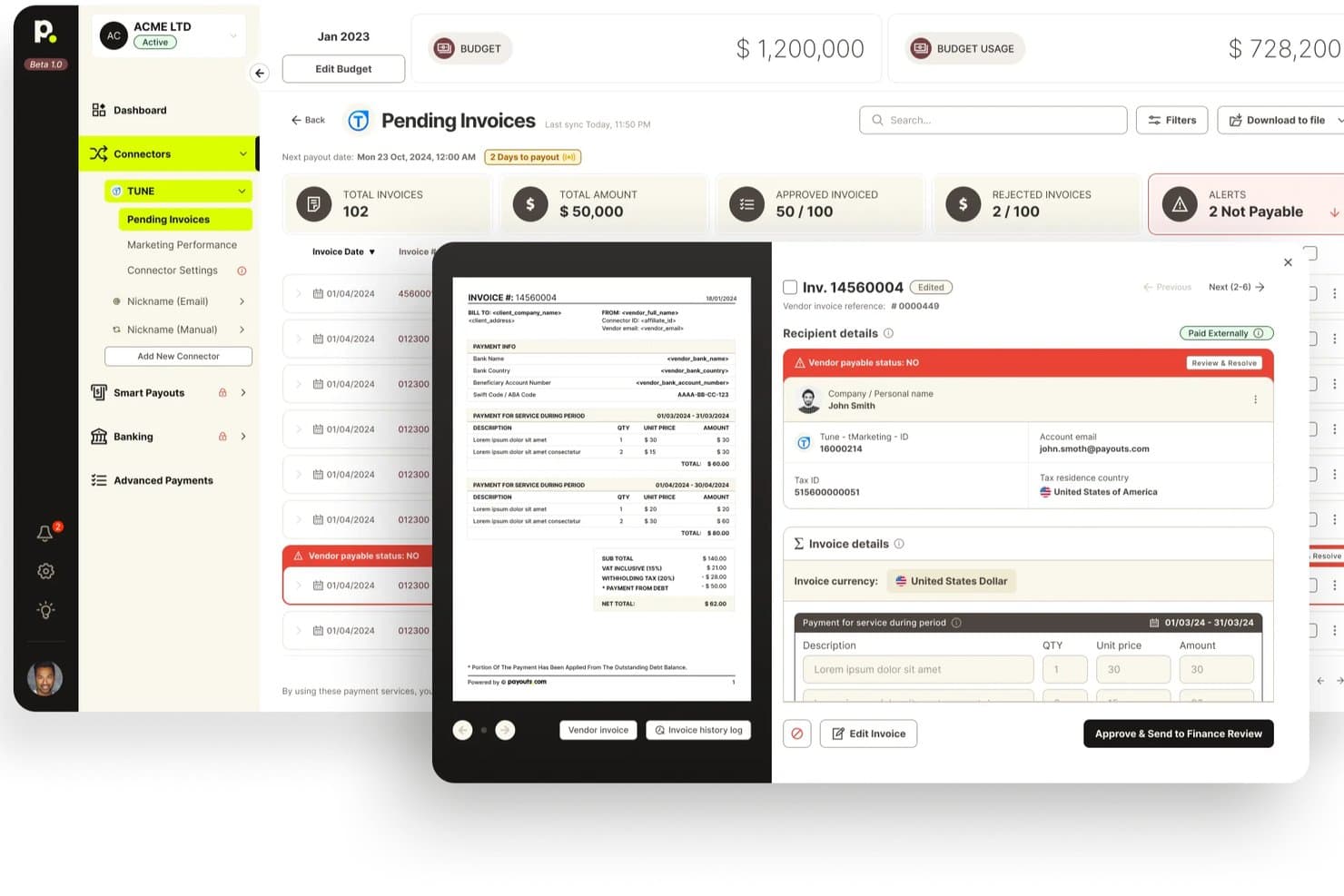
Payouts offers a pending invoices dashboard with invoice previews, vendor payable status alerts, and approval workflows for billing management. Payouts is an AP and AR automation platform that combines AI-driven invoice processing, global payment disbursement, automated dunning, tax compliance, and reconciliation in a single system.
Who Is Payouts Best For?
Payouts suits mid-market finance teams managing high-volume, cross-border vendor payments alongside accounts receivable operations.
Why I Picked Payouts
Payouts earns its spot on my shortlist because the AI automation it applies to both AP and AR is genuinely differentiated. I picked it specifically for the AI Digital Employees feature, which chases missing documents and follows up on blocked payouts over email, WhatsApp, and voice. On the AR side, I like that automated dunning runs alongside cash application, so overdue invoices get chased and matched in the same workflow.
Payouts Key Features
- OCR invoice capture: Invoices can be imported by email, inbox sync, manual entry, or API, with automatic data extraction.
- Three-way PO matching: The system matches purchase orders, invoices, and receipts to prevent payment errors.
- Global multi-rail payment support: Enables payouts in 135+ currencies across 190+ countries using 40+ payment rails.
- Real-time tax ID verification: Instantly checks tax identification numbers against IRS records and supports tax form collection.
Payouts Integrations
Payouts offers native integrations with NetSuite, Priority ERP, PayPal, Venmo, Everflow, Outlook, Awin, Outbrain, and provides an API for custom integrations.
Pros and Cons
Pros:
- Automates tax ID verification at scale
- Supports cross-border payments in 135+ currencies
- AI agents chase overdue invoices autonomously
Cons:
- Setup requires significant onboarding support
- Not ideal for freelancers or small teams
Learn more about Payouts: Best for complex contract management
- Free demo available
- Pricing upon request
Visit WebsiteCustomer Rating:4.2/5
Younium automates subscription billing, invoicing, and revenue management. Younium is a subscription billing and invoicing platform built for B2B companies with recurring revenue models. It combines automated invoicing, subscription management, revenue recognition, and contract lifecycle management in a single system.
Who Is Younium Best For?
Younium is a strong fit for mid-market and enterprise SaaS companies that manage recurring subscriptions, complex pricing structures, and high volumes of contract-driven billing.
Why I Picked Younium
I picked Younium because it handles contract changes without creating additional work for finance teams. When customers upgrade plans, add products, or make mid-term changes, the platform automatically updates billing schedules, invoices, and revenue recognition records. I also like that every contract adjustment is tracked through a detailed audit trail, making it easier to maintain accuracy and support compliance requirements as subscription businesses scale.
Key Features
- Billing and revenue sync: Automatically updates invoices, billing schedules, and revenue recognition records when subscription changes occur.
- Subscription management: Supports recurring billing models, contract amendments, renewals, and usage-based pricing structures.
- Revenue recognition: Helps finance teams comply with ASC 606 and IFRS 15 requirements through automated revenue tracking.
- Contract lifecycle management: Tracks contract versions, amendments, and customer changes throughout the subscription lifecycle.
Integrations
Younium integrates with Salesforce, HubSpot, NetSuite, QuickBooks, Xero, Stripe, Microsoft Dynamics 365, Avalara, Fortnox, Exact Online, and Slack. It also supports Zapier, webhooks, and a REST API for custom integrations.
Pros and Cons
Pros:
- Supports multi-entity subscription billing
- Built-in ASC 606 and IFRS 15 compliance
- Tracks MRR, ARR, and churn metrics
Cons:
- Payment plans require detailed setup
- Cannot credit the same invoice twice
Learn more about Younium: Best for complex deal flow automation
- Free demo available
- Pricing upon request
Visit WebsiteCustomer Rating:4.7/5
DealHub AI offers a guided interface where sales reps can select solutions and define project duration. DealHub AI is a quote-to-revenue platform that brings CPQ, contract management, subscription management, and automated billing into one AI-powered workflow.
Who Is DealHub AI Best For?
DealHub AI is a strong fit for B2B sales and revenue operations teams at mid-market to enterprise companies managing high-volume or complex deal cycles.
Why I Picked DealHub AI
I picked DealHub AI as one of the best because of how it handles the full arc of a complex deal without dropping the baton between stages. What I find genuinely useful is the automated approval workflow engine: parallel approvals run simultaneously, so a deal requiring sign-off from legal, finance, and sales leadership doesn't move in a single-file queue. On the billing side, every mid-cycle amendment, like an upsell or co-term, updates the billing schedule automatically from the effective date, with no manual finance ticket required.
DealHub AI Key Features
- Subscription billing scheduler: Automates recurring billing across monthly, annual, usage-based, and milestone payment schedules.
- Multi-currency billing: Generates invoices in local currencies and handles exchange rates for international deals.
- Revenue recognition: Maps billing events to recognized revenue to support ASC 606 and IFRS 15 compliance.
- DealRoom: A shared digital workspace where buyers and sellers track deal milestones, documents, and approvals.
DealHub AI Integrations
DealHub AI integrates with Salesforce, Microsoft Dynamics, HubSpot, and SugarCRM, as well as Stripe and Avalara for billing and tax compliance.
Pros and Cons
Pros:
- Includes ASC 606/IFRS 15 revenue recognition
- Consolidates all pricing into one document
- Supports usage-based, tiered, and fixed pricing
Cons:
- Frequent UI bugs require page refreshes
- Advanced customization options are quite limited
Learn more about DealHub AI:

QuickBooks helps SMBs integrate invoicing, payroll, and expenses QuickBooks is a complete accounting software solution designed for small- to medium-sized businesses. It manages invoicing, payroll, and expense tracking, allowing you to concentrate on growing your business.
Why I picked QuickBooks: QuickBooks excels in accounting integration, making it a top choice for SMBs needing seamless financial management. Its invoicing feature is straightforward, allowing you to create and send invoices quickly, while an expense tracking tool monitors your spending, ensuring you stay within budget. The payroll management system simplifies employee payments and merges smoothly with your existing accounts.
Standout features and integrations:
Features include the ability to generate detailed financial reports, giving you insights into your business's performance, and also manage your cash flow effectively with its budgeting tools. The tax preparation feature helps you prepare for tax season with minimal stress.
Integrations include PayPal, Shopify, Amazon, Square, TSheets, BILL, Expensify, HubSpot, Salesforce, Mailchimp, and more.
Pros and Cons
Pros:
- Extensive reporting capabilities
- Tax preparation tools
- Strong financial management features
Cons:
- Steep learning curve
- Limited industry features
 Best for open-source options
- Free plan available
- From $11.67/month (billed annually)
Visit WebsiteCustomer Rating:4.7/5
Invoice Ninja provides solutions for invoicing, time tracking, and expenses Invoice Ninja is a highly flexible billing and invoicing platform ideal for budget-conscious freelancers and small businesses. It provides customizable invoice tracking and expense management at a lower cost.
Why I picked Invoice Ninja: Invoice Ninja is unique for its open-source options, making it highly customizable for tech-savvy users. The invoicing feature supports multiple currencies and languages, which is great for international clients. Time tracking is integrated, allowing you to bill clients accurately, while expense management ensures your spending stays within budget.
Standout features and integrations:
Features include customizable invoice templates that let you align them with your brand identity. The client portal is a convenient way for your clients to view their invoices and make card payments (via credit card or debit card) or bank transfers. Automatic billing for recurring payments saves you time.
Integrations include Zapier, Slack, Stripe, PayPal, Authorize.net, WePay, Mailchimp, Google Analytics, QuickBooks Online, Xero, and more.
Pros and Cons
Pros:
- Supports multiple currencies
- Generous free plan
- Highly customizable open-source options
Cons:
- Limited customer support options
- Requires technical knowledge for customization
Learn more about Invoice Ninja: Best for online payment processing
- Free plan + demo available
- Pricing upon request
Visit WebsiteCustomer Rating:4.6/5
PayPal supports online payment methods, invoicing, and transaction management PayPal is a widely used online payment processing platform serving individuals and businesses of all sizes. It facilitates online transactions, invoicing, and payment collection, making it easy for you to manage financial transactions.
Why I picked PayPal: PayPal excels in online payment processing, offering a reliable and secure method for handling transactions. Its invoicing feature allows you to send professional invoices quickly and receive payments online, and it supports multiple currencies, which is ideal for businesses with international clients. PayPal's buyer and seller protection ensures that your transactions are safe and secure.
Standout features and integrations:
Features include the ability to set up recurring payments using custom-branded invoices, which is useful for subscription-based services. You can manage your transactions on the go using your mobile device, providing flexibility and convenience.
Integrations include Shopify, WooCommerce, BigCommerce, Xero, QuickBooks, Adobe Commerce, Squarespace, Wix, Salesforce, HubSpot, and more.
Pros and Cons
Pros:
- Mobile app for transactions
- Secure buyer and seller protection
- Global acceptance
Cons:
- Complex dispute resolution
- High transaction fees
Learn more about PayPal:

NetSuite manages finance, billing, and orders in one system NetSuite is cloud-based enterprise resource planning (ERP) software that serves mid-sized to large businesses. It covers financial management, billing, and order management, providing an all-in-one platform for your business operations.
Why I picked NetSuite: NetSuite excels in ERP integration, offering extensive solutions for businesses needing unified operations management. Its billing feature automates invoicing and payment processing, reducing manual effort. Financial management tools give you a real-time overview of your financial status, helping you make the correct choices. Order management ensures efficient processing and fulfillment, enhancing your operational efficiency.
Standout features and integrations:
Features include advanced financial reporting that gives you insights into your financial performance. You can manage your entire order-to-cash process within the platform, simplifying operations. Customizable dashboards provide real-time data, helping you track key performance indicators effectively.
Integrations include Salesforce, Shopify, Adobe Commerce, HubSpot, Expensify, Avalara, Concur, Adaptive Insights, Docusign, PayPal, and more.
Pros and Cons
Pros:
- Efficient order management
- Real-time data dashboards
- Strong ERP integration
Cons:
- Costly for small businesses
- Complex implementation process
 Best for simple invoicing solutions
- Free plan available
- From $9.99/month
Visit WebsiteCustomer Rating:4.6/5
Invoicely helps small teams manage invoicing, expenses, and time tracking Invoicely is an online invoicing software program designed for small businesses and freelancers. It offers invoicing, expense tracking, and time tracking, making it easier for you to manage your billing needs.
Why I picked Invoicely: Invoicely provides simple invoicing solutions that are easy to use and efficient for small businesses. The invoicing feature lets you create and send invoices with just a few clicks, and expense tracking keeps a close eye on your spending, ensuring you stay within your budget. Time tracking integrates seamlessly, allowing you to bill clients accurately for your work hours.
Standout features and integrations:
Features include invoice generation and time tracking to track billable hours and ensure accurate client billing. Reporting tools provide insights into your company's financial health, helping you make informed decisions.
Integrations include PayPal, Stripe, Mollie, Authorize.net, WePay, Dropbox, and more.
Pros and Cons
Pros:
- User-friendly for small businesses
- Complete payment integration
- Simple setup process
Cons:
- No mobile app
- Limited advanced features
Learn more about Invoicely: Best for automated expense management
- 14-day free trial
- From $10/month
Visit WebsiteCustomer Rating:4.7/5
Envoice automates invoice capture, expense processing, and receipt management Envoice is a billing- and expense-focused financial automation tool designed for businesses that need to process incoming invoices, track expenses, and manage receipts with minimal manual effort. It’s best suited for teams that deal with high volumes of supplier invoices and want better visibility into payables.
Why I picked Envoice: Envoice is particularly strong in automating invoice intake and expense documentation. Its invoice processing tools extract data from uploaded or emailed invoices, reducing manual data entry and helping speed up approvals. Receipt capture allows teams to digitize and store expense records centrally, while consolidated expense reports make it easier to monitor spend across vendors and departments. For finance teams focused on controlling incoming costs rather than customer billing, Envoice helps keep payables organized and auditable.
Standout features and integrations:
Features include automated invoice data extraction to speed up accounts payable workflows, customizable expense categories for clearer cost tracking, and approval workflows to route invoices and expenses for review before payment. The dashboard provides a real-time view of pending invoices, approved expenses, and overall spend, helping teams avoid missed or delayed payments.
Integrations include Xero, QuickBooks, Sage, FreshBooks, Microsoft Dynamics, NetSuite, SAP, Oracle, Dropbox, Google Drive, OneDrive, and more.
Pros and Cons
Pros:
- Approval workflows for invoice and expense control
- Centralized receipt and expense management
- Automated invoice capture and data extraction
Cons:
- Not designed for complex billing scenarios (e.g., subscriptions or usage-based billing)
- Limited support for outgoing customer invoicing
Learn more about Envoice:

Zoho Invoice simplifies billing, payments, and financial tracking Zoho Invoice is a free cloud-based invoicing software solution perfect for freelancers and small businesses. Zoho Invoice is best for one-off and time-based billing. It simplifies billing, payment collection, and financial tracking, making it a valuable tool for managing your business finances.
Why I picked Zoho Invoice: Zoho Invoice's cost-effective global invoicing system supports multiple currencies and languages. Its recurring invoicing feature helps automate billing for repeat clients, saving you time, while payment reminders ensure you collect payments promptly. Additionally, the time tracking tool integrates billing with project management, providing a comprehensive solution for freelancers.
Standout features and integrations:
Features include customizable templates, allowing you to brand your invoices. You can track expenses easily, helping you manage your costs, and the reporting tools provide an understanding of your financial performance, helping you make strategic decisions.
Integrations include Zoho CRM, Zoho Books, PayPal, Stripe, Slack, Google Drive, Dropbox, OneDrive, Office 365, G Suite, and more.
Pros and Cons
Pros:
- All-in-one platform with integrated invoicing apps
- Strong focus on data security
- Competitive pricing and free options
Cons:
- Learning curve for complex tasks
- Advanced features require paid upgrades
Learn more about Zoho Invoice:
Alte programe de facturare și emitere de facturi
Iată câteva opțiuni suplimentare de programe de facturare și emitere de facturi care nu au ajuns pe lista mea scurtă, dar care merită totuși luate în considerare:
- 11WaveBest for freelancers and startups
- 12Zoho BillingBest for subscription management
- 13Bill4timeBest for legal professionals
- 14FlexpriceBest for on-premise billing infrastructure
- 15SquareBest for small retail businesses
- 16TipaltiBest for built-in compliance
- 17MinuteDockBest for flexible time tracking
How I Evaluate Billing and Invoicing Software
My evaluation has two layers: the baseline every billing tool must clear—like recurring invoicing and payment gateway support—and the differentiators that separate the best fits.
Core Functionality (Table Stakes For This List)
When I'm selecting tools for my list, I rank each one on a scale from 0 (does not offer the functionality) to 5 (excels in this area) for each core functionality listed below. Then, I calculate the tool's total score into a percentage. Each tool needs to achieve a minimum total score of 75% to be considered for inclusion.
- Invoice Creation & Customization: I check whether you can build branded, professional invoices with flexible templates, multi-currency support, and configurable line items for different client types.
- Recurring & Automated Billing: Platforms should handle scheduled billing cycles for retainers, subscriptions, or fixed-interval contracts with auto-send and adjustable frequency options.
- Online Payment Processing: I evaluate which payment gateways each tool supports and whether customers can pay directly from the invoice via credit card, ACH, or other methods.
- Accounts Receivable Tracking: Real-time invoice status (sent, viewed, overdue) matters, along with automated reminder sequences that reduce the manual chase for outstanding payments.
- Tax Calculation & Compliance: I look for automated tax logic that handles VAT, GST, and sales tax across multiple jurisdictions rather than forcing manual rate entry on every invoice.
- Accounting System Integration: Each tool should sync invoices, payments, and customer records with platforms like QuickBooks, Xero, or NetSuite to avoid double-entry and reconciliation headaches.
Once I have a list of tools that meet this criteria, I consider what sets each platform apart.
Differentiating Factors (What Sets Vendors Apart)
Here's how I compare and contrast different vendors:
Standout Features
A client self-service portal is a big differentiator—it lets customers view invoices, download receipts, and update payment details on their own, which cuts down on back-and-forth for AR teams. I also evaluate multi-entity management, especially for firms billing across subsidiaries that need consolidated reporting. Built-in time and expense tracking is another factor I weigh, since agencies and consultancies benefit from converting billable hours directly into invoices without toggling between tools.
Beyond Features
Pricing structure matters—I look at whether a vendor charges per user, per invoice, or a flat rate, and how those costs scale as your volume grows. Compliance is another key factor; finance teams need SOC 2, PCI DSS, and role-based access controls to protect sensitive payment data. I also consider industry fit, since a tool built for SaaS subscription billing handles very different workflows than one designed for professional services firms billing by the hour.
Cum să alegeți un program de facturare și emitere de facturi
Este ușor să vă pierdeți în liste lungi de funcții și structuri complexe de prețuri. Pentru a vă ajuta să rămâneți concentrat în timp ce parcurgeți procesul unic de selectare a programului potrivit, iată o listă de verificare a factorilor de care trebuie să țineți cont:
| Factor | Ce trebuie avut în vedere |
|---|---|
| FactorScalabilitate | Ce trebuie avut în vedereVa evolua programul odată cu afacerea dumneavoastră? Verificați dacă poate gestiona mai mulți clienți, tranzacții și utilizatori pe măsură ce vă extindeți. Căutați planuri flexibile. |
| FactorIntegrări | Ce trebuie avut în vedereVerificați compatibilitatea cu instrumentele pe care le utilizați deja. Asigurați-vă că se conectează la sistemele de contabilitate, gestionare a relațiilor cu clienții și plată, pentru a evita izolarea datelor. |
| FactorPosibilități de personalizare | Ce trebuie avut în vederePuteți adapta programul pentru a se potrivi fluxurilor dumneavoastră de lucru? Căutați opțiuni pentru modificarea șabloanelor și automatizarea sarcinilor, astfel încât să corespundă nevoilor dumneavoastră. |
| FactorUșurință în utilizare | Ce trebuie avut în vedereEste interfața intuitivă? Echipa dumneavoastră ar trebui să o poată utiliza fără instruire extinsă. Testați personal programul pentru a verifica ușurința în utilizare. |
| FactorImplementare și integrare inițială | Ce trebuie avut în vedereCât durează configurarea? Căutați instrumente cu tutoriale ghidate sau asistență în timpul integrării inițiale, pentru a reduce la minimum întreruperile. |
| FactorCost | Ce trebuie avut în vedereSe încadrează prețul în bugetul dumneavoastră? Comparați planurile și verificați existența unor taxe ascunse. Asigurați-vă că valoarea primită justifică suma plătită. |
| FactorMăsuri de securitate | Ce trebuie avut în vedereSunt implementate măsuri de protecție a datelor? Verificați existența criptării și respectarea reglementărilor privind datele, pentru a proteja informațiile sensibile. |
| FactorDisponibilitatea asistenței | Ce trebuie avut în vedereCe opțiuni de asistență există? Asigurați-vă că aveți acces la ajutor prompt prin chat, e-mail sau telefon, mai ales în momentele critice. |
Ce este programul de facturare și emitere de facturi?
Programul de facturare și emitere de facturi este un instrument care automatizează procesul de creare și trimitere a facturilor, urmărirea plăților și gestionarea ciclurilor de facturare. Contabilii, profesioniștii din domeniul financiar și proprietarii de întreprinderi mici folosesc în mod obișnuit aceste instrumente pentru a asigura facturarea corectă și colectarea eficientă a plăților.
Facturarea automată, urmărirea plăților și șabloanele personalizabile contribuie la reducerea erorilor, economisirea timpului și menținerea unei imagini profesioniste. În general, aceste instrumente simplifică gestionarea financiară și îmbunătățesc fluxul de numerar.
Funcții
Când alegeți un program de facturare și emitere de facturi, urmăriți următoarele funcții principale:
- Facturare automatizată: Generează și trimite automat facturi, economisind timp și reducând erorile manuale.
- Urmărirea plăților: Monitorizează plățile și soldurile restante pentru a asigura încasările la timp și menținerea fluxului de numerar.
- Șabloane personalizabile: Creează facturi aliniate cu marca dvs., sporind profesionalismul și recunoașterea de către clienți.
- Facturare recurentă: Configurează cicluri de facturare automatizate pentru serviciile pe bază de abonament, asigurând fluxuri de venit constante.
- Urmărirea cheltuielilor: Înregistrează cheltuielile companiei pentru gestionarea bugetelor și îmbunătățirea planificării financiare.
- Suport pentru mai multe monede: Gestionează tranzacții în monede diferite, fiind util pentru companiile cu clienți internaționali.
- Portal pentru clienți: Oferă clienților o platformă pentru vizualizarea facturilor, efectuarea plăților și gestionarea conturilor bancare.
- Rapoarte financiare: Generează rapoarte pentru a înțelege performanța financiară, sprijinind procesul decizional.
- Urmărirea timpului: Monitorizează cu precizie orele facturabile pentru a asigura facturarea exactă a clienților și optimizarea alocării resurselor.
- Măsuri de securitate: Protejează datele financiare sensibile prin criptare și respectarea reglementărilor privind protecția datelor.
Beneficii
Implementarea unui software de facturare și emitere a facturilor oferă mai multe beneficii echipei și companiei dvs. Iată câteva dintre acestea:
- Economie de timp: Facturarea automată și urmărirea plăților eliberează timp valoros, permițând echipei să se concentreze asupra altor sarcini.
- Precizie: Reduce erorile manuale din facturare și raportarea financiară, asigurând evidențe financiare exacte.
- Gestionarea fluxului de numerar: Monitorizează plățile restante și urmărește cheltuielile pentru menținerea unui flux de numerar sănătos.
- Aspect profesional: Șabloanele de facturi personalizate reflectă marca dvs., îmbunătățind imaginea companiei.
- Confort pentru clienți: Portalurile pentru clienți le permit acestora să vizualizeze și să plătească facturile, îmbunătățindu-le experiența și satisfacția.
- Scalabilitate: Numărul crescut de tranzacții și clienți este gestionat cu ușurință datorită proceselor automatizate.
- Securitatea datelor: Măsurile de protecție sigure și conformitatea cu reglementările asigură protejarea corespunzătoare a informațiilor financiare sensibile.
Costuri și prețuri
Selectarea unui software de facturare și emitere a facturilor necesită înțelegerea diferitelor modele și planuri de tarifare disponibile. Costurile variază în funcție de funcții, dimensiunea echipei, suplimente și multe altele. Tabelul de mai jos prezintă pe scurt planurile comune, prețurile medii ale acestora și funcțiile incluse de obicei în soluțiile software de facturare și emitere a facturilor:
Tabel comparativ al planurilor pentru software-ul de facturare și emitere a facturilor
| Tipul planului | Preț mediu | Funcții comune |
|---|---|---|
| Tipul planuluiPlan gratuit | Preț mediu$0 | Funcții comuneFacturare de bază, urmărirea plăților și gestionarea limitată a clienților. |
| Tipul planuluiPlan personal | Preț mediu$5-$25/utilizator/lună | Funcții comuneFacturi personalizabile, urmărirea cheltuielilor și raportare de bază. |
| Tipul planuluiPlan pentru companii | Preț mediu$30-$60/utilizator/lună | Funcții comuneFacturare automatizată, suport pentru mai multe monede și raportare avansată. |
| Tipul planuluiPlan pentru întreprinderi | Preț mediu$70-$150/utilizator/lună | Funcții comuneAnalize cuprinzătoare, integrări personalizate și asistență dedicată. |
Întrebări frecvente despre software-ul de facturare și emitere a facturilor
Iată câteva răspunsuri la întrebările frecvente despre software-ul de facturare și emitere a facturilor:
Cum poate software-ul de facturare și emitere a facturilor să contribuie la reducerea erorilor manuale din procesele financiare?
Software-ul de facturare și emitere a facturilor minimizează erorile manuale prin automatizarea sarcinilor de rutină, precum introducerea datelor și calculele. Astfel, apar mai puține greșeli în facturi, iar procesul de reconciliere este mai eficient. Automatizarea impune, de asemenea, standardizarea, ajutându-vă să mențineți consecvența în toate documentele financiare.
Poate software-ul de facturare și emitere a facturilor să gestioneze tranzacții în mai multe monede sau internaționale?
Da, multe platforme de facturare procesează facturi în mai multe monede și acceptă impozitarea internațională. Puteți stabili cursuri de schimb, gestiona regulile fiscale în funcție de regiune și vă puteți asigura că afacerea dvs. globală rămâne organizată și exactă peste granițe.
Cât de des ar trebui reconciliate datele financiare atunci când se utilizează platforme de facturare și emitere a facturilor?
Ar trebui să reconciliați datele financiare cel puțin lunar; cu toate acestea, mulți directori financiari aleg reconcilierea săptămânală sau zilnică atunci când gestionează volume mai mari de tranzacții. Reconcilierea frecventă permite identificarea mai rapidă a discrepanțelor, asigurând actualizarea evidențelor pentru audituri și raportare.
Related Reviews