

Intuit Enterprise Suite jämfört med Microsoft Dynamics 365 Business Central: jämförelse och recensioner 2026

We review tools independently, and commissions help fund our testing. See our transparency policy, our methodology, or suggest a tool.
Vid någon tidpunkt börjar de system som en gång fungerade för ditt företag att sakta ner dig. Ekonomisk rapportering tar längre tid än den borde, lagersiffrorna stämmer inte alltid överens med verkligheten, och för att få en tydlig bild av verksamheten måste du hämta data från flera olika verktyg. I stället för att hjälpa dig att arbeta snabbare börjar programvaran skapa flaskhalsar.
Det är då många företag börjar utforska ERP-programvara för att samla allt på ett ställe. Men att utvärdera plattformar kan snabbt bli överväldigande när varje lösning utlovar automatisering, insyn och skalbarhet. Om du överväger Intuit Enterprise Suite och Microsoft Dynamics 365 Business Central ger den här artikeln dig en jämförelse sida vid sida av båda lösningarna, expertinsikter och praktisk vägledning som hjälper dig att fatta ett tryggt och välgrundat beslut.
Intuit Enterprise Suite
4.6/5
- Free demo available
- Pricing upon request
Microsoft Dynamics 365 Business Central

4/5
- 30-day free trial
- From $80/user/month (billed annually)
Varför du kan lita på våra programvarurekommendationer
6,700+
Reviews
20
Industry experts
16+
Evaluation factors
14
Years
Våra recensioner speglar vårt oberoende omdöme — inte ett säljbudskap. Läs mer om hur vi förblir transparenta.
För den här guiden utvärderade vi verktyg genom praktisk testning och oberoende research, och betygsatte verktygen enligt våra urvalskriterier.
Våra recensioner speglar vårt mänskliga redaktionella omdöme, inte ett säljbudskap.
| Intuit Enterprise Suite | Microsoft Dynamics 365 Business Central | |
|---|---|---|
| Free Trial | Free demo available | 30-day free trial |
| Pricing | Pricing upon request | From $80/user/month (billed annually) |
Priser och dolda kostnader för Intuit Enterprise Suite jämfört med Microsoft Dynamics 365 Business Central
Intuit Enterprise Suite använder en prenumerationsbaserad prismodell där kostnaderna vanligtvis beror på faktorer som antalet enheter, användare och funktioner som ingår i implementationen. Eftersom priserna ofta anpassas efter verksamhetens behov anges exakta kostnader inte alltid offentligt. Du kan också möta ytterligare avgifter för avancerade funktioner, lönetjänster eller integrationer med tredjepartsapplikationer.
Microsoft Dynamics 365 Business Central följer också en prenumerationsmodell, men använder definierade licensnivåer som varierar beroende på funktionalitet och användaråtkomst. Även om grundprenumerationen omfattar centrala ERP-funktioner kan den totala kostnaden öka genom implementeringstjänster, anpassningar, datamigrering och löpande support – särskilt om du samarbetar med en Microsoft-partner för att implementera och underhålla systemet.
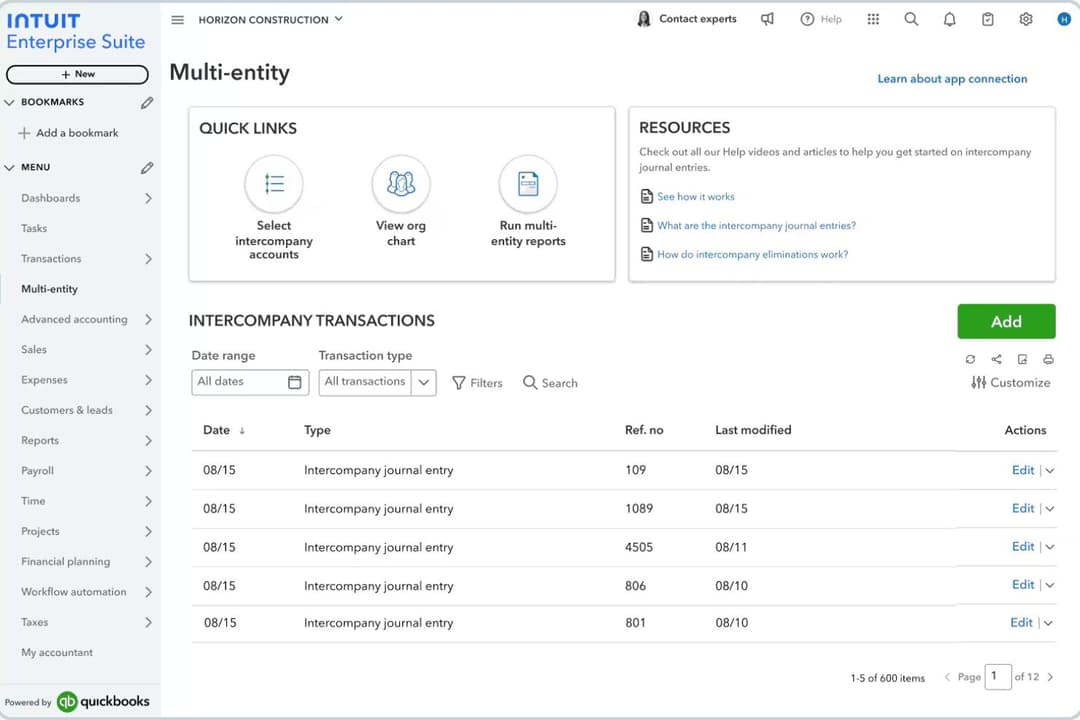
\u003cspan style=\u0022font-weight: 400;\u0022\u003eIntuit Enterprise Suite utmärker sig genom sin ekonomihantering för flera enheter och konsoliderade rapportering, vilket gör plattformen väl lämpad för företag som hanterar flera dotterbolag eller affärsenheter. Plattformen centraliserar ekonomiska data från olika enheter och automatiserar redovisningsarbetsflöden, vilket hjälper ekonomiteam att minska manuell konsolidering och få bättre insyn i hela organisationen.\u003c/span\u003e\n\n\u003cspan style=\u0022font-weight: 400;\u0022\u003eMicrosoft Dynamics 365 Business Central utmärker sig genom sin breda operativa funktionalitet och djupa integration med Microsofts ekosystem, inklusive verktyg som Excel, Outlook, Teams och Power BI. Det kopplar samman ekonomi, försäljning, leveranskedja och projektledning i ett enda system. Båda plattformarna erbjuder också centrala ERP-funktioner som ekonomihantering, rapportering, lageruppföljning och automatisering av arbetsflöden för att stödja den dagliga verksamheten.\u003c/span\u003e
| Intuit Enterprise Suite | Microsoft Dynamics 365 Business Central | |
|---|---|---|
| Accounts Payable | Yes | Yes |
| Accounts Receivable | Yes | Yes |
| API | Yes | Yes |
| Budgeting | Yes | Yes |
| Calendar Management | No | No |
| Customer Management | No | Yes |
| Dashboard | Yes | Yes |
| Data Export | Yes | Yes |
| Data Import | Yes | Yes |
| Data Visualization | Yes | Yes |
| Expense Tracking | Yes | Yes |
| External Integrations | Yes | Yes |
| Forecasting | Yes | Yes |
| Inventory Tracking | Yes | Yes |
| Multi-User | Yes | Yes |
| Notifications | Yes | Yes |
| Payroll | Yes | No |
| Project Management | Yes | Yes |
| Scheduling | No | Yes |
| Supplier Management | Yes | Yes |
| Third-Party Plugins/Add-Ons | Yes | Yes |
| Integration | Intuit Enterprise Suite | Microsoft Dynamics 365 Business Central |
| Salesforce | ✅ | ✅ |
| Shopify | ✅ | ✅ |
| Avalara | ✅ | ✅ |
| HubSpot | ✅ | ✅ |
| PayPal | ✅ | ✅ |
| Bill.com | ✅ | ❌ |
| Expensify | ✅ | ❌ |
| Power BI | ❌ | ✅ |
| Microsoft Teams | ❌ | ✅ |
| ADP | ✅ | ❌ |
| API | ✅ | ✅ |
| Zapier | ✅ | ✅ |
Både Intuit Enterprise Suite och Microsoft Dynamics 365 Business Central stöder integrationer med många vanliga affärsverktyg, inklusive e-handelsplattformar, CRM-system, betalningsförmedlare och tjänster för automatisering av skattehantering. I många fall kan anslutningar upprättas genom inbyggda integrationer, API:er, mellanprogramsplattformar eller integrationsverktyg som Zapier, vilket gör det möjligt för företag att koppla sitt ERP-system till resten av sin teknikplattform.
Där plattformarna tenderar att skilja sig åt är anpassningen till ekosystemet. Microsoft Dynamics 365 Business Central har särskilt starka inbyggda integrationer med Microsoft-produkter som Power BI och Microsoft Teams, medan Intuit Enterprise Suite ofta ansluter mer direkt till ekonomifokuserade verktyg som plattformar för utgiftshantering, lönehantering och leverantörsreskontra, vilka vanligtvis används tillsammans med QuickBooks.
| Faktor | Intuit Enterprise Suite | Microsoft Dynamics 365 Business Central |
| Datakryptering | Använder 128-bitars SSL-kryptering för data under överföring och i vila. | Krypterar data både i vila och under överföring genom Microsoft Azures säkerhetsramverk och kryptografi av företagsklass. |
| Efterlevnad av regelverk | Stöds av Intuits bredare ramverk för efterlevnad, inklusive standarder som SOC 1, SOC 2, ISO 27001 och PCI DSS i hela den molnbaserade infrastrukturen. | Omfattas av Microsofts globala efterlevnadsprogram, inklusive ISO-certifieringar, SOC-standarder och stöd för GDPR, tillsammans med ytterligare regelverk via Azure. |
| Åtkomstkontroller | Rollbaserade behörigheter och användarautentisering för åtkomst till känsliga data. | Detaljerade rollbaserade behörigheter integrerade med Microsoft Entra ID (Azure AD), vilket möjliggör enkel inloggning, policyer för villkorad åtkomst och multifaktorautentisering. |
| Drifttid & tillförlitlighet | Molninfrastruktur med säkerhetskopior, övervakning och åtgärder för katastrofåterställning som är utformade för att upprätthålla tjänstens tillgänglighet. | Bygger på Microsoft Azures globala infrastruktur med automatiserade säkerhetskopior, redundans och ett SLA på 99,9 % drifttid för onlinetjänsten. |
Båda plattformarna erbjuder en stark säkerhetsgrund med kryptering, rollbaserade åtkomstkontroller och stöd för efterlevnad. Microsoft Dynamics 365 Business Central drar nytta av Microsoft Azures globala molninfrastruktur och omfattande portfölj av efterlevnadsprogram, medan Intuit Enterprise Suite fokuserar på säkra ekonomiska arbetsflöden och styrningskontroller inom Intuits ekosystem. I praktiken beror det bästa valet ofta på om organisationen föredrar Microsofts bredare molnmiljö för företag eller Intuits integrerade plattform med fokus på ekonomi.
| Faktor | Intuit Enterprise Suite | Microsoft Dynamics 365 Business Central |
| Användargränssnitt | Rent, ekonomifokuserat gränssnitt som är utformat för att kännas bekant för team som är vana vid modern bokföringsprogramvara. | Modern, anpassningsbar instrumentpanel med djup integration med Microsoft 365. |
| Introduktion | Guidad konfiguration och tips i appen hjälper nya användare att snabbt komma igång. | Stegvisa guider och omfattande dokumentation stöder introduktionen. |
| Anpassning | Konfigurerbara arbetsflöden, integrationer och rapporteringsalternativ som samtidigt är relativt enkla att använda. | Mycket anpassningsbara arbetsflöden och fält som kan anpassas efter komplexa behov. |
| Support | Tillgång till Intuits supportresurser, dokumentation och hjälp via supportkanaler och implementeringspartner. | Support levereras vanligtvis via Microsoft-partner, med ytterligare dokumentation, communityresurser och Microsofts supportplaner tillgängliga. |
| Inlärningskurva | Minimal inlärningskurva för användare som är bekanta med bokföringsprogramvara. | Den bredare funktionaliteten kan innebära en brantare inlärningskurva, men möjliggör mer avancerade operativa arbetsflöden. |
Intuit Enterprise Suite är vanligtvis enklare för ekonomifokuserade team att snabbt börja använda, tack vare det strömlinjeformade gränssnittet och den ekonomiinriktade utformningen. Microsoft Dynamics 365 Business Central erbjuder större flexibilitet och djupare operativa funktioner, men organisationer kan behöva mer tid för konfiguration, utbildning och implementering för att fullt ut dra nytta av plattformen.
Intuit Enterprise Suite
- Multi-entity management supports complex organizational structures.
- AI-powered forecasting and insights help businesses analyze financial data.
- Built-in migration tools support transitions from QuickBooks Desktop and Advanced.
- The platform lacks sufficient training for new releases.
- Features can feel overwhelming.
- Reports take longer than expected to load.
Microsoft Dynamics 365 Business Central
- It offers extensive customization options to fit your business needs.
- The financial management tools provide comprehensive insights for better decision-making.
- It seamlessly integrates with other Microsoft products, enhancing your team's productivity.
- Some users find the initial setup complex and time-consuming.
- The user interface can feel outdated compared to other modern ERP solutions.
- There may be a learning curve for teams not already familiar with Microsoft products.
Intuit Enterprise Suite
- Multi-Entity BusinessesCompanies managing multiple subsidiaries, brands, or locations that need consolidated financial visibility while maintaining separate books.
- Finance Teams Focused on ForecastingOrganizations that rely on financial planning and projections to guide budgeting, expansion, and strategic decisions.
- Businesses With Structured Financial WorkflowsCompanies with complex approval processes that want to automate financial workflows and improve internal controls.
- Growing Service BusinessesService businesses needing project profitability tracking, workforce management, and consolidated financial planning across departments benefit significantly.
- Product-Based BusinessesCompanies that manage inventory and sales orders and need accounting, inventory, and order workflows connected in one system.
- Construction FirmsConstruction companies tracking job costing, project budgets, and multi-entity structures gain stronger operational visibility.
Microsoft Dynamics 365 Business Central
- Retail BusinessesYou can streamline inventory management and gain valuable insights into sales trends with its comprehensive reporting tools.
- Manufacturing CompaniesYour production processes can become more efficient with its detailed planning and scheduling functionalities.
- Service ProvidersYou can manage projects more effectively with its integrated project management features.
- Finance DepartmentsYour team will benefit from advanced financial reporting and analysis capabilities, providing deeper insights into financial health.
- Operations ManagersYou can tailor the system to your specific operational needs with its extensive customization options.
- Microsoft Product UsersYour work becomes more seamless with its native integration with other Microsoft applications, boosting overall productivity.
Vem bör använda Intuit Enterprise Suite och vem bör använda Microsoft Dynamics 365 Business Central?
Intuit Enterprise Suite passar bäst för växande medelstora företag som har vuxit ur verktyg som QuickBooks och behöver starkare ekonomihantering för flera juridiska enheter, automatisering och konsoliderad rapportering utan att införa ett fullskaligt traditionellt ERP-system.
Microsoft Dynamics 365 Business Central är idealiskt för små och medelstora organisationer som vill ha ett mer heltäckande ERP-system för att hantera ekonomi, lager, försäljning och verksamhet – särskilt om de redan förlitar sig på Microsoft-verktyg som Excel, Teams och Outlook.
| Intuit Enterprise Suite | Microsoft Dynamics 365 Business Central | |
|---|---|---|
| Automation | Intuit Enterprise Suite Financial workflow automation and AI-driven insights focused on accounting processes. | Microsoft Dynamics 365 Business Central Advanced automation across finance, supply chain, approvals, and operational workflows. |
| Core Focus | Intuit Enterprise Suite Financial management platform with strong multi-entity accounting and consolidated reporting for growing businesses. | Microsoft Dynamics 365 Business Central Full ERP designed to manage finance, operations, sales, inventory, and projects in one system. |
| Customization | Intuit Enterprise Suite Configurable workflows and integrations with moderate customization. | Microsoft Dynamics 365 Business Central Highly customizable with extensions, workflows, and partner-built apps. |
| Inventory Management | Intuit Enterprise Suite Provides basic inventory visibility for financial tracking. | Microsoft Dynamics 365 Business Central Advanced inventory, warehouse, and supply chain management tools. |
| Learning Curve | Intuit Enterprise Suite Easier adoption for teams familiar with accounting software. | Microsoft Dynamics 365 Business Central Steeper learning curve due to broader operational functionality. |
| Cloud-Based Access | Both offer secure, cloud-based platforms, letting teams access financial data and workflows from anywhere; each provides mobile and web interfaces. |
|---|---|
| Financial Reporting | Each solution includes robust financial reporting tools, with customizable templates and real-time dashboards for tracking performance. |
| Role-Based Permissions | Both platforms allow you to set user roles and permissions, helping control access to sensitive financial data and workflows. |
| Third-Party Integrations | Both support integrations with CRM, ecommerce, and business productivity tools through APIs, connectors, and integration platforms. |
| Workflow Approvals | Both allow businesses to set approval processes for transactions, expenses, or financial workflows. |