

AI audit software uses artificial intelligence to automate tasks like risk assessment, error detection, and document review during financial audits. As corporate AI adoption accelerates across financial spaces with growing audit demands, you need tools that deliver accuracy, speed, and data-driven insights you can trust.
In this guide, you’ll find my picks for the best AI audit software of 2026—so you can compare features, speed up executive decision-making, and find the right fit to reduce risk and boost audit quality.
Why Trust Our Software Recommendations
6,700+
Reviews
20
Industry experts
16+
Evaluation factors
14
Years
Our team has been testing and reviewing software since 2012. As finance leaders ourselves, we know how difficult—and important—it is to choose the right software.
For this guide, we evaluated tools using hands-on testing and independent research, scoring tools using our selection criteria.
Our reviews reflect our human editorial judgment, not a sales pitch.
AI Audit Software Comparison Table
This comparison table summarizes pricing details for my top AI audit software selections:
| Tool | Best For | Trial Info | Price | ||
|---|---|---|---|---|---|
| 1 | Best for AI-powered assessment acceleration | Free demo available | Pricing upon request | Website | |
| 2 | Best for audit process standardization | Not available | Pricing upon request | Website | |
| 3 | Best for real-time risk monitoring | Free demo available | Pricing upon request | Website | |
| 4 | Best for enterprise-scale compliance management | Free demo available. | Pricing upon request | Website | |
| 5 | Best for anomaly detection in financial data | Free demo available. | Pricing upon request | Website | |
| 6 | Best for customizable reporting dashboards | Free demo available | Pricing upon request | Website | |
| 7 | Best for automated contract data extraction | Free demo available | Pricing upon request | Website | |
| 8 | Best for cloud-based workflow automation | 14-day free trial + free demo available | From $149/user/month (billed annually) | Website | |
| 9 | Best for Excel-integrated document analysis | Free demo available | Pricing upon request | Website | |
| 10 | Best for collaborative engagement management | Free demo available | Pricing upon request | Website |


Best AI Audit Software Reviews
Below are my detailed summaries of the best end-to-end AI audit software that made it onto my shortlist. My reviews offer a detailed look at the features, capabilities, and best use cases of each platform to help protect your financial statements and choose the best tool.
 Best for AI-powered assessment acceleration
- Free demo available
- Pricing upon request
Visit WebsiteCustomer Rating:4.1/5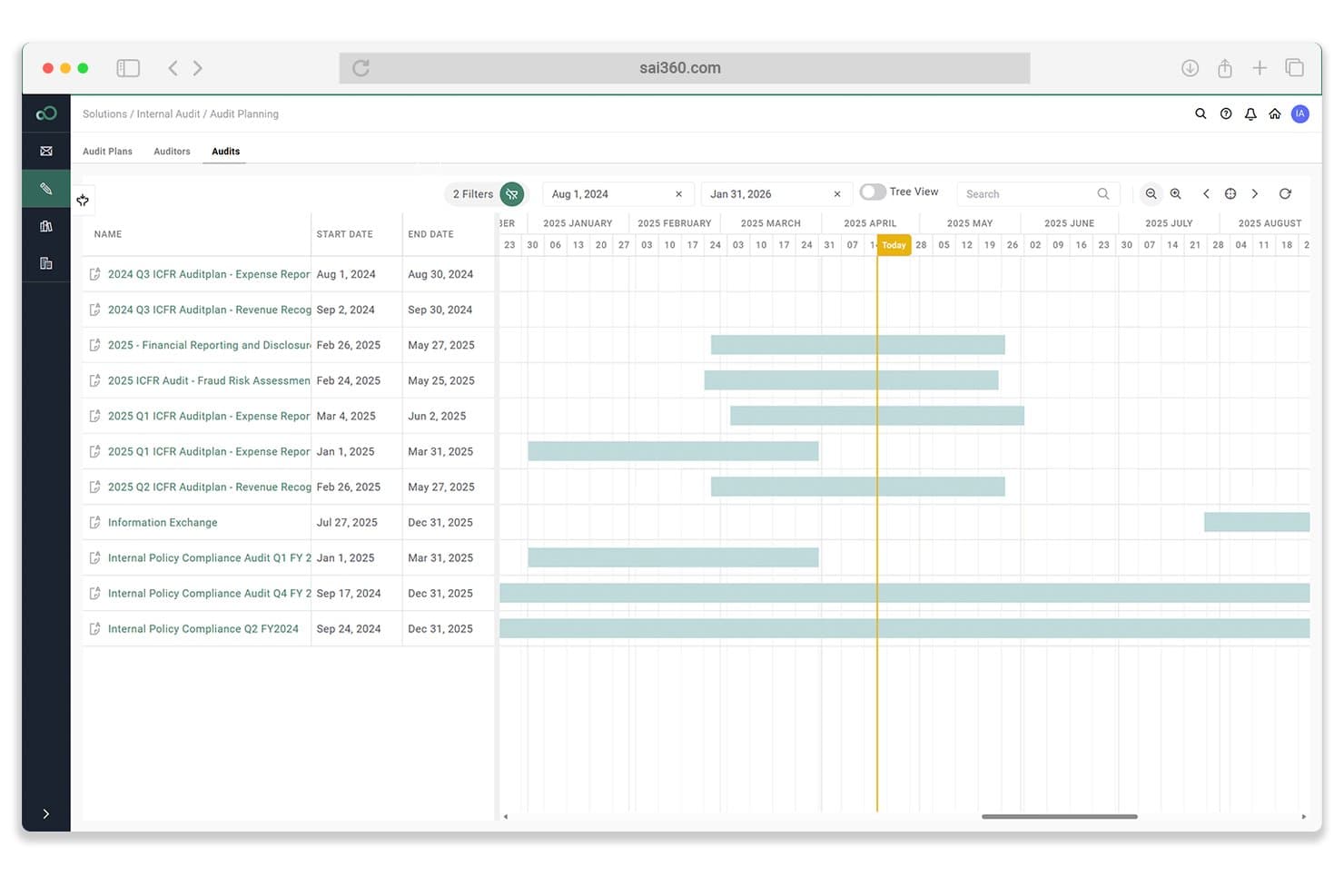
SAI360 visualizes audit schedules on an interactive Gantt chart timeline. SAI360 is a GRC platform with dedicated internal audit and SOX compliance modules that uses embedded AI to support evidence review, workpaper assistance, risk-based audit scoping, and continuous control monitoring.
Who Is SAI360 Best For?
SAI360 is a strong fit for SOX compliance officers and GRC teams at large enterprises who need AI-assisted control monitoring and audit documentation in a single connected platform.
Why I Picked SAI360
I picked SAI360 as one of the best because its AI genuinely cuts time out of the assessment process. The Intelligent Evidence Review feature analyzes policies, screenshots, and supporting documents to surface relevant insights automatically, which is where audit teams tend to lose hours. Pair that with AI-driven audit scoping that ranks engagements by control maturity and enterprise risk, and you have a tool that accelerates the front end of every audit cycle without requiring manual triage first.
SAI360 Key Features
- Continuous control monitoring: Tracks control performance over time and sends alerts when issues are detected before they escalate.
- AI gap analysis: Scans regulations and frameworks to flag missing, weak, or failing controls in your control library.
- Risk-based audit scoping: Ranks and prioritizes audit engagements by control maturity, enterprise risk, and business impact.
- Automated evidence collection: Pulls evidence directly from connected ERP, identity, and operational systems to support control testing workflows.
SAI360 Integrations
SAI360 lists 100+ integrations, including NetSuite, SAP, Oracle, Microsoft 365, SharePoint, Power BI, Jira, and ServiceNow. Finance integrations sync evidence and risk workflows rather than enabling direct general ledger or journal-entry analysis.
Pros and Cons
Pros:
- Continuous control monitoring supports SOX teams
- Supports risk-based audit scoping
- Accelerates evidence review with embedded AI
Cons:
- Limited financial anomaly detection
- No full-population transaction testing
Learn more about SAI360:

TeamMate+ offers structured compliance procedures with defined workflows. TeamMate is an audit management platform designed for internal audit teams, offering configurable workflows, audit analytics, automated risk assessment, and reporting tools tailored to the needs of modern audit operations.
Who Is TeamMate Best For?
TeamMate suits audit departments in mid-size and large organizations that need standardized audit processes and centralized oversight across distributed teams.
Why I Picked TeamMate
I picked TeamMate because I can roll out consistent audit methodologies, enforce approval hierarchies, and embed AI-guided templates across our projects. I use its workflow engine and standardized issue tracking to control and document process adherence.
TeamMate Key Features
- AI-guided risk assessment: Built-in AI tools help automate audit risk evaluations.
- Evidence management: Centralizes documentation and supports real-time collaboration on audit evidence.
- Time tracking and timesheets: Lets teams log audit hours and allocate resources.
- Custom report builder: Users can design, schedule, and distribute tailored audit reports.
TeamMate Integrations
Native integrations are not publicly listed. TeamMate supports integrations via API for custom integrations.
Pros and Cons
Pros:
- Strong evidence management and documentation controls
- AI-assisted risk assessment for improved audit quality
- Workflow engine enables complex audit process automation
Cons:
- Reporting customizations require configuration expertise
- Initial setup can be time-intensive
Learn more about TeamMate:

AuditBoard offers real-time visibility into risks, audits, and controls. AuditBoard is an AI-powered audit management platform with modules for detecting potential risks, issue tracking, reporting, document management, and workflow automation tailored to internal audit teams.
Who Is AuditBoard Best For?
Internal audit teams at mid-sized to large enterprises looking to deploy intelligent AI systems for advanced automation and risk intelligence.
Why I Picked AuditBoard
I picked AuditBoard as one of the best because its AI can flag emerging risks in real time, send automated risk alerts, and visualize risk heatmaps right in the dashboard. I can monitor issues as they develop and prioritize responses on the fly.
AuditBoard Key Features
- Automated workflow management: Configures and assigns audit tasks with tailored notifications.
- Centralized document repository: Stores audit evidence and workpapers in an organized, searchable platform.
- Audit planning module: Schedules audit projects and tracks milestones across multiple teams.
- Dashboards and analytics: Visualize status, findings, and audit coverage in interactive reports.
AuditBoard Integrations
AuditBoard offers native integrations with Workiva, Oracle NetSuite, Microsoft 365, and SAP, and provides an API for custom integrations.
Pros and Cons
Pros:
- Automated issue tracking and audit workflows
- Real-time dashboard with actionable audit insights
- AI-driven risk identification and monitoring
Cons:
- Advanced configuration requires platform expertise
- Initial setup process can be time-consuming
Learn more about AuditBoard: Best for enterprise-scale compliance management
- Free demo available.
- Pricing upon request

Diligent HighBond offers real-time audit monitoring and risk metrics. Diligent HighBond is a risk and audit management platform designed for large organizations that need tools for audit planning, controls testing, continuous control monitoring, and compliance management in one place.
Who Is Diligent HighBond Best For?
Diligent HighBond fits audit, risk, and compliance teams in global enterprises or highly regulated industries that need centralized, scalable compliance management.
Why I Picked Diligent HighBond
I picked Diligent HighBond because I can manage large-scale compliance initiatives across business units, set up enterprise risk assessments, and automate evidence collection. I rely on its real-time control testing and audit trails to handle complex compliance needs.
Diligent HighBond Key Features
- Automated workflow engine: Configure custom workflow steps for audit, risk, and compliance tasks.
- Policy management module: Manage and version control company policies within the platform.
- Survey and questionnaire tools: Distribute assessments to collect audit evidence or control feedback.
- Role-based access controls: Assign layered permissions for stakeholders and contributors.
Diligent HighBond Integrations
Diligent HighBond offers native integrations with SAP, Oracle, Microsoft 365, and ServiceNow, and provides an API for custom integrations.
Pros and Cons
Pros:
- Custom report designer for compliance audits
- Automated tracking for controls and evidence
- Enterprise-level risk and audit planning tools
Cons:
- Initial setup requires significant configuration
- Interface navigation can be unintuitive
Learn more about Diligent HighBond: Best for anomaly detection in financial data
- Free demo available.
- Pricing upon request

MindBridge offers risk-based analysis of financial account activity. MindBridge is an AI-powered audit platform for finance teams that specializes in analyzing financial data, identifying unusual transactions, and supporting risk assessment with automated analytics.
Who Is MindBridge Best For?
Audit and assurance teams in financial services firms who need automated analysis of large volumes of financial transactions.
Why I Picked MindBridge
I picked MindBridge because I rely on its AI to flag abnormal patterns and anomalies in financial data. I like how it applies automated risk scoring and visual mapping so my team can quickly investigate high-risk transactions. MindBridge’s analytics feel deeper than most.
MindBridge Key Features
- Data ingestion automation: Upload and process financial data files from various accounting systems.
- User access controls: Set granular permissions for audit team members and stakeholders.
- Audit trail tracking: Maintain a record of all actions and changes within each engagement.
- Exportable reports: Generate downloadable audit findings and data analysis summaries.
MindBridge Integrations
MindBridge offers integrations with MuleSoft, Box, OneStream, Snowflake, Oracle, Coupa, Paychex, MariaDB, Power BI, and more. MindBridge offers an API for custom integrations.
Pros and Cons
Pros:
- Detailed visualization of data flows
- Automated risk scoring of audit entries
- Detects rare and unusual financial transactions
Cons:
- No built-in connections to accounting platforms
- Limited industry-specific audit templates available
Learn more about MindBridge: Best for customizable reporting dashboards
- Free demo available
- Pricing upon request

Onspring audit dashboard lets you track projects, risks, and hours. Onspring is an internal audit management software for audit teams that need tools for workflow automation, issue tracking, document management, and highly flexible data visualizations in one cloud platform.
Who Is Onspring Best For?
Onspring suits audit teams at mid-size to large enterprises that want full control over custom reporting and workflow configurations.
Why I Picked Onspring
I picked Onspring as one of the best because I can build dashboards that visualize audit metrics exactly how I want. My team uses Onspring’s drag-and-drop interface to design custom reports, schedule data refreshes, and filter real-time results for each audit project.
Onspring Key Features
- Workflow automation: Configure approval flows and recurring tasks for audit activities.
- Issue tracking: Log, assign, and follow up on audit findings within the platform.
- Document management: Upload, organize, and access audit documents in a secure repository.
- User access controls: Set detailed role-based permissions for audit users and stakeholders.
Onspring Integrations
Onspring offers native integrations with Jira, ServiceNow, Microsoft 365, DocuSign, LogicGate, and Tableau, and provides an API for custom integrations.
Pros and Cons
Pros:
- Bulk import and export of audit data
- Dynamic dashboards support audit risk tracking
- Granular audit workflow customization options
Cons:
- Some audit reporting templates require manual setup
- Steep configuration process for new users
Learn more about Onspring: Best for automated contract data extraction
- Free demo available
- Pricing upon request

Trullion extracts lease data and tracks payments centrally. Trullion is an AI-powered audit software platform that automates contract review, data extraction, lease accounting, and revenue recognition for accounting and finance teams.
Who Is Trullion Best For?
Trullion fits accounting teams and internal auditors at mid-sized to large enterprises that need automated extraction and review of high volumes of contracts and leases.
Why I Picked Trullion
I picked Trullion as one of the best because I rely on its AI-driven contract data extraction and instant mapping of contractual terms to accounting standards. My team uploads leases and revenue agreements, and Trullion auto-extracts data fields for ASC 842 and ASC 606 compliance.
Trullion Key Features
- Multi-format document import: Upload PDFs, Excel files, and images for processing.
- Audit trail management: Track all changes and actions on extracted data.
- Collaboration tools: Assign tasks and share documents with team members.
- Built-in disclosure reports: Generate disclosures directly aligned with current accounting standards.
Trullion Integrations
Trullion offers native integrations with NetSuite, Sage Intacct, QuickBooks Online, Microsoft Dynamics 365, and Xero. An API is available for custom integrations.
Pros and Cons
Pros:
- Side-by-side document source traceability
- Machine learning for accounting standard mapping
- Fast OCR of complex contract files
Cons:
- Manual review sometimes needed for non-standard terms
- Fewer out-of-the-box audit templates
Learn more about Trullion: Best for cloud-based workflow automation
- 14-day free trial + free demo available
- From $149/user/month (billed annually)

AuditFile risk dashboard includes materiality thresholds and automation. AuditFile is an AI-powered audit software solution designed for accounting professionals, bringing together workflow automation, audit planning, document management, and data analytics in one cloud-based platform.
Who Is AuditFile Best For?
AuditFile is built for small to mid-sized accounting firms seeking secure, cloud-based audit workflow automation that supports financial and ESG reporting.
Why I Picked AuditFile
I picked AuditFile as one of the best because its AI modules let me automate repetitive audit tasks, manage workflow steps in the cloud, and keep audit documents organized for my team. I can monitor progress from anywhere and trigger approvals quickly.
AuditFile Key Features
- Secure client portal: Lets clients upload, view, and retrieve files instantly.
- Built-in trial balance module: Imports trial balances for real-time audit adjustments and mapping.
- Audit program template library: Provides pre-built templates aligned with standards and industry needs.
- Automated document version control: Tracks changes and manages file versions throughout each audit.
AuditFile Integrations
Native integrations are not publicly listed.
Pros and Cons
Pros:
- Real-time team collaboration on engagements
- Secure portal for client document sharing
- AI-powered audit workflow automation for firms
Cons:
- Few pre-built integrations with accounting platforms
- Limited library of advanced analytics tools
Learn more about AuditFile: Best for Excel-integrated document analysis
- Free demo available
- Pricing upon request

DataSnipper dashboard offers an overview of audit snips and workflow metrics. DataSnipper is an audit software platform that adds intelligent document analysis, automated data extraction, and audit workflow tools directly within Microsoft Excel.
Who Is DataSnipper Best For?
Audit and finance professionals who need advanced document analysis and automated audit tools inside Microsoft Excel.
Why I Picked DataSnipper
I picked DataSnipper as one of the best because I can instantly extract, cross-reference, and match data from audit documents all within Excel. That lets my team automate document testing, trace source data, and attach evidence directly to our workpapers.
DataSnipper Key Features
- Process flows: Map and document process steps directly within Excel.
- Automated document archiving: Securely store and organize source files within your spreadsheet.
- Annotation tools: Add comments, highlights, and notes to key data.
- Version control: Track each change and preserve historical document states.
DataSnipper Integrations
DataSnipper has native integration with Microsoft Excel. An API is available for custom integrations.
Pros and Cons
Pros:
- Centralizes supporting documents for each test
- Automates cross-referencing and data extraction
- Embedded directly within Microsoft Excel
Cons:
- Lacks advanced workflow automation features
- Limited functions outside the Excel environment
Learn more about DataSnipper: Best for collaborative engagement management
- Free demo available
- Pricing upon request

Fieldguide offers audit progress tracking with milestone-based workflows. Fieldguide is an AI-powered audit and engagement management platform that combines workflow automation, document management, client collaboration tools, and analytics designed for audit and advisory teams.
Who Is Fieldguide Best For?
Fieldguide suits audit and advisory teams at accounting firms that need unified project, document, and client management across multiple auditors and engagement types.
Why I Picked Fieldguide
I picked Fieldguide because I rely on its secure client portal, live document collaboration, and real-time engagement status updates. My team manages audits in parallel, making it easy to coordinate open items and communications with multiple clients at once.
Fieldguide Key Features
- Automated workpaper generation: Creates audit-ready workpapers based on engagement templates and data inputs.
- AI-driven risk assessment: Uses machine learning to help identify and prioritize audit risks.
- Workflow task tracking: Monitors and manages audit steps with visual progress monitoring.
- Role-based permission controls: Controls user access and editing capabilities by engagement role.
Fieldguide Integrations
Fieldguide offers native integrations with Zendesk, GitHub, Workday, Xero, QuickBooks, ADP, AWS, Zoho CRM, and more. Fieldguide offers an API for custom integrations.
Pros and Cons
Pros:
- Automated evidence collection workflows
- AI-driven audit risk assessments
- Real-time client document collaboration
Cons:
- Limited out-of-the-box template variety
- Custom reporting setup is complex
Learn more about Fieldguide:
Other AI Audit Software
Here are some additional AI audit software options that didn’t make it onto my shortlist, but are still worth checking out:
- 11CoCounsel AuditBest for regulatory audit support
- 12Compliance.aiBest for regulatory change tracking
- 13Credo AIBest for automated risk assessment workflows
- 14Holistic AIBest for multi-standard audit coverage
- 15Norm AiBest for regulatory compliance mapping
How I Evaluate AI Audit Software
Every tool on this list needs to do more than slap an AI label on basic analytics—I look for platforms that actually cut audit hours by running full-population testing and surfacing real anomalies. I split my evaluation into core functionality a tool must have to qualify and the differentiating factors that separate good options from great ones.
Core Functionality (Table Stakes For This List)
When I'm selecting tools for my list, I rank each one on a scale from 0 (does not offer the functionality) to 5 (excels in this area) for each core functionality listed below. Then, I calculate the tool's total score into a percentage. Each tool needs to achieve a minimum total score of 65% to be considered for inclusion.
- AI-Driven Anomaly Detection: I check whether the tool uses actual ML models to surface unusual journal entries and outliers, or just applies static rules dressed up as AI.
- Full-Population Data Analysis: The platform should ingest and test 100% of GL and subledger transactions, not limit auditors to sample-based approaches.
- Automated Risk Scoring: I look for AI that ranks accounts, transactions, or controls by risk level so auditors can focus time on areas like revenue cutoff or related-party entries.
- Audit Workflow & Workpaper Automation: Tools should automate workpaper creation, evidence linking, and sign-off routing rather than just storing documents in a shared folder.
- Financial System Integrations: I evaluate each tool's connector library for major ERPs and GLs like SAP, Oracle, NetSuite, and QuickBooks, plus API access for custom sources.
- Audit Trail & Compliance Reporting: Reports need to map to recognized frameworks like SOX, PCAOB, or IFRS so findings hold up under regulatory or peer review scrutiny.
Once I have a list of tools that meet this criteria, I consider what sets each platform apart.
Differentiating Factors (What Sets Vendors Apart)
Here's how I compare and contrast different vendors:
Standout Features
Explainable AI outputs matter a lot here—when an auditor presents flagged entries to an audit committee, the tool needs to show clear reasoning behind each risk score, not just a number. I also evaluate continuous controls monitoring, which shifts coverage from periodic snapshots to always-on surveillance of segregation-of-duties conflicts and policy exceptions. A generative AI audit assistant adds real value when it drafts narratives and review notes, saving hours during busy-season close cycles.
Beyond Features
Fit matters here. I evaluate whether a platform is built for external audit firms managing client portfolios or internal teams running year-round controls testing. AI model accuracy is another big differentiator—false-positive tunability and auditor feedback loops that sharpen detection over time make a real difference during busy season. On the security side, I check for SOC 2 Type II certification and AI governance policies confirming client data isn't used to train shared models.
How to Choose AI Audit Software
It’s easy to get bogged down in long feature lists and complex pricing structures. To help you stay focused as you work through your unique software selection process, here’s a checklist of factors to keep in mind:
| Factor | What to Consider |
|---|---|
| FactorScalability | What to ConsiderWill the platform handle your transaction volume and growing data needs? Consider whether historical data can be retained and how the tool performs at peak loads. |
| FactorIntegrations | What to ConsiderCan the software connect to your existing ERP or accounting systems without extra workarounds? Audit whether native or API integrations support vital workflows. |
| FactorCustomizability | What to ConsiderCan you tailor workflows, scoring rules, or reports to your company’s audit processes and industry requirements? Evaluate available configuration options. |
| FactorEase of use | What to ConsiderHow accessible is the interface for both technical and non-technical team members? Look for clear navigation and a low learning curve for audit tasks. |
| FactorImplementation and onboarding | What to ConsiderHow quickly can your team get up and running? Assess the availability of guided onboarding, migration support, and whether outside consultants are needed. |
| FactorCost | What to ConsiderBeyond upfront pricing, will add-ons or data limits increase your spend? Ask for clear cost projections, including volume, support, and upgrade fees. |
| FactorSecurity safeguards | What to ConsiderDoes the vendor meet your company’s data privacy, encryption, and user permission requirements? Review certifications and audit logs for peace of mind. |
| FactorCompliance requirements | What to ConsiderWill the software support your industry’s audit and regulatory standards? Ensure it stays current on relevant compliance updates and audit evidence needs. |
What Is AI Audit Software?
AI audit software is a digital tool that uses artificial intelligence to analyze financial data and identify risks or anomalies in audit processes. These platforms automate tasks like data ingestion, transaction scoring, and report generation, helping audit teams detect errors or fraud more quickly and accurately than traditional methods.
Features of AI Audit Software
When selecting AI audit software, keep an eye out for the following key features:
- Automated anomaly detection: Uses AI algorithms to scan large datasets and highlight unusual transactions or patterns that may indicate errors or fraud.
- Risk scoring: Assigns risk levels to transactions, accounts, or business units to help prioritize audit focus areas based on data-driven insights.
- Data ingestion automation: Imports and standardizes data from multiple sources, such as ERP or accounting systems, reducing manual effort and errors.
- Customizable workflow rules: Allow users to set specific criteria or controls for audits, tailoring the platform to your business’s compliance and operational requirements.
- Drill-down reporting: Enables auditors to click into anomalies or flagged transactions for deeper investigation, supporting a more thorough audit process.
- Audit trail tracking: Records every step, change, and user action within the tool to ensure transparency, accountability, and regulatory compliance.
- Visual analytics dashboards: Present data visually through charts, graphs, and timelines, making it easier to spot trends and outliers at a glance.
- Regulatory compliance support: Includes features or templates that align with audit and financial reporting standards relevant to your industry.
- Granular user permissions: Lets administrators control access to sensitive audit data and set roles and user permissions based on team structure.
- API and integration capabilities: Connects with other financial, risk management, or document management systems to centralize audit data and streamline workflows.
Benefits of AI Audit Software
Implementing AI audit software provides several benefits for your team and your business. Here are a few you can look forward to:
- Faster risk detection: Automated anomaly detection highlights suspicious transactions quickly, allowing your team to respond before minor issues escalate.
- Stronger regulatory compliance: Built-in workflow rules and audit trail tracking help you meet regulatory standards and internal controls more easily.
- Reduced manual workload: Automated data ingestion and report generation eliminate repetitive tasks, letting auditors focus on high-value analysis.
- Improved audit accuracy: AI-driven risk scoring reduces human error and oversight, supporting more reliable audit outcomes.
- Visual data insights: Analytics dashboards and drill-down reporting make it easier to identify trends, patterns, and outliers in financial data.
- Custom-fit audit processes: Customizable workflow rules and permissions let you adapt audits to pinpoint potential risks across different business units, industries, or compliance needs.
- Transparent audit history: Detailed activity tracking and user logs ensure full accountability and traceability throughout the audit lifecycle.
Costs and Pricing of AI Audit Software
Selecting AI audit software requires an understanding of the various pricing models and plans available. Costs vary based on features, team size, add-ons, and more. The table below summarizes common plans, their average prices, and typical features included in AI audit software solutions:
Plan Comparison Table for AI Audit Software
| Plan Type | Average Price | Common Features |
|---|---|---|
| Plan TypeFree Plan | Average Price$0 | Common FeaturesBasic anomaly detection, limited data uploads, essential reporting, and email-only support. |
| Plan TypePersonal Plan | Average Price$20-$50/user/month | Common FeaturesAutomated risk scoring, small team collaboration, basic workflow customization, and standard analytics dashboards. |
| Plan TypeBusiness Plan | Average Price$60-$120/user/month | Common FeaturesAdvanced data ingestion, granular permissions, workflow automation, role-based access, and expanded integrations. |
| Plan TypeEnterprise Plan | Average Price$150-$300/user/month | Common FeaturesCustom compliance templates, API access, dedicated account manager, advanced audit trails, and premium support. |
AI Audit Software FAQs
Here are some answers to common questions about AI audit software:
How does AI audit software detect anomalies in financial data?
AI audit software uses machine learning algorithms to scan large datasets and identify transactions that differ from normal patterns. This process highlights entries that may indicate errors, fraud, or unusual activity, making it easier for auditors to focus their investigations.
Can AI audit software integrate with existing accounting systems?
Yes, most AI audit software can connect with popular accounting and ERP platforms using native integrations or APIs. This allows you to import your financial data seamlessly, reduce manual entry, and automate parts of the audit workflow.
What kind of companies benefit most from AI audit software?
Companies with high transaction volumes, complex regulatory requirements, or limited audit resources benefit most from AI audit software. These tools are also useful for organizations seeking to strengthen fraud detection and streamline audit cycles.
Is AI audit software secure enough for sensitive financial data?
Yes, reputable AI audit software providers use encryption, access controls, and audit logs to protect sensitive information. Always check for compliance with standards like SOC 2 or ISO 27001 before selecting a platform.
How long does it take to implement AI audit software?
Implementation timelines vary, but most platforms offer guided onboarding, training resources, and migration tools to help you get started in a few days or weeks. Factors like integration complexity and data volume can impact the rollout schedule.