

Briefcase Review 2026 : Features, Pricing, Pros and Cons Explained
I’ve put Briefcase to the test—here’s what stands out: real AI-driven accounting that actually frees up your focus. Dive in to see if it lives up to the 2026 automation hype.

We review tools independently, and commissions help fund our testing. See our transparency policy, our methodology, or suggest a tool.
Briefcase is an AI accounting software built for finance teams that need to automate transaction categorization, reconciliation, and financial close processes. I'd lean toward it over Botkeeper if you want more direct control of your AI-driven workflows. Botkeeper takes more of a managed service approach, where a third party handles your books rather than your own team doing it in-house.
Briefcase Evaluation Summary
5/5
- From $12/client/month
- 14-day free trial
Why Trust Our Software Recommendations
6,700+
Reviews
20
Industry experts
16+
Evaluation factors
14
Years
Our team has been testing and reviewing software since 2012. As finance leaders ourselves, we know how difficult—and important—it is to choose the right software.
For this guide, we evaluated tools using hands-on testing and independent research, scoring tools using our selection criteria.
Our reviews reflect our human editorial judgment, not a sales pitch.
Briefcase Overview
I think Briefcase stands out for its smooth interface and rapid onboarding, especially when compared to other AI accounting software. Its automation cuts down on data entry, and support is quick to respond. Pricing is reasonable for small to mid-size teams, though deep integrations with legacy ERP systems are limited. If you’re weighing options for a tech-forward finance function or a lean startup, I’d judge Briefcase as a smart pick—particularly for teams open to embracing workflow automation without heavy customization.
Pros
- Automates invoice data extraction and categorization with high accuracy
- Offers real-time financial dashboards and reporting tools
- Slack integration streamlines approvals and communication in-app
Cons
- No built-in payroll or HR modules available yet
- Limited support for complex global tax compliance needs
- Custom reporting options are not fully flexible
Is Briefcase Right For Your Needs?
Who Would be a Good Fit for Briefcase?
Briefcase is a smart pick for growing businesses, digital-first teams, or finance departments who want fast automation and user-friendly workflows without heavy IT overhead. Teams dealing with frequent approvals, remote work, and dynamic expense flows will see the most value. The intuitive interface, Slack integration, and AI-driven features cut down manual work and improve transparency, especially for organizations with moderate complexity and rapid scaling needs.
- SaaS StartupsBriefcase fits SaaS startups that need to digitize all finance ops quickly—its Slack integration and AI routing boost speed and accuracy.
- Marketing AgenciesAgencies handling multiple clients benefit from fast expense approvals and clear audit trails to keep client billing transparent.
- Hybrid WorkplacesCompanies with distributed finance teams can approve, track, and reconcile on the go with Briefcase’s real-time, cloud-based dashboards.
- Series A Finance TeamsEarly-stage but growing companies can automate payables and reporting, freeing up lean teams to focus on analysis.
- Professional Services FirmsFirms with frequent billable hours and client reimbursements get value from categorized expenses and built-in documentation matching.
- Nonprofit Finance DepartmentsNonprofits managing grants and donor funds gain from real-time spend tracking and audit-ready activity logs built into Briefcase.
Who Would be a Bad Fit for Briefcase?
Briefcase isn’t built for global enterprises, heavy manufacturing, or businesses with specialized regulatory needs—it lacks deep customization, multi-entity support, and industry-focused compliance features. If you require granular, country-specific tax handling, complex inventory management, or full-service HR modules, you'll likely outgrow the platform fast. Briefcase is best for nimble, finance-led teams, not complex multinational operations.
- Multinational CorporationsLarge global firms will find Briefcase’s tax compliance and entity management too limited for their complex structures.
- Manufacturing EnterprisesManufacturers who need advanced inventory tracking or supply chain integrations don’t get those features built in.
- Government AgenciesAgencies with stringent regulatory or auditing requirements miss out on deep compliance controls and workflows.
- Retail ChainsRetailers with large, physical inventory and omnichannel platforms need more extensive POS and logistics integrations.
- Healthcare ProvidersOrganizations requiring industry-specific controls and HIPAA compliance will find Briefcase unsuitable for their unique needs.
- In-House Payroll TeamsCompanies seeking a unified payroll and HR solution need more than Briefcase’s core accounting and bill pay functions.
How We Test & Score Tools
We’ve spent years building, refining, and improving our software testing and scoring system. The rubric is designed to capture the nuances of software selection and what makes a tool effective, focusing on critical aspects of the decision-making process.
Below, you can see exactly how our testing and scoring works across seven criteria. It allows us to provide an unbiased evaluation of the software based on core functionality, standout features, ease of use, onboarding, customer support, integrations, customer reviews, and value for money.
Core Functionality (25% of final scoring)
The starting point of our evaluation is always the core functionality of the tool. Does it have the basic features and functions that a user would expect to see? Are any of those core features locked to higher-tiered pricing plans? At its core, we expect a tool to stand up against the baseline capabilities of its competitors.
Standout Features (25% of final scoring)
Next, we evaluate uncommon standout features that go above and beyond the core functionality typically found in tools of its kind. A high score reflects specialized or unique features that make the product faster, more efficient, or offer additional value to the user.
We also evaluate how easy it is to integrate with other tools typically found in the tech stack to expand the functionality and utility of the software. Tools offering plentiful native integrations, 3rd party connections, and API access to build custom integrations score best.
Ease of Use (10% of final scoring)
We consider how quick and easy it is to execute the tasks defined in the core functionality using the tool. High scoring software is well designed, intuitive to use, offers mobile apps, provides templates, and makes relatively complex tasks seem simple.
Onboarding (10% of final scoring)
We know how important rapid team adoption is for a new platform, so we evaluate how easy it is to learn and use a tool with minimal training. We evaluate how quickly a team member can get set up and start using the tool with no experience. High scoring solutions indicate little or no support is required.
Customer Support (10% of final scoring)
We review how quick and easy it is to get unstuck and find help by phone, live chat, or knowledge base. Tools and companies that provide real-time support score best, while chatbots score worst.
Customer Reviews (10% of final scoring)
Beyond our own testing and evaluation, we consider the net promoter score from current and past customers. We review their likelihood, given the option, to choose the tool again for the core functionality. A high scoring software reflects a high net promoter score from current or past customers.
Value for Money (10% of final scoring)
Lastly, in consideration of all the other criteria, we review the average price of entry level plans against the core features and consider the value of the other evaluation criteria. Software that delivers more, for less, will score higher.
Core Features
Automated Invoice Processing
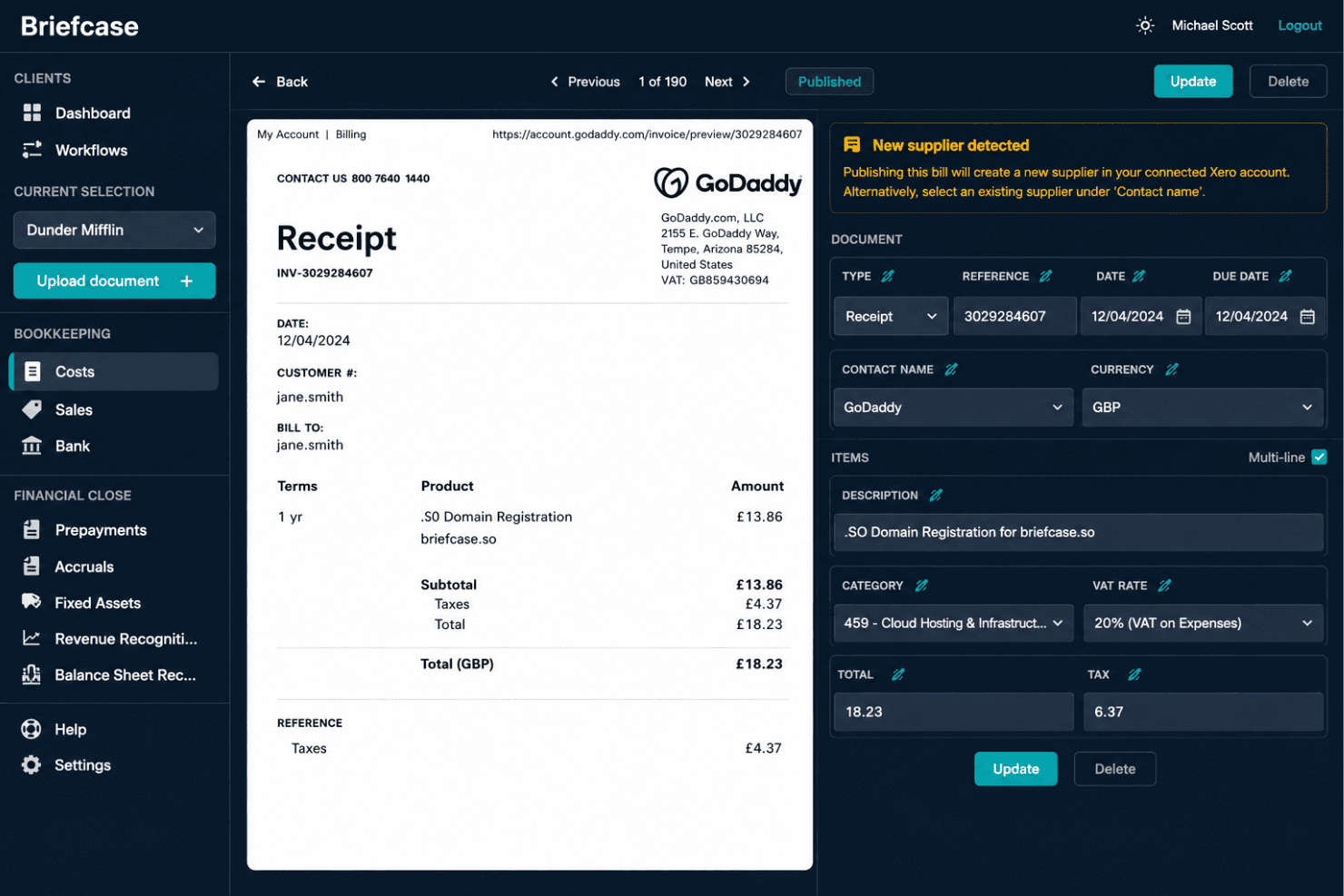
Briefcase uses AI to capture, extract, and categorize invoice data automatically. This eliminates manual data entry and speeds up invoice approvals.
Real-Time Financial Dashboards
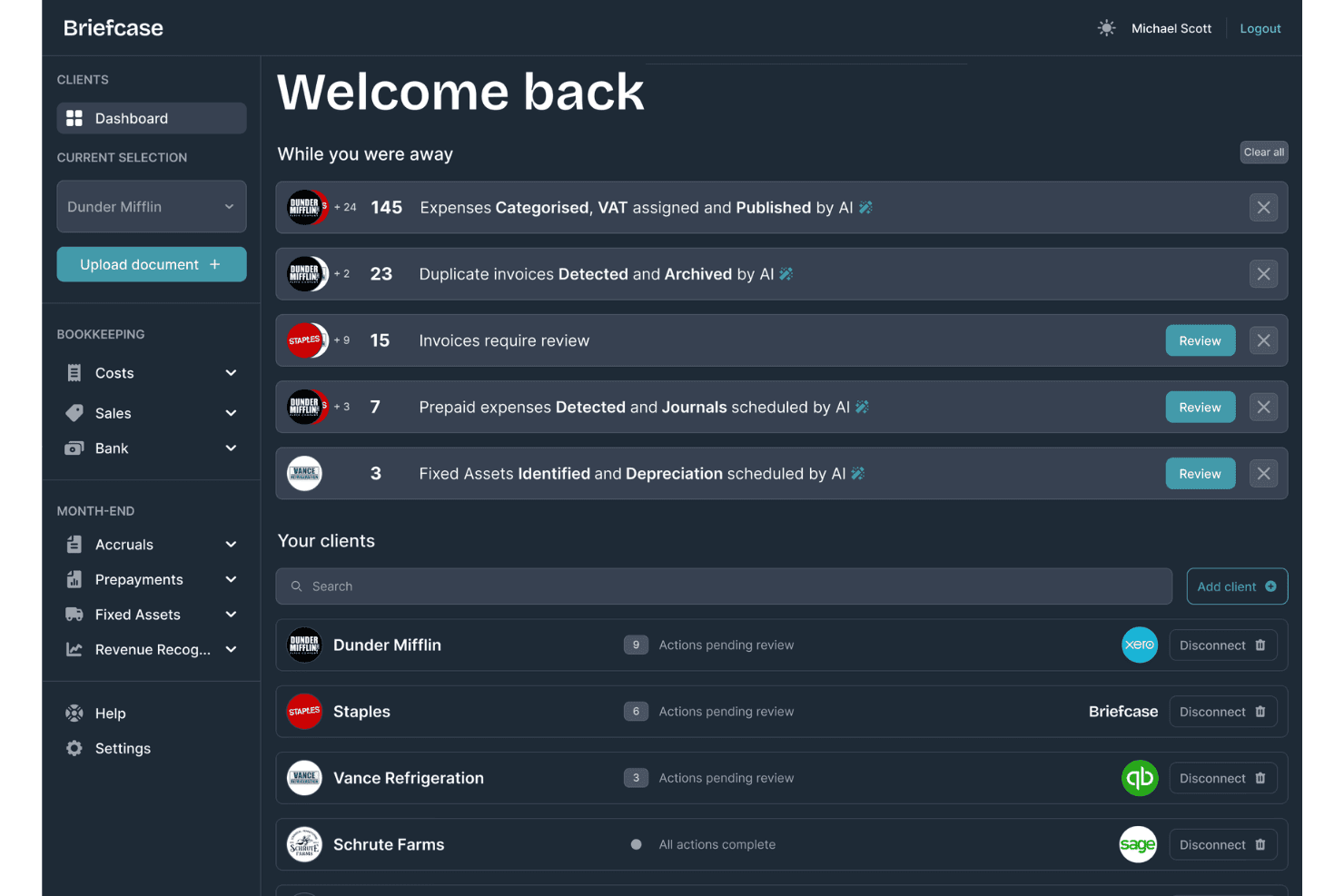
View live snapshots of cash flow, expenses, and revenue trends in customizable dashboards. Finance teams can track KPIs and spot anomalies instantly.
AI-Powered Categorization
Transactions are sorted and labeled by AI to match your chart of accounts. This keeps financial data clean and ready for reporting with little effort.
Smart Approval Workflows
Route bills and expenses to the right approvers with automated logic. Approvals happen in one place, making audits and reviews easier.
PDF and Email Receipt Matching
Upload or email receipts and let Briefcase match them to transactions automatically. This reduces missing documentation and speeds up month-end close.
Audit Trail and Activity Log
Each transaction includes a timestamped, tamper-proof audit history. You can review who made edits or approved invoices for total transparency.
Standout Features
Automated Publishing to Accounting Software
You can approve and pay bills from inside Slack without logging in elsewhere. This enables finance and business users to manage payments directly within their daily workflow.
AI-Generated Payment Recommendations
Briefcase suggests which bills to prioritize based on cash flow projections and vendor terms. This feature helps prevent late fees and maximizes available working capital.
Ease of Use
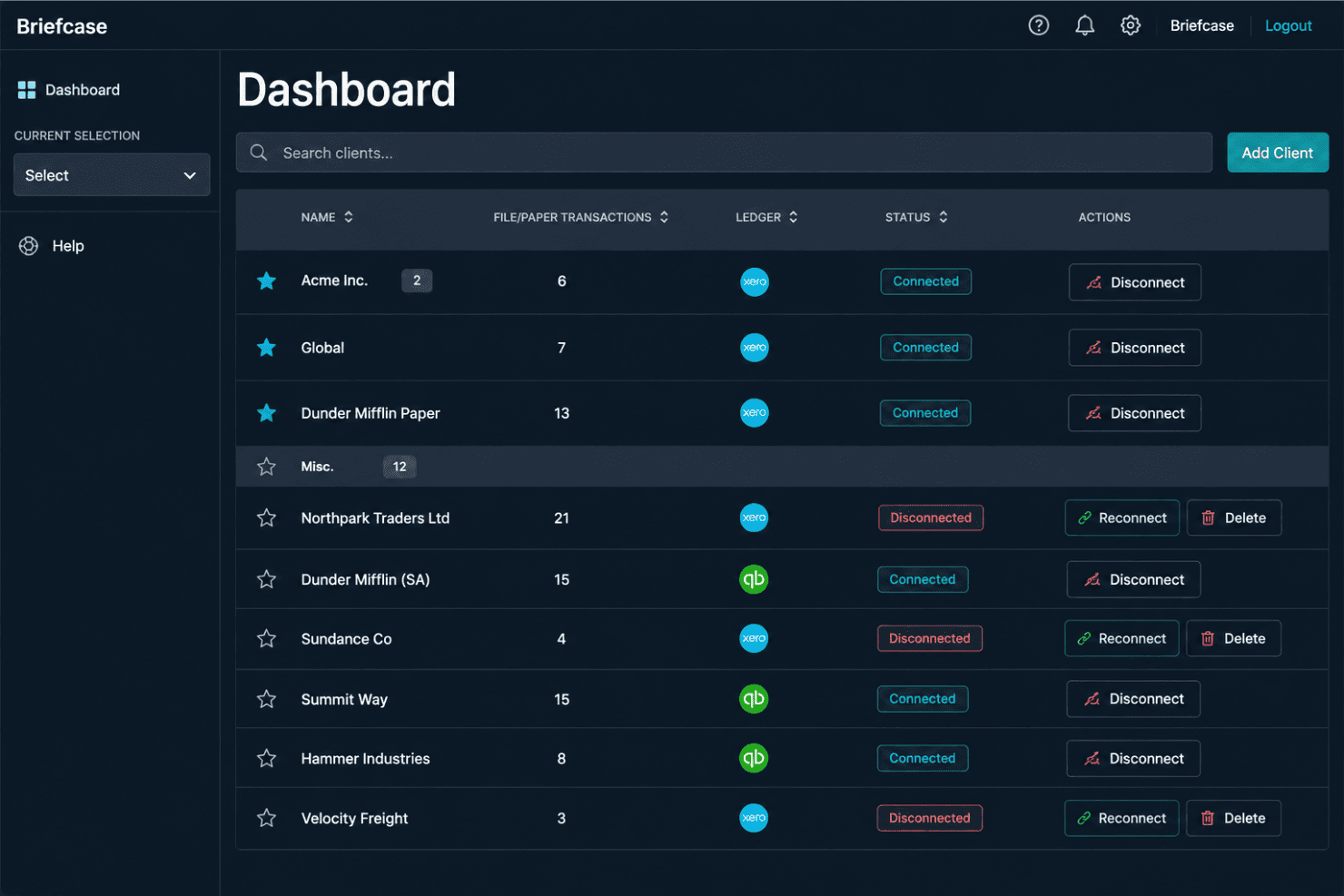
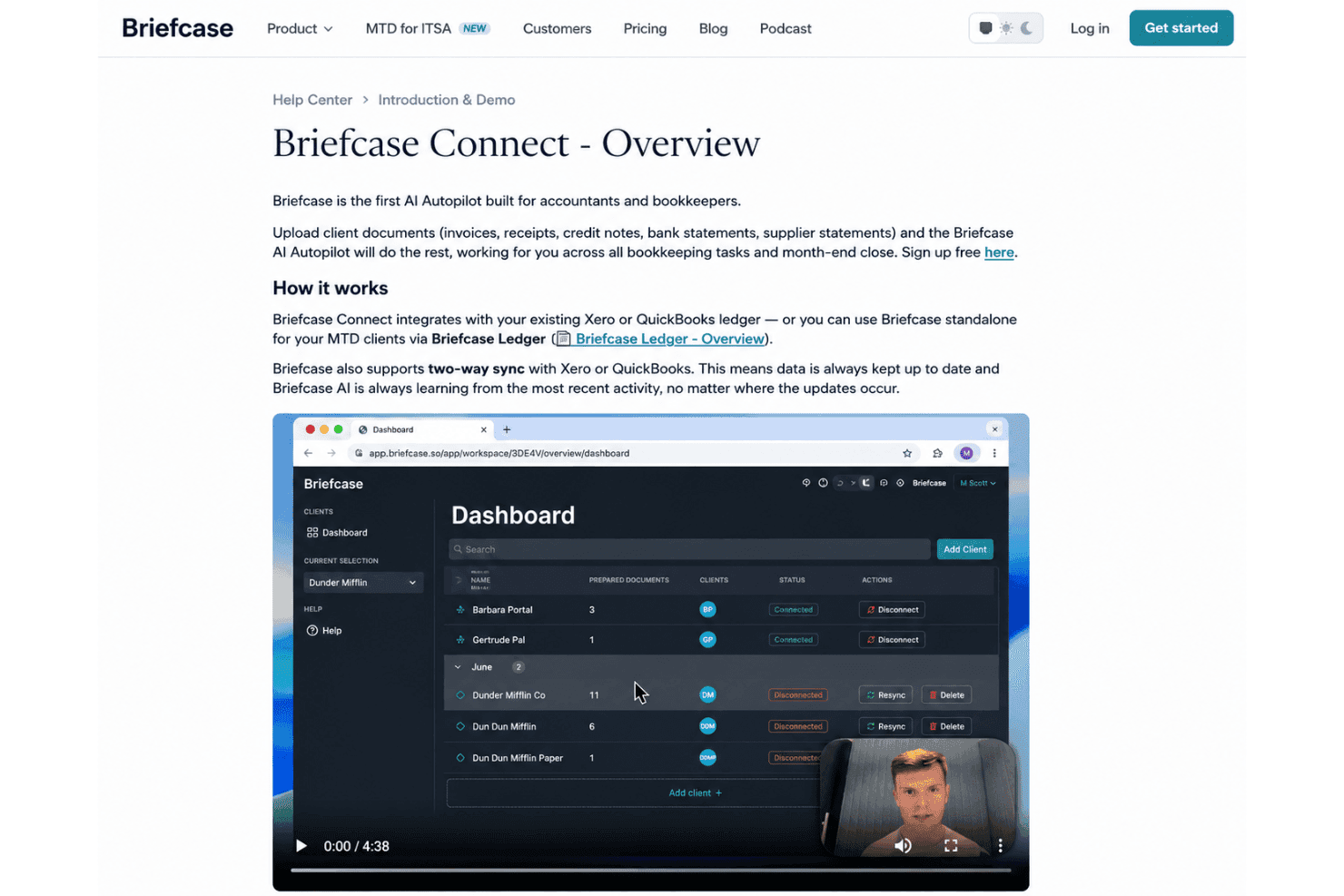
Briefcase has a straightforward interface and requires minimal setup or manual configuration. Its AI-driven categorization learns from accounting history and user corrections, reducing repetitive work, while dashboards keep completed tasks, pending reviews, and client activity accessible.
Onboarding
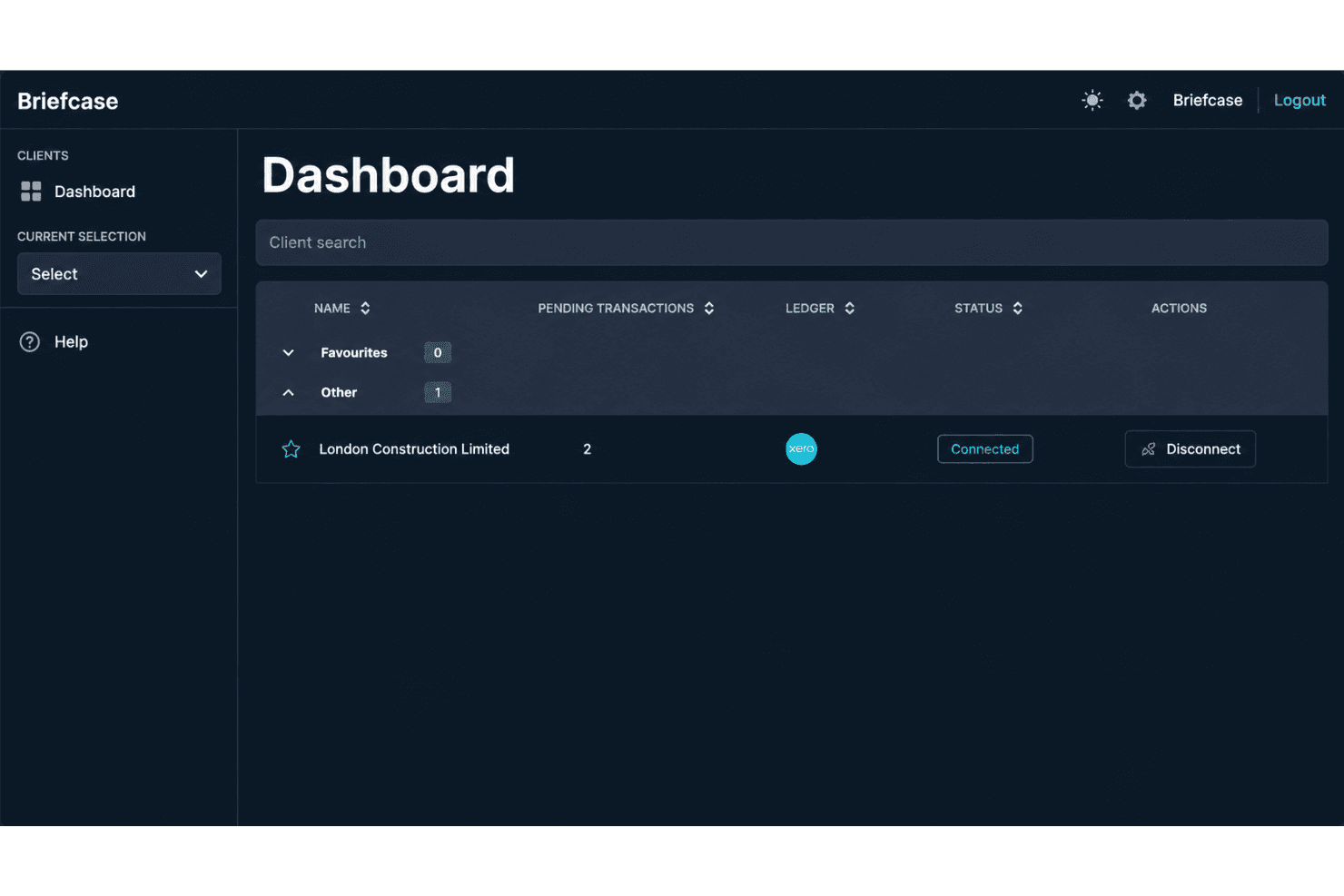
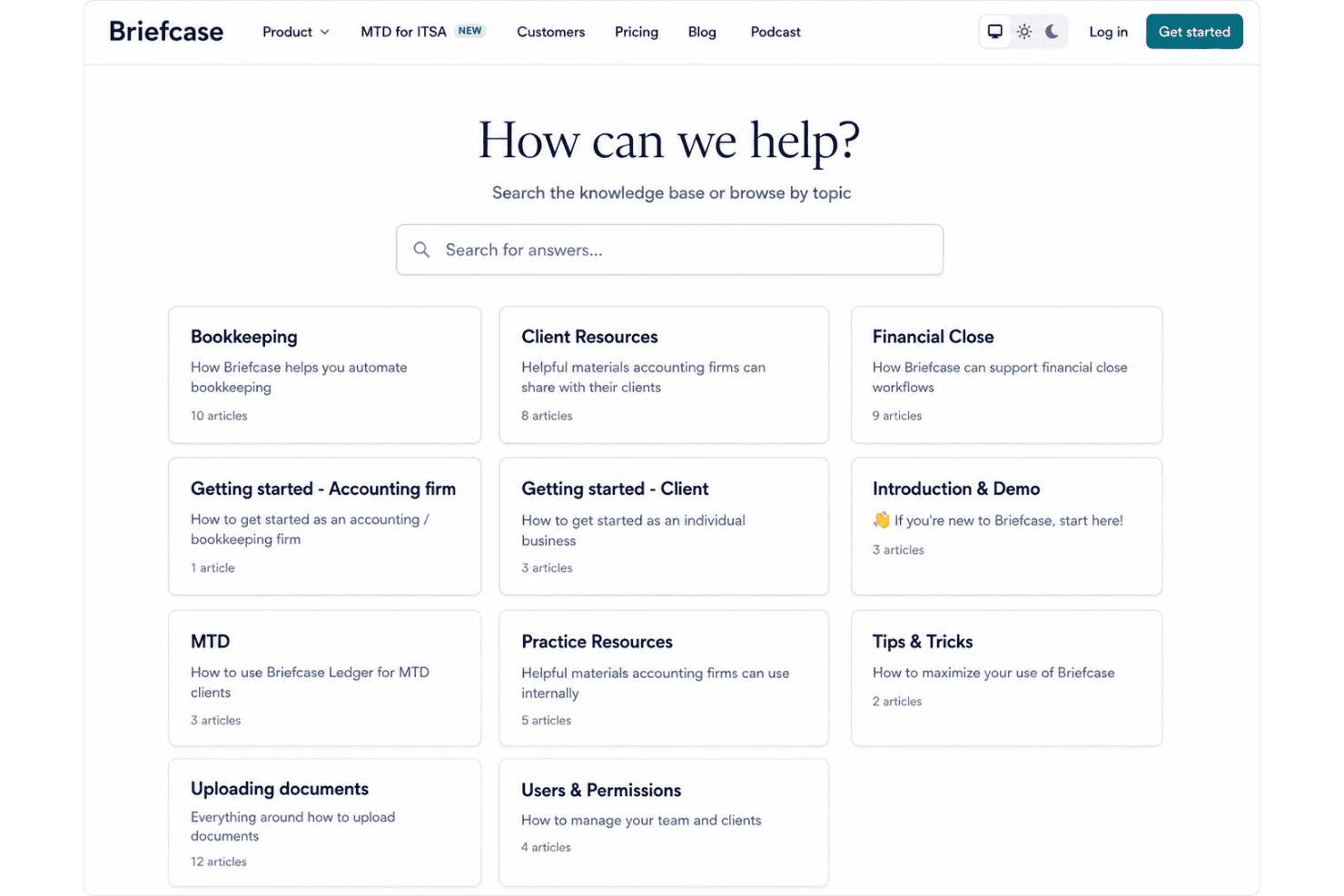
Getting started with Briefcase is fast—most users mention completing setup in under an hour with helpful in-app guidance. I’ve noticed the dedicated onboarding resources, clear walkthroughs, and responsive chat support help teams reach value quickly. The help center answers common questions, and live support responds to requests in minutes, not days.
Customer Support
I think Briefcase’s customer support is a real strength, with fast live chat that users consistently praise for being knowledgeable and quick to resolve issues. The support team often gives specific, actionable advice instead of generic responses, and most basic questions are answered within minutes. I’ve seen feedback saying even after onboarding, help is just a message away.
Integrations
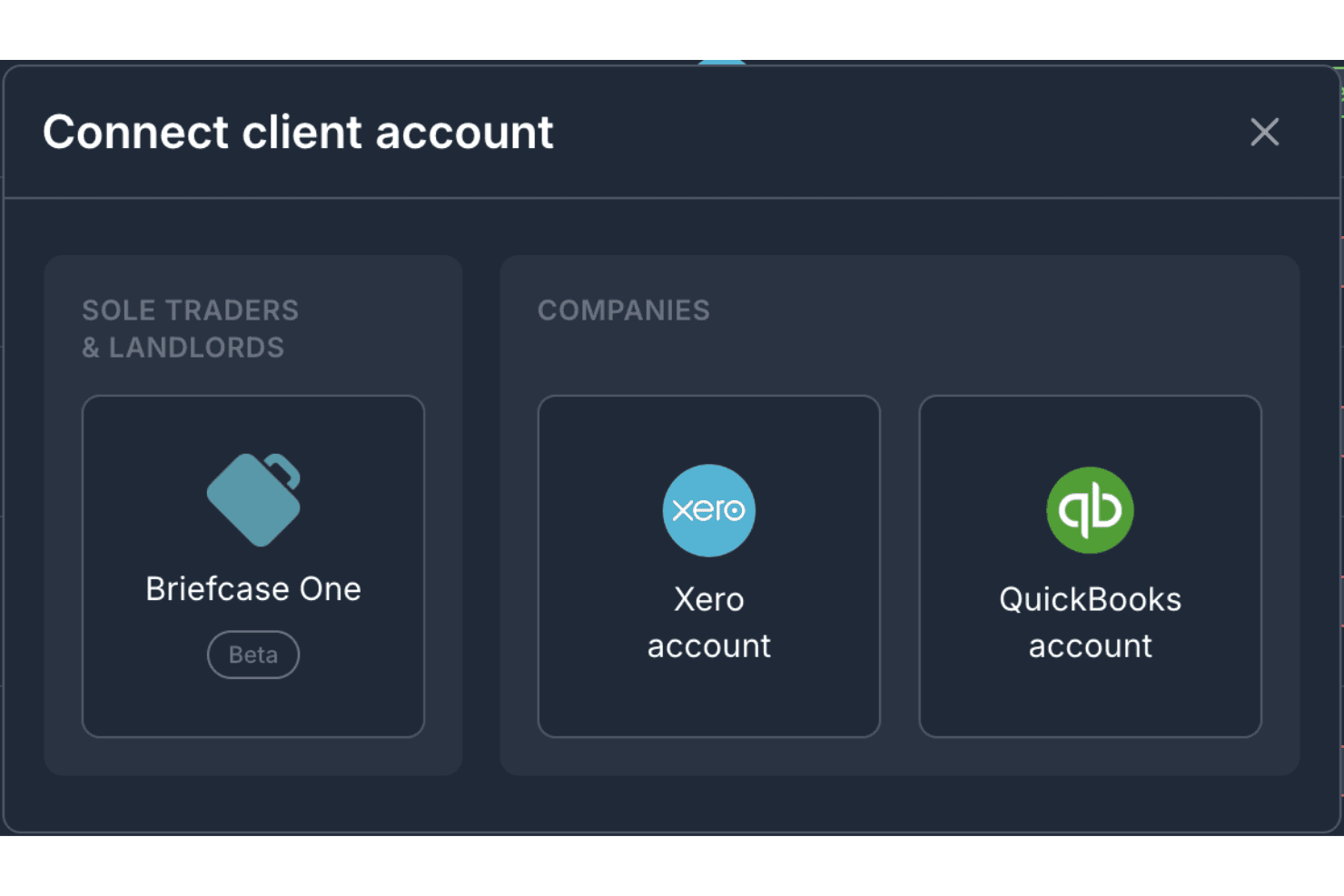
Briefcase integrates with Xero and QuickBooks to synchronize accounting data and publish processed transactions. However, it does not currently advertise a public API, which may limit teams that need custom integrations beyond its supported accounting platforms.
Value for Money
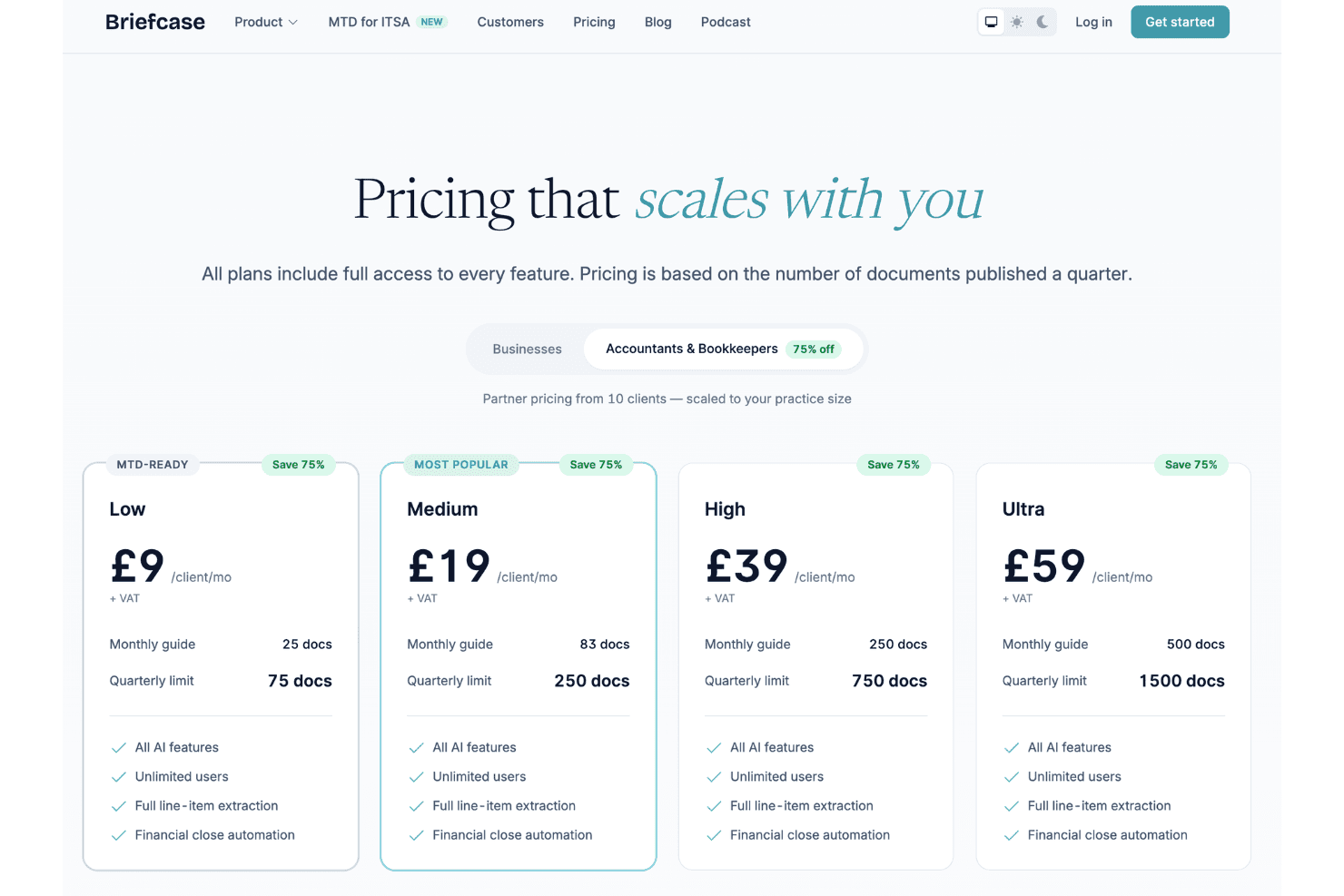
Briefcase offers good value by including its complete feature set across every plan, so you don't lose functionality as you scale. Instead of locking advanced AI capabilities behind higher tiers, pricing is based on the number of documents processed each quarter, making it easier to choose a plan that matches your workload rather than your feature requirements.
- Low: Includes the full Briefcase feature set with a lower quarterly document allowance, making it suitable for businesses with lighter processing needs.
- Medium: Increases the quarterly document allowance while retaining the same AI features, unlimited users, full line-item extraction, and financial close automation.
- High: Supports higher document volumes for growing businesses without changing the available features.
- Ultra: Provides the largest quarterly document allowance for organizations with high-volume accounting workflows, while maintaining access to the complete feature set.
Briefcase Specs
- 2-Factor Authentication: Yes
- Accounts Payable: Yes
- Accounts Receivable: No
- API: Yes
- Balance Sheet: Yes
- Billing/Invoicing: No
- BitCoin: No
- Budgeting: No
- Calendar Management: No
- Contact Management: No
- CRM Integration: No
- Customer Management: No
- Dashboard: Yes
- Data Export: Yes
- Data Import: Yes
- Data Visualization: Yes
- Expense Tracking: Yes
- External Integrations: Yes
- Forecasting: Yes
- General Account Ledger: No
- Inventory Tracking: No
- Multi-Currency: Yes
- Multi-User: Yes
- Notifications: No
- P&L: No
- PayPal: No
- Payroll: No
- SAP Integration: No
- Stripe: No
- Supplier Management: Yes
- Tax Management: Yes
Briefcase FAQs
Briefcase Company Overview & History
Briefcase is a privately held, London-based software company that provides AI-powered bookkeeping and accounting automation for businesses, accountants, and bookkeepers. Its platform automates tasks such as financial document extraction, transaction categorization, line-item processing, and financial close workflows. The company was founded in 2024 by Ján Stehlík and Reuben Steenkamp and operates with a small team. Briefcase publicly features several accounting firms and finance teams among its customers, although its revenue and valuation have not been disclosed.
Briefcase Major Milestones
- 2024: Briefcase was founded by Ján Stehlík and Reuben Steenkamp.
- 2024: The company raised a $3 million seed round led by Earlybird, with participation from Tiny Supercomputer Investment Company and Entrepreneur First.
- 2025: Briefcase expanded its AI bookkeeping capabilities and introduced additional ways for clients to submit accounting documents, including WhatsApp uploads.
- 2026: The company continued expanding its accounting automation platform with features supporting document collection, bookkeeping, and financial close workflows.