

Unlike traditional tools, AI accounting software doesn’t just record data—it helps you spot patterns, catch errors, and automate the boring stuff. With so many options out there, though, picking the right one can feel like a gamble.
As a digital software expert, I’ve tried a lot of tools to find what actually works in real day-to-day finance work. I’ve rounded up my top picks that save time, reduce errors, and make your job easier. These are tools I’d recommend to any team looking to work smarter, not harder.
Why Trust Our Software Recommendations
6,700+
Reviews
20
Industry experts
16+
Evaluation factors
14
Years
Our team has been testing and reviewing software since 2012. As finance leaders ourselves, we know how difficult—and important—it is to choose the right software.
For this guide, we evaluated tools using hands-on testing and independent research, scoring tools using our selection criteria.
Our reviews reflect our human editorial judgment, not a sales pitch.
AI Accounting Software Comparison Table
This comparison table summarizes pricing details for my top AI accounting software selections:
| Tool | Best For | Trial Info | Price | ||
|---|---|---|---|---|---|
| 1 | Best for accounts payable automation | Free plan available | Pricing upon request | Website | |
| 2 | Best for multi-software accounting integrations | 14-day free trial | Pricing upon request | Website | |
| 3 | Best for automated bank matching | Free demo available | Pricing upon request | Website | |
| 4 | Best for AI-driven invoice data extraction | Free demo available | Pricing upon request | Website | |
| 5 | Best for auto-generating purchase orders | Free plan + free demo available | From $15/user/month | Website | |
| 6 | Best for tax practice management | Free demo available | From $700/seat/year | Website | |
| 7 | Best for user-friendly interface | 30-day free trial available | From $2.50/month | Website | |
| 8 | Best for simple accounting solutions | 14-day free trial available | From $30/month | Website | |
| 9 | Best for practice management for firms | 15-day free trial | From $22/user/month | Website | |
| 10 | Best for automated bookkeeping for firms | Free plan available | From $69/license/month | Website |


Best AI Accounting Software Reviews
This is where we break things down. I’ll walk you through each AI accounting software—what it does well, where it might fall short, and when it’s the right fit. Think of it as a friendly guide to help you figure out which tool actually makes your life easier.
 Best for accounts payable automation
- Free plan available
- Pricing upon request
Visit WebsiteCustomer Rating:4.5/5
Payouts' dashboard facilitates the management of pending invoices, allowing users to keep track of outstanding payments and manage cash flow. Payouts is an AI-driven accounts payable (AP) automation platform designed to help digital economy businesses handle invoice processing, vendor payments, and compliance tasks.
Why I picked Payouts: Payouts employs AI and OCR technologies to automate invoice processing. It captures data from various invoice formats, such as PDFs and scanned images, and converts them into digital files. This automation reduces manual data entry and speeds up the payment process, allowing your accounting team to focus on more strategic tasks. The platform also offers customizable approval workflows, allowing you to set up approvals based on criteria like amount, vendor, or department.
Standout features & integrations:
Features include real-time dashboards and custom reporting tools that offer visibility into your spending and cash flow. Additionally, the collaborative vendor portal enhances communication and transparency between your business and its vendors.
Integrations include Everflow, CJ Affiliate, Awin, PayPal, Venmo, Payoneer, NetSuite, Priority, Workday, Skrill, and Tune.
Pros and Cons
Pros:
- Comprehensive automation of accounts payable processes
- Multiple payout methods
- Supports scaling operations
Cons:
- Potential challenges integrating with existing systems
- Mostly geared towards digital economy businesses
Learn more about Payouts: 2Best for multi-software accounting integrations
Dext
- 14-day free trial
- Pricing upon request
Visit WebsiteCustomer Rating:4.5/5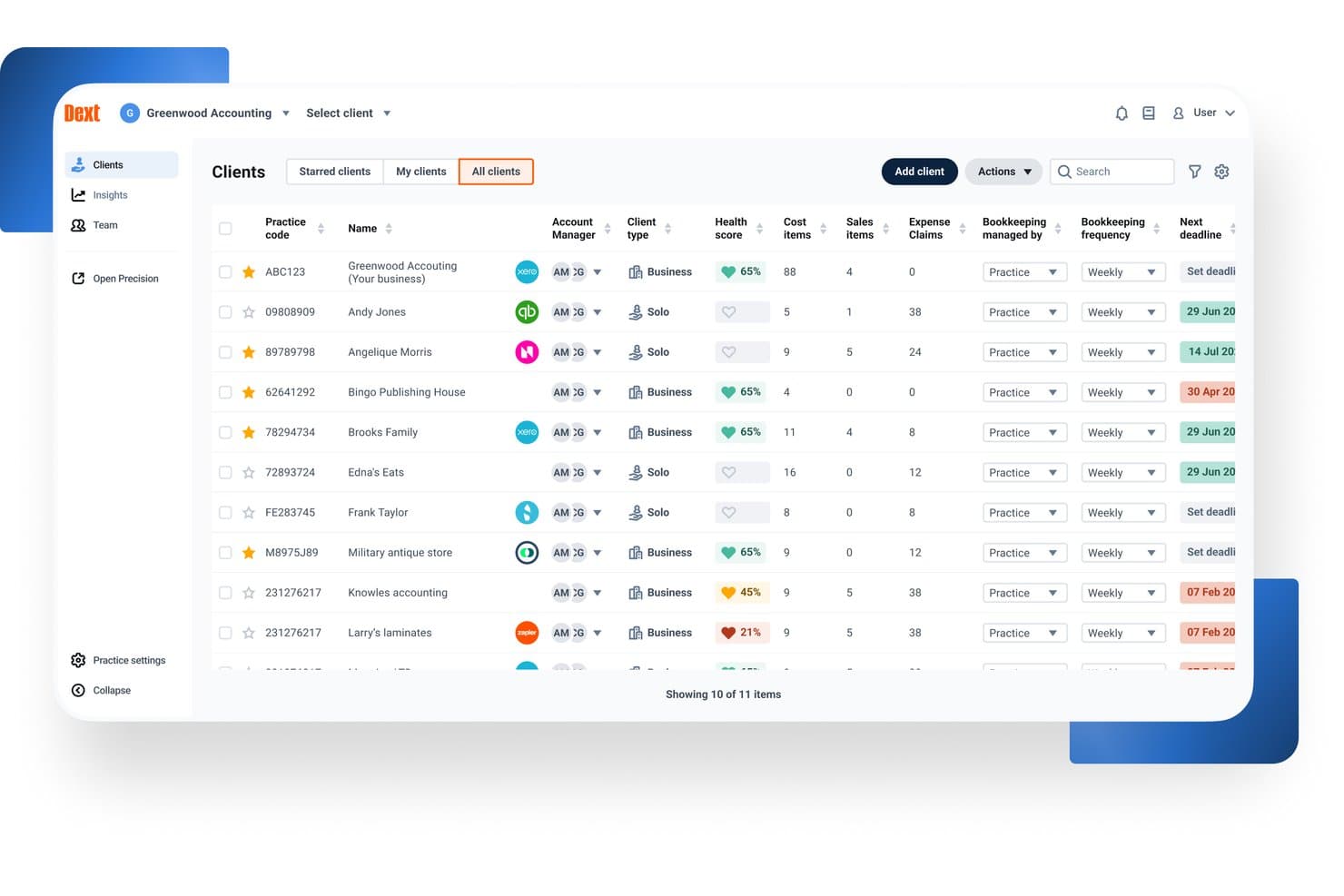
Dext offers a centralized client management dashboard where accountants can view health scores, cost items, deadlines, and bookkeeping frequency across all clients. Dext is an AI-powered pre-accounting automation platform that captures financial documents, extracts data from receipts, invoices, and bank statements, and syncs that data to your accounting software via automated categorization and reconciliation.
Who Is Dext Best For?
Dext is a strong fit for bookkeepers and staff accountants at accounting firms managing high document volumes across multiple clients and accounting platforms.
Why I Picked Dext
I picked Dext as one of the best because no other pre-accounting tool matches its integration depth. It syncs bi-directionally with 30+ accounting platforms, including Xero, QuickBooks, Sage, and NetSuite, so my team doesn't have to recode data when clients switch GLs mid-year. I especially like the auto-publish feature, which pushes extracted, coded documents directly to the correct ledger without a manual review step in between.
Dext Key Features
- AI document extraction: Captures and processes receipts, invoices, and bank statements from mobile, email, or direct upload.
- Supplier statement reconciliation: Matches supplier statements to transactions to help identify missing or mismatched records.
- Data health checks: Flags duplicate contacts, uncoded transactions, and out-of-date reconciliations in client accounting data.
- Practice insights dashboard: Provides client-level and practice-wide metrics to surface bookkeeping issues and track data cleanup.
Dext Integrations
Dext offers native integrations with Xero, QuickBooks Online, Sage Accounting, FreeAgent, NetSuite, and FreshBooks. An API is available for custom integrations.
Pros and Cons
Pros:
- Mobile capture app works reliably
- Handles high client document volumes well
- High-accuracy OCR across document types
Cons:
- Reporting features are basic and limited
- No native general ledger included
Learn more about Dext: Best for automated bank matching
- Free demo available
- Pricing upon request
Visit WebsiteCustomer Rating:4.9/5
DualEntry provides a real-time dashboard view of revenue, cash flow, and performance. DualEntry is an AI-native ERP platform designed to automate and optimize core financial operations for mid-market businesses. It offers a full suite of accounting tools, including general ledger, accounts payable, revenue recognition, and multi-entity management, all powered by AI.
Why I picked DualEntry: Its accounting intelligence tools automate tasks like bank matching, transaction categorization, and document processing. For example, the platform uses AI to automatically create and match transactions, allowing for faster reconciliation with just a few clicks. It also offers OCR technology that reads and logs documents such as bills and invoices, reducing manual data entry. Additionally, DualEntry's AI copilot provides tailored recommendations for handling transactions, offering instant insights and data-driven suggestions.
Standout features & integrations:
Features include multi-entity consolidation, enabling businesses to manage unlimited subsidiaries and automate intercompany transactions. It also offers automated journal entries with smart approval workflows that verify threshold amounts and approval limits, helping to centralize management and ensure compliance.
Integrations include BambooHR, Bill.com, Brex, Deel, Google SSO, Gusto, HubSpot, Ramp, Rippling, Salesforce, Stripe Billing, and Stripe Invoicing.
Pros and Cons
Pros:
- Advanced AI features help with complex accounting tasks
- Supports multi-entity and multi-currency operations
- Automated revenue recognition ensures compliance with standards
Cons:
- Initial data migration could be complex depending on existing systems
- No option to try the system before buying
Learn more about DualEntry: Best for AI-driven invoice data extraction
- Free demo available
- Pricing upon request
Visit WebsiteCustomer Rating:4.8/5
DOKKA Close automates expense reconciliation and suggests journal entries. DOKKA is an AI-powered document management and accounts payable automation platform built to streamline the bookkeeping lifecycle. It serves finance departments and accounting firms seeking to eliminate manual data entry and reduce processing errors. By leveraging advanced machine learning algorithms, the platform successfully tackles the challenge of digitizing, categorizing, and organizing high volumes of financial paperwork.
Who Is DOKKA Best For?
It is best suited for mid-sized enterprises and busy accounting practices that handle extensive daily invoice volumes across multiple client accounts.
Why I Picked DOKKA
I selected this platform because its optical character recognition capabilities are remarkably accurate right out of the box. It easily earns its title as the best for AI-driven invoice data extraction due to its ability to learn from user corrections over time. Furthermore, its side-by-side verification screen makes reviewing and approving parsed financial data incredibly efficient for busy controllers.
DOKKA Key Features
- Digital Filing Cabinet: Securely stores all financial documents in a centralized, cloud-based archive with easily searchable tags.
- Custom Workflow Routing: Facilitates multi-step rules based on specific amount thresholds or departments for authorizing vendor payments.
- Automated General Ledger Sync: Pushes approved transactions and their source documents directly to major accounting ERPs without manual export.
- Month-End Reconciliation: Generates automated working papers and suggests additional journal entries to speed up the financial close process.
DOKKA Integrations
Integrations include Xero, QuickBooks Online, NetSuite, SAP Business One, Acumatica, and Priority Software.
Pros and Cons
Pros:
- Smart learning algorithms improve
- Speeds up month-end reconciliation
- Eliminates manual data entry
Cons:
- Complex invoices can cause delays
- Initial setup requires data mapping
Learn more about DOKKA: 5Best for auto-generating purchase orders
Ramp
- Free plan + free demo available
- From $15/user/month
Visit WebsiteCustomer Rating:4.8/5
Ramp provides an automated accounting dashboard that categorizes transactions, syncs expenses, and flags missing memos for review. Ramp is a financial management platform that uses artificial intelligence to automate spend tracking, approvals, reimbursements, and vendor payments. It supports accounts payable, procurement, and expense workflows, making it a strong complement to existing accounting systems.
Why I picked Ramp: I picked Ramp because of how it simplifies key finance functions using automation and AI. You can auto-generate purchase orders, forward invoices for auto-processing, and approve payments with minimal manual effort. The platform’s AI flags potential issues in real time—helping you control costs before they happen. Ramp also stood out for its automatic coding of receipts and accounting entries, which helps speed up month-end close and reduces errors.
Standout features & integrations:
Features include AI-powered invoice processing, automatic expense categorization, policy-based spend controls, and purchase approval workflows. Ramp also offers built-in corporate cards with pre-approved limits and real-time tracking of spend, plus integrations with your ERP to sync bills and vendor records automatically.
Integrations include NetSuite, Sage, Xero, QuickBooks, Microsoft Dynamics Business Central, Acumatica, Uber, Lyft, Okta, Google, Rippling, and Gmail.
Pros and Cons
Pros:
- Automated expense reporting and receipt matching
- Ability to issue multiple virtual cards with customizable controls
- Comprehensive reporting features
Cons:
- Could offer more advanced accounting features
- Mostly focuses on accounts payable and spend management
 Best for tax practice management
- Free demo available
- From $700/seat/year
Visit WebsiteCustomer Rating:4.7/5
TaxDome manages tax practices with workflows, client portals, and automation. TaxDome is an all-in-one platform designed for managing tax firms, providing tools for automating workflows, organizing client communications, and streamlining document management. It’s ideal for tax professionals looking to manage their entire operation in one place, from client onboarding to tax preparation and filing.
Why I picked TaxDome: TaxDome offers features like a customizable client portal, automated reminders, and task management that help your team keep everything on track. You can also manage secure document storage and e-signatures within the platform, reducing manual paperwork. Its workflow automation allows your team to handle repetitive tasks more efficiently, giving you more time to focus on client needs.
Standout features & integrations:
Features include built-in time tracking and invoicing tools, so you can manage billing without switching platforms. It also helps organize client information and track progress across jobs, while integrated email syncing keeps all communication in one place.
Integrations include QuickBooks, Zapier, Stripe, PayPal, Calendly, Google Drive, Dropbox, Docusign, Microsoft Outlook, and Slack.
Pros and Cons
Pros:
- Access to one-on-one setup support
- Highly customizable workflows
- Centralized platform for client management
Cons:
- Few advanced AI integrations for emails
- High upfront cost for smaller firms
 7Best for user-friendly interface
Xero
- 30-day free trial available
- From $2.50/month
Visit WebsiteCustomer Rating:4.4/5
Xero supports expense tracking and payroll with an easy-to-use interface. Xero is a cloud-based accounting software designed to simplify financial management for businesses. It helps users manage key tasks and is suitable for small to mid-sized businesses that need an easy-to-navigate system.
Why I picked Xero: Xero’s user-friendly interface allows you to quickly get up to speed with its features, making financial management straightforward. You can manage invoices, track expenses, and view real-time cash flow all in one place.
Xero also provides customizable financial reports, so your team can generate insights tailored to your business needs. The software supports automatic bank transaction imports, reducing manual data entry and letting your team focus on more critical tasks.
Standout features & integrations:
Features include multi-currency support, which is great if your business operates across different countries. Xero also supports payroll management, helping your team keep employee payments and taxes organized.
Integrations include PayPal, Stripe, HubSpot, Gusto, Square, Shopify, Mailchimp, GoCardless, WooCommerce, and Microsoft Dynamics 365.
Pros and Cons
Pros:
- Detailed financial reporting tools
- Strong recurring invoicing features
- Simplifies audit trails for tracking
Cons:
- Project tracking is limited to top plans
- Bulk reconciliation requires higher-tier plans
Learn more about Xero: Best for simple accounting solutions
- 14-day free trial available
- From $30/month
Visit WebsiteCustomer Rating:4.5/5
Kashoo provides simple accounting for small businesses with real-time tracking. Kashoo is an easy-to-use accounting platform designed for small businesses, offering tools for managing financial tasks. It simplifies accounting processes by providing a user-friendly interface that helps businesses maintain accurate financial records with minimal effort.
Why I picked Kashoo: Kashoo offers straightforward accounting features that make it ideal for small business owners who need a simple solution. You can quickly generate invoices and track expenses in real time, ensuring that your financials are always up to date.
The platform also provides one-click reporting, which allows your team to produce financial statements with ease. Its simplicity and automation features help streamline your accounting without the need for complex setups or extensive training.
Standout Features & Integrations:
Features include real-time transaction tracking, which helps your team stay updated on all business expenses and income. The platform also offers automatic categorization of transactions, simplifying the bookkeeping process.
Integrations include Stripe, PayPal, Square, FreshBooks, Hubdoc, Google Workspace, BluePay, Plaid, Plooto, Wise, and RBC Banking.
Pros and Cons
Pros:
- Simplifies vendor management with automatic contact creation
- Offers advanced income and expense reporting
- Real-time bank feeds for quick updates
Cons:
- Lacks integration with certain invoicing tools
- No built-in payroll functionality
Learn more about Kashoo: Best for practice management for firms
- 15-day free trial
- From $22/user/month
Visit WebsiteCustomer Rating:4.6/5
Canopy enhances practice management with client communication and task tracking. Canopy is a cloud-based software designed to help accounting firms manage their day-to-day operations more effectively.
Why I picked Canopy: Canopy offers a full suite of practice management tools that allow your team to manage client communications, deadlines, and document storage all in one place. It helps automate tasks like client onboarding and billing, so your team can focus on more strategic work.
The platform also provides detailed reporting and time tracking, giving you better visibility into how your firm is performing. With built-in features for secure document sharing and e-signatures, Canopy simplifies compliance and client collaboration, making it an ideal solution for firms looking to optimize their workflows.
Standout features & integrations:
Features include AI-powered email generation, which helps your team craft and rephrase client communications efficiently. Canopy also offers a secure document management system, enabling your firm to store, organize, and share files seamlessly.
Integrations include QuickBooks, Zapier, Google Drive, Microsoft Outlook, Stripe, and FreshBooks.
Pros and Cons
Pros:
- Organizes tax resolution processes
- Customizable client communications and file sharing
- Provides real-time IRS transcript access
Cons:
- Lacks advanced reporting features
- Workflow regeneration can be unintuitive
Learn more about Canopy: Best for automated bookkeeping for firms
- Free plan available
- From $69/license/month
Visit WebsiteCustomer Rating:4.4/5
Botkeeper automates bookkeeping, transaction coding, and bank reconciliations. Botkeeper is a cloud-based platform that automates bookkeeping tasks for accounting firms, allowing them to manage finances without manual data entry. It is designed to support accounting professionals and firms by providing automated transaction classification, reconciliations, and financial reporting, making it easier to oversee financial workflows.
Why I picked Botkeeper: Botkeeper automates key bookkeeping tasks like transaction coding and bank reconciliations, saving your team time on manual data entry. Its real-time reporting capabilities let you track your financials as they happen, giving you better insights.
Additionally, the platform’s AI learns from user inputs, continuously improving accuracy over time. With automated workflows, your team can focus on higher-level tasks while Botkeeper handles routine bookkeeping.
Standout features & integrations:
Features include role-based access controls, so you can manage who sees what across your team. Its customizable dashboards make it easy to monitor the metrics that matter most to your firm. The platform also offers consolidated reporting for multi-entity businesses, streamlining insights across multiple locations or clients.
Integrations include QuickBooks, Xero, Sage, FreshBooks, BILL, Gusto, Expensify, PayPal, Stripe, and HubSpot.
Pros and Cons
Pros:
- Allows customization for financial reports
- Provides real-time transaction updates
- Automates manual bookkeeping tasks
Cons:
- Initial onboarding can be time-consuming
- AI sometimes needs manual correction
Learn more about Botkeeper:
Other AI Accounting Software Shortlist
Here are some additional AI accounting software options that didn’t make it onto my shortlist, but are still worth checking out:
- 11CertiniaBest for integrated financial and operational data
- 12FulfilBest for AI-driven workflow automation
- 13PuzzleBest for real-time financial insights
- 14ClickUpBest for all-in-one productivity
- 15HighRadiusBest for large-scale reconciliation processing
- 16Vic.aiBest for autonomous invoice processing
- 17ZeniBest for AI-driven financial management
- 18TrullionBest for AI-powered lease accounting
- 19QuickBooks OnlineBest for complete financial management
- 20Zoho BooksBest for small business invoicing
Related Reviews
Related Reviews
Related Reviews
Related Reviews
Related Reviews
Related Reviews
Related Reviews
How I Evaluate AI Accounting Software
Every tool on this list has to deliver AI that actually saves time—auto-coding transactions, catching duplicate invoices, or speeding up reconciliations—not just surface-level branding. I split my evaluation into two layers: the core functionality a tool needs to qualify and the differentiating factors that separate one option from another.
Core Functionality (Table Stakes For This List)
When I'm selecting tools for my list, I rank each one on a scale from 0 (does not offer the functionality) to 5 (excels in this area) for each core functionality listed below. Then, I calculate the tool's total score into a percentage. Each tool needs to achieve a minimum total score of 65% to be considered for inclusion.
- AI Transaction Categorization: I look for ML that learns from corrections and auto-codes expenses, revenue, and transfers to the right GL accounts over time.
- Intelligent Document Capture: The tool should extract line-item detail from invoices, receipts, and bills with minimal manual cleanup before posting.
- Automated Reconciliation: I evaluate how well AI matches bank feed transactions against sub-ledger and GL entries, especially around month-end volume spikes.
- Anomaly & Error Detection: Flagging duplicate vendor payments or unusual posting patterns matters here—I check whether alerts include context, not just raw flags.
- Core Accounting Functions: Whether native or through deep integration, the platform needs to support GL, AP, AR, and standard financial statement generation.
- AI-Driven Reporting & Insights: I look for AI that goes beyond dashboards—tools that surface variance explanations, cash flow trends, or forecast adjustments proactively.
Once I have a list of tools that meet this criteria, I consider what sets each platform apart.
Differentiating Factors (What Sets Vendors Apart)
Here's how I compare and contrast different vendors:
Standout Features
Audit trail explainability is one of the first things I check—when AI auto-codes a transaction or flags an anomaly, your team and auditors need to see exactly why it made that call. A natural language copilot adds real value too, especially for controllers pulling ad hoc reports mid-close without building custom views. I also evaluate predictive cash flow forecasting, which helps CFOs model runway and working capital from live transaction data rather than static spreadsheets.
Beyond Features
AI model transparency matters a lot in this space—I look at whether vendors disclose how they handle your financial data and if it's used to train their models. Integration depth is equally important; a tool that doesn't sync bi-directionally with your ERP or bank feeds creates more manual work than it saves. I also evaluate time-to-value, specifically whether AI models come pre-trained or require months of transaction history before categorization accuracy becomes reliable.
How To Choose AI Accounting Software
It’s easy to get lost in endless features and confusing pricing plans. To make things a little easier while you figure out what works best for your team, here’s a simple checklist to help you stay on track:
| Factor | What to Consider |
| Scalability | Will the software grow with your business and its evolving accounting needs? |
| Integrations | Does it integrate smoothly with your existing systems and tools (i.e. ERP systems and CRMs)? |
| Customizability | Can you tailor the software to meet your team’s specific accounting workflows? |
| Ease of Use | How quickly can your team adopt and effectively use the software? |
| Budget | Does the software fit within your financial constraints without sacrificing key features? |
| Security Safeguards | Are there strong measures in place to protect your financial data? |
Trends In AI Accounting Software
While digging into the latest from AI accounting software vendors, I went through tons of product updates, press releases, and release notes. There’s a lot happening in this space, but a few trends really stood out to me. Here’s what I’m keeping an eye on:
- Predictive Analytics for Financial Forecasting: Many vendors are adding AI tools that use historical data to forecast future financial trends, helping businesses make better decisions about budgeting, spending, and resource allocation.
- Compliance Monitoring: With increasing regulations, AI accounting tools are being equipped with features that automatically monitor compliance with tax laws and financial regulations, reducing the risk of human error and penalties.
- Real-Time Anomaly Detection: AI is now being used to flag unusual transactions in real-time, helping businesses detect potential fraud or errors faster. This trend is especially useful in high-volume transaction environments.
- Self-Learning Algorithms: Some AI accounting platforms are incorporating machine learning algorithms that improve their accuracy over time by learning from user behavior, making transaction categorization and other tasks more precise and efficient.
- Natural Language Processing for Reporting: Vendors are starting to integrate AI that can generate easy-to-understand financial reports using natural language processing, making financial data more accessible to non-experts in businesses.
What Is AI Accounting Software?
AI accounting software is a type of AI technology that automates and enhances financial management tasks using artificial intelligence. Accountants, finance teams, and business owners typically use these tools to save time on manual processes, reduce errors, and gain deeper insights into their financial data.
Automated data entry, real-time anomaly detection, and predictive analytics help with tasks like transaction categorization, fraud detection, and financial forecasting. Overall, these accounting automation tools offer businesses more accuracy and efficiency in managing their finances.
Features Of AI Accounting Software
When you're looking into AI accounting software, it helps to know what really matters. Here are a few key features to keep an eye on that can make a big difference in your day-to-day.
- Automated Data Entry: Automatically records transactions to save time and reduce manual errors.
- Predictive Analytics: Provides insights into future financial trends to help with budgeting and planning.
- Anomaly Detection: Flags unusual transactions in real-time, helping prevent fraud and catch errors early.
- Compliance Monitoring: Ensures that your financial operations adhere to relevant tax and financial regulations.
- Customizable Reporting: Allows users to create tailored financial reports that meet their specific business needs.
- Machine Learning Algorithms: Continuously improves accuracy by learning from user inputs and transaction patterns.
- Real-Time Dashboard: Offers a comprehensive view of financial health with up-to-date data and visualizations.
- Natural Language Processing: Generates easy-to-read financial reports, making data more accessible to non-experts.
- Expense Tracking: Automatically categorizes and tracks expenses, ensuring accurate financial records.
- Audit Trail: Keeps a record of all financial activities for easier auditing and compliance verification.
Benefits Of AI Accounting Software
Bringing AI into your accounting toolkit can make a big difference—for you, your team, and the way you work. Here are a few perks you can look forward to once you make the switch:
- Increased Accuracy: Automates data entry and calculations, reducing the risk of human errors in your financial records.
- Time Savings: Automates repetitive tasks like transaction categorization, accounts payable processes, and expense tracking, freeing up time for more strategic work.
- Improved Compliance: Monitors regulatory changes and ensures your financial processes stay aligned with legal requirements.
- Better Decision-Making: Provides real-time insights and predictive analytics to help you make informed financial decisions.
- Fraud Prevention: Detects anomalies in transactions early, allowing for quicker identification of potential fraud or errors.
- Scalability: Adapts to growing businesses by managing larger volumes of data without extra manual input.
- Enhanced Reporting: Generates customized financial reports quickly, helping you understand your business's financial health at a glance.
Costs And Pricing Of AI Accounting Software
Picking the right AI accounting software means looking past the features and digging into the pricing, too. Plans can vary a lot depending on what you need—team size, advanced tools, or extra add-ons can all change the cost. To make it easier, I’ve put together a quick table that breaks down the most common pricing models, average costs, and what you usually get with each plan.
Plan Comparison Table for AI Accounting Software
| Plan Type | Average Price | Common Features |
| Free Plan | $0 | Basic invoicing, simple expense tracking, and limited reporting. |
| Personal Plan | $5-$25/user/month | Automated invoicing, basic financial reports, bank reconciliation, and receipt capture. |
| Business Plan | $25-$75/user/month | Advanced financial reporting, automated workflows, multi-currency support, and audit trails. |
| Enterprise Plan | $75+/user/month | Custom reporting, real-time analytics, AI-driven forecasting, and dedicated account support. |
AI Accounting Software FAQs
Here are some answers to common questions about AI accounting software:
How does AI improve fraud detection in accounting?
AI uses advanced algorithms to monitor transactions and financial data for unusual patterns. By detecting anomalies or inconsistencies in real time, AI helps identify potential fraud faster than traditional methods, allowing your team to act quickly and reduce financial risk.
Can AI accounting software handle multiple currencies?
Yes, many AI accounting platforms support multi-currency transactions. This feature is particularly useful for businesses operating globally, as it automates currency conversion, tracks exchange rates, and simplifies international financial reporting.
What’s the role of AI in financial forecasting?
AI analyzes historical financial data, market trends, and economic indicators to generate accurate financial forecasts. This helps your business plan budgets, predict cash flow, and make informed decisions about resource allocation based on data-driven insights.
How secure is AI accounting software?
Most AI accounting systems include strong security measures like encryption, multi-factor authentication, and compliance with industry standards such as SOC 2. These safeguards help protect sensitive financial data from breaches or unauthorized access.
Can AI accounting software adapt to different industries?
Yes, AI accounting tools are highly customizable and can be tailored to meet the specific needs of various industries. Whether you’re in retail, healthcare, or manufacturing, the software can adapt workflows, reporting, and compliance tracking to match your sector.
How does AI help with audit preparation?
AI simplifies audit preparation by maintaining detailed audit trails and automating the categorization and documentation of financial transactions. This not only ensures compliance but also helps your team quickly generate accurate reports for auditors.