

Intuit Enterprise Suite vs Microsoft Dynamics 365 Business Central: 2026 Comparison and Reviews

We review tools independently, and commissions help fund our testing. See our transparency policy, our methodology, or suggest a tool.
At some point, the systems that once worked for your business start slowing you down. Financial reporting takes longer than it should, inventory numbers don’t always match reality, and getting a clear view of your operations requires pulling data from multiple tools. Instead of helping you move faster, your software starts creating bottlenecks.
That’s when many businesses start exploring ERP software to bring everything into one place. But evaluating platforms can quickly become overwhelming when every solution promises automation, visibility, and scalability. If you’re deciding between Intuit Enterprise Suite and Microsoft Dynamics 365 Business Central, this article gives you a side-by-side look at both solutions, expert insights, and practical guidance to help you make a confident, informed decision.
Intuit Enterprise Suite
4.6/5
- Free demo available
- Pricing upon request
Microsoft Dynamics 365 Business Central

4/5
- 30-day free trial
- From $80/user/month (billed annually)
Why Trust Our Software Recommendations
6,700+
Reviews
20
Industry experts
16+
Evaluation factors
14
Years
Our team has been testing and reviewing software since 2012. As finance leaders ourselves, we know how difficult—and important—it is to choose the right software.
For this guide, we evaluated tools using hands-on testing and independent research, scoring tools using our selection criteria.
Our reviews reflect our human editorial judgment, not a sales pitch.
| Intuit Enterprise Suite | Microsoft Dynamics 365 Business Central | |
|---|---|---|
| Free Trial | Free demo available | 30-day free trial |
| Pricing | Pricing upon request | From $80/user/month (billed annually) |
Intuit Enterprise Suite vs. Microsoft Dynamics 365 Business Central Pricing & Hidden Costs
Intuit Enterprise Suite uses a subscription-based pricing model with costs that typically depend on factors such as the number of entities, users, and features included in your deployment. Because pricing is often customized based on business requirements, exact costs are not always publicly listed. You may also encounter additional charges for advanced capabilities, payroll services, or integrations with third-party applications.
Microsoft Dynamics 365 Business Central also follows a subscription model but uses defined licensing tiers that vary by level of functionality and user access. While the base subscription covers core ERP capabilities, the overall cost can increase with implementation services, customizations, data migration, and ongoing support—especially if you work with a Microsoft partner to deploy and maintain the system.
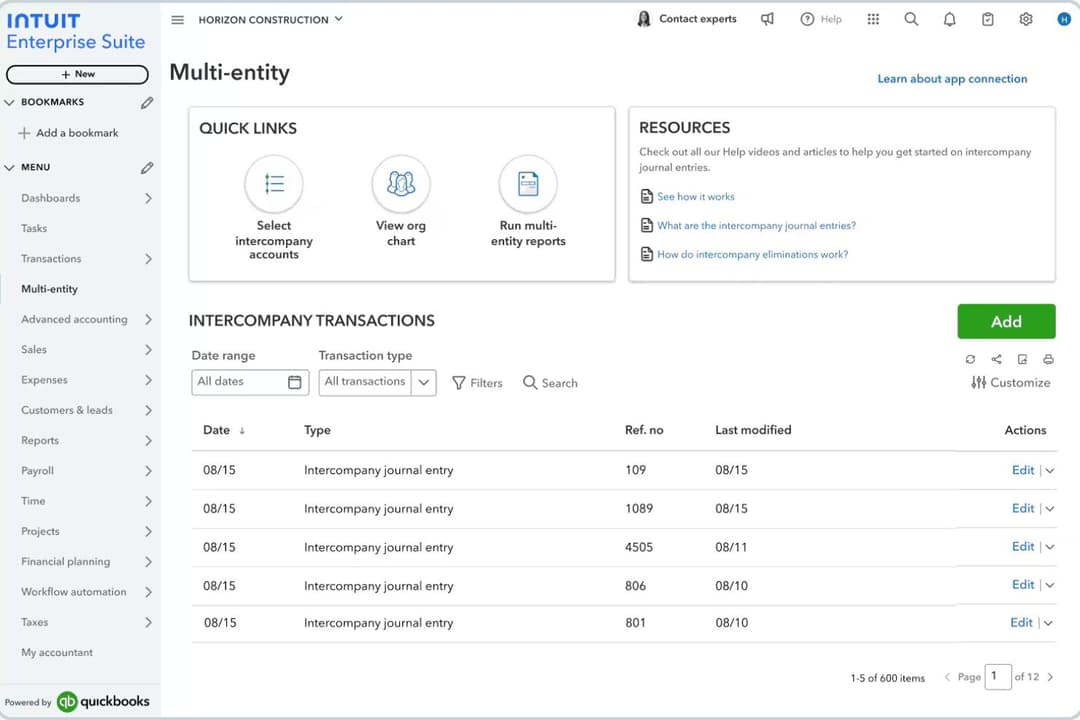
Intuit Enterprise Suite stands out for its multi-entity financial management and consolidated reporting, making it well suited for companies managing multiple subsidiaries or business units. The platform centralizes financial data across entities and automates accounting workflows, helping finance teams reduce manual consolidation and gain clearer visibility across the organization.‘r’n’r’nMicrosoft Dynamics 365 Business Central stands out for its broad operational functionality and deep integration with the Microsoft ecosystem, including tools like Excel, Outlook, Teams, and Power BI. It connects financials, sales, supply chain, and project management in one system. Both platforms also provide core ERP capabilities such as financial management, reporting, inventory tracking, and workflow automation to support day-to-day operations.
| Intuit Enterprise Suite | Microsoft Dynamics 365 Business Central | |
|---|---|---|
| Accounts Payable | Yes | Yes |
| Accounts Receivable | Yes | Yes |
| API | Yes | Yes |
| Budgeting | Yes | Yes |
| Calendar Management | No | No |
| Customer Management | No | Yes |
| Dashboard | Yes | Yes |
| Data Export | Yes | Yes |
| Data Import | Yes | Yes |
| Data Visualization | Yes | Yes |
| Expense Tracking | Yes | Yes |
| External Integrations | Yes | Yes |
| Forecasting | Yes | Yes |
| Inventory Tracking | Yes | Yes |
| Multi-User | Yes | Yes |
| Notifications | Yes | Yes |
| Payroll | Yes | No |
| Project Management | Yes | Yes |
| Scheduling | No | Yes |
| Supplier Management | Yes | Yes |
| Third-Party Plugins/Add-Ons | Yes | Yes |
| Integration | Intuit Enterprise Suite | Microsoft Dynamics 365 Business Central |
| Salesforce | ✅ | ✅ |
| Shopify | ✅ | ✅ |
| Avalara | ✅ | ✅ |
| HubSpot | ✅ | ✅ |
| PayPal | ✅ | ✅ |
| Bill.com | ✅ | ❌ |
| Expensify | ✅ | ❌ |
| Power BI | ❌ | ✅ |
| Microsoft Teams | ❌ | ✅ |
| ADP | ✅ | ❌ |
| API | ✅ | ✅ |
| Zapier | ✅ | ✅ |
Both Intuit Enterprise Suite and Microsoft Dynamics 365 Business Central support integrations with many common business tools, including ecommerce platforms, CRM systems, payment processors, and tax automation services. In many cases, connections can be established through native integrations, APIs, middleware platforms, or integration tools like Zapier, allowing businesses to connect their ERP with the rest of their tech stack.
Where the platforms tend to differ is ecosystem alignment. Microsoft Dynamics 365 Business Central has particularly strong native integrations with Microsoft products such as Power BI and Microsoft Teams, while Intuit Enterprise Suite often connects more directly with finance-focused tools like expense management, payroll, and accounts payable platforms commonly used alongside QuickBooks.
| Factor | Intuit Enterprise Suite | Microsoft Dynamics 365 Business Central |
| Data Encryption | Uses 128-bit SSL encryption for data in transit and at rest. | Encrypts data both at rest and in transit through Microsoft Azure’s security framework and enterprise-grade cryptography. |
| Regulatory Compliance | Supported by Intuit’s broader compliance framework, including standards such as SOC 1, SOC 2, ISO 27001, and PCI DSS across its cloud infrastructure. | Inherits Microsoft’s global compliance programs, including ISO certifications, SOC standards, and GDPR support, along with additional regulatory frameworks through Azure. |
| Access Controls | Role-based permissions and user authentication for sensitive data access. | Granular role-based permissions integrated with Microsoft Entra ID (Azure AD), enabling single sign-on, conditional access policies, and multi-factor authentication. |
| Uptime & Reliability | Cloud infrastructure with backups, monitoring, and disaster-recovery safeguards designed to maintain service availability. | Built on Microsoft Azure’s global infrastructure with automated backups, redundancy, and a 99.9% uptime SLA for the online service. |
Both platforms provide strong security foundations with encryption, role-based access controls, and compliance support. Microsoft Dynamics 365 Business Central benefits from Microsoft Azure’s global cloud infrastructure and extensive compliance portfolio, while Intuit Enterprise Suite focuses on secure financial workflows and governance controls within the Intuit ecosystem. In practice, the better choice often depends on whether your organization prefers Microsoft’s broader enterprise cloud environment or Intuit’s integrated finance-centric platform.
| Factor | Intuit Enterprise Suite | Microsoft Dynamics 365 Business Central |
| User Interface | Clean, finance-focused interface designed to feel familiar for teams accustomed to modern accounting software. | Modern, customizable dashboard with deep integration into Microsoft 365. |
| Onboarding | Guided setup and in-app tips help new users get started quickly. | Step-by-step wizards and extensive documentation support onboarding. |
| Customization | Configurable workflows, integrations, and reporting options while remaining relatively straightforward to use. | Highly customizable workflows and fields to fit complex needs. |
| Support | Access to Intuit support resources, documentation, and assistance through support channels and implementation partners. | Support typically delivered through Microsoft partners, with additional documentation, community resources, and Microsoft support plans available. |
| Learning Curve | Minimal learning curve for users familiar with accounting software. | Broader functionality can create a steeper learning curve but enables more advanced operational workflows. |
Intuit Enterprise Suite is typically easier for finance-focused teams to adopt quickly, thanks to its streamlined interface and accounting-centric design. Microsoft Dynamics 365 Business Central offers greater flexibility and deeper operational capabilities, but organizations may need more time for configuration, training, and implementation to fully take advantage of the platform.
Intuit Enterprise Suite
- Multi-entity management supports complex organizational structures.
- AI-powered forecasting and insights help businesses analyze financial data.
- Built-in migration tools support transitions from QuickBooks Desktop and Advanced.
- The platform lacks sufficient training for new releases.
- Features can feel overwhelming.
- Reports take longer than expected to load.
Microsoft Dynamics 365 Business Central
- It offers extensive customization options to fit your business needs.
- The financial management tools provide comprehensive insights for better decision-making.
- It seamlessly integrates with other Microsoft products, enhancing your team's productivity.
- Some users find the initial setup complex and time-consuming.
- The user interface can feel outdated compared to other modern ERP solutions.
- There may be a learning curve for teams not already familiar with Microsoft products.
Intuit Enterprise Suite
- Multi-Entity BusinessesCompanies managing multiple subsidiaries, brands, or locations that need consolidated financial visibility while maintaining separate books.
- Finance Teams Focused on ForecastingOrganizations that rely on financial planning and projections to guide budgeting, expansion, and strategic decisions.
- Businesses With Structured Financial WorkflowsCompanies with complex approval processes that want to automate financial workflows and improve internal controls.
- Growing Service BusinessesService businesses needing project profitability tracking, workforce management, and consolidated financial planning across departments benefit significantly.
- Product-Based BusinessesCompanies that manage inventory and sales orders and need accounting, inventory, and order workflows connected in one system.
- Construction FirmsConstruction companies tracking job costing, project budgets, and multi-entity structures gain stronger operational visibility.
Microsoft Dynamics 365 Business Central
- Retail BusinessesYou can streamline inventory management and gain valuable insights into sales trends with its comprehensive reporting tools.
- Manufacturing CompaniesYour production processes can become more efficient with its detailed planning and scheduling functionalities.
- Service ProvidersYou can manage projects more effectively with its integrated project management features.
- Finance DepartmentsYour team will benefit from advanced financial reporting and analysis capabilities, providing deeper insights into financial health.
- Operations ManagersYou can tailor the system to your specific operational needs with its extensive customization options.
- Microsoft Product UsersYour work becomes more seamless with its native integration with other Microsoft applications, boosting overall productivity.
Who Should Use Intuit Enterprise Suite, and Who Should Use Microsoft Dynamics 365 Business Central?
Intuit Enterprise Suite is best for growing mid-market businesses that have outgrown tools like QuickBooks and need stronger multi-entity financial management, automation, and consolidated reporting without adopting a full traditional ERP.
Microsoft Dynamics 365 Business Central is ideal for small to mid-sized organizations that want a more comprehensive ERP to manage finance, inventory, sales, and operations—especially if they already rely on Microsoft tools like Excel, Teams, and Outlook.
| Intuit Enterprise Suite | Microsoft Dynamics 365 Business Central | |
|---|---|---|
| Automation | Intuit Enterprise Suite Financial workflow automation and AI-driven insights focused on accounting processes. | Microsoft Dynamics 365 Business Central Advanced automation across finance, supply chain, approvals, and operational workflows. |
| Core Focus | Intuit Enterprise Suite Financial management platform with strong multi-entity accounting and consolidated reporting for growing businesses. | Microsoft Dynamics 365 Business Central Full ERP designed to manage finance, operations, sales, inventory, and projects in one system. |
| Customization | Intuit Enterprise Suite Configurable workflows and integrations with moderate customization. | Microsoft Dynamics 365 Business Central Highly customizable with extensions, workflows, and partner-built apps. |
| Inventory Management | Intuit Enterprise Suite Provides basic inventory visibility for financial tracking. | Microsoft Dynamics 365 Business Central Advanced inventory, warehouse, and supply chain management tools. |
| Learning Curve | Intuit Enterprise Suite Easier adoption for teams familiar with accounting software. | Microsoft Dynamics 365 Business Central Steeper learning curve due to broader operational functionality. |
| Cloud-Based Access | Both offer secure, cloud-based platforms, letting teams access financial data and workflows from anywhere; each provides mobile and web interfaces. |
|---|---|
| Financial Reporting | Each solution includes robust financial reporting tools, with customizable templates and real-time dashboards for tracking performance. |
| Role-Based Permissions | Both platforms allow you to set user roles and permissions, helping control access to sensitive financial data and workflows. |
| Third-Party Integrations | Both support integrations with CRM, ecommerce, and business productivity tools through APIs, connectors, and integration platforms. |
| Workflow Approvals | Both allow businesses to set approval processes for transactions, expenses, or financial workflows. |