


Priority Software vs. Microsoft Dynamics 365: Expert Comparison and Reviews for 2026

We review tools independently, and commissions help fund our testing. See our transparency policy, our methodology, or suggest a tool.
Running a business without a dedicated ERP system can open the door to all sorts of problems. Think delayed reporting, scattered information, and constant back-and-forth between teams just to get basic answers. That’s a headache no one needs.
But still, choosing the right ERP solution can feel overwhelming when you’re balancing growth, compliance, and day-to-day operations. You want erp software that fits your workflows, scales with your business, and doesn’t raise more issues than it solves. Priority Software and Microsoft Dynamics 365 both promise to streamline your processes, but which one actually delivers what you need?
In this article, I’ll provide a clear, side-by-side comparison of both tools—including pros and cons, use cases, pricing, security, and usability. Hopefully this article helps you cut through the noise so you can make a confident, informed decision.
Priority Software
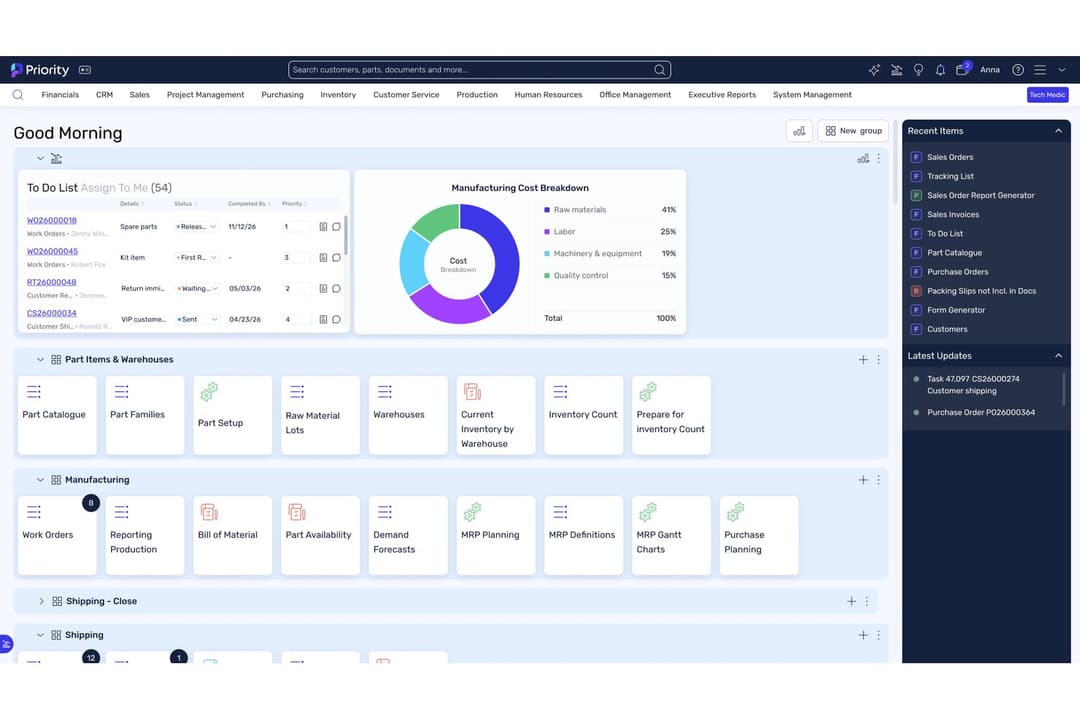
4.4/5
- Free demo available
- Pricing available upon request
Microsoft Dynamics 365 Business Central

4/5
- 30-day free trial
- From $80/user/month (billed annually)
Why Trust Our Software Recommendations
6,700+
Reviews
20
Industry experts
16+
Evaluation factors
14
Years
Our team has been testing and reviewing software since 2012. As finance leaders ourselves, we know how difficult—and important—it is to choose the right software.
For this guide, we evaluated tools using hands-on testing and independent research, scoring tools using our selection criteria.
Our reviews reflect our human editorial judgment, not a sales pitch.
| Priority Software | Microsoft Dynamics 365 Business Central | |
|---|---|---|
| Free Trial | Free demo available | 30-day free trial |
| Pricing | Pricing available upon request | From $80/user/month (billed annually) |
Priority Software vs. Microsoft Dynamics 365 Pricing & Hidden Costs
Priority Software uses a modular pricing model, letting you pay for only the features and users you need. Costs can increase if you add more modules, users, or require advanced integrations. Microsoft Dynamics 365 follows a more traditional subscription-based approach, with separate fees for different apps and user types. You may also face extra charges for implementation, customizations, and ongoing support with both platforms.
To choose the right vendor, look beyond the base subscription and consider your total cost of ownership. Factor in setup, training, support, and any future upgrades or integrations you might need. Ask each vendor for a detailed breakdown of all potential costs, and talk to reference customers about their real-world expenses after rollout. This helps you avoid surprises and ensures the solution fits your long-term plans.
Both Priority Software and Microsoft Dynamics 365 cover the essentials you expect from a modern ERP: financial management, inventory control, procurement, sales, and reporting. Each platform also supports workflow automation and offers integration options with other business tools. These shared features help you manage daily operations and keep your data connected across departments.
Priority Software stands out with its flexible, modular design that lets you tailor the system to your exact needs without heavy customization. On the other hand, Microsoft Dynamics 365 shines with its deep integration into the Microsoft ecosystem, offering advanced analytics and AI-driven insights through Power BI and Azure. These unique strengths can tip the scales depending on your business priorities and existing tech stack.
| Priority Software | Microsoft Dynamics 365 Business Central | |
|---|---|---|
| Accounts Payable | Yes | Yes |
| Accounts Receivable | Yes | Yes |
| API | Yes | Yes |
| Budgeting | Yes | Yes |
| Calendar Management | Yes | No |
| Compliance Tracking | Yes | Yes |
| Customer Management | Yes | Yes |
| Dashboard | Yes | Yes |
| Data Export | Yes | Yes |
| Data Import | Yes | Yes |
| Data Visualization | Yes | Yes |
| Expense Tracking | Yes | Yes |
| External Integrations | Yes | Yes |
| Financial Analysis | Yes | Yes |
| Forecasting | Yes | Yes |
| Inventory Tracking | Yes | Yes |
| Multi-Currency | Yes | Yes |
| Multi-User | Yes | Yes |
| Notifications | Yes | Yes |
| Order Management | Yes | Yes |
| Payroll | Yes | No |
| Project Management | Yes | Yes |
| Purchase Orders | Yes | Yes |
| Resource Management | Yes | Yes |
| Scheduling | Yes | Yes |
| Supplier Management | Yes | Yes |
| Task Scheduling/Tracking | Yes | Yes |
| Third-Party Plugins/Add-Ons | Yes | Yes |
| Warehouse Management | Yes | Yes |
| Workflow Management | Yes | Yes |
| Integration | Priority Software | Microsoft Dynamics 365 |
| Salesforce | ✅ | ✅ |
| Shopify | ✅ | ✅ |
| Amazon Web Services | ✅ | ✅ |
| Azure Active Directory | ✅ | ✅ |
| HubSpot | ❌ | ✅ |
| Magento | ✅ | ❌ |
| WooCommerce | ✅ | ❌ |
| Power BI | ❌ | ✅ |
| ❌ | ✅ | |
| DocuSign | ✅ | ✅ |
| API | ✅ | ✅ |
| Zapier | ✅ | ✅ |
Both platforms offer a strong set of popular integrations, but Microsoft Dynamics 365 stands out for its deep Microsoft ecosystem connections, while Priority Software provides broader ecommerce and marketplace integrations. With API and Zapier support on both sides, you’ll have the flexibility to connect to most business tools, so either solution can meet your integration needs depending on your priorities.
| Factor | Priority Software | Microsoft Dynamics 365 |
| Data Encryption | Uses end-to-end encryption for data at rest and in transit. | Provides advanced encryption standards and integrates with Azure security controls. |
| Regulatory Compliance | Offers exhaustive government and industry-specific compliance and security standards with audit trails | Offers broad compliance certifications, including GDPR, HIPAA, and ISO standards. |
| Access Controls | Role-based permissions and multi-factor authentication are available. | Granular user permissions, single sign-on, and multi-factor authentication supported. |
| Uptime & Reliability | Guarantees 99.9% uptime SLAs with cloud and on-premise redundancy. | Delivers 99.9% uptime SLA and robust disaster recovery through Microsoft Azure. |
Microsoft Dynamics 365 leads in global compliance coverage and reliability, while Priority Software offers strong encryption and flexible access controls for regulated industries. I find Dynamics 365’s security ecosystem especially robust for enterprises, but Priority Software’s straightforward controls and compliance features are a great fit for mid-sized organizations.
| Factor | Priority Software | Microsoft Dynamics 365 |
| User Interface | Clean, intuitive interface with customizable dashboards and quick access menus. | Modern, familiar layout for Microsoft users, but can feel complex for new users. |
| Onboarding | Guided setup and help centre resources help teams get started quickly. | Extensive documentation and training resources, but onboarding can be time-consuming. |
| Customization | Flexible module selection and easy-to-configure, no-code workflows. | Highly customizable with advanced options, but setup may require IT support. |
| Support | Responsive customer support with phone, email, and a help centre. | 24/7 global support and a large partner network for troubleshooting and training. |
Priority Software is easier to pick up and run with, while Microsoft Dynamics 365 offers more depth but comes with a steeper learning curve. I find Priority Software’s guided setup ideal for teams wanting quick adoption, while Dynamics 365 is best for organizations ready to invest in training for advanced capabilities.
Priority Software
- Fast implementation compared to most ERP systems
- Strong AI-driven automation and reporting tools
- Highly customizable workflows for different industries
- Extensive customization can become complex.
- Some users report inconsistent customer support experiences.
- Priority might not meet certain regulatory requirements in some regions.
Microsoft Dynamics 365 Business Central
- It offers extensive customization options to fit your business needs.
- The financial management tools provide comprehensive insights for better decision-making.
- It seamlessly integrates with other Microsoft products, enhancing your team's productivity.
- Some users find the initial setup complex and time-consuming.
- The user interface can feel outdated compared to other modern ERP solutions.
- There may be a learning curve for teams not already familiar with Microsoft products.
Priority Software
- Growing Mid-Sized CompaniesScalable modules and fast onboarding suit expanding teams and operations.
- Financial ServicesAutomated reporting and audit trails simplify compliance and month-end close.
- Retail ChainsMulti-location management and POS integration are included out of the box.
- Field ServicesPriority ERP allows for seamless communication between site teams and headquarters.
- Wholesale DistributorsIts real-time inventory tracking and order management are highly effective.
- Manufacturing FirmsPriority ERP supports complex production planning and inventory management.
Microsoft Dynamics 365 Business Central
- Retail BusinessesYou can streamline inventory management and gain valuable insights into sales trends with its comprehensive reporting tools.
- Manufacturing CompaniesYour production processes can become more efficient with its detailed planning and scheduling functionalities.
- Service ProvidersYou can manage projects more effectively with its integrated project management features.
- Finance DepartmentsYour team will benefit from advanced financial reporting and analysis capabilities, providing deeper insights into financial health.
- Operations ManagersYou can tailor the system to your specific operational needs with its extensive customization options.
- Microsoft Product UsersYour work becomes more seamless with its native integration with other Microsoft applications, boosting overall productivity.
Who Should Use Priority Software, and Who Should Use Microsoft Dynamics 365?
Priority Software is a smart choice for mid-sized businesses and growing companies that want a flexible, easy-to-use ERP without heavy IT overhead. It’s especially well-suited for teams in manufacturing, distribution, and retail that need modular features and quick deployment. Microsoft Dynamics 365 is best for large enterprises or organizations with complex, global operations that require deep integrations, advanced analytics, and broad compliance coverage.
| Priority Software | Microsoft Dynamics 365 Business Central | |
|---|---|---|
| Analytics & Insights | Priority Software Standard reporting and dashboards included. | Microsoft Dynamics 365 Business Central Advanced analytics and AI-driven insights via Power BI and Azure. |
| Customization | Priority Software Easy-to-configure modules and workflows for fast setup. | Microsoft Dynamics 365 Business Central Highly customizable but often requires IT or partner support. |
| Microsoft Integration | Priority Software Limited Microsoft ecosystem integration. | Microsoft Dynamics 365 Business Central Deep integration with Microsoft 365, Power BI, and Azure. |
| Pricing Model | Priority Software Modular pricing lets you pay for only what you use. | Microsoft Dynamics 365 Business Central Subscription-based with separate fees for apps and user types. |
| User Experience | Priority Software Simple, intuitive interface for quick adoption. | Microsoft Dynamics 365 Business Central Feature-rich but can be complex for new users. |
| Cloud Deployment | Both are available as cloud-based solutions, offering remote access, automatic updates, and scalable infrastructure for growing businesses. |
|---|---|
| Core ERP Modules | Both offer financial management, inventory, procurement, sales, and reporting modules to cover essential business operations. |
| Integration Options | Both provide a wide range of integrations with popular business tools and marketplaces, plus API and Zapier support for custom connections. |
| Role-Based Security | Each solution includes robust role-based access controls and multi-factor authentication to protect sensitive business data. |
| Workflow Automation | Each platform supports workflow automation to streamline repetitive tasks and approvals, helping teams boost efficiency and reduce manual errors. |