


Priority Software ERP vs. SAP ERP: Comparison and Expert Reviews for 2026

We review tools independently, and commissions help fund our testing. See our transparency policy, our methodology, or suggest a tool.
A myriad of issues can arise if you’re running a business without a dedicated ERP system. Poor financial visibility, operational inefficiencies, and potential compliance risks are all pitfalls that could spell trouble for your enterprise. And no one wants that.
But still, choosing the right ERP solution can feel overwhelming when you’re balancing growth, compliance, and efficiency. You want an ERP that fits your workflows, scales with your business, and doesn’t create more headaches than it solves. Priority Software and SAP ERP both promise to streamline operations, but they take very different approaches to features, flexibility, and cost.
In this article, you’ll get a clear comparison of both tools—including pros and cons, use cases, pricing, security, and usability. I’ll help you decide which platform is the better fit for your unique needs.
Priority Software
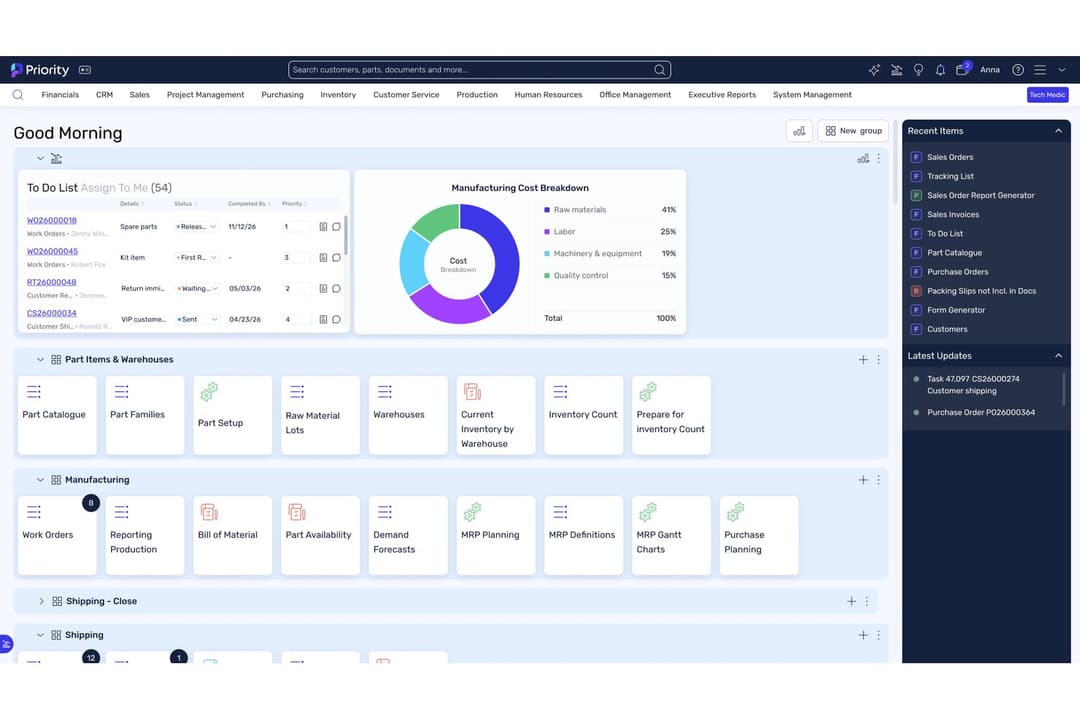
4.4/5
- Free demo available
- Pricing available upon request
SAP ERP

4.4/5
- Free demo available
- Pricing upon request
Why Trust Our Software Recommendations
6,700+
Reviews
20
Industry experts
16+
Evaluation factors
14
Years
Our team has been testing and reviewing software since 2012. As finance leaders ourselves, we know how difficult—and important—it is to choose the right software.
For this guide, we evaluated tools using hands-on testing and independent research, scoring tools using our selection criteria.
Our reviews reflect our human editorial judgment, not a sales pitch.
| Priority Software | SAP ERP | |
|---|---|---|
| Free Trial | Free demo available | Free demo available |
| Pricing | Pricing available upon request | Pricing upon request |
Priority Software vs. SAP ERP Pricing & Hidden Costs
Priority Software uses a modular pricing model, letting you pay for only the features you need, with options for cloud or on-premise deployment. SAP ERP typically follows a more complex pricing structure, often based on user count, modules, and required customizations, with additional costs for implementation, support, and future upgrades. Both solutions may involve extra fees for integrations, training, or advanced support, so it’s important to look beyond the base price.
To choose the right vendor, map out your current and future requirements, including user numbers, integration needs, and expected growth. Ask each provider for a detailed breakdown of all potential costs—implementation, support, upgrades, and add-ons—so you can compare total ownership costs over several years. This approach helps you avoid surprises and ensures the solution you pick will scale with your business without straining your resources.
Both Priority Software and SAP ERP cover the essentials you expect from a modern ERP system. You’ll find modules for finance, inventory, procurement, sales, and supply chain management in both platforms. Each solution also supports reporting, analytics, and workflow automation to help you manage operations efficiently.
Priority Software stands out with its flexible modular design and rapid deployment options, making it easier to tailor and implement for growing businesses. SAP ERP, on the other hand, is known for its deep industry-specific solutions and advanced integration capabilities, especially for large enterprises with complex global operations. These unique strengths can make a big difference depending on your business size and industry needs.
| Priority Software | SAP ERP | |
|---|---|---|
| Accounts Payable | Yes | Yes |
| Accounts Receivable | Yes | Yes |
| API | Yes | Yes |
| Budgeting | Yes | Yes |
| Calendar Management | Yes | Yes |
| Compliance Tracking | Yes | Yes |
| Customer Management | Yes | Yes |
| Dashboard | Yes | Yes |
| Data Export | Yes | Yes |
| Data Import | Yes | Yes |
| Data Visualization | Yes | Yes |
| Expense Tracking | Yes | No |
| External Integrations | Yes | Yes |
| Financial Analysis | Yes | Yes |
| Forecasting | Yes | No |
| Inventory Tracking | Yes | No |
| Multi-Currency | Yes | Yes |
| Multi-User | Yes | Yes |
| Notifications | Yes | No |
| Order Management | Yes | No |
| Payroll | Yes | No |
| Project Management | Yes | Yes |
| Purchase Orders | Yes | No |
| Resource Management | Yes | Yes |
| Scheduling | Yes | No |
| Supplier Management | Yes | Yes |
| Task Scheduling/Tracking | Yes | Yes |
| Third-Party Plugins/Add-Ons | Yes | Yes |
| Warehouse Management | Yes | No |
| Workflow Management | Yes | Yes |
| Integration | Priority Software | SAP ERP |
| Salesforce | ✅ | ✅ |
| Microsoft 365 | ✅ | ✅ |
| Shopify | ✅ | ✅ |
| Amazon Marketplace | ✅ | ✅ |
| HubSpot | ✅ | ❌ |
| Magento | ✅ | ✅ |
| Xero | ✅ | ❌ |
| Silver Warehouse Management | ❌ | ✅ |
| Silver Shop Floor | ❌ | ✅ |
| QuickBooks | ✅ | ❌ |
| API | ✅ | ✅ |
| Zapier | ✅ | ❌ |
Priority Software and SAP ERP both cover the most popular business integrations, but Priority offers broader out-of-the-box connections with cloud accounting and CRM tools, while SAP ERP stands out with specialized manufacturing and warehouse add-ons. Both platforms support API access, but only Priority Software offers Zapier, making it easier for you to connect with hundreds of other apps and automate workflows without custom development.
| Factor | Priority Software | SAP ERP |
| Data Encryption | Uses robust end-to-end encryption for data at rest and in transit. | Employs advanced encryption protocols and secure data centers globally. |
| Regulatory Compliance | Offers exhaustive government and industry-specific compliance and security standards. | Offers extensive compliance with GDPR, SOX, and industry-specific standards. |
| Access Controls | Role-based permissions and multi-factor authentication are standard. | Granular user roles, SSO, and advanced authentication options available. |
| Uptime & Reliability | Guarantees 99.9% uptime SLAs with cloud and on-premise redundancy. | Delivers enterprise-grade uptime SLAs and disaster recovery capabilities. |
| Audit Trails | Provides detailed audit logs for all user and system activities. | Comprehensive audit logging and automated compliance reporting. |
While both ERP solutions are similar in terms of compliance, Priority Software shines with its wide array of industry-specific compliance standards. I find that SAP ERP has exceptional value for large, multinational companies, while Priority Software’s straightforward compliance and robust encryption make it a solid choice for mid-sized businesses.
| Factor | Priority Software | SAP ERP |
| User Interface | Modern, intuitive dashboards with customizable layouts for quick access. | Feature-rich but complex interface that can feel overwhelming to new users. |
| Onboarding | Guided setup help teams get started quickly. | Requires extensive training and onboarding due to system depth. |
| Customization | Easy to tailor workflows and screens without coding. | Highly customizable but often needs IT support or consultants. |
| Support | Responsive support phone, email, and a detailed help centre. | Dedicated enterprise support and a vast knowledge base. |
| Mobile Access | Full-featured mobile app for on-the-go management. | Mobile access available but with limited functionality compared to desktop. |
Priority Software is easier for new users to adopt and manage, while SAP ERP’s depth and complexity can slow down onboarding but pays off for organizations with advanced needs. I find Priority Software shines for teams wanting a straightforward, relatively user-friendly experience, while SAP ERP is best for those ready to invest in training for powerful, customizable workflows.
Priority Software
- Fast implementation compared to most ERP systems
- Strong AI-driven automation and reporting tools
- Highly customizable workflows for different industries
- Extensive customization can become complex.
- Some users report inconsistent customer support experiences.
- Priority might not meet certain regulatory requirements in some regions.
SAP ERP
- It integrates complex business processes, making it ideal for large enterprises.
- The software provides robust data analytics tools for informed decision-making.
- SAP ERP offers a unified view of operations, enhancing collaboration across departments.
- The system can be complex, requiring extensive training for users.
- Customization can be time-consuming and requires technical expertise.
- Some users find the interface less intuitive compared to other ERP solutions.
Priority Software
- Growing Mid-Sized CompaniesScalable modules and fast onboarding suit expanding teams and operations.
- Financial ServicesAutomated reporting and audit trails simplify compliance and month-end close.
- Retail ChainsMulti-location management and POS integration are included out of the box.
- Field ServicesPriority ERP allows for seamless communication between site teams and headquarters.
- Wholesale DistributorsIts real-time inventory tracking and order management are highly effective.
- Manufacturing FirmsPriority ERP supports complex production planning and inventory management.
SAP ERP
- Manufacturing IndustrySAP ERP’s ability to integrate supply chain and production data ensures efficient operations.
- Retail SectorIt helps manage inventory and sales data seamlessly, improving customer service.
- Finance DepartmentsThe software offers robust financial reporting and data analytics for better decision-making.
- Large EnterprisesIts scalability supports complex workflows and large-scale operations.
- Data-Driven TeamsAdvanced analytics tools make it ideal for teams needing deep data insights.
- Multi-Departmental OrganizationsSAP ERP provides a unified view of operations, enhancing interdepartmental collaboration.
Who Should Use Priority Software, and Who Should Use SAP ERP?
Priority Software is a smart pick for mid-sized businesses, fast-growing companies, and teams that want a flexible, easy-to-use ERP without a steep learning curve or heavy IT investment. It’s especially well-suited for organizations in distribution, retail, and services that value quick deployment and straightforward customization. SAP ERP, on the other hand, is the go-to for large enterprises, global organizations, and highly regulated industries that need deep functionality, advanced integrations, and robust compliance.
| Priority Software | SAP ERP | |
|---|---|---|
| Automation | Priority Software Built-in workflow automation and easy integration with Zapier. | SAP ERP Advanced automation, but often requires IT support or consultants. |
| Deployment Options | Priority Software Cloud and on-premise with rapid deployment capabilities. | SAP ERP Cloud, on-premise, and hybrid, with enterprise-grade infrastructure. |
| Industry Focus | Priority Software Flexible for a wide range of industries, especially mid-market. | SAP ERP Deep, industry-specific modules for large enterprises and regulated sectors. |
| Pricing Model | Priority Software Modular pricing with add-ons depending on your needs. | SAP ERP Complex, user-based pricing with additional costs for customization. |
| User Interface | Priority Software Modern, intuitive, and easy for users to navigate. | SAP ERP Feature-rich but can be overwhelming and requires more training. |
| Core ERP Modules | Both offer finance, inventory, procurement, sales, and supply chain management modules, supporting end-to-end business operations for most industries. |
|---|---|
| Customization | Both platforms allow you to tailor workflows, fields, and user permissions to fit your unique business processes, though the approach may differ. |
| Integration Support | Both solutions integrate with popular business tools like Microsoft 365, Salesforce, and Shopify, and offer APIs for custom connections. |
| Reporting & Analytics | Each platform provides robust reporting, dashboards, and analytics tools to help you monitor performance and make data-driven decisions. |
| Security Standards | Each system uses strong encryption, role-based access controls, and compliance with major regulations like GDPR to protect your data. |