
Prophix Review: Pros, Cons, Features & Pricing
Prophix excels in providing user-friendly financial planning tools that empower your team to make data-driven decisions efficiently.

We review tools independently, and commissions help fund our testing. See our transparency policy, our methodology, or suggest a tool.
Prophix is a corporate performance management software built for finance teams that need to manage budgeting, forecasting, consolidation, and reporting in one platform. I'd consider it if your team has outgrown spreadsheets but doesn't have the IT resources or implementation budget for something like Anaplan—Prophix gives you comparable planning depth with a faster path to deployment and less dependency on technical staff to maintain it.
Prophix Evaluation Summary
4.5/5
- Pricing upon request
- Free demo available
Why Trust Our Software Recommendations
6,700+
Reviews
20
Industry experts
16+
Evaluation factors
14
Years
Our team has been testing and reviewing software since 2012. As finance leaders ourselves, we know how difficult—and important—it is to choose the right software.
For this guide, we evaluated tools using hands-on testing and independent research, scoring tools using our selection criteria.
Our reviews reflect our human editorial judgment, not a sales pitch.
Prophix Overview
In my opinion, Prophix stands out as a reliable performance management software, offering robust financial planning tools that suit mid-sized businesses and industries like manufacturing. While its pricing might be a concern for smaller teams, the comprehensive support and intuitive interface make it a solid choice for finance professionals. It excels in budgeting and forecasting, though it may underperform in integration options compared to competitors. Prophix is best for finance teams that need detailed analytics and value strong customer support. If your team prioritizes these features, Prophix could be a good fit.
Pros
- It offers strong budgeting and forecasting capabilities that improve your team's financial planning.
- The user-friendly interface makes it easy for your team to navigate and use daily.
- Customer support is responsive, helping your team resolve issues quickly.
Cons
- The software may have limited customization options for your specific needs.
- It might not offer as many integration options as some competitors.
- Some users find the initial setup process a bit time-consuming for their teams.


How We Test & Score Tools
We’ve spent years building, refining, and improving our software testing and scoring system. The rubric is designed to capture the nuances of software selection and what makes a tool effective, focusing on critical aspects of the decision-making process.
Below, you can see exactly how our testing and scoring works across seven criteria. It allows us to provide an unbiased evaluation of the software based on core functionality, standout features, ease of use, onboarding, customer support, integrations, customer reviews, and value for money.
Core Functionality (25% of final scoring)
The starting point of our evaluation is always the core functionality of the tool. Does it have the basic features and functions that a user would expect to see? Are any of those core features locked to higher-tiered pricing plans? At its core, we expect a tool to stand up against the baseline capabilities of its competitors.
Standout Features (25% of final scoring)
Next, we evaluate uncommon standout features that go above and beyond the core functionality typically found in tools of its kind. A high score reflects specialized or unique features that make the product faster, more efficient, or offer additional value to the user.
We also evaluate how easy it is to integrate with other tools typically found in the tech stack to expand the functionality and utility of the software. Tools offering plentiful native integrations, 3rd party connections, and API access to build custom integrations score best.
Ease of Use (10% of final scoring)
We consider how quick and easy it is to execute the tasks defined in the core functionality using the tool. High scoring software is well designed, intuitive to use, offers mobile apps, provides templates, and makes relatively complex tasks seem simple.
Onboarding (10% of final scoring)
We know how important rapid team adoption is for a new platform, so we evaluate how easy it is to learn and use a tool with minimal training. We evaluate how quickly a team member can get set up and start using the tool with no experience. High scoring solutions indicate little or no support is required.
Customer Support (10% of final scoring)
We review how quick and easy it is to get unstuck and find help by phone, live chat, or knowledge base. Tools and companies that provide real-time support score best, while chatbots score worst.
Customer Reviews (10% of final scoring)
Beyond our own testing and evaluation, we consider the net promoter score from current and past customers. We review their likelihood, given the option, to choose the tool again for the core functionality. A high scoring software reflects a high net promoter score from current or past customers.
Value for Money (10% of final scoring)
Lastly, in consideration of all the other criteria, we review the average price of entry level plans against the core features and consider the value of the other evaluation criteria. Software that delivers more, for less, will score higher.
Core Features
Budgeting and Forecasting: Prophix helps your team plan and adjust budgets with ease, using data-driven insights to improve accuracy. Its forecasting tools allow you to predict financial outcomes, helping you make informed decisions.
Financial Reporting: Generate comprehensive reports that give your team clear insights into financial performance. The intuitive interface lets you customize and share reports easily.
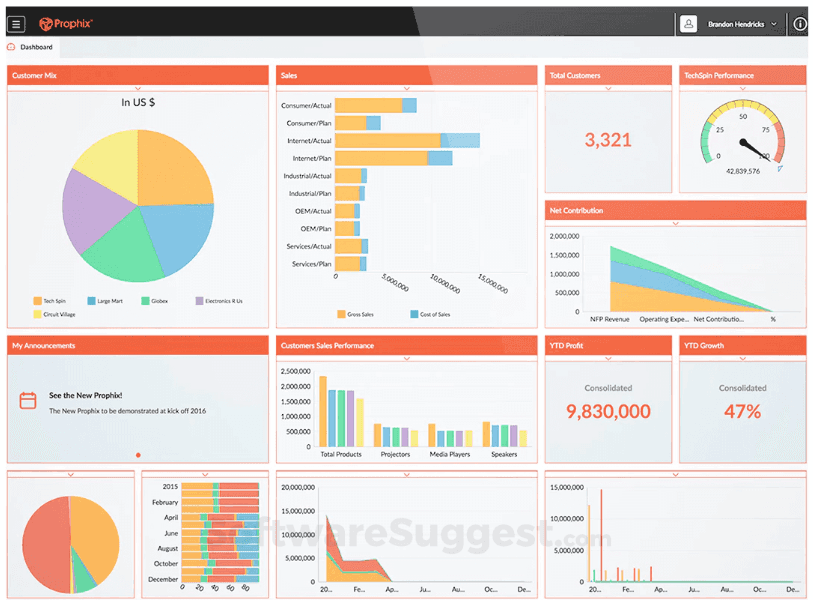
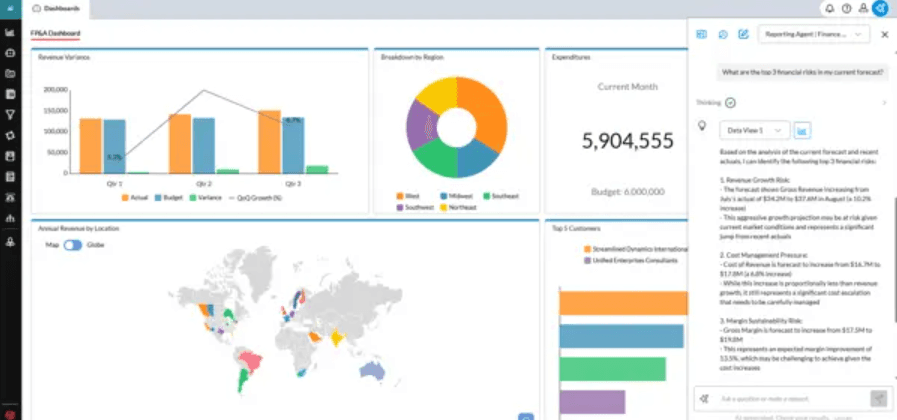
Data Visualization: Prophix offers dashboards that turn complex data into easy-to-understand visuals. This feature helps your team quickly grasp key financial metrics.
Workflow Automation: Streamline your processes with Prophix's automation tools that reduce manual tasks. This saves your team time and minimizes errors, supporting account reconciliation and recurring FP&A workflows.
Scenario Planning: Test different financial scenarios to see potential impacts on your business. This feature aids your team in strategic planning and risk management.
Security and Access Controls: Protect your financial data with robust security features. You can set permissions to ensure only authorized team members access sensitive information.
Ease of Use
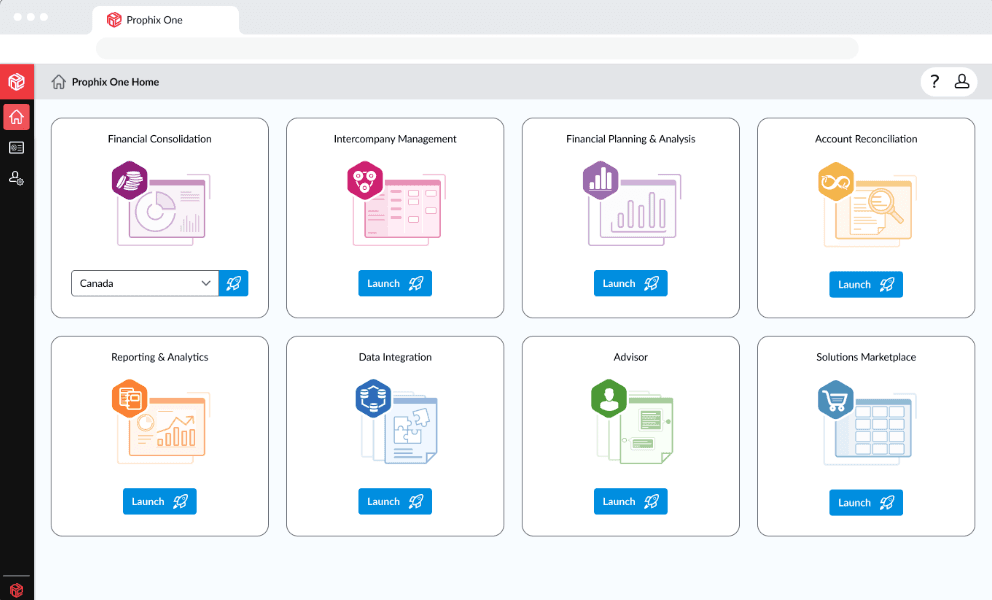
Prophix offers a user-friendly interface that makes it easy for your team to navigate and use daily. The intuitive design ensures that even those new to performance management software can quickly understand its functionalities. Its straightforward dashboards and reporting tools help streamline your team's workflow. While some users mention a learning curve during setup, the overall usability is praised for making complex financial tasks more manageable. This makes it a practical choice for teams seeking efficient financial management tools.
Integrations
Prophix integrates natively with Acumatica, Deltek, Microsoft Dynamics 365, Sage Intacct, Sage 300, Salesforce, HubSpot, Viewpoint, Ellucian, and Nimble.

Prophix Specs
- 2-Factor Authentication: Yes
- Accounts Payable: Yes
- Accounts Receivable: Yes
- API: Yes
- Approval Workflows: Yes
- Balance Sheet: Yes
- Billing/Invoicing: Yes
- Budgeting: Yes
- Calendar Management: Yes
- Comparative Reporting: Yes
- CRM Integration: Yes
- Custom Reports: Yes
- Customer Management: Yes
- Dashboard: Yes
- Data Export: Yes
- Data Import: Yes
- Data Visualization: Yes
- Expense Tracking: Yes
- External Integrations: Yes
- Forecasting: Yes
- General Account Ledger: Yes
- Historical Data Analysis: Yes
- Inventory Tracking: Yes
- Multi-Currency: Yes
- Multi-User: Yes
- Notifications: Yes
- P&L: Yes
- Payroll: Yes
- Scenario Planning: Yes
- Scheduling: Yes
- Supplier Management: Yes
- Tax Management: Yes
- Time Management: Yes


