


Sage Intacct Vs. Acumatica: Comparison & Expert Reviews for 2026
Want the real story on Sage Intacct vs. Acumatica? I break down features, pricing, and use cases so you can choose the best ERP fit for your business in 2026.

We review tools independently, and commissions help fund our testing. See our transparency policy, our methodology, or suggest a tool.
Sage Intacct

4.3/5
- Free demo available
- From £1,200/month
Acumatica
4.4/5
- Free demo available
- From $1,495/month
Why Trust Our Software Recommendations
6,700+
Reviews
20
Industry experts
16+
Evaluation factors
14
Years
Our team has been testing and reviewing software since 2012. As finance leaders ourselves, we know how difficult—and important—it is to choose the right software.
For this guide, we evaluated tools using hands-on testing and independent research, scoring tools using our selection criteria.
Our reviews reflect our human editorial judgment, not a sales pitch.
| Sage Intacct | Acumatica | |
|---|---|---|
| Free Trial | Free demo available | Free demo available |
| Pricing | From £1,200/month | From $1,495/month |
Sage Intacct vs. Acumatica Pricing & Hidden Costs
Sage Intacct and Acumatica both use quote-based pricing, but they arrive at the number differently. Sage Intacct prices around modules, user seats, and transaction volume, so costs climb as you add features or people. Acumatica leans on the applications you switch on, the transaction volume you run, and the system resources you consume, which appeals to teams tired of paying by the seat. Its current license tiers do carry named user allowances by product edition, though, so treat unlimited users as something to confirm in your quote rather than assume. Both charge extra for advanced modules, third-party connectors, training, and support, and those extras drive the total up quickly.
To pick the right fit, I think you’ve got to map your real usage patterns and growth plans against how each vendor prices. Look at total cost over multiple years, not just the monthly headline number. With Acumatica, ask how transaction tiers, resource levels, storage, and your deployment choice move the bill as volume grows, and whether renewal increases are capped. With Sage Intacct, work out which modules and how many seats you will need at each stage of growth. Get specifics in writing from each vendor before you commit so you know exactly what to expect when you start expanding.
| Sage Intacct | Acumatica | |
|---|---|---|
| Accounts Payable | Yes | Yes |
| Accounts Receivable | Yes | Yes |
| API | Yes | Yes |
| Budgeting | Yes | Yes |
| Calendar Management | No | Yes |
| Customer Management | Yes | Yes |
| Dashboard | Yes | Yes |
| Data Export | Yes | Yes |
| Data Import | Yes | Yes |
| Data Visualization | Yes | Yes |
| Expense Tracking | Yes | Yes |
| External Integrations | Yes | Yes |
| Forecasting | Yes | Yes |
| Inventory Tracking | Yes | Yes |
| Multi-Currency | Yes | Yes |
| Multi-User | Yes | Yes |
| Notifications | Yes | Yes |
| Payroll | Yes | Yes |
| Supplier Management | Yes | Yes |
| Integration | Sage Intacct | Acumatica |
|---|---|---|
| IntegrationSalesforce | Sage Intacct✅ | Acumatica✅ |
| IntegrationAvalara | Sage Intacct✅ | Acumatica✅ |
| IntegrationADP | Sage Intacct✅ | Acumatica✅ |
| IntegrationExpensify | Sage Intacct✅ | Acumatica❌ |
| IntegrationShopify | Sage Intacct❌ | Acumatica✅ |
| IntegrationStripe | Sage Intacct✅ | Acumatica❌ |
| IntegrationBill.com | Sage Intacct✅ | Acumatica✅ |
| IntegrationMicrosoft 365 | Sage Intacct❌ | Acumatica✅ |
| IntegrationAPI | Sage Intacct✅ | Acumatica✅ |
| IntegrationZapier | Sage Intacct✅ | Acumatica❌ |
Sage Intacct and Acumatica cover the core financial and operational integrations finance teams look for, with prebuilt connectors on both sides for staples like Avalara and ADP. Each exposes an open API, so your team can wire up nearly anything missing from the prebuilt list, and Acumatica adds webhooks, OData feeds, and integration platform partners that handle connections such as Salesforce. Where the lists differ is telling. Sage Intacct leans toward finance and expense tooling, while Acumatica ships native commerce connectors for storefronts and marketplaces, plus its own expense and payment modules that reduce the need for outside apps in those categories.
| Factor | Sage Intacct | Acumatica |
|---|---|---|
| FactorData Encryption | Sage IntacctEncrypts data at rest and in transit using current industry-standard protocols. | AcumaticaEncrypts data at rest and in transit, with token-based authentication protecting API traffic. |
| FactorRegulatory Compliance | Sage IntacctSupports SOC 1, SOC 2, ISO 27001, PCI, and GDPR, plus HIPAA for eligible healthcare customers when configured accordingly. | AcumaticaCarries SOC 1, SOC 2, and SOC 3 attestations and GDPR alignment, with support for regulated manufacturing record-keeping rules. |
| FactorAvailability & Resilience | Sage IntacctHigh published average availability, backed by redundancy and round-the-clock monitoring. | AcumaticaMajor cloud infrastructure with geo-redundant backups, a documented recovery path to an alternate data center, and brief scheduled maintenance windows. |
| FactorUser Access Controls | Sage IntacctRole-based access and permissions that reach down to transaction level, with approval workflows layered on top. | AcumaticaRole-based access with field and row-level restrictions, single sign-on, multi-factor authentication, and session controls. |
| FactorAudit Logging | Sage IntacctFull audit trails covering user actions, configuration changes, and data history, with deeper monitoring available for sensitive records. | AcumaticaLogs user and system activity with change tracking and reporting across sensitive actions. |
Both Sage Intacct and Acumatica deliver enterprise-level security and compliance, but the emphasis differs. Sage Intacct brings the broader certification set, including the healthcare-specific arrangements regulated finance teams ask about. Acumatica runs on major cloud infrastructure with a separate database per customer, layered access controls, and options for regulated manufacturers. I think security leaders will like Sage Intacct’s breadth of attestations, while teams who need hands-on configuration or a hosting model of their own choosing will find Acumatica more adaptable.
| Factor | Sage Intacct | Acumatica |
|---|---|---|
| FactorUser Interface | Sage IntacctModern dashboards, though deep menu trees can feel busy for new users. | AcumaticaCustomizable screens and personal workspaces that business users can rearrange themselves. |
| FactorOnboarding | Sage IntacctGuided setup with vendor involvement, and configuration that takes time for complex orgs. | AcumaticaPartner-led implementation, with phased or accelerated tracks that can reach go-live in about a quarter. |
| FactorCustomization | Sage IntacctGranular personalization, but custom fields and layouts call for admin skills. | AcumaticaNo-code tools for screens, workflows, and alerts, with changes layered above the core so upgrades leave them intact. |
| FactorSupport | Sage IntacctVendor support by phone and chat, backed by a deep knowledge base and training resources. | AcumaticaSupport and training run mainly through your implementation partner, alongside an open user community and documentation. |
| FactorReporting Workflow | Sage IntacctQuick links for frequent reports, though advanced report setup takes several steps to learn. | AcumaticaNo-code inquiries and dashboards with filters, pivots, drilldowns, and export to spreadsheets. |
Acumatica tends to be more approachable for teams new to ERP, largely because so much of the configuration is no-code and changes sit on top of the core product rather than inside it, so upgrades do not undo your work. Sage Intacct rewards users who want detailed controls and will invest the time to learn the system. One practical difference worth weighing: Acumatica sells and implements through partners, so the quality of your rollout and your day-to-day help depends heavily on the firm you choose, while Sage Intacct runs implementation and support through the vendor alongside its partner network.
Sage Intacct
- Handles multi-entity consolidations without ERP-level complexity
- Offers granular dimensional reporting for detailed financial analysis
- Automates approvals, invoice coding, and close tasks for stricter financial controls
- Advanced reporting and workflow setup usually needs partner or admin help
- Not built for manufacturing, warehousing, or supply chain operations
- No on-premises option for teams with local hosting requirements
Acumatica
- Responsive customer support and active user community.
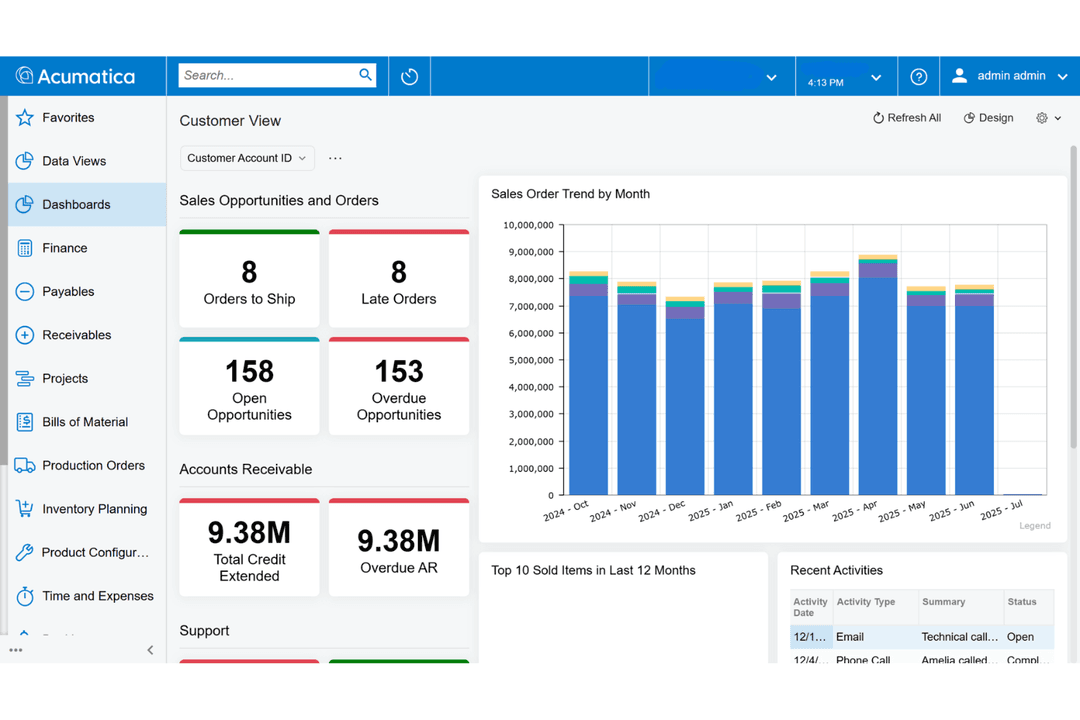
- Strong reporting and dashboard customization options.
- Transparent pricing with unlimited user licensing.
- Some updates can disrupt custom workflows or settings.
- Mobile app functionality is limited compared to desktop.
- Advanced manufacturing features require extra configuration.
Sage Intacct
- Multi-Entity OrganizationsSage Intacct simplifies consolidations, intercompany transactions, and multi-currency workflows for businesses operating across subsidiaries or global entities.
- Healthcare ProvidersAudit-ready tracking, dimensional reporting, and support for strict HIPAA-eligible configurationss help healthcare finance teams uphold regulatory requirements and control costs.
- SaaS CompaniesYou can automate revenue recognition, manage complex contracts, and integrate with Salesforce for clear, GAAP-compliant SaaS reporting.
- Nonprofit OrganizationsDimensional chart of accounts, strong fund accounting, and grant tracking features make it much easier for nonprofits to manage restricted funds and donor reporting.
- Professional Services FirmsProject accounting, expense management, and real-time dashboards help project-based teams bill accurately and keep a close eye on profitability.
- Fast-Growth Mid-MarketsRapidly scaling companies with layered structures and evolving systems benefit from Sage Intacct’s flexible modules, integrations, and scalable user-based pricing.
- Nonprofit OrganizationsDimensional chart of accounts, strong fund accounting, grant tracking, and prebuilt FASB-compliant statements make it much easier for nonprofits to manage restricted funds.
Acumatica
- Growing Mid-Sized CompaniesScalable modules and unlimited users accommodate rapid business growth.
- Field Service TeamsMobile field service management tools support dispatch and scheduling.
- Multi-Entity OrganizationsCentralized financials and intercompany accounting simplify multi-entity management.
- Professional ServicesTime tracking and billing modules help manage client projects and resources.
- Wholesale DistributionInventory management and order automation tools fit distribution operations.
- Construction FirmsAcumatica’s project accounting and job costing features support complex construction workflows.
Who Should Use Sage Intacct, and Who Should Use Acumatica?
Sage Intacct fits finance leaders who need tight controls, granular reporting, and deep compliance in industries like professional services, nonprofits, healthcare, and subscription businesses. Acumatica is the better pick when operations are the hard part, with editions spanning manufacturing, distribution,and general business, plus deployment choices covering cloud, private cloud, and self-hosted.
The dividing line is usually clear. If financial complexity, audit readiness, and dimensional analysis dominate your requirements, go Sage Intacct. If production, inventory, warehousing, or field operations sit at the center of the business and you want one system covering them, head for Acumatica.
| Sage Intacct | Acumatica | |
|---|---|---|
| Customization | Sage Intacct Custom fields and layouts need admin skills and setup time. | Acumatica Configuration aimed at business users, with no coding required for most screen and workflow changes. |
| Deployment Options | Sage Intacct Cloud-only, with no self-hosted option. | Acumatica Cloud, private cloud, or self-hosted, with the ability to switch later. |
| Industry Focus | Sage Intacct Finance-first depth for nonprofits, healthcare, professional services, subscription businesses, and construction finance. | Acumatica Operations-first editions for manufacturing, distribution, retail and commerce, construction, and professional services. |
| Pricing Model | Sage Intacct Priced by modules, seats, and transaction volume, so costs rise as you add features or users. | Acumatica Priced by the applications you license, transaction volume, and resource use, with named user allowances set by product tier. |
| Reporting Depth | Sage Intacct Dimensional reporting across entity, department, location, project, fund, and more, without expanding the chart of accounts. | Acumatica Flexible inquiries, dashboards, and pivots with AI-assisted anomaly detection, though dimensional analysis is less deep out of the box. |
| Advanced Reporting | Both provide advanced reporting that helps finance teams analyze performance, track KPIs, and deliver insights quickly, with real-time data and drill-down to source transactions. Sage Intacct is known for dimensional reporting; Acumatica leans on inquiries and dashboards that business users can build without code. |
|---|---|
| Automation | Automation is a core theme in both platforms, covering recurring invoices, bank reconciliations, routine approvals, and workflow triggers, and both now apply AI to the repetitive parts. Sage Intacct focuses that automation on audit and controls; Acumatica on workflow flexibility and business process tweaks. |
| Compliance & Security | Both platforms invest in enterprise-grade security, independent audits, and recognized attestations, with detailed permissions, audit logging, and encryption throughout. Sage Intacct carries the wider certification list including healthcare provisions, while Acumatica adds hosting choices and per-customer data separation for teams with specific requirements. |
| Core Financials | Both systems cover all essential accounting needs, offering modules for accounts payable, accounts receivable, general ledger, budgeting, fixed assets, and financial dashboards. Each delivers this core toolkit out-of-the box, letting you build a reliable finance foundation regardless of company size. |
| Integration Options | Both offer open APIs plus marketplaces of prebuilt connectors for widely used applications like Avalara, ADP, and BILL, with integration platforms covering the rest. Sage Intacct carries more finance and expense tooling, while Acumatica adds native commerce connectors for storefronts and marketplaces. |