Key Takeaways
Definition & Purpose: Invoicing software automates invoice creation, delivery, and tracking, reducing manual effort and minimizing billing errors.
Key Benefits: Using invoicing software streamlines billing workflows, shortens payment cycles, and provides better financial oversight for teams.
Core Features: Essential features include customizable templates, recurring invoicing, automated reminders, multi-currency support, and accounting integrations.
User Types: Small businesses, contractors, professional services, subscription firms, and finance teams all benefit from adopting invoicing software.
Selecting the Right Tool: Understand what is invoicing software, compare tool types, and review your specific needs before choosing a solution.
invoicing software is what stands between a billing process that works and one that quietly costs you time, cash flow, and client trust. I've seen teams lose hours each week chasing overdue invoices, manually reconciling payments, and fixing errors that software would've caught instantly.
The stakes are real: slow billing delays revenue, and fragmented records create audit risk. This guide walks you through the core benefits, must-have features, and the right questions to ask before committing to a tool—so you can make a confident, informed decision.
What Is Invoicing Software?
Invoicing software creates, sends, and tracks customer invoices in a digital system. It can store client details, calculate totals, apply taxes, and record payment status, reducing manual data entry and billing errors.
Many tools also support recurring invoices, payment reminders, and online payment options. For finance teams, invoice histories and accounting integrations help connect customer billing with cash reconciliation and financial reporting.
Invoicing software primarily handles accounts receivable (AR), helping businesses bill customers and collect payments. Accounts payable (AP) software manages the opposite process: receiving, approving, and paying supplier invoices.
Some billing software platforms support both workflows, but the distinction matters when choosing a solution.
How Does Invoicing Software Work?
Invoicing software manages the billing process from creating an invoice to recording the customer's payment. While workflows vary by platform, most follow five basic steps:
- Create the invoice: Enter customer details, products or services, payment terms, and applicable taxes. Freelancers and service businesses can also use time tracking data to calculate billable hours when supported.
- Send the invoice: Deliver invoices by email or through a secure link. For repeat customers, recurring billing features can automatically generate invoices on a set schedule.
- Track invoice status: Monitor outstanding balances, due dates, and completed payments. Automated reminders can notify customers about upcoming or overdue payments, reducing manual follow-up.
- Collect payments: Customers can pay through supported options, such as credit card payments or bank transfers. Available methods and processing fees depend on the software and payment provider.
- Update financial records: Once payment is recorded, the software updates the invoice status and can sync transaction details with connected accounting systems. Finance teams can then verify payments and reconcile outstanding balances.
This workflow helps businesses maintain accurate billing records while giving finance teams clearer visibility into incoming payments and accounts receivable.
Examples of Invoicing Software
These examples show how invoicing software presents invoice creation, payment status, and customer billing details:
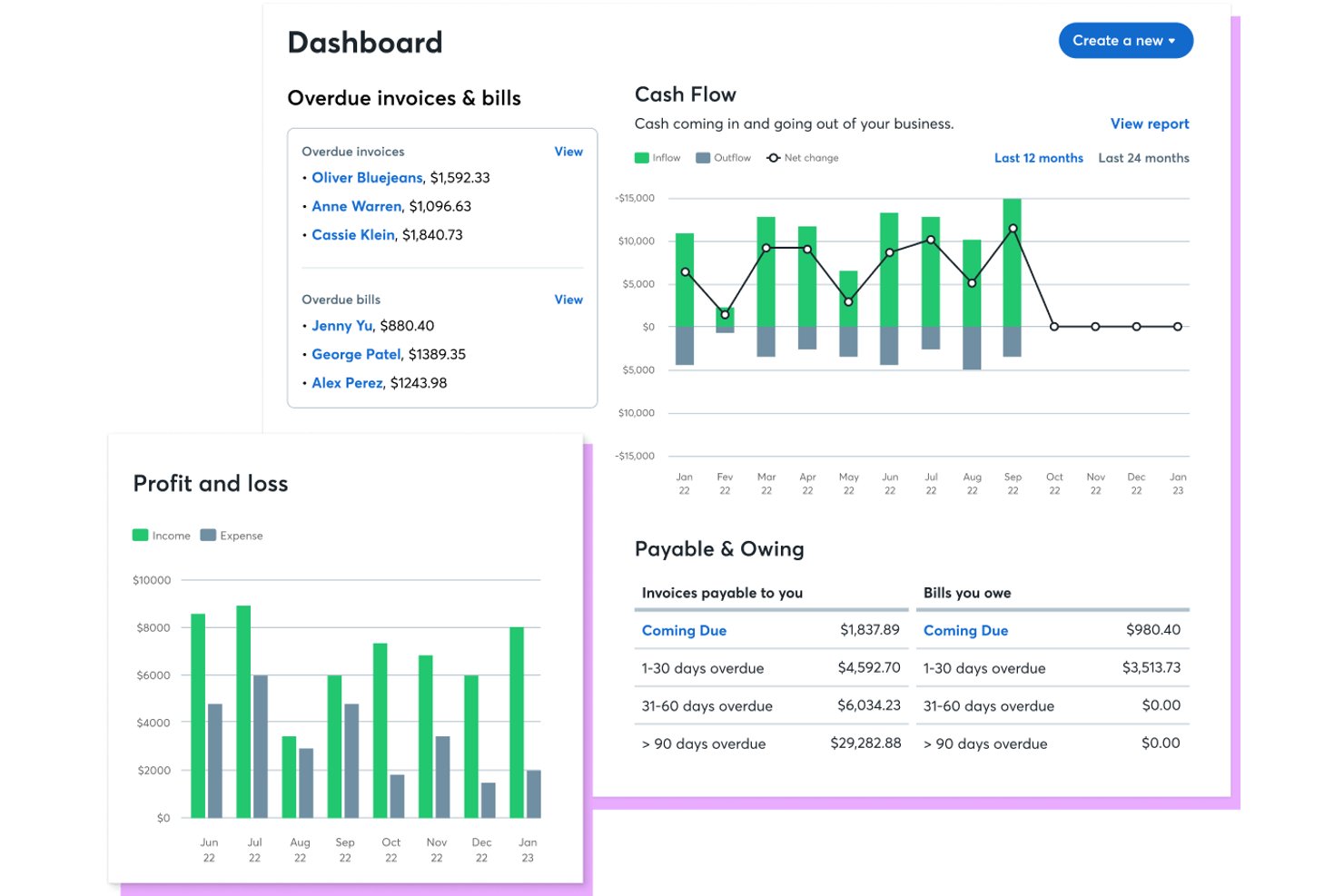
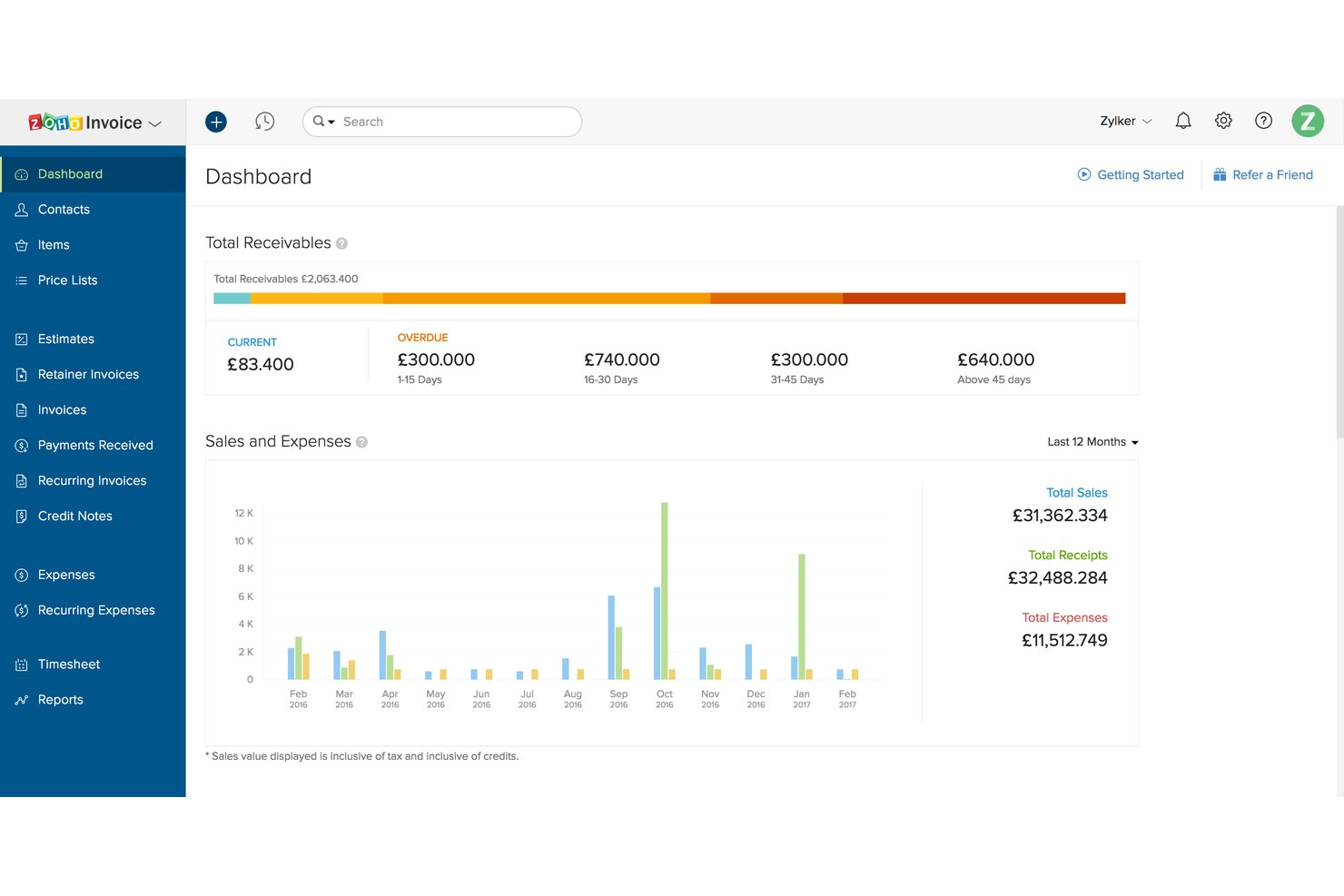
Have an account? Log In
Top Invoicing Software to Consider
Here's my shortlist of the best invoicing software solutions:
Who Uses Invoicing Software?
Organizations that bill customers directly use invoicing software to create, send, and track invoices:
- Small businesses and sole proprietors: Keep client details, invoice records, and payment status together without a dedicated billing team.
- Professional services firms: Bill for hourly work, retainers, project milestones, and reimbursable expenses.
- Subscription and membership businesses: Schedule recurring invoices and track which customers have paid.
- Contractors and field service companies: Invoice for deposits, completed work, and staged project payments.
- Finance and accounts receivable teams: Manage invoice volumes, follow up on overdue balances, and reconcile payments with accounting records.
Key Invoicing Software Benefits & Potential Business Impacts
By automating invoice creation, delivery, reminders, and payment tracking, invoicing software can shorten billing cycles, reduce data-entry errors, improve cash visibility, and support audit-ready records.
Costs range from free tools to subscriptions and transaction fees; poor configuration, weak access controls, or integration gaps can create errors or expose financial data.
Review these benefits and risks to assess how invoicing software could affect financial operations:
| Benefits | Risks |
|---|---|
| BenefitsAutomated invoice generation reduces manual entry and billing errors | RisksIncorrect tax rules or invoice templates can produce inaccurate bills |
| BenefitsInvoice status dashboards give finance teams clearer receivables visibility | RisksDelayed or incomplete data can distort cash forecasts |
| BenefitsScheduled reminders support more consistent follow-up on overdue balances | RisksPoorly timed reminders can frustrate customers or damage relationships |
| BenefitsRecurring billing features support predictable invoice schedules | RisksIncorrect schedules can create duplicate or missed charges |
| BenefitsAccounting integrations connect billing records with reconciliation and reporting | RisksIntegration gaps can create mismatched records or reconciliation work |
| BenefitsInvoice histories and approval logs support audit trails | RisksWeak permissions can expose financial data or allow unauthorized changes |
Invoicing Software Case Studies
These case studies show how businesses changed their billing workflows after adopting invoicing software. Each compares the process before implementation with what changed afterward, from invoice creation to payment tracking and follow-up.
Case Study: Coastal Reprographic Services' Implementation of Zoho Invoice
Coastal Reprographic Services (CRS) is a California-based reprographic firm that grew from a single blueprint shop to three locations. The team switched to Zoho Invoice in 2015 after outgrowing handwritten carbon-copy invoices and a PayPal-based process that couldn't handle growing order volume.
Here are the results of Coastal Reprographic Services' implementation of invoicing software:
- 10+ hours saved per week: CRS reduced order processing time by more than 10 hours weekly after moving off manual invoicing workflows.
- Consistent billing workflow: The team adopted a three-step invoicing process—from order confirmation through client approval to final delivery—replacing ad hoc communication.
- Customer credit tracking: The credit notes feature let CRS record and apply customer credits toward future purchases, replacing a manual tracking process.
- Platform reliability: CRS ran Zoho Invoice for more than five years without a reported system failure, supporting stable AR operations across all three locations.
Case Study: Tally Energy Services' Implementation of Enverus SupplierLink
Tally Energy Services is a Houston-based oil and gas services provider that adopted Enverus SupplierLink to automate a high-volume AR invoicing process. Rapid growth through acquisitions had pushed monthly invoice volume past 1,000, with staff manually entering each invoice twice to validate data before submission.
Here are the results of Tally Energy Services' implementation of invoicing software:
- 40+ hours saved per week: SupplierLink eliminated double entry, saving Tally's AR team at least 40 hours each week—160 hours per month in recovered capacity.
- 58% of invoices automated: The tool imports and validates more than 1,000 invoices per month, covering 58% of Tally's total OpenInvoice submissions.
- Headcount avoidance: Without SupplierLink, Tally estimated it would need at least one additional full-time employee to process its 25,000 annual invoices manually.
- ROI within 90 days: Customers began paying faster after implementation, and Tally's accounting team reported significant ROI within 90 days of go-live.
- Decreased DSO: Visibility into field ticket approvals and payment status helped Tally significantly reduce days sales outstanding across its customer base.
Core Features & Capabilities of Invoicing Software
For stronger control over receivables and reporting, look for these invoicing software features:
- Invoice creation and templates: Create itemized invoices with client details, payment terms, taxes, and consistent branding. Reusable templates reduce repeated data entry.
- Recurring invoices: Schedule invoices for subscriptions, retainers, or other repeat billing. Review schedules and changes to catch missed or duplicate charges.
- Tax calculations and validation: Apply configured tax rules and flag incomplete invoice details before sending. Confirm the software supports the jurisdictions and tax workflows your business needs.
- Payment collection and tracking: Offer payment methods and track invoice status, partial payments, and outstanding balances. Clear status records help teams assess expected cash receipts.
- Reminders and aging reports: Schedule payment reminders and view balances by due date. Aging reports help prioritize follow-up and support receivables reviews.
- Accounting integrations: Transfer invoice and payment data to your accounting system. Check how the integration handles mapping, timing, edits, and reconciliation to avoid mismatched records.
- Approval workflows and audit trails: Route invoices for review and record changes, approvals, and user activity. These controls support oversight and make it easier to investigate billing discrepancies.
- Multi-currency support: Create invoices and record payments in supported currencies. Check how the system handles exchange rates and reporting currency so finance can reconcile amounts consistently.
More Articles
Invoicing Software Use Cases: Typical Processes & Workflows
Invoicing software supports workflows for creating and sending bills, scheduling recurring invoices, following up on overdue balances, and recording payments. Templates, reminders, status tracking, and accounting integrations reduce manual steps and give finance teams clearer receivables records.
Review these CFO-level processes to see where invoicing software can support cash visibility, billing controls, and financial reporting:
| Process | Description | How Software Helps |
|---|---|---|
| ProcessManage receivables and collections | DescriptionReview outstanding balances, aging, and collection priorities to manage customer exposure and days sales outstanding. | How Software HelpsAging reports, invoice statuses, and scheduled reminders show which accounts need follow-up. This gives finance teams a shared view of overdue balances and collection activity. |
| ProcessForecast customer cash receipts | DescriptionEstimate when customers will pay and incorporate expected receipts into cash forecasts. | How Software HelpsDue dates, outstanding balances, payment histories, and scheduled invoices provide billing data for forecast assumptions. Teams still need to assess payment timing and other cash flow drivers. |
| ProcessOversee billing accuracy and controls | DescriptionConfirm invoices reflect approved terms, correct customer details, and applicable tax rules. Set review steps for changes and exceptions. | How Software HelpsConfigurable templates, tax settings, validation checks, approval workflows, and activity logs help document how invoices are prepared and reviewed. |
| ProcessReconcile invoices and payments | DescriptionMatch billing and payment records with accounting records, investigate discrepancies, and support period-end close. | How Software HelpsAccounting integrations transfer invoice and payment data, while payment statuses and partial-payment records help teams identify items to reconcile. Integration mapping and timing need review. |
| ProcessGovern recurring and high-volume billing | DescriptionOversee scheduled customer billing and ensure invoice volumes and schedules remain aligned with business operations. | How Software HelpsRecurring schedules, reusable templates, and invoice histories help teams review upcoming bills and identify missed or duplicate charges. |
Types of Invoicing Software & Similar Tools
Invoicing software shares some overlap with adjacent financial tools, and the differences between them aren't always obvious at first glance. Here's a quick breakdown of how each type differs:
| Type | Differentiator |
|---|---|
| TypeStandalone invoicing software | DifferentiatorFocused entirely on invoice creation, delivery, and payment tracking, with no broader accounting features |
| TypeRecurring billing software | DifferentiatorBuilt around subscription and usage-based billing cycles, with revenue recognition and subscription lifecycle management as core functions |
| TypeAccounts receivable (AR) software | DifferentiatorManages the full AR process, including collections, dispute resolution, and customer credit, beyond what invoicing tools typically cover |
| TypeAccounts payable (AP) software | DifferentiatorFocuses on incoming supplier invoices, including invoice capture, approval workflows, and payment tracking. Unlike accounts receivable software, it helps businesses manage what they owe rather than what customers owe them. |
| TypeAccounting software | DifferentiatorCovers the complete financial management stack; invoicing is one module within a broader system that includes the general ledger, payroll, and reporting |
Ready to Find the Right Fit?
Once you know what invoicing software does, the next step is figuring out which tool actually fits your business—and our guide on how to choose invoicing software walks you through a five-step buying framework covering everything from identifying your requirements to evaluating vendors and building a business case for implementation.