

Expensify Bewertung: Vorteile, Nachteile, Funktionen und Preise
Expensify vereinfacht das Ausgabenmanagement mit benutzerfreundlichen Funktionen und ist somit eine herausragende Wahl für Teams, die Effizienz und Einfachheit suchen.

Wir bewerten Tools unabhängig; Provisionen helfen, unsere Tests zu finanzieren. Siehe unsere Transparenzrichtlinie und unsere Methodik.
Expensify is an expense management software built for teams that need to capture receipts, submit expense reports, and process reimbursements without a lot of manual back-and-forth. I'd consider it if you want something faster to configure and easier for employees to adopt than SAP Concur, with SmartScan receipt capture and automated approval workflows that are genuinely accessible for mid-sized finance teams who don't need a full enterprise procurement suite.
Expensify Evaluation Summary
4.5/5
- From $5/user/month
- Not available
Warum Sie unseren Software-Empfehlungen vertrauen können
6,700+
Reviews
20
Industry experts
16+
Evaluation factors
14
Years
Unsere Bewertungen spiegeln unser unabhängiges Urteilsvermögen wider – keine Verkaufsstrategie. Erfahren Sie, wie wir transparent bleiben.
Für diesen Leitfaden haben wir Tools mithilfe von praktischen Tests und unabhängiger Recherche bewertet und dabei unsere Bewertungskriterien angewendet.
Unsere Bewertungen spiegeln unser menschliches redaktionelles Urteilsvermögen wider, keine Verkaufsstrategie.
Expensify Overview
Expensify is a solid choice for teams looking to automate expense management and reduce manual data entry. Its user-friendly interface and integration capabilities make it a favorite among small to midsize businesses. For organizations needing advanced controls, highly customized workflows, or heavy enterprise-grade features, the platform may feel limited. While advanced functionalities require you to switch to the paid plan, the software's ease of use and support options stand out. Expensify excels in simplifying expense reports and integrating with accounting tools, but it can lag in offering advanced features compared to competitors. It's best suited for companies that prioritize efficiency and straightforward expense tracking.
Pros
- Excellent mobile experience for fast receipt capture and reimbursements.
- Flexible expense automation with strong travel and card integrations.
- Concierge AI simplifies approvals, submissions, and expense management workflows.
Cons
- Chat-first support may frustrate teams wanting direct phone assistance.
- Collect plan charges for inactive users added to workspaces.
- Reporting customization feels limited for highly complex finance organizations.
Is Expensify Right For Your Needs?
Who Would be a Good Fit for Expensify?
Expensify is a strong fit for startups, small to midsize businesses, and distributed teams that want to simplify employee expense management without adding heavy administrative overhead. I think it works especially well for organizations with frequent travel, client meetings, or receipt-heavy workflows, since the platform makes it easy to capture expenses, automate approvals, and process reimbursements from virtually anywhere.
- Small BusinessesExpensify's simple setup and ease of use make it perfect for small businesses without a dedicated IT staff.
- Professional Services FirmsConsultants and service-based teams benefit from Expensify’s travel integrations, expense approvals, and client expense tracking capabilities.
- Travel-Heavy OrganizationsCompanies with frequent flights, hotels, rideshare, and business travel can streamline bookings, receipt matching, and reimbursements in one platform.
- StartupsGrowing startups benefit from Expensify’s fast employee adoption, flexible approvals, and scalable expense workflows as spending increases.
- Remote TeamsRemote teams appreciate Expensify's mobile app for on-the-go expense management and tracking.
- Sales TeamsSales organizations with frequent travel and client expenses can quickly capture receipts and automate reimbursement workflows on the go.
Who Would be a Bad Fit for Expensify?
Expensify might not be ideal for large corporations or organizations with complex expense policies and multi-layered approval processes. Its workflow limitations can make handling intricate expense structures challenging. If your team requires highly customized reporting or has unique compliance needs, Expensify's standard offerings may fall short. Additionally, companies needing extensive customer support might find response times slower than desired, which could impact their operations.
- Large EnterprisesExpensify's capabilities may not handle the complexity of large enterprises with intricate expense policies.
- Complex Approval ChainsOrganizations with multi-layered approval processes might find Expensify's workflow options too limited.
- Custom Reporting NeedsIf you need highly customized reports, Expensify's standard reporting might not meet your requirements.
- Regulated IndustriesIndustries with strict compliance needs might find Expensify lacking in necessary customization and support.
- Heavy Support DependenceCompanies requiring frequent support may experience delays, impacting their operations negatively.
- Non-Profit OrganizationsNon-profits with specific reporting needs might find Expensify's options insufficient for their detailed requirements.
Wie wir Tools testen und bewerten
Wir haben jahrelang daran gearbeitet, unser System zur Softwarebewertung zu entwickeln, zu verfeinern und stetig zu verbessern. Der Bewertungsleitfaden wurde entworfen, um die Feinheiten der Softwareauswahl und die Qualitätskriterien eines effektiven Tools präzise zu erfassen, mit Fokus auf entscheidende Aspekte im Auswahlprozess. Im Folgenden sehen Sie genau, wie unsere Prüfungen und Bewertungen nach sieben Kriterien funktioniert. So können wir eine objektive Bewertung der Software auf Grundlage der Kernfunktionalitäten, herausragenden Eigenschaften, Benutzerfreundlichkeit, Einführung, Kundensupport, Integrationen, Kundenbewertungen sowie Preis-Leistungs-Verhältnis bieten.
Kernfunktionalität (25 % der Gesamtbewertung)
Der Ausgangspunkt unserer Bewertung ist immer die Kernfunktionalität des Tools. Verfügt es über die grundlegenden Features und Funktionen, die ein Nutzer erwarten würde? Sind einige dieser Kernfunktionen auf höherpreisige Tarife beschränkt? Im Kern erwarten wir, dass ein Tool mit den Basisfunktionen seiner Wettbewerber mithalten kann.
Herausragende Funktionen (25 % der Gesamtbewertung)
Im nächsten Schritt bewerten wir ungewöhnliche, herausragende Funktionen, die über die üblichen Kernfunktionen vergleichbarer Tools hinausgehen. Eine hohe Punktzahl erhält, wer spezialisierte oder einzigartige Funktionen bietet, die das Produkt schneller, effizienter oder besonders wertvoll für den Nutzer machen. Wir prüfen auch, wie einfach sich das Tool mit anderen Programmen des typischen Tech-Stacks integrieren lässt, um den Funktionsumfang und die Nützlichkeit der Software zu erweitern. Vielseitige native Integrationen, Drittanbieter-Anbindungen sowie API-Zugänge für individuelle Integrationen schneiden am besten ab.
Benutzerfreundlichkeit (10 % der Gesamtbewertung)
Wir bewerten, wie schnell und einfach sich die wichtigsten Aufgaben im Tool erledigen lassen. Hoch bewertete Software ist gut gestaltet, intuitiv bedienbar, bietet mobile Apps, Vorlagen und macht selbst komplexere Aufgaben handhabbar.
Einführung (10 % der Gesamtbewertung)
Wir wissen, wie wichtig eine rasche Teamakzeptanz bei neuen Plattformen ist. Deshalb prüfen wir, wie einfach sich ein Tool mit minimalem Trainingsaufwand erlernen und bedienen lässt. Wir bewerten auch, wie schnell ein Teammitglied ohne vorherige Erfahrung startklar ist. Hoch bewertete Lösungen benötigen wenig oder gar keinen Support.
Kundensupport (10 % der Gesamtbewertung)
Wir prüfen, wie leicht und schnell Sie mit Telefon, Live-Chat oder Wissensdatenbank Hilfe erhalten können. Tools und Unternehmen, die Echtzeit-Support bieten, erzielen die besten Ergebnisse, während Chatbots am schlechtesten abschneiden.
Kundenbewertungen (10 % der Gesamtbewertung)
Neben unseren eigenen Tests berücksichtigen wir den Net-Promoter-Score aktueller und ehemaliger Kunden. Wir prüfen, wie wahrscheinlich sie sich erneut für das Tool entscheiden würden, basierend auf der Kernfunktionalität. Hoch bewertete Software spiegelt einen hohen Net-Promoter-Score wider.
Preis-Leistungs-Verhältnis (10 % der Gesamtbewertung)
Abschließend vergleichen wir alle Kriterien und bewerten den Durchschnittspreis der Einstiegstarife im Verhältnis zu den Kernfunktionen und dem Nutzen der weiteren Bewertungskriterien. Software, die mehr für weniger bietet, erhält die besten Bewertungen.
Core Features
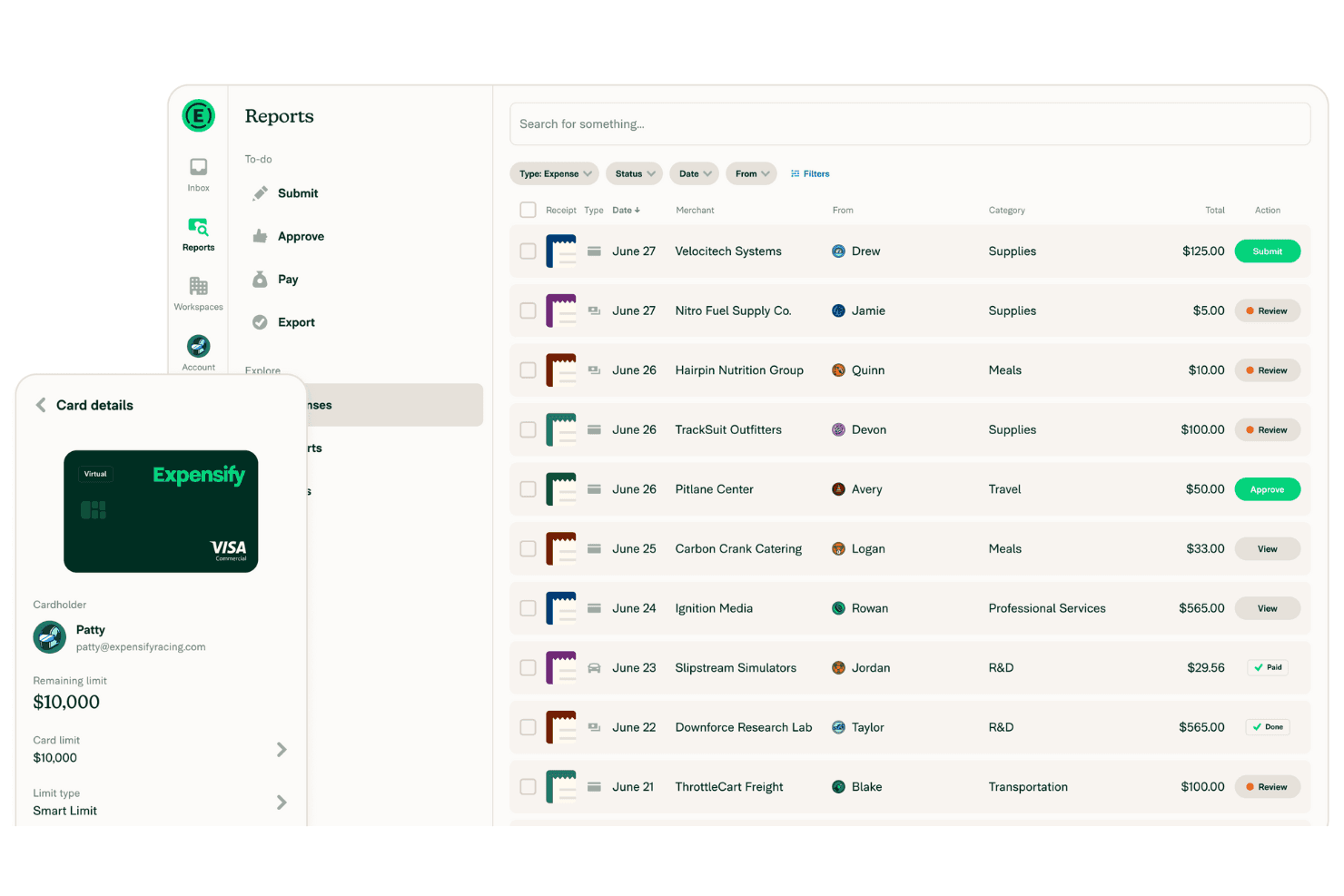
Receipt Capture & OCR: Expensify’s automatic receipt scanning captures and logs your expenses effortlessly. Simply snap a photo, and it handles the rest, saving you time while syncing everything across your accounting systems.
Expense Reporting: Create detailed expense reports with a few clicks. The intuitive interface makes it easy for your team to compile and submit expenses.
Real-Time Tracking: Monitor your expenses as they happen. This feature helps you keep your budget in check and avoid surprises.
Approval Workflow: Customize approval processes to fit your team’s needs. It streamlines expense approval, ensuring nothing slips through the cracks.
Mobile App: Manage expenses on the go with Expensify’s mobile app. It keeps your team connected and efficient, no matter where they are.
Compliance Management: Stay compliant with company policies using built-in checks. This feature minimizes errors and ensures your expenses align with guidelines.
Concierge: Expensify’s Concierge is its embedded AI that works like your personalized, built-in financial assistant. It powers everything from tech support to accounting workflows, using a combination of 24/7 human agents and AI automation.
.png&w=3840&q=75)
Ease of Use
Expensify shines in user-friendliness, making expense management straightforward for your team. Its intuitive interface and clear navigation ensure that even first-time users can easily create reports and track expenses. The automatic receipt scanning and real-time tracking features simplify tasks that typically consume time. With a well-designed mobile app, Expensify allows you to manage expenses anywhere, adding flexibility to your work routine. Overall, it offers a hassle-free experience that stands out in expense management.

Integrations
Expensify integrates with several finance, banking, HR, travel, and accounting software companies, including QuickBooks Online, NetSuite, Xero, Sage Intacct, Oracle, American Express, Chase, Gusto, Workday, Uber, Delta, and KAYAK for Business.
Expensify also offers an API for custom integrations and connects with third-party integration tools like Zapier to extend its functionality. In all, Expensify has over 45 official integrations, and you can also connect it to thousands of other apps to create your own custom workflows.

Expensify Specs
- 2-Factor Authentication: No
- 360 Degree Feedback: No
- API: Yes
- Application Tracking: No
- Attendance Tracking: No
- Batch Permissions & Access: No
- Compliance Tracking: No
- Dashboard: Yes
- Data Export: Yes
- Data Import: Yes
- Data Visualization: No
- Employee Database: No
- Employee Engagement: No
- Employee Incentive Management: No
- Employee Onboarding: No
- Employee Training: No
- Expense Tracking: Yes
- External Integrations: Yes
- Feedback Management: No
- Multi-User: Yes
- Notifications: Yes
- Payroll: No
- Performance Appraisal: No
- Scheduling: No
- Time Management: No
- Timesheets: No
- Travel Management: Yes
- Vacation & Absence Calendar: No


