

Float Bewertung: Vorteile, Nachteile, Funktionen und Preisgestaltung
Float überzeugt durch benutzerfreundliche Ausgabenverwaltung und bietet Ihrem Team intuitive Tools, die das Finanzmanagement vereinfachen, ohne zu überfordern.

Wir bewerten Tools unabhängig; Provisionen helfen, unsere Tests zu finanzieren. Siehe unsere Transparenzrichtlinie und unsere Methodik.
Float Financial is an expense management software for small business that pairs spending controls with cash flow forecasting. I'd consider it if you need more than receipt capture. Specifically, it's worth a look if you want to see how daily expenses affect your projected cash position. Compared to a tool like Expensify, Float Financial connects expense data to forward-looking cash flow views. That makes it a better fit when cash visibility matters as much as expense tracking.
Float Financial Evaluation Summary
4.2/5
- From $10/user/month
- Free plan available
Warum Sie unseren Software-Empfehlungen vertrauen können
6,700+
Reviews
20
Industry experts
16+
Evaluation factors
14
Years
Unsere Bewertungen spiegeln unser unabhängiges Urteilsvermögen wider – keine Verkaufsstrategie. Erfahren Sie, wie wir transparent bleiben.
Für diesen Leitfaden haben wir Tools mithilfe von praktischen Tests und unabhängiger Recherche bewertet und dabei unsere Bewertungskriterien angewendet.
Unsere Bewertungen spiegeln unser menschliches redaktionelles Urteilsvermögen wider, keine Verkaufsstrategie.
Float Financial Overview
Float is a solid choice for teams needing straightforward expense management. Its user-friendly interface and responsive customer support stand out. However, the onboarding process could be more comprehensive, and its pricing is slightly above average without a free version.
Float excels in environments where teams prioritize ease of use and quick decision-making, such as small businesses and startups. Compared to others, it lacks some advanced features like approval workflows, but its integration with tools like Slack and Asana enhances its utility. If you value simplicity and efficient support, Float is worth considering.
Pros
- Easy to navigate the intuitive interface.
- Responsive customer support helps solve issues quickly.
- Real-time expense tracking.
Cons
- Onboarding process lacks depth.
- Doesn't offer some advanced features like approval workflows.
- Your work might require more detailed reporting options than Float provides.
Is Float Financial Right For Your Needs?
Who Would be a Good Fit for Float Financial?
Float is ideal for small Canadian businesses and startups that need a straightforward spend management tool. Your team will appreciate its user-friendly interface and real-time tracking, which simplifies financial oversight.
Finance teams looking for efficient support and quick issue resolution will find Float's customer service valuable. If your department needs to keep expenses up-to-date without complex features, Float's simplicity is a perfect match.
- Small businessesFloat's simplicity and ease of use make it perfect for small teams managing expenses without a dedicated finance department.
- StartupsStartups benefit from Float's real-time tracking, keeping financials current and transparent for fast-paced growth.
- Finance teamsYour finance team will value Float's responsive customer support and intuitive interface, easing daily management tasks. Your team can also export transactions in a CSV file or directly to QuickBooks Online, NetSuite, or Xero.
- Remote teamsFloat's cloud-based platform lets your remote team access and manage expenses from anywhere, ensuring smooth operations.
- Consulting firmsConsultants can use Float's real-time tracking to manage client expenses efficiently, saving time on administrative tasks.
- NonprofitsNonprofits appreciate Float's straightforward tracking, making financial reporting to stakeholders easier and more transparent.
Who Would be a Bad Fit for Float Financial?
Float isn't a great choice for large enterprises or departments needing complex expense approval workflows and detailed real-time reporting. Your team might struggle with Float's lack of advanced features, which could slow down processes in environments that require thorough financial documentation and approval chains. If your business relies heavily on customized reports and intricate financial analysis, Float's straightforward nature may not meet your needs.
- Large enterprisesFloat lacks the advanced features and reporting capabilities needed for managing extensive corporate financial operations.
- Manufacturing firmsManufacturing firms needing detailed cost tracking and approval workflows might find Float too simplistic for their complex needs.
- Government agenciesGovernment agencies often require rigorous compliance and reporting standards that Float doesn't fully support.
- Financial institutionsFinancial institutions needing advanced analytics and detailed reporting will find Float's features too basic.
- Healthcare providersHealthcare providers with intricate billing and expense processes may find Float doesn't offer the detailed tracking they require.
- Educational institutionsEducational institutions often need complex budget management and approval systems, which Float's straightforward approach doesn't provide.
Wie wir Tools testen und bewerten
Wir haben jahrelang daran gearbeitet, unser System zur Softwarebewertung zu entwickeln, zu verfeinern und stetig zu verbessern. Der Bewertungsleitfaden wurde entworfen, um die Feinheiten der Softwareauswahl und die Qualitätskriterien eines effektiven Tools präzise zu erfassen, mit Fokus auf entscheidende Aspekte im Auswahlprozess. Im Folgenden sehen Sie genau, wie unsere Prüfungen und Bewertungen nach sieben Kriterien funktioniert. So können wir eine objektive Bewertung der Software auf Grundlage der Kernfunktionalitäten, herausragenden Eigenschaften, Benutzerfreundlichkeit, Einführung, Kundensupport, Integrationen, Kundenbewertungen sowie Preis-Leistungs-Verhältnis bieten.
Kernfunktionalität (25 % der Gesamtbewertung)
Der Ausgangspunkt unserer Bewertung ist immer die Kernfunktionalität des Tools. Verfügt es über die grundlegenden Features und Funktionen, die ein Nutzer erwarten würde? Sind einige dieser Kernfunktionen auf höherpreisige Tarife beschränkt? Im Kern erwarten wir, dass ein Tool mit den Basisfunktionen seiner Wettbewerber mithalten kann.
Herausragende Funktionen (25 % der Gesamtbewertung)
Im nächsten Schritt bewerten wir ungewöhnliche, herausragende Funktionen, die über die üblichen Kernfunktionen vergleichbarer Tools hinausgehen. Eine hohe Punktzahl erhält, wer spezialisierte oder einzigartige Funktionen bietet, die das Produkt schneller, effizienter oder besonders wertvoll für den Nutzer machen. Wir prüfen auch, wie einfach sich das Tool mit anderen Programmen des typischen Tech-Stacks integrieren lässt, um den Funktionsumfang und die Nützlichkeit der Software zu erweitern. Vielseitige native Integrationen, Drittanbieter-Anbindungen sowie API-Zugänge für individuelle Integrationen schneiden am besten ab.
Benutzerfreundlichkeit (10 % der Gesamtbewertung)
Wir bewerten, wie schnell und einfach sich die wichtigsten Aufgaben im Tool erledigen lassen. Hoch bewertete Software ist gut gestaltet, intuitiv bedienbar, bietet mobile Apps, Vorlagen und macht selbst komplexere Aufgaben handhabbar.
Einführung (10 % der Gesamtbewertung)
Wir wissen, wie wichtig eine rasche Teamakzeptanz bei neuen Plattformen ist. Deshalb prüfen wir, wie einfach sich ein Tool mit minimalem Trainingsaufwand erlernen und bedienen lässt. Wir bewerten auch, wie schnell ein Teammitglied ohne vorherige Erfahrung startklar ist. Hoch bewertete Lösungen benötigen wenig oder gar keinen Support.
Kundensupport (10 % der Gesamtbewertung)
Wir prüfen, wie leicht und schnell Sie mit Telefon, Live-Chat oder Wissensdatenbank Hilfe erhalten können. Tools und Unternehmen, die Echtzeit-Support bieten, erzielen die besten Ergebnisse, während Chatbots am schlechtesten abschneiden.
Kundenbewertungen (10 % der Gesamtbewertung)
Neben unseren eigenen Tests berücksichtigen wir den Net-Promoter-Score aktueller und ehemaliger Kunden. Wir prüfen, wie wahrscheinlich sie sich erneut für das Tool entscheiden würden, basierend auf der Kernfunktionalität. Hoch bewertete Software spiegelt einen hohen Net-Promoter-Score wider.
Preis-Leistungs-Verhältnis (10 % der Gesamtbewertung)
Abschließend vergleichen wir alle Kriterien und bewerten den Durchschnittspreis der Einstiegstarife im Verhältnis zu den Kernfunktionen und dem Nutzen der weiteren Bewertungskriterien. Software, die mehr für weniger bietet, erhält die besten Bewertungen.
Core Features
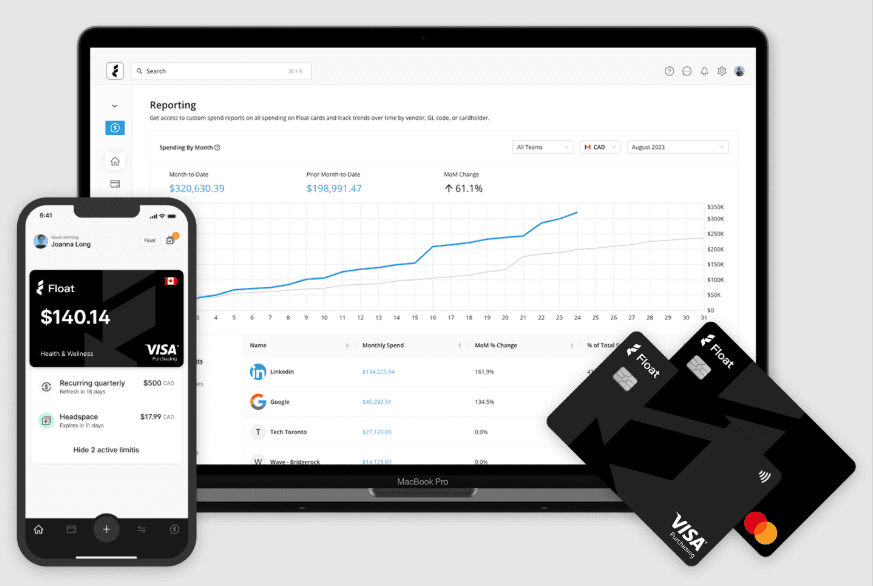
Real-time tracking: You can monitor expenses as they happen and even link your company credit card with Float to keep your finances current and transparent. These can be physical cards or any business card you use for business expenses. Float Financial also offers its own CAD (Visa) and USD (MasterCard) corporate cards. These are virtual cards for which you can set card limits to control spending. These offer low FX fees and low transaction fees, and attractive cashback depending on your monthly spending. If your Float corporate card is prepaid, all deposits are held at Scotiabank, which is a CDIC member institution, which means you don’t need to worry about losing money to fraud.
User-friendly interface: Your team will find it easy to navigate with a clean, intuitive design. It reduces the learning curve, letting everyone get up to speed fast.
Automated expense categorization: Automatically categorize business expenses to streamline your financial organization. This saves time and ensures consistency across your reports.
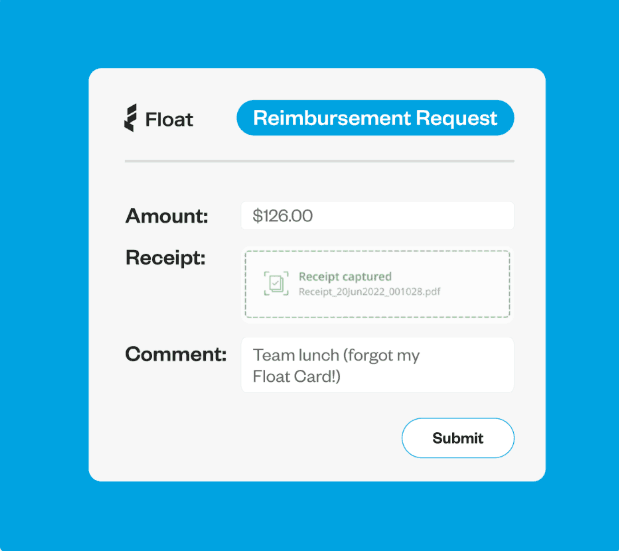
Receipt uploads: Upload and store receipts digitally, simplifying record-keeping and speeding up approval of reimbursements. This reduces paperwork and helps you maintain an audit trail.
Budget tracking: Set spending limits and monitor them to keep your spending in line with the budget. This helps you avoid overspending and stay aligned with financial goals.
Customizable reports: Generate reports tailored to your specific needs, offering flexibility in how you view your business spending data. This aids in clearer financial analysis.
Ease of Use
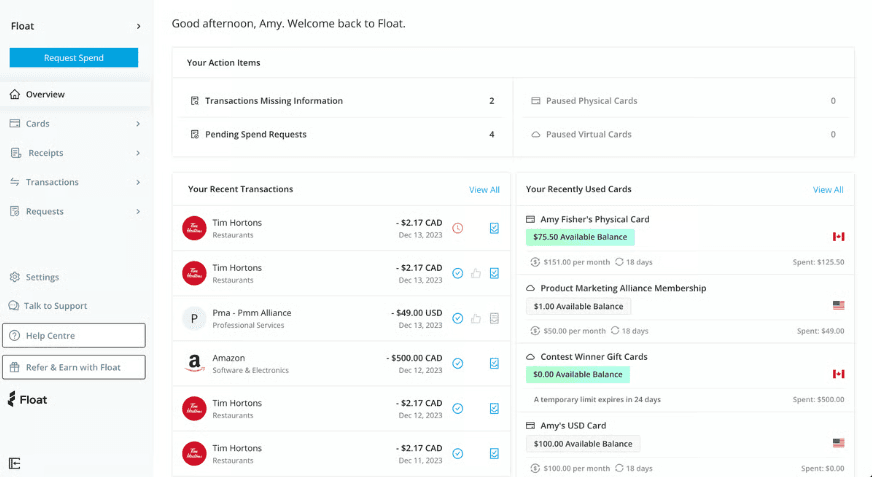
Float scores well on ease of use, thanks to its intuitive interface that your team will navigate with ease. The design is straightforward, reducing the learning curve and letting you focus on managing expenses rather than figuring out the software.
Features like real-time tracking and receipt uploads are simple to use, enhancing your team's productivity. Compared to others, Float's simplicity and user-friendliness make it a strong choice for those seeking an uncomplicated expense management solution.
Integrations
Float integrates with Asana, Jira, Teamwork, Trello, Slack, Google Calendar, and Zapier.
Float also offers an API and connects with third-party tools like Zapier for additional app connections.
Float Financial Specs
- 2-Factor Authentication: Yes
- API: Yes
- Batch Permissions & Access: No
- BitCoin: No
- Customer Management: No
- Data Export: Yes
- Data Import: Yes
- External Integrations: No
- Multi-Currency: Yes
- Multi-User: Yes
- Notifications: Yes
- PayPal: No
- Stripe: No


