

Gusto HR- und Lohnabrechnungssoftware Testbericht für 2026
Gusto vereinfacht HR und Lohnabrechnung mit seiner benutzerfreundlichen Oberfläche und umfangreichen Funktionen und ist damit eine Top-Wahl für Kleinunternehmer, die Effizienz suchen.

Wir bewerten Tools unabhängig; Provisionen helfen, unsere Tests zu finanzieren. Siehe unsere Transparenzrichtlinie und unsere Methodik.
Gusto is a HR and payroll provider that helps you manage employee pay, benefits, and compliance. It integrates easily with leading accounting tools like QuickBooks, Xero, and FreshBooks, ensuring efficient data flow across systems.
Gusto is ideal for small to medium-sized businesses—especially those in tech companies or creative agencies who need an efficient way to manage employee details and payroll without the hassle. Overall, the software helps finance professionals maintain payroll accuracy, minimize manual input, and speed up the month-end close.
In this Gusto review, you’ll get a quick breakdown of the software’s core features, pros and cons, ideal use cases, pricing, and more. If payroll tasks slow down your month-end process, this one’s worth a closer look.
Warum Sie unseren Software-Empfehlungen vertrauen können
6,700+
Reviews
20
Industry experts
16+
Evaluation factors
14
Years
Unsere Bewertungen spiegeln unser unabhängiges Urteilsvermögen wider – keine Verkaufsstrategie. Erfahren Sie, wie wir transparent bleiben.
Für diesen Leitfaden haben wir Tools mithilfe von praktischen Tests und unabhängiger Recherche bewertet und dabei unsere Bewertungskriterien angewendet.
Unsere Bewertungen spiegeln unser menschliches redaktionelles Urteilsvermögen wider, keine Verkaufsstrategie.
Gusto Evaluation Summary
4.6/5
- From $49/month + $6/month/user
- Free demo available
Gusto Overview
Gusto excels as an HR and payroll software with its intuitive interface and advanced feature set. Compared to other tools, it offers excellent value with seamless integration options and competitive pricing.
The software offers a strong core feature set, including automated payroll processing, contractor payments, and benefits administration. These capabilities make it an ideal fit for service-based firms or companies with hybrid workforces. However, businesses that require in-depth customization or niche compliance tools may find its offerings less advanced than those of more specialized enterprise platforms.
Overall, Gusto stands out as a reliable, efficient HR solution that prioritizes simplicity and user experience—making it a smart choice for growing businesses focused on operational efficiency.
Pros
- Well-organized dashboard makes it easy for finance teams to onboard quickly.
- The platform streamlines payroll processing with automatic calculations, direct deposits, and end-to-end tax filing.
- Simplifies benefits management by offering integrated access to health insurance, 401(k) plans, and commuter benefit.
Cons
- While support is generally helpful, users may experience delays in response during peak periods.
- Reporting lacks the customization and depth of data analytics required for larger corporations and enterprises.
- Limited flexibility for tailoring workflows, fields, or integrations.
Wie wir Tools testen und bewerten
Wir haben jahrelang daran gearbeitet, unser System zur Softwarebewertung zu entwickeln, zu verfeinern und stetig zu verbessern. Der Bewertungsleitfaden wurde entworfen, um die Feinheiten der Softwareauswahl und die Qualitätskriterien eines effektiven Tools präzise zu erfassen, mit Fokus auf entscheidende Aspekte im Auswahlprozess. Im Folgenden sehen Sie genau, wie unsere Prüfungen und Bewertungen nach sieben Kriterien funktioniert. So können wir eine objektive Bewertung der Software auf Grundlage der Kernfunktionalitäten, herausragenden Eigenschaften, Benutzerfreundlichkeit, Einführung, Kundensupport, Integrationen, Kundenbewertungen sowie Preis-Leistungs-Verhältnis bieten.
Kernfunktionalität (25 % der Gesamtbewertung)
Der Ausgangspunkt unserer Bewertung ist immer die Kernfunktionalität des Tools. Verfügt es über die grundlegenden Features und Funktionen, die ein Nutzer erwarten würde? Sind einige dieser Kernfunktionen auf höherpreisige Tarife beschränkt? Im Kern erwarten wir, dass ein Tool mit den Basisfunktionen seiner Wettbewerber mithalten kann.
Herausragende Funktionen (25 % der Gesamtbewertung)
Im nächsten Schritt bewerten wir ungewöhnliche, herausragende Funktionen, die über die üblichen Kernfunktionen vergleichbarer Tools hinausgehen. Eine hohe Punktzahl erhält, wer spezialisierte oder einzigartige Funktionen bietet, die das Produkt schneller, effizienter oder besonders wertvoll für den Nutzer machen. Wir prüfen auch, wie einfach sich das Tool mit anderen Programmen des typischen Tech-Stacks integrieren lässt, um den Funktionsumfang und die Nützlichkeit der Software zu erweitern. Vielseitige native Integrationen, Drittanbieter-Anbindungen sowie API-Zugänge für individuelle Integrationen schneiden am besten ab.
Benutzerfreundlichkeit (10 % der Gesamtbewertung)
Wir bewerten, wie schnell und einfach sich die wichtigsten Aufgaben im Tool erledigen lassen. Hoch bewertete Software ist gut gestaltet, intuitiv bedienbar, bietet mobile Apps, Vorlagen und macht selbst komplexere Aufgaben handhabbar.
Einführung (10 % der Gesamtbewertung)
Wir wissen, wie wichtig eine rasche Teamakzeptanz bei neuen Plattformen ist. Deshalb prüfen wir, wie einfach sich ein Tool mit minimalem Trainingsaufwand erlernen und bedienen lässt. Wir bewerten auch, wie schnell ein Teammitglied ohne vorherige Erfahrung startklar ist. Hoch bewertete Lösungen benötigen wenig oder gar keinen Support.
Kundensupport (10 % der Gesamtbewertung)
Wir prüfen, wie leicht und schnell Sie mit Telefon, Live-Chat oder Wissensdatenbank Hilfe erhalten können. Tools und Unternehmen, die Echtzeit-Support bieten, erzielen die besten Ergebnisse, während Chatbots am schlechtesten abschneiden.
Kundenbewertungen (10 % der Gesamtbewertung)
Neben unseren eigenen Tests berücksichtigen wir den Net-Promoter-Score aktueller und ehemaliger Kunden. Wir prüfen, wie wahrscheinlich sie sich erneut für das Tool entscheiden würden, basierend auf der Kernfunktionalität. Hoch bewertete Software spiegelt einen hohen Net-Promoter-Score wider.
Preis-Leistungs-Verhältnis (10 % der Gesamtbewertung)
Abschließend vergleichen wir alle Kriterien und bewerten den Durchschnittspreis der Einstiegstarife im Verhältnis zu den Kernfunktionen und dem Nutzen der weiteren Bewertungskriterien. Software, die mehr für weniger bietet, erhält die besten Bewertungen.
Core Features
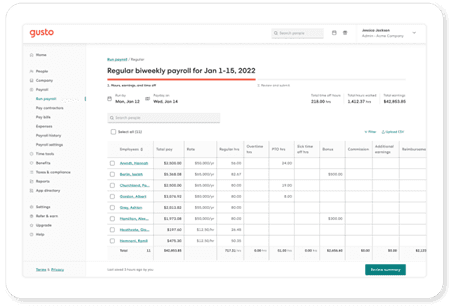
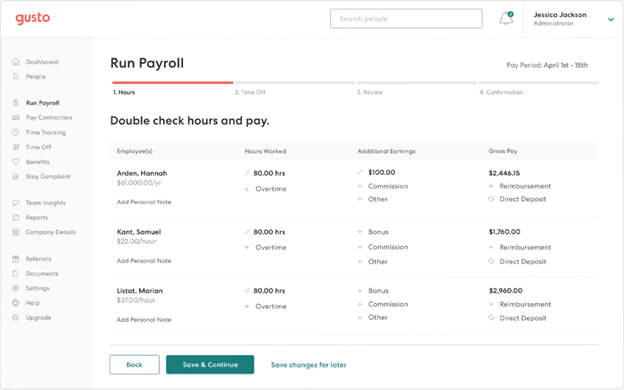
Automated Payroll Processing: Gusto handles all your payroll calculations automatically, saving you time and reducing errors. You can run payroll with just a few clicks, ensuring employees are paid accurately and on time.
Tax Filing: Gusto automatically calculates and files your payroll taxes, keeping you compliant with government regulations. This helps take the hassle out of tax season and bookkeeping by managing quarterly and annual filings.
Employee Benefits Management: Easily manage health insurance, retirement plans, and more through Gusto's benefits platform. Your team can enroll in benefits with minimal effort, enhancing employee satisfaction.
Time Tracking: Gusto offers built-in time tracking so your employees can clock in and out seamlessly. This feature also ensures accurate payroll by integrating directly with your timesheets.
Direct Deposit: With Gusto, you can pay your employees through direct deposit quickly and securely. In such, you eliminate the need for paper checks and pay stubs, and simplify payday for everyone.
HR Tools: Gusto provides essential HR tools for onboarding, employee self-service, and document management. This way, you can streamline your HR processes by keeping everything in one place.
Standout Features
Employee Self-Serve Portal: Gusto's portal allows employees to manage their own benefits and personal information, including bank accounts. This empowers your team and reduces the administrative load on your HR staff.
Compliance Assistance: Gusto offers compliance support to help you navigate labor laws and regulations. As a result, your business stays up-to-date with the latest requirements, reducing legal risks.
Ease of Use
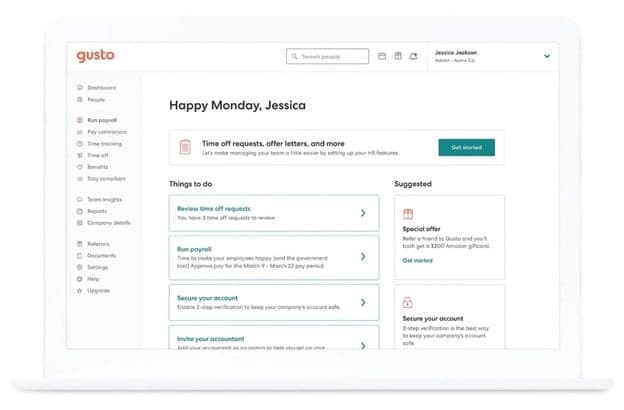
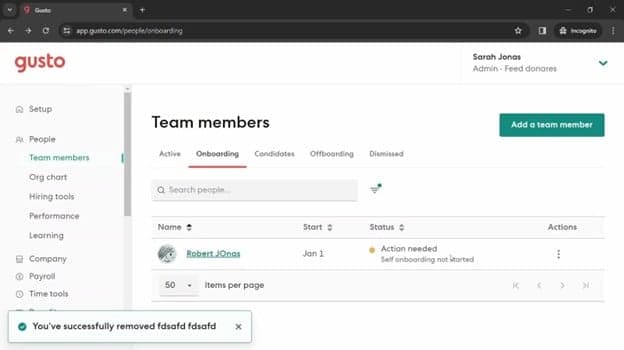
Gusto offers a user-friendly experience, designed to make payroll and human resources tasks simple for your team. Its intuitive layout makes navigation effortless, helping users quickly find what they need without confusion. Plus, with easy-to-use tools for payroll, benefits administration, and onboarding, Gusto minimizes the learning curve, making it accessible even for first-time users. Additional features like automated tax filing and employee self-onboarding also contribute to its ease of use, helping teams save time and avoid common administrative headaches.
Onboarding
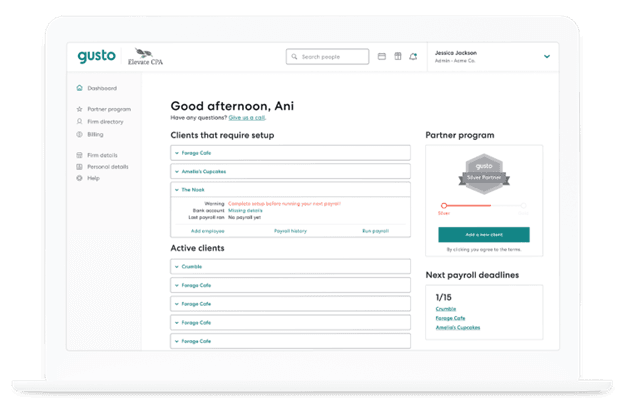
Gusto offers a smooth onboarding process with clear instructions and helpful resources to get you started. You and your team can quickly set up accounts and begin using the platform with minimal hassle. The availability of tutorials and support articles also ensures you have the guidance needed to navigate the system efficiently. All in all, Gusto's onboarding tools and flow are designed to be straightforward and user-centric, helping you integrate the software into your operations seamlessly.
Customer Support
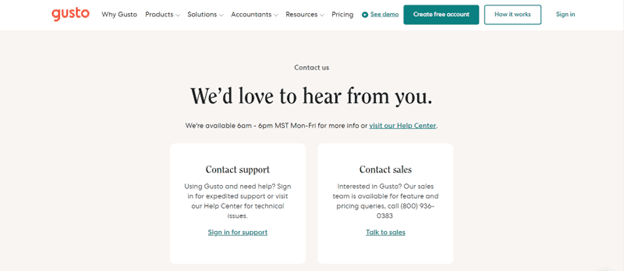
Gusto provides reliable customer support with multiple channels, including phone and email, to assist you and your team. While some users report occasional delays, the support team is generally helpful and knowledgeable. Gusto also offers an advanced help center with articles and guides, ensuring you have access to necessary information when you need it. The availability of these resources aids in resolving issues efficiently, though improvements in response times would enhance the overall experience.
Value for Money
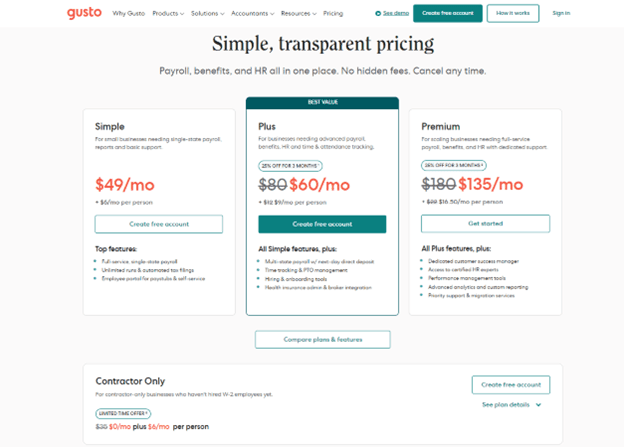
Gusto plans come at a competitive value, making it a solid investment for small to medium-sized businesses. The software provides a transparent pricing model and a good range of features included in each tier. Each of the available plans cater to different needs, ensuring you only pay for what your team requires.
- Simple Plan: Basic payroll processing and employee self-service.
- Plus Plan: Adds benefits administration and time tracking.
- Premium Plan: Includes HR resource center and priority support.
New Product Updates from Gusto
Gusto Adds Solo Advisory Tools and Mobile Money Features
Gusto adds Solo S-Corp Advisory Tools with tax and salary calculators, plus mobile access to Gusto Money for invoicing and bill payments. These updates make it easier to provide S-corp guidance and manage incoming and outgoing payments on the go. Highlights include:
- Tax Savings Calculator: Compares S-corp and sole proprietor or LLC taxation to help assess potential tax savings.
- Reasonable Salary Calculator: Uses BLS wage data to help determine a defensible salary for S-corp owners.
- Mobile Invoicing: Creates branded invoices with shareable payment links, card or bank payments, and automatic reminders from mobile.
- Mobile Bill Pay: Pays bills by card or bank transfer and schedules one-time or recurring payments from mobile.
Visit Gusto’s official site for more details.
Gusto Expands 401(k), Life, and Disability Benefits
Gusto now lets admins set up and manage 401(k) plans directly from the Benefits dashboard while offering voluntary life and disability coverage through national carriers. These updates reduce administrative work, keep benefit deductions connected to payroll, and give employees access to more coverage options without adding employer premium costs. Highlights include:
- Built-In 401(k) Management: Set up and manage retirement plans directly from Gusto’s Benefits dashboard without using a separate platform.
- Voluntary Life Insurance: Offer employee-paid life insurance through national carriers with deductions synced to payroll.
- Voluntary Disability Insurance: Add employee-paid disability coverage without additional employer premium costs.
- Integrated Benefits Administration: Manage retirement and insurance benefits alongside payroll from the same system.
Visit Gusto’s official site for more details.
Gusto Automates FICA Tip Tax Credit Calculations
Gusto now automatically calculates the FICA tip tax credit and generates pre-filled, ready-to-file tax documents for eligible employers with tipped workers. These updates reduce manual tax preparation and make it easier to claim eligible Social Security and Medicare tax credits. Highlights include:
- Automatic FICA Tip Tax Credit Calculations: Calculate eligible FICA tip tax credits automatically for tipped employees.
- Pre-Filled Tax Forms: Generate ready-to-file tax documents with pre-filled credit information.
- Simplified Tax Filing: Reduce manual work when claiming Social Security and Medicare tax credits.
Visit Gusto's official site for more details.
Gusto Specs
- API: Yes
- Application Tracking: Yes
- Approval Workflows: Yes
- Attendance Tracking: No
- Budgeting: Yes
- Calendar Management: Yes
- Compliance Tracking: Yes
- Dashboard: Yes
- Data Export: Yes
- Data Import: No
- Data Visualization: Yes
- Employee Database: Yes
- Employee Incentive Management: No
- Employee Onboarding: Yes
- Expense Tracking: Yes
- External Integrations: Yes
- Feedback Management: No
- Forecasting: No
- Multi-Currency: No
- Multi-User: No
- Notifications: Yes
- Payroll: Yes
- Scheduling: Yes
- Tax Management: Yes
- Time Management: Yes
- Timesheets: Yes
- Travel Management: No
- Vacation & Absence Calendar: Yes
Gusto FAQs
Gusto Company Overview & History
Gusto, originally founded as ZenPayroll in November 2011, is headquartered in San Francisco and specializes in payroll, benefits, and HR management software for U.S. businesses.
The company launched its services in 2012 and rebranded to Gusto in 2015, expanding its offerings to include health benefits and workers' compensation. As of recent reports, Gusto serves over 400,000 businesses nationwide and processes tens of billions of dollars in payroll annually.
They currently employ over 2,400 people and are recognized for their innovative and user-friendly services.
Gusto Major Milestones
- 2011: Founded as ZenPayroll in November.
- 2012: Launched payroll services.
- 2015: Rebranded to Gusto, adding health benefits and workers' compensation.
- 2020: Developed new products, including tools for the Paycheck Protection Program.
Wie geht es weiter?
Bereit, Ihre Fähigkeiten als Finanzfachkraft zu erweitern? Abonnieren Sie unseren kostenlosen Newsletter.