
Koyfin Test: Vorteile, Nachteile, Funktionen und Preise
Koyfin überzeugt mit seiner intuitiven Benutzeroberfläche und umfangreichen Werkzeugen zur Datenvisualisierung, was es zur ersten Wahl für Ihre Finanzanalyse macht.

Wir bewerten Tools unabhängig; Provisionen helfen, unsere Tests zu finanzieren. Siehe unsere Transparenzrichtlinie und unsere Methodik.
Koyfin is a financial analytics software for investment professionals who need to research equities, track macro trends, and build custom dashboards in one place. I'd consider it most seriously if you want the market data depth of a Bloomberg Terminal without the enterprise price tag. Koyfin gives you charting, screening, and portfolio analytics that rival what Bloomberg offers, but at a cost that's actually accessible to smaller teams, independent analysts, and buy-side professionals who can't justify a six-figure subscription.
Koyfin Evaluation Summary
4.8/5
- From $39/month (billed annually)
- Free plan available
Warum Sie unseren Software-Empfehlungen vertrauen können
6,700+
Reviews
20
Industry experts
16+
Evaluation factors
14
Years
Unsere Bewertungen spiegeln unser unabhängiges Urteilsvermögen wider – keine Verkaufsstrategie. Erfahren Sie, wie wir transparent bleiben.
Für diesen Leitfaden haben wir Tools mithilfe von praktischen Tests und unabhängiger Recherche bewertet und dabei unsere Bewertungskriterien angewendet.
Unsere Bewertungen spiegeln unser menschliches redaktionelles Urteilsvermögen wider, keine Verkaufsstrategie.
Koyfin Overview
In my opinion, Koyfin is a solid choice for financial analysts and investment teams seeking detailed market data, valuation tools, and analytics. The platform excels with its advanced charting, graphing, and extensive data coverage across the global market, making it a top contender for those who value in-depth market research and analysis. While its interface offers an enhanced user experience, onboarding can be smoother, especially for those new to financial data tools. Compared to alternatives such as Bloomberg Terminal, Koyfin offers competitive pricing, though its customer support can be more responsive. It's best suited for teams that need robust data visualization without the hefty price tag of more established Wall Street platforms.
Pros
- You get advanced charting tools and financial metrics for intensive data analysis.
- Your team can access extensive live market data and up-to-date market news.
- It's user-friendly, making navigation easy for your work.
Cons
- You may find the onboarding process less intuitive for beginners.
- Your access to customer support can be more responsive.
- It offers limited coverage of U.S. mutual funds for basic users.
Is Koyfin Right For Your Needs?
Who Would be a Good Fit for Koyfin?
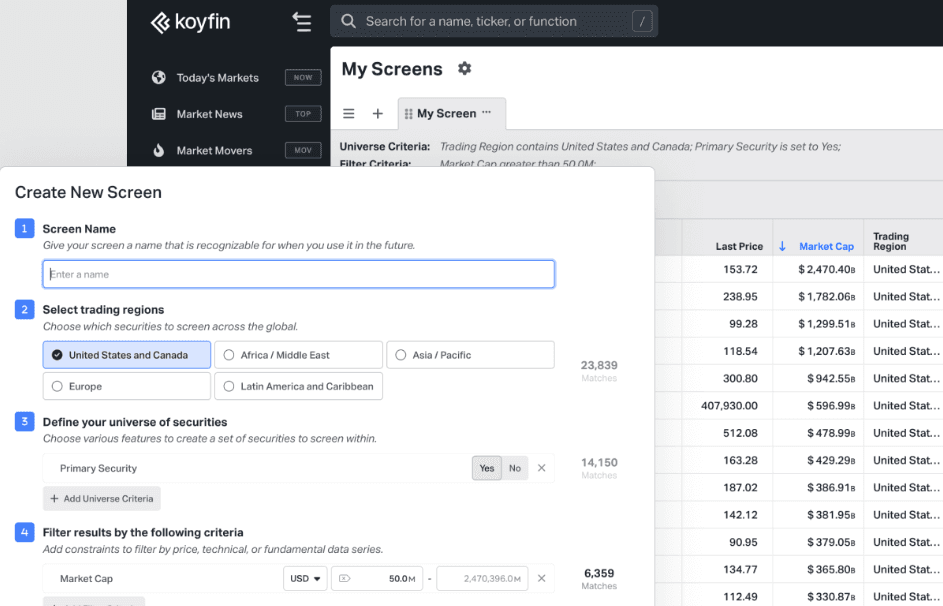
Koyfin is ideal for financial analysts and investment teams who need detailed market insights and flexible custom dashboards. If your team values advanced charting and real-time data, Koyfin's functionalities will support your analysis needs. Its accessible interface makes it easier for experienced analysts to navigate customizable dashboards and custom watchlists. For example, investment firms benefit from its extensive data coverage, helping you make informed decisions.
- Investment FirmsYour firm will benefit from Koyfin's live market data, stock screener, and advanced analytics for better investment strategies.
- Hedge FundsKoyfin's detailed charting tools help your team analyze trends and make informed trading decisions.
- Corporate Finance TeamsYour team can leverage real-time data for strategic financial planning and analysis.
- Equity Research AnalystsYou can use Koyfin's in-depth data visualization to support your research reports.
- Portfolio ManagersKoyfin offers tools to track and analyze portfolios, aiding your decision-making process.
- Financial AdvisorsYou can provide clients with detailed market insights using Koyfin's comprehensive data.
Who Would be a Bad Fit for Koyfin?
Koyfin isn't the best choice for beginners or small businesses without dedicated financial teams. If your team lacks experience with financial data tools, Koyfin's advanced features may overwhelm you. Businesses needing detailed U.S. mutual fund data will find it limited, as this functionality is only available in the Pro account. Additionally, if you rely heavily on customer support, Koyfin's response time may not meet your expectations.
- Small StartupsYour team may find Koyfin's advanced features too complex and unnecessary for basic financial tracking.
- Non-Finance DepartmentsKoyfin's specialized tools won't benefit your team if you're outside the financial sector.
- Casual InvestorsYou may not need Koyfin's in-depth data if you're not making frequent investment decisions.
- Educational InstitutionsIf you're teaching basic finance, Koyfin's advanced tools may be overkill for students.
- Retail BusinessesYour focus on sales and inventory doesn't align with Koyfin's financial analysis capabilities.
- Customer Support TeamsKoyfin's tools don't cater to customer service functions, making it irrelevant for your work.
Wie wir Tools testen und bewerten
Wir haben jahrelang daran gearbeitet, unser System zur Softwarebewertung zu entwickeln, zu verfeinern und stetig zu verbessern. Der Bewertungsleitfaden wurde entworfen, um die Feinheiten der Softwareauswahl und die Qualitätskriterien eines effektiven Tools präzise zu erfassen, mit Fokus auf entscheidende Aspekte im Auswahlprozess. Im Folgenden sehen Sie genau, wie unsere Prüfungen und Bewertungen nach sieben Kriterien funktioniert. So können wir eine objektive Bewertung der Software auf Grundlage der Kernfunktionalitäten, herausragenden Eigenschaften, Benutzerfreundlichkeit, Einführung, Kundensupport, Integrationen, Kundenbewertungen sowie Preis-Leistungs-Verhältnis bieten.
Kernfunktionalität (25 % der Gesamtbewertung)
Der Ausgangspunkt unserer Bewertung ist immer die Kernfunktionalität des Tools. Verfügt es über die grundlegenden Features und Funktionen, die ein Nutzer erwarten würde? Sind einige dieser Kernfunktionen auf höherpreisige Tarife beschränkt? Im Kern erwarten wir, dass ein Tool mit den Basisfunktionen seiner Wettbewerber mithalten kann.
Herausragende Funktionen (25 % der Gesamtbewertung)
Im nächsten Schritt bewerten wir ungewöhnliche, herausragende Funktionen, die über die üblichen Kernfunktionen vergleichbarer Tools hinausgehen. Eine hohe Punktzahl erhält, wer spezialisierte oder einzigartige Funktionen bietet, die das Produkt schneller, effizienter oder besonders wertvoll für den Nutzer machen. Wir prüfen auch, wie einfach sich das Tool mit anderen Programmen des typischen Tech-Stacks integrieren lässt, um den Funktionsumfang und die Nützlichkeit der Software zu erweitern. Vielseitige native Integrationen, Drittanbieter-Anbindungen sowie API-Zugänge für individuelle Integrationen schneiden am besten ab.
Benutzerfreundlichkeit (10 % der Gesamtbewertung)
Wir bewerten, wie schnell und einfach sich die wichtigsten Aufgaben im Tool erledigen lassen. Hoch bewertete Software ist gut gestaltet, intuitiv bedienbar, bietet mobile Apps, Vorlagen und macht selbst komplexere Aufgaben handhabbar.
Einführung (10 % der Gesamtbewertung)
Wir wissen, wie wichtig eine rasche Teamakzeptanz bei neuen Plattformen ist. Deshalb prüfen wir, wie einfach sich ein Tool mit minimalem Trainingsaufwand erlernen und bedienen lässt. Wir bewerten auch, wie schnell ein Teammitglied ohne vorherige Erfahrung startklar ist. Hoch bewertete Lösungen benötigen wenig oder gar keinen Support.
Kundensupport (10 % der Gesamtbewertung)
Wir prüfen, wie leicht und schnell Sie mit Telefon, Live-Chat oder Wissensdatenbank Hilfe erhalten können. Tools und Unternehmen, die Echtzeit-Support bieten, erzielen die besten Ergebnisse, während Chatbots am schlechtesten abschneiden.
Kundenbewertungen (10 % der Gesamtbewertung)
Neben unseren eigenen Tests berücksichtigen wir den Net-Promoter-Score aktueller und ehemaliger Kunden. Wir prüfen, wie wahrscheinlich sie sich erneut für das Tool entscheiden würden, basierend auf der Kernfunktionalität. Hoch bewertete Software spiegelt einen hohen Net-Promoter-Score wider.
Preis-Leistungs-Verhältnis (10 % der Gesamtbewertung)
Abschließend vergleichen wir alle Kriterien und bewerten den Durchschnittspreis der Einstiegstarife im Verhältnis zu den Kernfunktionen und dem Nutzen der weiteren Bewertungskriterien. Software, die mehr für weniger bietet, erhält die besten Bewertungen.
Core Features
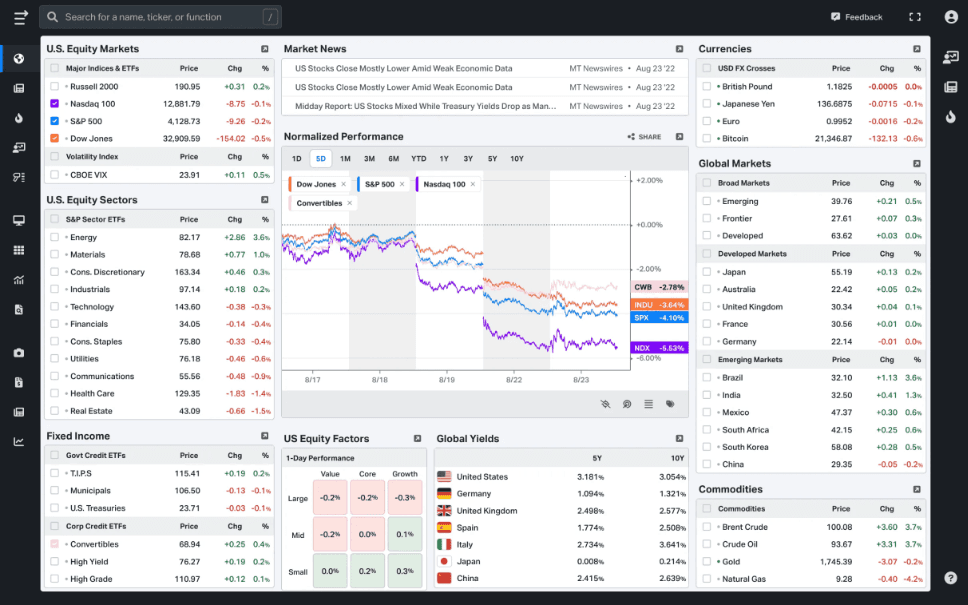
Advanced Charting Tools: You can create detailed and customizable charts to visualize financial data effectively. These tools help your team analyze trends and make informed decisions.
Real-Time Market Data: Access up-to-the-minute data to keep your analysis current. This feature ensures your decisions are based on the latest market conditions.
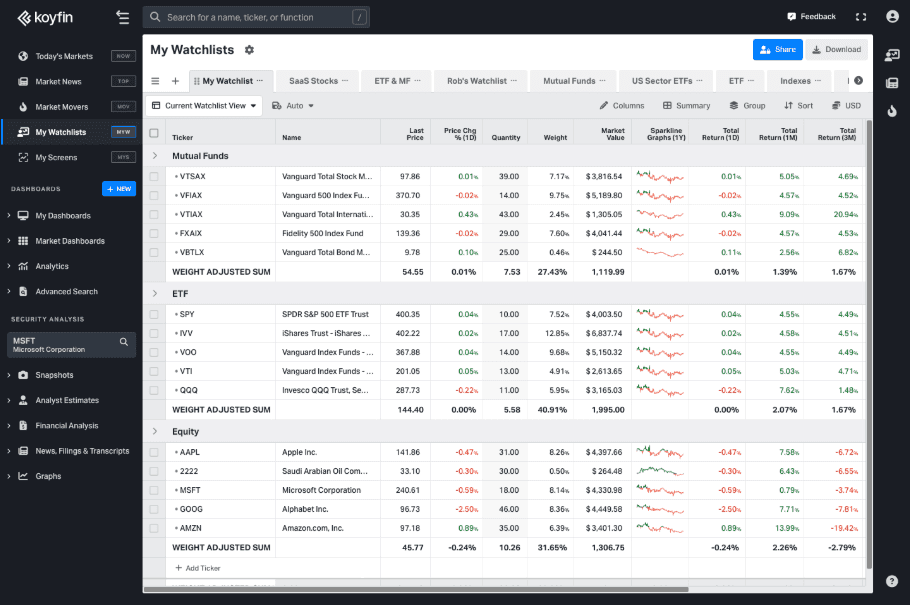
Customizable Watchlists: You can track specific stocks or financial instruments with ease. This lets you monitor market movements that matter most to your work.
Financial Statement Analysis: Dive deep into company financials to understand performance indicators. Your team can use this functionality to thoroughly evaluate investment opportunities.
Macro Dashboards: Get a comprehensive view of economic indicators and market trends. This helps you stay informed about global financial movements.
Portfolio Management: Manage and analyze your investment portfolios efficiently. This tool provides insights into asset allocation and performance.
Ease of Use
Koyfin is generally user-friendly, with an intuitive interface that makes navigation easy for experienced analysts. You can quickly access tools such as advanced charting and customizable watchlists, which streamline your workflow. However, beginners may face a learning curve due to its complex features. Compared to other software, Koyfin's layout is clean and logical, allowing your team to focus on analysis without unnecessary distractions.
Integrations
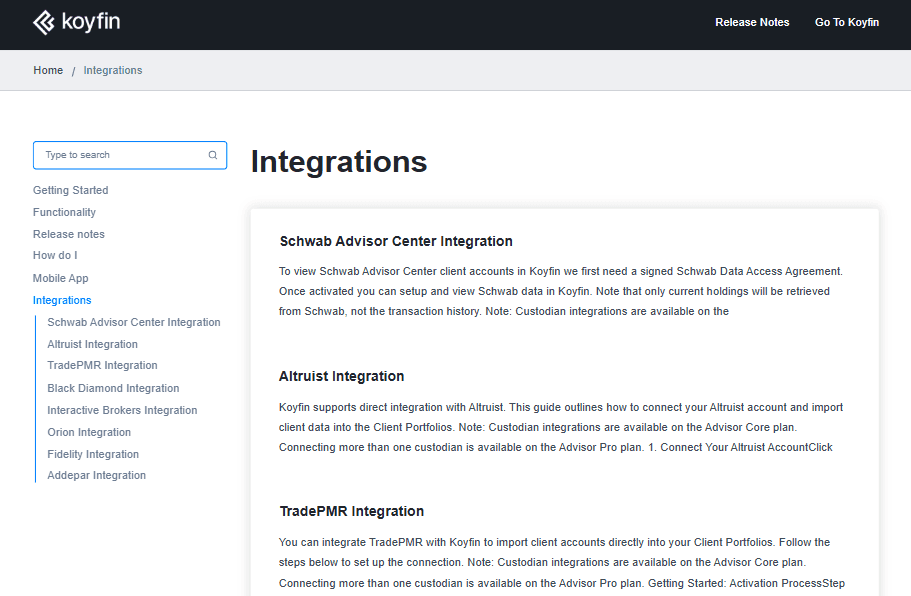
Koyfin integrates with Schwab Advisor Center, Altruist, TradePMR, Black Diamond, Interactive Brokers, and Orion. Koyfin does not offer an API for data access due to restrictions from data providers.
Koyfin Specs
- 2-Factor Authentication: Yes
- Accounts Payable: No
- Accounts Receivable: No
- API: No
- Audit Trail: No
- Balance Sheet: No
- Billing/Invoicing: No
- Budgeting: No
- Calendar Management: No
- Comparative Reporting: Yes
- Compliance Tracking: No
- CRM Integration: No
- Custom Reports: Yes
- Dashboard: No
- Dashboards: Yes
- Data Export: Yes
- Data Import: Yes
- Data Mining: No
- Data Visualization: Yes
- Document Comparison: No
- Expense Tracking: No
- External Integrations: Yes
- Financial Analysis: Yes
- Forecasting: Yes
- General Account Ledger: No
- Multi-Currency: Yes
- Multi-User: Yes
- Notifications: Yes
- P&L: Yes
- Payroll: No
- Process Reporting: No
- Risk Assessment: Yes
- SAP Integration: No
- Scenario Planning: No
- Scheduling: No
- Tax Management: No
- Visualization: No
- Workflow Management: No


