

MATLAB Bewertung: Vorteile, Nachteile, Funktionen und Preise
MATLAB überzeugt bei der Finanzdatenanalyse mit leistungsstarken Rechenwerkzeugen und ist somit eine Top-Wahl für komplexe, zeitkritische Entscheidungsfindungen.

Wir bewerten Tools unabhängig; Provisionen helfen, unsere Tests zu finanzieren. Siehe unsere Transparenzrichtlinie und unsere Methodik.
MATLAB is a statistical analysis software built for technical computing, numerical analysis, and custom algorithm development. It's a strong fit for finance and data teams that need to build, test, and deploy complex quantitative models—not just run standard statistical reports. If you're weighing MATLAB against SAS, MATLAB gives you more flexibility through its open programming environment and an extensive library of specialized toolboxes, making it the better pick when your analysis workflows require custom-built solutions rather than predefined procedures.
MATLAB Evaluation Summary

4.6/5
- From $1,050/individual license/year
- Free trial available
Warum Sie unseren Software-Empfehlungen vertrauen können
6,700+
Reviews
20
Industry experts
16+
Evaluation factors
14
Years
Unsere Bewertungen spiegeln unser unabhängiges Urteilsvermögen wider – keine Verkaufsstrategie. Erfahren Sie, wie wir transparent bleiben.
Für diesen Leitfaden haben wir Tools mithilfe von praktischen Tests und unabhängiger Recherche bewertet und dabei unsere Bewertungskriterien angewendet.
Unsere Bewertungen spiegeln unser menschliches redaktionelles Urteilsvermögen wider, keine Verkaufsstrategie.
MATLAB Overview
In my opinion, MATLAB is a robust choice for financial data analysis, particularly for users who need advanced computational capabilities such as optimization, iteration, and large-scale prototyping. It excels in handling intricate data models and numerical computation, making it ideal for analysts and data scientists in finance and engineering, as well as researchers in higher education. However, onboarding can be challenging due to its specialized syntax and technical depth. Compared to competitors, MATLAB's computational power stands out, though its GUI might seem less intuitive to beginners. For teams that require high-powered data analysis and have the resources to invest in training, MATLAB offers significant value.
Pros
- MATLAB offers powerful computational capabilities.
- The software provides advanced visualization tools.
- MATLAB's functions support a wide range of applications.
Cons
- MATLAB's syntax and GUI can be less intuitive for beginners.
- Your team might face a steep learning curve during initial use.
- Onboarding and training can take longer than with other tools.
Is MATLAB Right For Your Needs?
Who Would be a Good Fit for MATLAB?
MATLAB is a strong fit for industries and teams requiring advanced data analysis, such as finance, engineering, and academia. If your work involves intricate data modeling or simulations, MATLAB's extensive library of functions and significant computational capabilities support these tasks well. Data scientists and financial analysts who need precise and customizable tools for in-depth analysis will find MATLAB beneficial. Its ability to handle large datasets makes it ideal for research institutions and companies that prioritize robust data analysis.
- Financial AnalystsMATLAB's advanced computational tools make it ideal for analyzing complex financial models and performing statistical analysis.
- Data ScientistsData scientists can leverage MATLAB's extensive library for precise data manipulation, debugging, and algorithm testing.
- Engineering TeamsMATLAB supports intricate simulations and modeling, which are crucial for engineering projects.
- Research InstitutionsMATLAB's ability to handle large datasets aids in comprehensive analysis to support research.
- AcademiaStudents and professors can use MATLAB in coursework and when conducting research in quantitative fields.
- Quantitative AnalystsThe software's high-powered tools help develop and test financial algorithms efficiently using iteration and optimization techniques.
Who Would be a Bad Fit for MATLAB?
MATLAB isn't ideal for small businesses or teams with limited technical expertise that need simple data analysis tools. Its complexity can be overwhelming for users who don't require advanced computational features. If your work focuses on straightforward data processing with minimal customization, MATLAB's extensive capabilities may be unnecessary and cumbersome. Additionally, startups with limited resources may find the onboarding process and time investment too demanding.
- Small BusinessesThe complexity of MATLAB may overwhelm teams needing simple, quick data solutions.
- StartupsLimited resources make MATLAB's steep learning curve and time investment impractical.
- Nontechnical TeamsMATLAB's advanced tools, syntax, and modeling focus can be too complicated for users without technical backgrounds.
- Retail CompaniesRetailers requiring straightforward sales data analysis won't benefit from MATLAB's advanced features.
- Marketing DepartmentsMarketing teams focused on basic analytics and reporting may find MATLAB unnecessarily complex.
- Customer Service TeamsCustomer service teams typically require simpler tools for tracking and analyzing customer interactions.
Wie wir Tools testen und bewerten
Wir haben jahrelang daran gearbeitet, unser System zur Softwarebewertung zu entwickeln, zu verfeinern und stetig zu verbessern. Der Bewertungsleitfaden wurde entworfen, um die Feinheiten der Softwareauswahl und die Qualitätskriterien eines effektiven Tools präzise zu erfassen, mit Fokus auf entscheidende Aspekte im Auswahlprozess. Im Folgenden sehen Sie genau, wie unsere Prüfungen und Bewertungen nach sieben Kriterien funktioniert. So können wir eine objektive Bewertung der Software auf Grundlage der Kernfunktionalitäten, herausragenden Eigenschaften, Benutzerfreundlichkeit, Einführung, Kundensupport, Integrationen, Kundenbewertungen sowie Preis-Leistungs-Verhältnis bieten.
Kernfunktionalität (25 % der Gesamtbewertung)
Der Ausgangspunkt unserer Bewertung ist immer die Kernfunktionalität des Tools. Verfügt es über die grundlegenden Features und Funktionen, die ein Nutzer erwarten würde? Sind einige dieser Kernfunktionen auf höherpreisige Tarife beschränkt? Im Kern erwarten wir, dass ein Tool mit den Basisfunktionen seiner Wettbewerber mithalten kann.
Herausragende Funktionen (25 % der Gesamtbewertung)
Im nächsten Schritt bewerten wir ungewöhnliche, herausragende Funktionen, die über die üblichen Kernfunktionen vergleichbarer Tools hinausgehen. Eine hohe Punktzahl erhält, wer spezialisierte oder einzigartige Funktionen bietet, die das Produkt schneller, effizienter oder besonders wertvoll für den Nutzer machen. Wir prüfen auch, wie einfach sich das Tool mit anderen Programmen des typischen Tech-Stacks integrieren lässt, um den Funktionsumfang und die Nützlichkeit der Software zu erweitern. Vielseitige native Integrationen, Drittanbieter-Anbindungen sowie API-Zugänge für individuelle Integrationen schneiden am besten ab.
Benutzerfreundlichkeit (10 % der Gesamtbewertung)
Wir bewerten, wie schnell und einfach sich die wichtigsten Aufgaben im Tool erledigen lassen. Hoch bewertete Software ist gut gestaltet, intuitiv bedienbar, bietet mobile Apps, Vorlagen und macht selbst komplexere Aufgaben handhabbar.
Einführung (10 % der Gesamtbewertung)
Wir wissen, wie wichtig eine rasche Teamakzeptanz bei neuen Plattformen ist. Deshalb prüfen wir, wie einfach sich ein Tool mit minimalem Trainingsaufwand erlernen und bedienen lässt. Wir bewerten auch, wie schnell ein Teammitglied ohne vorherige Erfahrung startklar ist. Hoch bewertete Lösungen benötigen wenig oder gar keinen Support.
Kundensupport (10 % der Gesamtbewertung)
Wir prüfen, wie leicht und schnell Sie mit Telefon, Live-Chat oder Wissensdatenbank Hilfe erhalten können. Tools und Unternehmen, die Echtzeit-Support bieten, erzielen die besten Ergebnisse, während Chatbots am schlechtesten abschneiden.
Kundenbewertungen (10 % der Gesamtbewertung)
Neben unseren eigenen Tests berücksichtigen wir den Net-Promoter-Score aktueller und ehemaliger Kunden. Wir prüfen, wie wahrscheinlich sie sich erneut für das Tool entscheiden würden, basierend auf der Kernfunktionalität. Hoch bewertete Software spiegelt einen hohen Net-Promoter-Score wider.
Preis-Leistungs-Verhältnis (10 % der Gesamtbewertung)
Abschließend vergleichen wir alle Kriterien und bewerten den Durchschnittspreis der Einstiegstarife im Verhältnis zu den Kernfunktionen und dem Nutzen der weiteren Bewertungskriterien. Software, die mehr für weniger bietet, erhält die besten Bewertungen.
Core Features
Data Analysis Tools: MATLAB provides a range of tools for mathematical analysis and data modeling, allowing you to perform complex calculations involving matrices. These tools are essential for users needing detailed insights from large datasets.
Visualization Capabilities: The software's advanced plotting and visualization functions help you present data clearly. You can create customized graphs and charts that make your findings easy to understand.
Algorithm Development: You can develop and test algorithms directly within MATLAB, making it valuable for research and analysis. This feature supports iterative testing and refinement of models.
Data Import and Export: MATLAB supports various file formats, enabling you to easily import and export data. This flexibility ensures smooth integration with your existing datasets.
Custom Scripting: With MATLAB, you can write custom scripts to automate repetitive tasks, saving you time and effort. This is particularly useful for users who need tailored solutions.
Statistical Functions: The software includes a comprehensive set of built-in functions for analyzing data trends and patterns. These tools are crucial for making informed decisions based on your data analysis.

Ease of Use
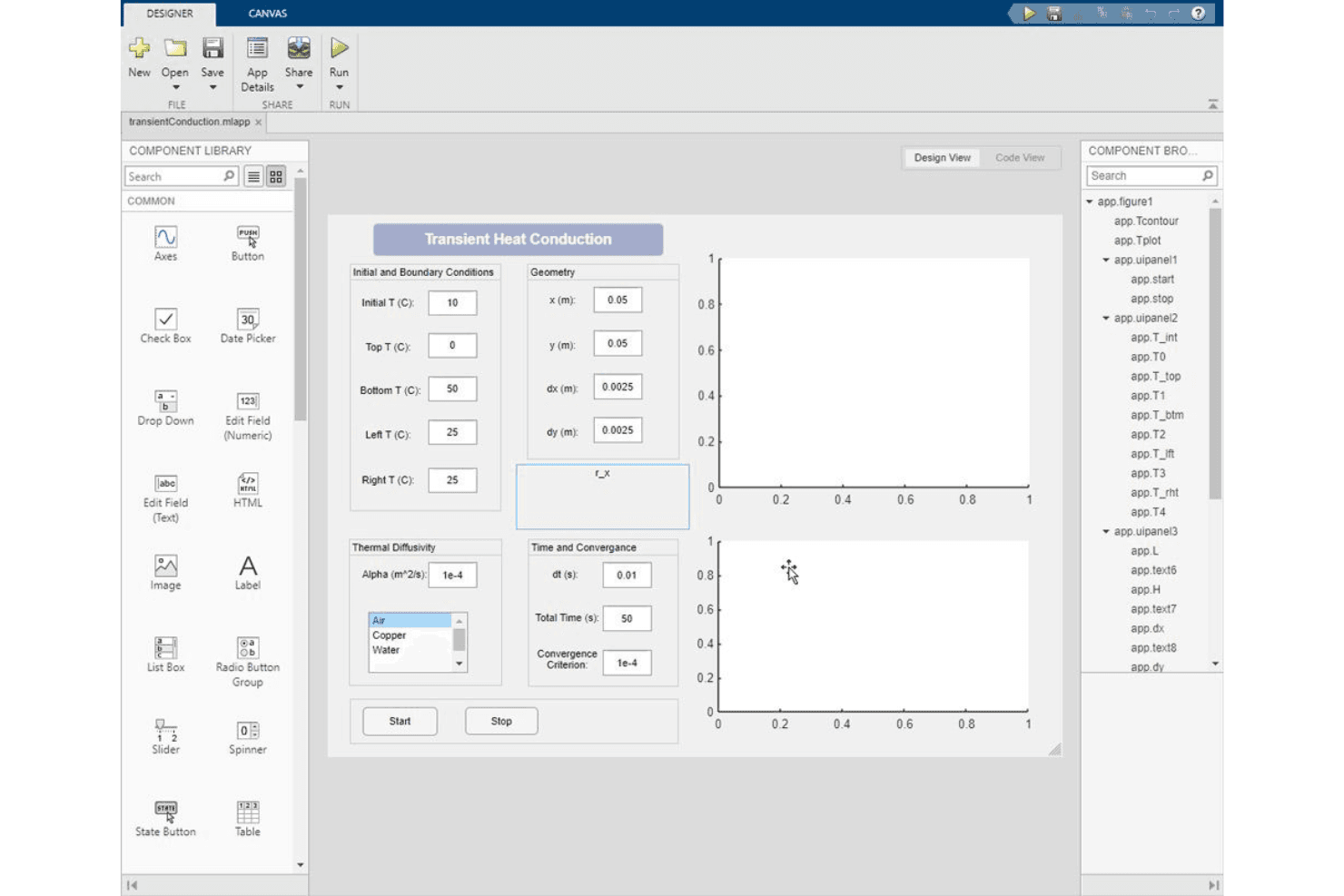
MATLAB can be challenging to use for beginners due to its specialized syntax, dense GUI, and extensive feature set. The software's powerful tools have a steep learning curve for those without technical backgrounds. While its capabilities are impressive, users may need significant time and training to understand how to navigate the workspace and effectively use MATLAB functions. However, once familiar with its functionalities, the efficiency and precision it offers in numerical computation are unmatched.
Integrations
MATLAB is integrated with Simulink, MathWorks' simulation software. This allows you to use MATLAB algorithms in simulations and export simulation results into MATLAB for further analysis.
Regarding APIs and third-party integration tools, MATLAB offers integration with many other programming languages, including C/C++, Python, and Fortran, allowing you to expand its functionality.

MATLAB Specs
- A/B Testing: Yes
- API: Yes
- Automated Testing: Yes
- Browser Compatibility Testing: Yes
- Bug Tracking: Yes
- Calendar Management: Yes
- CI/CD Integration: Yes
- Dashboard: Yes
- Data Export: Yes
- Data Import: Yes
- Data Visualization: Yes
- Developer Tools: Yes
- External Integrations: Yes
- History/Version Control: Yes
- Manual Testing: Yes
- Multi-User: Yes
- Notifications: Yes
- Performance Testing: Yes
- Regression Testing: Yes
- Scheduling: Yes
- Status Notifications: Yes
- Third-Party Plugins/Add-Ons: Yes


