

MATLAB Review: Pros, Cons, Features, and Pricing
MATLAB excels in financial data analysis with its powerful computational tools, making it a top choice for complex, real-time decision-making.

We review tools independently, and commissions help fund our testing. See our transparency policy, our methodology, or suggest a tool.
MATLAB is a statistical analysis software built for technical computing, numerical analysis, and custom algorithm development. It's a strong fit for finance and data teams that need to build, test, and deploy complex quantitative models—not just run standard statistical reports. If you're weighing MATLAB against SAS, MATLAB gives you more flexibility through its open programming environment and an extensive library of specialized toolboxes, making it the better pick when your analysis workflows require custom-built solutions rather than predefined procedures.
MATLAB Evaluation Summary

4.6/5
- From $1,050/individual license/year
- Free trial available
Why Trust Our Software Recommendations
6,700+
Reviews
20
Industry experts
16+
Evaluation factors
14
Years
Our team has been testing and reviewing software since 2012. As finance leaders ourselves, we know how difficult—and important—it is to choose the right software.
For this guide, we evaluated tools using hands-on testing and independent research, scoring tools using our selection criteria.
Our reviews reflect our human editorial judgment, not a sales pitch.
MATLAB Overview
In my opinion, MATLAB is a robust choice for financial data analysis, particularly for users who need advanced computational capabilities such as optimization, iteration, and large-scale prototyping. It excels in handling intricate data models and numerical computation, making it ideal for analysts and data scientists in finance and engineering, as well as researchers in higher education. However, onboarding can be challenging due to its specialized syntax and technical depth. Compared to competitors, MATLAB's computational power stands out, though its GUI might seem less intuitive to beginners. For teams that require high-powered data analysis and have the resources to invest in training, MATLAB offers significant value.
Pros
- MATLAB offers powerful computational capabilities.
- The software provides advanced visualization tools.
- MATLAB's functions support a wide range of applications.
Cons
- MATLAB's syntax and GUI can be less intuitive for beginners.
- Your team might face a steep learning curve during initial use.
- Onboarding and training can take longer than with other tools.
Is MATLAB Right For Your Needs?
Who Would be a Good Fit for MATLAB?
MATLAB is a strong fit for industries and teams requiring advanced data analysis, such as finance, engineering, and academia. If your work involves intricate data modeling or simulations, MATLAB's extensive library of functions and significant computational capabilities support these tasks well. Data scientists and financial analysts who need precise and customizable tools for in-depth analysis will find MATLAB beneficial. Its ability to handle large datasets makes it ideal for research institutions and companies that prioritize robust data analysis.
- Financial AnalystsMATLAB's advanced computational tools make it ideal for analyzing complex financial models and performing statistical analysis.
- Data ScientistsData scientists can leverage MATLAB's extensive library for precise data manipulation, debugging, and algorithm testing.
- Engineering TeamsMATLAB supports intricate simulations and modeling, which are crucial for engineering projects.
- Research InstitutionsMATLAB's ability to handle large datasets aids in comprehensive analysis to support research.
- AcademiaStudents and professors can use MATLAB in coursework and when conducting research in quantitative fields.
- Quantitative AnalystsThe software's high-powered tools help develop and test financial algorithms efficiently using iteration and optimization techniques.
Who Would be a Bad Fit for MATLAB?
MATLAB isn't ideal for small businesses or teams with limited technical expertise that need simple data analysis tools. Its complexity can be overwhelming for users who don't require advanced computational features. If your work focuses on straightforward data processing with minimal customization, MATLAB's extensive capabilities may be unnecessary and cumbersome. Additionally, startups with limited resources may find the onboarding process and time investment too demanding.
- Small BusinessesThe complexity of MATLAB may overwhelm teams needing simple, quick data solutions.
- StartupsLimited resources make MATLAB's steep learning curve and time investment impractical.
- Nontechnical TeamsMATLAB's advanced tools, syntax, and modeling focus can be too complicated for users without technical backgrounds.
- Retail CompaniesRetailers requiring straightforward sales data analysis won't benefit from MATLAB's advanced features.
- Marketing DepartmentsMarketing teams focused on basic analytics and reporting may find MATLAB unnecessarily complex.
- Customer Service TeamsCustomer service teams typically require simpler tools for tracking and analyzing customer interactions.
How We Test & Score Tools
We’ve spent years building, refining, and improving our software testing and scoring system. The rubric is designed to capture the nuances of software selection and what makes a tool effective, focusing on critical aspects of the decision-making process.
Below, you can see exactly how our testing and scoring works across seven criteria. It allows us to provide an unbiased evaluation of the software based on core functionality, standout features, ease of use, onboarding, customer support, integrations, customer reviews, and value for money.
Core Functionality (25% of final scoring)
The starting point of our evaluation is always the core functionality of the tool. Does it have the basic features and functions that a user would expect to see? Are any of those core features locked to higher-tiered pricing plans? At its core, we expect a tool to stand up against the baseline capabilities of its competitors.
Standout Features (25% of final scoring)
Next, we evaluate uncommon standout features that go above and beyond the core functionality typically found in tools of its kind. A high score reflects specialized or unique features that make the product faster, more efficient, or offer additional value to the user.
We also evaluate how easy it is to integrate with other tools typically found in the tech stack to expand the functionality and utility of the software. Tools offering plentiful native integrations, 3rd party connections, and API access to build custom integrations score best.
Ease of Use (10% of final scoring)
We consider how quick and easy it is to execute the tasks defined in the core functionality using the tool. High scoring software is well designed, intuitive to use, offers mobile apps, provides templates, and makes relatively complex tasks seem simple.
Onboarding (10% of final scoring)
We know how important rapid team adoption is for a new platform, so we evaluate how easy it is to learn and use a tool with minimal training. We evaluate how quickly a team member can get set up and start using the tool with no experience. High scoring solutions indicate little or no support is required.
Customer Support (10% of final scoring)
We review how quick and easy it is to get unstuck and find help by phone, live chat, or knowledge base. Tools and companies that provide real-time support score best, while chatbots score worst.
Customer Reviews (10% of final scoring)
Beyond our own testing and evaluation, we consider the net promoter score from current and past customers. We review their likelihood, given the option, to choose the tool again for the core functionality. A high scoring software reflects a high net promoter score from current or past customers.
Value for Money (10% of final scoring)
Lastly, in consideration of all the other criteria, we review the average price of entry level plans against the core features and consider the value of the other evaluation criteria. Software that delivers more, for less, will score higher.
Core Features
Data Analysis Tools: MATLAB provides a range of tools for mathematical analysis and data modeling, allowing you to perform complex calculations involving matrices. These tools are essential for users needing detailed insights from large datasets.
Visualization Capabilities: The software's advanced plotting and visualization functions help you present data clearly. You can create customized graphs and charts that make your findings easy to understand.
Algorithm Development: You can develop and test algorithms directly within MATLAB, making it valuable for research and analysis. This feature supports iterative testing and refinement of models.
Data Import and Export: MATLAB supports various file formats, enabling you to easily import and export data. This flexibility ensures smooth integration with your existing datasets.
Custom Scripting: With MATLAB, you can write custom scripts to automate repetitive tasks, saving you time and effort. This is particularly useful for users who need tailored solutions.
Statistical Functions: The software includes a comprehensive set of built-in functions for analyzing data trends and patterns. These tools are crucial for making informed decisions based on your data analysis.

Ease of Use
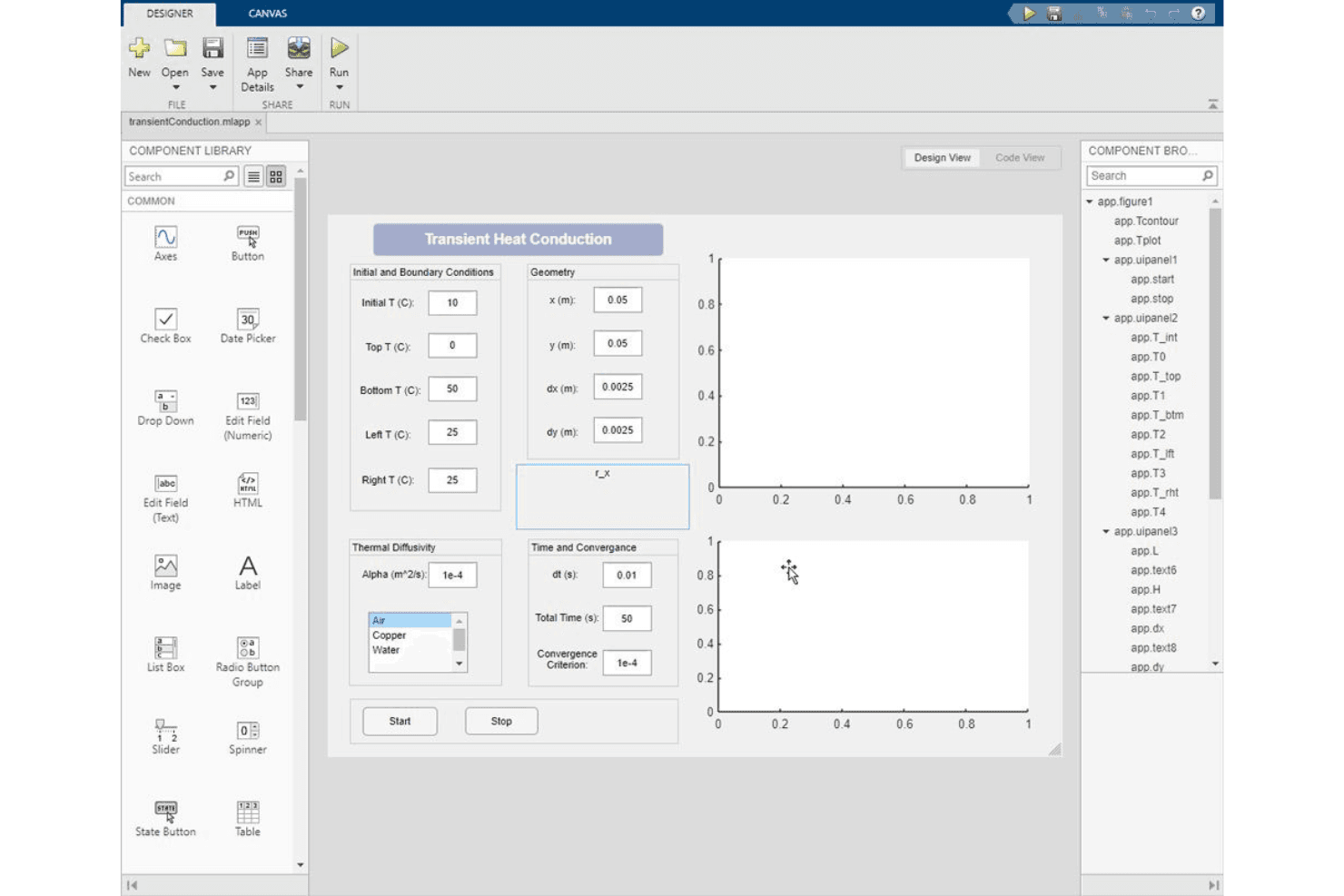
MATLAB can be challenging to use for beginners due to its specialized syntax, dense GUI, and extensive feature set. The software's powerful tools have a steep learning curve for those without technical backgrounds. While its capabilities are impressive, users may need significant time and training to understand how to navigate the workspace and effectively use MATLAB functions. However, once familiar with its functionalities, the efficiency and precision it offers in numerical computation are unmatched.
Integrations
MATLAB is integrated with Simulink, MathWorks' simulation software. This allows you to use MATLAB algorithms in simulations and export simulation results into MATLAB for further analysis.
Regarding APIs and third-party integration tools, MATLAB offers integration with many other programming languages, including C/C++, Python, and Fortran, allowing you to expand its functionality.

MATLAB Specs
- A/B Testing: Yes
- API: Yes
- Automated Testing: Yes
- Browser Compatibility Testing: Yes
- Bug Tracking: Yes
- Calendar Management: Yes
- CI/CD Integration: Yes
- Dashboard: Yes
- Data Export: Yes
- Data Import: Yes
- Data Visualization: Yes
- Developer Tools: Yes
- External Integrations: Yes
- History/Version Control: Yes
- Manual Testing: Yes
- Multi-User: Yes
- Notifications: Yes
- Performance Testing: Yes
- Regression Testing: Yes
- Scheduling: Yes
- Status Notifications: Yes
- Third-Party Plugins/Add-Ons: Yes


