

OpenEMR Bewertung: Vorteile, Nachteile, Funktionen und Preise erklärt
OpenEMR zeichnet sich als flexible, quelloffene Lösung für medizinische Abrechnung aus und bietet umfassende Funktionen und Anpassungsmöglichkeiten – ganz ohne Lizenzkosten.

Wir bewerten Tools unabhängig; Provisionen helfen, unsere Tests zu finanzieren. Siehe unsere Transparenzrichtlinie und unsere Methodik.
OpenEMR is an open-source medical invoicing software built for healthcare practices that need to handle billing, claims processing, and patient records in one place—without paying per-seat licensing fees. I'd consider it if your practice has the IT resources to manage a self-hosted setup and wants full control over its billing configuration. Compared to a paid platform like Kareo, OpenEMR gives you more flexibility to customize workflows and removes recurring subscription costs, making it a practical option for cost-conscious practices willing to invest in the setup.
OpenEMR Evaluation Summary
3.9/5
- Pricing upon request
- Free demo available
Warum Sie unseren Software-Empfehlungen vertrauen können
6,700+
Reviews
20
Industry experts
16+
Evaluation factors
14
Years
Unsere Bewertungen spiegeln unser unabhängiges Urteilsvermögen wider – keine Verkaufsstrategie. Erfahren Sie, wie wir transparent bleiben.
Für diesen Leitfaden haben wir Tools mithilfe von praktischen Tests und unabhängiger Recherche bewertet und dabei unsere Bewertungskriterien angewendet.
Unsere Bewertungen spiegeln unser menschliches redaktionelles Urteilsvermögen wider, keine Verkaufsstrategie.
OpenEMR Overview
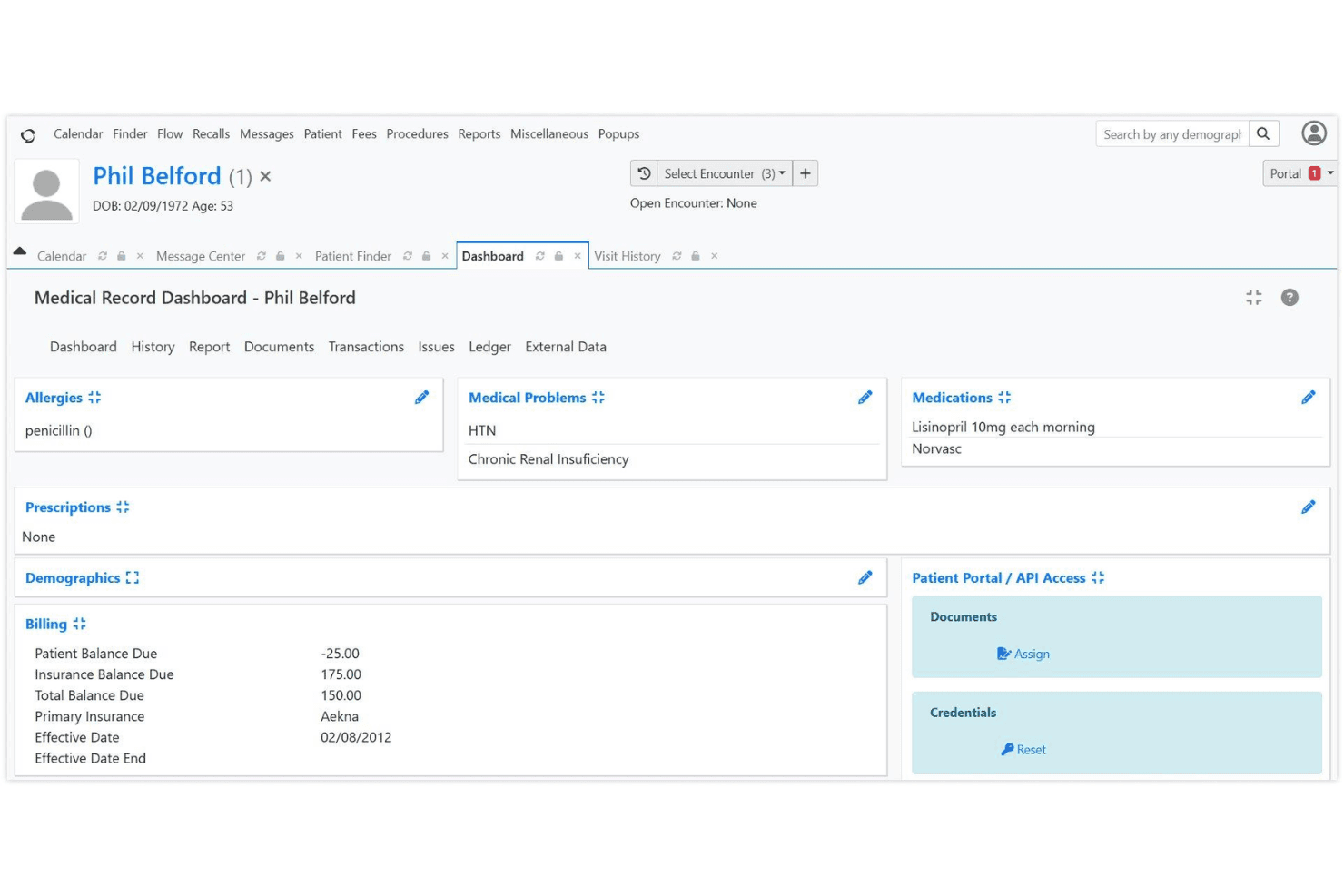
If you’re judging medical invoicing software by flexibility and cost, OpenEMR is hard to beat. Its open-source model means no licensing fees, and you can tailor workflows or reports to your needs. While the interface feels dated and onboarding takes effort, the feature set—claims, scheduling, patient records, and billing—rivals pricier options. Support relies on community forums, so I think it’s best for tech-savvy teams or clinics with IT resources. If you’re comparing options and want control over customization and budget, OpenEMR deserves a close look.
Pros
- No licensing fees for software or updates
- Supports electronic and paper claims billing
- Customizable billing workflows and reporting
Cons
- Billing features are basic for complex needs
- Requires strong IT support for setup and maintenance
- Limited official customer support beyond community forums
Is OpenEMR Right For Your Needs?
Who Would be a Good Fit for OpenEMR?
OpenEMR is a strong choice for organizations that want control over their billing processes, need customizable workflows, and have the technical resources to manage open-source software. It’s especially well-suited for smaller clinics, specialty practices, and nonprofits that want to avoid licensing fees and tailor their invoicing to unique requirements. If your team values flexibility and can handle some IT overhead, OpenEMR’s feature set and cost structure make it a compelling option.
- Small PracticesOpenEMR’s no-cost licensing and customizable billing suit small budgets.
- Community Health CentersThe open-source model supports grant-funded clinics with limited resources.
- Behavioral Health ProvidersCustomizable templates and billing workflows fit specialized documentation needs.
- Rural ClinicsOffline access and local hosting options help clinics with unreliable internet.
- Medical Billing DepartmentsDetailed reporting and claims management support in-house billing teams.
- Nonprofit Healthcare OrganizationsCost savings and open-source flexibility align with nonprofit priorities.
Who Would be a Bad Fit for OpenEMR?
OpenEMR isn’t ideal for organizations that need advanced billing automation, premium support, or seamless integration with a wide range of third-party systems. Large enterprises, hospital networks, and teams without dedicated IT support may find the platform’s setup and maintenance requirements too demanding. If you need out-of-the-box automation or extensive vendor support, OpenEMR may not meet your needs.
- Large Hospital NetworksComplex billing and compliance needs exceed OpenEMR’s core capabilities.
- Multi-Specialty GroupsLacks advanced automation for high-volume, multi-specialty billing.
- Enterprise Healthcare SystemsLimited integration options hinder large-scale interoperability.
- Solo Practitioners Without ITSetup and maintenance require technical skills solo providers may lack.
- Dental PracticesOpenEMR’s billing features are not tailored for dental coding.
- Urgent Care ChainsFast-paced, multi-location operations need more automation and support.
Wie wir Tools testen und bewerten
Wir haben jahrelang daran gearbeitet, unser System zur Softwarebewertung zu entwickeln, zu verfeinern und stetig zu verbessern. Der Bewertungsleitfaden wurde entworfen, um die Feinheiten der Softwareauswahl und die Qualitätskriterien eines effektiven Tools präzise zu erfassen, mit Fokus auf entscheidende Aspekte im Auswahlprozess. Im Folgenden sehen Sie genau, wie unsere Prüfungen und Bewertungen nach sieben Kriterien funktioniert. So können wir eine objektive Bewertung der Software auf Grundlage der Kernfunktionalitäten, herausragenden Eigenschaften, Benutzerfreundlichkeit, Einführung, Kundensupport, Integrationen, Kundenbewertungen sowie Preis-Leistungs-Verhältnis bieten.
Kernfunktionalität (25 % der Gesamtbewertung)
Der Ausgangspunkt unserer Bewertung ist immer die Kernfunktionalität des Tools. Verfügt es über die grundlegenden Features und Funktionen, die ein Nutzer erwarten würde? Sind einige dieser Kernfunktionen auf höherpreisige Tarife beschränkt? Im Kern erwarten wir, dass ein Tool mit den Basisfunktionen seiner Wettbewerber mithalten kann.
Herausragende Funktionen (25 % der Gesamtbewertung)
Im nächsten Schritt bewerten wir ungewöhnliche, herausragende Funktionen, die über die üblichen Kernfunktionen vergleichbarer Tools hinausgehen. Eine hohe Punktzahl erhält, wer spezialisierte oder einzigartige Funktionen bietet, die das Produkt schneller, effizienter oder besonders wertvoll für den Nutzer machen. Wir prüfen auch, wie einfach sich das Tool mit anderen Programmen des typischen Tech-Stacks integrieren lässt, um den Funktionsumfang und die Nützlichkeit der Software zu erweitern. Vielseitige native Integrationen, Drittanbieter-Anbindungen sowie API-Zugänge für individuelle Integrationen schneiden am besten ab.
Benutzerfreundlichkeit (10 % der Gesamtbewertung)
Wir bewerten, wie schnell und einfach sich die wichtigsten Aufgaben im Tool erledigen lassen. Hoch bewertete Software ist gut gestaltet, intuitiv bedienbar, bietet mobile Apps, Vorlagen und macht selbst komplexere Aufgaben handhabbar.
Einführung (10 % der Gesamtbewertung)
Wir wissen, wie wichtig eine rasche Teamakzeptanz bei neuen Plattformen ist. Deshalb prüfen wir, wie einfach sich ein Tool mit minimalem Trainingsaufwand erlernen und bedienen lässt. Wir bewerten auch, wie schnell ein Teammitglied ohne vorherige Erfahrung startklar ist. Hoch bewertete Lösungen benötigen wenig oder gar keinen Support.
Kundensupport (10 % der Gesamtbewertung)
Wir prüfen, wie leicht und schnell Sie mit Telefon, Live-Chat oder Wissensdatenbank Hilfe erhalten können. Tools und Unternehmen, die Echtzeit-Support bieten, erzielen die besten Ergebnisse, während Chatbots am schlechtesten abschneiden.
Kundenbewertungen (10 % der Gesamtbewertung)
Neben unseren eigenen Tests berücksichtigen wir den Net-Promoter-Score aktueller und ehemaliger Kunden. Wir prüfen, wie wahrscheinlich sie sich erneut für das Tool entscheiden würden, basierend auf der Kernfunktionalität. Hoch bewertete Software spiegelt einen hohen Net-Promoter-Score wider.
Preis-Leistungs-Verhältnis (10 % der Gesamtbewertung)
Abschließend vergleichen wir alle Kriterien und bewerten den Durchschnittspreis der Einstiegstarife im Verhältnis zu den Kernfunktionen und dem Nutzen der weiteren Bewertungskriterien. Software, die mehr für weniger bietet, erhält die besten Bewertungen.
Core Features
Integrated Medical Billing
OpenEMR supports HIPAA-compliant electronic and paper claims billing. Users can manage claims, payments, and remittances from a single dashboard.
Advanced Scheduling
Create repeating appointments, automate check-in workflows, and send patient reminders. This helps reduce no-shows and keeps billing aligned with visit schedules.
CMS Reporting
Generate compliance and financial reports with a few clicks. These reports help track billing performance and meet regulatory requirements.
Customizable Billing Workflows
Tailor billing processes to fit your clinic’s needs, including custom codes and templates. This flexibility supports unique payer or specialty requirements.
Patient Statements and Invoices
Produce detailed patient statements and invoices directly from the platform. This feature streamlines communication and payment collection.
Security and Access Controls
HIPAA-friendly access controls and password hashing protect sensitive billing data. You can assign permissions by user role to limit access to financial information.
Ease of Use
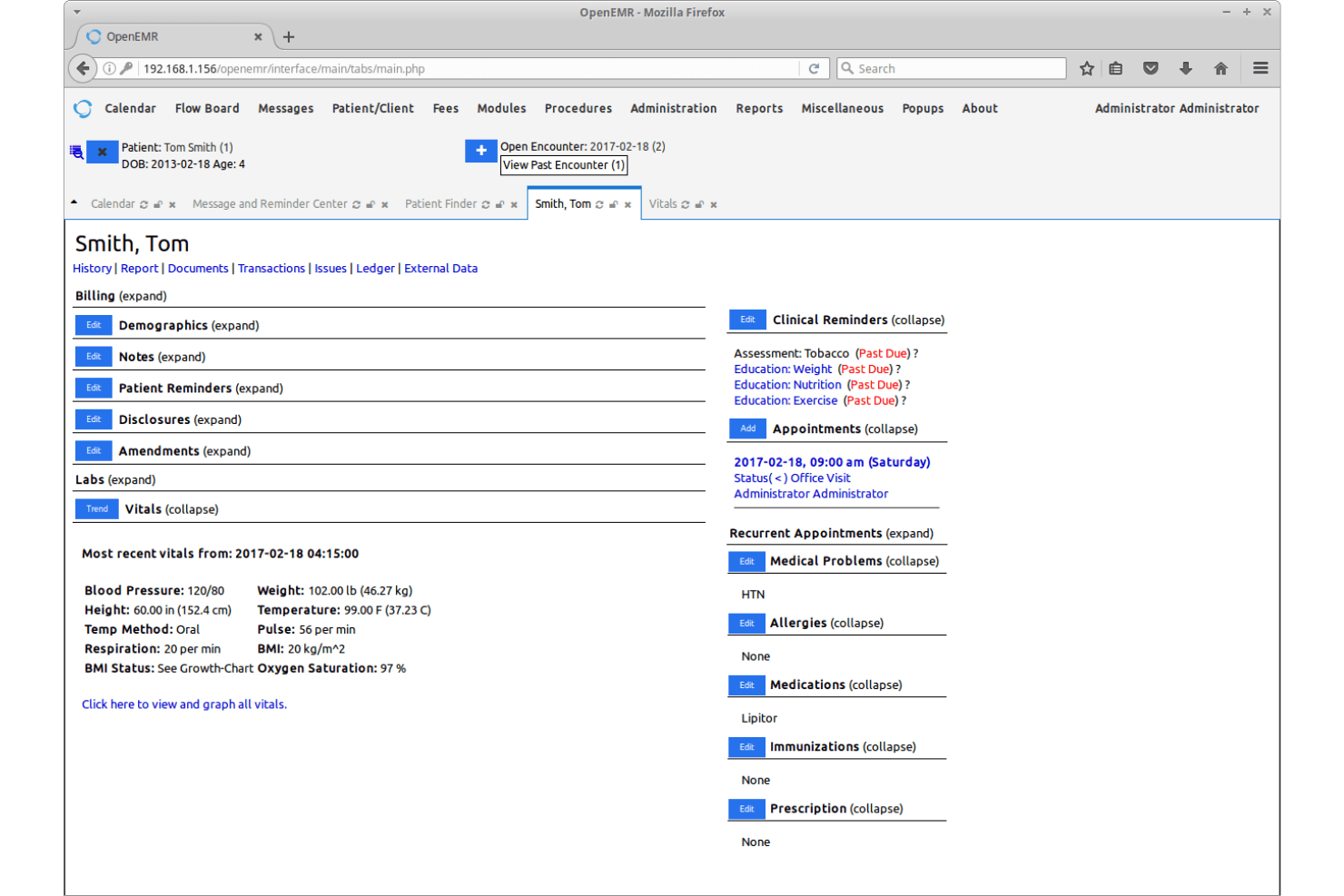
OpenEMR’s user interface feels dated and can be overwhelming for new users, especially compared to more modern medical invoicing software. Many users mention that setup and navigation require a bit of a learning curve, and documentation can be dense. However, once configured, the workflows are logical and customizable, letting experienced teams manage billing efficiently. If your team is comfortable with open-source EMR platforms and values flexibility over user-friendly aesthetics, you’ll find OpenEMR’s usability acceptable for daily invoicing tasks.

Integrations
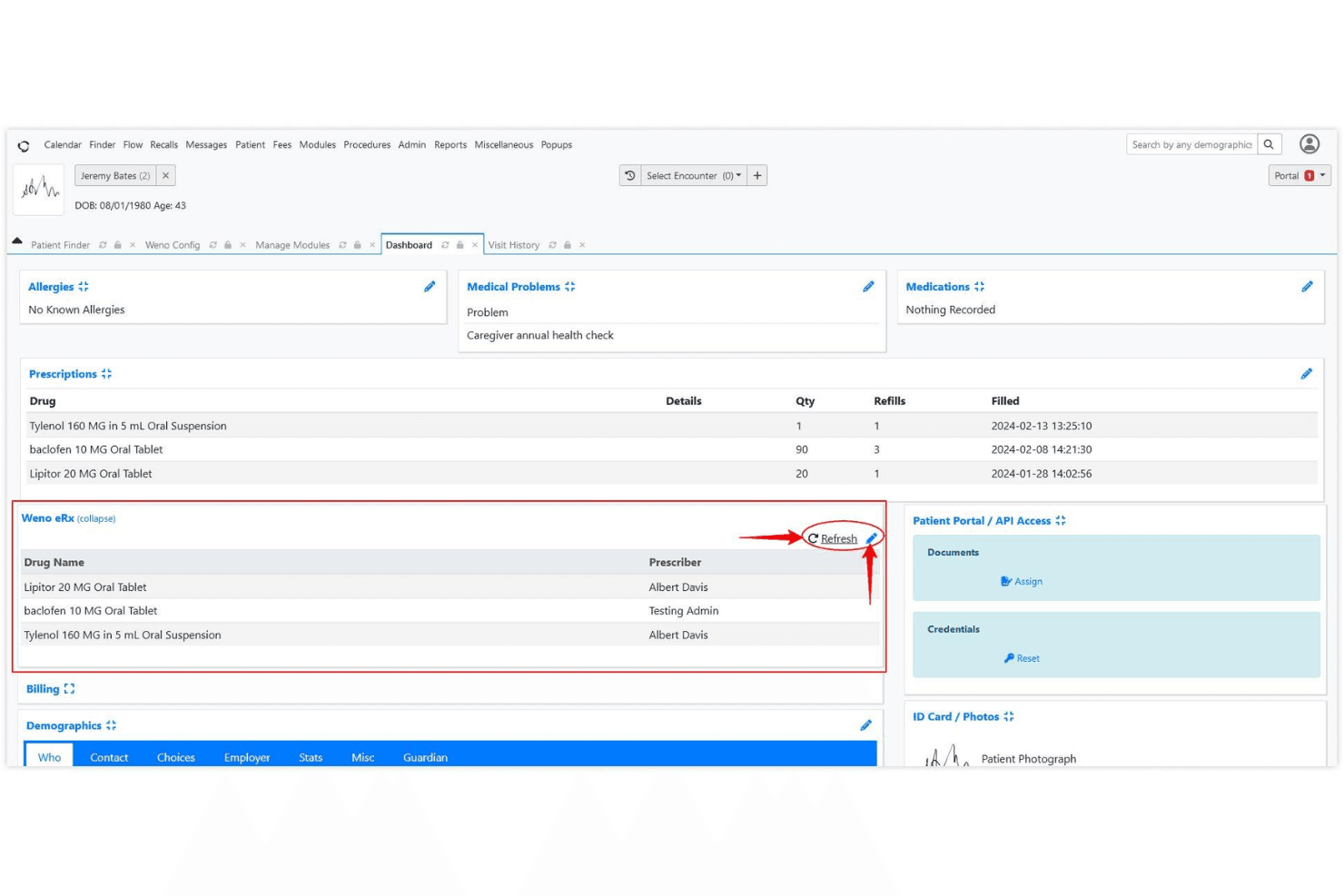
OpenEMR integrates with e-prescribing tools like NewCrop, Weno Exchange, and Allscripts, and can connect to labs such as Quest Diagnostics and LabCorp through third-party interfaces. These integrations often require additional setup and are not always available out of the box.
OpenEMR also offers REST and FHIR APIs, allowing custom integrations and extended functionality.
OpenEMR Specs
- API: Yes
- Appointment Scheduling: Yes
- Athlete Management: No
- Audit Management: Yes
- Calendar Management: No
- Compliance Tracking: Yes
- Customer Management: Yes
- Dashboard: No
- Data Export: Yes
- Data Import: Yes
- Data Visualization: No
- Electronic Prescribing: Yes
- External Integrations: Yes
- File Sharing: No
- File Transfer: No
- Health Management: No
- HIPAA Compliance: Yes
- Inventory Tracking: No
- Multi-User: Yes
- Notifications: Yes
- Organization Management: No
- Patient Management: Yes
- Project Management: No
- Regulatory Alerts: Yes
- Risk Assessment: Yes
- Scheduling: No
- Supplier Management: No


