

SAP Business One Bewertung 2026: Vorteile, Nachteile, Funktionen und Preise
SAP Business One unterstützt Unternehmen bei der Verwaltung von Finanzen, Lagerbestand, Vertrieb, Einkauf und Betrieb mit ERP-Tools, die speziell für wachsende kleine und mittelständische Unternehmen entwickelt wurden.

Wir bewerten Tools unabhängig; Provisionen helfen, unsere Tests zu finanzieren. Siehe unsere Transparenzrichtlinie und unsere Methodik.
SAP Business One is an ERP software designed for small and midsize businesses that need integrated financials, supply chain, and operations in one platform. If you’re a CFO tackling disjointed data, manual processes, or a lack of visibility, this software could bring all those elements together. The platform promises scalability, real-time reporting, and controls without the steep complexity you get from larger enterprise systems.
In this SAP Business One review, I break down its core features, strengths and weaknesses, pricing, and what types of businesses are likely to get the most value from it.
SAP Business One Evaluation Summary
4.4/5
- Pricing upon request
- Free demo available
Warum Sie unseren Software-Empfehlungen vertrauen können
6,700+
Reviews
20
Industry experts
16+
Evaluation factors
14
Years
Unsere Bewertungen spiegeln unser unabhängiges Urteilsvermögen wider – keine Verkaufsstrategie. Erfahren Sie, wie wir transparent bleiben.
Für diesen Leitfaden haben wir Tools mithilfe von praktischen Tests und unabhängiger Recherche bewertet und dabei unsere Bewertungskriterien angewendet.
Unsere Bewertungen spiegeln unser menschliches redaktionelles Urteilsvermögen wider, keine Verkaufsstrategie.
SAP Business One Overview
When judging SAP Business One, I think its all-in-one approach provides greater visibility and automation than most entry-level ERP systems, especially in finance and inventory. Its customization, bank integrations, and localized support stand out for global teams, though onboarding can be slower and costs steeper than some peers.
In my view, if you’re determining the right fit for growing manufacturers, distributors, or services that need granular controls but not full-blown, heavyweight ERP, SAP Business One is worth selecting—especially if you want mature features without overwhelming complexity
Pros
- Real-time inventory tracking and batch management are built in
- Localized tax and language support for global operations
- Advanced financial consolidation for multi-entity reporting
Cons
- Mobile app lacks some key desktop features
- Reporting tools feel dated compared to newer platforms
- Complex upgrades require expert consulting to execute
Is SAP Business One Right For Your Needs?
Who Would be a Good Fit for SAP Business One?
SAP Business One works best for companies with multi-entity operations, global compliance needs, and a demand for in-depth financial controls. Manufacturing, wholesale, and distribution teams that need strong inventory, production, and order visibility get real value from its unified workflows.
Mid-sized businesses expanding into new markets also benefit from localization tools and deployment flexibility.
- Global SubsidiariesCentralized controls, built-in multi-currency, and tax support make SAP Business One ideal for enterprises managing subsidiaries or international branches.
- Wholesale DistributorsReal-time inventory, advanced batch tracking, and warehouse management help distributors meet demanding logistics and replenishment needs.
- Manufacturing OperationsProduction planning, bill of materials, and material requirements planning features fit manufacturers who need end-to-end oversight.
- Financial ControllersIn-depth reporting, customizable user permissions, and audit trails make this platform a good match for finance teams running rigorous internal controls.
- Growing SMBsSMBs scaling up to international or multi-location businesses get enterprise features without switching to an unwieldy solution.
- Regulated IndustriesStrong compliance management, integrated document control, and regional localization are suited to industries with heavy regulatory oversight.
Who Would be a Bad Fit for SAP Business One?
SAP Business One won’t be a good fit for teams with simple needs, very small budgets, or those seeking ultra-modern, highly intuitive user interfaces out of the box. Early-stage startups, retail chains with a real-time ecommerce focus, or organizations needing industry-specific functionality not provided may struggle to see real value given the required investment and setup.
- Early-Stage StartupsThe software’s upfront costs and complexity are too high if you need a basic accounting or inventory tool.
- Solo EntrepreneursSingle-user businesses won’t benefit from the system’s advanced modules and multi-user workflows.
- Small NonprofitsResource-limited nonprofits likely find SAP Business One’s depth overwhelming and its licensing out of reach.
- High-Volume RetailBrick-and-mortar or ecommerce retailers needing highly specialized POS or omnichannel experiences may find core retail features lacking.
- Highly Niche VerticalsIndustries with unique, custom regulatory or workflow needs outside SAP’s standard templates will spend too much on customization.
- UX-First TeamsOrganizations that prioritize the newest, most modern UI or low training requirements may find SAP Business One cumbersome.
Wie wir Tools testen und bewerten
Wir haben jahrelang daran gearbeitet, unser System zur Softwarebewertung zu entwickeln, zu verfeinern und stetig zu verbessern. Der Bewertungsleitfaden wurde entworfen, um die Feinheiten der Softwareauswahl und die Qualitätskriterien eines effektiven Tools präzise zu erfassen, mit Fokus auf entscheidende Aspekte im Auswahlprozess. Im Folgenden sehen Sie genau, wie unsere Prüfungen und Bewertungen nach sieben Kriterien funktioniert. So können wir eine objektive Bewertung der Software auf Grundlage der Kernfunktionalitäten, herausragenden Eigenschaften, Benutzerfreundlichkeit, Einführung, Kundensupport, Integrationen, Kundenbewertungen sowie Preis-Leistungs-Verhältnis bieten.
Kernfunktionalität (25 % der Gesamtbewertung)
Der Ausgangspunkt unserer Bewertung ist immer die Kernfunktionalität des Tools. Verfügt es über die grundlegenden Features und Funktionen, die ein Nutzer erwarten würde? Sind einige dieser Kernfunktionen auf höherpreisige Tarife beschränkt? Im Kern erwarten wir, dass ein Tool mit den Basisfunktionen seiner Wettbewerber mithalten kann.
Herausragende Funktionen (25 % der Gesamtbewertung)
Im nächsten Schritt bewerten wir ungewöhnliche, herausragende Funktionen, die über die üblichen Kernfunktionen vergleichbarer Tools hinausgehen. Eine hohe Punktzahl erhält, wer spezialisierte oder einzigartige Funktionen bietet, die das Produkt schneller, effizienter oder besonders wertvoll für den Nutzer machen. Wir prüfen auch, wie einfach sich das Tool mit anderen Programmen des typischen Tech-Stacks integrieren lässt, um den Funktionsumfang und die Nützlichkeit der Software zu erweitern. Vielseitige native Integrationen, Drittanbieter-Anbindungen sowie API-Zugänge für individuelle Integrationen schneiden am besten ab.
Benutzerfreundlichkeit (10 % der Gesamtbewertung)
Wir bewerten, wie schnell und einfach sich die wichtigsten Aufgaben im Tool erledigen lassen. Hoch bewertete Software ist gut gestaltet, intuitiv bedienbar, bietet mobile Apps, Vorlagen und macht selbst komplexere Aufgaben handhabbar.
Einführung (10 % der Gesamtbewertung)
Wir wissen, wie wichtig eine rasche Teamakzeptanz bei neuen Plattformen ist. Deshalb prüfen wir, wie einfach sich ein Tool mit minimalem Trainingsaufwand erlernen und bedienen lässt. Wir bewerten auch, wie schnell ein Teammitglied ohne vorherige Erfahrung startklar ist. Hoch bewertete Lösungen benötigen wenig oder gar keinen Support.
Kundensupport (10 % der Gesamtbewertung)
Wir prüfen, wie leicht und schnell Sie mit Telefon, Live-Chat oder Wissensdatenbank Hilfe erhalten können. Tools und Unternehmen, die Echtzeit-Support bieten, erzielen die besten Ergebnisse, während Chatbots am schlechtesten abschneiden.
Kundenbewertungen (10 % der Gesamtbewertung)
Neben unseren eigenen Tests berücksichtigen wir den Net-Promoter-Score aktueller und ehemaliger Kunden. Wir prüfen, wie wahrscheinlich sie sich erneut für das Tool entscheiden würden, basierend auf der Kernfunktionalität. Hoch bewertete Software spiegelt einen hohen Net-Promoter-Score wider.
Preis-Leistungs-Verhältnis (10 % der Gesamtbewertung)
Abschließend vergleichen wir alle Kriterien und bewerten den Durchschnittspreis der Einstiegstarife im Verhältnis zu den Kernfunktionen und dem Nutzen der weiteren Bewertungskriterien. Software, die mehr für weniger bietet, erhält die besten Bewertungen.
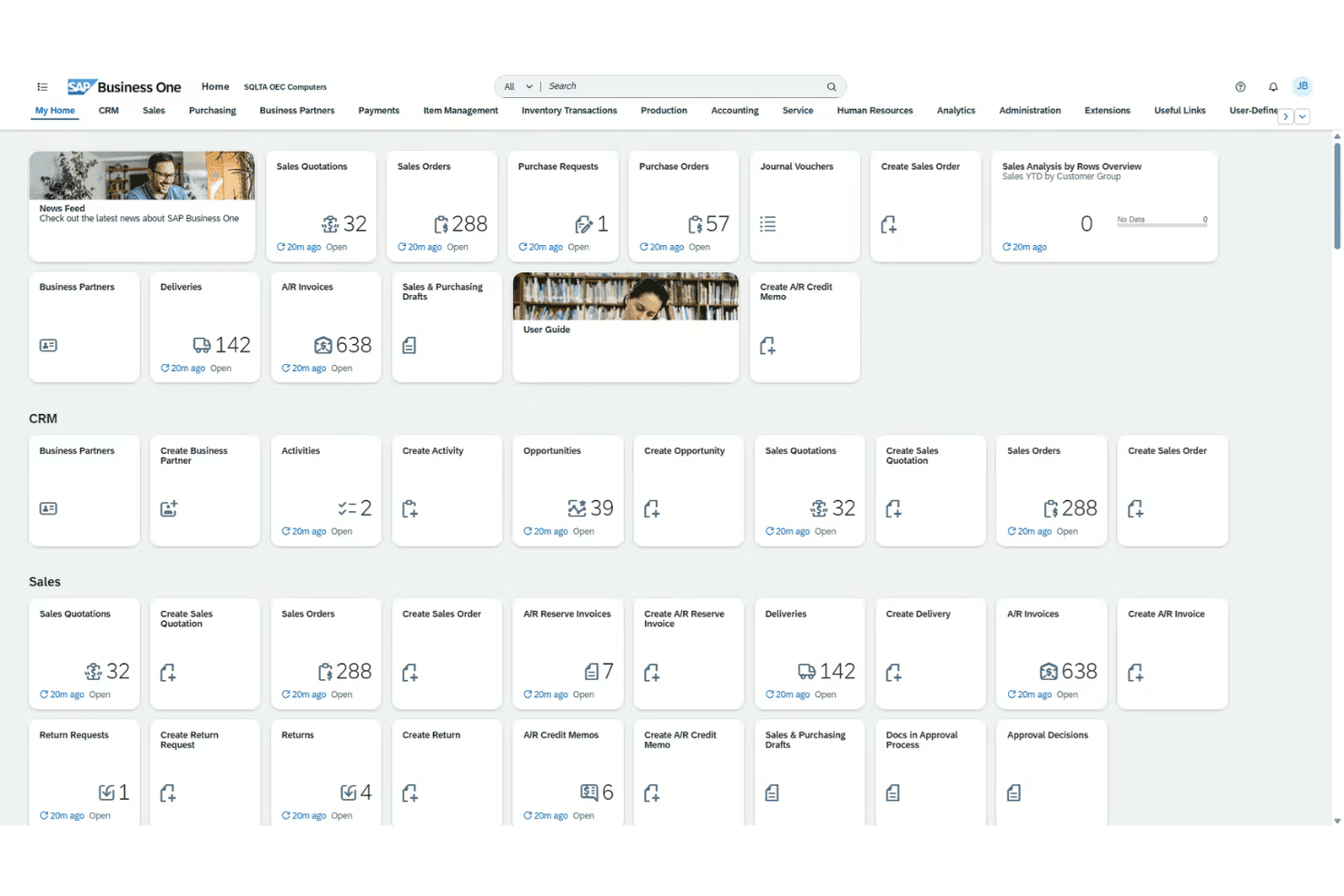
Core Features
Financial Management
Track accounts, budgets, and journal entries in real time. Streamline audits and financial closes with automated workflows.
Sales and Customer Management
Manage leads, quotes, and customer activity from first contact through post-sale service. Get a unified view of sales and customer data across your business.
Inventory and Distribution
Monitor stock levels, serial numbers, and order fulfillment across multiple warehouses. Automate replenishment and spot shortages or surplus before they become costly.
Purchasing and Supplier Control
Handle purchase orders, vendor performance, and payment processing on one platform. Reduce manual errors and keep supplier relationships transparent.
Production and MRP
Plan, track, and control production with bill of materials and resource planning tools. Optimize workflows for manufacturing and reduce bottlenecks.
Analytics and Reporting
Build custom dashboards and run real-time reports across all modules. Spot trends, analyze margins, and create board-ready summaries in a few clicks.
Ease of Use
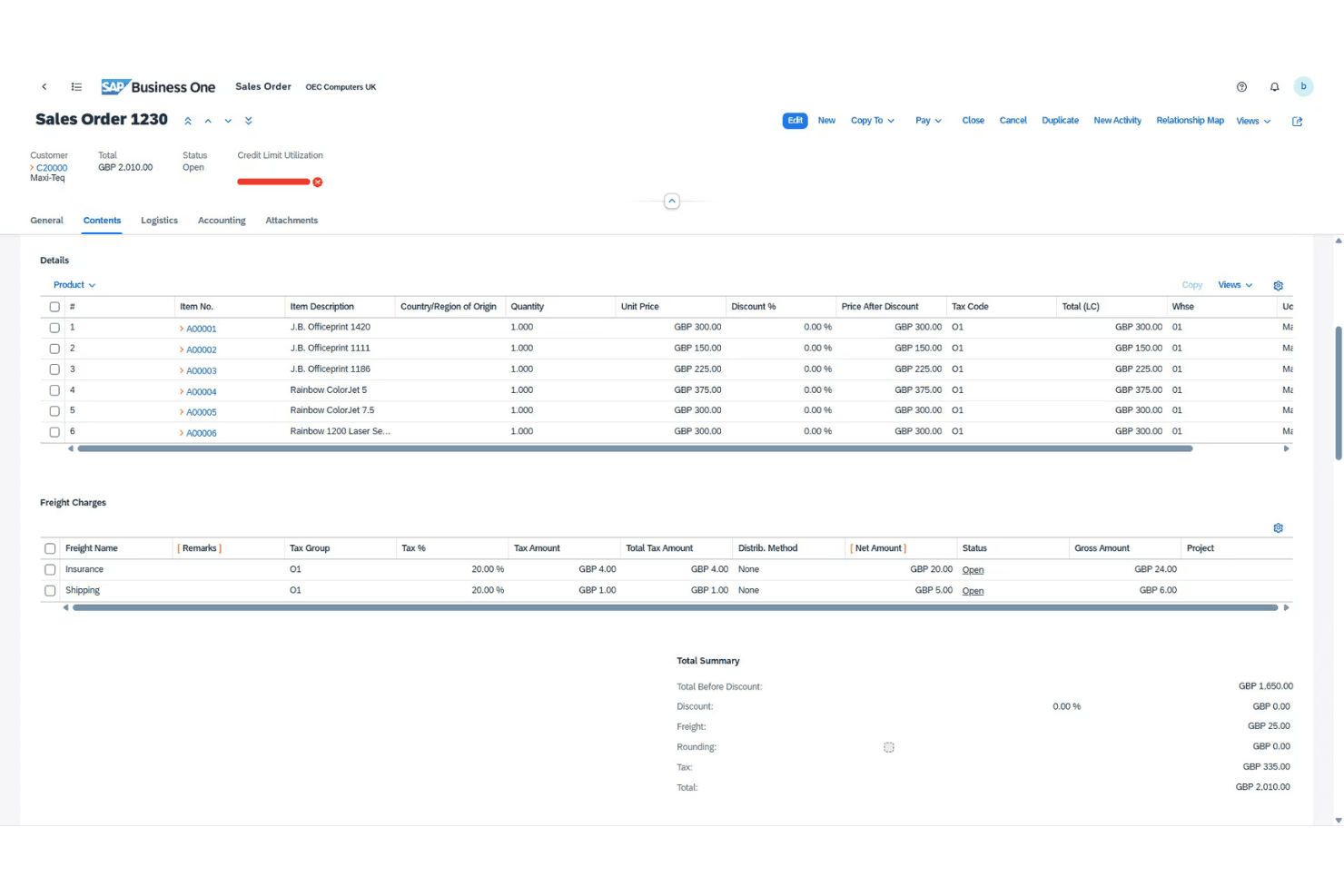
SAP Business One isn’t the most intuitive ERP for newcomers, but its navigation and menus are predictable once you learn the ropes. I’ve noticed users appreciate how task flows—like approvals and procurement—stay customizable, but some screens still feel crowded. Built-in help and regional support ease the learning curve, especially for teams handling complex financials.
Integrations
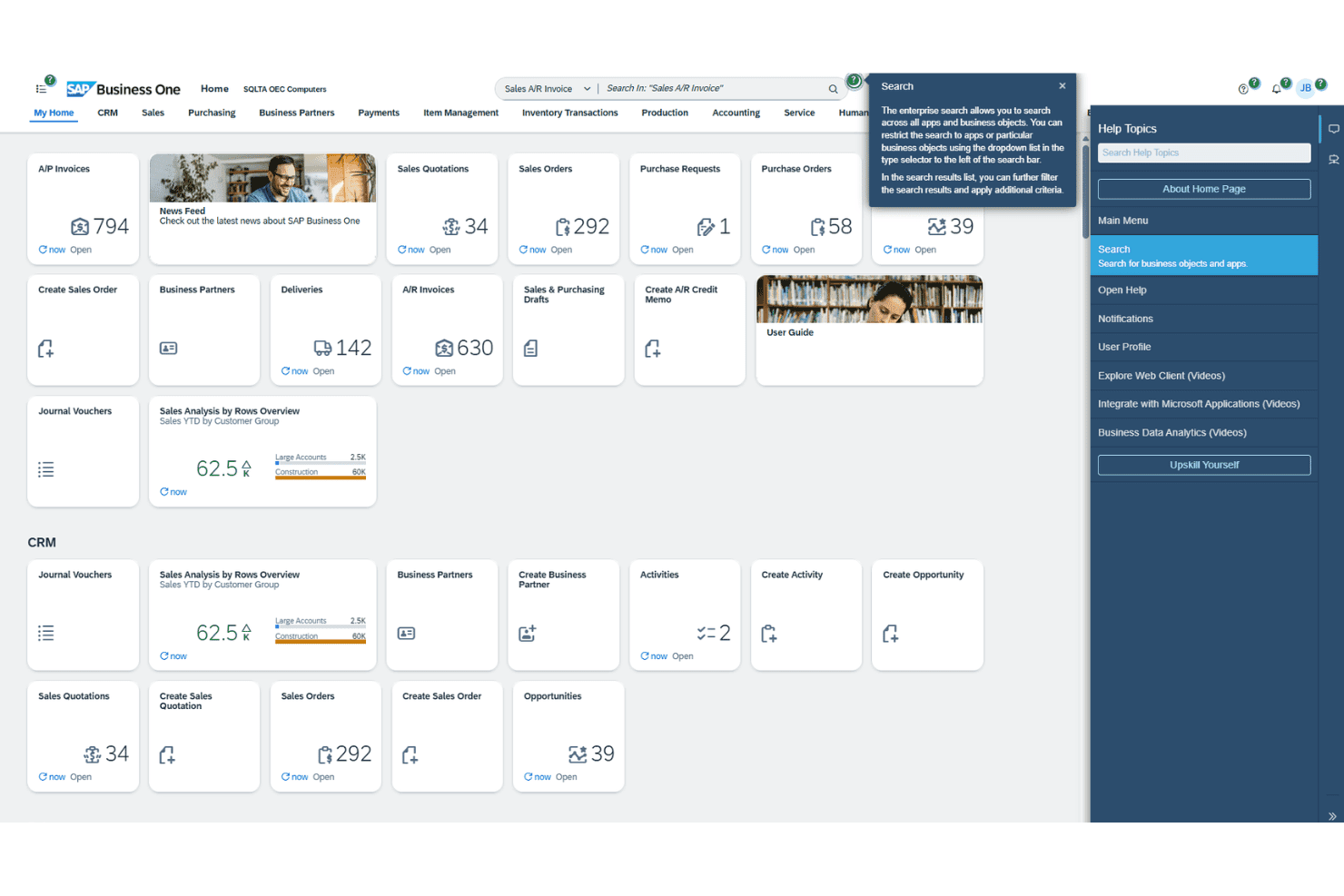
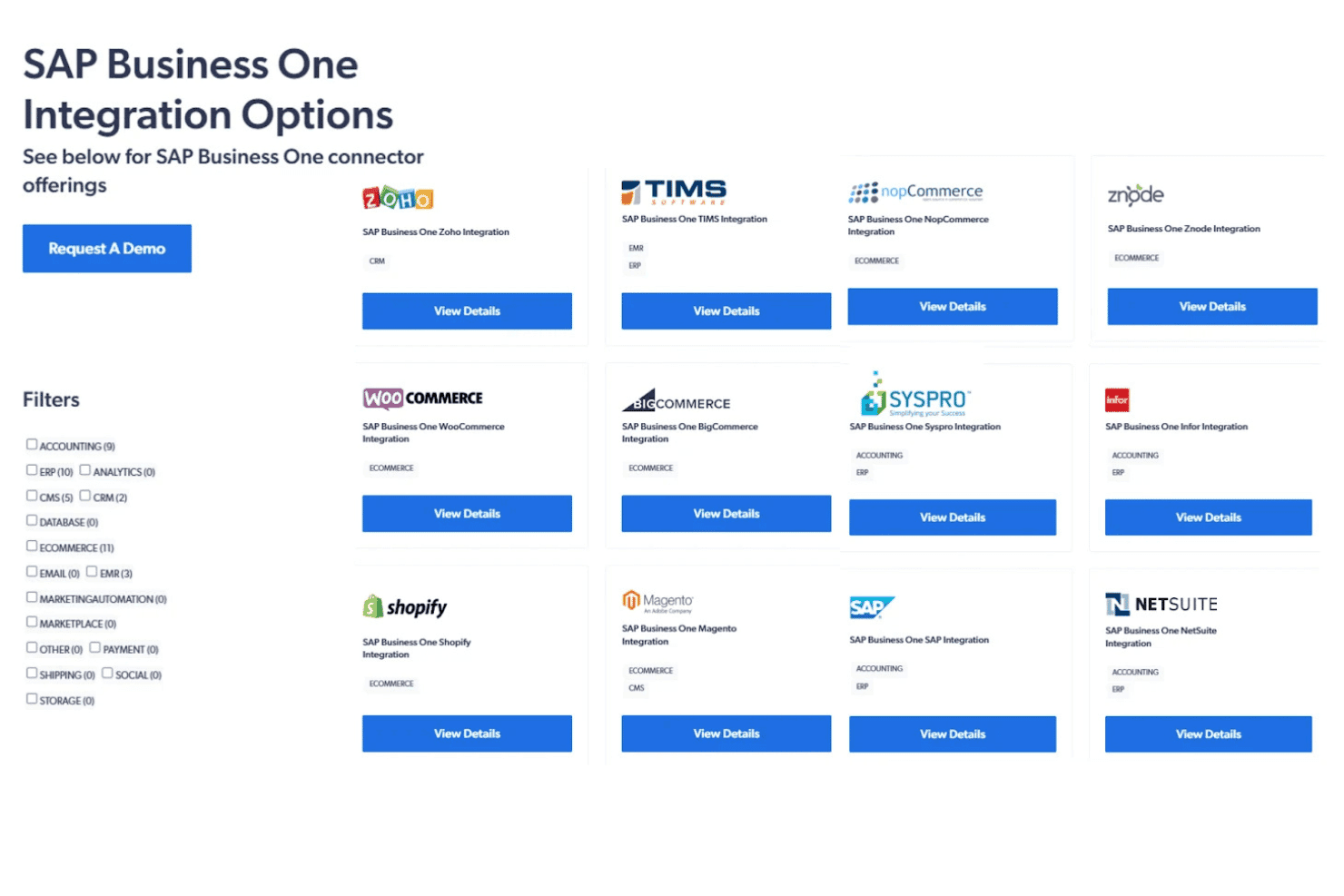
SAP Business One integrates with Microsoft Outlook, Magento, Shopify, WooCommerce, SAP Analytics Cloud, Boyum IT, Mailchimp, DHL, FedEx, and Avalara, among others.
SAP Business One also offers a comprehensive API and can connect with popular third-party integration platforms.
SAP Business One Specs
- 2-Factor Authentication: No
- Analytics: Yes
- Anti-Virus: No
- API: Yes
- Batch Permissions & Access: No
- Bug Tracking: No
- Call Integration: No
- Chat: No
- Contact Management: Yes
- CRM Integration: Yes
- Customer Management: Yes
- Data Export: Yes
- Data Import: Yes
- Email Integration: Yes
- Escalation Management: No
- External Integrations: Yes
- Incident Management: No
- Instant Chat Integration: No
- Knowledge Base: No
- Malware Protection: No
- Multi-User: Yes
- Notifications: Yes
- Organization Management: Yes
- Password & Access Management: No
- Project Management: Yes
- Real-time Alerts: Yes
- SAP Integration: Yes
- Self-service Portal: No
- Social Media Integration: No
- Support Forum: No
- Ticket Management: No
- Workflow Management: Yes


