

Una buena alternativa a ADP ofrece un procesamiento de nóminas fiable, funciones flexibles de recursos humanos y asistencia para el cumplimiento normativo que iguala o supera lo que esperas de ADP. Si estás buscando alternativas a ADP, probablemente buscas soluciones que se adapten mejor al tamaño, el sector o las necesidades de integración de tu empresa, sin renunciar a la precisión ni al control. Esta lista te ayudará a comparar las principales opciones, conocer sus puntos fuertes y elegir una plataforma de nóminas y recursos humanos que se ajuste a las necesidades y los planes de crecimiento de tu equipo.
¿Qué es ADP?
ADP es un proveedor de software de nóminas y recursos humanos que ayuda a las empresas a gestionar las nóminas, las tareas de recursos humanos, el cumplimiento fiscal y los beneficios para empleados. Las empresas utilizan ADP para automatizar el procesamiento de nóminas, gestionar las declaraciones fiscales y respaldar funciones de recursos humanos como la incorporación de empleados y el control horario. ADP es ampliamente reconocido por sus soluciones escalables, lo que lo convierte en una opción habitual para organizaciones de todos los tamaños que necesitan herramientas fiables de gestión de nóminas y recursos humanos.
Tabla comparativa de alternativas a ADP
Esta tabla comparativa resume los detalles de precios de mis principales alternativas a ADP seleccionadas:
| Tool | Best For | Trial Info | Price | ||
|---|---|---|---|---|---|
| 1 | La mejor opción para la incorporación integral de empleados a escala global | Demostración gratuita disponible | Desde $599/empleado/mes | Website | |
| 2 | Mejor para gestionar nóminas basadas en el registro de horas con un presupuesto establecido | Prueba gratuita de 30 días + demostración gratuita disponible | Desde $50/usuario/mes | Website | |
| 3 | Ideal para pagos globales a contratistas | Plan gratuito disponible | Desde $19/usuario/mes | Website | |
| 4 | La mejor opción para la nómina de comercios minoristas y restaurantes | No disponible | Desde $35/mes + $6/persona/mes | Website | |
| 5 | La mejor opción para la simplicidad de la nómina en pequeñas empresas | Prueba gratuita de 30 días | Desde $20/mes | Website | |
| 6 | Ideal para la administración automatizada de beneficios | Demo gratuita + plan gratuito disponible | Desde $49/mes + $6/usuario/mes | Website | |
| 7 | Ideal para la integración con software de contabilidad | Prueba gratuita de 30 días disponible | Desde $38/usuario/mes | Website | |
| 8 | Ideal para el procesamiento interno de nóminas | Demostración gratuita disponible | Precios disponibles previa solicitud | Website | |
| 9 | Ideal para herramientas de informes personalizables | Demostración gratuita disponible | Precios disponibles bajo solicitud | Website | |
| 10 | Ideal para soluciones escalables de RR. HH. | Demostración gratuita disponible | Precios disponibles previa solicitud | Website |


Por qué confiar en nuestras recomendaciones de software
6,700+
Reviews
20
Industry experts
16+
Evaluation factors
14
Years
Nuestras reseñas reflejan nuestro criterio independiente, no un discurso de ventas. Descubra cómo mantenemos la transparencia.
Para esta guía, evaluamos las herramientas mediante pruebas prácticas e investigación independiente, puntuando las herramientas según nuestros criterios de selección.
Nuestras reseñas reflejan nuestro criterio editorial humano, no un discurso de ventas.
Opiniones sobre alternativas a ADP
A continuación encontrarás mis resúmenes detallados de las alternativas a ADP que han entrado en mi lista de opciones seleccionadas. Mis análisis ofrecen una visión detallada de las funciones, integraciones y casos de uso más adecuados de cada plataforma para ayudarte a encontrar la mejor opción para ti.
 La mejor opción para la incorporación integral de empleados a escala global
- Demostración gratuita disponible
- Desde $599/empleado/mes
Visit WebsiteCustomer Rating:4.9/5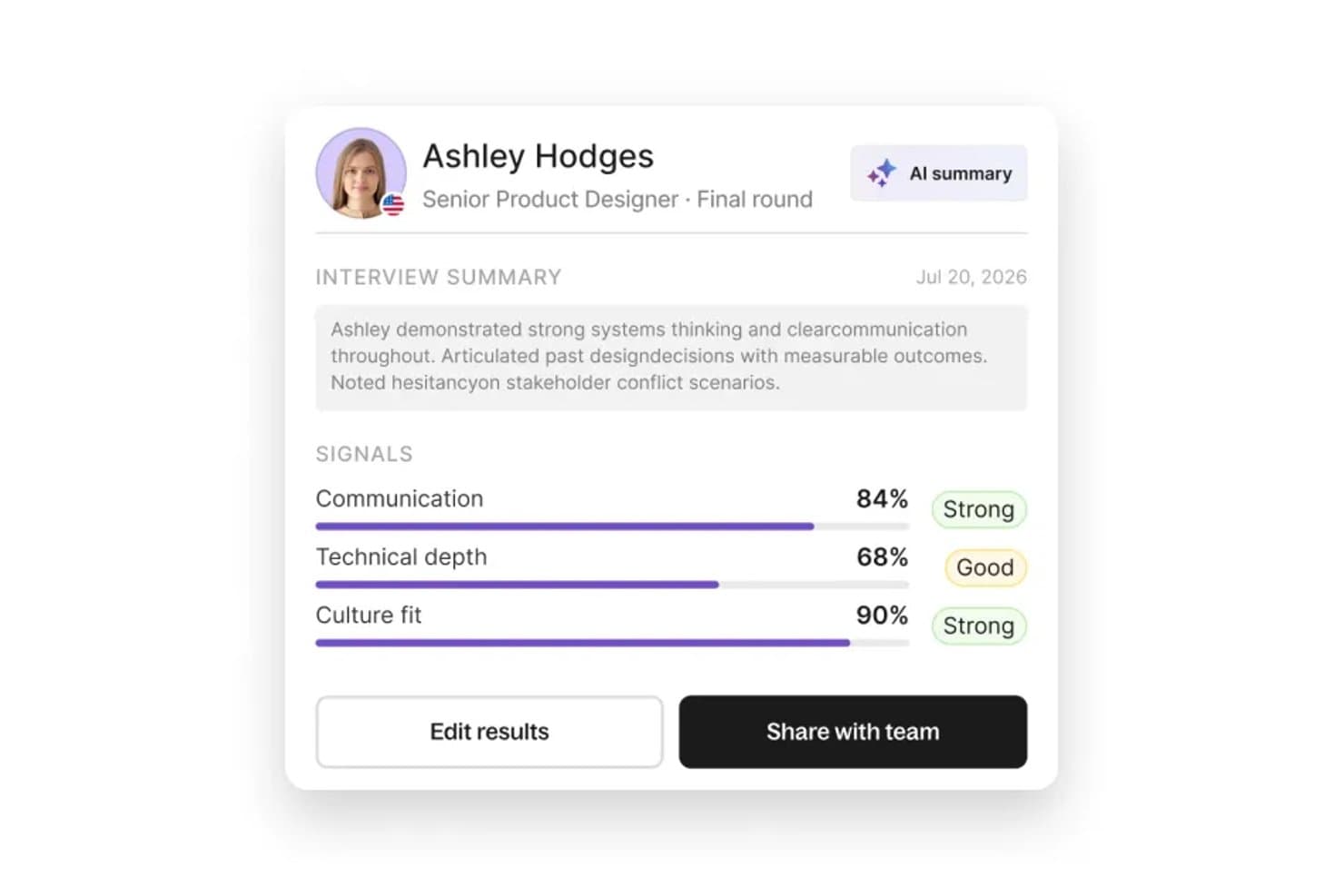
Deel Hire muestra indicadores de entrevistas evaluados por IA para agilizar las decisiones de contratación. Deel Hire es una plataforma global de contratación y nóminas diseñada para empresas que necesitan incorporar, pagar y gestionar empleados o contratistas en varios países sin tener que coordinar entidades legales independientes, herramientas de cumplimiento ni sistemas de RR. HH.
¿Para quién es más adecuado Deel Hire?
Deel Hire es una opción especialmente adecuada para empresas medianas y grandes que contratan personal en varios países y necesitan gestionar las nóminas, los contratos y los recursos humanos cumpliendo la normativa desde un solo lugar.
Por qué Deel Hire es una buena alternativa a ADP
Elegí Deel Hire como una de las mejores opciones porque su proceso integral de incorporación realmente lo diferencia del conjunto fragmentado de socios regionales de ADP. Mientras que ADP depende de entidades externas en muchos mercados, Deel opera mediante entidades legales propias en más de 50 países, por lo que los contratos conformes con la normativa local, las verificaciones de antecedentes y la provisión de equipos se llevan a cabo dentro de un único flujo conectado. Me gusta especialmente que una nueva contratación en Berlín pueda completar todo el proceso de incorporación y estar lista para la nómina en cuestión de días, no semanas.
Características principales de Deel Hire
- Motor de nóminas multinacional: Automatiza el procesamiento de nóminas, las declaraciones fiscales y los pagos para empleados y contratistas en más de 100 países.
- Sincronización contable integrada: Se conecta de forma nativa con QuickBooks, Xero, NetSuite y Sage Intacct para sincronizar en tiempo real los asientos contables de las nóminas.
- Alertas de cumplimiento impulsadas por IA: Señala las actualizaciones normativas, los cambios fiscales y los riesgos de clasificación incorrecta antes de ejecutar las nóminas.
- Portal de autoservicio para empleados: Permite a los trabajadores acceder a sus recibos de nómina y documentos fiscales, así como gestionar su información personal desde un ordenador o dispositivo móvil.
Integraciones de Deel Hire
Deel Hire ofrece más de 65 integraciones nativas, entre ellas QuickBooks, Xero, NetSuite, Sage Intacct, BambooHR, Workday, HiBob, Rippling, Greenhouse, Lever y Zapier, además de una API para integraciones personalizadas.
Pros and Cons
Pros:
- Entidades legales propias en más de 50 países
- Incorpora a empleados internacionales en días, no semanas
- Gestiona las nóminas de contratistas y empleados en todo el mundo
Cons:
- Los tiempos de respuesta del servicio de atención al cliente pueden ser lentos
- No es ideal para necesidades de nóminas exclusivamente en Estados Unidos
Learn more about Deel Hire: Mejor para gestionar nóminas basadas en el registro de horas con un presupuesto establecido
- Prueba gratuita de 30 días + demostración gratuita disponible
- Desde $50/usuario/mes
Visit WebsiteCustomer Rating:4.5/5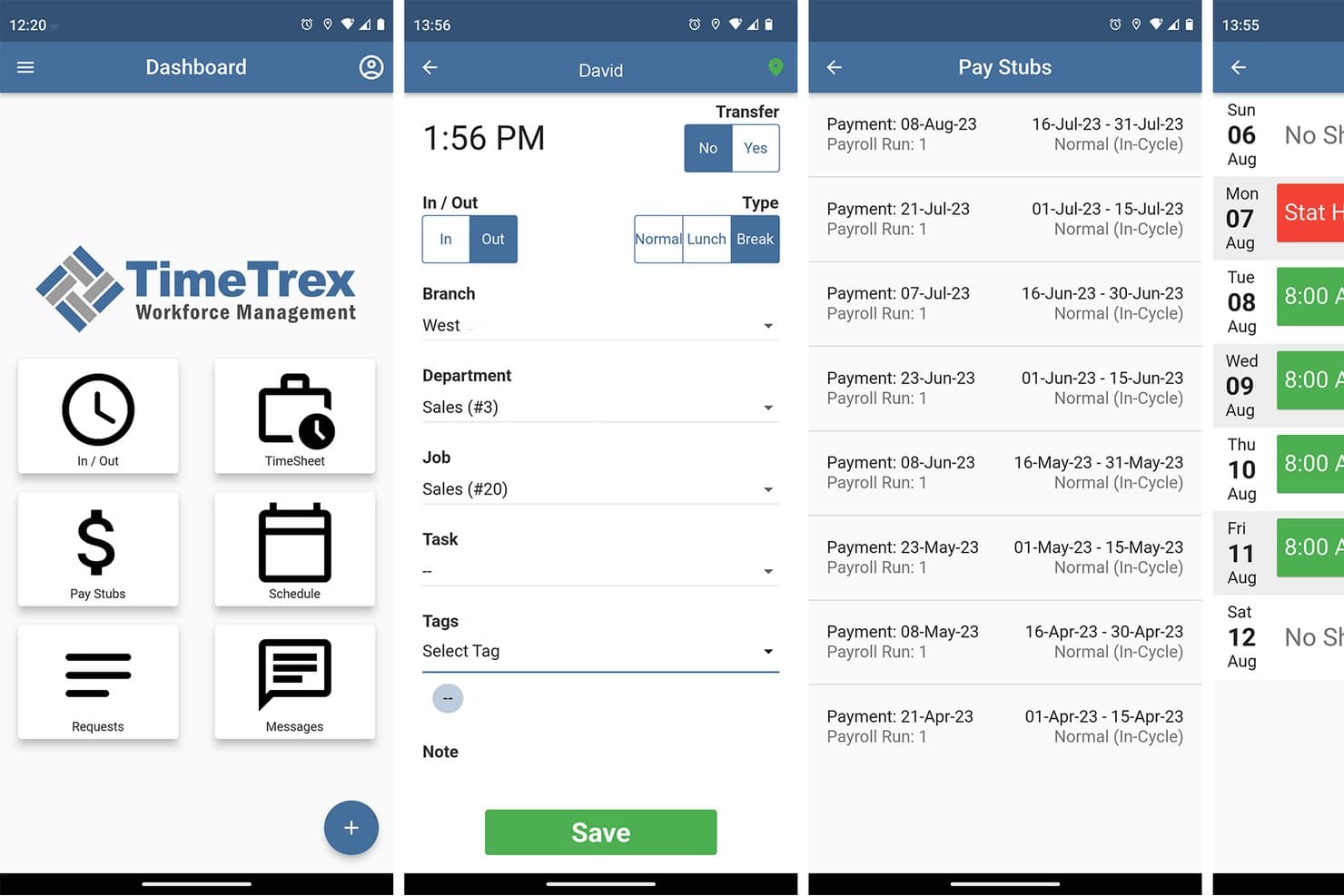
TimeTrex permite a los usuarios registrar su entrada, consultar los recibos de nómina y gestionar los horarios desde el móvil. TimeTrex es una plataforma de gestión de nóminas y personal que conecta las horas, los horarios y la asistencia de los empleados con el procesamiento de nóminas, ayudando a los equipos financieros a gestionar los costes laborales y los cálculos salariales.
¿Para quién es más adecuado TimeTrex?
TimeTrex es adecuado para pequeñas empresas con equipos por horas o basados en turnos que quieren vincular las nóminas con las horas de trabajo registradas dentro de un presupuesto establecido.
Por qué elegí TimeTrex
Elegí TimeTrex como alternativa a ADP, especialmente por su adaptación a la opción “Mejor para gestionar nóminas basadas en el registro de horas con un presupuesto establecido”. Calcula los salarios a partir de las horas registradas e incorpora los datos de tiempo, descansos y horas extra a las nóminas. Los registros de entrada desde la web, el móvil y mediante reconocimiento facial ofrecen a los equipos por turnos formas prácticas de registrar las horas antes del día de pago.
Características principales de TimeTrex
- Deducciones de nómina: Configura las retenciones de impuestos, beneficios, jubilación y embargos.
- Calendarios de pago: Establece periodos de nómina semanales, quincenales, bisemanales o mensuales.
- Depósito directo: Envía pagos a varias cuentas bancarias de los empleados.
- Documentos fiscales digitales: Proporciona a los empleados acceso seguro a recibos de nómina y formularios fiscales.
Integraciones de TimeTrex
TimeTrex documenta integraciones con QuickBooks, ADP, Sage, Paychex, Surepay y Ceridian para el intercambio de datos contables, de nóminas y de recursos humanos. También proporciona una API para integraciones personalizadas.
Pros and Cons
Pros:
- Las horas registradas se incorporan directamente a las nóminas
- El cálculo detallado de costes por trabajo facilita el análisis laboral
- Los usuarios elogian la asistencia receptiva para las nóminas
Cons:
- La configuración compleja requiere una parametrización cuidadosa
- La interfaz recargada dificulta encontrar las funciones
Learn more about TimeTrex: Ideal para pagos globales a contratistas
- Plan gratuito disponible
- Desde $19/usuario/mes
Visit WebsiteCustomer Rating:4.6/5
Plane gestiona la nómina global, los servicios de EOR y el cumplimiento normativo en distintos países. Si necesitas pagar a contratistas en varios países, Plane ofrece una solución específica para los pagos globales y el cumplimiento normativo. Está diseñado para equipos de finanzas y recursos humanos de empresas que contratan talento internacional y quieren evitar la complejidad de los proveedores de nómina tradicionales como ADP. Plane destaca por gestionar la incorporación de contratistas, los pagos en monedas locales y el cumplimiento de las leyes laborales locales, todo en una sola plataforma.
Por qué Plane es una buena alternativa a ADP
A diferencia de los proveedores de nómina tradicionales, Plane está diseñado específicamente para gestionar los pagos y el cumplimiento normativo de contratistas a nivel global. Elegí Plane porque permite incorporar contratistas internacionales, automatizar pagos en más de 240 países y gestionar la documentación fiscal local desde un único panel.
Además de las conversiones de divisas, Plane también ayuda a garantizar el cumplimiento de las leyes laborales locales, lo que puede ser un desafío con el enfoque más centrado en la nómina de ADP. Para las empresas que priorizan la gestión de contratistas en distintos países, Plane ofrece una solución especializada difícil de igualar.
Características principales de Plane
Otras características de Plane que pueden resultar útiles para los equipos que comparan alternativas a ADP incluyen:
- Generación automatizada de facturas: Los contratistas pueden generar y enviar facturas directamente a través de la plataforma.
- Flujos de trabajo de incorporación personalizables: Configura pasos de incorporación adaptados a diferentes funciones y regiones de los contratistas.
- Gestión de documentos: Almacena, comparte y gestiona contratos y documentos de cumplimiento en un solo lugar.
- Procesamiento masivo de pagos: Envía pagos a varios contratistas a la vez con una sola acción.
Integraciones de Plane
Actualmente, Plane no incluye integraciones nativas.
Pros and Cons
Pros:
- Solución de software diseñada específicamente para gestionar pagos globales a contratistas en más de 200 países
- Automatiza la incorporación de contratistas, la facturación y los pagos transfronterizos desde un único panel
- Admite pagos en varias monedas y la gestión de documentación fiscal internacional
Cons:
- No ofrece nómina tradicional para empleados ni capacidades de nómina integral
- Integraciones limitadas con plataformas de contabilidad o HCM utilizadas por empresas de todos los tamaños
Learn more about Plane: La mejor opción para la nómina de comercios minoristas y restaurantes
- No disponible
- Desde $35/mes + $6/persona/mes
Visit WebsiteCustomer Rating:4.2/5
Square Payroll ofrece funciones sencillas de nómina, presentación de impuestos e integraciones con Square. Square Payroll está diseñado para empresas minoristas y restaurantes que necesitan gestionar personal por horas, propinas y turnos con las mínimas complicaciones. Es una opción ideal para propietarios y gerentes que desean que la nómina esté estrechamente integrada con las tarjetas de control horario, el punto de venta y los informes de propinas. A diferencia de ADP y muchas otras alternativas, Square Payroll ofrece herramientas integradas para gestionar la distribución de propinas, la programación de turnos y el cumplimiento de la FLSA y las leyes estatales sobre salarios.
Por qué Square Payroll es una buena alternativa a ADP
Si gestionas una tienda minorista o un restaurante, Square Payroll está diseñado para atender las necesidades únicas de nómina de tu empresa. Elegí Square Payroll porque se sincroniza automáticamente con el sistema de punto de venta de Square para realizar un seguimiento de las horas, las propinas y las comisiones en tiempo real.
La plataforma también gestiona la distribución y el reparto de propinas, algo esencial para el cumplimiento y la transparencia en los entornos de hostelería. Para las empresas que necesitan que la nómina esté estrechamente conectada con las operaciones diarias, Square Payroll ofrece funciones especializadas que ADP no iguala.
Funciones principales de Square Payroll
Otras funciones que hacen destacar a Square Payroll incluyen:
- Presentación automática de impuestos: Gestiona en tu nombre las declaraciones de impuestos federales, estatales y locales sobre la nómina.
- Opciones de depósito directo y tarjeta de pago: Ofrece a los empleados la posibilidad de elegir entre el depósito directo o una Square Pay Card para recibir sus salarios.
- Portal de autoservicio para empleados: Permite a los empleados acceder en línea a sus recibos de nómina y formularios fiscales, así como actualizar su información personal.
- Pagos a contratistas: Admite pagos y declaraciones 1099 para contratistas independientes junto con empleados W-2.
Integraciones de Square Payroll
Las integraciones incluyen Square POS, QuickBooks Online, Xero, TSheets, Gusto, Deputy, Homebase, When I Work y Expensify.
Pros and Cons
Pros:
- Se integra directamente con Square POS para proporcionar datos de nómina en tiempo real
- Automatiza los informes y la distribución de propinas para el personal de restaurantes
- Gestiona las declaraciones de impuestos sobre la nómina para organismos federales, estatales y locales
Cons:
- Compatibilidad limitada para empresas que operan fuera de Estados Unidos
- Las opciones de informes son menos detalladas que las de algunas alternativas a ADP
Learn more about Square Payroll: La mejor opción para la simplicidad de la nómina en pequeñas empresas
- Prueba gratuita de 30 días
- Desde $20/mes
Visit WebsiteCustomer Rating:5/5
Patriot Software ofrece servicios asequibles de nómina y contabilidad para pequeñas empresas. Patriot Software está diseñado para pequeñas empresas que buscan un enfoque sencillo para la nómina. Si buscas una alternativa a ADP con una interfaz simple y precios claros, esta plataforma destaca. Es una buena opción para propietarios y contadores que necesitan procesar la nómina rápidamente sin complejidad adicional.
Por qué Patriot Software es una buena alternativa a ADP
Lo que distingue a Patriot Software como alternativa a ADP es su enfoque en la simplicidad de la nómina para pequeñas empresas. Lo elegí para esta lista porque ofrece procesos de nómina sencillos y herramientas claras para la presentación de impuestos que no requieren una curva de aprendizaje pronunciada. Puedes gestionar depósitos directos, imprimir cheques y administrar la presentación de impuestos desde un único panel. Esto facilita que los propietarios de pequeñas empresas cumplan con las normativas y paguen a sus empleados a tiempo sin pasos adicionales.
Características clave de Patriot Software
Otras características de Patriot Software que pueden interesar a los usuarios de pequeñas empresas incluyen:
- Portal de autoservicio para empleados: Los empleados pueden acceder en línea a sus recibos de nómina, formularios fiscales y datos personales sin tener que ponerse en contacto con el personal de nómina.
- Seguimiento del tiempo y la asistencia: Registra las horas y la asistencia de los empleados directamente en la plataforma para procesar la nómina con mayor precisión.
- Deducciones personalizables: Configura y administra diversas deducciones de nómina, incluidas prestaciones, embargos y aportaciones para la jubilación.
- Informes de nómina: Genera informes detallados de nómina, impuestos y empleados para facilitar auditorías y revisiones financieras.
Integraciones de Patriot Software
Las integraciones incluyen QuickBooks, Xero y varias otras soluciones de contabilidad y nómina.
Pros and Cons
Pros:
- Flujo de trabajo de nómina sencillo, diseñado para propietarios de pequeñas empresas sin equipos de recursos humanos
- Precios transparentes con un coste base bajo en comparación con los proveedores de nómina empresariales
- Incluye servicios de presentación de impuestos sobre la nómina sin niveles de servicio adicionales
Cons:
- Carece de administración integrada de prestaciones en comparación con ADP
- Solo admite nóminas en Estados Unidos, no a nivel internacional
Learn more about Patriot Software: Ideal para la administración automatizada de beneficios
- Demo gratuita + plan gratuito disponible
- Desde $49/mes + $6/usuario/mes

Gusto simplifica las nóminas, los beneficios y la incorporación para pequeñas empresas. Si buscas una solución de nóminas que automatice la administración de beneficios, vale la pena considerar Gusto. Está diseñado para pequeñas y medianas empresas que quieren simplificar las nóminas, los beneficios y el cumplimiento normativo en una sola plataforma. A diferencia de ADP, Gusto pone un fuerte énfasis en automatizar la inscripción y la gestión de beneficios, lo que facilita que los equipos administren seguros médicos, planes de jubilación y mucho más sin esfuerzo manual.
Por qué Gusto es una buena alternativa a ADP
Gusto destaca como alternativa a ADP porque automatiza la administración de beneficios de maneras que ahorran tiempo y reducen los errores manuales. Elegí Gusto para esta lista porque permite gestionar seguros médicos, planes 401(k) y otros beneficios para empleados directamente dentro del flujo de trabajo de nóminas.
La plataforma sincroniza automáticamente las deducciones de beneficios y los cambios de inscripción, por lo que no tienes que gestionar las actualizaciones por separado. Este nivel de automatización es especialmente útil para pequeñas y medianas empresas que quieren ofrecer beneficios competitivos sin la carga administrativa.
Características principales de Gusto
Otras características de Gusto que pueden ser útiles para las empresas que buscan alternativas a ADP incluyen:
- Presentación automatizada de impuestos: Gusto calcula, presenta y paga automáticamente los impuestos federales, estatales y locales sobre las nóminas.
- Listas de verificación de incorporación: Crea y gestiona tareas digitales de incorporación para las nuevas contrataciones.
- Control del tiempo: Registra las horas de los empleados, el tiempo libre remunerado y sincroniza los datos de tiempo directamente con las nóminas.
- Portal de autoservicio para empleados: Los empleados pueden acceder en línea a sus recibos de pago y formularios fiscales, y actualizar su información personal.
Integraciones de Gusto
Las integraciones incluyen QuickBooks, Xero, FreshBooks, 7shifts, Deputy, Trainual, Expensify, Clover, Shopify y Slack.
Pros and Cons
Pros:
- La administración automatizada de beneficios reduce el trabajo manual de los equipos de recursos humanos
- La presentación de impuestos sobre las nóminas se gestiona automáticamente en los 50 estados
- El portal de autoservicio para empleados permite al personal acceder a los documentos en cualquier momento
Cons:
- Los beneficios de salud no están disponibles en todos los estados de EE. UU.
- Las funciones de generación de informes pueden no satisfacer los requisitos complejos de las empresas
Learn more about Gusto: Ideal para la integración con software de contabilidad
- Prueba gratuita de 30 días disponible
- Desde $38/usuario/mes

QuickBooks Payroll integra la nómina con la contabilidad y permite pagar el mismo día. QuickBooks Payroll es una opción sólida para los equipos financieros que desean que los datos de nómina y contabilidad funcionen conjuntamente sin sincronización manual. Es especialmente útil para pequeñas y medianas empresas que ya utilizan QuickBooks para la contabilidad y los informes financieros. A diferencia de ADP, QuickBooks Payroll ofrece una integración nativa y en tiempo real con el software de contabilidad QuickBooks, lo que reduce los problemas de conciliación y la duplicación de datos.
Por qué Intuit QuickBooks Payroll es una buena alternativa a ADP
Para las empresas que dependen de QuickBooks para su contabilidad, QuickBooks Payroll ofrece un nivel de integración que ADP no puede igualar. Elegí QuickBooks Payroll porque los datos de nómina fluyen directamente al libro mayor, lo que elimina la introducción manual y reduce los errores de conciliación. El sistema también actualiza los gastos y pasivos de nómina en tiempo real, por lo que los informes financieros siempre reflejan la actividad de nómina más reciente. Si quieres que la nómina y la contabilidad funcionen como un proceso único y unificado, QuickBooks Payroll es una alternativa sólida a ADP.
Características principales de Intuit QuickBooks Payroll
Otras características que hacen atractivo a QuickBooks Payroll incluyen:
- Cálculos y declaraciones de impuestos automatizados: Calcula, presenta y paga automáticamente los impuestos federales y estatales sobre la nómina.
- Depósito directo el mismo día: Permite procesar la nómina y pagar a los empleados el mismo día.
- Portal de autoservicio para empleados: Permite a los empleados consultar sus recibos de nómina y formularios fiscales, así como actualizar sus datos personales en línea.
- Centro de asistencia de RR. HH.: Proporciona acceso a recursos de RR. HH., plantillas y orientación de expertos para resolver dudas sobre cumplimiento normativo.
Integraciones de Intuit QuickBooks Payroll
Las integraciones incluyen QuickBooks Online, TSheets, Gusto, Square, Shopify, PayPal, ADP, Xero, Expensify y HubSpot.
Pros and Cons
Pros:
- La integración nativa con la contabilidad de QuickBooks reduce el trabajo de conciliación
- Depósito directo disponible el mismo día para procesar la nómina más rápidamente
- Servicios automatizados de presentación y pago de impuestos sobre la nómina
Cons:
- Funciona mejor dentro del ecosistema de QuickBooks, con menos integraciones externas
- Faltan herramientas avanzadas de RR. HH., como la contratación y la gestión del rendimiento
Learn more about Intuit QuickBooks Payroll: Ideal para el procesamiento interno de nóminas
- Demostración gratuita disponible
- Precios disponibles previa solicitud

AME Software simplifica las nóminas con asistencia basada en EE. UU. y una configuración sencilla. Si su empresa desea tener un control total sobre el procesamiento de nóminas sin depender de proveedores basados en la nube, AME Software merece su atención. Esta solución de nóminas para equipos de escritorio está diseñada para empresas que prefieren gestionar internamente los datos confidenciales de nóminas y necesitan herramientas detalladas de impuestos y cumplimiento normativo. AME Software le proporciona acceso directo a los archivos y cálculos de nóminas, por lo que es una opción adecuada para organizaciones con estrictos requisitos de privacidad de datos o de TI.
Por qué AME Software es una buena alternativa a ADP
Para las organizaciones que desean mantener el procesamiento de nóminas completamente interno, AME Software ofrece un nivel de control que las soluciones basadas en la nube como ADP no pueden igualar. Recomiendo AME Software porque permite instalar el software de nóminas directamente en sus propios servidores, de modo que conserva la propiedad total de los datos confidenciales de nóminas.
AME Software también incluye una gestión detallada de las tablas de impuestos y herramientas de cumplimiento normativo, que le ayudan a mantenerse al día con los requisitos federales y estatales sin depender de actualizaciones de terceros. Este enfoque es especialmente valioso para las empresas con estrictas políticas de privacidad de datos o que operan en sectores altamente regulados.
Características principales de AME Software
Otras características de AME Software que pueden resultar útiles para las empresas que buscan alternativas a ADP incluyen:
- Gestión de nóminas de varias empresas: Gestione las nóminas de varias empresas o entidades comerciales desde una única instalación.
- Tipos de pago y deducciones personalizables: Configure códigos de pago, tipos de deducción y categorías de ingresos únicos para adaptarlos a las necesidades de su organización.
- Procesamiento de depósitos directos: Genere archivos ACH para pagos mediante depósito directo en las cuentas bancarias de los empleados.
- Impresión de cheques integrada: Imprima cheques de nómina directamente desde el software utilizando plantillas de cheques personalizables.
Integraciones de AME Software
Las integraciones incluyen AmericanEFT e InStaff.
Pros and Cons
Pros:
- La tarifa de licencia única evita los costes mensuales recurrentes del software de nóminas
- Control total sobre los datos de nóminas mediante una instalación local
- Admite el procesamiento de nóminas de varias empresas desde un único sistema
Cons:
- Carece de integraciones nativas con plataformas de contabilidad populares como QuickBooks
- No ofrece acceso en la nube ni funciones de procesamiento remoto de nóminas
Learn more about AME Software: Ideal para herramientas de informes personalizables
- Demostración gratuita disponible
- Precios disponibles bajo solicitud
Visit WebsiteCustomer Rating:4.3/5
Paylocity unifica las herramientas de nómina, recursos humanos y participación de los empleados para equipos medianos. Para los equipos financieros que necesitan flexibilidad avanzada en la generación de informes, Paylocity ofrece una plataforma de nómina y recursos humanos con herramientas de informes altamente personalizables. Es una opción adecuada para organizaciones medianas y grandes que desean profundizar en los datos de su plantilla y adaptar los análisis a sus necesidades específicas. A diferencia de ADP, Paylocity ofrece un mayor control sobre el diseño de los informes, los filtros y la visualización de datos, lo que ayuda a obtener información relevante para su empresa.
Por qué Paylocity es una buena alternativa a ADP
Si necesita un mayor control sobre sus datos de nómina y recursos humanos, Paylocity es una buena alternativa a ADP gracias a sus herramientas de informes personalizables. Elegí Paylocity para esta lista porque permite crear informes personalizados desde cero, aplicar filtros avanzados y visualizar los datos de formas que se ajusten a las necesidades de su organización.
La función de creación de informes admite campos de arrastrar y soltar y actualizaciones de datos en tiempo real, por lo que puede ajustar y analizar rápidamente la información a medida que cambian las prioridades. Este nivel de flexibilidad es especialmente valioso para los profesionales de finanzas que desean ir más allá de las plantillas estándar y obtener información específica de su empresa.
Características principales de Paylocity
Otras características de Paylocity que pueden resultar útiles para las organizaciones que consideran alternativas a ADP incluyen:
- Procesamiento automatizado de nóminas: Ejecute ciclos de nómina con cálculos automatizados y depósito directo.
- Portal de autoservicio para empleados: Los empleados pueden consultar sus recibos de nómina y formularios fiscales, y actualizar sus datos personales en línea.
- Seguimiento del tiempo y la asistencia: Registre las horas de los empleados, gestione los horarios y sincronice los datos con la nómina.
- Acceso mediante aplicación móvil: Acceda a las funciones de nómina, recursos humanos y seguimiento del tiempo desde cualquier dispositivo móvil.
Integraciones de Paylocity
Las integraciones incluyen QuickBooks, NetSuite, Microsoft Dynamics 365, Sage Intacct, Xero, Google Workspace, Okta, Microsoft Entra, Indeed y LinkedIn.
Pros and Cons
Pros:
- El creador de informes personalizados permite un control detallado de los análisis de la plantilla
- El procesamiento de nóminas admite múltiples calendarios de pago y ejecuciones fuera de ciclo
- El portal de autoservicio para empleados reduce la carga administrativa de recursos humanos
Cons:
- Compatibilidad limitada con nóminas internacionales en comparación con ADP
- Ciertas funciones avanzadas requieren tarifas adicionales o planes de nivel superior
Learn more about Paylocity: Ideal para soluciones escalables de RR. HH.
- Demostración gratuita disponible
- Precios disponibles previa solicitud
Visit WebsiteCustomer Rating:4.2/5
Paychex Flex ofrece herramientas personalizables de nóminas y RR. HH. para equipos en crecimiento. Paychex Flex ofrece una plataforma modular de RR. HH. y nóminas que se adapta a medida que crece su empresa. Es una opción excelente para organizaciones que desean pasar de unas nóminas básicas a una gestión avanzada de RR. HH., beneficios y cumplimiento normativo sin cambiar de sistema. Si busca una alternativa a ADP que pueda adaptarse a los cambios en el número de empleados y la complejidad, Paychex Flex está diseñado para ese tipo de crecimiento.
Por qué Paychex Flex es una buena alternativa a ADP
Lo que distingue a Paychex Flex como alternativa a ADP es su capacidad para ampliar los servicios de RR. HH. y nóminas a medida que crece su organización. Paychex Flex es una buena opción porque puede comenzar con unas nóminas básicas y añadir funciones como la administración de beneficios, el control de horarios y asistencia, y el soporte de RR. HH. a medida que evolucionan sus necesidades.
La estructura modular de la plataforma significa que no tiene que cambiar de sistema ni volver a capacitar a su equipo cuando su empresa se expande. Esta flexibilidad convierte a Paychex Flex en una opción sólida para las empresas que prevén que sus necesidades de RR. HH. cambien con el tiempo.
Funciones principales de Paychex Flex
Otras funciones de Paychex Flex que pueden interesar a las organizaciones que consideran alternativas a ADP incluyen:
- Aplicación móvil de nóminas: Ejecute las nóminas, consulte informes y gestione los datos de los empleados desde un dispositivo móvil.
- Portal de autoservicio para empleados: Los empleados pueden acceder a sus recibos de nómina y formularios fiscales, y actualizar sus datos personales en línea.
- Servicios de pago de embargos salariales: La plataforma gestiona y remite directamente a las agencias los embargos salariales.
- Integración con sistemas de gestión del aprendizaje: Se conecta con herramientas de aprendizaje para impartir y realizar un seguimiento de la formación de los empleados.
Integraciones de Paychex Flex
Entre las integraciones se incluyen QuickBooks Online, Xero, Sage Intacct, Microsoft Dynamics 365, NetSuite, BambooHR, Indeed, Greenhouse, Abacus y Vestwell.
Pros and Cons
Pros:
- Plataforma de HCM escalable que ofrece nóminas, RR. HH., administración de beneficios y servicios PEO opcionales
- Soporte integral de nóminas con especialistas dedicados que gestionan el cumplimiento normativo y las declaraciones de fin de año
- Solución de software flexible diseñada para empresas de todos los tamaños que están migrando desde las nóminas de ADP
Cons:
- La transparencia de precios es limitada antes de contactar con el equipo de ventas
- La personalización de informes y análisis es menos avanzada que la de algunas plataformas de HCM empresariales como UKG
Learn more about Paychex Flex:
Otras alternativas a ADP
Estas son algunas opciones adicionales de alternativas a ADP que no entraron en mi lista de opciones seleccionadas, pero que merece la pena conocer:
- 11HomebaseLa mejor opción para gestionar plantillas por horas
- 12PaycomIdeal para flujos de trabajo unificados de recursos humanos y nóminas
- 13OnPayIdeal para las necesidades de nómina de empresas agrícolas y organizaciones sin fines de lucro
- 14SurePayrollIdeal para las necesidades de nómina de empleadores domésticos
- 15APSIdeal para flujos de trabajo de RR. HH. personalizables
Cómo evalúo las alternativas a ADP
Evalúo las alternativas a ADP en dos niveles: los requisitos principales—nómina automatizada, presentación de impuestos, sincronización con el libro mayor—que califican una herramienta, y los diferenciadores como el precio y el soporte para la migración.
Funcionalidad principal (Condiciones imprescindibles para esta lista)
Al seleccionar herramientas para mi lista, califico cada una en una escala de 0 (no ofrece la funcionalidad) a 5 (destaca en esta área) para cada funcionalidad principal que se detalla a continuación. Luego, calculo la puntuación total de la herramienta en porcentaje. Cada herramienta debe lograr una puntuación total mínima del 65% para ser considerada en la selección.
- Procesamiento de nómina y presentación de impuestos: Busco plataformas que automaticen la ejecución completa de las nóminas y gestionen los cálculos, presentaciones y pagos de impuestos a nivel federal, estatal y local.
- Depósito directo y opciones de pago: Cada herramienta debe admitir depósito directo tanto para empleados W-2 como para contratistas 1099, con horarios de pago flexibles y diversos métodos de desembolso.
- Integración con software contable: Verifico si la plataforma sincroniza los asientos de nómina con herramientas como QuickBooks, Xero, NetSuite o Sage para mantener tu libro mayor actualizado.
- Cumplimiento y reportes: Generación de formularios de fin de año, seguimiento normativo en múltiples jurisdicciones y reportes de nuevas contrataciones, todo lo evalúo en cuanto a profundidad y automatización.
- Portal de autoservicio para empleados: Un buen portal permite a los empleados descargar recibos de pago, documentos fiscales y actualizar datos bancarios sin tener que generar un ticket al equipo de RRHH.
- Administración de beneficios y deducciones: Analizo cómo cada plataforma gestiona deducciones antes y después de impuestos, así como embargos, y si se conecta con proveedores de beneficios para la inscripción.
Una vez tengo una lista de herramientas que cumplen con estos criterios, considero qué distingue a cada plataforma.
Factores diferenciadores (Lo que distingue a los proveedores)
Así es como comparo y contrasto diferentes proveedores:
Características destacadas
Las capacidades de nómina global son importantes si tu equipo abarca múltiples países: busco plataformas que manejen conversiones de divisas, normativas fiscales locales y servicios de empleador global en un solo lugar. El registro de tiempo integrado es otro diferenciador que vale la pena evaluar, ya que traslada horas y acumulaciones de tiempo libre directamente a la nómina sin carga manual de datos. También valoro cómo cada herramienta gestiona los flujos de trabajo para contratistas, desde la incorporación y generación de 1099 hasta los pagos internacionales a contratistas.
Más allá de las características
La transparencia de precios es una gran razón por la que los equipos dejan ADP, así que analizo si cada proveedor publica precios claros por empleado sin esconder cargos por presentación de impuestos o ciclos de nómina adicionales. El soporte para la migración también es relevante: reviso si la plataforma ofrece transferencias de datos guiadas desde ADP, ya que una transición desordenada en mitad de un trimestre puede retrasar la conciliación. El ecosistema de integraciones es igual de importante; una herramienta de nómina que se conecta nativamente con tu libro mayor, proveedores de beneficios y planes de jubilación le ahorra a tu equipo financiero el ingreso manual de datos en cada periodo de pago.
¿Por qué buscar una alternativa a ADP?
Aunque ADP es una buena opción entre las alternativas a ADP, hay varios motivos por los que algunos usuarios buscan soluciones alternativas. Puede que estés buscando una alternativa a ADP porque…
- Quieres una integración más estrecha con tu software de contabilidad
- Necesitas precios más transparentes o previsibles
- Requieres una atención al cliente más rápida o eficaz
- Buscas funciones adaptadas a pequeñas o medianas empresas
- Necesitas una mejor asistencia para gestionar nóminas en varios estados o a escala internacional
- Quieres una experiencia de usuario más sencilla y menos compleja
Si alguna de estas situaciones te resulta familiar, has llegado al lugar adecuado. Mi lista incluye varias opciones de alternativas a ADP más adecuadas para equipos que se enfrentan a estos desafíos con ADP y buscan soluciones alternativas.
Funciones principales de ADP
Estas son algunas de las funciones principales de ADP, que te ayudarán a contrastar y comparar lo que ofrecen las soluciones alternativas:
- Procesamiento automatizado de nóminas para empleados y contratistas
- Cálculo y presentación de impuestos federales, estatales y locales sobre las nóminas
- Portal de autoservicio para empleados con recibos de nómina y formularios fiscales
- Seguimiento del tiempo y la asistencia con herramientas de programación
- Administración de beneficios para planes de salud, dentales y de jubilación
- Asistencia para el cumplimiento de la legislación laboral y las normativas fiscales
- Paneles personalizables de informes y análisis
- Integración con programas populares de contabilidad y recursos humanos
- Acceso mediante aplicación móvil para tareas de nóminas y recursos humanos
- Gestión de embargos y deducciones para órdenes de embargo salarial