

Reseña de Invoice2go: Ventajas, Desventajas, Características y Precios
Invoice2go destaca por su interfaz fácil de usar y precios competitivos, lo que lo convierte en una opción ideal para pequeñas empresas que buscan soluciones de facturación sencillas.

Revisamos las herramientas de forma independiente, y las comisiones ayudan a financiar nuestras pruebas. Consulta nuestra política de transparencia, nuestra metodología o sugiere una herramienta.
Invoice2Go is an invoicing software built for freelancers and small service businesses that need to create and send invoices quickly from a mobile device. I'd mainly consider it if you're a sole trader or independent contractor who bills clients on the go rather than from a desktop. If you've looked at FreshBooks, Invoice2Go is the stronger pick when mobile invoicing is your priority; FreshBooks brings more accounting depth, but that's extra complexity you may not need.
Invoice2Go Evaluation Summary
4.3/5
- From $5.99/month
- Free trial available
Por qué confiar en nuestras recomendaciones de software
6,700+
Reviews
20
Industry experts
16+
Evaluation factors
14
Years
Nuestras reseñas reflejan nuestro criterio independiente, no un discurso de ventas. Descubra cómo mantenemos la transparencia.
Para esta guía, evaluamos las herramientas mediante pruebas prácticas e investigación independiente, puntuando las herramientas según nuestros criterios de selección.
Nuestras reseñas reflejan nuestro criterio editorial humano, no un discurso de ventas.
Invoice2Go Overview
In my opinion, Invoice2go is a solid choice for freelancers and small businesses needing simple invoicing tools. It excels in mobile accessibility, making it perfect for users who work on the go. However, its pricing may be steep for those who don't require all its features. The platform's ease of use is a plus, though onboarding and integration options could be improved. Compared to other invoicing software, it may lack some advanced project management or time tracking features, but it compensates with a user-friendly design and reliable credit card processing. If you're a small business owner or freelancer, Invoice2go may be a suitable choice for your invoicing needs.
Pros
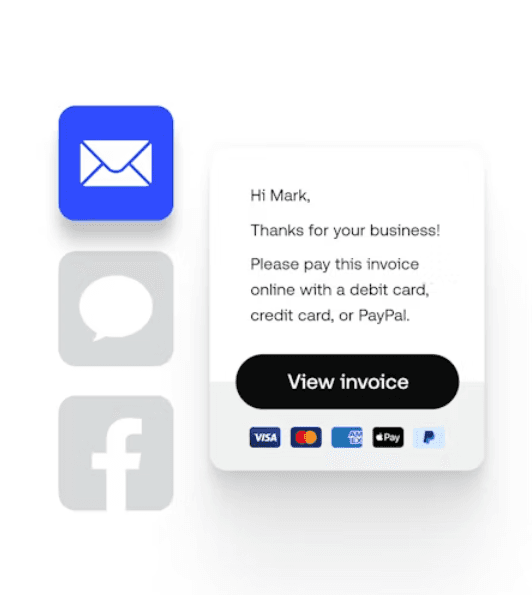
- The mobile app lets you accept online payments and manage invoices easily on the go.
- The user interface is intuitive, even for beginners.
- Payment tracking supports credit card transactions, bank transfers, and other payment methods.
Cons
- Limited customization options for invoice templates may frustrate your team.
- The reporting features aren't as detailed as some competitors.
- Some user reviews indicate that customer support can be slow to respond at times.
Is Invoice2Go Right For Your Needs?
Who Would be a Good Fit for Invoice2Go?
Invoice2go is a good fit for freelancers and small businesses that need simple invoicing, payment processing, and quick access to billing tools. If your work requires managing invoices on the go, the mobile app offers great convenience. The intuitive interface is perfect if you’re not tech-savvy and need straightforward invoicing. It helps you keep track of payments, send payment reminders, and maintain a healthy cash flow.
- FreelancersInvoice2go lets you create and send invoices quickly, accept credit card payments, and get paid faster.
- Small BusinessesThe app's ease of use, automation features, and mobile capabilities make it ideal for small teams that need efficient invoicing.
- ContractorsYou can manage invoicing, purchase orders, and payments from anywhere, which is crucial for contractors always on the move.
- ConsultantsThe software’s simplicity helps you focus on your clients and not on billing or time tracking.
- Solo EntrepreneursInvoice2go helps you keep your invoicing organized without hassle.
- Mobile TeamsTeams that work remotely or travel frequently benefit from the app’s mobile functionality and support for online payments.
Who Would be a Bad Fit for Invoice2Go?
Invoice2go may not suit large enterprises or businesses needing complex invoicing solutions. If your team requires detailed reporting and extensive customization, Invoice2go may fall short. The limited reporting features can hinder your ability to analyze financial data thoroughly. Additionally, if your work depends on quick customer support, you may find the response times frustrating.
- Large EnterprisesThe software lacks the advanced features and scalability that large organizations need.
- Accounting FirmsIf your firm needs detailed reporting, Invoice2go’s limited capabilities may be a drawback.
- Manufacturing CompaniesComplex invoicing requirements in manufacturing are not well-supported by Invoice2go’s straightforward features.
- Corporate Finance TeamsThe lack of advanced customization and detailed analytics makes it unsuitable for corporate finance departments.
- Retail ChainsRetail businesses with intricate invoicing needs may find Invoice2go’s features too basic.
- Tech StartupsIf your startup demands integration with other advanced platforms, Invoice2go may not meet those needs.
Cómo probamos y puntuamos las herramientas
Hemos dedicado años a construir, perfeccionar y mejorar nuestro sistema de evaluación y puntuación de software. La rúbrica está diseñada para capturar los matices de la selección de software y lo que hace que una herramienta sea efectiva, enfocándose en los aspectos críticos del proceso de toma de decisiones. A continuación, puedes ver exactamente cómo funcionan nuestras pruebas y puntuación en siete criterios. Esto nos permite proporcionar una evaluación imparcial del software basada en la funcionalidad principal, características destacadas, facilidad de uso, onboarding, atención al cliente, integraciones, opiniones de clientes y relación calidad-precio.
Funcionalidad principal (25% de la puntuación final)
Nuestro punto de partida siempre es la funcionalidad principal de la herramienta. ¿Tiene las funciones básicas que un usuario esperaría ver? ¿Alguna de estas características principales está limitada a planes de precios superiores? En esencia, esperamos que una herramienta esté a la altura de las capacidades básicas de sus competidores.
Características destacadas (25% de la puntuación final)
A continuación, evaluamos las características únicas y sobresalientes que van más allá de la funcionalidad principal normalmente encontrada en herramientas de este tipo. Una puntuación alta refleja funciones especializadas o únicas que hacen el producto más rápido, eficiente o que aportan valor adicional al usuario. También evaluamos lo fácil que es integrarse con otras herramientas que normalmente forman parte del stack tecnológico para ampliar la funcionalidad y utilidad del software. Las herramientas que ofrecen numerosas integraciones nativas, conexiones con terceros y acceso API para crear integraciones personalizadas obtienen la mejor puntuación.
Facilidad de uso (10% de la puntuación final)
Consideramos cuán rápido y fácil es ejecutar las tareas definidas en la funcionalidad principal usando la herramienta. El software que obtiene la puntuación más alta está bien diseñado, es intuitivo, ofrece aplicaciones móviles, proporciona plantillas y hace que tareas relativamente complejas parezcan simples.
Onboarding (10% de la puntuación final)
Sabemos lo importante que es una adopción rápida del equipo para una nueva plataforma, por lo que evaluamos cuán sencillo es aprender y utilizar una herramienta con una formación mínima. Analizamos lo rápido que un miembro del equipo puede configurarse y empezar a usar la herramienta sin experiencia previa. Las soluciones con alta puntuación indican que se requiere poco o ningún soporte.
Atención al cliente (10% de la puntuación final)
Revisamos cuán rápido y sencillo es salir de un atasco y encontrar ayuda por teléfono, chat en vivo o base de conocimiento. Las herramientas y empresas que proporcionan soporte en tiempo real obtienen la mejor puntuación, mientras que los chatbots obtienen la peor.
Opiniones de clientes (10% de la puntuación final)
Además de nuestras propias pruebas y evaluaciones, consideramos el net promoter score de clientes actuales y anteriores. Revisamos la probabilidad de que, de tener la opción, elijan nuevamente la herramienta por su funcionalidad principal. Un software con alta puntuación refleja un alto net promoter score de clientes presentes o pasados.
Relación calidad-precio (10% de la puntuación final)
Por último, considerando todos los demás criterios, revisamos el precio medio de los planes de entrada frente a las funciones principales y analizamos el valor de los demás criterios de evaluación. El software que ofrece más por menos obtiene una puntuación superior.
Core Features
Invoice Creation: You can quickly create professional invoices with customizable templates. This lets you maintain a consistent brand image in your billing.
Mobile App: Manage your invoices on the go with a user-friendly mobile app. It’s perfect for when you’re working away from your desk.
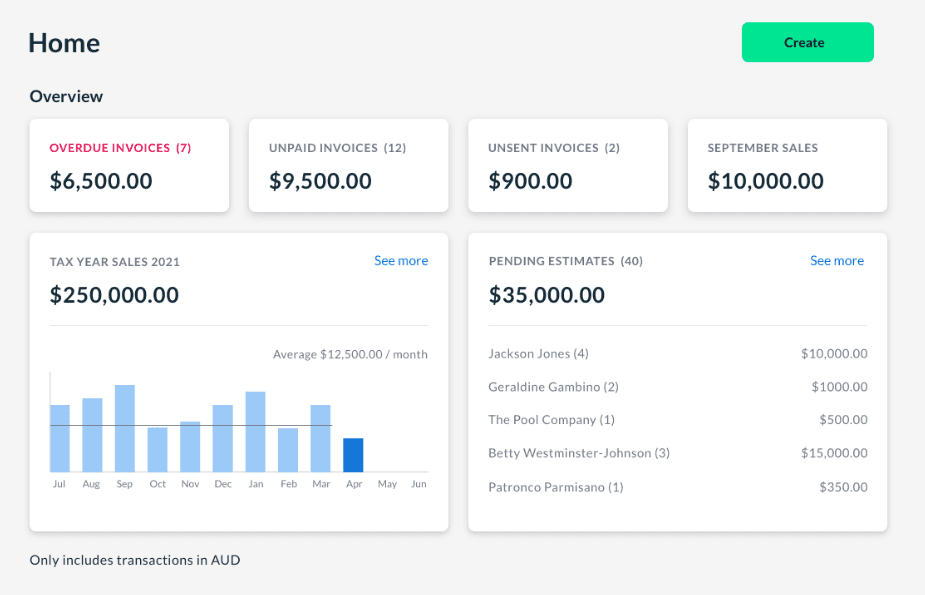
Payment Tracking: Keep track of payments with easy-to-read dashboards. This helps you manage your cash flow more effectively.
Estimates and Quotes: Generate estimates and quotes that can be easily converted into invoices. This saves you time and reduces repetitive work.
Expense Tracking: Record and categorize your expenses to see where your money goes. It helps you stay on top of your business finances.
Client Management: Store all your client information in one place for easy access. This feature streamlines your client interactions and the invoicing process.

Ease of Use
Invoice2go is fairly easy to use, making it a good choice if you’re not tech-savvy. The interface is intuitive, so you can quickly find the features you need without much hassle. Its mobile app stands out for allowing you to manage invoices seamlessly on the go. However, some users may find the limited customization options a bit restrictive. Overall, it simplifies invoicing tasks, though it may not offer the depth some businesses require.
Integrations
Invoice2go integrates with QuickBooks Online, Xero, Stripe, PayPal, Square, Google Contacts, Mailchimp, Pipedrive, FreshBooks, and Dropbox.
Invoice2go also has an API for custom integrations and connects with third-party tools, such as Zapier, for broader app connectivity.

Invoice2Go Specs
- 2-Factor Authentication: Yes
- Accounts Payable: Yes
- Accounts Receivable: Yes
- API: Yes
- Balance Sheet: Yes
- Billing/Invoicing: Yes
- BitCoin: No
- Budgeting: Yes
- Calendar Management: No
- Contact Management: Yes
- CRM Integration: Yes
- Customer Management: No
- Dashboard: No
- Data Export: Yes
- Data Import: Yes
- Data Visualization: Yes
- Expense Tracking: Yes
- External Integrations: Yes
- Forecasting: Yes
- General Account Ledger: No
- Inventory Tracking: No
- Multi-Currency: No
- Multi-User: No
- Notifications: No
- P&L: No
- PayPal: No
- Payroll: No
- SAP Integration: No
- Stripe: No
- Supplier Management: No
- Tax Management: No


