

Reseña de Salesforce CRM: Ventajas, Desventajas, Características y Precios
Salesforce CRM destaca por sus sólidas opciones de personalización e integración, lo que lo convierte en una opción ideal para necesidades contables complejas, aunque puede resultar abrumador para firmas más pequeñas.

Revisamos las herramientas de forma independiente, y las comisiones ayudan a financiar nuestras pruebas. Consulta nuestra política de transparencia, nuestra metodología o sugiere una herramienta.
Salesforce CRM is an accounting CRM built for finance and accounting teams that need to connect client relationship data with pipeline tracking, revenue reporting, and financial workflows. I'd consider it if your team has moved past what HubSpot CRM can offer, specifically, if you need deeper customization, more granular reporting, and the ability to integrate with a broader financial tech stack without hitting a ceiling.
Salesforce CRM Evaluation Summary
4.2/5
- From $25/user/month
- 30-day free trial
Por qué confiar en nuestras recomendaciones de software
6,700+
Reviews
20
Industry experts
16+
Evaluation factors
14
Years
Nuestras reseñas reflejan nuestro criterio independiente, no un discurso de ventas. Descubra cómo mantenemos la transparencia.
Para esta guía, evaluamos las herramientas mediante pruebas prácticas e investigación independiente, puntuando las herramientas según nuestros criterios de selección.
Nuestras reseñas reflejan nuestro criterio editorial humano, no un discurso de ventas.
Salesforce CRM Overview
If you're judging accounting CRM software on customization, integration, and reporting, Salesforce CRM consistently comes out ahead. Its flexible workflows and deep analytics let you tailor processes to your firm's needs, while the AppExchange ecosystem covers nearly any integration you'll want. Pricing can be steep, and onboarding takes time, but the interface is intuitive once set up. I think it's best for teams who want to build a CRM around their accounting processes, not the other way around—especially those with complex requirements or rapid growth plans.
Pros
- Advanced reporting and analytics for financial tracking.
- Highly customizable workflows for accounting processes.
- Strong audit trail and compliance features.
Cons
- Pricing increases quickly with advanced features.
- Initial setup and configuration can be complex.
- Native accounting functions require third-party add-ons.
Is Salesforce CRM Right For Your Needs?
Who Would be a Good Fit for Salesforce CRM?
Salesforce CRM is a strong choice for organizations that need advanced customization, detailed reporting, and scalable workflows to manage complex accounting and client relationships. It's one of the more powerful crm solutions available for teams with dedicated IT support, high compliance needs, or multi-entity operations—delivering real value through its automation, audit trails, and analytics. This makes the salesforce platform especially useful for industries with strict regulatory requirements or fast growth.
- Large Accounting FirmsHandles multi-entity management and complex client structures with ease.
- Financial ServicesSupports compliance, audit trails, and detailed client segmentation.
- Enterprise-Level CorporationsScales with high transaction volumes and custom workflow needs.
- Consulting AgenciesCustomizes project billing, invoicing, lead management, and client communications.
- CFOs in Regulated IndustriesOffers strong controls and documentation for audit-readiness.
- Multi-Department OrganizationsCentralizes customer data and automates cross-team collaboration.
Who Would be a Bad Fit for Salesforce CRM?
Salesforce CRM is less suitable for smaller businesses, teams with limited budgets, or those seeking out-of-the-box accounting features without heavy customization. If your team needs a simple, plug-and-play CRM system or lacks IT resources for setup and maintenance, you may find Salesforce CRM overwhelming or cost-prohibitive.
- Small BusinessesSetup complexity and cost outweigh basic accounting needs.
- Solo AccountantsToo feature-heavy for single-user workflows and simple tracking.
- Startups with Tight BudgetsPricing and required add-ons can strain limited resources.
- Nonprofits with Simple NeedsOverkill for basic donor or member management tasks.
- Teams Without IT SupportCustomization and maintenance require technical expertise.
- Firms Wanting Built-In AccountingNative accounting features are limited and need third-party apps.
Cómo probamos y puntuamos las herramientas
Hemos dedicado años a construir, perfeccionar y mejorar nuestro sistema de evaluación y puntuación de software. La rúbrica está diseñada para capturar los matices de la selección de software y lo que hace que una herramienta sea efectiva, enfocándose en los aspectos críticos del proceso de toma de decisiones. A continuación, puedes ver exactamente cómo funcionan nuestras pruebas y puntuación en siete criterios. Esto nos permite proporcionar una evaluación imparcial del software basada en la funcionalidad principal, características destacadas, facilidad de uso, onboarding, atención al cliente, integraciones, opiniones de clientes y relación calidad-precio.
Funcionalidad principal (25% de la puntuación final)
Nuestro punto de partida siempre es la funcionalidad principal de la herramienta. ¿Tiene las funciones básicas que un usuario esperaría ver? ¿Alguna de estas características principales está limitada a planes de precios superiores? En esencia, esperamos que una herramienta esté a la altura de las capacidades básicas de sus competidores.
Características destacadas (25% de la puntuación final)
A continuación, evaluamos las características únicas y sobresalientes que van más allá de la funcionalidad principal normalmente encontrada en herramientas de este tipo. Una puntuación alta refleja funciones especializadas o únicas que hacen el producto más rápido, eficiente o que aportan valor adicional al usuario. También evaluamos lo fácil que es integrarse con otras herramientas que normalmente forman parte del stack tecnológico para ampliar la funcionalidad y utilidad del software. Las herramientas que ofrecen numerosas integraciones nativas, conexiones con terceros y acceso API para crear integraciones personalizadas obtienen la mejor puntuación.
Facilidad de uso (10% de la puntuación final)
Consideramos cuán rápido y fácil es ejecutar las tareas definidas en la funcionalidad principal usando la herramienta. El software que obtiene la puntuación más alta está bien diseñado, es intuitivo, ofrece aplicaciones móviles, proporciona plantillas y hace que tareas relativamente complejas parezcan simples.
Onboarding (10% de la puntuación final)
Sabemos lo importante que es una adopción rápida del equipo para una nueva plataforma, por lo que evaluamos cuán sencillo es aprender y utilizar una herramienta con una formación mínima. Analizamos lo rápido que un miembro del equipo puede configurarse y empezar a usar la herramienta sin experiencia previa. Las soluciones con alta puntuación indican que se requiere poco o ningún soporte.
Atención al cliente (10% de la puntuación final)
Revisamos cuán rápido y sencillo es salir de un atasco y encontrar ayuda por teléfono, chat en vivo o base de conocimiento. Las herramientas y empresas que proporcionan soporte en tiempo real obtienen la mejor puntuación, mientras que los chatbots obtienen la peor.
Opiniones de clientes (10% de la puntuación final)
Además de nuestras propias pruebas y evaluaciones, consideramos el net promoter score de clientes actuales y anteriores. Revisamos la probabilidad de que, de tener la opción, elijan nuevamente la herramienta por su funcionalidad principal. Un software con alta puntuación refleja un alto net promoter score de clientes presentes o pasados.
Relación calidad-precio (10% de la puntuación final)
Por último, considerando todos los demás criterios, revisamos el precio medio de los planes de entrada frente a las funciones principales y analizamos el valor de los demás criterios de evaluación. El software que ofrece más por menos obtiene una puntuación superior.
Core Features
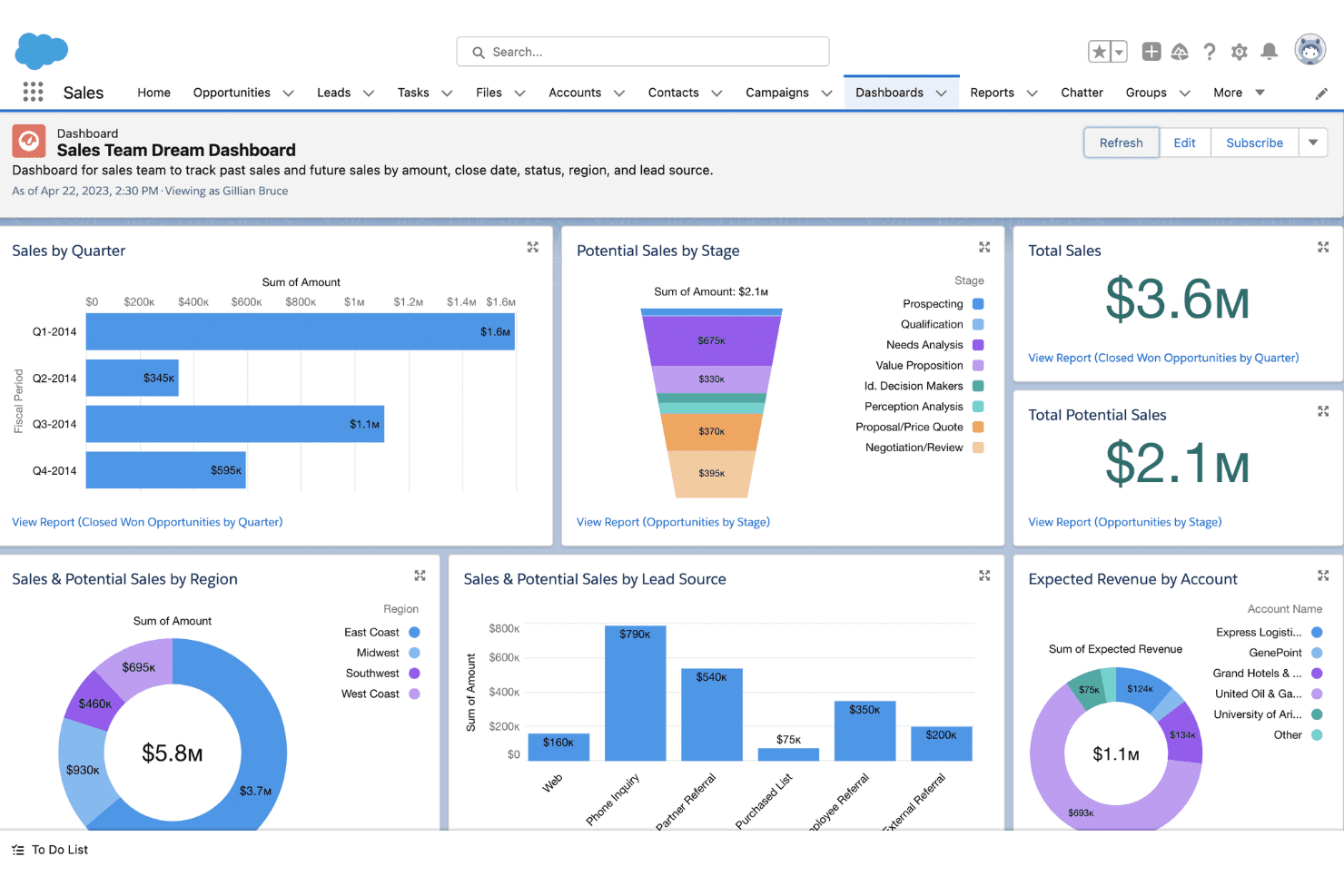
Customizable Dashboards
Build real-time financial dashboards tailored to your KPIs. Use drag-and-drop tools to visualize revenue, receivables, and pipeline data.
Automated Workflow Rules
Configure triggers for invoice approvals, payment reminders, and notifications. Reduce manual tasks and streamline accounting processes.
Opportunity and Pipeline Management
Track deals, proposals, and renewals with detailed financial forecasting. Monitor your sales pipeline and prioritize high-value clients.
Audit Trail and Compliance Tracking
Log every change to client records and transactions for audit-readiness. Meet regulatory requirements with detailed activity histories.
Document Management
Store contracts, invoices, and financial statements securely in client records. Access and share documents directly from the CRM system.
Advanced Reporting and Analytics
Generate custom reports and analyze trends across clients or periods. Drill down into revenue, expenses, and outstanding balances.

Ease of Use
Salesforce CRM offers a clean, modern interface, but its depth and customization options can feel overwhelming at first—especially for accounting teams without dedicated admins. Many users say the platform becomes intuitive after initial setup, thanks to customizable dashboards and guided workflows. However, configuring features like workflow automation and reporting often requires training or IT support, so it's best suited for teams ready to invest time in onboarding.
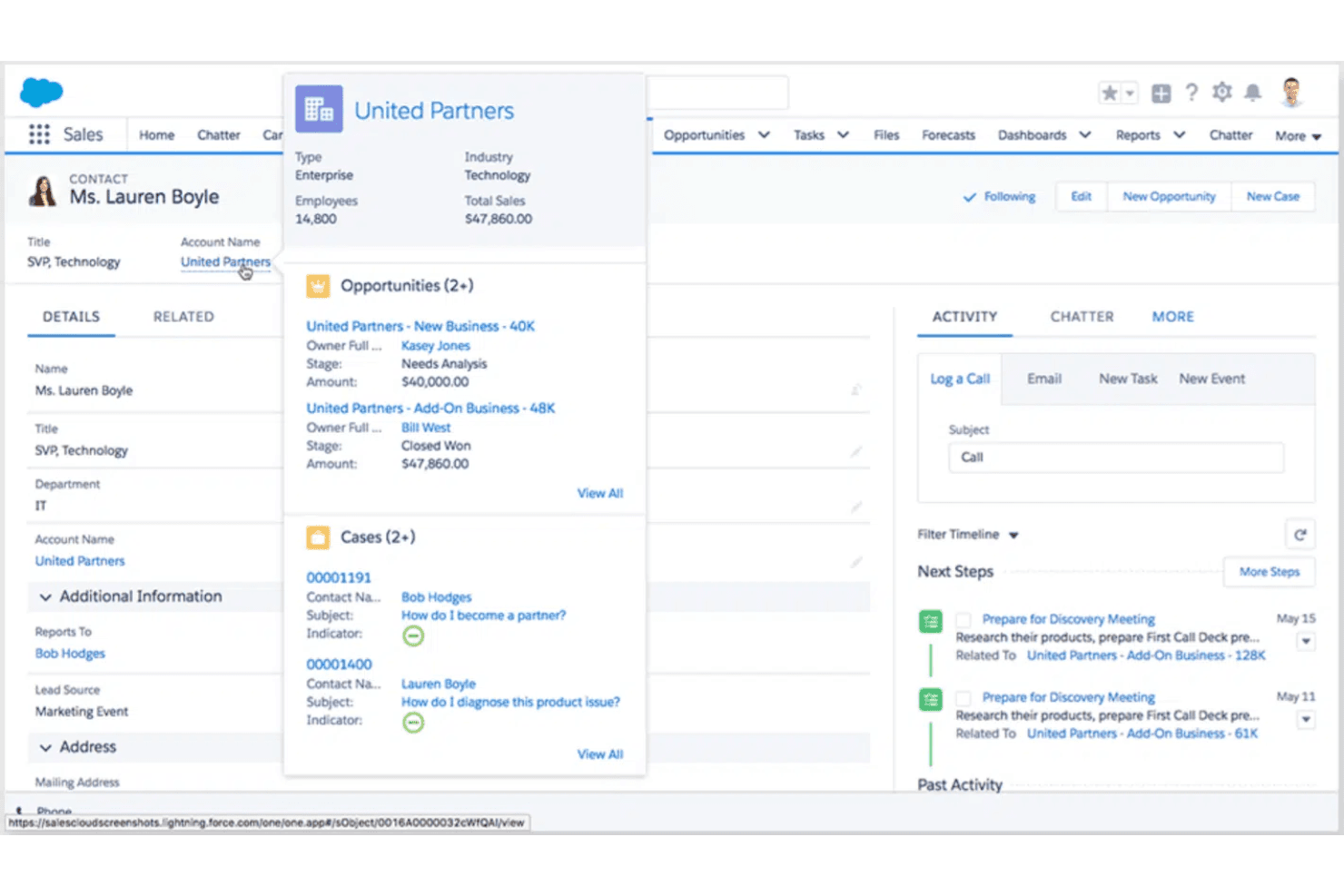
Integrations
Salesforce CRM integrates with QuickBooks, Jira, Slack, Microsoft Outlook, Google Workspace, and Dropbox, among others.
Salesforce CRM also offers a robust API and connects with third-party integration tools for custom workflows.

Salesforce CRM Specs
- 2-Factor Authentication: Yes
- API: Yes
- Calendar Management: Yes
- Call Tracking: Yes
- Campaign Management: Yes
- Click-to-Dial: Yes
- Contact Management: Yes
- Contact Sharing: Yes
- Custom Data Forms: Yes
- Customer Management: Yes
- Dashboard: Yes
- Data Export: Yes
- Data Import: Yes
- Data Visualization: Yes
- Email Integration: Yes
- External Integrations: Yes
- File Sharing: Yes
- File Transfer: Yes
- Google Apps Integration: Yes
- Lead Management: Yes
- Lead Scoring: Yes
- Marketing Automation: No
- Mobile App: Yes
- Multi-User: Yes
- Notifications: Yes
- Pipeline Management: Yes
- Sales Automation: Yes
- Scheduling: Yes
- Social-Media Integration: No
- Task Scheduling/Tracking: Yes
- Third-Party Plugins/Add-Ons: Yes


