

Avis sur JOBPOWER : Avantages, Inconvénients, Fonctionnalités et Tarification
JOBPOWER excelle grâce à ses fonctionnalités comptables axées sur la construction, ce qui en fait un choix de premier ordre pour les entrepreneurs recherchant une gestion financière spécialisée.

Nous évaluons les outils indépendamment ; les commissions aident à financer nos tests. Consultez notre politique de transparence et notre méthodologie.
JOBPOWER is an accounting software built specifically for contractors, covering job costing, payroll, and general ledger in a single system. It's worth considering if your team manages construction projects and needs cost tracking tied directly to your books—not bolted on after the fact. I'd choose it over something like QuickBooks if job costing accuracy is your priority. JOBPOWER is purpose-built for contractor accounting, not adapted from a general-purpose tool.
JOBPOWER Evaluation Summary
3.5/5
- Pricing upon request
- Free demo available
Pourquoi faire confiance à nos recommandations de logiciels
6,700+
Reviews
20
Industry experts
16+
Evaluation factors
14
Years
Nos avis reflètent notre jugement indépendant — et non un argumentaire de vente. Découvrez comment nous restons transparents.
Pour ce guide, nous avons évalué les outils grâce à des tests pratiques et une recherche indépendante, en notant les outils selon nos critères de sélection.
Nos avis reflètent notre jugement éditorial humain, et non un argumentaire de vente.
JOBPOWER Overview
JOBPOWER is a solid choice for construction businesses needing specialized accounting solutions. Its standout features, like project management integration, are a boon for contractors. However, its pricing might seem steep for smaller firms, and the onboarding process could be smoother.
Compared to others, JOBPOWER excels in customer support, making it a reliable option if your team values responsive assistance. If you’re in construction and need robust accounting features, JOBPOWER is worth considering despite the higher cost.
Pros
- Offers specialized features for construction accounting.
- Provides excellent customer support that helps your team quickly resolve issues.
- Integrates project management tools for better job tracking.
Cons
- The user interface can feel outdated compared to modern software.
- Onboarding can be a bit challenging for new users.
- Limited customization options might not fit your team's specific needs.
Is JOBPOWER Right For Your Needs?
Who Would be a Good Fit for JOBPOWER?
JOBPOWER is ideal for construction companies that need specialized accounting features. Its project management tools make tracking jobs easier, which is crucial for contractors. If your team values responsive customer support to resolve issues quickly, JOBPOWER stands out. For teams focused on construction accounting, it offers the right tools to manage projects and finances efficiently.
- Construction FirmsJOBPOWER excels in providing tools tailored for managing construction projects and accounting.
- ContractorsIts project management integration helps contractors track job costs and timelines effectively.
- Small to Mid-sized BusinessesThese businesses benefit from JOBPOWER’s focused features without needing overly complex systems.
- Project ManagersThe software’s job tracking capabilities support project managers in overseeing construction projects.
- Accounting DepartmentsSpecialized accounting features help your team handle construction-specific financial tasks.
- Customer Support-Focused TeamsIf your team needs quick issue resolution, JOBPOWER’s strong support is a major advantage.
Who Would be a Bad Fit for JOBPOWER?
JOBPOWER might not suit tech startups or industries outside construction needing modern, flexible accounting software. Its interface feels dated, making it less appealing for teams wanting sleek, user-friendly systems. If your business requires extensive customization or operates in a field with unique accounting needs, JOBPOWER's limited customization options could be a drawback.
- Tech StartupsThe outdated interface doesn’t align with the modern, dynamic needs of tech environments.
- Retail BusinessesRetailers might find JOBPOWER lacking in features tailored to inventory and sales tracking.
- Large EnterprisesBig companies that need complex, customizable solutions may find JOBPOWER too limited.
- Non-Construction IndustriesIndustries outside construction will not benefit from its focused construction features.
- Highly Customizable NeedsBusinesses that need extensive customization may struggle with JOBPOWER's limited options.
- Modern Interface SeekersTeams valuing cutting-edge, intuitive interfaces might find JOBPOWER's design lacking.
Comment nous testons et évaluons les outils
Nous avons passé des années à construire, affiner et améliorer notre système de test et d’évaluation des logiciels. Notre grille vise à saisir toute la subtilité de la sélection logicielle et les facteurs déterminant l’efficacité d’un outil, en mettant l’accent sur les aspects essentiels du processus de décision. Ci-dessous, vous pouvez voir exactement comment notre test et notre notation fonctionnent selon sept critères. Cela nous permet de fournir une évaluation impartiale des logiciels sur la base des fonctionnalités principales, des fonctionnalités distinctives, de la facilité d’utilisation, de la prise en main, du service client, des intégrations, des avis clients et du rapport qualité/prix.
Fonctionnalité principale (25 % de la note finale)
Le point de départ de notre évaluation est toujours la fonctionnalité principale de l’outil. Dispose-t-il des caractéristiques de base attendues ? Certaines de ces fonctions de base sont-elles réservées aux plans tarifaires supérieurs ? Fondamentalement, nous attendons d’un outil qu’il soit au moins l’égal de ses concurrents en capacités essentielles.
Fonctionnalités Distinctives (25 % de la note finale)
Ensuite, nous évaluons les fonctionnalités rares ou uniques, allant au-delà de la fonctionnalité principale habituellement trouvée dans ce type d’outil. Un score élevé traduit des fonctionnalités spécialisées ou innovantes qui rendent le produit plus rapide, plus efficace, ou apportent une valeur supplémentaire à l’utilisateur. Nous évaluons aussi la facilité d’intégration avec d’autres outils courants de l’écosystème technologique pour étendre les capacités du logiciel. Les outils offrant de nombreuses intégrations natives, des connexions tierces et un accès API pour des intégrations personnalisées obtiennent le meilleur score.
Facilité d’utilisation (10 % de la note finale)
Nous considérons la rapidité et la facilité d’exécution des tâches essentielles avec l’outil. Un logiciel bien conçu, intuitif, proposant des applications mobiles, des modèles et permettant de simplifier des tâches complexes obtient la meilleure note.
Prise en Main (10 % de la note finale)
Nous savons combien il est important d’adopter rapidement une nouvelle plateforme, c’est pourquoi nous évaluons la facilité d’apprentissage et d’utilisation du logiciel avec un minimum de formation. Nous évaluons la rapidité de mise en place d’un nouveau membre d’équipe sans expérience. Un outil ayant un bon score requiert peu voire aucun support pour la prise en main.
Service Client (10 % de la note finale)
Nous évaluons s’il est rapide et facile d’obtenir de l’aide ou de dépanner par téléphone, chat en direct ou base de connaissances. Les outils et entreprises offrant une assistance en temps réel obtiennent le meilleur score, tandis que les chatbots sont moins bien notés.
Avis Clients (10 % de la note finale)
Au-delà de nos propres tests et évaluations, nous prenons en compte le net promoter score fourni par les clients actuels et passés. Nous vérifions leur probabilité de recommander l’outil et d’en refaire le choix pour ses fonctionnalités principales. Un logiciel bien noté se traduit par un net promoter score élevé.
Rapport Qualité/Prix (10 % de la note finale)
Enfin, en tenant compte de tous les autres critères, nous comparons le prix moyen des plans d’entrée de gamme avec les fonctionnalités principales, et le rapport de valeur avec les autres critères d’évaluation. Les logiciels offrant plus pour moins obtiennent la meilleure note.
Core Features
Job Costing System: This feature helps your team track expenses and purchase orders on each project, ensuring you stay on budget. It provides customizable reports for better financial management.
Accounts Payable: Manage your bills and payments efficiently with this feature. It helps you keep track of what you owe and when payments are due.
Accounts Receivable: Keep tabs on your invoices and incoming payments. This feature ensures you know which clients owe money and helps manage cash flow.
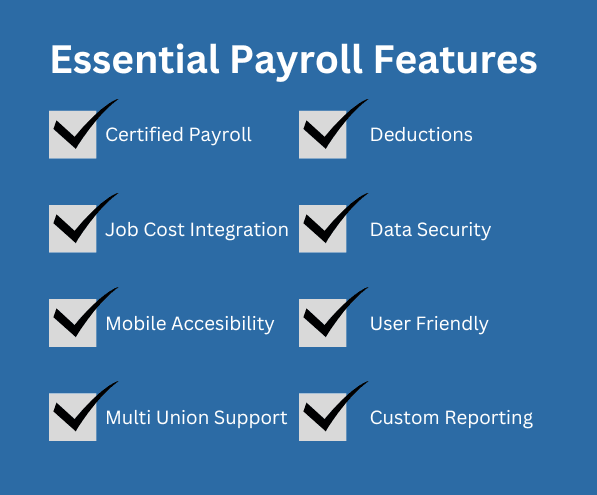
Payroll Management: Simplify paying your crew with integrated payroll features. It automatically calculates wages, taxes, and deductions.
General Ledger: JOBPOWER’s General Ledger provides a CPA‑recommended audit trail, organizes all financial data in one place, automates postings and billings, and keeps your ledgers balanced.
Financial Reporting: Generate detailed reports to understand your financial performance. These reports help in making informed business decisions.
Manage Subcontracts and Subcontractors: Track payments and change orders, and store all related construction documents efficiently.
Ease of Use
JOBPOWER's ease of use can be a mixed bag for some users. While it offers specialized features for construction accounting, the dashboard feels dated and may require a learning curve for new users.
Your team might find navigating its menus less intuitive than with more modern software. However, once you get the hang of it, the specific functionalities tailored for construction make it a valuable tool for managing projects and finances efficiently.
Integrations
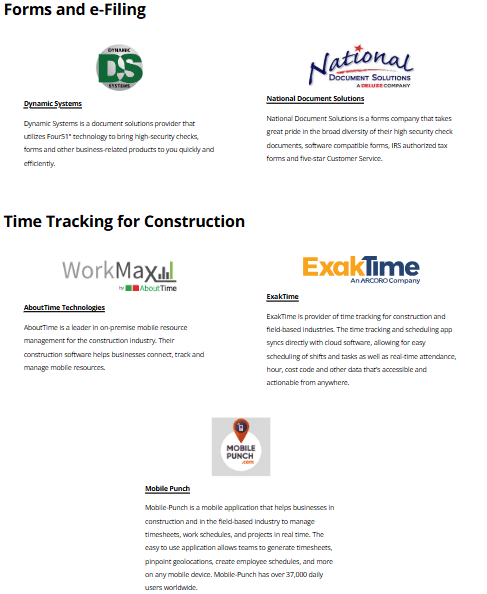
JOBPOWER integrates with Dynamic Systems, National Document Solutions, AboutTime Technologies, ExakTime, Mobile Punch, ConEst Software Systems, Vision InfoSoft, VirtualBoss, Creative Information Systems, and Builder Software Tools.
Based on the available information, JOBPOWER does not provide an API or integrate with third-party integration tools.
JOBPOWER Specs
- 2-Factor Authentication: Yes
- Accounts Payable: Yes
- Accounts Receivable: Yes
- API: Yes
- Balance Sheet: Yes
- Billing/Invoicing: Yes
- BitCoin: No
- Budgeting: Yes
- Calendar Management: No
- Contact Management: Yes
- CRM Integration: Yes
- Customer Management: No
- Dashboard: No
- Data Export: Yes
- Data Import: Yes
- Data Visualization: Yes
- Expense Tracking: Yes
- External Integrations: Yes
- Forecasting: Yes
- General Account Ledger: No
- Inventory Tracking: No
- Multi-Currency: No
- Multi-User: No
- Notifications: No
- P&L: No
- PayPal: No
- Payroll: No
- SAP Integration: No
- Stripe: No
- Supplier Management: No
- Tax Management: No


