

Avis sur SAP Business One 2026 : Avantages, inconvénients, fonctionnalités et tarifs
SAP Business One aide les entreprises à gérer la finance, les stocks, les ventes, les achats et les opérations grâce à des outils ERP conçus pour les PME en croissance.

Nous évaluons les outils indépendamment ; les commissions aident à financer nos tests. Consultez notre politique de transparence et notre méthodologie.
SAP Business One is an ERP software designed for small and midsize businesses that need integrated financials, supply chain, and operations in one platform. If you’re a CFO tackling disjointed data, manual processes, or a lack of visibility, this software could bring all those elements together. The platform promises scalability, real-time reporting, and controls without the steep complexity you get from larger enterprise systems.
In this SAP Business One review, I break down its core features, strengths and weaknesses, pricing, and what types of businesses are likely to get the most value from it.
SAP Business One Evaluation Summary
4.4/5
- Pricing upon request
- Free demo available
Pourquoi faire confiance à nos recommandations de logiciels
6,700+
Reviews
20
Industry experts
16+
Evaluation factors
14
Years
Nos avis reflètent notre jugement indépendant — et non un argumentaire de vente. Découvrez comment nous restons transparents.
Pour ce guide, nous avons évalué les outils grâce à des tests pratiques et une recherche indépendante, en notant les outils selon nos critères de sélection.
Nos avis reflètent notre jugement éditorial humain, et non un argumentaire de vente.
SAP Business One Overview
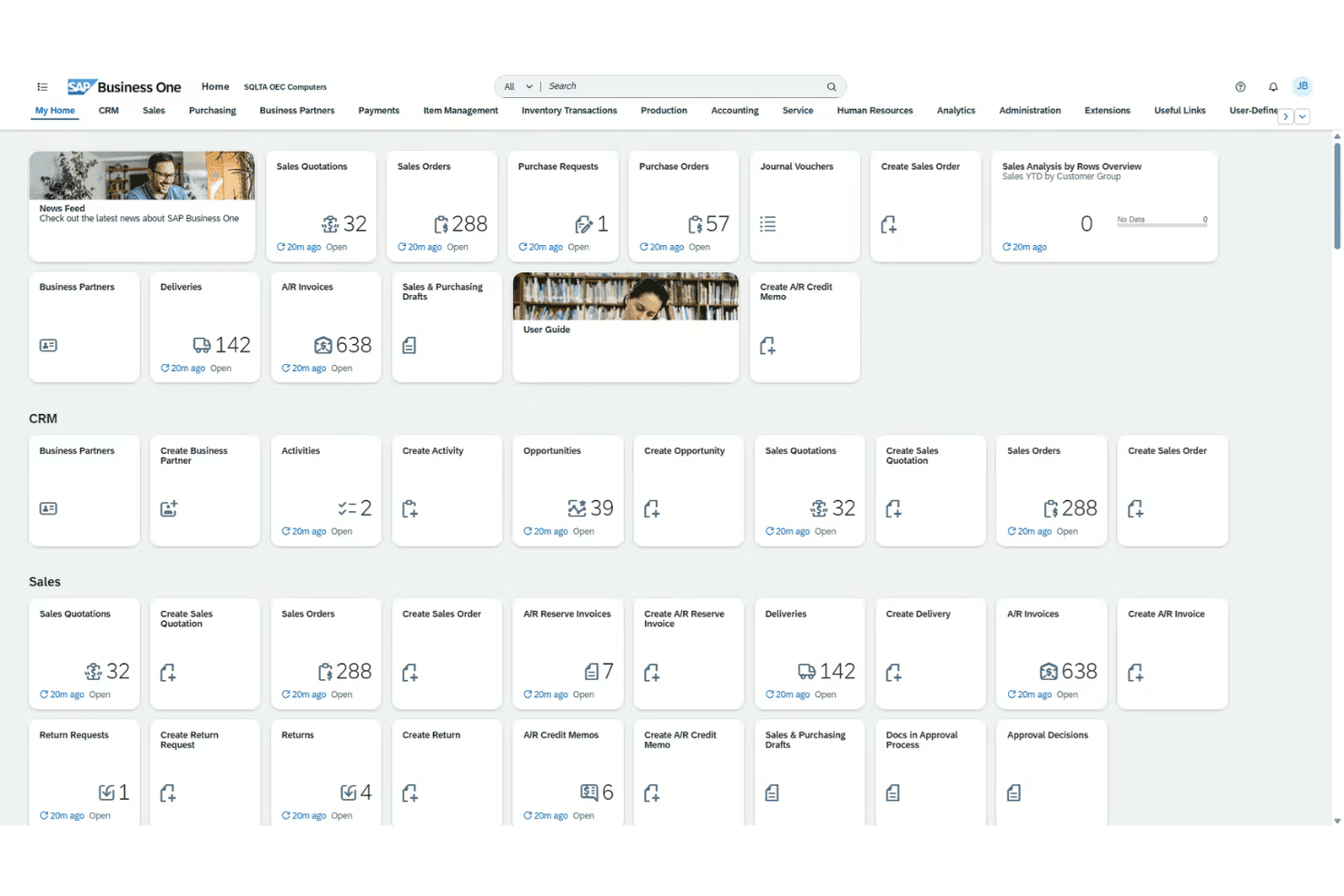
When judging SAP Business One, I think its all-in-one approach provides greater visibility and automation than most entry-level ERP systems, especially in finance and inventory. Its customization, bank integrations, and localized support stand out for global teams, though onboarding can be slower and costs steeper than some peers.
In my view, if you’re determining the right fit for growing manufacturers, distributors, or services that need granular controls but not full-blown, heavyweight ERP, SAP Business One is worth selecting—especially if you want mature features without overwhelming complexity
Pros
- Real-time inventory tracking and batch management are built in
- Localized tax and language support for global operations
- Advanced financial consolidation for multi-entity reporting
Cons
- Mobile app lacks some key desktop features
- Reporting tools feel dated compared to newer platforms
- Complex upgrades require expert consulting to execute
Is SAP Business One Right For Your Needs?
Who Would be a Good Fit for SAP Business One?
SAP Business One works best for companies with multi-entity operations, global compliance needs, and a demand for in-depth financial controls. Manufacturing, wholesale, and distribution teams that need strong inventory, production, and order visibility get real value from its unified workflows.
Mid-sized businesses expanding into new markets also benefit from localization tools and deployment flexibility.
- Global SubsidiariesCentralized controls, built-in multi-currency, and tax support make SAP Business One ideal for enterprises managing subsidiaries or international branches.
- Wholesale DistributorsReal-time inventory, advanced batch tracking, and warehouse management help distributors meet demanding logistics and replenishment needs.
- Manufacturing OperationsProduction planning, bill of materials, and material requirements planning features fit manufacturers who need end-to-end oversight.
- Financial ControllersIn-depth reporting, customizable user permissions, and audit trails make this platform a good match for finance teams running rigorous internal controls.
- Growing SMBsSMBs scaling up to international or multi-location businesses get enterprise features without switching to an unwieldy solution.
- Regulated IndustriesStrong compliance management, integrated document control, and regional localization are suited to industries with heavy regulatory oversight.
Who Would be a Bad Fit for SAP Business One?
SAP Business One won’t be a good fit for teams with simple needs, very small budgets, or those seeking ultra-modern, highly intuitive user interfaces out of the box. Early-stage startups, retail chains with a real-time ecommerce focus, or organizations needing industry-specific functionality not provided may struggle to see real value given the required investment and setup.
- Early-Stage StartupsThe software’s upfront costs and complexity are too high if you need a basic accounting or inventory tool.
- Solo EntrepreneursSingle-user businesses won’t benefit from the system’s advanced modules and multi-user workflows.
- Small NonprofitsResource-limited nonprofits likely find SAP Business One’s depth overwhelming and its licensing out of reach.
- High-Volume RetailBrick-and-mortar or ecommerce retailers needing highly specialized POS or omnichannel experiences may find core retail features lacking.
- Highly Niche VerticalsIndustries with unique, custom regulatory or workflow needs outside SAP’s standard templates will spend too much on customization.
- UX-First TeamsOrganizations that prioritize the newest, most modern UI or low training requirements may find SAP Business One cumbersome.
Comment nous testons et évaluons les outils
Nous avons passé des années à construire, affiner et améliorer notre système de test et d’évaluation des logiciels. Notre grille vise à saisir toute la subtilité de la sélection logicielle et les facteurs déterminant l’efficacité d’un outil, en mettant l’accent sur les aspects essentiels du processus de décision. Ci-dessous, vous pouvez voir exactement comment notre test et notre notation fonctionnent selon sept critères. Cela nous permet de fournir une évaluation impartiale des logiciels sur la base des fonctionnalités principales, des fonctionnalités distinctives, de la facilité d’utilisation, de la prise en main, du service client, des intégrations, des avis clients et du rapport qualité/prix.
Fonctionnalité principale (25 % de la note finale)
Le point de départ de notre évaluation est toujours la fonctionnalité principale de l’outil. Dispose-t-il des caractéristiques de base attendues ? Certaines de ces fonctions de base sont-elles réservées aux plans tarifaires supérieurs ? Fondamentalement, nous attendons d’un outil qu’il soit au moins l’égal de ses concurrents en capacités essentielles.
Fonctionnalités Distinctives (25 % de la note finale)
Ensuite, nous évaluons les fonctionnalités rares ou uniques, allant au-delà de la fonctionnalité principale habituellement trouvée dans ce type d’outil. Un score élevé traduit des fonctionnalités spécialisées ou innovantes qui rendent le produit plus rapide, plus efficace, ou apportent une valeur supplémentaire à l’utilisateur. Nous évaluons aussi la facilité d’intégration avec d’autres outils courants de l’écosystème technologique pour étendre les capacités du logiciel. Les outils offrant de nombreuses intégrations natives, des connexions tierces et un accès API pour des intégrations personnalisées obtiennent le meilleur score.
Facilité d’utilisation (10 % de la note finale)
Nous considérons la rapidité et la facilité d’exécution des tâches essentielles avec l’outil. Un logiciel bien conçu, intuitif, proposant des applications mobiles, des modèles et permettant de simplifier des tâches complexes obtient la meilleure note.
Prise en Main (10 % de la note finale)
Nous savons combien il est important d’adopter rapidement une nouvelle plateforme, c’est pourquoi nous évaluons la facilité d’apprentissage et d’utilisation du logiciel avec un minimum de formation. Nous évaluons la rapidité de mise en place d’un nouveau membre d’équipe sans expérience. Un outil ayant un bon score requiert peu voire aucun support pour la prise en main.
Service Client (10 % de la note finale)
Nous évaluons s’il est rapide et facile d’obtenir de l’aide ou de dépanner par téléphone, chat en direct ou base de connaissances. Les outils et entreprises offrant une assistance en temps réel obtiennent le meilleur score, tandis que les chatbots sont moins bien notés.
Avis Clients (10 % de la note finale)
Au-delà de nos propres tests et évaluations, nous prenons en compte le net promoter score fourni par les clients actuels et passés. Nous vérifions leur probabilité de recommander l’outil et d’en refaire le choix pour ses fonctionnalités principales. Un logiciel bien noté se traduit par un net promoter score élevé.
Rapport Qualité/Prix (10 % de la note finale)
Enfin, en tenant compte de tous les autres critères, nous comparons le prix moyen des plans d’entrée de gamme avec les fonctionnalités principales, et le rapport de valeur avec les autres critères d’évaluation. Les logiciels offrant plus pour moins obtiennent la meilleure note.
Core Features
Financial Management
Track accounts, budgets, and journal entries in real time. Streamline audits and financial closes with automated workflows.
Sales and Customer Management
Manage leads, quotes, and customer activity from first contact through post-sale service. Get a unified view of sales and customer data across your business.
Inventory and Distribution
Monitor stock levels, serial numbers, and order fulfillment across multiple warehouses. Automate replenishment and spot shortages or surplus before they become costly.
Purchasing and Supplier Control
Handle purchase orders, vendor performance, and payment processing on one platform. Reduce manual errors and keep supplier relationships transparent.
Production and MRP
Plan, track, and control production with bill of materials and resource planning tools. Optimize workflows for manufacturing and reduce bottlenecks.
Analytics and Reporting
Build custom dashboards and run real-time reports across all modules. Spot trends, analyze margins, and create board-ready summaries in a few clicks.
Ease of Use
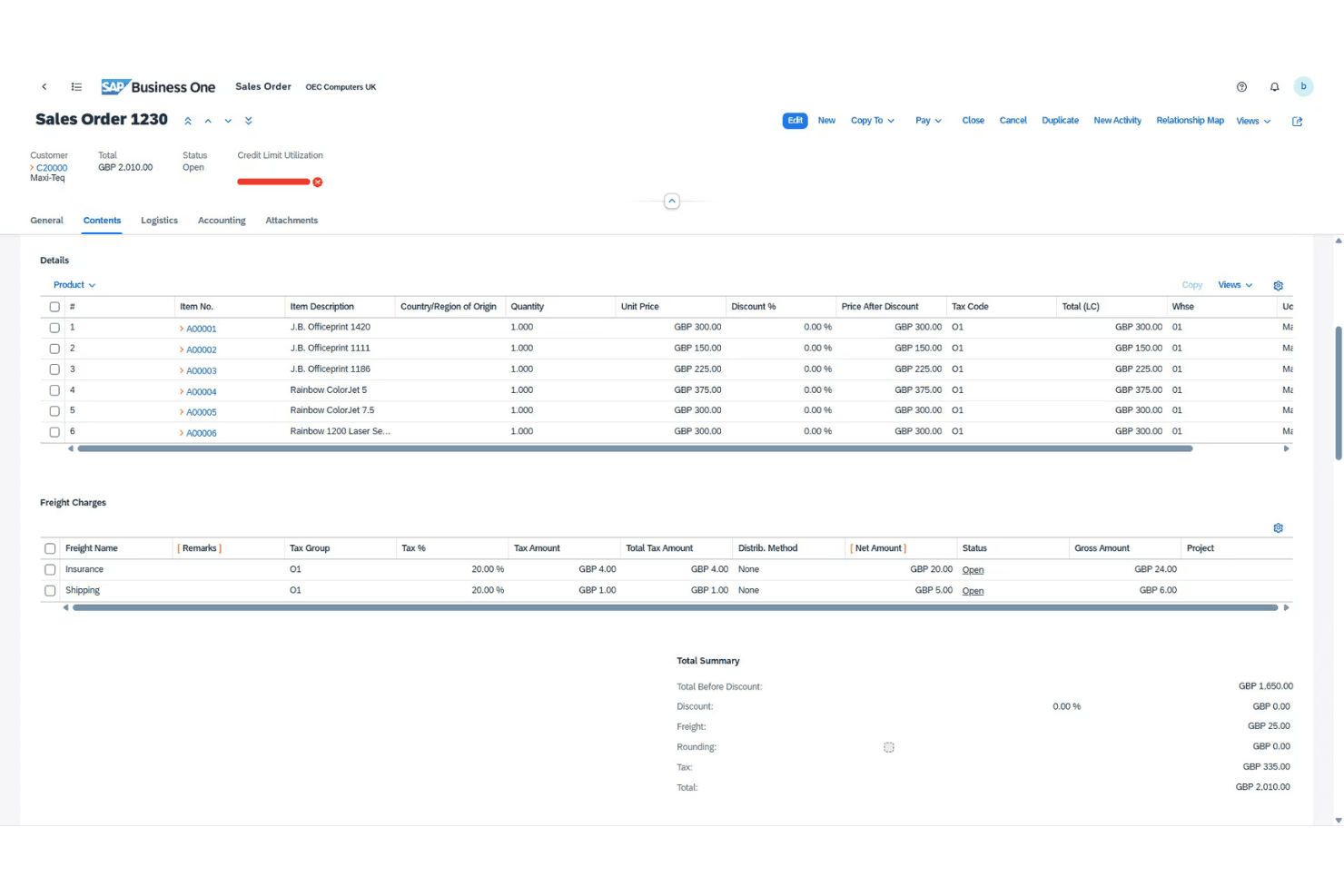
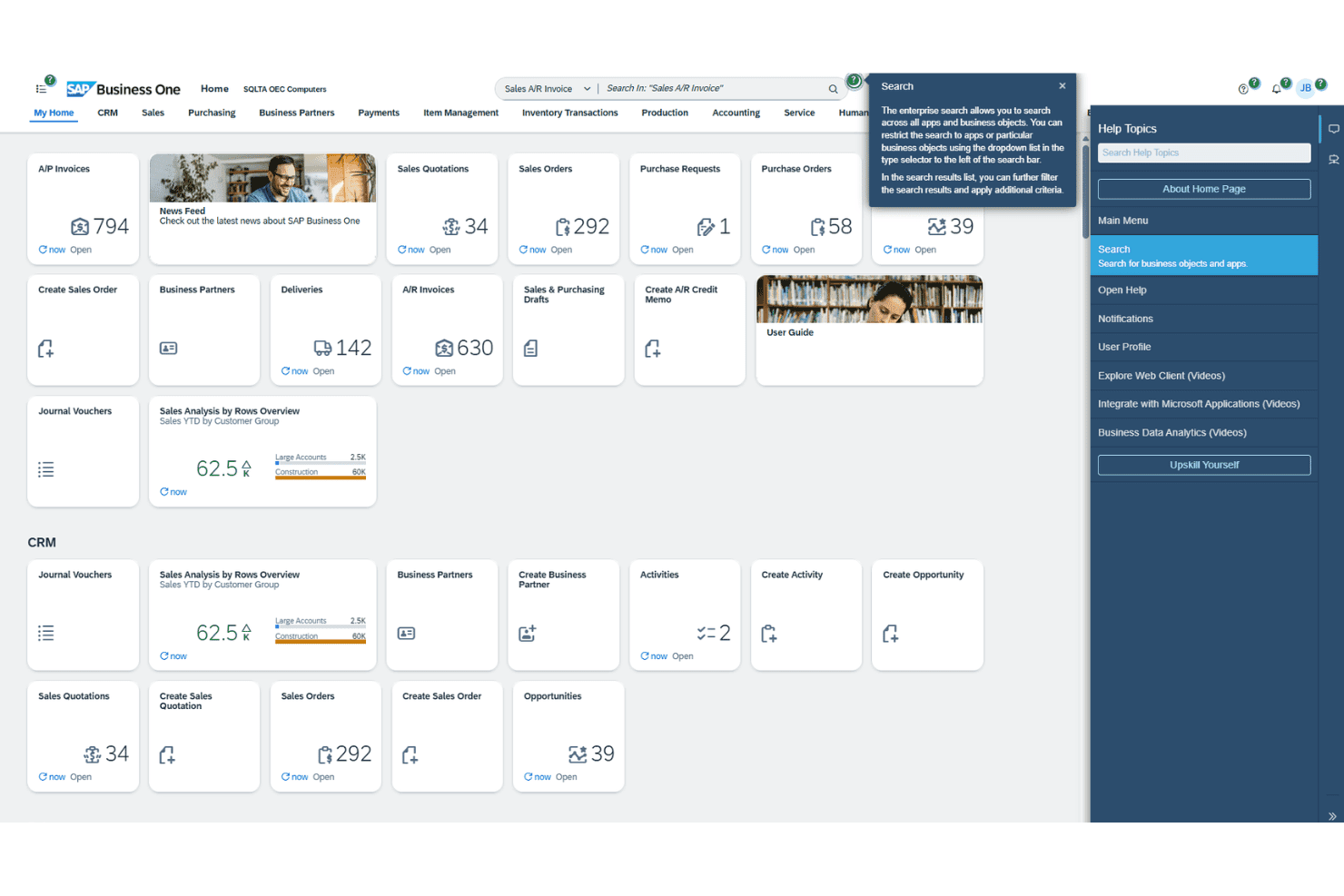
SAP Business One isn’t the most intuitive ERP for newcomers, but its navigation and menus are predictable once you learn the ropes. I’ve noticed users appreciate how task flows—like approvals and procurement—stay customizable, but some screens still feel crowded. Built-in help and regional support ease the learning curve, especially for teams handling complex financials.
Integrations
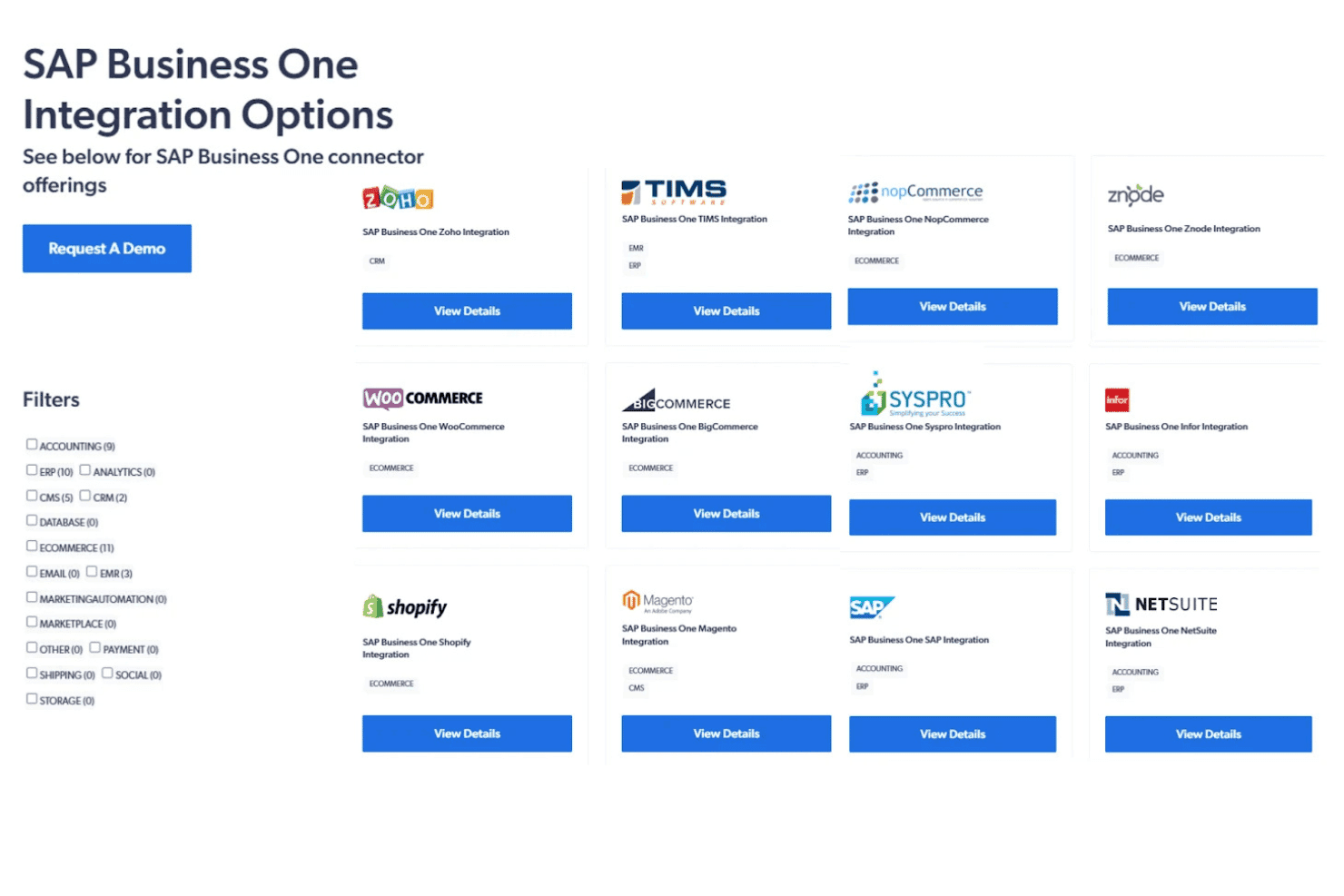
SAP Business One integrates with Microsoft Outlook, Magento, Shopify, WooCommerce, SAP Analytics Cloud, Boyum IT, Mailchimp, DHL, FedEx, and Avalara, among others.
SAP Business One also offers a comprehensive API and can connect with popular third-party integration platforms.
SAP Business One Specs
- 2-Factor Authentication: No
- Analytics: Yes
- Anti-Virus: No
- API: Yes
- Batch Permissions & Access: No
- Bug Tracking: No
- Call Integration: No
- Chat: No
- Contact Management: Yes
- CRM Integration: Yes
- Customer Management: Yes
- Data Export: Yes
- Data Import: Yes
- Email Integration: Yes
- Escalation Management: No
- External Integrations: Yes
- Incident Management: No
- Instant Chat Integration: No
- Knowledge Base: No
- Malware Protection: No
- Multi-User: Yes
- Notifications: Yes
- Organization Management: Yes
- Password & Access Management: No
- Project Management: Yes
- Real-time Alerts: Yes
- SAP Integration: Yes
- Self-service Portal: No
- Social Media Integration: No
- Support Forum: No
- Ticket Management: No
- Workflow Management: Yes


