

Una valida alternativa a Hubstaff offre funzionalità affidabili di monitoraggio del tempo, controllo della produttività e gestione del team, adatte ai flussi di lavoro specifici della tua azienda. Se stai cercando le migliori alternative a Hubstaff, probabilmente cerchi strumenti che eguaglino o superino le funzionalità di Hubstaff, che tu abbia bisogno di report più completi, integrazioni più flessibili o di un approccio diverso alla supervisione dei dipendenti.
Con così tante opzioni disponibili, è essenziale trovare una soluzione in linea con le tue esigenze di conformità, che sostenga la produttività del tuo team e si adatti ai tuoi requisiti operativi. Questo elenco ti aiuterà a confrontare le migliori alternative a Hubstaff per 2026, così potrai prendere una decisione consapevole per la tua organizzazione.
Cos'è Hubstaff?
Hubstaff è una piattaforma per il monitoraggio del tempo e la gestione della forza lavoro, progettata per controllare la produttività dei dipendenti, monitorare le ore lavorate e gestire team remoti o distribuiti. Offre funzionalità come il monitoraggio delle attività, i fogli presenze automatici, il tracciamento GPS e i report basati sui progetti. Le aziende utilizzano Hubstaff per migliorare la visibilità sulle prestazioni del team, garantire una gestione accurata delle buste paga e sostenere la conformità alle normative sul lavoro. Hubstaff è popolare tra le organizzazioni con team remoti, ibridi o operativi sul campo.
Tabella di confronto delle alternative a Hubstaff
Questa tabella di confronto riassume i dettagli sui prezzi delle migliori alternative a Hubstaff che ho selezionato:
| Tool | Best For | Trial Info | Price | ||
|---|---|---|---|---|---|
| 1 | Ideale per gestire contratti di lavoro internazionali | Demo gratuita disponibile | Da $5/dipendente/mese | Website | |
| 2 | Ideale per analisi e approfondimenti sulla forza lavoro | Prova gratuita di 14 giorni + piano gratuito + demo gratuita disponibile | Da $10/utente/mese (fatturato annualmente) | Website | |
| 3 | Ideale per strumenti di reportistica personalizzabili | Prova gratuita di 30 giorni | A partire da $50/mese | Website | |
| 4 | Ideale per il monitoraggio del tempo conveniente | Piano gratuito + prova gratuita di 7 giorni disponibile | Da $3.99/user/month (fatturato annualmente) | Website | |
| 5 | Ideale per funzionalità di rilevazione presenze biometrica | Piano gratuito + demo gratuita disponibile | Prezzi su richiesta | Website | |
| 6 | Ideale per integrazione automatica con tracciamento del tempo | Prova gratuita di 14 giorni + piano gratuito + demo gratuita disponibile | Da $3.99/utente/mese (fatturazione annuale) | Website | |
| 7 | Ideale per report dettagliati sul tempo e sulle attività | Prova gratuita di 14 giorni + demo gratuita disponibile | Da $6,67/utente/mese (fatturazione annuale) | Website | |
| 8 | Ideale per la gestione di team distribuiti | Prova gratuita di 14 giorni | Da $5/utente/mese | Website | |
| 9 | Ideale per la mappatura automatizzata del tempo per progetto | Prova gratuita di 7 giorni + demo gratuita disponibile | Da $8/postazione/mese | Website | |
| 10 | Ideale per l'inserimento manuale semplice del tempo | Piano gratuito + prova gratuita di 30 giorni + demo gratuita disponibile | A partire da $9/utente/mese (fatturato annualmente) | Website |


Perché fidarsi dei nostri consigli sui software
6,700+
Reviews
20
Industry experts
16+
Evaluation factors
14
Years
Le nostre recensioni riflettono il nostro giudizio indipendente, non un discorso di vendita. Scopri come manteniamo la trasparenza.
Per questa guida, abbiamo valutato gli strumenti attraverso test pratici e ricerche indipendenti, assegnando un punteggio agli strumenti in base ai nostri criteri di selezione.
Le nostre recensioni riflettono il nostro giudizio editoriale umano, non un discorso di vendita.
Recensioni delle alternative a Hubstaff
Di seguito trovi le mie analisi dettagliate delle migliori alternative a Hubstaff incluse nel mio elenco. Le mie recensioni offrono una panoramica approfondita delle funzionalità, dei casi d’uso ideali e delle integrazioni di ogni piattaforma, per aiutarti a trovare quella più adatta a te.
 Ideale per gestire contratti di lavoro internazionali
- Demo gratuita disponibile
- Da $5/dipendente/mese
Visit WebsiteCustomer Rating:4.8/5
Dashboard dipendente di Deel HR che mostra strumenti di gestione delle buste paga, cedolini, attività di conformità e strumenti per la gestione di pagamenti per team e collaboratori internazionali. Deel HR offre a responsabili finanziari e team HR una piattaforma unificata per gestire assunzioni globali, paghe e conformità. È possibile gestire l'occupazione internazionale, i contratti complessi e i requisiti per dati sensibili grazie a controlli integrati per team distribuiti a livello internazionale.
Per chi è ideale Deel HR?
Per team finanziari e HR che gestiscono contratti di lavoro internazionali tra più paesi e valute.
Perché Deel è una buona alternativa a Hubstaff
Ho scelto Deel HR per questa posizione perché risolve un problema per il quale Hubstaff semplicemente non è stato progettato: gestire contratti di lavoro legalmente conformi in diversi paesi. Quando il mio team assume in un nuovo paese, Deel HR genera contratti localizzati che già riflettono le leggi del lavoro locali—senza bisogno di revisione legale esterna. Apprezzo anche gli strumenti integrati per la classificazione dei lavoratori, che segnalano i rischi di errata classificazione prima che il contratto venga finalizzato. Per i responsabili finanziari che gestiscono headcount transnazionali, questo tipo di protezione proattiva della conformità è difficile da trovare in un'unica soluzione.
- Automazione della busta paga globale: Esegui le paghe in più paesi da un'unica dashboard, con gestione automatica di detrazioni fiscali e dichiarazioni.
- Analisi delle persone e cruscotti: Visualizza organico, turnover e dati della forza lavoro in cruscotti visivi per supportare la pianificazione finanziaria.
- Ruoli, permessi e approvazioni: Imposta controlli granulari sugli accessi e flussi di approvazione tra i tuoi team HR e finance.
- Supporto e approfondimenti tramite IA: Ricevi suggerimenti e avvisi generati dall'intelligenza artificiale riguardo a dati sulla forza lavoro, cambiamenti normativi e attività HR direttamente sulla piattaforma.
Integrazioni Deel HR
Deel HR offre integrazioni native con piattaforme come QuickBooks, Xero, Netsuite, BambooHR, Greenhouse e Slack. È disponibile anche una API per integrazioni personalizzate.
Pros and Cons
Pros:
- Automatizza la generazione di contratti di lavoro localizzati
- Supporta buste paga internazionali e pagamenti a collaboratori esterni
- Calcolo trasparente dei costi per datore di lavoro prima dell'assunzione
Cons:
- Nessun monitoraggio nativo di tempi o attività
- L'amministrazione dei benefit varia in base al paese
Learn more about Deel HR: Ideale per analisi e approfondimenti sulla forza lavoro
- Prova gratuita di 14 giorni + piano gratuito + demo gratuita disponibile
- Da $10/utente/mese (fatturato annualmente)
Visit WebsiteCustomer Rating:4.5/5
La dashboard di ActivTrak mostra il polso del team, grafici di produttività, utenti top e utilizzo delle app. ActivTrak è pensato per le organizzazioni che vogliono andare oltre il semplice monitoraggio del tempo e comprendere la produttività della forza lavoro a un livello più profondo. A differenza di Hubstaff, punta su analisi e approfondimenti, aiutando responsabili operativi e team HR a individuare tendenze, misurare il coinvolgimento e identificare i colli di bottiglia nei flussi di lavoro. Ciò lo rende particolarmente utile per le aziende focalizzate sull’ottimizzazione delle prestazioni dei team e sul supporto alle decisioni manageriali basate sui dati.
Perché ActivTrak è una valida alternativa a Hubstaff
Se cerchi qualcosa di più del semplice rilevamento del tempo, ActivTrak si distingue per l’analisi della forza lavoro e le statistiche approfondite. Ho scelto ActivTrak perché mette a disposizione dashboard che visualizzano le tendenze di produttività, il coinvolgimento dei dipendenti e l’equilibrio del carico di lavoro tra i team. La piattaforma offre anche classificazione dell’attività e benchmarking, così puoi confrontare le prestazioni e individuare aree di miglioramento. Queste funzionalità orientate all’analisi rendono ActivTrak una scelta eccellente per i responsabili che vogliono prendere decisioni basate su dati reali della forza lavoro.
Caratteristiche principali di ActivTrak
Ho trovato anche diverse funzionalità in ActivTrak che aiutano i team a gestire la produttività e le esigenze di compliance:
- Monitoraggio in tempo reale delle attività degli utenti: Visualizza i dati delle attività in tempo reale di singoli o team durante il lavoro.
- Avvisi automatici: Configura avvisi personalizzati per comportamenti specifici, come l’accesso a siti web vietati o il superamento dei limiti di pausa.
- Rilevamento dispositivi USB: Traccia quando dispositivi esterni vengono collegati ai computer monitorati.
- Installazione remota degli agenti: Distribuisci agenti di monitoraggio su più dispositivi a distanza da una dashboard centrale.
Integrazioni ActivTrak
Le integrazioni includono Microsoft Outlook, Google Calendar, Microsoft Entra ID, Workday, HiBob, Paycor, Dayforce, ADO, Okta e molto altro.
Pros and Cons
Pros:
- Le dashboard di analisi della forza lavoro rivelano modelli di produttività
- Il monitoraggio delle attività in tempo reale consente una supervisione istantanea
- Avvisi automatici segnalano comportamenti insoliti o a rischio
Cons:
- Funzionalità limitate per la gestione di progetti e compiti
- Nessuna cattura schermata per la verifica delle attività
Learn more about ActivTrak: Ideale per strumenti di reportistica personalizzabili
- Prova gratuita di 30 giorni
- A partire da $50/mese
Visit WebsiteCustomer Rating:4.5/5
TimeTrex mostra un rapporto riepilogativo dettagliato in un pannello centralizzato. TimeTrex è una piattaforma completa per la gestione della forza lavoro, progettata per le squadre finanziarie e operative che necessitano di strumenti avanzati per il monitoraggio, le buste paga e la conformità. Se desideri sostituire i processi manuali di gestione delle ore, delle presenze e delle buste paga con una soluzione unificata, vale la pena prendere in considerazione TimeTrex.
Per chi è più adatto TimeTrex?
Responsabili del controllo di gestione e analisti finanziari che necessitano di rapporti su ore, presenze e buste paga disponibili su richiesta e personalizzati in base a requisiti operativi o di revisione dettagliati.
Perché TimeTrex è una buona alternativa a Hubstaff per i direttori finanziari
Ciò che distingue TimeTrex per la reportistica è il livello di controllo su ciò che viene incluso in ogni rapporto e sulla sua struttura. Apprezzo il fatto che il generatore di rapporti consenta alla mia squadra di filtrare per reparto, periodo di paga, codice di commessa o gruppo di dipendenti senza dover ricorrere a modelli predefiniti. In pratica, questo significa che posso ottenere una ripartizione dei costi della manodopera per centro di costo a metà mese senza dover attendere una richiesta al reparto informatico. Per le squadre finanziarie che necessitano di esportazioni pronte per la revisione o di riepiloghi destinati al consiglio di amministrazione con scadenze ravvicinate, questa flessibilità fa davvero la differenza.
Funzionalità principali di TimeTrex
- Monitoraggio delle maturazioni: Calcola e monitora automaticamente i saldi delle ferie, delle assenze per malattia e degli altri permessi in base a regole di maturazione configurabili.
- Recinzione geografica: Limita le registrazioni di entrata dei dipendenti alle sedi fisiche approvate utilizzando confini basati sul GPS.
- Conformità in materia di retribuzione e orario di lavoro: Applica automaticamente ai dati delle ore le regole specifiche della giurisdizione relative a straordinari, pause e salario minimo.
- Portale autonomo per i dipendenti: Consente ai dipendenti di visualizzare i cedolini, richiedere permessi e aggiornare le informazioni personali senza l'intervento delle risorse umane.
Integrazioni di TimeTrex
TimeTrex offre integrazioni native con QuickBooks, Sage, ADP, Paychex e Ceridian e consente di esportare i dati in formato CSV per flussi di lavoro personalizzati. È disponibile un'API per integrazioni personalizzate.
Pros and Cons
Pros:
- Offre la rilevazione biometrica delle ore
- Monitora e gestisce le assenze dei dipendenti
- Automatizza le buste paga con supporto per la dichiarazione delle imposte
Cons:
- Interfaccia dal design obsoleto rispetto ai concorrenti
- La configurazione può richiedere molto tempo
Learn more about TimeTrex: Ideale per il monitoraggio del tempo conveniente
- Piano gratuito + prova gratuita di 7 giorni disponibile
- Da $3.99/user/month (fatturato annualmente)
Visit WebsiteCustomer Rating:4.8/5
Clockify mostra il monitoraggio del tempo, i timer dei progetti, le pause e le voci dettagliate. Clockify si distingue per i team che hanno bisogno di una soluzione per il monitoraggio del tempo senza limiti al numero di utenti o progetti. È una scelta eccellente per aziende in crescita, agenzie o organizzazioni che gestiscono più clienti o reparti. A differenza di Hubstaff, Clockify consente di estendere il monitoraggio del tempo a tutte le persone e i progetti necessari senza costi o complessità aggiuntivi.
Perché Clockify è una buona alternativa a Hubstaff
Ho selezionato Clockify come alternativa a Hubstaff perché offre strumenti essenziali per il monitoraggio del tempo senza obbligare i team ad adottare costosi piani aziendali. I responsabili delle operazioni possono aggiungere interi gruppi di progetto per registrare le ore e gestire i fogli presenze, mantenendo al contempo uno stretto controllo sui costi generali della piattaforma. Questo lo rende ideale per i manager che hanno bisogno di una verifica affidabile del lavoro svolto, di una panoramica chiara sull'avanzamento dei progetti e di una scalabilità conveniente.
Funzionalità principali di Clockify
Alcune altre funzionalità di Clockify possono aiutarti a gestire il tempo e le risorse in modo più efficiente:
- Approvazione dei fogli presenze: Invia e rivedi i fogli presenze per l'approvazione dei manager direttamente dalla piattaforma.
- Monitoraggio delle spese: Registra e categorizza le spese insieme al tempo monitorato per ogni progetto.
- Modalità chiosco: Configura un dispositivo condiviso per consentire ai team sul posto di registrare entrata e uscita utilizzando un PIN.
- Report personalizzabili: Genera ed esporta report dettagliati sull'utilizzo del tempo, sulle ore fatturabili e sull'avanzamento dei progetti.
Integrazioni di Clockify
Le integrazioni includono Asana, Trello, Jira, QuickBooks, Google Calendar, Outlook, GitHub, GitLab, Notion e Monday.
Pros and Cons
Pros:
- Gratuito fino a cinque utenti
- L'approvazione dei fogli presenze migliora la responsabilità nel monitoraggio
- I report personalizzabili offrono una visione flessibile dei dati
Cons:
- Nessuna funzionalità per schermate o monitoraggio delle attività
- Funzionalità limitate relative alle buste paga
Learn more about Clockify: Ideale per funzionalità di rilevazione presenze biometrica
- Piano gratuito + demo gratuita disponibile
- Prezzi su richiesta
Visit WebsiteCustomer Rating:4.8/5
La dashboard di Jibble mostra ore tracciate, stato del team, festività e orari di entrata/uscita. Jibble offre funzionalità di rilevazione delle presenze biometriche che aiutano i team a verificare la presenza tramite riconoscimento facciale o check-in da dispositivi mobili. È una scelta solida per aziende con personale in sede, come negozi al dettaglio, produzione o servizi sul campo, dove il fenomeno dei sostituti e il furto di tempo sono preoccupazioni. A differenza di Hubstaff, Jibble si concentra su timbrature sicure e precise tramite dati biometrici.
Perché Jibble è una buona alternativa a Hubstaff
Per i team che desiderano un rilevamento delle presenze sicuro e affidabile, le funzioni biometriche di Jibble offrono un vantaggio chiaro rispetto a Hubstaff. Ho scelto Jibble perché utilizza riconoscimento facciale e geolocalizzazione per verificare ogni timbratura, aiutando a prevenire i sostituti e le frodi sulle presenze. La piattaforma supporta anche la modalità chiosco, che consente a più dipendenti di timbrare da un dispositivo condiviso tramite verifica biometrica. Queste funzionalità rendono Jibble particolarmente utile per le aziende con personale in sede che devono garantire registri delle presenze precisi e a prova di manomissione.
Funzionalità principali di Jibble
Altre funzionalità di Jibble ti aiutano a gestire la presenza della forza lavoro e la conformità:
- Fogli presenze automatici: Genera fogli presenze automaticamente dai dati di entrata e uscita.
- Calcolo degli straordinari: Tieni traccia e calcola le ore di straordinario in base alle politiche aziendali.
- Gestione delle assenze: Invia, approva e monitora le richieste di permesso dei dipendenti all'interno della piattaforma.
- Orari di lavoro personalizzabili: Imposta diversi turni e orari di lavoro per team o singoli dipendenti.
Integrazioni di Jibble
Le integrazioni includono Xero, QuickBooks Online, Deel, Google Workspace, Slack, Microsoft Teams, BambooHR, Sage, ADP e monday.com.
Pros and Cons
Pros:
- Il riconoscimento facciale migliora l'accuratezza delle presenze
- La modalità chiosco supporta timbrature da dispositivi condivisi
- Tracciamento di straordinari e assenze integrati nella piattaforma
Cons:
- Funzionalità limitate di budget e monitoraggio dei costi di progetto
- L'app mobile può avere ritardi occasionali di sincronizzazione
Learn more about Jibble: Ideale per integrazione automatica con tracciamento del tempo
- Prova gratuita di 14 giorni + piano gratuito + demo gratuita disponibile
- Da $3.99/utente/mese (fatturazione annuale)
Visit WebsiteCustomer Rating:4.7/5
Il foglio presenze di TimeCamp mostra le attività giornaliere, gli orari di inizio/fine e il monitoraggio dei progetti. Se stai cercando uno strumento di monitoraggio del tempo che lavora silenziosamente in background, TimeCamp offre il tracciamento automatico del tempo con opzioni di integrazione avanzate. È particolarmente utile per team e professionisti che vogliono registrare le ore di lavoro su più app senza inserimento manuale. A differenza di Hubstaff, le funzionalità di tracciamento automatico e integrazione di TimeCamp ti permettono di collegare direttamente i dati di tempo ai tuoi flussi di lavoro esistenti.
Perché TimeCamp è una valida alternativa a Hubstaff
Per i team che desiderano automatizzare il monitoraggio del tempo su tutta la loro dotazione tecnologica, TimeCamp è una scelta solida. Ho scelto TimeCamp perché la sua funzione di tracciamento automatico registra le ore di lavoro in base all’uso di app e siti web, così non devi avviare o fermare manualmente i timer. Lo strumento assegna inoltre le voci di tempo a progetti o attività specifiche utilizzando regole basate su parole chiave. Questo livello di automazione ti consente di raccogliere dati precisi con meno sforzo rispetto all’approccio più manuale di Hubstaff.
Funzionalità principali di TimeCamp
Altre funzionalità di TimeCamp possono aiutarti a gestire il tempo e i progetti in modo più preciso:
- Monitoraggio delle presenze: Monitora presenze e assenze dei dipendenti direttamente sulla piattaforma.
- Calcolo delle ore fatturabili: Calcola automaticamente le ore fatturabili per i progetti dei clienti ed esportale per la fatturazione.
- Suite di report dettagliati: Genera report personalizzabili su produttività, avanzamento dei progetti e allocazione del tempo.
- App mobile: Monitora il tempo e gestisci le attività ovunque ti trovi con le app dedicate per iOS e Android.
Integrazioni di TimeCamp
Le integrazioni includono Asana, Trello, Jira, monday.com, ClickUp, Notion, Slack, Google Calendar, QuickBooks e Xero.
Pros and Cons
Pros:
- Il tracciamento automatico registra il tempo senza timer manuali
- Le regole basate su parole chiave assegnano il tempo ai progetti con precisione
- Report dettagliati supportano l’analisi della produttività e dei progetti
Cons:
- Nessun monitoraggio degli screenshot per la verifica delle attività
- L’app mobile manca di alcune funzionalità presenti su desktop
Learn more about TimeCamp: Ideale per report dettagliati sul tempo e sulle attività
- Prova gratuita di 14 giorni + demo gratuita disponibile
- Da $6,67/utente/mese (fatturazione annuale)
Visit WebsiteCustomer Rating:4.5/5
La dashboard di Time Doctor mostra il tempo tracciato, i livelli di produttività, i minuti di inattività e le linee temporali. Time Doctor offre a team e manager un modo per approfondire come vengono spese le ore di lavoro tra progetti e attività. Se hai bisogno di report sul tempo e sull'attività più dettagliati rispetto a quelli offerti da Hubstaff, questo strumento si distingue per le sue analisi approfondite e gli avvisi di distrazione. È particolarmente adatto alle aziende che desiderano analizzare i modelli di produttività e identificare i colli di bottiglia nei flussi di lavoro.
Perché Time Doctor è una buona alternativa a Hubstaff
Per i team che necessitano di più del semplice monitoraggio del tempo, Time Doctor offre report dettagliati su tempi e attività che vanno oltre ciò che fornisce Hubstaff. Ho scelto Time Doctor perché suddivide le ore di lavoro per progetto, attività e persino per utilizzo di siti web o app, offrendoti un quadro chiaro di come viene impiegato il tempo. Lo strumento include anche avvisi di distrazione e la possibilità di catturare schermate opzionali per aiutare i manager a risolvere problemi di produttività in tempo reale. Queste funzionalità rendono Time Doctor una scelta solida per aziende che vogliono analizzare e migliorare le prestazioni del team tramite approfondimenti basati sui dati.
Funzionalità principali di Time Doctor
Altre funzionalità di Time Doctor aiutano i team a gestire la forza lavoro da remoto e le esigenze di conformità:
- Foglio presenze automatizzato: Genera automaticamente fogli presenze basati sulle ore tracciate per facilitare l'elaborazione delle paghe.
- Portale di accesso cliente: Fornisci ai clienti l'accesso per visualizzare direttamente l'avanzamento dei progetti e i report.
- Monitoraggio offline del tempo: Traccia le ore di lavoro anche quando gli utenti non sono connessi a Internet.
- Gestione degli orari di lavoro: Imposta e monitora gli orari dei dipendenti direttamente dalla piattaforma.
Integrazioni di Time Doctor
Le integrazioni includono Asana, Trello, Jira, monday.com, ClickUp, Salesforce, HubSpot, Bamboo HR, PayPal e ADP.
Pros and Cons
Pros:
- Il tracciamento dettagliato dell'uso di app e siti web migliora la visibilità
- Gli avvisi di distrazione aiutano a mantenere la concentrazione durante le ore di lavoro
- I fogli presenze automatizzati semplificano il monitoraggio delle ore e delle paghe
Cons:
- Il monitoraggio tramite screenshot può sollevare dubbi sulla privacy dei dipendenti
- Le funzionalità mobili sono più limitate rispetto alla versione desktop
Learn more about Time Doctor: Ideale per la gestione di team distribuiti
- Prova gratuita di 14 giorni
- Da $5/utente/mese
Visit WebsiteCustomer Rating:4.4/5
Vista dei timesheet di HiveDesk che mostra le ore del team per progetto con filtri per intervallo di date nell’interfaccia utente. Se gestisci un team distribuito o remoto, HiveDesk offre un modo mirato per monitorare produttività e presenza. È pensato per aziende che necessitano di coordinare il lavoro su più sedi, con funzionalità come i timesheet automatici e la cattura di screenshot per aiutare a verificare l’attività. A differenza di Hubstaff, HiveDesk punta su una supervisione semplice del team e il monitoraggio basato sui progetti, rendendo più facile la gestione dei flussi di lavoro remoti senza complessità aggiuntive.
Perché HiveDesk è una buona alternativa a Hubstaff
Se devi gestire team distribuiti, HiveDesk ti offre strumenti per monitorare produttività e presenza su più sedi. Ho scelto HiveDesk perché consente di assegnare progetti, monitorare il tempo per progetto e catturare screenshot casuali per verificare il lavoro da remoto. La funzione di timesheet automatico ti aiuta a mantenere registri precisi senza l’inserimento manuale da parte dei dipendenti. Queste capacità rendono HiveDesk una scelta valida se vuoi coordinare e supervisionare team remoti con meno oneri amministrativi rispetto a Hubstaff.
Funzionalità principali di HiveDesk
Altre funzionalità di HiveDesk possono aiutarti a gestire i team distribuiti in modo più efficiente:
- Report sulle attività: Genera report dettagliati sull’attività dei dipendenti per qualsiasi periodo di tempo selezionato.
- Monitoraggio del tempo per progetto: Tieni traccia delle ore lavorate su progetti specifici per monitorare i progressi e l’allocazione delle risorse.
- Inserimento manuale del tempo: Consenti ai membri del team di aggiungere manualmente il tempo, se necessario, con approvazione dell’amministratore.
- Accesso per i clienti: Offri ai clienti accesso limitato per visualizzare l’avanzamento dei progetti e i report.
Integrazioni di HiveDesk
Le integrazioni includono Asana. Altre integrazioni personalizzate sono disponibili tramite l’API REST di HiveDesk.
Pros and Cons
Pros:
- I timesheet automatici riducono gli errori dovuti al tracciamento manuale
- Il monitoraggio basato sui progetti supporta flussi di lavoro multi-cliente
- L’accesso clienti migliora la trasparenza sull’avanzamento dei progetti
Cons:
- Nessuna app mobile per il monitoraggio in mobilità
- Le funzionalità di reportistica sono basilari rispetto alle alternative
Learn more about HiveDesk: Ideale per la mappatura automatizzata del tempo per progetto
- Prova gratuita di 7 giorni + demo gratuita disponibile
- Da $8/postazione/mese
Visit WebsiteCustomer Rating:4.8/5
Insightful mostra i progetti dei dipendenti, le ore tracciate, il tempo di attività e le statistiche sui costi. Se il tuo team ha bisogno di un monitoraggio del tempo preciso e automatizzato per progetto, Insightful merita attenzione. È stato progettato per aziende e agenzie basate su progetti che vogliono associare le ore di lavoro direttamente a specifici compiti e clienti senza input manuale. Questo approccio ti aiuta a ottenere costi di progetto accurati e una migliore allocazione delle risorse, distinguendosi da Hubstaff e altre alternative che si concentrano maggiormente sul rilevamento generale del tempo.
Perché Insightful è una buona alternativa a Hubstaff
A differenza di molti strumenti di rilevamento del tempo, Insightful assegna automaticamente il tempo ai progetti e ai compiti senza richiedere input manuale dagli utenti. Ho scelto Insightful perché utilizza un riconoscimento intelligente delle attività per assegnare le ore di lavoro ai progetti corretti, il che è particolarmente utile per i team che gestiscono più clienti o consegne. La piattaforma offre anche report dettagliati per progetto, così puoi vedere esattamente dove viene impiegato il tempo e identificare aree di miglioramento. Questo livello di automazione e dettaglio rende Insightful una scelta solida per le aziende che necessitano di una valutazione accurata dei costi e di un monitoraggio preciso delle risorse per progetto.
Funzionalità principali di Insightful
Altre funzionalità di Insightful possono aiutare il tuo team a gestire produttività e conformità:
- Screenshot automatici: Acquisisci screenshot periodici per verificare l'attività e supportare le esigenze di conformità.
- Monitoraggio dei dipendenti in tempo reale: Visualizza dati sulle attività in tempo reale di singoli o team durante lo svolgimento del lavoro.
- Monitoraggio dell'utilizzo di app e siti web: Tieni traccia delle applicazioni e dei siti web utilizzati durante l'orario di lavoro.
- Opzione modalità invisibile: Monitora i dispositivi in modo discreto senza indicatori visibili agli utenti.
Integrazioni Insightful
Le integrazioni includono BigQuery, ADP Workforce Now, Aha!, Asana, Basecamp, Bamboo HR, ClickUp, Deel, Gusto, HiBob, HR Cloud e molte altre.
Pros and Cons
Pros:
- La mappatura automatica del tempo assegna il lavoro ai progetti in modo accurato
- Il monitoraggio in tempo reale offre visibilità sulle attività del team
- Il monitoraggio di app e siti web mostra il comportamento di utilizzo in dettaglio
Cons:
- Nessuna funzione di gestione dei compiti o di coordinamento del flusso di lavoro
- Capacità limitate di monitoraggio offline per il lavoro da remoto
Learn more about Insightful: 10Ideale per l'inserimento manuale semplice del tempo
Toggl
- Piano gratuito + prova gratuita di 30 giorni + demo gratuita disponibile
- A partire da $9/utente/mese (fatturato annualmente)
Visit WebsiteCustomer Rating:4.7/5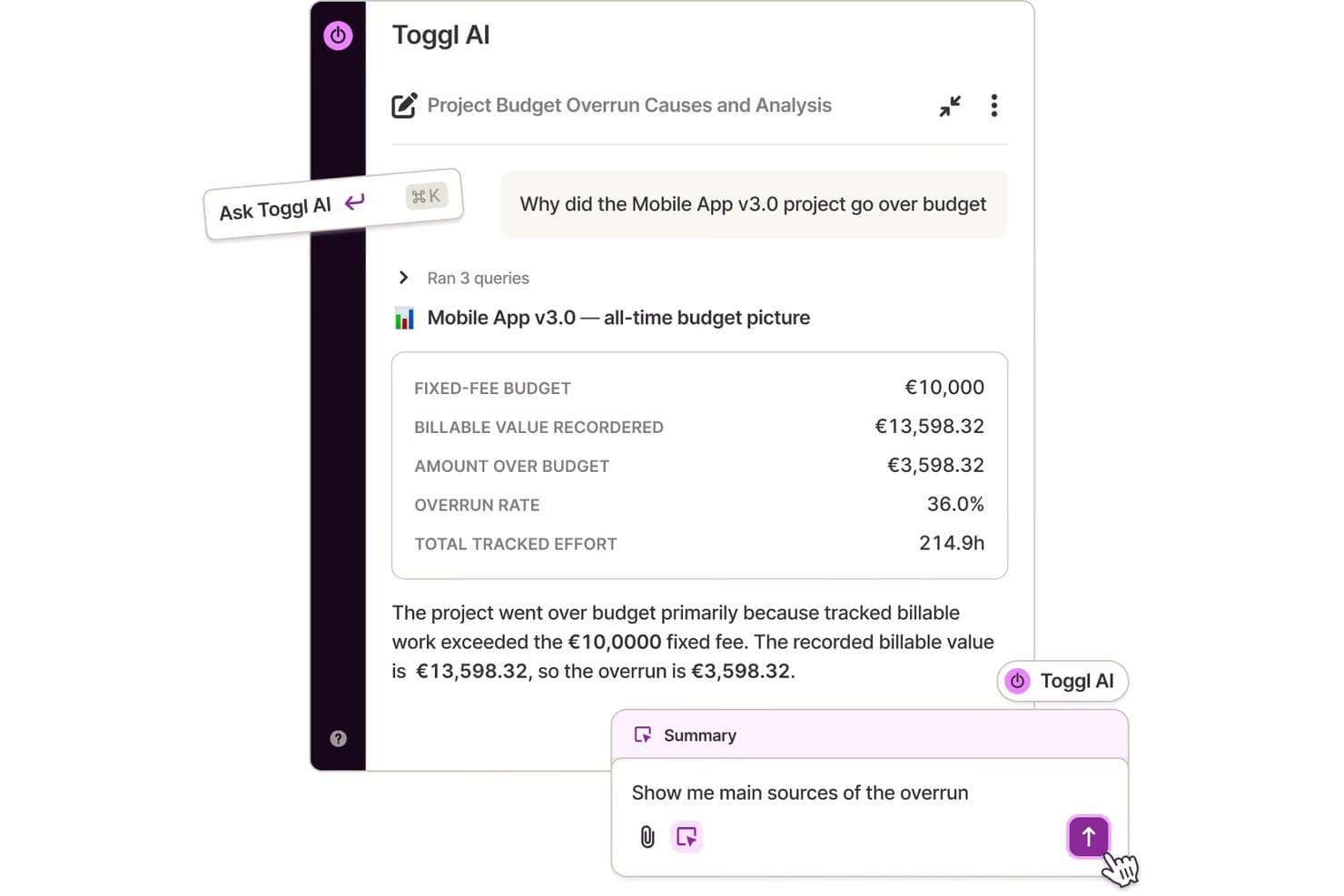
L'AI di Toggl analizza gli sforamenti del budget dei progetti tramite query in linguaggio naturale. Se cerchi uno strumento per il monitoraggio del tempo che mantenga le cose semplici, vale la pena prendere in considerazione Toggl. È progettato per professionisti e team che desiderano un inserimento manuale rapido del tempo, senza la complessità delle funzionalità di monitoraggio o sorveglianza. A differenza di Hubstaff, Toggl si concentra su un monitoraggio flessibile e gestito dagli utenti, adatto al lavoro basato su progetti e agli ambienti creativi.
Perché Toggl è una buona alternativa a Hubstaff
A differenza di Hubstaff, Toggl mette l'inserimento manuale del tempo in primo piano, risultando ideale per i team che non hanno bisogno del monitoraggio o della sorveglianza automatizzati. Ho scelto Toggl Track perché consente agli utenti di avviare, interrompere e modificare i timer oppure registrare le ore a posteriori, una soluzione ideale per il lavoro basato su progetti o per i professionisti creativi che apprezzano la flessibilità. La piattaforma supporta anche la modifica in blocco delle registrazioni del tempo e l'uso di tag per una facile organizzazione. Queste funzionalità aiutano i team a monitorare con precisione le ore fatturabili senza dare la sensazione di essere sottoposti a una microgestione.
Funzionalità principali di Toggl
Alcune altre funzionalità di Toggl Track possono aiutarti a gestire il monitoraggio del tempo e la reportistica all'interno del tuo team:
- Monitoraggio di progetti e clienti: Assegna il tempo monitorato a progetti e clienti specifici per una reportistica organizzata.
- Tariffe fatturabili: Imposta tariffe fatturabili diverse per utenti, progetti o clienti, così da supportare una fatturazione accurata.
- Report dettagliati: Genera report riepilogativi, dettagliati e settimanali per analizzare la distribuzione del tempo.
- Integrazione con il calendario: Sincronizza Google Calendar e Outlook per visualizzare il tempo monitorato insieme agli eventi programmati.
Integrazioni di Toggl
Le integrazioni includono Asana, Jira, Google Calendar, Outlook, QuickBooks Online, Salesforce, Slack, Toggl Plan, iCal e Trello.
Pros and Cons
Pros:
- L'inserimento manuale del tempo supporta un monitoraggio flessibile del lavoro
- La modifica in blocco velocizza la correzione delle registrazioni del tempo
- Il sistema di tag organizza chiaramente attività e progetti
Cons:
- Nessuna funzionalità di monitoraggio dei dipendenti o delle attività
- Rilevamento limitato dei periodi di inattività per il monitoraggio passivo
Learn more about Toggl:
Altre alternative a Hubstaff
Ecco alcune ulteriori alternative a Hubstaff che non sono state incluse nel mio elenco, ma che vale comunque la pena prendere in considerazione:
Come Valuto le Alternative a Hubstaff
Valuto su due livelli: le funzionalità di base che un sistema di rilevazione del tempo deve avere—come tariffe fatturabili e integrazioni con il payroll—e i fattori differenzianti che contano di più per i team finanziari.
Funzionalità Principali (Requisiti Fondamentali per Questa Lista)
Quando seleziono gli strumenti per la mia lista, valuto ognuno di essi su una scala da 0 (non offre la funzionalità) a 5 (eccelle in quest'area) per ciascuna funzionalità principale elencata di seguito. Poi calcolo il punteggio totale dello strumento in percentuale. Ogni strumento deve raggiungere un punteggio totale minimo del 65% per essere considerato per l'inclusione.
- Rilevazione del Tempo: Cerco timer automatici, inserimento manuale e registrazione a livello di attività—come la registrazione delle ore per la chiusura mensile di un cliente specifico o per l'incarico di dichiarazione dei redditi.
- Fatturazione a Clienti e Progetti: Ogni strumento dovrebbe permettere la configurazione di tariffe fatturabili e l'assegnazione delle ore a livello di progetto, così i team possono collegare il tempo registrato alle fatture dei clienti.
- Integrazione con il Payroll: Verifico se uno strumento si collega con piattaforme di payroll come Gusto o ADP e gestisce regole sulle tariffe di pagamento, inclusi i calcoli degli straordinari.
- Monitoraggio della Produttività e delle Attività: Gli strumenti dovrebbero offrire approfondimenti a livello di attività come il tracciamento delle app, il rilevamento dell'inattività o screenshot per la gestione dello staff contabile remoto.
- Integrazioni con Software Contabili: Valuto le connessioni native con strumenti come QuickBooks, Xero e Sage per confermare che dati su tempo e costi fluiscano nel tuo GL senza reinserimenti manuali.
- Report e Tracciabilità Auditabile: I team finanziari hanno bisogno di report esportabili e filtrabili—per esempio, ore fatturabili per cliente o suddivisione dei costi del lavoro—che risultino affidabili durante audit o revisioni.
Una volta che ho un elenco di strumenti che soddisfano questi criteri, considero cosa distingue ogni piattaforma.
Fattori Differenzianti (Cosa Distingue i Fornitori)
Ecco come confronto e metto in contrasto i vari fornitori:
Funzionalità Distintive
Le notifiche di budget e previsioni sono fondamentali—cerco strumenti che avvisino i responsabili quando un incarico per un cliente si avvicina al limite di ore o costi, prima che i margini si riducano. I flussi di lavoro di approvazione configurabili sono anch'essi importanti per i team finanziari che necessitano l'approvazione dei timesheet a più livelli per mantenere la segregazione dei compiti. Valuto attentamente le dashboard di utilizzo perché vedere il rapporto tra ore fatturabili e non fatturabili a livello di studio aiuta i soci delle società di contabilità a individuare rapidamente gli incarichi poco performanti.
Oltre le Funzionalità
Conformità e sicurezza dei dati sono aspetti fondamentali—verifico la certificazione SOC 2 e i controlli di accesso basati sui ruoli, visto che questi strumenti spesso gestiscono dati di payroll e informazioni finanziarie dei clienti. Anche la struttura dei prezzi è importante, soprattutto per le società di contabilità che incrementano il personale nei periodi di punta e necessitano di piani per utente che siano flessibili senza dover sottoscrivere impegni annuali enterprise. Valuto inoltre i controlli sulla privacy del personale, come la possibilità di disabilitare il monitoraggio fuori dall'orario di lavoro, essenziale per i team distribuiti che operano in diversi contesti regolatori.
Perché cercare un'alternativa a Hubstaff?
Sebbene Hubstaff sia una buona scelta per quanto riguarda i software di monitoraggio del tempo e gli strumenti di gestione dei progetti, ci sono diversi motivi per cui alcuni utenti cercano soluzioni alternative. Potresti cercare un'alternativa a Hubstaff perché…
- Vuoi monitorare il tempo senza controllare i dipendenti
- Hai bisogno di opzioni più flessibili per l'inserimento manuale del tempo
- Richiedi funzionalità avanzate per gli strumenti di pianificazione del budget dei progetti
- Hai bisogno di una migliore integrazione con il tuo sistema paghe
- Vuoi una soluzione più adatta a liberi professionisti e piccoli team
- Hai bisogno del supporto per i requisiti di conformità internazionali
Se ti riconosci in una di queste situazioni, sei nel posto giusto. Il mio elenco contiene diverse alternative a Hubstaff più adatte ai team che affrontano queste difficoltà con Hubstaff e cercano soluzioni alternative.
Funzionalità
Ecco alcune delle principali funzionalità di Hubstaff, per aiutarti a mettere a confronto ciò che offrono le soluzioni alternative:
- Monitoraggio automatico del tempo con timer di avvio/arresto
- Cattura di schermate per il monitoraggio delle attività
- Monitoraggio della posizione GPS per i team mobili
- Fogli presenze online e gestione delle presenze
- Integrazione dei salari con i principali fornitori
- Budgeting dei progetti e monitoraggio dei costi
- Misurazione della produttività con livelli di attività
- Strumenti di fatturazione per le ore fatturabili
- Funzionalità di assegnazione di attività e progetti
- Dashboard dettagliate per report e analisi