

Una valida alternativa a Rippling combina funzionalità affidabili per le risorse umane (HR), le buste paga e la gestione della forza lavoro con la flessibilità necessaria per adattarsi alle esigenze specifiche della tua azienda. Se stai cercando alternative a Rippling, probabilmente stai valutando opzioni in grado di gestire requisiti di conformità complessi, automatizzare i processi di routine e fornire informazioni chiare sulla forza lavoro, senza rinunciare alla facilità d’uso o all’integrazione con i sistemi esistenti. Questo elenco ti aiuterà a confrontare le principali piattaforme per la gestione della forza lavoro, così potrai scegliere con sicurezza una soluzione adatta ai tuoi requisiti operativi, in grado di supportare il tuo team e di aiutare la tua startup o la tua grande azienda a progredire.
Che cos’è Rippling?
Rippling è un software per la gestione della forza lavoro che riunisce HR, buste paga, gestione dei benefit e gestione IT in un’unica piattaforma. Aiuta le aziende ad automatizzare l’inserimento dei dipendenti, gestire la conformità e centralizzare i dati della forza lavoro. Rippling è pensato per le organizzazioni che desiderano semplificare i processi HR fondamentali, collegarsi a strumenti di terze parti e mantenere una visione d’insieme della propria forza lavoro. La sua flessibilità e le opzioni di integrazione lo rendono una scelta popolare per le aziende con esigenze operative in evoluzione.
Tabella di confronto delle alternative a Rippling
Questa tabella di confronto riassume i dettagli dei prezzi delle mie principali alternative a Rippling:
| Tool | Best For | Trial Info | Price | ||
|---|---|---|---|---|---|
| 1 | Ideale per la precisione dei dati delle paghe gestiti dai dipendenti | Demo gratuita disponibile | Prezzo su richiesta | Website | |
| 2 | Ideale per un responsabile paghe dedicato per ciascun cliente | Demo gratuita disponibile | Da $29/dipendente/mese | Website | |
| 3 | Migliore con oltre 150 integrazioni predefinite con altri software | Demo gratuita disponibile | Da $10/utente/mese | Website | |
| 4 | Ideale per regole personalizzate di rilevazione presenze | Prova gratuita di 30 giorni + demo disponibile | Da $50/mese | Website | |
| 5 | Ideale per la pianificazione della forza lavoro su scala aziendale | Demo gratuita disponibile | Prezzi su richiesta | Website | |
| 6 | Ideale per la visualizzazione organizzativa | Demo gratuita + piano gratuito disponibile | Da $5/dipendente/mese (fatturato annualmente) | Website | |
| 7 | Ideale per analisi unificate HR e finanza | Demo gratuita disponibile | Prezzo su richiesta | Website | |
| 8 | Ideale per il calcolo continuo della retribuzione | Demo gratuita disponibile | Prezzo su richiesta | Website | |
| 9 | Ideale per buste paga e automazione fiscale | Demo gratuita disponibile | Prezzi su richiesta | Website | |
| 10 | Ideale per l'ottimizzazione della pianificazione tramite intelligenza artificiale | Demo gratuita disponibile | Prezzi su richiesta | Website |


Perché fidarsi dei nostri consigli sui software
6,700+
Reviews
20
Industry experts
16+
Evaluation factors
14
Years
Le nostre recensioni riflettono il nostro giudizio indipendente, non un discorso di vendita. Scopri come manteniamo la trasparenza.
Per questa guida, abbiamo valutato gli strumenti attraverso test pratici e ricerche indipendenti, assegnando un punteggio agli strumenti in base ai nostri criteri di selezione.
Le nostre recensioni riflettono il nostro giudizio editoriale umano, non un discorso di vendita.
Recensioni delle migliori alternative a Rippling
Di seguito trovi i miei riepiloghi dettagliati delle alternative a Rippling incluse nel mio elenco ristretto. Le mie recensioni offrono una panoramica approfondita delle funzionalità, dei casi d’uso ideali e delle integrazioni di ciascuna piattaforma, per aiutarti a trovare quella più adatta a te.
 Ideale per la precisione dei dati delle paghe gestiti dai dipendenti
- Demo gratuita disponibile
- Prezzo su richiesta
Visit WebsiteCustomer Rating:4.3/5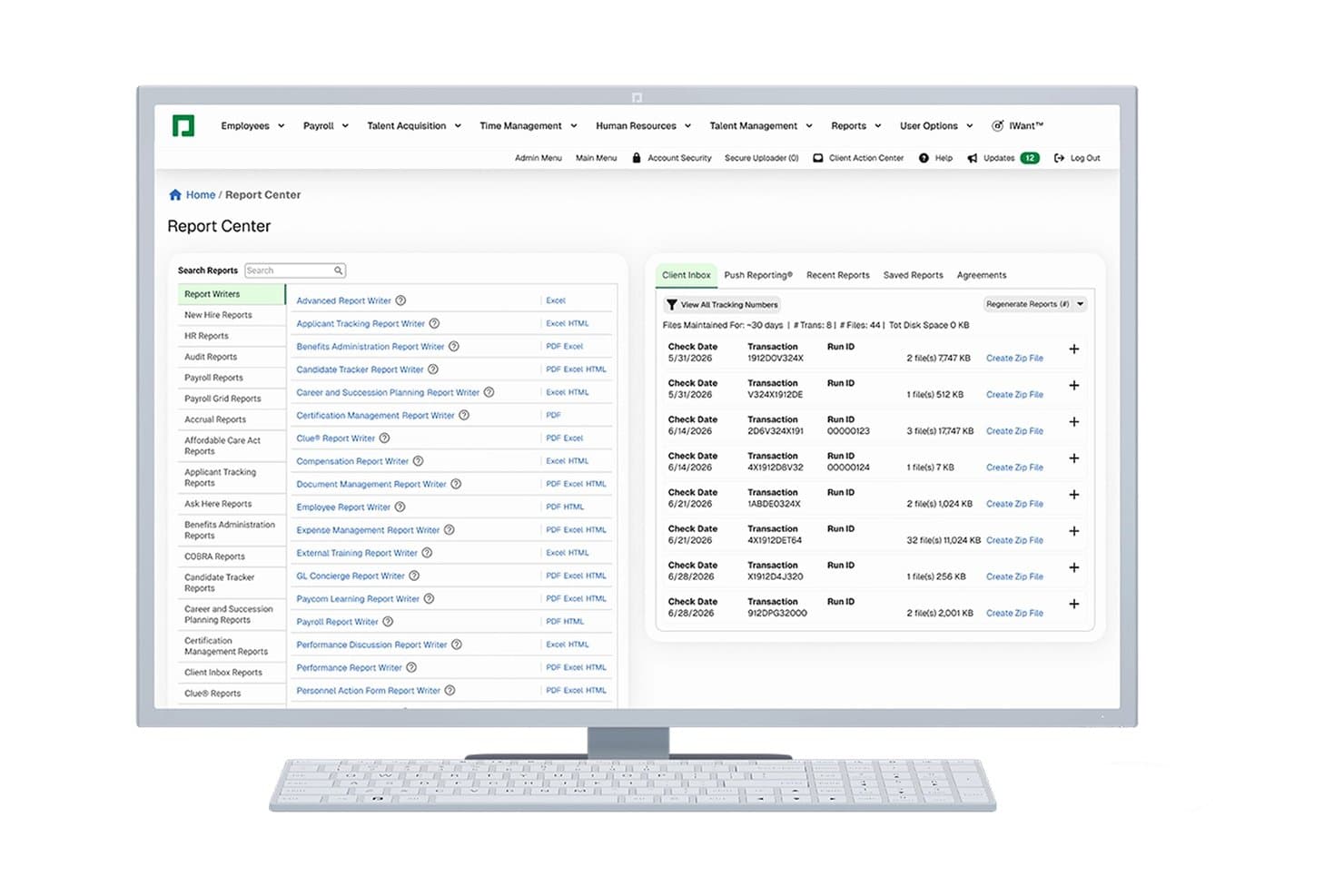
Paycom offre un Centro Report centralizzato con diversi editor di report, una lista di report ricercabile e una Client Inbox che mostra la cronologia delle transazioni delle paghe. Paycom è una piattaforma HCM a database unico progettata per aziende di medie dimensioni negli Stati Uniti che desiderano gestire paghe, risorse umane, benefit e monitoraggio delle presenze senza dover integrare più sistemi.
Per chi è migliore Paycom?
Paycom è adatto a responsabili delle paghe e team HR di aziende con sede negli Stati Uniti che abbiano tra 50 e 1.000 dipendenti e necessitino di una piattaforma unica per gestire l'intero ciclo di vita del dipendente.
Perché Paycom è una valida alternativa a Rippling
Ho inserito Paycom tra le mie scelte migliori grazie a Beti®, la sua funzione di elaborazione delle paghe gestita dai dipendenti che segnala eventuali discrepanze riportandole agli stessi dipendenti prima dell'invio definitivo. Invece che far correggere eventuali errori dal reparto HR successivamente, sono gli stessi dipendenti a rivedere e correggere i propri dati in tempo reale. Questo approccio a ciclo chiuso, basato sul database unico di Paycom, garantisce che le paghe inviate siano corrette fin dall'inizio senza richiedere una revisione manuale tra il dipendente e il ciclo finale delle paghe.
Funzionalità principali di Paycom
- GL Concierge: Associa i dati delle paghe direttamente ai conti del libro mastro per semplificare la preparazione e l'esportazione delle registrazioni contabili.
- Direct Data Exchange: Visualizza e valuta l'efficienza dei processi HR con dashboard di reportistica integrate attraverso l'intera suite HCM.
- Manager on-the-Go mobile app: Approva permessi, spese e azioni sul personale in modo sicuro dal dispositivo mobile.
- Strumenti per la conformità ACA e COBRA: Monitora l'idoneità e gestisci automaticamente le dichiarazioni richieste dalle normative ACA e COBRA.
Integrazioni Paycom
Le integrazioni native non sono attualmente elencate. È disponibile una REST API per integrazioni e connessioni personalizzate.
Pros and Cons
Pros:
- I dipendenti possono autocorreggere gli errori di busta paga
- GL Concierge collega le paghe ai sistemi contabili
- Conformità ACA integrata nei flussi di lavoro
Cons:
- Gestione integrata delle carte aziendali non disponibile
- Supporto limitato per l'elaborazione delle paghe globali
Learn more about Paycom: Ideale per un responsabile paghe dedicato per ciascun cliente
- Demo gratuita disponibile
- Da $29/dipendente/mese
Visit WebsiteCustomer Rating:4.9/5
Deel unifica paghe, conformità e dati dei dipendenti per semplificare i pagamenti ai team globali su un'unica piattaforma. Deel Payroll offre una piattaforma globale di gestione paghe e conformità progettata per le aziende che gestiscono team o collaboratori internazionali. Se la tua organizzazione deve pagare dipendenti in diversi Paesi rispettando le normative locali, Deel Payroll risponde direttamente a queste esigenze. La piattaforma si distingue tra le alternative a Rippling supportando pagamenti multi-valuta, onboarding dei collaboratori e conformità automatizzata in oltre 100 Paesi.
Per chi è ideale Deel Payroll?
Deel Payroll è perfetto per aziende internazionali o team HR che desiderano un supporto dedicato per la gestione delle paghe di dipendenti e collaboratori in tutto il mondo.
Perché Deel Payroll è una valida alternativa a Rippling
Uno dei motivi per cui ho scelto Deel Payroll come alternativa a Rippling è il suo impegno a fornire a ogni cliente un responsabile paghe dedicato. Questo approccio offre al tuo team un unico punto di riferimento per domande sulle paghe, questioni di conformità e guida sui processi, il che può essere particolarmente prezioso per aziende con operazioni internazionali complesse. Apprezzo il fatto che i responsabili dedicati di Deel Payroll aiutino a navigare tra le leggi sul lavoro locali e a garantire pagamenti puntuali e accurati in più Paesi. Questo livello di supporto personalizzato non è sempre disponibile con altre piattaforme per la gestione paghe, rendendo Deel Payroll una scelta solida per le organizzazioni che valorizzano un servizio pratico e diretto.
Caratteristiche principali di Deel Payroll
Altre funzionalità di Deel Payroll che potrebbero interessare i team amministrativi e HR includono:
- Gestione paghe multi-valuta: Paga dipendenti e collaboratori in oltre 150 valute direttamente dalla piattaforma.
- Generazione automatica di documenti fiscali: Genera e distribuisci modelli e documenti di conformità fiscale per ciascun Paese in cui operi.
- Flussi di lavoro per l'onboarding dei collaboratori: Semplifica l'onboarding con creazione automatica dei contratti, raccolta dei documenti e supporto per la firma digitale.
- Gestione globale dei benefit: Offri pacchetti di benefit localizzati ai dipendenti in diversi Paesi tramite gli strumenti di gestione dei benefit di Deel.
Integrazioni con Deel Payroll
Le integrazioni includono SAP SuccessFactors, NetSuite, Slack, Google Workspace, Humaans, Ramp, FaceUp, CrowdStrike, Human Interest, Hofy e altri.
Pros and Cons
Pros:
- Copertura della conformità globale in più Paesi
- Onboarding rapido per PMI in tempi brevi
- Classificazione e documentazione dei collaboratori automatizzate
Cons:
- Nessuna gestione integrata dei benefit per dipendenti negli Stati Uniti
- Le opzioni di personalizzazione dei report sono limitate
Learn more about Deel Payroll: Migliore con oltre 150 integrazioni predefinite con altri software
- Demo gratuita disponibile
- Da $10/utente/mese
Visit WebsiteCustomer Rating:4.5/5
Dashboard di BambooHR® che mostra i profili dei dipendenti, iscrizione ai benefit, tracciamento delle assenze e funzionalità di gestione delle paghe. BambooHR è una piattaforma HR basata su cloud progettata per piccole e medie imprese che desiderano centralizzare i dati dei dipendenti, automatizzare le attività delle risorse umane e migliorare la gestione del personale. La troverai particolarmente utile se hai bisogno di semplificare l'onboarding, tracciare le assenze e gestire la conformità in un unico luogo.
Per chi è più indicato BambooHR®?
I team HR di piccole e medie imprese che necessitano di ampie opzioni di integrazione con il loro software già in uso.
Perché BambooHR® è una valida alternativa a Rippling
Ho scelto BambooHR® perché il mio team può collegarlo a oltre 150 strumenti aziendali senza sviluppo personalizzato. Mi piace il fatto che possiamo sincronizzare i dati HR con le piattaforme di payroll, benefit e recruiting che utilizziamo già. In pratica, ciò significa che l'onboarding e le modifiche dei dipendenti fluiscono automaticamente tra i sistemi. Questo livello di integrazione ci fa risparmiare tempo e riduce gli errori manuali rispetto ad altre piattaforme HR.
Caratteristiche principali di BambooHR®
- Portale self-service per i dipendenti: I dipendenti possono aggiornare le informazioni personali e accedere direttamente ai documenti.
- Workflow di approvazione personalizzabili: Imposta approvazioni a più livelli per assenze, modifiche e richieste.
- Modulo per la gestione delle performance: Tieni traccia degli obiettivi, esegui valutazioni e raccogli feedback in un unico posto.
- Archiviazione documenti e firme elettroniche: Conserva i file HR in modo sicuro e raccogli firme digitali dai collaboratori.
Integrazioni di BambooHR®
BambooHR offre oltre 150 integrazioni native, tra cui ADP, QuickBooks, Slack, Greenhouse, Checkr, Okta, Zapier, Lattice, PayScale e Indeed. È disponibile un'API per integrazioni personalizzate.
Pros and Cons
Pros:
- Funzionalità integrate per la gestione della conformità e dei documenti
- Portale self-service per i dipendenti con accesso mobile
- Tracciamento e approvazioni delle assenze automatizzate
Cons:
- Nessuna funzione integrata per il provisioning IT o la gestione dei dispositivi
- Gli strumenti di gestione delle performance richiedono un acquisto aggiuntivo
Learn more about BambooHR: Ideale per regole personalizzate di rilevazione presenze
- Prova gratuita di 30 giorni + demo disponibile
- Da $50/mese
Visit WebsiteCustomer Rating:4.5/5
TimeTrex mostra registri dettagliati delle presenze dei dipendenti con ore ordinarie e straordinarie. TimeTrex offre alle aziende una piattaforma flessibile di gestione della forza lavoro pensata per il monitoraggio di presenze, orari e paghe. È un’ottima soluzione se cerchi un’alternativa a Rippling che metta al centro controllo e configurabilità nel tracciamento dei dipendenti.
Per chi è ideale TimeTrex?
TimeTrex è ideale per responsabili paghe e team operativi che gestiscono personale orario con esigenze specifiche di presenze e straordinari.
Perché TimeTrex è una valida alternativa a Rippling
Ho scelto TimeTrex proprio per quanto permette di personalizzare le regole di rilevazione presenze. Si possono creare politiche sugli straordinari su misura, definire regole di arrotondamento e impostare calendari complessi per i ratei che rispecchiano realmente le proprie pratiche di pagamento—non solo i valori predefiniti. In pratica, significa che i team con turni variabili, tariffe orarie multiple o esigenze normative di settore possono modellare i flussi di lavoro reali direttamente nel sistema. Ritengo che questo livello di controllo sia difficile da trovare nella maggior parte delle piattaforme HR tutto-in-uno, incluso Rippling.
Funzionalità principali di TimeTrex
- Portale self-service per dipendenti: I dipendenti possono inoltrare richieste di ferie, accedere alle buste paga e aggiornare i propri dati direttamente dal portale.
- Job costing: Assegna ore di lavoro e costi a specifici progetti o attività per monitorare la redditività in tempo reale.
- GPS e geofencing: Imposta confini basati sulla posizione affinché i dipendenti possano timbrare solo quando sono fisicamente in sede o all’interno del perimetro di un determinato cantiere.
- Monitoraggio della conformità ACA e FMLA: Tieni automaticamente traccia delle ore lavorate e delle assenze dei dipendenti per supportare la reportistica dell’Affordable Care Act e la gestione del Family and Medical Leave Act.
Integrazioni di TimeTrex
TimeTrex offre integrazioni native con QuickBooks, ADP, Sage e altri. È disponibile anche un’API per integrazioni personalizzate.
Pros and Cons
Pros:
- Politiche di rilevazione presenze altamente configurabili
- Supporta l’uso sia su cloud che on-premise
- Offre calcoli avanzati per i ratei
Cons:
- L’interfaccia risulta datata per alcuni utenti
- Meno moduli HR rispetto alle soluzioni tutto-in-uno
Learn more about TimeTrex: Ideale per la pianificazione della forza lavoro su scala aziendale
- Demo gratuita disponibile
- Prezzi su richiesta
Visit WebsiteCustomer Rating:4.6/5
Oracle offre un ERP basato sul cloud per la gestione delle finanze, delle catene di approvvigionamento e della forza lavoro. Per le organizzazioni che gestiscono forze lavoro ampie e complesse, Oracle offre una suite di strumenti progettati per la pianificazione e l'analisi della forza lavoro su scala aziendale. È particolarmente adatto alle aziende globali e ai responsabili delle risorse umane che devono allineare talenti, budget e strategia aziendale in più sedi. A differenza di Rippling, Oracle offre funzionalità avanzate di modellazione, pianificazione di scenari e integrazione approfondita con i sistemi finanziari per supportare le decisioni sulla forza lavoro a lungo termine.
Perché Oracle è una buona alternativa a Rippling
Se la tua azienda deve gestire la pianificazione della forza lavoro su scala aziendale, Oracle si distingue per le sue avanzate funzionalità di modellazione e analisi. Ho scelto Oracle perché consente di prevedere il numero di dipendenti, modellare diversi scenari relativi alla forza lavoro e allineare i piani di assunzione agli obiettivi aziendali.
La sua piattaforma supporta strutture organizzative complesse e offre una visibilità approfondita sui costi del lavoro e sull'allocazione delle risorse. Per le aziende che necessitano di qualcosa di più delle funzionalità HR di base e della gestione delle buste paga, Oracle offre gli strumenti di pianificazione strategica e gestione dei dipendenti che Rippling non comprende.
Funzionalità principali di Oracle
Altre funzionalità che rendono Oracle prezioso per la gestione della forza lavoro includono:
- Gestione di orari e lavoro: Tieni traccia delle ore lavorate, delle presenze e della pianificazione dei turni dei dipendenti in più sedi.
- Elaborazione globale delle buste paga: Gestisci la conformità normativa e i pagamenti in diversi Paesi da un'unica piattaforma.
- Suite per l'acquisizione dei talenti: Gestisci il recruiting, il monitoraggio dei candidati e i flussi di lavoro di inserimento.
- Portale self-service per i dipendenti: Consenti ai dipendenti di aggiornare le informazioni personali, visualizzare i cedolini paga e richiedere permessi.
Integrazioni di Oracle
Le integrazioni includono Salesforce, SAP, Workday, Microsoft Office 365, ServiceNow e Adobe Sign.
Pros and Cons
Pros:
- Modellazione avanzata della forza lavoro
- Integrazione approfondita con i moduli di pianificazione finanziaria
- Conformità integrata ai requisiti normativi globali
Cons:
- Richiede notevoli risorse IT
- Funzionalità HR e di gestione delle buste paga limitate per le piccole aziende
Learn more about Oracle: Ideale per la visualizzazione organizzativa
- Demo gratuita + piano gratuito disponibile
- Da $5/dipendente/mese (fatturato annualmente)
Visit WebsiteCustomer Rating:4.4/5
ChartHop visualizza i dati della forza lavoro per supportare la pianificazione HR e le analisi delle persone. Per i team finanziari e HR interni che necessitano di una visione chiara della struttura organizzativa, ChartHop offre strumenti avanzati per organigrammi e visualizzazione. È particolarmente utile per aziende che gestiscono una crescita rapida, linee di riporto complesse o team remoti. Diversamente da Rippling, ChartHop consente di integrare pianificazione della forza lavoro, dati DEI e informazioni sulla retribuzione direttamente sugli organigrammi dinamici.
Perché ChartHop è una valida alternativa a Rippling
Se hai bisogno di una visualizzazione organizzativa più avanzata rispetto a quella offerta da Rippling, ChartHop è un'ottima scelta. Ho selezionato ChartHop perché permette di creare organigrammi interattivi che si aggiornano automaticamente al variare della forza lavoro. Puoi anche sovrapporre la pianificazione degli organici, i dati retributivi e le metriche DEI direttamente sulla struttura organizzativa per un'analisi più approfondita. Questo livello di visualizzazione e stratificazione dei dati aiuta i team HR e finanziari a prendere decisioni più informate sulla pianificazione della forza lavoro e sul design organizzativo.
Funzionalità principali di ChartHop
Altre funzionalità di ChartHop che mi hanno colpito includono:
- Costruttore di report personalizzati: Crea report su misura utilizzando dati relativi al personale, retribuzioni e dati demografici.
- Workflow di aggiornamento guidato dai manager: I manager possono inserire e tracciare le modifiche ai dati dei dipendenti direttamente sulla piattaforma.
- Controlli di accesso basati sui ruoli: Imposta permessi dettagliati per diversi utenti e team al fine di proteggere i dati sensibili.
- Pagine profilo dei dipendenti: Archivia e mostra informazioni dettagliate dei dipendenti, inclusa la storia lavorativa e note sulle performance.
Integrazioni ChartHop
Le integrazioni includono ADP, BambooHR, Greenhouse, Gusto, Justworks e Workday.
Pros and Cons
Pros:
- Visualizzazione dell'organigramma straordinaria
- Strumenti di pianificazione organico in tempo reale
- Directory trasparente a livello aziendale
Cons:
- Costo elevato per team piccoli
- La pulizia iniziale dei dati è laboriosa
Learn more about ChartHop: Ideale per analisi unificate HR e finanza
- Demo gratuita disponibile
- Prezzo su richiesta
Visit WebsiteCustomer Rating:4.3/5
Workday supporta HCM, finanza e analisi in una piattaforma enterprise cloud unificata. Workday riunisce i dati di HR e finanza in un'unica piattaforma cloud, rendendolo una scelta ideale per le organizzazioni che desiderano analisi e reportistica unificati. Questa soluzione è particolarmente utile per i leader di finanza e HR che hanno bisogno di collegare la pianificazione della forza lavoro con il budget, le previsioni e le informazioni operative. Se la tua azienda vuole migliorare il processo decisionale interfunzionale, Workday offre un livello di integrazione superiore rispetto alla maggior parte degli strumenti di gestione della forza lavoro.
Perché Workday è una buona alternativa a Rippling
Per le organizzazioni che desiderano unificare le analisi HR e finanziarie, Workday offre un livello di integrazione difficile da eguagliare. Ho scelto Workday perché collega la gestione della forza lavoro, il payroll e la pianificazione finanziaria in un'unica piattaforma, permettendoti di analizzare headcount, costi e performance fianco a fianco.
Le sue analisi in tempo reale e le dashboard personalizzabili aiutano i team HR e finanza a collaborare sulle previsioni e sull'allocazione delle risorse. Se hai bisogno di una soluzione di workforce management che abbatti i silos di dati tra HR e finanza, Workday è una valida alternativa a Rippling.
Caratteristiche chiave di Workday
Altre funzionalità che rendono Workday interessante per la gestione della forza lavoro includono:
- Suite di gestione talenti: Gestisci recruiting, onboarding, performance e formazione in un unico posto.
- Rilevazione presenze: Registra le ore lavorative, la presenza e le assenze dei dipendenti con strumenti integrati.
- App mobile: Offri a dipendenti e manager l'accesso alle attività HR e finanziarie ovunque si trovino.
- Monitoraggio della conformità: Tieni traccia dei cambiamenti normativi e automatizza i compiti di compliance a livello regionale.
Integrazioni Workday
Le integrazioni includono Salesforce, Microsoft Teams, Slack, ServiceNow, ADP e Google Workspace.
Pros and Cons
Pros:
- Strumenti integrati di compliance per requisiti globali
- App mobile per accesso remoto
- Suite di gestione talenti
Cons:
- La configurazione di report personalizzati può richiedere competenze tecniche
- Prezzi non trasparenti
 Ideale per il calcolo continuo della retribuzione
- Demo gratuita disponibile
- Prezzo su richiesta
Visit WebsiteCustomer Rating:4.2/5
Dayforce gestisce retribuzioni, forza lavoro e talenti su un'unica piattaforma per i team HR. Dayforce si distingue per le organizzazioni che necessitano di una precisione della retribuzione in tempo reale e di informazioni aggiornate sui costi del lavoro. È particolarmente utile per i team finanziari e delle risorse umane in settori con pianificazioni complesse o retribuzioni variabili, come il retail, la produzione e l'assistenza sanitaria. A differenza di Rippling, Dayforce calcola la retribuzione in modo continuo, consentendo di rilevare errori e gestire la conformità prima delle scadenze del libro paga.
Perché Dayforce è una valida alternativa a Rippling
Ciò che distingue Dayforce è il suo motore di calcolo della retribuzione continua, che aggiorna i dati del libro paga in tempo reale man mano che vengono lavorate le ore e si verificano cambiamenti. Ho scelto Dayforce per i team che hanno bisogno di rilevare tempestivamente errori nel libro paga e gestire i rischi di conformità prima della chiusura delle buste paga.
Il sistema a registro dati unico della piattaforma HR assicura che tempi, presenze e pagamenti siano sempre allineati, riducendo la necessità di riconciliazioni manuali. Se desideri un maggiore controllo e visibilità sul libro paga lungo tutto il ciclo di retribuzione, Dayforce rappresenta una solida alternativa a Rippling.
Caratteristiche chiave di Dayforce
Oltre alle sue capacità di gestione del libro paga in tempo reale, ho trovato utili anche queste funzionalità:
- Pianificazione della forza lavoro: Crea, gestisci e modifica i turni dei dipendenti in base alle esigenze aziendali e alle regole sul lavoro.
- Accesso tramite app mobile: Dipendenti e responsabili possono consultare i turni, richiedere permessi e approvare modifiche direttamente dai dispositivi mobili.
- Gestione documentale: Archivia, organizza e accedi in modo sicuro ai documenti dei dipendenti all'interno della piattaforma.
- Analisi e reportistica: Genera report dettagliati su forza lavoro e buste paga a supporto della conformità e delle decisioni.
Integrazioni Dayforce
Le integrazioni native non sono attualmente elencate da Dayforce.
Pros and Cons
Pros:
- Registro dati unico che mantiene sincronizzati HR e retribuzioni
- App mobile per gestire turni e richieste
- Funzionalità avanzate di pianificazione
Cons:
- Interfaccia poco intuitiva e non user-friendly
- Caricamento lento e prestazioni poco reattive
Learn more about Dayforce: 9Ideale per buste paga e automazione fiscale
ADP
- Demo gratuita disponibile
- Prezzi su richiesta
Visit WebsiteCustomer Rating:4.1/5
ADP gestisce buste paga, risorse umane e gestione dei talenti per team di tutte le dimensioni. Quando l'accuratezza delle buste paga e la conformità fiscale sono priorità assolute, ADP offre strumenti di automazione progettati per ridurre il lavoro manuale e il rischio. È una scelta ideale per i team finanziari e i professionisti delle risorse umane in aziende di ogni dimensione che devono gestire buste paga complesse, detrazioni e versamenti governativi. A differenza di Rippling, ADP è specializzata nell'automatizzare i calcoli delle buste paga e la presentazione delle dichiarazioni fiscali in più giurisdizioni, aiutandoti a rimanere conforme man mano che la tua forza lavoro cresce.
Perché ADP è una valida alternativa a Rippling
Per le aziende che necessitano di una soluzione affidabile per le buste paga e di automazione fiscale, ADP offre strumenti specializzati che vanno oltre ciò che Rippling offre. Ho scelto ADP perché calcola automaticamente le buste paga, gestisce le detrazioni e presenta le dichiarazioni fiscali in conformità con le normative locali, statali e federali.
La sua piattaforma gestisce anche i moduli fiscali di fine anno e supporta la gestione delle buste paga in più giurisdizioni, fondamentale per le aziende con dipendenti in regioni diverse. Se vuoi ridurre il lavoro manuale sulle buste paga e minimizzare i rischi di non conformità, ADP è un'alternativa da prendere seriamente in considerazione.
Funzionalità principali di ADP
Altre funzionalità che rendono ADP utile per la gestione della forza lavoro includono:
- Portale self-service dipendenti: I dipendenti possono accedere alle buste paga, aggiornare i dati personali e gestire le informazioni per l'accredito diretto.
- Monitoraggio ore e presenze: Traccia le ore di lavoro dei dipendenti, gestisci i turni e monitora la presenza in tempo reale.
- Gestione dei benefit: Amministra benefit come salute, dentale, pensione e altri vantaggi per i dipendenti da un'unica dashboard centrale.
- Strumenti per il reclutamento e l'onboarding: Pubblica annunci di lavoro, monitora i candidati e automatizza i processi di onboarding per i nuovi assunti.
Integrazioni ADP
Le integrazioni includono QuickBooks, Xero, Sage, Microsoft Dynamics 365, Oracle, SAP SuccessFactors e Salesforce.
Pros and Cons
Pros:
- Automazione della presentazione delle dichiarazioni fiscali delle buste paga
- Supporta buste paga multi-paese
- Si integra con le principali piattaforme di contabilità e software HR
Cons:
- Tempi di risposta dell'assistenza clienti non sempre coerenti
- Gli strumenti di reportistica possono richiedere una formazione aggiuntiva
 10Ideale per l'ottimizzazione della pianificazione tramite intelligenza artificiale
Legion
- Demo gratuita disponibile
- Prezzi su richiesta
Visit WebsiteCustomer Rating:4.4/5
Legion ottimizza la pianificazione dei turni, il monitoraggio degli orari e la gestione del personale orario. Se stai cercando un software di gestione della forza lavoro che utilizzi l'intelligenza artificiale per ottimizzare la pianificazione dei turni, Legion merita attenzione. Rivenditori, ristoranti e altre aziende con personale orario possono utilizzare Legion per adeguare la forza lavoro alla domanda e ridurre gli eccessi o le carenze di personale. Diversamente da Rippling, il motore basato su AI di Legion genera automaticamente orari che bilanciano le esigenze aziendali, la conformità e le preferenze dei dipendenti.
Perché Legion è una valida alternativa a Rippling
Legion si distingue per l'ottimizzazione della pianificazione tramite intelligenza artificiale, particolarmente utile per le aziende con esigenze di personale variabili. Ho scelto Legion perché i suoi modelli di machine learning prevedono la domanda e generano automaticamente i turni, allineando la forza lavoro alle reali necessità del business in tempo reale.
La piattaforma tiene inoltre conto delle preferenze dei dipendenti e delle regole di conformità, riducendo il lavoro manuale di pianificazione e i possibili conflitti. Se vuoi andare oltre l'organizzazione manuale o basata su regole fisse, Legion offre un livello di automazione e intelligenza che Rippling non raggiunge.
Caratteristiche principali di Legion
Altre funzionalità utili che ho trovato in Legion includono:
- Portale self-service per i dipendenti: Il personale può visualizzare i turni, scambiare orari e richiedere ferie direttamente dal portale.
- Rilevamento automatico di presenze e orari: Il sistema registra le ore di lavoro e le presenze, riducendo l'inserimento manuale.
- Gestione dei costi del lavoro: Monitora e gestisci in tempo reale i costi del personale per rimanere entro il budget.
- Monitoraggio della conformità: Strumenti integrati aiutano a garantire che i turni rispettino le normative sul lavoro e le policy aziendali.
Integrazioni Legion
Le integrazioni includono Workday, SAP SuccessFactors, ADP, UKG e Zipline.
Pros and Cons
Pros:
- Pianificazione precisa tramite AI
- App mobile intuitiva per il personale
- Riduce i costi e gli sprechi di manodopera
Cons:
- Errori occasionali nelle previsioni dell'AI
- Processo di integrazione complesso
Learn more about Legion:
Altre alternative a Rippling
Ecco alcune ulteriori alternative a Rippling che non sono state incluse nel mio elenco ristretto, ma che vale comunque la pena prendere in considerazione:
- 11ZendeskIdeale per integrare i ticket di supporto ai dipendenti
- 12Workforce SoftwareIdeale per la gestione della conformità globale
- 13ActivTrakIdeale per approfondimenti sulla produttività della forza lavoro
- 14Workforce.comIdeale per il monitoraggio in tempo reale dei costi del lavoro
- 15HomebaseIdeale per pianificazione team a ore
Come Valuto le Alternative a Rippling
Divido la mia valutazione in due livelli: la base che ogni strumento deve superare—paghe, HRIS, sincronizzazione con la contabilità generale (GL)—e i fattori differenzianti che distinguono le migliori opzioni in base alle esigenze specifiche del tuo team.
Funzionalità Principali (Requisiti Indispensabili per Questa Lista)
Quando seleziono gli strumenti per la mia lista, valuto ciascuno su una scala da 0 (non offre la funzionalità) a 5 (eccelle in quest'area) per ogni funzionalità chiave elencata di seguito. Poi, calcolo il punteggio totale dello strumento in percentuale. Ogni strumento deve raggiungere un punteggio minimo totale del 75% per essere preso in considerazione.
- Elaborazione Paghe a Servizio Completo: Verifico se ogni piattaforma gestisce nativamente il calcolo, la dichiarazione e il pagamento delle imposte invece di affidarsi a un motore di terze parti dietro le quinte.
- Gestione Dati Dipendenti HRIS: Qui conta un solido sistema di registrazione dei dipendenti—cerco flussi di onboarding, organigrammi, cronologia retributiva e tracciamento del ciclo di vita.
- Gestione dei Benefit: Ogni strumento dovrebbe supportare l'iscrizione ai benefit con collegamenti ai provider assicurativi e sincronizzazione delle detrazioni nelle buste paga, non solo il monitoraggio manuale in stile foglio di calcolo.
- Integrazioni Contabili & GL: Valuto come ciascuna piattaforma sincronizzi dati di paghe e spese con strumenti come NetSuite, QuickBooks, Sage Intacct o Xero tramite mappatura configurabile delle scritture contabili.
- Gestione Spese & Pagamenti: Carte aziendali, rimborsi o pagamento fatture collegati ai record dei dipendenti e ai centri di costo sono ciò che cerco—non solo una semplice funzione di caricamento delle ricevute.
- Supporto Multi-Entità & Globale: I team che gestiscono paghe per diverse entità legali o pagano collaboratori all'estero hanno bisogno di una vera infrastruttura, quindi valuto la profondità della copertura di ogni strumento.
Una volta che ho una lista di strumenti che risponde a questi criteri, considero cosa distingue ciascuna piattaforma.
Fattori Differenzianti (Cosa Distingue i Fornitori)
Ecco come confronto e valuto diversi fornitori:
Funzionalità Distintive
La reportistica dei costi in tempo reale è fondamentale per me. Cerco dashboard guidate dall'organico che suddividano il burn rate per dipartimento, entità o progetto senza dover prima esportare in Excel. Anche i builder per l'automazione dei flussi di lavoro sono importanti—strumenti come Gusto e Deel permettono di innescare catene di approvazione per variazioni retributive o revisioni di spese tramite regole senza codice. Valuto anche le capacità di pagamento globale dei collaboratori, poiché pagare freelancer in valuta locale senza bonifici di terzi fa davvero risparmiare tempo ai team finanziari in fase di chiusura contabile.
Oltre le Funzionalità
La trasparenza dei prezzi è una delle prime cose che valuto. Alcuni fornitori includono paghe e HRIS in un'unica tariffa per dipendente, mentre altri fanno pagare ogni modulo separatamente—questo può rapidamente far salire i costi se aggiungi benefit, gestione spese e paghe internazionali. Esamino anche con attenzione le certificazioni di conformità e sicurezza, in particolare i report SOC 1 e SOC 2, dato che i team finanziari che gestiscono dati paghe necessitano di controlli pronti per l'audit. Anche il supporto all'implementazione è importante. Una migrazione pulita della storia fiscale e delle mappature contabili può fare la differenza tra un roll-out di due settimane e mesi di riconciliazione faticosa.
Perché cercare un’alternativa a Rippling?
Sebbene Rippling sia una buona scelta per la gestione della forza lavoro, ci sono diversi motivi per cui alcuni utenti cercano soluzioni alternative. Potresti essere alla ricerca di un’alternativa a Rippling perché…
- Hai bisogno di strumenti più avanzati per la pianificazione dei turni orari
- La tua azienda opera al di fuori dei Paesi supportati da Rippling
- Desideri una soluzione conveniente incentrata sui team organizzati per turni o sul personale operativo
- Hai bisogno di un’integrazione più approfondita delle buste paga con i fornitori locali
- Il tuo team ha bisogno di funzionalità integrate di comunicazione o messaggistica
- Hai bisogno di servizi per le buste paga e della gestione dei benefit per le assunzioni internazionali
Se ti riconosci in una di queste situazioni, sei nel posto giusto. Il mio elenco contiene diverse opzioni di software per la gestione della forza lavoro e delle risorse umane più adatte ai team che affrontano queste difficoltà con Rippling e cercano soluzioni alternative.
Funzionalità principali di Rippling
Ecco alcune delle funzionalità principali di Rippling, per aiutarti a mettere a confronto ciò che offrono le soluzioni alternative:
- Elaborazione automatizzata delle buste paga per dipendenti retribuiti con stipendio fisso o a ore
- Flussi di lavoro per l'inserimento dei dipendenti con gestione dei documenti
- Monitoraggio delle ore lavorate e delle presenze con supporto alla geolocalizzazione
- Amministrazione dei benefit e strumenti per l'adesione durante il periodo di iscrizione aperta
- Sistema integrato di gestione delle risorse umane per i dati dei dipendenti e la conformità normativa
- Automazione personalizzabile dei flussi di lavoro per le attività delle risorse umane e informatiche
- Gestione globale della forza lavoro con supporto per più Paesi
- Marketplace di applicazioni integrato per connettere strumenti di terze parti
- Controlli degli accessi basati sui ruoli e gestione delle autorizzazioni
- Funzionalità di reportistica e dashboard di analisi per i dati sulla forza lavoro