

Stanco di software per il monitoraggio del tempo e la fatturazione che sembrano richiedere più lavoro di quanto valgano? Fogli presenze disordinati, errori nelle fatture e pagamenti in ritardo non si limitano a rallentarti: danneggiano i tuoi profitti. Hai bisogno di uno strumento che registri le ore senza sforzo, automatizzi la fatturazione e mantenga stabile il flusso di cassa senza complicazioni aggiuntive.
Per anni, in qualità di controller finanziario, ho analizzato software che promettono l'automazione ma finiscono per creare ancora più stress. I migliori strumenti semplificano davvero la vita: fanno risparmiare tempo, migliorano la precisione e mantengono la fatturazione libera da frustrazioni.
Per semplificare la tua ricerca, ho testato e recensito i migliori software per il monitoraggio del tempo e la fatturazione disponibili. Queste soluzioni semplificheranno il monitoraggio, velocizzeranno la fatturazione e ti aiuteranno a tenere sotto controllo le tue finanze. Troviamo quella giusta per te!
Perché fidarsi dei nostri consigli sui software
6,700+
Reviews
20
Industry experts
16+
Evaluation factors
14
Years
Le nostre recensioni riflettono il nostro giudizio indipendente, non un discorso di vendita. Scopri come manteniamo la trasparenza.
Per questa guida, abbiamo valutato gli strumenti attraverso test pratici e ricerche indipendenti, assegnando un punteggio agli strumenti in base ai nostri criteri di selezione.
Le nostre recensioni riflettono il nostro giudizio editoriale umano, non un discorso di vendita.
Tabella comparativa dei software per il monitoraggio del tempo e la fatturazione
Questa tabella comparativa riassume i dettagli sui prezzi delle mie migliori selezioni di software per il monitoraggio del tempo e la fatturazione:
| Tool | Best For | Trial Info | Price | ||
|---|---|---|---|---|---|
| 1 | Ideale per la fatturazione con modelli cliente misti | Prova gratuita di 14 giorni + demo gratuita disponibile | A partire da $24/utente/mese | Website | |
| 2 | Ideale per il monitoraggio della redditività in tempo reale | Prova gratuita di 14 giorni | A partire da $10/utente/mese | Website | |
| 3 | Ideale per report visivi sui costi del lavoro | Piano gratuito + prova gratuita di 30 giorni + demo gratuita disponibile | A partire da $9/utente/mese (fatturato annualmente) | Website | |
| 4 | Ideale per gli strumenti integrati di fatturazione e l'emissione delle fatture | Piano gratuito + prova gratuita di 30 giorni + demo gratuita disponibile | A partire da $6/utente/mese (fatturato annualmente) | Website | |
| 5 | Ideale per il monitoraggio personalizzabile del tempo fino alla fatturazione | Piano gratuito + prova gratuita di 7 giorni disponibile | Da $3.99/utente/mese (fatturato annualmente) | Website | |
| 6 | Ideale per il monitoraggio automatico del tempo | Prova gratuita di 14 giorni + piano gratuito + demo gratuita disponibile | Da $3.99/utente/mese (fatturazione annuale) | Website | |
| 7 | Ideale per studi di contabilità | Demo gratuita disponibile | Da $59/utente/mese (fatturazione annuale) | Website | |
| 8 | Ideale per report di fatturazione dettagliati | Piano gratuito disponibile + prova gratuita di 14 giorni | A partire da $5.83/utente/mese (fatturazione annuale) | Website | |
| 9 | Ideale per la contabilità delle piccole imprese | Prova gratuita di 30 giorni disponibile | Da $2.50/mese | Website | |
| 10 | Ideale per team creativi | Versione demo gratuita disponibile | Da $10.50/utente/mese (fatturazione annuale) | Website |


Recensione dei migliori software per il monitoraggio del tempo e la fatturazione
Di seguito trovi i miei riepiloghi dettagliati dei migliori software per il monitoraggio del tempo e la fatturazione inclusi nella mia selezione. Le mie recensioni offrono uno sguardo approfondito alle funzionalità principali, ai pro e contro, alle integrazioni e ai casi d’uso ideali di ogni strumento, per aiutarti a trovare quello più adatto a te.
 Ideale per la fatturazione con modelli cliente misti
- Prova gratuita di 14 giorni + demo gratuita disponibile
- A partire da $24/utente/mese
Visit WebsiteCustomer Rating:4.5/5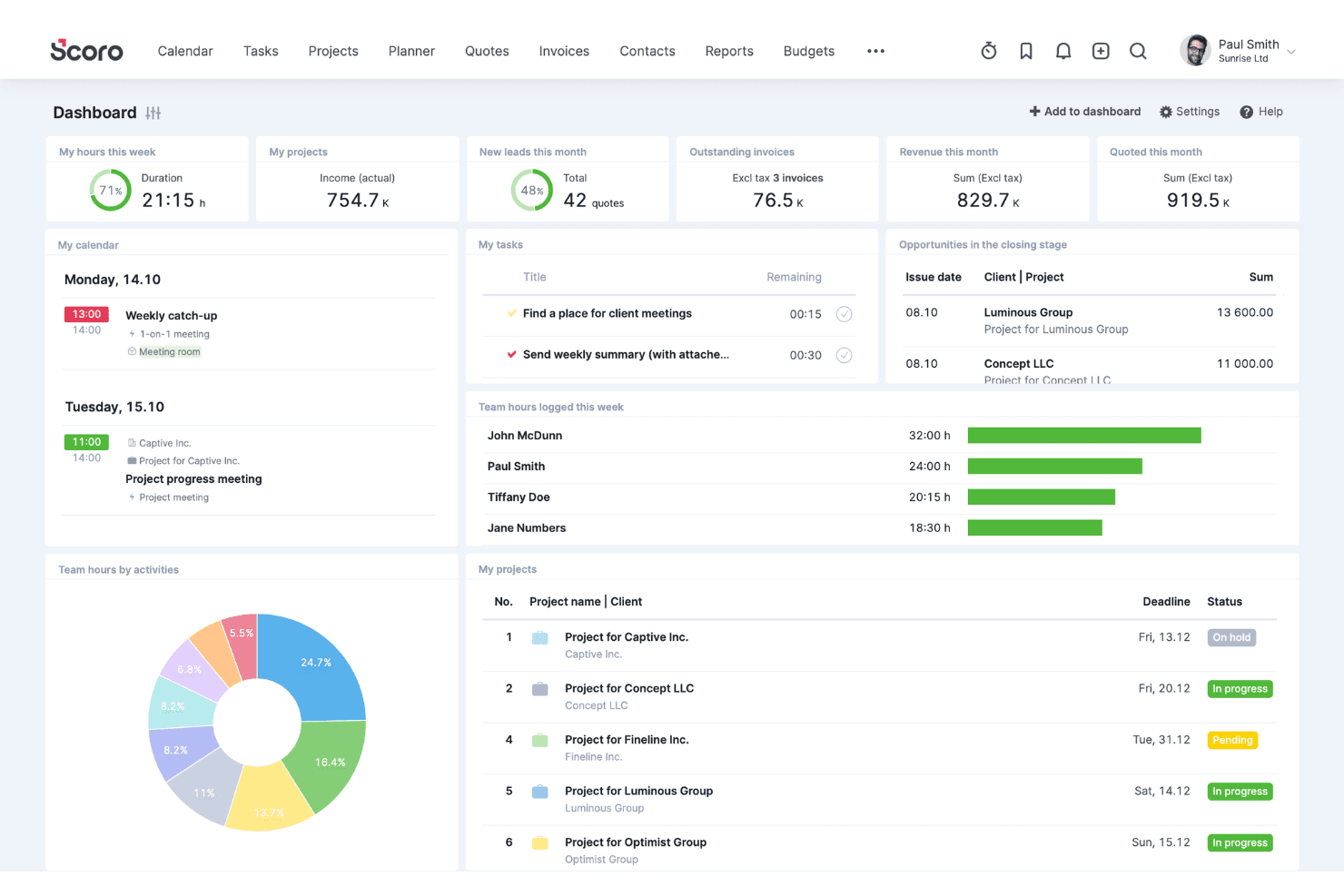
Scoro coordina clienti, vendite, progetti, risorse, tempo e fatturazione. Scoro è una piattaforma di automazione dei servizi professionali che combina il monitoraggio del tempo, la fatturazione, la pianificazione dei budget dei progetti e la gestione della fatturazione, supportando accordi a ore, a tariffa fissa, a ritenuta e a tempo e materiali con tetto massimo all'interno di un unico sistema.
Per chi è più adatto Scoro?
Scoro è particolarmente adatto a CFO frazionari, controller e team di società di consulenza che gestiscono clienti con modalità di fatturazione a ore, a ritenuta e a tariffa fissa contemporaneamente.
Perché ho scelto Scoro
Ho incluso Scoro tra le mie scelte migliori perché gestisce i modelli di fatturazione misti meglio di quasi qualsiasi altra soluzione che abbia visto: la fatturazione a ore, a tariffa fissa, a ritenuta, a tempo e materiali con tetto massimo e per milestone possono essere gestite tutte all'interno di un unico progetto senza soluzioni alternative. Ciò che trovo più utile è il modo in cui le registrazioni del tempo confluiscono direttamente nelle fatture con la tariffa corretta, che si tratti di una tariffa basata sul ruolo per un cliente o di una ritenuta fissa per un altro, senza alcun reinserimento manuale tra i sistemi.
Funzionalità principali di Scoro
- Flussi di approvazione dei fogli presenze: I responsabili possono esaminare e approvare i fogli presenze inviati prima che le ore confluiscano nelle fatture, con promemoria automatici per le registrazioni non inviate fino alle otto settimane precedenti.
- Matrice di stima dei preventivi: Crea proposte suddivise per ruolo, risultato e impegno, con visibilità su costi e margine, prima di trasferire direttamente tali condizioni nei budget e nella fatturazione dei progetti.
- Pannelli di controllo dell'utilizzo: I report in tempo reale mostrano le ore fatturabili rispetto a quelle non fatturabili e le tendenze della produttività del team, aiutandoti a individuare l'eccesso di servizi erogati e a gestire la capacità.
- Sincronizzazione contabile bidirezionale: Scoro si collega in entrambe le direzioni a QuickBooks Online, Xero, Sage Intacct ed Exact Online per mantenere allineati i dati finanziari dei progetti e i registri contabili senza reinserimenti manuali.
Integrazioni di Scoro
Scoro offre integrazioni native con QuickBooks Online, Xero, Sage Intacct, Exact Online e Stripe. Si collega inoltre a Salesforce, Google Calendar, Microsoft 365, Slack e Jira, con un'API REST, integrazioni del marketplace e supporto per Zapier.
Pros and Cons
Pros:
- Gestisce modelli di fatturazione misti in un unico progetto
- Pannelli di controllo per il monitoraggio della redditività dei progetti in tempo reale
- Flusso diretto dalla registrazione del tempo alla fattura
Cons:
- Nessun portale self-service o per i pagamenti dei clienti
- Nessuna acquisizione passiva o automatica del tempo
 Ideale per il monitoraggio della redditività in tempo reale
- Prova gratuita di 14 giorni
- A partire da $10/utente/mese
Visit WebsiteCustomer Rating:4.6/5
Productive collega la rilevazione del tempo a informazioni sulla redditività in tempo reale per supportare una fatturazione più accurata. Nell'affollato mondo degli affari, Productive si distingue come una soluzione versatile pensata per agenzie, società di consulenza e aziende orientate ai servizi che desiderano ottimizzare la gestione del tempo e dei processi di fatturazione. Se stai cercando di aumentare l'efficienza operativa e la redditività, Productive offre approfondimenti in tempo reale e comunicazione centralizzata, rispondendo alla necessità fondamentale di una gestione fluida dei progetti e delle finanze. Con il suo focus su settori come i servizi IT, l'architettura e la contabilità, Productive è progettato per aiutarti a semplificare le operazioni e prendere decisioni consapevoli con sicurezza.
Perché ho scelto Productive
Ho scelto Productive per il suo approccio mirato alla risoluzione delle complesse sfide legate al controllo del tempo e alla fatturazione. La piattaforma si distingue per il monitoraggio della redditività in tempo reale, che ti consente di tenere sotto controllo costi, ricavi e margini. Inoltre, le sue funzionalità di fatturazione sono pensate per supportare più valute e inviare promemoria automatici per i pagamenti in ritardo, rispondendo all'esigenza comune di una gestione finanziaria efficiente. Queste funzioni, unite a un'integrazione senza soluzione di continuità con strumenti di contabilità come Xero e QuickBooks, rendono Productive una scelta ideale per le aziende che desiderano semplificare i processi di fatturazione e gestione finanziaria.
Caratteristiche principali di Productive
Oltre alle sue eccellenti capacità di fatturazione, ho individuato anche altre funzionalità che ne aumentano l'utilità come strumento per il controllo del tempo e delle fatture.
- Pianificazione delle risorse: questa funzione ti aiuta ad allocare efficacemente le risorse per evitare colli di bottiglia e ottimizzare i calendari del team.
- Gestione dei progetti: monitora l'avanzamento dei progetti e coordina le attività in modo fluido grazie agli strumenti di project management integrati.
- Pianificazione del budget: ottieni informazioni sullo stato di salute finanziaria grazie a strumenti che consentono di pianificare e prevedere con precisione.
- Reportistica: accedi a report personalizzati per una migliore visibilità delle performance aziendali e approfondimenti sulla redditività.
Integrazioni di Productive
Le integrazioni includono Xero, Slack, QuickBooks, Google Calendar, Jira, Asana, Trello, Microsoft Teams, Dropbox e HubSpot. È disponibile un'API per integrazioni personalizzate.
Pros and Cons
Pros:
- Visibilità in tempo reale sulla redditività
- Supporto fatturazione multivaluta
- Rilevazione integrata di tempo e fatturazione
Cons:
- Nessun piano gratuito disponibile
- Curva di apprendimento per i piccoli team
Learn more about Productive: Ideale per report visivi sui costi del lavoro
- Piano gratuito + prova gratuita di 30 giorni + demo gratuita disponibile
- A partire da $9/utente/mese (fatturato annualmente)
Visit WebsiteCustomer Rating:4.7/5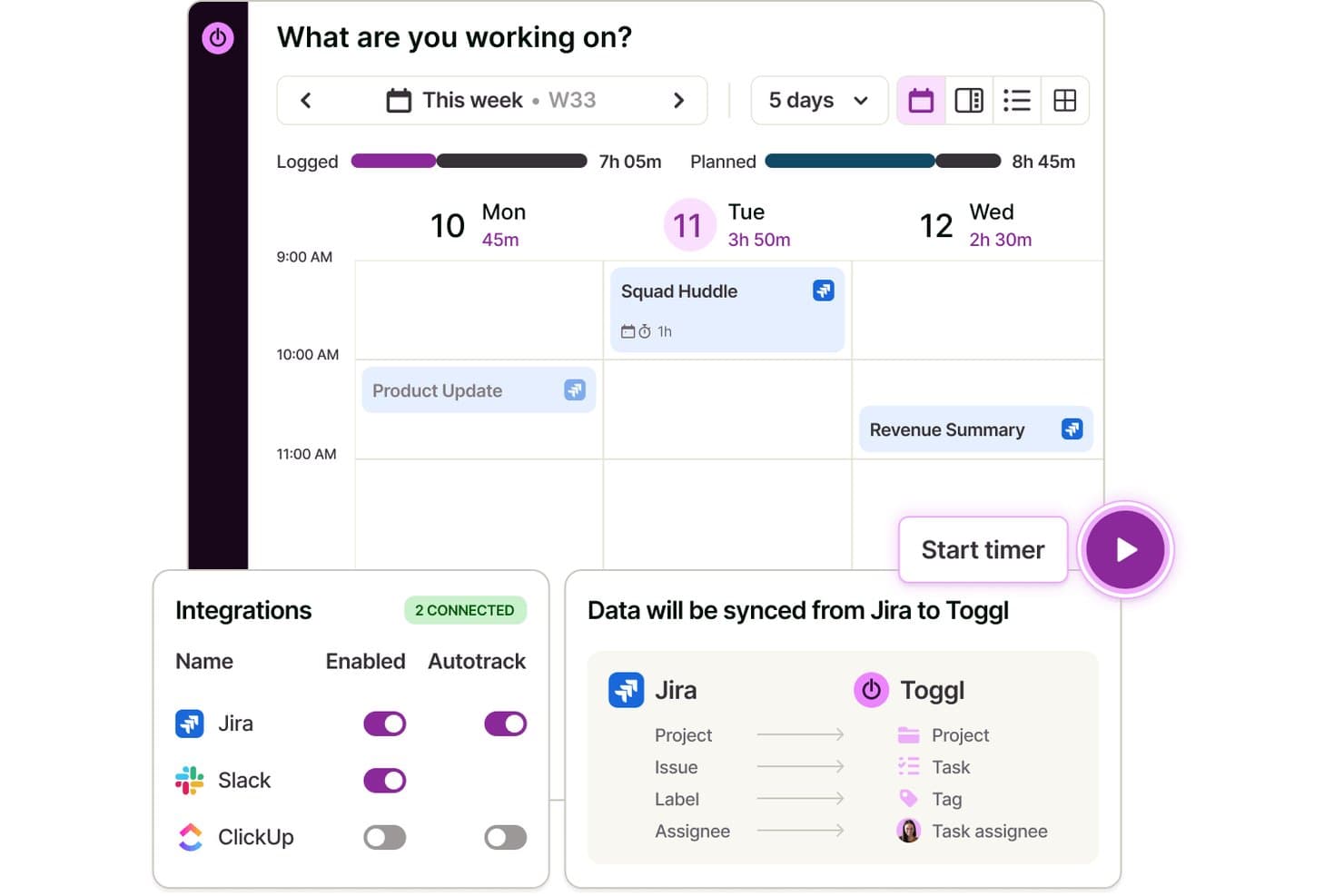
Toggl sincronizza automaticamente i dati di Jira per monitorare il tempo dedicato alle attività. Toggl è uno strumento per il monitoraggio del tempo, la pianificazione della capacità e la fatturazione, che consente di registrare le ore fatturabili per clienti e progetti, assegnare tariffe di fatturazione, gestire visivamente le attività e analizzare i costi del lavoro e la redditività del team.
Per chi è più indicato Toggl?
Toggl è adatto a team e freelance che hanno bisogno di un modo semplice per monitorare le ore fatturabili, gestire attività e progetti e comprendere come vengono impiegati il tempo e il denaro dei progetti.
Perché ho scelto Toggl
Ho scelto Toggl come uno dei migliori perché la sua suite di report Premium offre una panoramica veramente visiva di come vengono distribuiti i costi del lavoro tra ogni progetto, cliente e membro del team. Mi piace in particolare assegnare una tariffa di costo per ogni membro del team e poi visualizzare questi dati suddivisi in una tabella pivot o in un grafico a barre raggruppate, così posso individuare immediatamente quali incarichi stanno erodendo i margini di profitto. Puoi anche programmare l'invio automatico di questi report in formato PDF, risparmiando così un passaggio concreto nella rendicontazione mensile dell'utilizzo del team.
Funzionalità principali di Toggl
- Gestione di progetti e clienti: Organizza il tempo monitorato per un numero illimitato di clienti, progetti e sottoattività con tariffe di fatturazione personalizzate.
- Monitoraggio del tempo multipiattaforma: Monitora il tempo sul web, desktop, dispositivi mobili ed estensioni del browser, con sincronizzazione automatica.
- Tariffe fatturabili e creazione di fatture: Applica lo stato fatturabile o non fatturabile alle ore monitorate e genera fatture dalle registrazioni fatturabili.
- Integrazioni con i calendari: Sincronizza i calendari Google e Outlook per trasformare le riunioni programmate in registrazioni del tempo.
Integrazioni di Toggl
Toggl offre oltre 100 integrazioni native, tra cui Jira, Asana, GitHub, Todoist, Google Calendar, Outlook e altre.
Pros and Cons
Pros:
- Report visivi sui costi del lavoro e sulla redditività
- Assegna tariffe di fatturazione personalizzate per progetto o cliente
- Monitoraggio automatico del tempo da desktop o browser
Cons:
- Nessuno strumento integrato per la riscossione dei pagamenti
- Le fatture ricorrenti e i contratti a canone fisso non sono supportati
Learn more about Toggl: Ideale per gli strumenti integrati di fatturazione e l'emissione delle fatture
- Piano gratuito + prova gratuita di 30 giorni + demo gratuita disponibile
- A partire da $6/utente/mese (fatturato annualmente)
Visit WebsiteCustomer Rating:4.6/5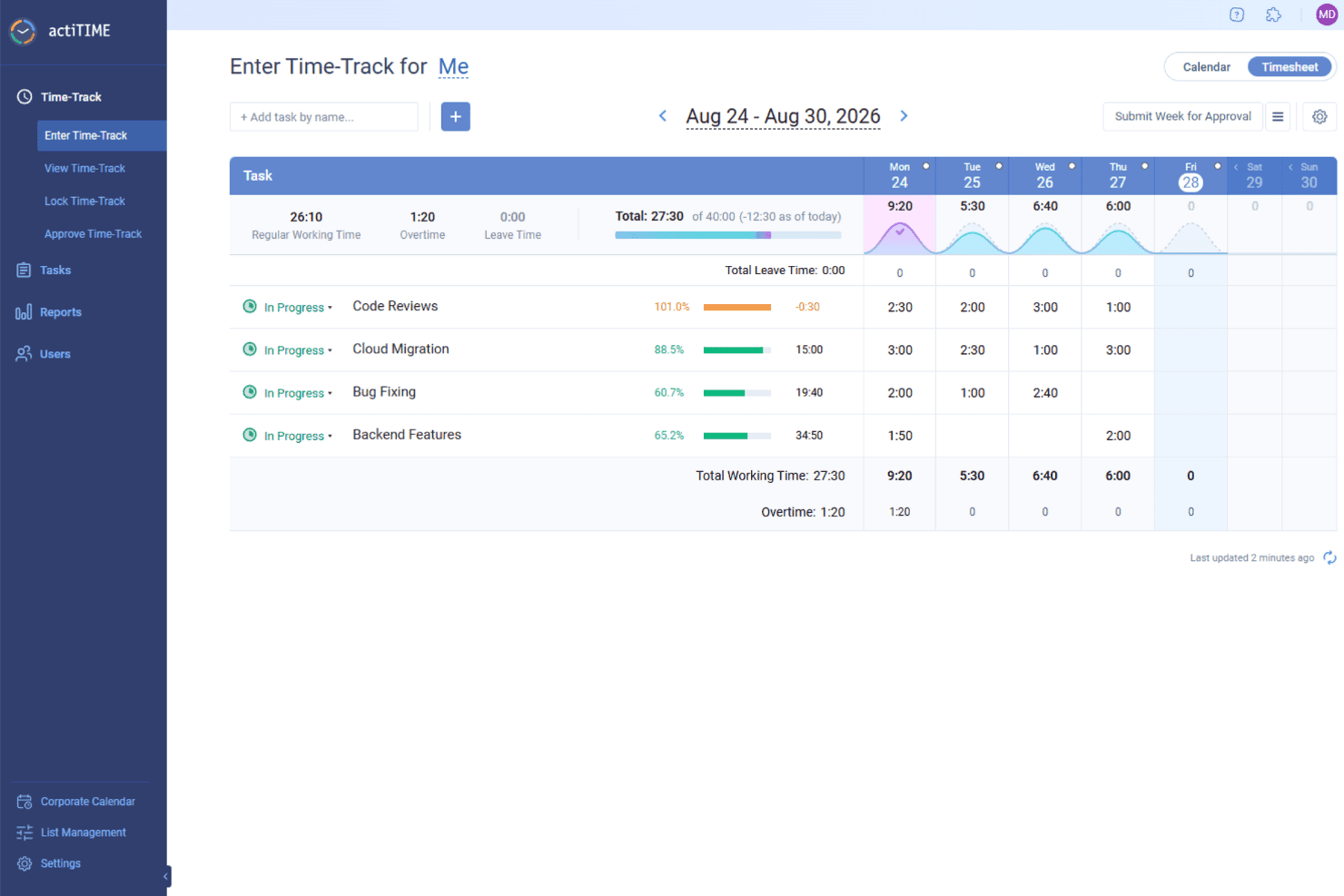
actiTIME monitora le ore fatturabili per attività e progetto, aiutando le squadre a calcolare gli addebiti e generare le fatture per i clienti. actiTIME è un software versatile che offre soluzioni per il monitoraggio del tempo e la fatturazione, rendendolo uno strumento prezioso per le aziende che desiderano gestire i propri progetti e le proprie finanze. È progettato per adattarsi a vari settori, fornendo le funzionalità necessarie per tenere traccia del tempo e gestire la fatturazione.
Perché ho scelto actiTIME: Ho scelto actiTIME perché consente di monitorare con precisione il tempo dedicato alle attività e ai progetti, permettendoti di sapere sempre come vengono impiegati gli sforzi della tua squadra. Puoi registrare le ore, gestire i carichi di lavoro e rimanere allineato alle tempistiche dei progetti. Gli strumenti integrati per la fatturazione e l'emissione delle fatture semplificano inoltre la gestione dei pagamenti dei clienti e riducono il lavoro manuale. Mi piace anche la possibilità di monitorare in tempo reale i budget e l'avanzamento dei progetti, così da evitare spese eccessive e mantenere il lavoro in carreggiata. Inoltre, i flussi di lavoro personalizzabili consentono di adattare il sistema al modo in cui la tua squadra lavora al meglio.
Funzionalità e integrazioni principali:
Le funzionalità includono l'analisi delle prestazioni, che fornisce informazioni sulle tendenze della produttività e sulla redditività dei progetti, aiutandoti a capire dove è possibile apportare miglioramenti. La funzionalità di gestione delle ferie offre criteri personalizzabili per i congedi e il monitoraggio automatizzato dei permessi retribuiti, garantendo una gestione efficace delle risorse della squadra senza interventi manuali. La fatturazione e l'analisi dei costi generano report di fatturazione e calcolano le buste paga, semplificando gli aspetti finanziari dei progetti e permettendoti di concentrarti sul lavoro che conta.
Le integrazioni includono QuickBooks e Zapier.
Pros and Cons
Pros:
- Tariffe di fatturazione personalizzabili
- Configurazione facile dei progetti
- Inserimento manuale semplice delle ore
Cons:
- Interfaccia utente di base
- Funzionalità avanzate limitate
Learn more about actiTIME: Ideale per il monitoraggio personalizzabile del tempo fino alla fatturazione
- Piano gratuito + prova gratuita di 7 giorni disponibile
- Da $3.99/utente/mese (fatturato annualmente)
Visit WebsiteCustomer Rating:4.8/5
Clockify offre un monitoraggio illimitato del tempo con una fatturazione semplice per i team. Clockify è un software per il monitoraggio del tempo pensato per aziende di tutte le dimensioni, con funzionalità che aiutano a gestire il tempo e la fatturazione. Consente ai team di monitorare le ore di lavoro (ore fatturabili e non fatturabili), gestire i progetti e generare report dettagliati.
Perché ho scelto Clockify: Ho scelto Clockify perché semplifica il tuo flusso completo di fatturazione trasformando le ore dei progetti registrate in fatture personalizzate e dettagliate. Puoi configurare tariffe fatturabili per ruolo, cliente o attività specifica e applicare l'approvazione dei fogli presenze prima dell'emissione delle fatture. In questo modo elimini le discrepanze tra il lavoro registrato e la fatturazione dei clienti, proteggendo i tuoi margini di profitto e facendo risparmiare al team finanziario ore di riconciliazione manuale.
Funzionalità e integrazioni principali:
Le funzionalità includono un foglio presenze visivo che ti aiuta a capire come viene impiegato il tempo. Il pannello di controllo del progetto offre una panoramica delle attività e dei progressi del tuo team, mentre i report personalizzabili ti consentono di analizzare i dati per migliorare la produttività.
Le integrazioni includono Asana, Trello, Slack, Jira, monday.com, QuickBooks, Notion, Microsoft Teams, Todoist e Google Calendar.
Pros and Cons
Pros:
- Pannello di controllo dettagliato del progetto
- Flessibile per la crescita del team
- Report personalizzabili per ottenere informazioni utili
Cons:
- Curva di apprendimento per i nuovi utenti
- Funzionalità offline limitate
Learn more about Clockify: Ideale per il monitoraggio automatico del tempo
- Prova gratuita di 14 giorni + piano gratuito + demo gratuita disponibile
- Da $3.99/utente/mese (fatturazione annuale)
Visit WebsiteCustomer Rating:4.7/5
TimeCamp automatizza il monitoraggio del tempo con fatturazione e analisi tramite un solo clic. TimeCamp è un software di monitoraggio del tempo e fatturazione rivolto a liberi professionisti e piccole imprese. Automatizza il tracciamento delle ore lavorative e aiuta nella gestione della fatturazione, rendendo più facile tenere traccia delle ore di lavoro e delle fatture.
Perché ho scelto TimeCamp: TimeCamp offre il monitoraggio automatico del tempo, che riduce al minimo l'inserimento manuale e ti fa risparmiare tempo. Le funzioni principali della piattaforma permettono di tracciare il tempo dedicato alle diverse attività senza dover avviare o interrompere manualmente il timer. Inoltre, genera report dettagliati che forniscono approfondimenti sulla produttività e sull'utilizzo del tempo. Le funzionalità di fatturazione di TimeCamp ti aiutano inoltre a convertire le ore tracciate in fatture con facilità.
Caratteristiche e integrazioni principali:
Funzionalità includono un foglio ore grafico che offre una panoramica visiva delle tue ore di lavoro. La funzione di monitoraggio della presenza ti aiuta a controllare la presenza e la puntualità del team. TimeCamp offre anche la gestione del budget del progetto, consentendoti di tenere sotto controllo i costi e assicurarti che i progetti rimangano entro il budget.
Integrazioni includono Trello, Asana, Slack, QuickBooks, Xero, monday.com, Jira, GitHub, Evernote e Google Calendar.
Pros and Cons
Pros:
- Funzionalità di fatturazione per le ore tracciate
- Report dettagliati sulla produttività disponibili
- Monitoraggio della presenza per il controllo del team
Cons:
- A volte si riscontrano rallentamenti nelle prestazioni
- La configurazione iniziale può essere complessa
Learn more about TimeCamp: Ideale per studi di contabilità
- Demo gratuita disponibile
- Da $59/utente/mese (fatturazione annuale)
Visit WebsiteCustomer Rating:4.8/5
Karbon semplifica il lavoro con i clienti grazie alla collaborazione sul monitoraggio del tempo e la fatturazione. Karbon è un software di gestione dello studio progettato per studi contabili e team di servizi professionali. Aiuta a gestire i flussi di lavoro, le attività e migliora la collaborazione tra i membri del team.
Perché ho scelto Karbon: Karbon è ideale per gli studi di contabilità, grazie a funzionalità come l'integrazione delle email e la gestione delle attività. L'opzione di integrazione delle email consente di gestire le comunicazioni con i clienti direttamente all'interno della piattaforma, il che è importante per mantenere una corrispondenza organizzata. Inoltre, la gestione delle attività permette di assegnare e monitorare i compiti in modo efficiente all'interno del team.
Caratteristiche e integrazioni principali:
Funzionalità includono l'automazione dei flussi di lavoro, che riduce il lavoro manuale e aumenta l'efficienza. La funzione di rilevamento del tempo consente di monitorare accuratamente le ore fatturabili. Karbon offre anche analisi dettagliate, fornendo approfondimenti sulle prestazioni del team e sull'avanzamento dei progetti.
Integrazioni includono QuickBooks Online, Xero, Slack, Microsoft 365, Google Workspace, Outlook, Gmail, Zapier, Practice Ignition e TSheets.
Pros and Cons
Pros:
- Gestione delle attività per un flusso di lavoro efficiente
- Piattaforma centralizzata per la condivisione dei documenti
- Integrazione email per la comunicazione con i clienti
Cons:
- L'app mobile non offre la piena funzionalità
- Processo di configurazione iniziale complesso
Learn more about Karbon: Ideale per report di fatturazione dettagliati
- Piano gratuito disponibile + prova gratuita di 14 giorni
- A partire da $5.83/utente/mese (fatturazione annuale)
Visit WebsiteCustomer Rating:4.5/5
TMetric traccia le ore fatturabili con fatturazione e reportistica basate sui progetti. TMetric è un software di monitoraggio del tempo e fatturazione progettato per liberi professionisti e piccole e medie imprese. Aiuta gli utenti a tracciare il tempo, gestire le attività e generare report di fatturazione dettagliati.
Perché ho scelto TMetric: TMetric offre report di fatturazione dettagliati, essenziali per una fatturazione accurata e una gestione finanziaria efficace. La funzione di monitoraggio del tempo consente di registrare le ore con precisione, garantendo una corretta fatturazione ai clienti. Offre inoltre funzionalità di gestione dei progetti, aiutandoti a mantenere le attività organizzate e sotto controllo.
Caratteristiche principali & integrazioni:
Funzionalità includono l'inserimento manuale del tempo, che ti permette di aggiungere registrazioni di ore per lavori già svolti. La funzione di budget ti aiuta a impostare limiti finanziari per i progetti ed evitare sforamenti. TMetric offre anche il tracciamento delle attività, fornendo informazioni su come viene impegnato il tempo sulle varie attività.
Integrazioni disponibili con Asana, Trello, Jira, Slack, QuickBooks, GitHub, Bitbucket, Freshdesk, Microsoft Outlook e Google Calendar.
Pros and Cons
Pros:
- Funzione di budget per impostare limiti di progetto
- Inserimento manuale delle ore per maggiore flessibilità
- Report di fatturazione dettagliati per una fatturazione accurata
Cons:
- Curva di apprendimento per i nuovi utenti
- La configurazione iniziale può essere complessa
Learn more about TMetric: 9Ideale per la contabilità delle piccole imprese
Xero
- Prova gratuita di 30 giorni disponibile
- Da $2.50/mese
Visit WebsiteCustomer Rating:4.4/5
Xero sincronizza la contabilità con la fatturazione e la rilevazione delle ore per una fatturazione senza intoppi. Xero è un software di contabilità progettato per piccole imprese e lavoratori autonomi. Gestisce la contabilità, la fatturazione e l'amministrazione finanziaria, rendendolo uno strumento prezioso per chi necessita di soluzioni contabili efficienti.
Perché ho scelto Xero: Xero è particolarmente indicato per la contabilità delle piccole imprese, offrendo funzionalità come la contabilità automatizzata e analisi intelligenti dei dati. Il software offre un archivio cloud sicuro, essenziale per le aziende che desiderano proteggere i propri dati finanziari. Include anche strumenti specifici per settori come edilizia e vendita al dettaglio, offrendo flessibilità nella gestione delle finanze.
Caratteristiche distintive e integrazioni:
Caratteristiche includono contabilità automatizzata, che ti fa risparmiare tempo occupandosi delle attività di routine. Le analisi intelligenti di Xero ti aiutano a prendere decisioni finanziarie, mentre l'archiviazione cloud sicura garantisce che i tuoi dati siano protetti e accessibili quando ne hai bisogno.
Integrazioni includono Shopify, HubSpot, Square, Stripe, PayPal, Gusto, Mailchimp, Vend, WorkflowMax, ed Expensify.
Pros and Cons
Pros:
- Supporto all'onboarding e consulenti esperti
- Archiviazione cloud sicura per la protezione dei dati
- Analisi intelligenti per decisioni finanziarie
Cons:
- Curva di apprendimento per i nuovi utenti
- Opzioni di personalizzazione limitate
Learn more about Xero: Ideale per team creativi
- Versione demo gratuita disponibile
- Da $10.50/utente/mese (fatturazione annuale)
Visit WebsiteCustomer Rating:4.5/5
FunctionFox aiuta i team creativi a tracciare il tempo e generare fatture dettagliate. FunctionFox è uno strumento di gestione progetti e monitoraggio del tempo progettato per team creativi e agenzie. Aiuta gli utenti a gestire i progetti, tracciare il tempo e migliorare l'efficienza del flusso di lavoro.
Perché ho scelto FunctionFox: FunctionFox si rivolge specificamente ai team creativi, offrendo funzionalità come il monitoraggio dei progetti e l'assegnazione dei compiti. La funzione di monitoraggio dei progetti ti permette di controllare scadenze e budget, fondamentale per i progetti creativi. Anche le sue capacità di assegnazione dei compiti permettono di delegare facilmente il lavoro all'interno del team. Infine, FunctionFox offre un'interfaccia semplice che aiuta il team a concentrarsi sulla creatività invece che sui compiti amministrativi.
Funzionalità principali & integrazioni:
Funzionalità includono un blog di progetto che facilita la comunicazione e la collaborazione del team. La funzione di reportistica in tempo reale ti offre una panoramica sull'avanzamento dei progetti e sull'allocazione delle risorse. FunctionFox offre anche un cronometro che consente di tracciare con precisione il tempo dedicato ad ogni compito.
Integrazioni includono QuickBooks, Microsoft Excel e Basecamp.
Pros and Cons
Pros:
- Reportistica in tempo reale per informazioni sui progetti
- Blog di progetto per la comunicazione del team
- Interfaccia semplice per la concentrazione creativa
Cons:
- Alcune opzioni di personalizzazione sono limitate
- L'app mobile non offre tutte le funzionalità
Learn more about FunctionFox:
Altri software per il monitoraggio del tempo e la fatturazione
Ecco alcune altre opzioni di software per il monitoraggio del tempo e la fatturazione che non sono entrate nella mia selezione, ma che vale comunque la pena considerare:
- 11Zoho InvoiceIdeale per l'automazione della fatturazione
- 12AppolyeIdeale per il monitoraggio di team remoti
- 13SynerionIdeale per la gestione della forza lavoro
- 14InsightfulIdeale per la mappatura automatica del tempo
- 15MonitaskIdeale per fogli presenze online
- 16PaymoIdeale per l'integrazione della gestione progetti
- 17HubstaffIdeale per la fatturazione personalizzata
- 18IntelogosMigliore per le analisi della forza lavoro basate su AI
Come valuto i software per il monitoraggio del tempo e la fatturazione
Valuto gli strumenti su due livelli: le funzionalità di base—registrazione del tempo fatturabile, fatturazione e monitoraggio dei crediti—che ogni strumento deve offrire, e gli elementi distintivi che rendono una piattaforma più adatta di un'altra.
Funzionalità principali (requisiti fondamentali per questo elenco)
Quando seleziono gli strumenti per il mio elenco, assegno a ciascuno un punteggio su una scala da 0 (non offre la funzionalità) a 5 (eccelle in quest'area) per ogni funzionalità principale elencata di seguito. Poi calcolo il punteggio totale dello strumento trasformandolo in una percentuale. Ogni strumento deve raggiungere un punteggio totale minimo del 65% per essere preso in considerazione.
- Monitoraggio del tempo fatturabile: cerco timer e opzioni di inserimento manuale che consentano di contrassegnare le ore come fatturabili per uno specifico cliente o incarico, ad esempio registrando separatamente il lavoro di consulenza e la preparazione fiscale per lo stesso cliente.
- Generazione delle fatture: ogni strumento dovrebbe convertire le registrazioni del tempo e le spese approvate in fatture personalizzabili con gestione delle imposte, in modo che un contabile possa fatturare le ore mensili senza reinserire i dati.
- Gestione di clienti e progetti: verifico se è possibile configurare più clienti con tariffe di fatturazione distinte per progetto, membro del personale o tipo di servizio, poiché la maggior parte degli studi gestisce strutture tariffarie diversificate.
- Pagamenti online e monitoraggio dei crediti: la riscossione dei pagamenti è importante, quindi valuto se uno strumento supporta i pagamenti con carta e ACH, tiene traccia dello stato delle fatture e fornisce viste sull'anzianità dei crediti per segnalare i saldi scaduti.
- Fatturazione ricorrente e a forfait: per gli studi che lavorano con forfait mensili o incarichi in abbonamento, osservo come ogni piattaforma gestisce le fatture ricorrenti automatiche e la riduzione dei saldi dei forfait.
- Contabilità e report finanziari: gli strumenti più efficaci si sincronizzano con piattaforme come QuickBooks o Xero e offrono report sull'utilizzo, sui ricavi e sull'anzianità dei crediti che un CFO frazionale possa utilizzare concretamente durante il ciclo di chiusura.
Una volta ottenuto un elenco di strumenti che soddisfano i criteri, considero ciò che distingue ciascuna piattaforma.
Fattori distintivi (ciò che differenzia i fornitori)
Ecco come confronto e metto in contrapposizione i diversi fornitori:
Funzionalità di rilievo
L'automazione dal rilevamento del tempo alla fatturazione è un aspetto fondamentale. Cerco strumenti che convertano i fogli presenze approvati in fatture in bozza secondo una cadenza prestabilita, così uno studio che fattura mensilmente 30 clienti non deve creare ogni fattura manualmente. Anche le analisi della redditività hanno un peso importante, in particolare i cruscotti che evidenziano i tassi di realizzo e gli storni per cliente o membro del personale. Per gli studi che trasferiscono le spese ai clienti, la registrazione delle spese con scansione mobile delle ricevute e il ricarico che confluisce direttamente nelle fatture eliminano gran parte del reinserimento manuale.
Oltre le funzionalità
Le integrazioni con l'ecosistema tecnologico contabile sono molto importanti in questo ambito. Verifico se uno strumento offre la sincronizzazione bidirezionale con piattaforme come QuickBooks o Xero, perché le esportazioni unidirezionali creano problemi di riconciliazione durante la chiusura di fine mese. Anche la struttura dei prezzi influisce sull'adeguatezza: un contabile indipendente e uno studio CPA con 15 persone hanno esigenze molto diverse, quindi valuto se il prezzo per utente rimane ragionevole quando si aggiungono postazioni. Per gli strumenti che gestiscono dati finanziari sensibili dei clienti, verifico la presenza di registri di controllo, controlli degli accessi basati sui ruoli e conformità allo standard PCI-DSS per i dati di pagamento memorizzati.
Come scegliere un software per il monitoraggio del tempo e la fatturazione
È facile perdersi in lunghi elenchi di funzionalità e strutture tariffarie complesse. Per aiutarti a rimanere concentrato mentre affronti il tuo processo di selezione del software, ecco una lista di fattori da tenere a mente:
| Fattore | Cosa considerare |
| Scalabilità | Assicurati che il software possa crescere insieme alla tua azienda. Cerca soluzioni in grado di gestire un numero crescente di utenti e dati senza cali nelle prestazioni. |
| Integrazioni | Verifica se il software si integra con gli strumenti che già utilizzi, come software di contabilità, app per la gestione dei progetti e sistemi CRM, per ottenere flussi di lavoro più fluidi. |
| Personalizzazione | Valuta se puoi adattare il software alle tue esigenze specifiche. I modelli e i report personalizzabili possono essere particolarmente utili per requisiti aziendali specifici. |
| Facilità d'uso | Valuta la semplicità dell'interfaccia del software. Il tuo team dovrebbe poterlo utilizzare senza una formazione approfondita, risparmiando tempo e riducendo la frustrazione. |
| Budget | Confronta i piani tariffari con il tuo budget. Cerca prezzi trasparenti e considera il costo per utente, soprattutto se hai un team numeroso. |
| Misure di sicurezza | Dai priorità ai software con solide funzionalità di sicurezza, come la crittografia dei dati e l'autenticazione a due fattori, per proteggere le informazioni sensibili. |
| Opzioni di supporto | Verifica i canali di supporto disponibili, come la chat dal vivo o l'assistenza telefonica, per assicurarti di poter ricevere aiuto quando necessario. |
| Funzionalità di reportistica | Cerca un software che offra funzionalità dettagliate di reportistica per aiutarti ad analizzare efficacemente i dati relativi al tempo e alla fatturazione. |
Tendenze nei software per il monitoraggio del tempo e la fatturazione
Nella mia ricerca, ho raccolto innumerevoli aggiornamenti sui prodotti, comunicati stampa e registri delle versioni di diversi fornitori di software per il monitoraggio del tempo e la fatturazione. Ecco alcune delle tendenze emergenti che sto tenendo d'occhio:
- Analisi basate sull'intelligenza artificiale: un numero sempre maggiore di strumenti utilizza l'intelligenza artificiale per analizzare i dati relativi al tempo e alla fatturazione, fornendo informazioni sui modelli di produttività e aiutando i team a prendere decisioni migliori. Questa tendenza è utile per le aziende che desiderano ottimizzare le proprie operazioni e ridurre le inefficienze.
- Funzionalità di comando vocale: alcuni software ora consentono agli utenti di avviare e arrestare i timer utilizzando comandi vocali. Questa funzionalità è particolarmente preziosa per i professionisti che devono gestire il monitoraggio del tempo mentre svolgono più attività contemporaneamente.
- Blockchain per la sicurezza: alcuni fornitori stanno esplorando la tecnologia blockchain per migliorare la sicurezza dei dati e la trasparenza delle transazioni. Questa tendenza è particolarmente rilevante per le aziende che gestiscono dati finanziari sensibili e richiedono un ulteriore livello di protezione.
- Collaborazione in tempo reale: gli strumenti offrono sempre più funzionalità che facilitano la collaborazione in tempo reale su fatture e progetti, consentendo a più utenti di lavorare insieme e apportare aggiornamenti istantaneamente.
- Modelli di fatturazione in abbonamento: i fornitori stanno integrando funzionalità di fatturazione in abbonamento, consentendo alle aziende di automatizzare le fatture ricorrenti e gestire gli abbonamenti in modo efficiente. Questa tendenza risponde alla crescente domanda di servizi basati su abbonamento in diversi settori.
Che cos'è il software per il monitoraggio del tempo e la fatturazione?
Il software per il monitoraggio del tempo e la fatturazione è uno strumento che aiuta le aziende a gestire in modo efficiente le ore lavorate e i processi di fatturazione. Professionisti come freelance, titolari di piccole imprese e project manager utilizzano generalmente questi strumenti per garantire una fatturazione accurata e una gestione efficace del tempo.
Questi strumenti includono generalmente funzionalità essenziali come il monitoraggio automatico del tempo, le funzionalità di fatturazione e la collaborazione in tempo reale, per supportare la produttività e aiutare gli utenti a gestire il lavoro e le finanze in modo efficiente. Nel complesso, il software per il monitoraggio del tempo e la fatturazione offre un valore significativo semplificando le attività amministrative e migliorando l'accuratezza finanziaria.
Funzionalità
Ecco le funzionalità fondamentali che ogni ottimo software per il monitoraggio del tempo e la fatturazione dovrebbe avere:
- Monitoraggio automatico del tempo: registra le ore lavorate senza inserimento manuale, garantendo una fatturazione e una gestione del tempo precise e semplificate.
- Funzionalità di fatturazione: crea fatture a partire dal tempo monitorato, migliorando il processo di fatturazione.
- Collaborazione in tempo reale: consente a più utenti di lavorare insieme su fatture e progetti, migliorando il lavoro di squadra e l'efficienza.
- Analisi basate sull'intelligenza artificiale: analizza i dati per fornire informazioni sui modelli di produttività e supportare il processo decisionale.
- Modelli personalizzabili: consente di personalizzare fatture e report per adattarli al marchio aziendale.
- Fatturazione in abbonamento: automatizza le fatture ricorrenti, semplificando la gestione degli abbonamenti per le aziende.
- Rilevamento dell'inattività: avvisa gli utenti quando il monitoraggio del tempo è inattivo, garantendo registri temporali accurati.
- Funzionalità di comando vocale: offre una gestione del tempo a mani libere, utile per i professionisti che svolgono più attività contemporaneamente.
- Misure di sicurezza: protegge i dati sensibili con crittografia e controlli degli accessi, garantendo la sicurezza delle informazioni.
Vantaggi
L'implementazione di un software per il monitoraggio del tempo e la fatturazione offre diversi vantaggi al tuo team e alla tua azienda. Eccone alcuni:
- Fatturazione accurata: il monitoraggio automatico del tempo e le funzionalità di fatturazione garantiscono che tutte le ore fatturabili siano conteggiate, riducendo gli errori nella fatturazione ai clienti.
- Maggiore produttività: le analisi basate sull'intelligenza artificiale e la collaborazione in tempo reale aiutano i team a individuare le inefficienze e a lavorare insieme in modo più efficace.
- Risparmio di tempo: funzionalità come i comandi vocali e il rilevamento dell'inattività riducono al minimo le attività manuali, liberando tempo per il lavoro più importante.
- Migliore gestione finanziaria: gli strumenti di budgeting dei progetti tengono traccia delle spese, aiutando a prevenire le spese eccessive e a ottimizzare l'allocazione delle risorse e la redditività.
- Maggiore sicurezza: le misure di sicurezza proteggono i dati sensibili, garantendo la conformità agli standard sulla privacy.
- Gestione efficiente degli abbonamenti: la fatturazione in abbonamento automatizza le fatture ricorrenti, semplificando la gestione dei rapporti continuativi con i clienti.
- Branding personalizzato: i modelli personalizzabili consentono di personalizzare e creare fatture e report, mantenendo un'immagine del marchio coerente.
Costi e prezzi
La scelta di un software per il monitoraggio del tempo e la fatturazione richiede la comprensione dei diversi modelli e piani tariffari disponibili, che vanno dalle opzioni gratuite ai costi personalizzati. I costi variano in base alle funzionalità, alle dimensioni del team, ai componenti aggiuntivi e ad altri fattori. La tabella seguente riassume i piani più comuni, i relativi prezzi medi e le funzionalità tipicamente incluse nelle soluzioni software per il monitoraggio del tempo e la fatturazione:
Tabella comparativa dei piani per software di monitoraggio del tempo e fatturazione
| Tipo di piano | Prezzo medio | Funzionalità comuni |
| Piano gratuito | $0 | Monitoraggio di base del tempo, funzionalità di fatturazione e report limitati. |
| Piano personale | $5-$25 /utente /mese | Monitoraggio del tempo, fatturazione, gestione dei progetti e report di base. |
| Piano aziendale | $25-$50 /utente /mese | Report avanzati, integrazioni, collaborazione tra team e pianificazione del budget dei progetti. |
| Piano per grandi aziende | $50-$100+/utente /mese | Funzionalità personalizzabili, assistenza dedicata, potenziamenti della sicurezza e scalabilità. |
Domande frequenti
Ecco alcune risposte alle domande comuni sul software per il monitoraggio del tempo e la fatturazione:
Qual è il miglior sistema di monitoraggio del tempo per la fatturazione?
Il miglior software per il monitoraggio del tempo ai fini della fatturazione dipende dalle tue esigenze specifiche, ma opzioni popolari come Clockify offrono funzionalità complete per monitorare e fatturare le ore fatturabili. Cerca strumenti che automatizzino le fatture e si integrino con i tuoi sistemi esistenti, così da rendere il processo più fluido.
Quali sono i vantaggi del monitoraggio in tempo reale?
Il monitoraggio in tempo reale fornisce informazioni aggiornate sull’avanzamento del lavoro, aiutandoti a gestire i progetti in modo più efficace. Consente di apportare modifiche tempestive e aumenta la produttività offrendo dati accurati su come vengono utilizzate le risorse. Questa funzionalità è utile per i team che desiderano ottimizzare il proprio flusso di lavoro.
Qual è il metodo principale per registrare il tempo dedicato alla fornitura di servizi a un cliente?
I fogli presenze vengono comunemente utilizzati per registrare il tempo dedicato ai servizi per i clienti, soprattutto nei settori basati sui servizi. Forniscono una suddivisione dettagliata delle attività, garantendo una fatturazione accurata basata sul lavoro effettivamente completato. Questo metodo contribuisce a mantenere la trasparenza con i clienti e supporta una fatturazione precisa.
In che modo il monitoraggio del tempo può migliorare la produttività?
Il monitoraggio del tempo aiuta a identificare come viene impiegato il tempo ed evidenzia le aree di inefficienza. Analizzando questi dati, puoi prendere decisioni informate per ottimizzare i flussi di lavoro e allocare meglio le risorse. Questo porta a una maggiore produttività e a una gestione più efficace dei progetti per il tuo team.