

Gestire le finanze non è affatto semplice, soprattutto a causa della pressione costante di elaborare previsioni accurate. Sono necessari strumenti in grado di gestire grandi quantità di dati e fornire rapidamente informazioni utili. Gli strumenti di previsione basati sull'IA possono aiutare il tuo team ad anticipare le tendenze future e a prendere decisioni informate.
Nella mia esperienza, funzionalità di IA come l'analisi predittiva e l'apprendimento automatico possono trasformare il tuo approccio alle previsioni. Questi strumenti possono far risparmiare tempo e ridurre gli errori, permettendoti di concentrarti sulla strategia.
Ti guiderò attraverso i migliori strumenti di previsione basati sull'IA disponibili sul mercato, evidenziandone caratteristiche e vantaggi. Il mio obiettivo è offrirti una recensione imparziale e basata su un'analisi approfondita, così che tu possa scegliere la soluzione più adatta alle tue esigenze.
Perché fidarsi dei nostri consigli sui software
6,700+
Reviews
20
Industry experts
16+
Evaluation factors
14
Years
Le nostre recensioni riflettono il nostro giudizio indipendente, non un discorso di vendita. Scopri come manteniamo la trasparenza.
Per questa guida, abbiamo valutato gli strumenti attraverso test pratici e ricerche indipendenti, assegnando un punteggio agli strumenti in base ai nostri criteri di selezione.
Le nostre recensioni riflettono il nostro giudizio editoriale umano, non un discorso di vendita.
Tabella di confronto degli strumenti di previsione basati sull'IA
Questa tabella di confronto riassume i dettagli sui prezzi dei miei principali strumenti di previsione basati sull’IA selezionati:
| Tool | Best For | Trial Info | Price | ||
|---|---|---|---|---|---|
| 1 | Ideale per agenti IA personalizzabili per le aziende | Non disponibile | Prezzo su richiesta | Website | |
| 2 | Ideale per la previsione finanziaria assistita dall'IA e l'automazione dei dati | Demo gratuita disponibile | Prezzo su richiesta | Website | |
| 3 | Ideale per strategie di go-to-market | Demo gratuita disponibile | Prezzo su richiesta | Website | |
| 4 | Ideale per la pianificazione predittiva aziendale tramite modelli IA | Demo gratuita disponibile | Prezzo su richiesta | Website | |
| 5 | Ideale per le previsioni finanziarie delle PMI basate sull'IA e le analisi di simulazione | Demo gratuita disponibile | Prezzo su richiesta | Website | |
| 6 | Ideale per previsioni finanziarie in tempo reale supportate da approfondimenti predittivi tramite IA | Demo gratuita disponibile | Prezzo su richiesta | Website | |
| 7 | Ideale per previsioni sulla forza lavoro potenziate dal machine learning | Prova gratuita di 30 giorni + demo gratuita disponibile | Prezzo su richiesta | Website | |
| 8 | Ideale per il budgeting e le previsioni continui basati sull'IA | Demo gratuita disponibile | Prezzi su richiesta | Website | |
| 9 | Ideale per la previsione assistita da IA nei flussi di lavoro Excel | Demo gratuita disponibile | Prezzo su richiesta | Website | |
| 10 | Ideale per la previsione aziendale e l’intelligenza di scenario supportate dall’IA | Prova gratuita di 30 giorni | Prezzo su richiesta | Website |


Recensioni dei migliori strumenti di previsione basati sull'IA
Di seguito trovi i miei riepiloghi dettagliati dei migliori strumenti di previsione basati sull’IA che sono entrati nel mio elenco. Le mie recensioni offrono un’analisi approfondita delle caratteristiche principali, dei pro e dei contro, delle integrazioni e dei casi d’uso ideali di ogni strumento, per aiutarti a trovare quello più adatto a te.
 Ideale per agenti IA personalizzabili per le aziende
- Non disponibile
- Prezzo su richiesta
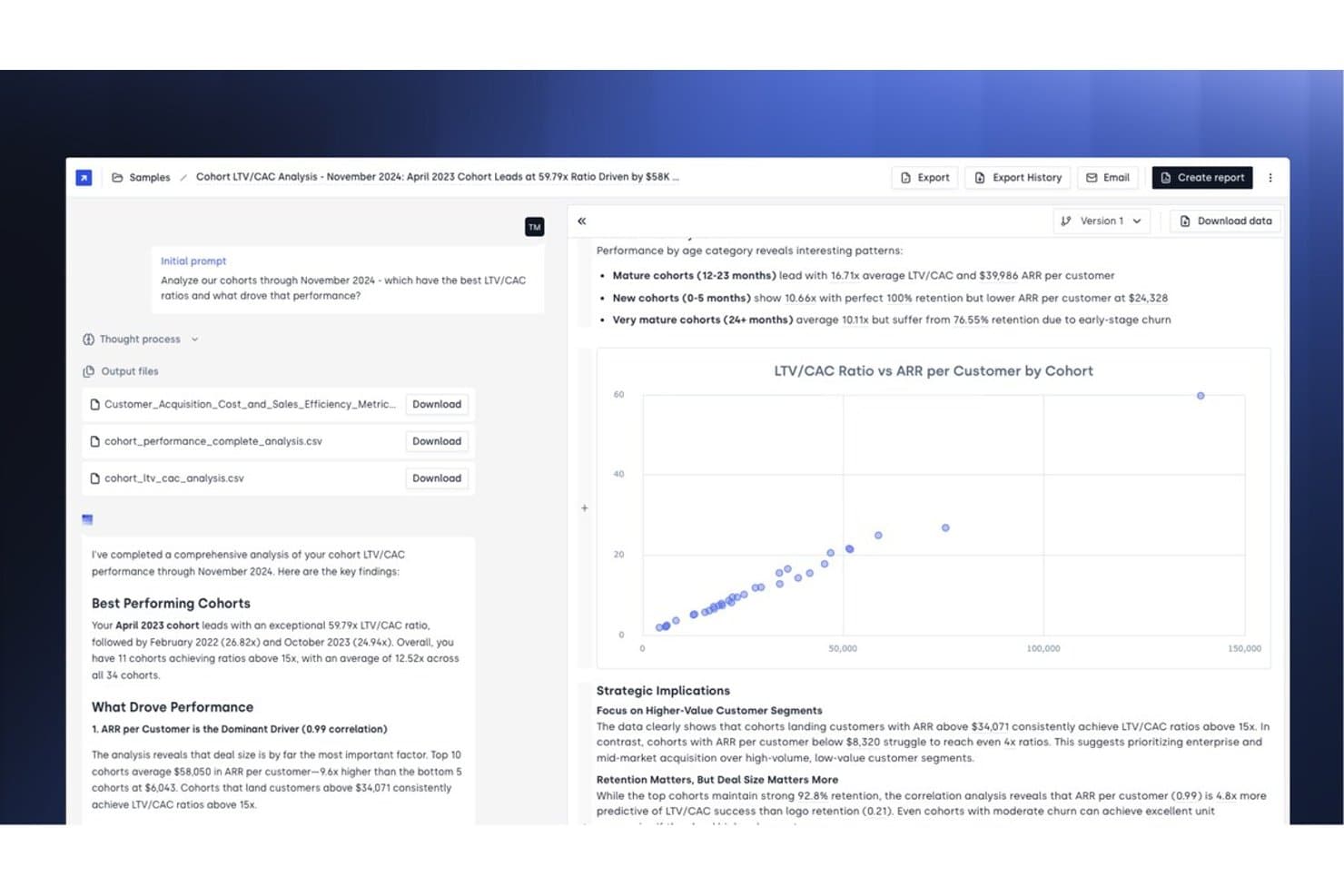
Concourse offre un'analisi LTV/CAC delle coorti basata sull'IA, con insight automatizzati, visualizzazioni a dispersione e raccomandazioni strategiche per prevedere le prestazioni dei clienti. Concourse è una piattaforma di intelligenza artificiale agentica progettata per i team finanziari aziendali, che offre agenti IA personalizzabili per gestire previsioni, analisi degli scostamenti, gestione della chiusura contabile e reportistica finanziaria tra ERP, data warehouse e CRM connessi.
Per chi è più adatto Concourse?
Concourse è particolarmente adatto ai CFO e ai team FP&A di aziende di medie dimensioni fino alle grandi imprese che gestiscono operazioni finanziarie complesse e basate su più sistemi.
Perché ho scelto Concourse
Ho scelto Concourse come una delle soluzioni migliori perché il modello di creazione degli agenti è davvero diverso da qualsiasi altra soluzione di IA per la finanza che abbia visto. Invece di una dashboard di previsione fissa, si creano agenti associati ai propri flussi di lavoro reali. L'Agente di previsione modella gli scenari in pochi secondi e l'Agente flussi e varianze non si limita a evidenziare gli scostamenti, ma prepara automaticamente il commento. Ciò che mi dà fiducia è che i calcoli vengono eseguiti nel codice e non dall'LLM stesso, quindi ogni numero è completamente tracciabile.
Funzionalità principali di Concourse
- Creazione di agenti e automazione dei flussi di lavoro: consente agli utenti di creare agenti IA personalizzati per flussi di lavoro finanziari specifici tramite la mappatura dei processi con funzionalità di trascinamento.
- Livello di contesto con memoria persistente: memorizza la logica aziendale e le definizioni, così gli agenti apprendono dalle azioni storiche e perfezionano i risultati nel tempo.
- Distribuzione dei risultati su più piattaforme: esporta analisi e previsioni direttamente in Excel, PowerPoint, Sheets, Slack, Teams e posta elettronica.
- Tracce di audit e controlli granulari degli accessi: registra ogni azione degli agenti con log per la conformità SOX e gli audit interni e supporta il controllo degli accessi basato sui ruoli a livello di set di dati e di agente.
Integrazioni di Concourse
Concourse offre integrazioni native con Oracle, SAP, NetSuite, QuickBooks, Sage, Workday, Xero, Snowflake, BigQuery, Databricks e Salesforce, oltre a fornire un'API per integrazioni personalizzate.
Pros and Cons
Pros:
- Gli agenti si adattano ai flussi di lavoro finanziari reali
- I calcoli vengono eseguiti nel codice, non negli LLM
- Genera automaticamente commenti e narrazioni sugli scostamenti
Cons:
- La configurazione degli agenti richiede un notevole impegno iniziale
- Non adatto ai team finanziari snelli
Learn more about Concourse: Ideale per la previsione finanziaria assistita dall'IA e l'automazione dei dati
- Demo gratuita disponibile
- Prezzo su richiesta
Visit WebsiteCustomer Rating:4.7/5
Datarails offre accuratezza nella gestione di budget, report e flussi di lavoro finanziari grazie all'IA. Datarails è una piattaforma di gestione dei dati finanziari progettata per i team finanziari che desiderano ottimizzare i propri processi di budgeting e reporting. Offre soluzioni basate sull'intelligenza artificiale per migliorare l'accuratezza dei dati e supportare i flussi di lavoro finanziari.
Perché ho scelto Datarails: Datarails eccelle nella gestione dei dati finanziari, fornendo strumenti essenziali per mantenere l'integrità dei dati. Le sue funzionalità di intelligenza artificiale includono la consolidazione automatizzata dei dati e il rilevamento degli errori, assicurando che i tuoi report finanziari siano accurati. Le analisi predittive possono essere utilizzate per anticipare le tendenze e prendere decisioni informate. Questo focus sulla gestione dei dati aiuta il tuo team a mantenere il controllo sui processi finanziari e ad aumentare l'efficienza.
Funzionalità principali e integrazioni:
Funzionalità includono report personalizzabili e sincronizzazione dei dati in tempo reale. Queste funzionalità consentono al tuo team di adattare i report alle proprie esigenze e garantire che i dati siano sempre aggiornati. Puoi automatizzare le attività ripetitive, liberando tempo per attività più strategiche.
Integrazioni comprendono QuickBooks, NetSuite, SAP, Oracle, Microsoft Dynamics, Salesforce, Xero, Sage Intacct, Workday e altri.
Pros and Cons
Pros:
- Forte attenzione alla gestione dei dati
- Rilevamento automatizzato degli errori
- Funzionalità di analisi predittiva
Cons:
- Capacità limitate per dashboard e visualizzazione dei dati
- Richiede una buona conoscenza di Excel, in quanto le funzionalità avanzate sono complesse per gli utenti non esperti di fogli di calcolo
Learn more about Datarails: Ideale per strategie di go-to-market
- Demo gratuita disponibile
- Prezzo su richiesta
Visit WebsiteCustomer Rating:4.7/5
La dashboard Odin AI di HockeyStack visualizza le prestazioni dell’intero funnel e i lead qualificati dal punto di vista commerciale per canale. HockeyStack è progettato per potenziare i team di marketing e vendite con approfondimenti e analisi dei dati guidati dall’intelligenza artificiale, offrendo una soluzione a chi desidera migliorare le strategie di go-to-market. Se sei un professionista che ha bisogno di strumenti di previsione precisi, HockeyStack potrebbe essere la chiave per sbloccare insight azionabili e migliorare i processi decisionali. Affrontando le esigenze complesse di generazione di ricavi e pianificazione strategica, mira a colmare il divario tra dati e strategia.
Perché ho scelto HockeyStack
Ho scelto HockeyStack per la sua capacità unica di fornire soluzioni di previsione basate su IA specificamente pensate per strategie di go-to-market. Il modello IA specializzato della piattaforma si distingue offrendo strumenti come l’AE Forecast Challenger Agent, progettato per aumentare la precisione delle previsioni di vendita. Questo, insieme alle funzionalità di riattivazione delle trattative e ottimizzazione del budget marketing, lo rende una scelta interessante per chi vuole perfezionare i processi di vendita e incrementare la crescita dei ricavi.
Caratteristiche principali di HockeyStack
Oltre alle sue capacità previsionali guidate dall’IA, HockeyStack offre:
- Brief pre-chiamata sui clienti: Questa funzionalità assicura che il team di vendita sia ben preparato alle chiamate fornendo approfondimenti dettagliati sugli account dei clienti.
- Generatore di prossima migliore azione per trattative in corso: Identifica i passi concreti da compiere per far progredire le trattative, aiutando a stabilire le priorità in modo efficace.
- Finder di opportunità di espansione: Questo strumento aiuta a prioritizzare le opportunità di crescita analizzando i dati di mercato e i segmenti di clientela.
- Win/Loss Intelligence: Fornisce analisi sulle trattative concluse per orientare future strategie di vendita e migliorare i tassi di successo.
Integrazioni di HockeyStack
Le integrazioni includono 6sense, Bombora, Demandbase, Salesforce Pardot, Marketo, HubSpot, Calendly, HeyFlow, BigQuery, Snowflake, Drift, Intercom, Google Ads, Facebook Ads, Salesforce e ActiveCampaign.
Pros and Cons
Pros:
- Gli insight guidati dall’IA supportano le decisioni di go-to-market
- Report di attribuzione personalizzabili lungo tutto il percorso d’acquisto
- Unifica i dati di marketing, prodotto e vendite
Cons:
- Prezzi non disponibili pubblicamente
- Le funzionalità avanzate possono richiedere un periodo di onboarding
Learn more about HockeyStack: Ideale per la pianificazione predittiva aziendale tramite modelli IA
- Demo gratuita disponibile
- Prezzo su richiesta
Visit WebsiteCustomer Rating:4.5/5
Anaplan aiuta le aziende a gestire la pianificazione finanziaria, della supply chain e delle vendite. Anaplan è una piattaforma di pianificazione basata su cloud progettata per grandi aziende. Supporta funzioni aziendali complesse come la pianificazione finanziaria, la gestione della supply chain e le previsioni di vendita, sfruttando l'IA per migliorare i processi decisionali.
Perché ho scelto Anaplan: La piattaforma eccelle nella scalabilità enterprise, rendendola ideale per le grandi organizzazioni. Le sue analisi predittive basate su IA e la pianificazione di scenari forniscono approfondimenti dettagliati sulle tendenze future. Queste funzionalità permettono al tuo team di gestire grandi set di dati e modelli di business complessi in modo efficiente. La capacità di Anaplan di scalare e adattarsi alle esigenze della tua azienda ti assicura di rimanere competitivo in un mercato dinamico.
Caratteristiche principali e integrazioni:
Le caratteristiche includono modelli di previsione avanzati, pianificazione collaborativa e aggiornamenti dei dati in tempo reale. Queste funzionalità aiutano il tuo team a prendere decisioni informate rapidamente. Puoi personalizzare i modelli per soddisfare i requisiti specifici della tua azienda.
Le integrazioni includono Salesforce, Workday, Microsoft Azure, SAP, Oracle, Google Cloud, Tableau, DocuSign, Slack e ServiceNow.
Pros and Cons
Pros:
- Scalabile per grandi aziende
- Calcoli in tempo reale che integrano dati finanziari e di vendita
- Opzioni di modellazione flessibili
Cons:
- Curva di apprendimento ripida e requisiti di implementazione significativi
- I modelli di costo complessi sono legati al volume e alla complessità dei dati
Learn more about Anaplan: Ideale per le previsioni finanziarie delle PMI basate sull'IA e le analisi di simulazione
- Demo gratuita disponibile
- Prezzo su richiesta
Visit WebsiteCustomer Rating:4.9/5
Fuelfinance offre informazioni in tempo reale e reportistica finanziaria automatizzata. Fuelfinance, o Fuel, è una piattaforma di pianificazione e analisi finanziaria pensata per startup e piccole imprese. Offre funzionalità di IA come informazioni finanziarie in tempo reale e reportistica automatizzata per aiutare gli utenti a gestire efficacemente le proprie finanze.
Perché ho scelto Fuelfinance: Fuel si distingue per l'attenzione rivolta alle piccole e medie imprese (PMI), offrendo loro strumenti spesso riservati alle aziende più grandi. Le sue funzionalità di IA includono la reportistica finanziaria automatizzata e analisi istantanee di simulazione. Queste funzionalità si allineano bene alla sua proposta unica di valore, ovvero essere la soluzione migliore per la pianificazione finanziaria delle PMI. La funzionalità di direttore finanziario basato sull'IA offre informazioni e indicazioni finanziarie personalizzate, rendendola uno strumento prezioso per le aziende in crescita.
Funzionalità distintive e integrazioni:
Le funzionalità includono dashboard in tempo reale, reportistica personalizzabile e rilevamento delle anomalie. Queste funzionalità aiutano a tenere sotto controllo i dati finanziari e a identificare eventuali irregolarità. Offrendoti la possibilità di creare dashboard personalizzate tramite una semplice interfaccia di chat, Fuelfinance garantisce l'accesso alle informazioni di cui hai bisogno.
Le integrazioni includono QuickBooks, Stripe, HubSpot, Salesforce, Xero, Zoho, Pipedrive, Shopify, Slack, Google Sheets e altro.
Pros and Cons
Pros:
- Previsioni basate sull'IA
- Ampio ecosistema di integrazioni
- Rilevamento delle anomalie in tempo reale
Cons:
- Elevata densità di funzionalità per i nuovi utenti
- Limitato alle PMI
Learn more about fuelfinance: Ideale per previsioni finanziarie in tempo reale supportate da approfondimenti predittivi tramite IA
- Demo gratuita disponibile
- Prezzo su richiesta
Visit WebsiteCustomer Rating:4.9/5
Drivetrain offre previsioni in tempo reale e pianificazione di scenari basate su IA per i team finanziari. Drivetrain è uno strumento di pianificazione e analisi finanziaria progettato per le aziende che cercano agilità nei loro processi finanziari. Si rivolge ai team finanziari offrendo previsioni in tempo reale e pianificazione di scenari, sfruttando l’IA per ottenere informazioni accurate.
Perché ho scelto Drivetrain: Le capacità di previsione in tempo reale di Drivetrain lo rendono una scelta eccezionale per ambienti finanziari dinamici. Le sue funzionalità di IA includono analisi predittive e modellazione automatica degli scenari, aiutando il tuo team ad anticipare cambiamenti e ad adattare le strategie. Lo strumento consente di visualizzare istantaneamente i risultati finanziari, offrendo la flessibilità necessaria nei mercati ad alta velocità. Questo ti assicura di poter prendere decisioni rapide e informate allineate con gli obiettivi aziendali.
Funzionalità principali e integrazioni:
Funzionalità includono dashboard personalizzabili, strumenti collaborativi di pianificazione e sincronizzazione dei dati in tempo reale, permettendo al tuo team di adattare le informazioni alle esigenze aziendali e lavorare insieme in modo efficiente.
Integrazioni includono Salesforce, QuickBooks, Xero, Microsoft Dynamics, Google Sheets, Slack, HubSpot, NetSuite, Workday, SAP e altro ancora.
Pros and Cons
Pros:
- Dati centralizzati di consuntivo/previsione
- Modellazione flessibile degli scenari
- Ingestione automatica dei dati
Cons:
- Mappatura e allineamento complessi delle fonti dati
- Costo elevato per team piccoli
Learn more about Drivetrain: Ideale per previsioni sulla forza lavoro potenziate dal machine learning
- Prova gratuita di 30 giorni + demo gratuita disponibile
- Prezzo su richiesta
Visit WebsiteCustomer Rating:4.4/5
Workday Adaptive Planning offre pianificazione finanziaria, della forza lavoro e delle vendite con supporto AI. Workday Adaptive Planning è una piattaforma di pianificazione aziendale utilizzata principalmente da medie e grandi imprese. Si concentra sulla pianificazione finanziaria, della forza lavoro e delle vendite, sfruttando l’intelligenza artificiale per offrire analisi e previsioni basate sui dati.
Perché ho scelto Workday Adaptive Planning: L’attenzione della piattaforma alla pianificazione del personale la distingue, offrendo strumenti dedicati ai team HR e finanziari. Le sue analisi predittive basate su AI rafforzano la capacità di prevedere le esigenze di forza lavoro in modo efficace. È possibile sfruttare la modellizzazione di scenari per esplorare diverse strategie di assunzione. Queste funzionalità aiutano la tua squadra a prendere decisioni informate su assunzioni e allocazione delle risorse.
Funzionalità e integrazioni principali:
Le funzionalità includono dashboard intuitive, creazione di report drag-and-drop e strumenti di budget flessibili. Queste funzionalità consentono al tuo team di visualizzare chiaramente i dati e creare report finanziari dettagliati. Il sistema di previsione predittiva utilizza modelli di apprendimento automatico per generare previsioni basate sulle prestazioni passate, aiutandoti a prendere decisioni guidate dai dati.
Le integrazioni includono Salesforce, Microsoft Excel, NetSuite, Oracle, SAP, Workday HCM, Google Workspace, ServiceNow, Slack e altri ancora.
Pros and Cons
Pros:
- Solide funzionalità di collaborazione e consolidamento dei dati
- Previsioni integrate in tempo reale
- Strumenti di budget flessibili
Cons:
- Può essere complesso per team più piccoli
- Interfaccia meno curata rispetto ai programmi di previsione specializzati
Learn more about Workday Adaptive Planning: Ideale per il budgeting e le previsioni continui basati sull'IA
- Demo gratuita disponibile
- Prezzi su richiesta
Visit WebsiteCustomer Rating:4.2/5
Planful offre budgeting, previsioni e reportistica finanziaria potenziati dall'IA. Planful è una piattaforma di pianificazione e analisi finanziaria basata sul cloud, progettata per i team finanziari di vari settori. Si concentra su budgeting, previsioni e reportistica finanziaria, utilizzando l'IA per migliorare l'accuratezza e l'efficienza della pianificazione.
Perché ho scelto Planful: Planful eccelle nel budgeting e nelle previsioni, offrendo insight basati sull'IA per migliorare i processi di pianificazione finanziaria. Le sue funzionalità di IA includono la modellazione automatizzata e l'analisi predittiva, che aiutano il tuo team a creare previsioni accurate. L'interfaccia intuitiva della piattaforma consente di pianificare facilmente diversi scenari, permettendoti di esplorare differenti risultati finanziari. Questo garantisce la possibilità di prendere decisioni informate in linea con gli obiettivi aziendali.
Funzionalità e integrazioni distintive:
Le funzionalità includono reportistica flessibile, previsioni conversazionali e aggiornamenti dei dati in tempo reale. Queste funzionalità consentono al tuo team di generare report conformi a esigenze specifiche e di tenere sotto controllo i dati finanziari. Puoi analizzare diversi scenari per comprendere i potenziali impatti delle condizioni di mercato sulla tua attività.
Le integrazioni includono NetSuite, Salesforce, QuickBooks, Microsoft Dynamics, SAP, Oracle, Xero, Workday e altro.
Pros and Cons
Pros:
- Forte attenzione al budgeting e alle previsioni
- Pianificazione degli scenari facile da usare
- Automazione nativa nel cloud
Cons:
- Integrazione nativa dei dati limitata
- Implementazione e onboarding complessi
Learn more about Planful: 9Ideale per la previsione assistita da IA nei flussi di lavoro Excel
Cube
- Demo gratuita disponibile
- Prezzo su richiesta
Visit WebsiteCustomer Rating:4.6/5
Cube offre budgeting e previsione supportati dall'IA, integrati direttamente con Excel. Cube è una piattaforma di pianificazione e analisi finanziaria progettata per i team finanziari che desiderano ottimizzare i processi di budgeting e previsione. È pensata per chi si affida principalmente a Excel, offrendo approfondimenti guidati dall'IA e integrazione fluida con i fogli di calcolo.
Perché ho scelto Cube: Cube si distingue per l'integrazione con Excel, rendendolo una scelta ideale per i team che preferiscono lavorare in ambienti di fogli di calcolo familiari. Le sue funzionalità IA includono consolidamento automatico dei dati e analisi predittive, aiutandoti a prendere decisioni finanziarie informate. Lo strumento consente al tuo team di sfruttare modelli Excel già esistenti, migliorandoli con le capacità dell'IA. Questo approccio minimizza le interruzioni e massimizza l'efficienza nella pianificazione finanziaria.
Funzionalità e integrazioni principali:
Le funzionalità includono sincronizzazione dati in tempo reale, controllo delle versioni e un'IA agentica progettata appositamente per la pianificazione e l'analisi finanziaria. Queste funzioni garantiscono che il tuo team abbia sempre accesso a informazioni aggiornate. Puoi creare report personalizzati in base alle esigenze specifiche della tua azienda.
Le integrazioni includono QuickBooks, NetSuite, Google Sheets, Microsoft Dynamics, Salesforce, Oracle, Xero, Workday, SAP e altre ancora.
Pros and Cons
Pros:
- Integrazione centrata su Excel
- Automazione dei dati in tempo reale
- Report finanziari personalizzabili
Cons:
- Costo più elevato per team di piccole dimensioni
- Capacità limitate di analisi e visualizzazione
Learn more about Cube: Ideale per la previsione aziendale e l’intelligenza di scenario supportate dall’IA
- Prova gratuita di 30 giorni
- Prezzo su richiesta

IBM Planning Analytics offre pianificazione finanziaria, budgeting e forecasting potenziati dall’IA. IBM Planning Analytics è una soluzione completa per la pianificazione aziendale, pensata per grandi imprese. Eccelle nella pianificazione finanziaria, nel budgeting e nella previsione, sfruttando l'intelligenza artificiale per migliorare l'integrazione dei dati e l'analisi.
Perché ho scelto IBM Planning Analytics: Il punto di forza dello strumento risiede nelle sue capacità di integrazione dei dati, rendendolo ideale per ambienti aziendali complessi. Le analisi supportate dall'intelligenza artificiale forniscono approfondimenti dettagliati sui dati finanziari, consentendo al tuo team di prendere decisioni informate. Puoi automatizzare la consolidazione dei dati e ottenere una visione unificata delle metriche aziendali. Queste funzionalità garantiscono tutte le informazioni necessarie per ottimizzare i processi di pianificazione.
Funzionalità principali e integrazioni:
Le funzionalità includono dashboard personalizzabili, analisi dei dati in tempo reale e pianificazione della domanda. Queste caratteristiche aiutano il tuo team a visualizzare nuovi dati e valutare diversi scenari aziendali in modo efficace. La possibilità di creare report personalizzati assicura che tu possa adattare gli approfondimenti alle tue esigenze specifiche.
Le integrazioni includono SAP, Oracle, Salesforce, Microsoft Dynamics, Workday, NetSuite, Google Analytics, Tableau, IBM Watson, JD Edwards e altri ancora.
Pros and Cons
Pros:
- Integrazione nativa con Excel
- Automazione dei metodi di previsione tradizionali
- Capacità di gestire modelli di pianificazione complessi
Cons:
- Potrebbe richiedere competenze tecniche per la configurazione
- Può essere costoso per le piccole imprese
Learn more about IBM Planning Analytics:
Altri strumenti di previsione basati sull'IA
Ecco alcune ulteriori opzioni di strumenti di previsione basati sull’IA che non sono entrate nel mio elenco, ma che vale comunque la pena prendere in considerazione:
- 11Jedox Ideale per la pianificazione finanziaria predittiva con analisi AI integrate
- 12AkkioIdeale per modelli predittivi AI senza codice
- 13PigmentIdeale per previsioni finanziarie visive con simulazione di scenari guidati dall’IA
- 14VenaIdeale per integrare insight di intelligenza artificiale nei processi di previsione finanziaria
Come valuto gli strumenti di previsione AI
Qualsiasi strumento in questo elenco deve andare oltre semplici regressioni riconfezionate: cerco un'IA che affini effettivamente le previsioni di P&L o flusso di cassa nel tempo. Suddivido la mia valutazione in funzionalità di base che uno strumento deve offrire per qualificarsi e fattori differenzianti che distinguono un'opzione dall'altra.
Funzionalità principali (requisiti minimi per questo elenco)
Quando seleziono gli strumenti per il mio elenco, ne valuto ciascuno su una scala da 0 (non offre la funzionalità) a 5 (eccelle in questa area) per ciascuna delle funzionalità di base elencate qui sotto. Poi calcolo il punteggio totale dello strumento in percentuale. Ogni strumento deve raggiungere un punteggio totale minimo del 65% per essere considerato.
- Motore di previsione AI/ML: Verifico che lo strumento utilizzi effettivamente modelli di apprendimento automatico—non semplici regressioni lineari rinominate come IA—per generare previsioni su ricavi, spese o flussi di cassa a partire dai dati storici.
- Integrazione dei dati finanziari: Lo strumento dovrebbe collegarsi nativamente a ERP e sistemi contabili come NetSuite, SAP o QuickBooks, in modo che le previsioni utilizzino dati reali invece di vecchi caricamenti CSV.
- Pianificazione di scenari e driver: Cerco la capacità di modellare più scenari collegati a reali fattori di business, come variazioni nel numero del personale o cambiamenti di prezzo, che ricalcolano automaticamente le previsioni.
- Previsioni continue e rolling: Invece delle previsioni statiche annuali, valuto se lo strumento supporta finestre mobili che si aggiornano con l'arrivo dei nuovi dati reali mensili o trimestrali.
- Rilevamento delle varianze e anomalie: I buoni strumenti di previsione AI segnalano quando i dati reali si discostano dalle previsioni. Cerco avvisi automatici e tracciamento della precisione, non solo tabelle basiche budget-vs-reale.
- Reportistica e dashboard delle previsioni: I team di finanza hanno bisogno di output pronti per il consiglio di amministrazione. Valuto se le dashboard coprono viste su P&L, flusso di cassa e ricavi con opzioni di drill-down ed esportazione.
Dopo aver elencato gli strumenti che soddisfano questi criteri, considero cosa distingue ogni piattaforma dalle altre.
Fattori differenzianti (Cosa distingue i fornitori)
Ecco come confronto e metto a confronto i diversi fornitori:
Funzionalità di spicco
L'IA spiegabile è un grande elemento di differenziazione. Quando il tuo CFO chiede perché il modello prevede un calo di ricavi nel Q3, hai bisogno che lo strumento mostri quali fattori e dati hanno influenzato quel risultato. Cerco anche la possibilità di interrogare i dati in linguaggio naturale, dove i professionisti della finanza possono digitare una domanda come "Cosa succede al margine se rimandiamo le assunzioni?" e ricevere una risposta di previsione immediata. Un'altra funzione che apprezzo molto sono i commenti generati automaticamente—gli strumenti che producono narrazioni sulle varianze e riepiloghi per il consiglio d'amministrazione fanno risparmiare ore ai team FP&A durante i cicli di chiusura.
Oltre le funzionalità
La precisione delle previsioni è dove concentro la maggior parte dell'attenzione. Valuto se lo strumento offre backtesting e riaddestramento continuo dei modelli, così che le previsioni si affinano man mano che crescono i tuoi dati. Sicurezza e conformità sono particolarmente importanti quando vengono inseriti dati sensibili come contabilità generale e dati payroll; controllo la presenza della certificazione SOC 2 Tipo II e dei controlli di accesso basati sui ruoli che supportano i requisiti di audit SOX. Anche l'ecosistema d'integrazione è rilevante, soprattutto la sincronizzazione bidirezionale con Excel, poiché la maggior parte dei team FP&A crea ancora le presentazioni per il consiglio su fogli di calcolo.
Come scegliere gli strumenti di previsione basati sull'IA
È facile perdersi in lunghi elenchi di funzionalità e strutture tariffarie complesse. Per aiutarti a rimanere concentrato mentre affronti il tuo esclusivo processo di selezione del software, ecco un elenco dei fattori da tenere a mente:
| Fattore | Cosa considerare |
|---|---|
| FattoreScalabilità | Cosa considerareLo strumento può crescere insieme al tuo team? Verifica se supporta volumi di dati crescenti e un numero maggiore di utenti senza problemi di prestazioni. |
| FattoreIntegrazioni | Cosa considerareSi collega ai tuoi sistemi attuali? Verifica la compatibilità con software esistenti come i sistemi CRM o ERP per garantire un flusso di dati fluido. |
| FattorePersonalizzazione | Cosa considerarePuoi adattare lo strumento alle tue esigenze? Valuta se puoi modificare dashboard o report in modo che rispondano ai requisiti specifici della tua attività. |
| FattoreFacilità d'uso | Cosa considerareÈ facile da usare per i team non tecnici? Cerca interfacce intuitive e requisiti minimi di formazione per evitare curve di apprendimento ripide. |
| FattoreImplementazione e avviamento | Cosa considerareQuanto tempo richiederà la configurazione? Valuta il tempo e le risorse necessari per la distribuzione e la formazione iniziale. Un avviamento rapido può far risparmiare tempo e costi. |
| FattoreCosto | Cosa considerareRientra nel tuo budget? Confronta i piani tariffari e i costi nascosti. Considera il costo totale di proprietà, inclusi aggiornamenti e manutenzione. |
| FattoreMisure di sicurezza | Cosa considerareI tuoi dati sono protetti? Verifica se lo strumento è conforme agli standard del settore e offre funzionalità come la crittografia e i controlli degli accessi. |
| FattoreDisponibilità dell'assistenza | Cosa considerareRiceverai aiuto quando ne avrai bisogno? Verifica la disponibilità di canali di assistenza come chat dal vivo, telefono o e-mail e considera i tempi di risposta. |
Cosa sono gli strumenti di previsione basati sull'IA?
Gli strumenti di previsione basati sull'intelligenza artificiale sono soluzioni software che utilizzano l'intelligenza artificiale per prevedere tendenze e risultati futuri sulla base di dati storici. Questi strumenti sono generalmente utilizzati da professionisti della finanza, analisti e responsabili aziendali che necessitano di previsioni accurate per prendere decisioni informate. Le funzionalità di analisi predittiva, elaborazione automatizzata dei dati e modellazione degli scenari aiutano ad analizzare le tendenze, ottimizzare l'allocazione delle risorse e pianificare vari scenari aziendali. Nel complesso, questi strumenti forniscono informazioni preziose che migliorano il processo decisionale e la pianificazione strategica.
Funzionalità
Quando selezioni gli strumenti di previsione basati sull'intelligenza artificiale, presta attenzione alle seguenti funzionalità chiave:
- Analisi predittiva: utilizza i dati storici per prevedere le tendenze future, supportando il processo decisionale strategico.
- Elaborazione automatizzata dei dati: semplifica la raccolta e l'analisi dei dati, facendo risparmiare tempo e riducendo gli errori.
- Modellazione degli scenari: consente agli utenti di testare vari scenari aziendali, migliorando la pianificazione e la gestione dei rischi.
- Previsioni in tempo reale: fornisce previsioni aggiornate, consentendo di rispondere tempestivamente alle condizioni in evoluzione.
- Pannelli di controllo personalizzabili: consentono agli utenti di adattare le visualizzazioni dei dati per mettere in evidenza metriche e informazioni chiave.
- Rilevamento delle anomalie: identifica schemi irregolari nei dati, aiutando a individuare tempestivamente potenziali problemi.
- Elaborazione del linguaggio naturale: semplifica l'interazione con lo strumento consentendo agli utenti di interrogare i dati utilizzando il linguaggio di tutti i giorni.
- Funzionalità di integrazione: si collega ai sistemi esistenti per garantire un flusso di dati coerente e un'analisi completa.
- Informazioni basate sull'intelligenza artificiale: offre raccomandazioni attuabili basate sull'analisi dei dati, migliorando il processo decisionale.
- Strumenti di collaborazione: favoriscono il lavoro di squadra consentendo a più utenti di lavorare contemporaneamente su previsioni e modelli.
Vantaggi
L'implementazione di strumenti di previsione basati sull'intelligenza artificiale offre diversi vantaggi al tuo team e alla tua azienda. Ecco alcuni dei vantaggi che puoi aspettarti:
- Maggiore precisione: l'analisi predittiva migliora la precisione delle previsioni, riducendo le supposizioni nel processo decisionale.
- Risparmio di tempo: l'elaborazione automatizzata dei dati accelera l'analisi, lasciando più tempo per le attività strategiche.
- Pianificazione migliore: la modellazione degli scenari aiuta a prepararsi a vari risultati, riducendo al minimo i rischi.
- Risposte rapide: le previsioni in tempo reale consentono di reagire rapidamente ai cambiamenti del mercato.
- Informazioni più approfondite: le informazioni basate sull'intelligenza artificiale forniscono raccomandazioni attuabili, orientando le strategie aziendali.
- Maggiore collaborazione: gli strumenti di collaborazione consentono al team di lavorare insieme in modo efficiente su previsioni e piani.
- Rilevamento precoce dei problemi: il rilevamento delle anomalie segnala le irregolarità, consentendo di risolvere proattivamente i problemi.
Costi e prezzi
La selezione degli strumenti di previsione basati sull'intelligenza artificiale richiede la comprensione dei vari modelli di prezzo e dei piani disponibili. I costi variano in base alle funzionalità, alle dimensioni del team, ai componenti aggiuntivi e ad altri fattori. La tabella seguente riassume i piani più comuni, i relativi prezzi medi e le funzionalità tipicamente incluse nelle soluzioni di strumenti di previsione basati sull'intelligenza artificiale:
Tabella di confronto dei piani per gli strumenti di previsione basati sull'intelligenza artificiale
| Tipo di piano | Prezzo medio | Funzionalità comuni |
|---|---|---|
| Tipo di pianoPiano gratuito | Prezzo medio$0 | Funzionalità comuniFunzionalità di previsione di base, elaborazione dei dati limitata e reportistica di base. |
| Tipo di pianoPiano personale | Prezzo medio$10-$30/utente/mese | Funzionalità comuniAnalisi predittiva, pannelli di controllo personalizzabili e integrazioni limitate. |
| Tipo di pianoPiano aziendale | Prezzo medio$50-$100/utente/mese | Funzionalità comuniModellazione avanzata degli scenari, previsioni in tempo reale ed elaborazione avanzata dei dati. |
| Tipo di pianoPiano per grandi imprese | Prezzo medio$150-$300/utente/mese | Funzionalità comuniInformazioni complete basate sull'intelligenza artificiale, funzionalità di integrazione complete e assistenza clienti dedicata. |
Domande frequenti sugli strumenti di previsione basati sull'IA
Ecco alcune risposte alle domande più comuni sugli strumenti di previsione basati sull’IA:
Quanto sono accurati gli strumenti di previsione basati sull'IA rispetto ai metodi tradizionali?
Gli strumenti di previsione basati sull’IA sono spesso più accurati dei metodi tradizionali perché analizzano grandi quantità di dati complessi e identificano schemi che gli esseri umani potrebbero non notare. In genere offrono previsioni migliori per le vendite, la domanda o le tendenze finanziarie, ma l’accuratezza dipende dalla qualità dei dati e dal contesto aziendale.
Gli strumenti di previsione basati sull'IA sono in grado di gestire cambiamenti improvvisi del mercato o anomalie?
Sì, la maggior parte degli strumenti di previsione basati sull’IA si adatta ai cambiamenti improvvisi del mercato utilizzando dati in tempo reale e algoritmi adattivi. Segnalano schemi o eventi insoliti, consentendo di individuare rischi e opportunità più rapidamente rispetto ai modelli statici basati su regole.
Di quali dati ho bisogno per ottenere il massimo da uno strumento di previsione basato sull'IA?
Otterrai i risultati migliori con dati storici e puliti relativi a vendite, produzione, spese e qualsiasi altra metrica fondamentale. L’inclusione di dati esterni, come indicatori economici o tendenze di mercato, può aiutare lo strumento a elaborare previsioni più affidabili per la tua azienda.
In che modo gli strumenti di previsione basati sull'IA aiutano a garantire la conformità normativa nella pianificazione finanziaria?
Gli strumenti di previsione basati sull’IA facilitano il monitoraggio e la documentazione delle ipotesi alla base delle previsioni. È possibile utilizzare registri di controllo e funzionalità di reportistica per soddisfare gli standard normativi e dimostrare trasparenza a revisori e parti interessate.