

Recensione MarginEdge: Pro, Contro, Funzionalità e Prezzi
MarginEdge potenzia il tuo ristorante con dati in tempo reale, semplificando la gestione delle spese e offrendo informazioni approfondite alla tua attività di ospitalità.

Recensiamo gli strumenti in modo indipendente e le commissioni aiutano a finanziare i nostri test. Consulta la nostra politica sulla trasparenza, la nostra metodologia, oppure suggerisci uno strumento.
MarginEdge is an expense management software built for restaurant operators who need to track food costs, process vendor invoices, and monitor spending against daily sales. I'd choose it over Plate IQ if your priority is connecting invoice data directly to recipe-level cost analysis, MarginEdge ties purchasing and vendor bills to menu costing in a way that gives your finance team a much clearer picture of where margin is actually going.
MarginEdge Evaluation Summary
4.6/5
- From $330/location/month
- Free demo available
Perché fidarsi dei nostri consigli sui software
6,700+
Reviews
20
Industry experts
16+
Evaluation factors
14
Years
Le nostre recensioni riflettono il nostro giudizio indipendente, non un discorso di vendita. Scopri come manteniamo la trasparenza.
Per questa guida, abbiamo valutato gli strumenti attraverso test pratici e ricerche indipendenti, assegnando un punteggio agli strumenti in base ai nostri criteri di selezione.
Le nostre recensioni riflettono il nostro giudizio editoriale umano, non un discorso di vendita.
MarginEdge Overview
In my opinion, MarginEdge excels at providing restaurateurs with valuable real-time cost insights, which many user reviews describe as a game-changer for their operations. Its seamless integration with POS systems and accounting systems is a standout feature, making it ideal for restaurant management. In my opinion, its ease of use, strong automation, and effective customer support make it a solid choice for businesses looking to improve operational efficiency and forecasting. However, onboarding might require some patience, although it's manageable.
For restaurant teams, it's a great fit, offering a strong overall rating. It has excellent value for money and powerful tools for monitoring labor costs, line item expenses, and generating usage reports. Compared to other expense management software, MarginEdge's focus on the restaurant industry makes it uniquely advantageous for those specific needs.
Pros
- Provides real-time cost insights that improve recipe management.
- The user-friendly interface makes it easy to navigate and use daily.
- Its restaurant focus makes it well-suited to your specific industry needs.
Cons
- The onboarding process can be a bit lengthy.
- It may not cover all the features needed in non-restaurant industries.
- Some users report occasional system lags during peak times.
Is MarginEdge Right For Your Needs?
Who Would be a Good Fit for MarginEdge?
MarginEdge is perfect for restaurant operators who need real-time cost tracking, inventory management, and better expense visibility. If your team struggles with manual data entry and wants to integrate point-of-sale systems seamlessly with back-office accounting systems, MarginEdge offers a tailored solution. Its user-friendly interface, built-in automation, and focus on the restaurant industry make it a smart choice for those looking to enhance operational efficiency and gain actionable insights through detailed metrics and price alerts.
- Restaurant ChainsMarginEdge excels at helping you manage costs across multiple locations with real-time data, usage reports, and centralized cost management that positively impact your bottom line.
- Independent RestaurantsFor single-location restaurants, it simplifies your cost tracking and integrates with your existing accounting systems.
- Cafés and BistrosIts focus on small-scale operations means you can benefit from precise inventory, line item tracking, and cost management insights to optimize food usage.
- Food TrucksMarginEdge’s mobile-friendly features help your food truck track inventory, manage costs, and respond quickly to real-time price changes.
- Catering ServicesYour catering business can use MarginEdge to manage ingredient costs, automate invoice processing, and streamline operations efficiently.
- Hospitality GroupsFor hospitality groups managing diverse food services, it provides centralized control, forecasting tools, and insights into each operation.
Who Would be a Bad Fit for MarginEdge?
MarginEdge isn't ideal for industries outside the food service realm. If your business operates in manufacturing or retail, you might find its functionality lacking. Its focus on restaurant-specific needs means it doesn't cater to broader expense management requirements found in other industries. Your team may struggle with its limited capabilities if you require complex financial analytics beyond inventory, cost tracking, and labor costs.
- Manufacturing CompaniesYour manufacturing operations won't benefit from MarginEdge's restaurant-focused features, which lack production cost management.
- Retail StoresRetailers need inventory management tailored to product SKUs, which MarginEdge doesn't provide.
- Corporate OfficesFor corporate expense tracking, MarginEdge lacks features such as travel and expense reporting.
- Healthcare ProvidersYour healthcare facility needs specific medical inventory management that MarginEdge can't offer.
- Construction FirmsConstruction firms require project-based expense tracking, which MarginEdge doesn't support.
- Educational InstitutionsSchools need budget management across departments, a feature not available in MarginEdge’s offerings.
Come testiamo e valutiamo gli strumenti
Abbiamo impiegato anni a costruire, perfezionare e migliorare il nostro sistema di test e valutazione dei software. Il nostro schema è progettato per cogliere le sfumature della scelta del software e ciò che rende uno strumento efficace, concentrandosi sugli aspetti critici del processo decisionale. Di seguito puoi vedere esattamente come funzionano i nostri test e le nostre valutazioni in base a sette criteri. Questo ci permette di offrire una valutazione imparziale del software basata su funzionalità di base, caratteristiche distintive, facilità d’uso, onboarding, assistenza clienti, integrazioni, recensioni dei clienti e rapporto qualità-prezzo.
Funzionalità principali (25% del punteggio finale)
Il punto di partenza della nostra valutazione è sempre la funzionalità principale dello strumento. Dispone delle funzionalità base che un utente si aspetterebbe di trovare? Alcune di queste funzionalità sono riservate ai piani a pagamento più elevati? In sostanza, ci aspettiamo che uno strumento sia all’altezza delle capacità minime dei concorrenti.
Caratteristiche distintive (25% del punteggio finale)
Successivamente, valutiamo le caratteristiche distintive che vanno oltre la funzionalità principale normalmente presente negli strumenti di questo tipo. Un punteggio elevato riflette funzionalità specializzate o uniche che rendono il prodotto più rapido, efficiente o offrono valore aggiunto all’utente. Valutiamo inoltre quanto sia semplice integrare il software con altri strumenti tipicamente presenti nello stack tecnologico, per estenderne la funzionalità e l’utilità. Gli strumenti che offrono numerose integrazioni native, connessioni di terze parti e accesso API per creare integrazioni personalizzate ottengono il punteggio migliore.
Facilità d’uso (10% del punteggio finale)
Consideriamo quanto sia rapido e semplice eseguire le attività fondamentali previste dallo strumento. Un software con punteggio elevato è ben progettato, intuitivo da usare, offre app mobile, modelli predefiniti e semplifica operazioni complesse.
Onboarding (10% del punteggio finale)
Sappiamo quanto sia importante l’adozione rapida da parte del team quando si introduce una nuova piattaforma: per questo valutiamo quanto sia facile imparare e utilizzare lo strumento con una formazione minima. Valutiamo la rapidità con cui un membro del team può impostare e iniziare a utilizzare lo strumento senza esperienza pregressa. Le soluzioni con punteggio alto richiedono poco o nessun supporto.
Assistenza clienti (10% del punteggio finale)
Analizziamo quanto sia semplice e veloce ottenere aiuto tramite telefono, live chat o knowledge base. Gli strumenti e le aziende che offrono supporto in tempo reale ottengono i punteggi migliori, mentre i chatbot ricevono i punteggi più bassi.
Recensioni dei clienti (10% del punteggio finale)
Oltre ai nostri test e valutazioni, consideriamo il net promoter score dei clienti attuali e passati. Verifichiamo la probabilità che i clienti scelgano nuovamente lo strumento per le funzionalità di base. Un software con punteggio elevato riflette un net promoter score alto da parte dei clienti vecchi e attuali.
Rapporto qualità-prezzo (10% del punteggio finale)
Infine, considerando tutti gli altri criteri, valutiamo il prezzo medio dei piani base rispetto alle funzionalità principali e agli altri criteri di valutazione. I software che offrono di più, a un costo inferiore, ottengono punteggi migliori.
Core Features
Real-Time Cost Tracking: This feature lets your team monitor expenses as they happen with real-time data, giving you up-to-date insights into profitability. You can make informed decisions quickly to manage your costs effectively.
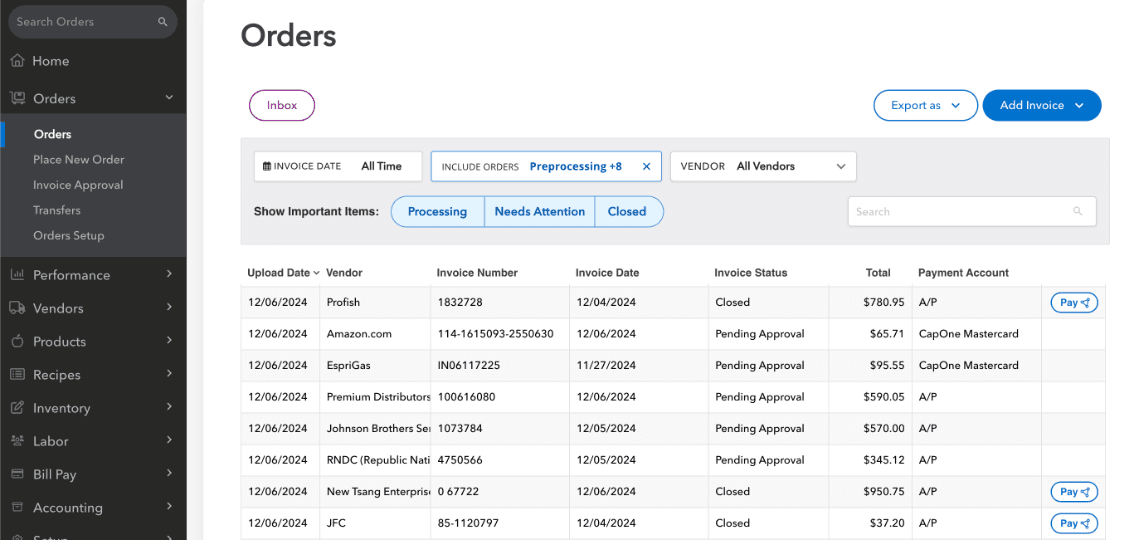
Inventory Management: MarginEdge helps you track your inventory levels in real time, reducing waste and saving money. Your team can easily adjust orders based on current stock, online ordering trends, and sales patterns.
Recipe Costing: You can calculate the cost of each menu item accurately at the line item level, ensuring pricing aligns with your profit goals. This transparency helps you maintain your desired profit margins.
Invoice Processing: Your invoices can be processed quickly and accurately with automation, reducing manual data entry errors. This speeds up your accounting workflow and keeps your records up-to-date.
Sales Data Integration: MarginEdge integrates sales data from your POS system into your accounting systems, giving you a clear picture of your restaurant's performance. You can identify trends and make data-driven decisions.
Reporting and Analytics: It provides detailed reports, usage reports, and analytics, helping your team understand financial performance and areas for improvement. This insight supports better strategic planning and forecasting.
Ease of Use
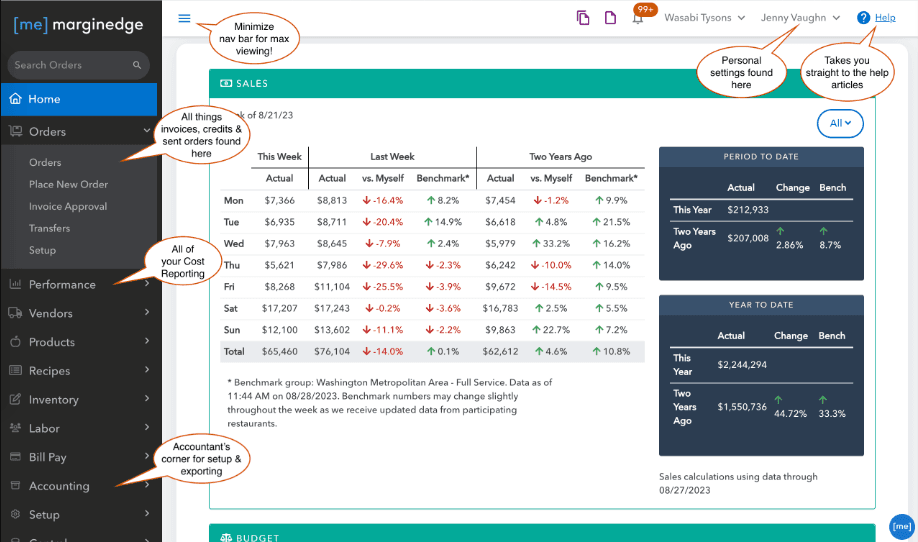
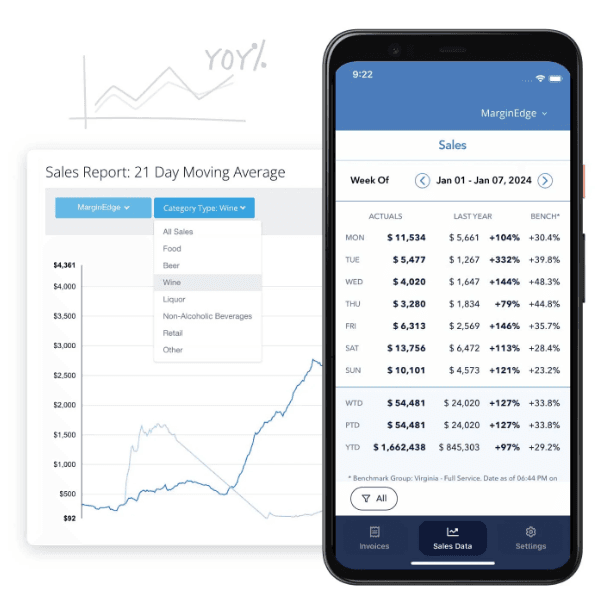
MarginEdge stands out for its intuitive, user-friendly interface, making it easy for your team to navigate and use on a daily basis. The integration with POS systems simplifies data entry, reducing the workload for your staff. Its clear dashboard provides real-time insights into key metrics, helping you make informed decisions quickly. While user reviews mention that the onboarding process takes time, the overall user experience is positive, with most users citing strong ease of use and a high overall rating once fully set up.
Integrations
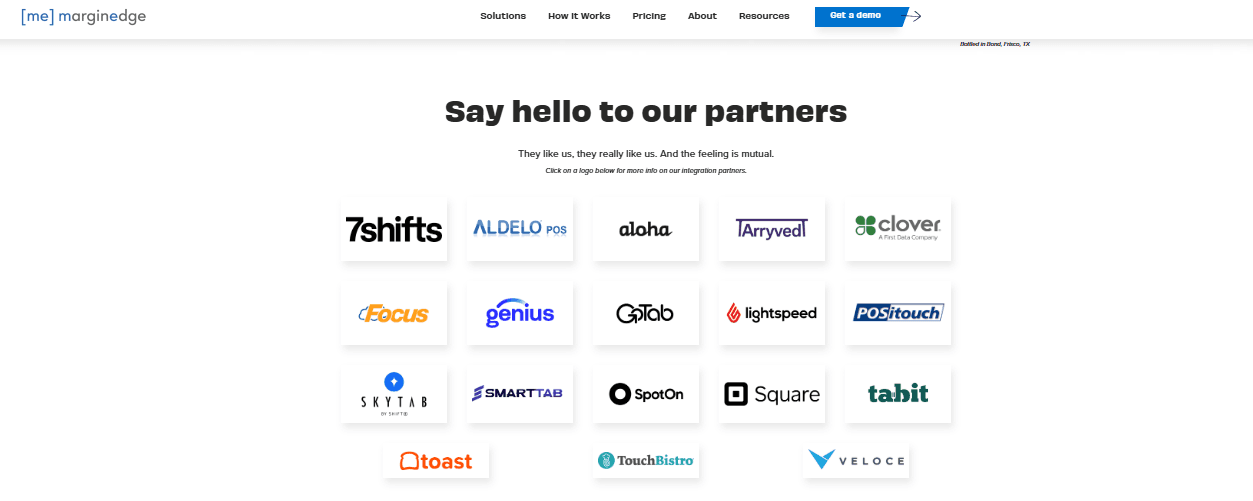
MarginEdge integrates with 7shifts, Clover, Square, Tabit, Toast, TouchBistro, Rezku, rPower, Salido, and Shopify. MarginEdge also offers an API and connects with third-party integration tools.
MarginEdge Specs
- 2-Factor Authentication: Yes
- Accounts Payable: Yes
- Accounts Receivable: Yes
- API: Yes
- Balance Sheet: Yes
- Billing/Invoicing: Yes
- BitCoin: No
- Budgeting: Yes
- Calendar Management: No
- Contact Management: Yes
- CRM Integration: Yes
- Customer Management: No
- Dashboard: No
- Data Export: Yes
- Data Import: Yes
- Data Visualization: Yes
- Expense Tracking: Yes
- External Integrations: Yes
- Forecasting: Yes
- General Account Ledger: No
- Inventory Tracking: No
- Multi-Currency: No
- Multi-User: No
- Notifications: No
- P&L: No
- PayPal: No
- Payroll: No
- SAP Integration: No
- Stripe: No
- Supplier Management: No
- Tax Management: No


